


 Apple Podcasts
 Spotify
 Youtube Music
 Spreaker
 Podchaser
 Amazon Music
 Azure Firewall - Simply Explained
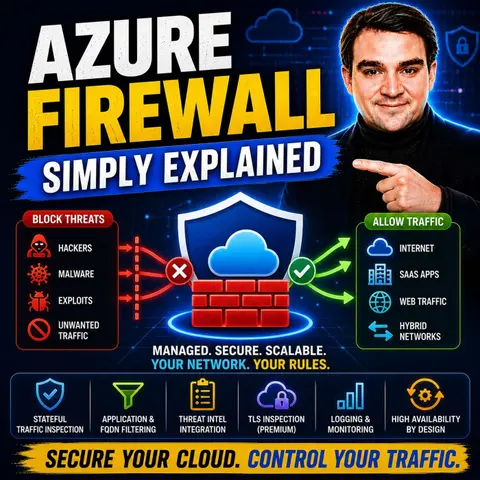

Azure Firewall is Microsoft's cloud-native, fully managed network security service that protects Azure workloads from both internal and external threats. Instead of deploying and maintaining traditional firewall appliances, Azure Firewall provides centralized traffic filtering, threat intelligence, and application-aware security that automatically scales with your environment.
In this episode, you'll learn what Azure Firewall is, how it works, and why it's a critical component of a secure Azure architecture. The discussion explains key concepts including network rules, application rules, NAT rules, threat intelligence, and the differences between the Basic, Standard, and Premium SKUs. You'll also discover how Azure Firewall fits into hub-and-spoke network designs and complements services like Network Security Groups (NSGs).
The episode explores practical scenarios such as securing virtual machines, controlling outbound internet access, protecting hybrid cloud environments, filtering application traffic, and preventing unauthorized network communication. You'll learn how Azure Firewall integrates with Azure Bastion, Azure Virtual WAN, Microsoft Defender for Cloud, Azure Monitor, and Azure Policy to create a layered security strategy for enterprise workloads.
By the end of this episode, you'll have a clear understanding of Azure Firewall, its core capabilities, common deployment patterns, and best practices for securing modern Azure environments with centralized, scalable network protection.
In today's digital world, securing your cloud infrastructure is essential, and that's where Azure Firewall comes in. This powerful tool acts as a crucial component of cloud security, protecting your Azure resources while efficiently managing network traffic. By providing a centralized way to enforce security policies, Azure Firewall helps you reduce security breaches in your Azure environments. Understanding its features and pricing is vital for effective implementation, ensuring you get the most out of this innovative security solution.
Key Takeaways
- Azure Firewall is a cloud-native security service that protects your Azure resources from cyber threats.
- It offers automatic scaling, ensuring it adapts to your network traffic without manual adjustments.
- Application Rules allow you to control internet access based on specific applications, enhancing security.
- Network Rules filter traffic based on IP addresses and ports, managing both inbound and outbound flows.
- NAT Rules help translate and redirect traffic, ensuring secure communication between networks.
- Integrating Azure Firewall with services like Azure Monitor improves visibility and threat detection.
- Choose the right pricing tier (Basic, Standard, Premium) based on your organization's security needs and budget.
- Regular monitoring and maintenance of Azure Firewall are essential for optimal performance and security.
What Is Azure Firewall?

Overview of Azure Firewall
Azure Firewall is a cloud-native, intelligent network firewall security service designed to protect your Azure workloads. As a fully stateful firewall as a service, it offers top-tier threat protection, ensuring that your cloud resources remain secure. This means you can deploy Azure Firewall without worrying about the complexities of traditional hardware-based firewalls. Instead, you get a solution that scales automatically with your needs, providing built-in high availability and unlimited cloud scalability.
Unlike traditional firewalls, which often require extensive maintenance and lifecycle management, Azure Firewall integrates seamlessly with other Azure services. This integration allows you to manage your security policies more effectively and respond to threats in real-time.
Here’s a quick comparison of Azure Firewall and traditional firewalls:
| Feature | Azure Firewall | Traditional Firewall |
|---|---|---|
| Architecture | Cloud-native solution | Hardware-based solution |
| Integration | Integrates with cloud services | Requires more maintenance and lifecycle management |
| Deployment | Deployed in the cloud | Deployed on-premises |
Importance in Cloud Security
In today's digital landscape, cloud security is more critical than ever. With the rise of cyber threats, you need a robust solution to safeguard your data and applications. Azure Firewall plays a vital role in this by providing essential protection against unauthorized access and potential attacks.
One of the standout features of Azure Firewall is its application-level filtering. This allows you to control outbound internet access by identifying traffic based on Fully Qualified Domain Names (FQDNs). Additionally, it utilizes threat intelligence feeds to automatically block known malicious IP addresses and domains, adapting to emerging threats. This proactive approach ensures that your Azure network security remains strong.
Moreover, Azure Firewall integrates with Azure Monitor, enhancing your visibility into network traffic and security events. This integration supports rapid attack detection, allowing you to respond swiftly to any potential threats. By leveraging Azure Firewall, you can confidently protect your cloud resources and maintain a secure environment for your applications.
Azure Firewall Features

Azure Firewall comes packed with features that enhance your network security and streamline your traffic management. Let’s dive into some of the key features, including Application Rules, Network Rules, and NAT Rules.
Application Rules
Definition and Purpose
Application Rules in Azure Firewall allow you to control outbound internet access based on Fully Qualified Domain Names (FQDNs). This means you can specify which applications can communicate with the internet, enhancing your overall cloud security. By using these rules, you can filter traffic without needing to terminate TLS, which keeps your data secure while still allowing necessary communications.
Use Cases
You might find Application Rules particularly useful in scenarios like:
- Restricting Access: Limit access to specific web applications or services, ensuring that only authorized applications can reach the internet.
- Monitoring Traffic: Track which applications are accessing the internet, helping you identify potential security risks or unauthorized usage.
- Compliance Requirements: Meet regulatory requirements by controlling and logging outbound traffic to specific domains.
Network Rules
Definition and Purpose
Network Rules are designed to filter traffic based on IP addresses and ports. They help you manage both inbound and outbound traffic flows, ensuring that only legitimate traffic reaches your Azure resources. This feature is crucial for maintaining a secure network environment.
Use Cases
Consider using Network Rules in the following situations:
- Inbound Traffic Control: Manage which external IP addresses can access your Azure resources, protecting them from unauthorized access.
- Outbound Traffic Management: Control which Azure resources can communicate with external networks, reducing the risk of data leaks.
- Layered Security: Combine Network Rules with Application Rules for a more robust security posture, ensuring that both IP and application-level filtering are in place.
NAT Rules
Definition and Purpose
NAT (Network Address Translation) Rules play a vital role in Azure Firewall by translating and redirecting traffic flows. They ensure secure communication between external networks and your Azure resources. NAT rules can be particularly useful for managing how traffic enters and exits your network.
Use Cases
Here are some common scenarios where NAT Rules come into play:
- Inbound Traffic Translation: Use DNAT rules to translate inbound internet traffic to your public IP address, directing it to private IP addresses on your virtual networks.
- East-West Traffic Flow: Manage traffic between Azure virtual networks or between Azure and on-premises networks without applying SNAT when traffic is within specific address spaces.
- North-South Traffic Filtering: Apply network rules to filter traffic flowing in and out of your datacenter, ensuring that only legitimate traffic is processed.
Azure Firewall’s ability to provide dual inspection for both north-south and east-west traffic is a game changer. It utilizes stateful inspection capabilities to monitor traffic flows, integrates with threat intelligence for enhanced security, and enforces uniform policies across environments. This means you can confidently manage your network security while ensuring that your applications remain protected.
Here’s a quick overview of some standout features of Azure Firewall:
| Feature | Description |
|---|---|
| Built-in high availability | Configurable for multiple Availability Zones, offering 99.99% uptime SLA. |
| Unrestricted cloud scalability | Allows scaling to accommodate increasing network traffic without scheduling for peak traffic. |
| Advanced threat intelligence | Alerts and denies traffic from known malicious IP addresses and domains using Microsoft Threat Intelligence feed. |
| Application FQDN filtering rules | Filters outbound traffic to a defined list of fully qualified domain names without needing TLS termination. |
| Multiple public IP addresses | Supports linking up to 250 public IP addresses, enabling various scenarios for SNAT and DNAT. |
By leveraging these features, you can enhance your network security and ensure that your Azure resources are well-protected against modern threats.
How Azure Firewall Works
Traffic Filtering Mechanism
Azure Firewall employs a robust traffic filtering mechanism to ensure your network remains secure. It uses several key techniques to manage and inspect network traffic effectively. Here’s a breakdown of how it works:
| Mechanism | Description |
|---|---|
| Traffic Routing | Ensures proper management and inspection of traffic through automatic and user-defined routes. |
| Traffic Filtering | Analyzes and controls data flows based on criteria like IP addresses and HTTP headers. |
| Stateful Inspection | Monitors the status of network sessions to allow or deny packets based on connection state. |
| Threat Intelligence | Integrates with Microsoft’s feed to block known malicious IPs and domains. |
| Application Rules | Governs outbound traffic based on fully qualified domain names for internet access control. |
| Network Rules | Filters traffic at the protocol and IP address level for comprehensive security. |
With these mechanisms, Azure Firewall can effectively filter network traffic, ensuring that only legitimate data flows reach your Azure resources. This proactive approach helps you prevent unauthorized access and maintain a secure environment.
Integration with Azure Services
Azure Firewall doesn’t work in isolation; it integrates seamlessly with various Azure services to enhance your overall cloud security. This integration allows you to automate security processes and gain deeper insights into your network traffic. Here are some key integrations:
| Service | Description |
|---|---|
| Azure Monitor | Provides comprehensive logging and monitoring, enabling threat detection and compliance reporting. |
| Azure Sentinel | Enhances security analytics by correlating Azure Firewall logs with other security events. |
| FireMon | Offers a platform for managing Azure firewall rules and policies, providing visibility and automation. |
| Tufin | Integrates advanced network security solutions, enhancing management for hybrid environments. |
By connecting Azure Firewall with these services, you can improve your threat detection capabilities and streamline your security operations. For instance, Azure Monitor captures detailed logs of network traffic, including allowed and denied connections. This logging is crucial for compliance and auditing, helping you identify anomalies and potential security incidents.
Moreover, integrating with Azure Sentinel allows for automated response capabilities. This means you can set up workflows that react to security events, reducing response times and minimizing human error. Centralized visibility across your Azure environment enhances your ability to detect and respond to threats effectively.
Azure Firewall Pricing
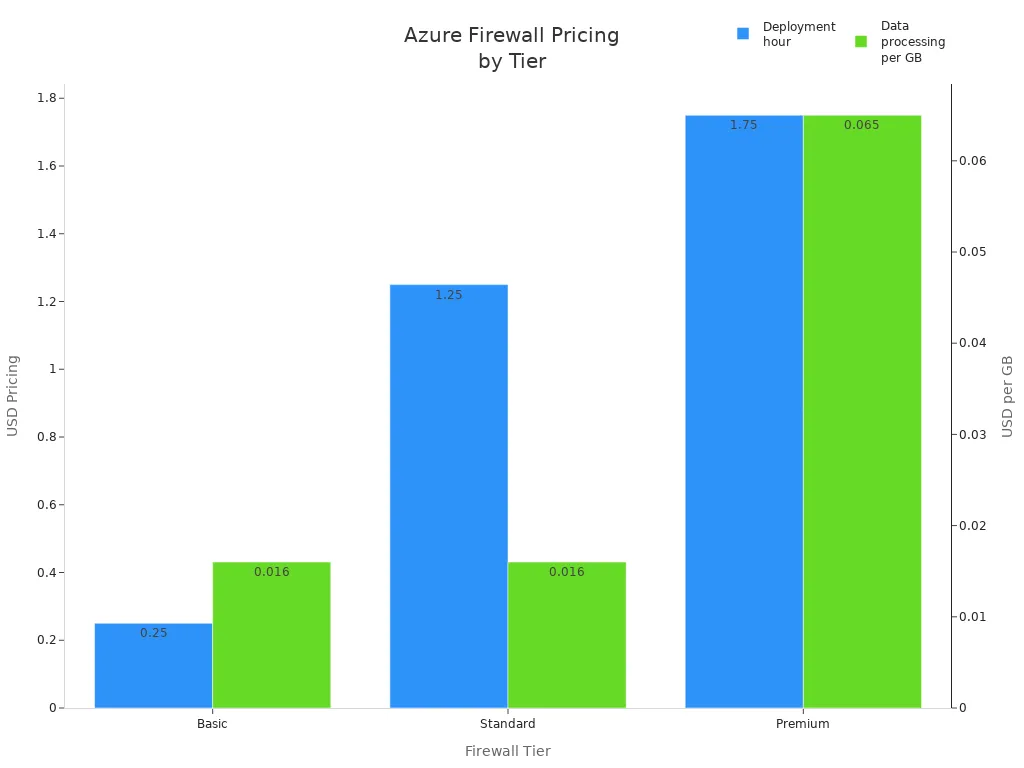
When considering Azure Firewall, understanding the pricing structure is essential. Microsoft offers three tiers: Basic, Standard, and Premium. Each tier provides different features and pricing options to suit various needs.
Basic Tier
The Basic tier is perfect for small businesses or those just starting with cloud security. It offers essential features at a lower cost. Here’s a quick look at the pricing:
| Item | Azure Firewall Basic |
|---|---|
| Deployment hour | $0.25 |
| Data processing | $0.016 per GB |
| Capacity units | N/A |
For example, if you use 1 TB of data per month, your Basic tier cost would be around £283. This tier is great for basic network security without breaking the bank.
Standard Tier
The Standard tier is designed for organizations that require more robust security features. It includes advanced capabilities like threat intelligence and application rules. Here’s how the pricing compares:
| Item | Azure Firewall Standard |
|---|---|
| Deployment hour | $1.25 |
| Data processing | $0.016 per GB |
| Capacity units | Extra if enabled |
If you process 10 TB of data monthly, your cost would be approximately £760. This tier is ideal for businesses that need enhanced cloud security without the premium price tag.
Premium Tier
The Premium tier offers the most comprehensive features, including advanced threat protection and performance enhancements. Here’s a breakdown of the pricing:
| Item | Azure Firewall Premium |
|---|---|
| Deployment hour | $1.75 |
| Data processing | $0.065 per GB |
| Capacity units | Extra if enabled |
With the Premium tier, you gain access to features like TLS inspection and an Intrusion Detection and Prevention System (IDPS). If you process 50 TB of data monthly, your cost would be around £2,880. This tier is perfect for enterprises that demand the highest level of network security.
Best Practices for Azure Firewall
Configuration Tips
To optimize your Azure Firewall performance, consider these configuration tips:
- Use Multiple Public IP Addresses: This approach lowers costs and simplifies configuration. However, remember that each public IP adds a fixed number of SNAT ports, which can affect capacity.
- Implement a NAT Gateway: A NAT gateway provides up to 64,512 SNAT ports per public IP address. It dynamically allocates ports across your subnet, enhancing scalability and resiliency.
Here’s a quick comparison of these options:
| Configuration Option | Advantages | Disadvantages |
|---|---|---|
| Add multiple public IP addresses | Lower cost, simple to configure, no extra resources to manage. | Each PIP adds a fixed number of SNAT ports, scaling linearly. |
| Use a NAT gateway | Provides greater scale and resiliency. | Adds another resource to manage, not supported in secured virtual hub. |
To minimize configuration errors, start with a performance efficiency checklist. Regularly review and optimize your firewall rules to ensure they remain effective against the latest security threats. Here are some additional tips:
- Remove bad traffic and notify server administrators about unauthorized outbound requests.
- Distribute unwanted traffic filtering across firewalls and routers to enhance performance.
- Use minimal logging to manage broadcast traffic and improve bandwidth.
- Avoid DNS objects that require constant DNS lookups.
- Segregate firewalls from VPNs to manage traffic effectively.
- Regularly update software to minimize vulnerabilities.
- Conduct penetration testing to ensure proper functionality.
Monitoring and Maintenance
Monitoring your Azure Firewall is crucial for maintaining its reliability. Utilize tools like Azure Monitor and Azure Firewall Workbook to collect logs, visualize data, and create interactive reports. Here are some key parameters to monitor:
| Parameter | Description |
|---|---|
| Firewall Health | Monitors the average health of the firewall based on SNAT port availability. |
| SNAT Port Utilization | Tracks the percentage of SNAT ports utilized, helping to identify resource constraints. |
| Data Processed (Total) | Measures the total data volume passing through the firewall within a polling interval (in MB). |
| Data Throughput | Indicates the average data transfer rate through the firewall in megabits per second (Mb/s). |
| Latency Probe | Measures average latency of the firewall in milliseconds, useful for performance monitoring. |
| Rule Hits | Counts the total hits on application and network rules, aiding in traffic and rule effectiveness analysis. |
These metrics enable you to monitor firewall health, performance, and usage trends, supporting proactive maintenance and timely adjustments.
For ongoing maintenance, consider these strategies:
| Maintenance Strategy | Description |
|---|---|
| Centralized Policy Management | Use Azure Firewall Manager for managing policies across multiple firewalls. |
| Traffic Routing | Implement Azure Traffic Manager or Azure Front Door for effective traffic management. |
| Service Maintenance | Configure daily maintenance windows to align with operational needs. |
| Transient Fault Handling | Implement retry logic with exponential backoff for handling transient connection issues. |
| Detection and Response | Understand the difference between zone-redundant and zonal configurations for failure response. |
| Notification | Use Azure Service Health for monitoring service health and setting alerts for issues. |
By following these best practices, you can ensure that your Azure Firewall remains effective and reliable, providing robust protection for your cloud resources.
In summary, Azure Firewall offers a robust solution for securing your cloud environment. Its key features include strong identity and access management, entry point protection, and high availability. You can also benefit from its modular economic model, which allows you to scale based on your network traffic.
To dive deeper into Azure Firewall, consider exploring these resources:
- Course: Designing and Implementing Microsoft Azure Networking Solutions (AZ-700) Cert Prep by Microsoft Press
- Demo Repository: Azure Firewall demo for quick deployment
- Documentation: Comprehensive Azure Firewall Documentation
- Tutorial: Step-by-step guide to deploy and configure Azure Firewall
With these tools, you can enhance your understanding and implementation of Azure Firewall for your cloud security needs.
FAQ
What is Azure Firewall?
Azure Firewall is a cloud-native security service that protects your Azure resources. It manages network traffic and provides centralized security policies, ensuring your cloud environment remains secure against threats.
How does Azure Firewall scale?
Azure Firewall automatically scales to meet your traffic demands. You don’t need to worry about manual adjustments, as it adapts to changes in your network traffic seamlessly.
Can I use Azure Firewall with other Azure services?
Yes! Azure Firewall integrates smoothly with various Azure services like Azure Monitor and Azure Sentinel. This integration enhances your security management and provides better visibility into your network traffic.
What are the pricing tiers for Azure Firewall?
Azure Firewall offers three pricing tiers: Basic, Standard, and Premium. Each tier provides different features and pricing options to suit your organization's needs and budget.
How do I monitor Azure Firewall?
You can monitor Azure Firewall using Azure Monitor and Azure Firewall Workbook. These tools help you collect logs, visualize data, and create reports to track performance and security events.
Is Azure Firewall easy to deploy?
Absolutely! You can deploy Azure Firewall quickly through the Azure portal. Its user-friendly interface simplifies the setup process, allowing you to get your firewall up and running in minutes.
What types of traffic can Azure Firewall inspect?
Azure Firewall inspects both north-south traffic (between Azure and the internet) and east-west traffic (between workloads within Azure). This dual inspection capability enhances your overall security posture.
Can I customize rules in Azure Firewall?
Yes! You can create custom rules in Azure Firewall to control traffic based on your specific needs. This flexibility allows you to tailor your security policies to fit your organization’s requirements.
🎧 Listen to this episode
Want a practical explanation of Azure Firewall? This episode breaks down the topic in clear language and shows why it matters for Microsoft 365, Azure, Power Platform, security, AI, and modern work.
Listen to this episode if you want to:
- Understand the key concepts behind Azure Firewall
- See how it fits into the wider Microsoft technology ecosystem
- Learn where it can create practical value for your organization
Discover more practical Microsoft conversations on M365 FM.
🚀 Want to be part of m365.fm?
Then stop just listening… and start showing up.
👉 Connect with me on LinkedIn and let’s make something happen:
- 🎙️ Be a podcast guest and share your story
- 🎧 Host your own episode (yes, seriously)
- 💡 Pitch topics the community actually wants to hear
- 🌍 Build your personal brand in the Microsoft 365 space
This isn’t just a podcast — it’s a platform for people who take action.
🔥 Most people wait. The best ones don’t.
👉 Connect with me on LinkedIn and send me a message:
"I want in"
Let’s build something awesome 👊
1
00:00:00,000 --> 00:00:02,280
Picture a security desk at the front of an office building.
2
00:00:02,280 --> 00:00:04,000
Someone walks in, shows their badge,
3
00:00:04,000 --> 00:00:05,800
and the guard checks them against a list.
4
00:00:05,800 --> 00:00:07,800
They sign in and maybe get a visitor pass.
5
00:00:07,800 --> 00:00:10,320
Now imagine that same building had no doors or walls.
6
00:00:10,320 --> 00:00:13,000
People could walk in from anywhere in the world at any hour.
7
00:00:13,000 --> 00:00:14,960
That's the difference between a traditional network
8
00:00:14,960 --> 00:00:16,240
and a cloud network.
9
00:00:16,240 --> 00:00:18,000
By the end of this episode, you'll understand
10
00:00:18,000 --> 00:00:21,120
what Azure Firewall actually is, why Cloud Firewalls work
11
00:00:21,120 --> 00:00:23,080
completely differently from the physical boxes
12
00:00:23,080 --> 00:00:25,680
most people picture, and how one service inspects
13
00:00:25,680 --> 00:00:29,040
and controls traffic across your entire Azure environment.
14
00:00:29,040 --> 00:00:29,920
Let's break it down.
15
00:00:29,920 --> 00:00:32,520
First, what a firewall is, stripped of the jargon,
16
00:00:32,520 --> 00:00:33,920
then why the cloud changes everything
17
00:00:33,920 --> 00:00:35,720
about how firewalls need to work,
18
00:00:35,720 --> 00:00:38,520
and finally, how Azure Firewall pieces it all together
19
00:00:38,520 --> 00:00:40,280
into one system you can use.
20
00:00:40,280 --> 00:00:41,240
Grab your coffee.
21
00:00:41,240 --> 00:00:42,240
Let's dive in.
22
00:00:42,240 --> 00:00:43,760
What is a firewall?
23
00:00:43,760 --> 00:00:46,760
Most people have heard the word Firewall a thousand times,
24
00:00:46,760 --> 00:00:49,000
but if you asked them to explain what it actually does,
25
00:00:49,000 --> 00:00:50,560
they'd probably get a bit fuzzy.
26
00:00:50,560 --> 00:00:51,760
So let's keep it simple.
27
00:00:51,760 --> 00:00:54,120
A Firewall is a guard at the network door.
28
00:00:54,120 --> 00:00:56,440
Every piece of data trying to enter or leave your network
29
00:00:56,440 --> 00:00:57,480
has to pass through it,
30
00:00:57,480 --> 00:00:59,040
and the firewall inspects each packet
31
00:00:59,040 --> 00:01:01,280
to decide whether to let it through or block it.
32
00:01:01,280 --> 00:01:04,080
For a long time, firewalls were physical boxes.
33
00:01:04,080 --> 00:01:06,160
You bought one, plugged it into your server room,
34
00:01:06,160 --> 00:01:08,200
configured it, and maintained it for years.
35
00:01:08,200 --> 00:01:11,680
Those boxes worked fine when your network had a clear boundary.
36
00:01:11,680 --> 00:01:15,040
One office, one internet connection, a single front door.
37
00:01:15,040 --> 00:01:16,360
But the cloud doesn't work that way.
38
00:01:16,360 --> 00:01:18,080
Your applications might run in one region,
39
00:01:18,080 --> 00:01:20,640
your database in another, and your users are scattered
40
00:01:20,640 --> 00:01:21,640
across the world.
41
00:01:21,640 --> 00:01:23,800
Some of your services live in Azure, some elsewhere.
42
00:01:23,800 --> 00:01:25,040
There is no front door.
43
00:01:25,040 --> 00:01:26,040
Here's the thing.
44
00:01:26,040 --> 00:01:28,600
You can't install a physical firewall box
45
00:01:28,600 --> 00:01:30,080
in a data center you don't own.
46
00:01:30,080 --> 00:01:31,960
And even if you could, it wouldn't help
47
00:01:31,960 --> 00:01:34,480
because there's no single door to guard anymore.
48
00:01:34,480 --> 00:01:36,280
Why cloud firewalls are different?
49
00:01:36,280 --> 00:01:38,240
In Azure, you create virtual networks.
50
00:01:38,240 --> 00:01:40,120
Think of them as private neighborhoods in the cloud
51
00:01:40,120 --> 00:01:41,840
where your applications live.
52
00:01:41,840 --> 00:01:43,760
They aren't tied to a physical building.
53
00:01:43,760 --> 00:01:45,320
They're just logical spaces.
54
00:01:45,320 --> 00:01:46,440
Let's break down the traffic flow.
55
00:01:46,440 --> 00:01:47,800
Traffic in these virtual networks
56
00:01:47,800 --> 00:01:48,920
moves in two directions.
57
00:01:48,920 --> 00:01:51,640
North-South traffic is data coming from the internet
58
00:01:51,640 --> 00:01:53,440
into your network or going from your network
59
00:01:53,440 --> 00:01:54,400
out to the internet.
60
00:01:54,400 --> 00:01:56,400
Think of it like visitors arriving at your building
61
00:01:56,400 --> 00:01:58,000
or packages being shipped out.
62
00:01:58,000 --> 00:01:59,240
Then there's East West traffic,
63
00:01:59,240 --> 00:02:02,440
which is data moving between your own workloads inside Azure,
64
00:02:02,440 --> 00:02:05,320
between applications, databases, and storage accounts.
65
00:02:05,320 --> 00:02:07,120
That's like people walking between departments
66
00:02:07,120 --> 00:02:08,200
inside a company.
67
00:02:08,200 --> 00:02:10,000
Both directions need inspection.
68
00:02:10,000 --> 00:02:11,760
If a hacker gets into one workload,
69
00:02:11,760 --> 00:02:13,920
you don't want them roaming freely to others.
70
00:02:13,920 --> 00:02:15,320
That's how breaches spread.
71
00:02:15,320 --> 00:02:17,800
Your applications also connect to other services,
72
00:02:17,800 --> 00:02:21,040
storage accounts, email servers, third party APIs.
73
00:02:21,040 --> 00:02:23,840
And the firewall controls those outbound connections too.
74
00:02:23,840 --> 00:02:26,520
It decides what your apps can talk to and what they cannot.
75
00:02:26,520 --> 00:02:27,440
Here's the thing.
76
00:02:27,440 --> 00:02:29,400
This firewall isn't a box you maintain.
77
00:02:29,400 --> 00:02:30,880
You don't patch it, update it, or worry
78
00:02:30,880 --> 00:02:32,200
about it running out of capacity.
79
00:02:32,200 --> 00:02:32,960
It's a service.
80
00:02:32,960 --> 00:02:34,800
Microsoft handles all the infrastructure.
81
00:02:34,800 --> 00:02:36,320
You simply define the rules
82
00:02:36,320 --> 00:02:39,160
and the service enforces them automatically at scale.
83
00:02:39,160 --> 00:02:40,840
So if your traffic spikes at 3 p.m.
84
00:02:40,840 --> 00:02:42,880
on a Tuesday, the firewall grows with it.
85
00:02:42,880 --> 00:02:44,880
If Microsoft releases a security patch,
86
00:02:44,880 --> 00:02:46,520
it's applied without you even noticing.
87
00:02:46,520 --> 00:02:47,760
That's the cloud difference.
88
00:02:47,760 --> 00:02:50,720
The firewall becomes invisible infrastructure.
89
00:02:50,720 --> 00:02:52,200
Introducing Azure Firewall.
90
00:02:52,200 --> 00:02:53,960
So what exactly is Azure Firewall?
91
00:02:53,960 --> 00:02:56,840
It's a fully managed cloud-native firewall as a service.
92
00:02:56,840 --> 00:02:59,000
I'm outful, but here's what it means in practice.
93
00:02:59,000 --> 00:03:02,000
You deploy it through the Azure portal in minutes.
94
00:03:02,000 --> 00:03:04,920
No hardware to order, no virtual machines to configure,
95
00:03:04,920 --> 00:03:06,720
no operating system to patch.
96
00:03:06,720 --> 00:03:09,000
Just click a few buttons, define your network,
97
00:03:09,000 --> 00:03:10,400
and the firewall is running.
98
00:03:10,400 --> 00:03:12,280
It comes with built-in high availability.
99
00:03:12,280 --> 00:03:15,240
If one instance fails, another takes over instantly.
100
00:03:15,240 --> 00:03:17,000
And it scales automatically.
101
00:03:17,000 --> 00:03:19,760
If your traffic doubles, the firewall grows with it.
102
00:03:19,760 --> 00:03:22,160
You never have to guess how much capacity you'll need.
103
00:03:22,160 --> 00:03:23,920
The simplest way to think about it is
104
00:03:23,920 --> 00:03:26,600
like hiring a security team for your cloud office building.
105
00:03:26,600 --> 00:03:28,480
You don't manage each guard individually,
106
00:03:28,480 --> 00:03:30,440
train them, or schedule their shifts.
107
00:03:30,440 --> 00:03:32,880
You set the policies, who's allowed in,
108
00:03:32,880 --> 00:03:34,360
what packages are permitted,
109
00:03:34,360 --> 00:03:37,040
and they enforce those policies around the clock.
110
00:03:37,040 --> 00:03:39,480
Azure Firewall sits at a central point in your network
111
00:03:39,480 --> 00:03:41,520
and inspects everything that passes through.
112
00:03:41,520 --> 00:03:43,760
It checks traffic against three types of rules.
113
00:03:43,760 --> 00:03:46,800
NAT rules, network rules, and application rules
114
00:03:46,800 --> 00:03:48,440
will break each one down in a moment.
115
00:03:48,440 --> 00:03:50,800
Now, here's something most people don't realize.
116
00:03:50,800 --> 00:03:53,560
Azure Firewall comes with built-in threat intelligence.
117
00:03:53,560 --> 00:03:56,200
Microsoft constantly monitors global attack patterns
118
00:03:56,200 --> 00:03:58,800
and known malicious IP addresses, dangerous domains,
119
00:03:58,800 --> 00:04:02,240
and emerging threats all feed into your firewall automatically.
120
00:04:02,240 --> 00:04:04,280
So if a hacker group in another country
121
00:04:04,280 --> 00:04:05,960
starts targeting Azure customers,
122
00:04:05,960 --> 00:04:07,880
your firewall already knows to block them
123
00:04:07,880 --> 00:04:09,560
before they even reach your network.
124
00:04:09,560 --> 00:04:11,080
The protection improves continuously
125
00:04:11,080 --> 00:04:12,600
without you doing anything.
126
00:04:12,600 --> 00:04:14,600
No manual updates, no signature downloads,
127
00:04:14,600 --> 00:04:15,960
it just happens, not everyone needs
128
00:04:15,960 --> 00:04:17,200
the same level of protection.
129
00:04:17,200 --> 00:04:19,160
A small business running, a single application
130
00:04:19,160 --> 00:04:22,080
has different needs than a bank processing financial transactions.
131
00:04:22,080 --> 00:04:25,280
That's why Azure Firewall comes in three versions.
132
00:04:25,280 --> 00:04:28,320
The three SKUs, basic, standard, and premium.
133
00:04:28,320 --> 00:04:30,240
Let's start with Azure Firewall Basic,
134
00:04:30,240 --> 00:04:32,520
the entry-level option built for small businesses
135
00:04:32,520 --> 00:04:33,960
and simpler environments.
136
00:04:33,960 --> 00:04:37,360
It handles up to about 250 megabits per second of traffic,
137
00:04:37,360 --> 00:04:40,240
enough for a modest application or a development setup.
138
00:04:40,240 --> 00:04:42,560
Basic includes essential network filtering
139
00:04:42,560 --> 00:04:44,280
that inspects traffic and applies rules
140
00:04:44,280 --> 00:04:46,080
based on IP addresses and ports,
141
00:04:46,080 --> 00:04:48,640
plus threat intelligence in alert mode only.
142
00:04:48,640 --> 00:04:50,840
So it warns you when something suspicious appears,
143
00:04:50,840 --> 00:04:52,600
but it won't automatically block it.
144
00:04:52,600 --> 00:04:54,320
Think of Basic as a security guard
145
00:04:54,320 --> 00:04:55,920
who watches the entrance carefully,
146
00:04:55,920 --> 00:04:57,280
sees the problem, reports it,
147
00:04:57,280 --> 00:04:59,360
but needs permission before stopping anyone.
148
00:04:59,360 --> 00:05:01,040
Then there's Azure Firewall Standard,
149
00:05:01,040 --> 00:05:04,200
the most common choice for enterprise workloads for good reason.
150
00:05:04,200 --> 00:05:06,760
It scales up to about 30 gigabits per second,
151
00:05:06,760 --> 00:05:10,240
handling production traffic for most organizations comfortably.
152
00:05:10,240 --> 00:05:11,920
With standard, threat intelligence works
153
00:05:11,920 --> 00:05:13,600
in both alert and deny mode,
154
00:05:13,600 --> 00:05:16,280
so the firewall can automatically block known bad actors
155
00:05:16,280 --> 00:05:17,720
without waiting for you.
156
00:05:17,720 --> 00:05:19,600
It also adds web category filtering.
157
00:05:19,600 --> 00:05:21,600
You can block entire categories like social media
158
00:05:21,600 --> 00:05:23,280
or gambling across your whole network
159
00:05:23,280 --> 00:05:25,720
and it supports custom DNS configuration.
160
00:05:25,720 --> 00:05:27,640
Standard is your fully equipped security team
161
00:05:27,640 --> 00:05:28,640
with authority to act.
162
00:05:28,640 --> 00:05:30,120
They see a problem and handle it,
163
00:05:30,120 --> 00:05:31,920
no waiting for approval.
164
00:05:31,920 --> 00:05:33,960
Finally, there's Azure Firewall Premium
165
00:05:33,960 --> 00:05:35,600
built for highly sensitive environments
166
00:05:35,600 --> 00:05:37,400
like finance, healthcare, government,
167
00:05:37,400 --> 00:05:39,600
anything handling regulated data.
168
00:05:39,600 --> 00:05:41,320
It scales up to 100 gigabits per second,
169
00:05:41,320 --> 00:05:43,400
but the real difference is what it can inspect.
170
00:05:43,400 --> 00:05:45,040
Premium adds TLS inspection,
171
00:05:45,040 --> 00:05:47,800
which decrypts encrypted traffic, inspects the contents
172
00:05:47,800 --> 00:05:49,560
and re-encrypts it before sending it on.
173
00:05:49,560 --> 00:05:52,160
That matters because most malicious traffic today hides
174
00:05:52,160 --> 00:05:53,680
inside encrypted connections
175
00:05:53,680 --> 00:05:55,560
without TLS inspection, you're flying blind.
176
00:05:55,560 --> 00:05:58,040
Premium also adds IDPS, intrusion detection
177
00:05:58,040 --> 00:05:59,280
and prevention system,
178
00:05:59,280 --> 00:06:02,520
with over 67,000 signatures across more than 50 categories
179
00:06:02,520 --> 00:06:04,040
updated in real time.
180
00:06:04,040 --> 00:06:05,920
It checks every packet for known attack patterns
181
00:06:05,920 --> 00:06:08,400
like SQL injection, malware callbacks, and port scanning
182
00:06:08,400 --> 00:06:10,920
and drops the traffic immediately when it finds something.
183
00:06:10,920 --> 00:06:12,920
Premium also adds URL filtering,
184
00:06:12,920 --> 00:06:15,360
letting you allow or block specific web addresses
185
00:06:15,360 --> 00:06:17,720
instead of entire categories, granular control
186
00:06:17,720 --> 00:06:18,760
at the page level.
187
00:06:18,760 --> 00:06:20,160
This is military grade protection,
188
00:06:20,160 --> 00:06:21,600
but here's the smart approach,
189
00:06:21,600 --> 00:06:23,720
match the SKU to what you actually need.
190
00:06:23,720 --> 00:06:26,240
Standard covers most enterprise use cases.
191
00:06:26,240 --> 00:06:29,360
Use Premium only where sensitive data requires deep inspection,
192
00:06:29,360 --> 00:06:31,800
basic for small environments or development and testing
193
00:06:31,800 --> 00:06:34,280
and don't pay for capabilities you won't use.
194
00:06:34,280 --> 00:06:35,760
Architecture and traffic flow.
195
00:06:35,760 --> 00:06:36,880
Once you've chosen your SKU,
196
00:06:36,880 --> 00:06:38,240
the next question is,
197
00:06:38,240 --> 00:06:39,320
how to lay out your network
198
00:06:39,320 --> 00:06:41,160
so the firewall can actually inspect traffic
199
00:06:41,160 --> 00:06:42,400
because here's the thing.
200
00:06:42,400 --> 00:06:45,800
A firewall only works if traffic actually passes through it.
201
00:06:45,800 --> 00:06:47,280
If you place it in the wrong spot,
202
00:06:47,280 --> 00:06:48,920
it might as well not exist.
203
00:06:48,920 --> 00:06:52,160
The most common approach is called hub and spoke architecture,
204
00:06:52,160 --> 00:06:53,800
picture a bicycle wheel.
205
00:06:53,800 --> 00:06:57,000
The hub is the center with spokes radiating outward.
206
00:06:57,000 --> 00:06:59,560
In Azure, you create one central virtual network.
207
00:06:59,560 --> 00:07:02,120
That's the hub where you're Azure firewall lives.
208
00:07:02,120 --> 00:07:03,760
Then you create multiple spoke networks,
209
00:07:03,760 --> 00:07:05,600
each one a separate workload or environment,
210
00:07:05,600 --> 00:07:07,400
maybe one spoke for your web application,
211
00:07:07,400 --> 00:07:08,560
another for your database,
212
00:07:08,560 --> 00:07:10,600
a third for your development environment,
213
00:07:10,600 --> 00:07:12,040
all traffic between spokes
214
00:07:12,040 --> 00:07:13,440
and between spokes and the internet
215
00:07:13,440 --> 00:07:15,320
routes through the hub for inspection.
216
00:07:15,320 --> 00:07:18,040
You get one security checkpoint for your entire network,
217
00:07:18,040 --> 00:07:20,640
efficient, consistent and much easier to manage then,
218
00:07:20,640 --> 00:07:23,080
trying to put a firewall in every single spoke.
219
00:07:23,080 --> 00:07:24,160
For larger organizations,
220
00:07:24,160 --> 00:07:25,320
there's also virtual one
221
00:07:25,320 --> 00:07:26,760
and managed networking service
222
00:07:26,760 --> 00:07:30,480
with Azure firewall integrated directly into the hub.
223
00:07:30,480 --> 00:07:32,280
The big advantage is automation.
224
00:07:32,280 --> 00:07:34,000
Virtual one handles the routing for you.
225
00:07:34,000 --> 00:07:36,280
So traffic from branch offices, remote users
226
00:07:36,280 --> 00:07:38,680
and spoke networks all flows through the firewall
227
00:07:38,680 --> 00:07:40,600
without manual configuration.
228
00:07:40,600 --> 00:07:43,200
It's more hands-off, but scales better for global deployments.
229
00:07:43,200 --> 00:07:45,320
Now, what does the firewall actually inspect?
230
00:07:45,320 --> 00:07:47,480
Three things, inbound traffic from the internet,
231
00:07:47,480 --> 00:07:48,840
outbound traffic to the internet
232
00:07:48,840 --> 00:07:50,760
and east-west traffic between your own workloads
233
00:07:50,760 --> 00:07:51,840
inside Azure.
234
00:07:51,840 --> 00:07:53,320
That third one is critical.
235
00:07:53,320 --> 00:07:55,080
If a breach happens in one workload,
236
00:07:55,080 --> 00:07:57,520
east-west inspection stops it from spreading to others.
237
00:07:57,520 --> 00:07:59,560
Without it, a hacker who gets into your web server
238
00:07:59,560 --> 00:08:01,440
can freely move to your database.
239
00:08:01,440 --> 00:08:03,160
With it, that movement is blocked.
240
00:08:03,160 --> 00:08:04,160
Here's the key point.
241
00:08:04,160 --> 00:08:05,400
Traffic only gets inspected
242
00:08:05,400 --> 00:08:06,640
if it passes through the firewall,
243
00:08:06,640 --> 00:08:08,440
so the architecture has to force traffic
244
00:08:08,440 --> 00:08:09,680
through that central point.
245
00:08:09,680 --> 00:08:10,680
You design the network,
246
00:08:10,680 --> 00:08:12,280
so there's no alternative path.
247
00:08:12,280 --> 00:08:13,760
That's why deployment design matters
248
00:08:13,760 --> 00:08:15,600
just as much as the rules themselves.
249
00:08:15,600 --> 00:08:17,840
A perfect rule set means nothing if traffic
250
00:08:17,840 --> 00:08:20,160
can bypass the firewall entirely.
251
00:08:20,160 --> 00:08:21,200
Rules deep dive.
252
00:08:21,200 --> 00:08:23,040
Now, let's talk about the rules themselves,
253
00:08:23,040 --> 00:08:25,840
because this is how you actually control what gets through.
254
00:08:25,840 --> 00:08:28,200
Azure firewall uses three types of rules
255
00:08:28,200 --> 00:08:30,120
and each one does a different job.
256
00:08:30,120 --> 00:08:32,760
So, Nate Rules Network Address translation.
257
00:08:32,760 --> 00:08:34,080
Think of it like a reception desk
258
00:08:34,080 --> 00:08:35,440
that hides your internal servers
259
00:08:35,440 --> 00:08:37,440
behind the firewall's public IP address.
260
00:08:37,440 --> 00:08:39,480
Someone on the internet connects to your firewalls
261
00:08:39,480 --> 00:08:42,320
and the firewall translates that public address
262
00:08:42,320 --> 00:08:44,480
to the private address of your backend server.
263
00:08:44,480 --> 00:08:46,680
The outside world never sees your internal network.
264
00:08:46,680 --> 00:08:48,160
Your servers stay invisible.
265
00:08:48,160 --> 00:08:49,520
Then you've got network rules.
266
00:08:49,520 --> 00:08:52,240
These are based on IP addresses, ports and protocols.
267
00:08:52,240 --> 00:08:54,000
Layer three and layer four filtering
268
00:08:54,000 --> 00:08:55,480
if you care about the technical terms.
269
00:08:55,480 --> 00:08:57,560
You can say, allow traffic from this IP address
270
00:08:57,560 --> 00:09:00,120
on port 443 to this other IP address
271
00:09:00,120 --> 00:09:01,280
and block everything else.
272
00:09:01,280 --> 00:09:03,080
Straight forward and powerful.
273
00:09:03,080 --> 00:09:04,000
But here's the limit.
274
00:09:04,000 --> 00:09:06,680
Network rules don't understand what kind of traffic it is.
275
00:09:06,680 --> 00:09:07,800
They only know where it's going
276
00:09:07,800 --> 00:09:08,920
and what port it's using.
277
00:09:08,920 --> 00:09:10,760
Third up, application rules.
278
00:09:10,760 --> 00:09:11,480
These are smarter.
279
00:09:11,480 --> 00:09:13,640
They filter based on fully qualified domain names
280
00:09:13,640 --> 00:09:14,840
and URL patterns.
281
00:09:14,840 --> 00:09:17,440
So instead of allowing traffic to a specific IP address,
282
00:09:17,440 --> 00:09:19,480
you say, allow traffic to Microsoft,
283
00:09:19,480 --> 00:09:21,280
come or allow Windows Update Traffic.
284
00:09:21,280 --> 00:09:23,640
Now the firewall understands the application layer.
285
00:09:23,640 --> 00:09:25,880
It can block or allow based on what the traffic actually
286
00:09:25,880 --> 00:09:27,240
is not just where it's headed.
287
00:09:27,240 --> 00:09:29,480
Now rules aren't just thrown into a flat list.
288
00:09:29,480 --> 00:09:31,480
They're organized into rule collection groups
289
00:09:31,480 --> 00:09:32,560
and rule collections.
290
00:09:32,560 --> 00:09:34,600
Think of them like folders and subfolders.
291
00:09:34,600 --> 00:09:36,760
You might have one group for HR systems,
292
00:09:36,760 --> 00:09:39,000
another for finance, each with its own priority.
293
00:09:39,000 --> 00:09:40,960
That keeps things organized when you have dozens
294
00:09:40,960 --> 00:09:42,280
or hundreds of rules.
295
00:09:42,280 --> 00:09:43,560
Order matters a lot.
296
00:09:43,560 --> 00:09:46,480
The firewall processes rules in a specific sequence.
297
00:09:46,480 --> 00:09:49,680
Enat rules first, then network rules, then application rules.
298
00:09:49,680 --> 00:09:52,520
Within each type, rules are processed by priority.
299
00:09:52,520 --> 00:09:54,160
Lower numbers get evaluated first.
300
00:09:54,160 --> 00:09:56,160
This is important because broad network rules
301
00:09:56,160 --> 00:09:58,120
that allow all traffic will be hit first.
302
00:09:58,120 --> 00:10:00,240
If a network rule allows everything,
303
00:10:00,240 --> 00:10:03,400
the application rules further down may never get evaluated.
304
00:10:03,400 --> 00:10:06,640
All your carefully crafted application rules become useless.
305
00:10:06,640 --> 00:10:08,800
IP groups are another tool worth knowing about.
306
00:10:08,800 --> 00:10:11,400
You create a group of IP addresses, give it a name,
307
00:10:11,400 --> 00:10:13,400
and reference it across multiple rules.
308
00:10:13,400 --> 00:10:16,720
Change one IP group and every rule using it updates automatically.
309
00:10:16,720 --> 00:10:19,960
That saves time and cuts down on errors, especially useful
310
00:10:19,960 --> 00:10:23,720
when you have the same set of IPs appearing in multiple rules.
311
00:10:23,720 --> 00:10:25,200
Advanced protection features.
312
00:10:25,200 --> 00:10:27,760
Rules handle the basics, but Azure Firewall Premium
313
00:10:27,760 --> 00:10:28,880
goes much deeper.
314
00:10:28,880 --> 00:10:30,720
Let's start with threat intelligence.
315
00:10:30,720 --> 00:10:33,200
This is a constantly updated feed from Microsoft
316
00:10:33,200 --> 00:10:36,120
of known malicious IPs, domains, and URLs.
317
00:10:36,120 --> 00:10:37,920
Every connection your firewall processes
318
00:10:37,920 --> 00:10:39,640
gets checked against this feed.
319
00:10:39,640 --> 00:10:42,360
When it finds a match, it can alert you or block it automatically.
320
00:10:42,360 --> 00:10:44,920
No manual rules to write, no lists to maintain.
321
00:10:44,920 --> 00:10:47,600
Microsoft's global security team does that work for you.
322
00:10:47,600 --> 00:10:50,840
Then there's IDPS, intrusion detection and prevention system.
323
00:10:50,840 --> 00:10:53,920
That's over 67,000 signatures checking every packet
324
00:10:53,920 --> 00:10:57,080
for known attack patterns, things like SQL injection attempts,
325
00:10:57,080 --> 00:10:59,360
where someone tries to inject malicious database commands
326
00:10:59,360 --> 00:11:00,280
through a web form.
327
00:11:00,280 --> 00:11:03,280
Port scanning, where attackers probe your network for open doors,
328
00:11:03,280 --> 00:11:05,120
malware callbacks, where infected systems
329
00:11:05,120 --> 00:11:07,240
try to phone home to a command server.
330
00:11:07,240 --> 00:11:09,000
The firewall recognizes the pattern
331
00:11:09,000 --> 00:11:11,520
and drops the traffic before it reaches its target.
332
00:11:11,520 --> 00:11:13,520
These signatures update in real time.
333
00:11:13,520 --> 00:11:16,200
When Microsoft's security teams identify a new attack pattern,
334
00:11:16,200 --> 00:11:17,760
it gets added to the feed.
335
00:11:17,760 --> 00:11:20,000
Your firewall starts blocking it immediately,
336
00:11:20,000 --> 00:11:21,400
no waiting for a patch Tuesday.
337
00:11:21,400 --> 00:11:22,720
Now TLS inspection.
338
00:11:22,720 --> 00:11:24,680
This is a big one for regulated environments.
339
00:11:24,680 --> 00:11:26,680
Encrypted traffic is great for privacy,
340
00:11:26,680 --> 00:11:28,840
but it's also great for hiding malicious data.
341
00:11:28,840 --> 00:11:29,800
Attackers know this.
342
00:11:29,800 --> 00:11:32,520
They wrap their payloads inside HTTPS connections
343
00:11:32,520 --> 00:11:34,560
because most firewalls can't see inside them.
344
00:11:34,560 --> 00:11:37,240
Premium can, it decrypts the traffic, inspects the payload,
345
00:11:37,240 --> 00:11:38,960
re-encrypts it and sends it on its way.
346
00:11:38,960 --> 00:11:40,440
The whole process takes milliseconds.
347
00:11:40,440 --> 00:11:43,920
Without it, encrypted attacks pass right through undetected.
348
00:11:43,920 --> 00:11:45,880
URL filtering goes beyond domain names.
349
00:11:45,880 --> 00:11:48,400
You can allow or block specific parts on a website.
350
00:11:48,400 --> 00:11:50,440
Maybe you want to allow access to Microsoft,
351
00:11:50,440 --> 00:11:51,960
convert block the download page,
352
00:11:51,960 --> 00:11:54,880
or allow a specific API endpoint while blocking everything else
353
00:11:54,880 --> 00:11:55,640
on that domain.
354
00:11:55,640 --> 00:11:57,000
All of this works together.
355
00:11:57,000 --> 00:11:59,040
Threat intelligence catches known bad actors.
356
00:11:59,040 --> 00:12:00,600
IDPS catches attack patterns.
357
00:12:00,600 --> 00:12:02,760
TLS inspection catches hidden payloads.
358
00:12:02,760 --> 00:12:05,680
Multiple layers of defense working as one system.
359
00:12:05,680 --> 00:12:08,200
How it all connects plus actionable takeaways.
360
00:12:08,200 --> 00:12:10,520
So here's how everything fits together.
361
00:12:10,520 --> 00:12:12,800
As your firewall isn't just one single service,
362
00:12:12,800 --> 00:12:15,320
it's a system of components working as a team.
363
00:12:15,320 --> 00:12:17,920
The architecture funnels all traffic through one central point
364
00:12:17,920 --> 00:12:19,600
then rules decide what's allowed,
365
00:12:19,600 --> 00:12:22,720
while threat intelligence and IDPS catch anything suspicious,
366
00:12:22,720 --> 00:12:26,560
and TLS inspection uncovers what's hiding inside encrypted connections.
367
00:12:26,560 --> 00:12:28,160
Each layer adds another check,
368
00:12:28,160 --> 00:12:30,280
and that's defense in depth in action.
369
00:12:30,280 --> 00:12:33,280
If you manage multiple firewalls across different regions,
370
00:12:33,280 --> 00:12:35,360
Azure Firewall Manager is your tool.
371
00:12:35,360 --> 00:12:37,600
It's free, and you create policies once,
372
00:12:37,600 --> 00:12:38,840
and apply them everywhere.
373
00:12:38,840 --> 00:12:41,800
You can set global policies that apply to all firewalls,
374
00:12:41,800 --> 00:12:44,240
then customize local policies per team or region,
375
00:12:44,240 --> 00:12:46,480
one tool to govern your entire firewall estate.
376
00:12:46,480 --> 00:12:49,240
Now let's talk cost because firewalls run 24/7
377
00:12:49,240 --> 00:12:50,800
and process a lot of data.
378
00:12:50,800 --> 00:12:53,400
A simple way to cut costs is to use the log analytics
379
00:12:53,400 --> 00:12:55,840
basic table plan for your firewall logs.
380
00:12:55,840 --> 00:12:58,240
You can save up to 80% on ingestion costs.
381
00:12:58,240 --> 00:13:00,800
That's the difference between a reasonable bill and a surprising one.
382
00:13:00,800 --> 00:13:02,120
For non-production environments,
383
00:13:02,120 --> 00:13:05,600
use Azure Automation to stop the firewall outside working hours
384
00:13:05,600 --> 00:13:07,200
and start it again in the morning.
385
00:13:07,200 --> 00:13:09,960
Dev and test environments don't need protection at 2am,
386
00:13:09,960 --> 00:13:11,760
so that's a big saving over time.
387
00:13:11,760 --> 00:13:13,320
To reduce data processing charges,
388
00:13:13,320 --> 00:13:16,240
review your routing and make sure only necessary traffic passes
389
00:13:16,240 --> 00:13:17,440
through the firewall.
390
00:13:17,440 --> 00:13:20,320
Use private endpoints for Azure services where possible,
391
00:13:20,320 --> 00:13:22,200
letting trusted services talk directly
392
00:13:22,200 --> 00:13:25,080
instead of routing everything through inspection.
393
00:13:25,080 --> 00:13:27,680
The single most impactful step you can take today
394
00:13:27,680 --> 00:13:30,840
is to start with a standard SKU in a hub and spoke architecture.
395
00:13:30,840 --> 00:13:33,480
Enable structured logs with the basic table plan
396
00:13:33,480 --> 00:13:35,800
and set up threat intelligence in alert mode first.
397
00:13:35,800 --> 00:13:39,040
See what's hitting your network before you go full prevention.
398
00:13:39,040 --> 00:13:41,840
That gives you visibility without surprises.
399
00:13:41,840 --> 00:13:44,520
So that's Azure Firewall, a cloud native security service
400
00:13:44,520 --> 00:13:47,480
that inspects traffic, blocks, threats and scales with your network
401
00:13:47,480 --> 00:13:49,480
all without you managing a single server.
402
00:13:49,480 --> 00:13:51,440
Start with standard in a hub and spoke setup.
403
00:13:51,440 --> 00:13:53,080
That's your most impactful step today.
404
00:13:53,080 --> 00:13:55,200
Subscribe on your favorite podcast platform
405
00:13:55,200 --> 00:13:57,400
and share this with someone starting there as your journey.

Founder of m365.fm, m365.show and m365con.net
Mirko Peters is a Microsoft 365 expert, content creator, and founder of m365.fm, a platform dedicated to sharing practical insights on modern workplace technologies. His work focuses on Microsoft 365 governance, security, collaboration, and real-world implementation strategies.
Through his podcast and written content, Mirko provides hands-on guidance for IT professionals, architects, and business leaders navigating the complexities of Microsoft 365. He is known for translating complex topics into clear, actionable advice, often highlighting common mistakes and overlooked risks in real-world environments.
With a strong emphasis on community contribution and knowledge sharing, Mirko is actively building a platform that connects experts, shares experiences, and helps organizations get the most out of their Microsoft 365 investments.




