
Identity Lifecycle Management JML Guide
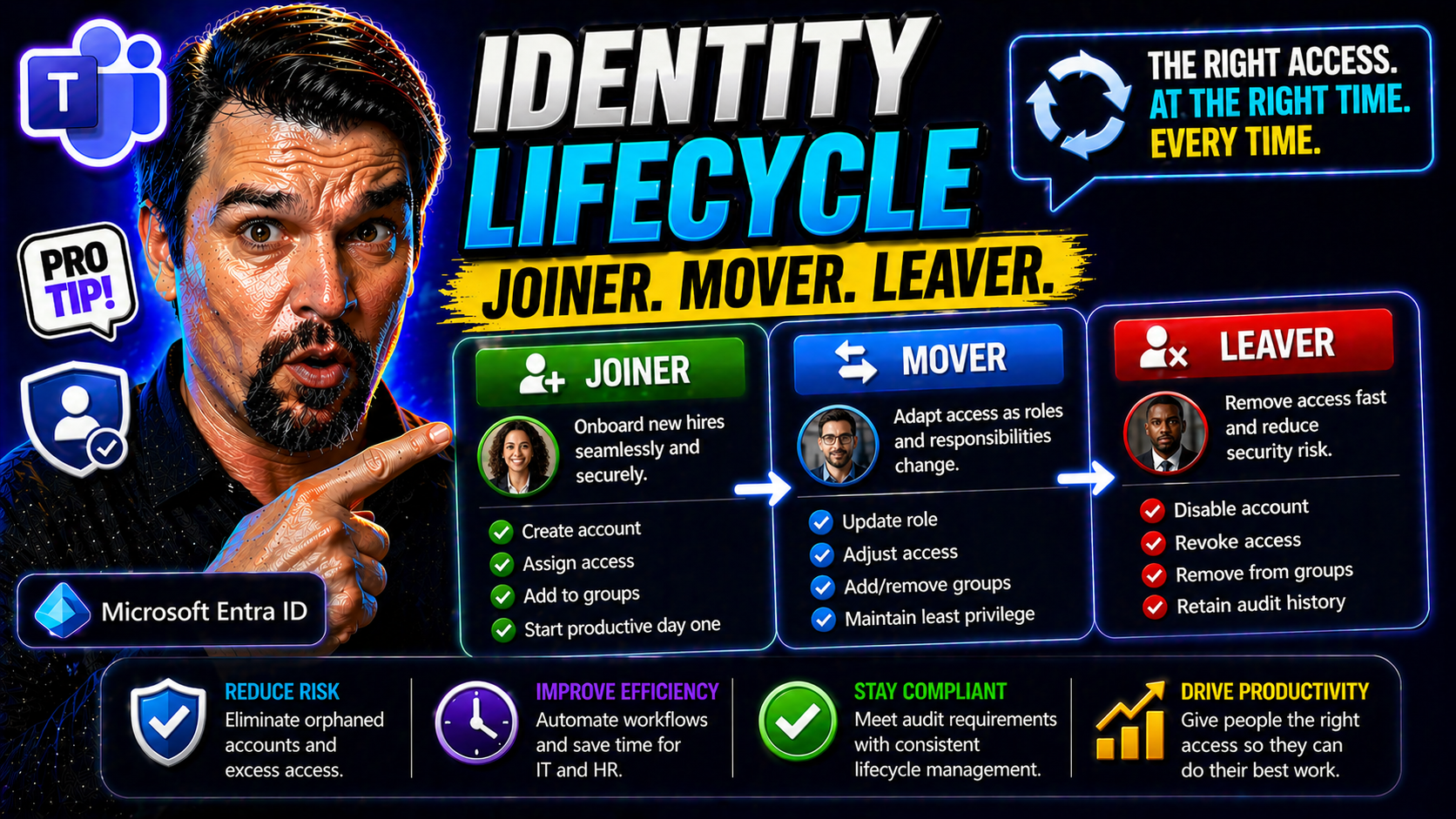
Identity lifecycle management—often called the Joiner, Mover, Leaver (JML) process—is a cornerstone of any secure, well-run organization. In today’s Microsoft-driven workplaces, from Microsoft 365 to Azure and Entra ID, getting identity right means everything. You want your staff to hit the ground running, change roles safely, and depart with their digital keys turned in at the door.
Why care about JML? Simple. Every hire, transfer, and exit is a potential moment where sensitive data could leak or compliance rules get tripped. A structured JML approach keeps you in control, making sure only the right people can do the right things at the right time. It’s the backbone of modern identity and access management, security, and governance—keeping your business productive, compliant, and out of the headlines.
Understanding Identity Joiners Movers Leavers in the Enterprise
Within every organization, people come and go or change their responsibilities—it’s the ebb and flow of business life. That flow creates different moments where security and access risks spike. Identity lifecycle management zeroes in on three critical phases: when someone joins (a “joiner”), when they shift jobs or duties (a “mover”), and when they eventually leave (a “leaver”).
Why is JML so important? Each of these stages is a point where your organization’s crown jewels—data, sensitive documents, critical apps—are exposed if not managed properly. Give someone too little access, and productivity stalls. Give them too much, and you invite risk, especially as people change roles or exit. These aren’t just technical handoffs; every change is both a business and a security event.
Managing JML isn’t just about ticking boxes for IT. It’s about aligning with how your teams work, stay productive, and keep customer trust. A good JML process fits snugly with your identity and access management (IAM) stack, from provisioning accounts in Entra ID to policy controls in Microsoft 365. As you’ll see, getting JML right isn’t just smart—it’s foundational to how you do business, meet compliance standards, and limit risk every single day.
Defining Joiners: The Start of Employee Onboarding
A “joiner” is any new user—employee, contractor, or even temp—who needs access to business systems on their first day. The joiner phase marks the beginning of a digital identity’s journey in your environment. This includes HR-driven events like new hires, or on-demand events like a contractor starting a project.
Fast, mistake-free onboarding is key. If a new hire waits hours (or days) for their email or Teams access, productivity tanks and frustration rises. But if you grant too much, or miss reviewing sensitive permissions, you risk opening doors to things they shouldn’t see. In real life, think of an engineer onboarded with admin rights “just in case”—one skipped check, and that’s a nightmare waiting to happen.
Movers and the Messy Middle: Navigating Internal Role Changes
A “mover” is someone who shifts roles inside your organization—getting promoted, transferred, or simply picking up new duties. This middle phase is where things get tricky. When job responsibilities evolve, so do access needs.
If you don’t update access as soon as someone becomes a mover, it’s easy for users to collect privileges like trading cards, ending up with more access than their new role requires. These mismatches can be hard to spot and create both unnecessary risk and messy audit trails. JML helps you keep this “messy middle” from turning into a compliance headache or a productivity bottleneck.
Leavers: Why Timely Offboarding Prevents Security Gaps
A “leaver” is anyone whose relationship with your business ends—an employee resigning, retiring, or having their contract end. Offboarding isn’t just a courtesy; it’s a frontline security and compliance priority. The goal is swift, complete removal of access to all systems, both in the cloud and on-premises.
Leaving any digital account alive after someone exits is asking for trouble. These so-called “orphaned accounts” are a top target for hackers and a blind spot for compliance teams. For example, unchecked guest accounts in Microsoft 365 can stick around far too long, as detailed in this discussion of lingering Microsoft 365 guest accounts. Getting this phase right stops data loss, closes loopholes, and gives you a clean audit trail next time the regulators come calling.
The Relationship Between JML IAM and Access Provisioning
The JML model is a backbone for modern identity and access management (IAM). At its heart, IAM is about making sure the right people have the right access, no matter where they are in the employment journey. JML brings structure to the moving pieces: onboarding, internal mobility, and offboarding. All of these rely on well-orchestrated provisioning and deprovisioning workflows.
In the Microsoft ecosystem, tools like Entra ID step in to automate these flows, enforce access policies, and enable continuous governance. Automated provisioning ensures new joiners get what they need, while deprovisioning instantly cuts access for leavers—crucial for compliance and audit requirements. For organizations struggling with policy sprawl or identity debt, insights like those shared in this podcast on Entra ID and conditional access offer practical ways to build a secure, scalable IAM foundation.
Ultimately, integrating JML into IAM ties personnel changes directly to system controls, closing security gaps and aligning IT operations with HR events and real business needs.
Joiners: Best Access Practices for Day-One Onboarding
For every new hire or contractor, the “joiner” phase is a moment of truth. If you nail day-one access, new employees feel welcome and productive immediately. Fail, and you risk lost productivity, shadow IT, and a flood of support tickets. Best practices here focus on pre-provisioning access before the first login, leveraging automation in platforms like Entra ID and Microsoft 365.
It’s not just about speed—it’s about granting only what’s needed, right when it’s needed. Too much access can be just as damaging as too little. The keys are standardized workflows, built-in policy checks, and leveraging HR system integration to trigger account creation and permissions assignments automatically. This approach makes onboarding secure, repeatable, and audit-ready.
Read on for a detailed look at the access delivery steps and the difference between role-based and policy-based access assignments, ensuring new team members are up and running—with no risks or roadblocks.
Employee Onboarding: Access Provisioning on Day One
- HR System Integration: Automatically trigger account creation when a new hire is entered into the HRIS. This eliminates manual onboarding delays and prevents errors that can happen with spreadsheets or email ticketing.
- Automated Account Provisioning: Use workflow automation in Microsoft 365 and Entra ID to spin up user profiles, email accounts, and group memberships before day one.
- Policy Checks and Birthright Access: Assign base access (such as company email and Teams) using role or attribute-based policies, ensuring every joiner gets the essentials—and nothing extra—right away.
- Avoid Overprovisioning: Automate permission assignment, but require approval for sensitive resources to keep privileges in check. Common onboarding mistakes include accidentally giving all new hires access to finance or admin groups.
- Cross-Platform Coverage: Ensure provisioning covers Microsoft 365, SaaS apps, and key on-prem systems so no one waits for resources or shortcuts process via shadow IT.
Assigning Role-Based and Policy-Based Access for Joiners
- Design an RBAC Model: Define job roles with a clear set of entitlements. Use Entra ID or a modern IAM tool to enforce role-based access control (RBAC), granting only what a role requires by default.
- Policy-Based Assignment: Implement attribute-based or policy-driven rules to handle exceptions—like contractors who need access for a limited time or project-based access outside standard roles.
- Automated Provisioning with SCIM/Entra ID: Connect HR or directory systems to provisioning engines (SCIM, Entra ID) that automatically create, update, and disable accounts based on HR events, minimizing manual touchpoints.
- Least-Privilege Enforcement: Regularly review RBAC definitions and policy exceptions; avoid “just in case” permissions that lead to privilege creep. Solutions like time-bound policies and inclusive Conditional Access (as outlined in this guide on Conditional Access policy improvements) reinforce guardrails.
Movers: Detecting Employee Changed Roles and Managing Access
The “mover” stage is where things often go sideways. Employees aren’t statues—they change roles, move to other departments, or gain new responsibilities. Each shift brings the risk of outdated access hanging around or missing key entitlements their new role demands.
Detecting these changes quickly is essential. That’s why hooking IAM platforms into HR systems is so valuable—real-time feeds flag movings and trigger automated updates. But just catching the move isn’t enough. You also need policies and automated workflows that revoke access to what’s no longer needed and grant what now is. This keeps your environment clear of lingering permissions, which is gold come audit time.
In the next sections, you’ll see how to build real-time detection and access alignment for movers, avoiding costly mistakes and security gaps as your people grow.
Real-Time Access Adjustments for Internal Role Transitions
- Integrate HR Systems with IAM: Sync HRIS updates with Entra ID or your IAM platform so every role change event automatically kicks off an access review and update—no more waiting for IT tickets.
- Map Role Changes to Identity Updates: Define logic that links new job roles, departments, or locations with updated access packages, ensuring the right permissions swap in as responsibilities change.
- Automate Access Revocation and Provisioning: Use event-driven scripts or policies to instantly remove unused entitlements and provision required ones, closing the window for privilege creep.
- Audit and Monitor Access Drift: Keep logs of before-and-after permissions and review changes periodically to catch outliers.
Preventing Access Misalignment and Overprovisioning in Movers
- Periodic Access Reviews: Regularly review user entitlements, especially for those who’ve moved roles, to catch leftover or inappropriate permissions.
- Automated Revocation Triggers: Use automated workflows to remove access no longer tied to a user’s current job code or department.
- Regular Audit Trails: Maintain and review logs—tools like Microsoft Purview Audit offer detailed activity tracking to validate access changes.
- Limit Entitlement Accumulation: Enforce policies preventing users from holding multiple privileged roles simultaneously, reducing the risk of harmful “role stacking.”
Leavers: Timely Deprovisioning, Credentials, and Audit Readiness
The “leaver” phase is where your offboarding process proves its worth. Every hour an ex-employee keeps their credentials, the risk of data leakage, sabotage, or compliance breach grows. Proper leaver management means every digital door is closed the moment an exit happens—from Microsoft 365 to enterprise SaaS to on-prem applications.
Delayed termination can lead to orphaned accounts lingering for months, leaving your organization open to attack. Automating leaver detection and integrating with audit systems is how you meet regulatory and customer expectations. Tracking every step—revoking credentials, reclaiming licenses, archiving data—gives you airtight evidence for the next audit.
Be sure to lock down not just employees but also guests and external collaborators. Unchecked external accounts, like those outlined in this look at Microsoft 365 guest account risks, are a favorite backdoor for attackers and auditors alike. The next section will give you an actionable checklist to make sure no leaver falls through the cracks.
Ultimate Offboarding Checklist for Leavers
- Disable User Accounts Immediately: As soon as offboarding is triggered, disable associated accounts in Microsoft 365, Entra ID, and connected apps.
- Revoke SaaS and External Access: Remove user permissions from linked SaaS platforms, cloud resources, and collaboration environments. Don’t forget to enforce guest and contractor revocation—refer to strategies like those found in external sharing control guides.
- Transfer Ownership and Data: Assign files, email, or other resources to another active user to ensure business continuity—ensure nothing valuable is left orphaned.
- Update Audit Logs and Documentation: Record who performed every offboarding action and double-check that all steps were completed for compliance readiness.
- Trigger End-of-Contract Reviews: For contractors or third parties, align account expiry with contract termination or project completion.
JML Process Automation: Streamline Each Lifecycle Phase
Manually managing JML is a recipe for errors, bottlenecks, and late-night troubleshooting. Automation is the secret sauce that turns your identity lifecycle into a scalable, repeatable, and rock-solid process. With event-driven triggers and structured workflows, each phase—joiner, mover, or leaver—runs smoothly without IT playing catch-up.
Why automate? It eliminates human mistakes, slashes onboarding and deprovisioning time, and ensures compliance through built-in controls and audit trails. You get faster access, instant revocation, and a happier, more secure workplace. Microsoft’s Entra ID and identity lifecycle management tools step in as powerful enablers here, whether you’re a small shop or a sprawling enterprise.
The next section will give you a rundown of key technologies powering this automation wave, so you know what to look for in your own environment.
Key Tools and Technologies Powering Automated Identity Lifecycle Management
- Entra ID (Azure AD): Microsoft’s cloud identity platform offers native lifecycle management, dynamic group assignment, access reviews, and integrated automation for onboarding and offboarding across Microsoft 365 and Azure.
- SCIM (System for Cross-domain Identity Management): An open standard that automates user provisioning and deprovisioning between HR, directories, and SaaS apps—think of it as a translator for user account automation.
- Lifecycle Management Tools: Platforms like SailPoint, Okta, or bespoke scripts orchestrate JML workflows, manage complex approvals, and ensure compliance with least-privilege policies.
- IAM Governance Platforms: Comprehensive solutions manage entitlements and enforce policy controls. They integrate with audit tools and often provide connectors for hybrid and multi-cloud environments. Protect against issues like OAuth consent abuse by leveraging best practices in Entra ID consent management.
Strategic Benefits of JML: Security, Compliance, and Efficiency
Investing in robust JML processes pays off across the board. You get stronger security—by slamming shut access windows hackers love. You stay on top of compliance, with clear audit trails and documented handoffs. And, just as importantly, you make work smoother and faster for everyone, from IT to end-users.
A well-oiled JML program means less time firefighting, fewer shadow IT headaches, and more productivity across the business. Security teams sleep easier, compliance folks have one less thing to worry about, and employees enjoy a frictionless experience moving through your organization.
For a closer look at the direct impact across security, compliance, and operational excellence—plus how JML supports Microsoft Copilot and AI governance—check out examples on keeping Copilot secure and compliant. The next sections will break down these benefits in more detail.
Security Teams: Reducing JML Risks and Insider Threats
With a robust JML workflow, security teams cut down on insider threats, stale accounts, and unauthorized access. Automated offboarding means no more forgotten accounts lingering in the system—eliminating soft targets for attackers.
Periodic access reviews help ensure that users only have permissions tied to their current role, closing risky gaps and keeping the environment tidy. Modern breaches, like those described in real-world Microsoft 365 attack chains, underline why attention to detail and timely access removal matter.
Meeting Compliance Pressures and Audit Readiness
- Documented Lifecycle Events: Every join, move, or leave action is logged and auditable—key for demonstrating compliance with regulations like GDPR, HIPAA, or SOX.
- Automated Remediation Programs: Automated workflows ensure that policy violations or access creep are caught and corrected without manual effort, streamlining audit responses.
- Traceability and Reporting: Role assignments, revocations, and exceptions are captured in detailed reports, enabling compliance teams to answer regulator questions with confidence.
- Continuous Compliance Monitoring: Integrate with tools like Microsoft Defender for Cloud for real-time compliance posture and proactive drift detection.
Improving Operational Efficiency and User Experience with Frustration-Free JML Processes
- Faster Onboarding: Employees hit the ground running, with all required access ready on day one.
- Reduced Manual Workload: Automation frees up IT from repetitive tasks, allowing them to focus on higher-value projects.
- Fewer Errors and Delays: Standardized processes minimize common mistakes and cut down on support tickets.
- Higher Employee Satisfaction: Smooth transitions lower onboarding anxiety and improve retention.
Key Steps to Launch a Robust JML Program
Launching or tuning up a JML program can feel daunting, but breaking it into practical steps makes the path clear. Start with creating a single source of truth—whether that’s your HR system or a central directory. Next, pilot workflows in a controlled group, ironing out edge cases and quick wins before rolling out wider changes.
Real-time event-driven provisioning and policy-based controls should be core from the beginning. They make for painless scaling and less technical debt. For greenfield environments, this may mean adopting tools like Entra ID from scratch; in brownfield environments, it’s about integrating legacy systems while upgrading core JML workflows.
All of this is easier with the right governance guardrails. To avoid policy drift and scale securely, insights from Azure governance guides (see this Azure enterprise governance strategy) reveal how policy enforcement stays ahead of chaos. Next, we’ll explore which metrics prove JML is working—and some real-world solutions for cloudy, hybrid, or legacy challenges.
Metrics to Analyze JML Success: What to Measure
- Onboarding Time: How long it takes from HR triggering to a new hire being fully operational.
- Access Removal Speed: Time between exit events and deprovisioning completion.
- Count of Orphaned or Inactive Accounts: Fewer lingering accounts means tighter controls and less risk.
- Manual Task Reduction: Track how many manual touchpoints have been replaced by automated workflows.
- Regular Access Reviews: Monitor the frequency and completeness of periodic access checks.
Overcoming Challenges: Legacy Implementation and Hybrid Environments
- Legacy Integration: Use connectors, scripting, or API layers to bridge dated systems without breaking business processes.
- Multi-Cloud and Hybrid Scenarios: Centralize policy enforcement and lifecycle management across clouds for consistent controls. Tools like management groups and landing zones help manage complexity (see governance pitfalls in Microsoft Fabric for perspective).
- Policy Enforcement: Embed deterministic guardrails and periodic audits to prevent policy drift and access sprawl as your environment grows.
- Stakeholder Alignment: Involve HR, security, compliance, and line-of-business teams early to ensure the JML process fits real daily needs.
Defining Access Lifecycles for Non-Employee Identities
Not every account in your directory belongs to a full-time employee. Contractors, vendors, freelancers, and temp workers are all “identities” that follow their own unique lifecycle patterns. That means the same care you use for employee JML must be applied here—but with important tweaks.
Non-employee access should always be time-bound and scoped tightly to what’s contractually required. Rely on expiration policies, just-in-time access, and approval (or “sponsorship”) workflows to ensure external identities don’t outstay their welcome. When a contract ends or a project finishes, their access has to disappear as automatically as it was granted.
Blind spots in this area can be huge. Guest or workload accounts in Microsoft 365 linger and become security holes without enforced lifecycle controls, as discussed in this breakdown of guest account dangers and workload identity management insights. Addressing non-employee identities closes a massive gap in your identity governance program.
Leveraging AI and Behavioral Analytics for Proactive Access Governance
The next wave of identity lifecycle management is fueled by AI and behavioral analytics. It’s one thing to have well-defined joiner, mover, leaver workflows—but what about detecting when access patterns start looking risky, even before an official departure or role change is recorded? That’s where machine learning steps in.
Modern IAM platforms can now monitor how users interact with systems, flagging when behavior drifts from the norm (maybe a “former” finance manager is still accessing sensitive ledgers). AI can even predict which employees are likely to leave soon, helping IT and security teams preemptively tighten controls or prep for rapid deprovisioning—ethically and transparently, of course.
As enterprises roll out AI-driven workflows and agents, risks like unsanctioned Shadow IT or rogue access spike, as seen with new platforms discussed in this podcast on Foundry AI risks and Purview governance. Combining behavioral analytics and automation lets you stay ahead of privilege creep and compliance risks, not just react to them. With these tools, your JML process becomes not just reactive, but proactive—raising your security and compliance game to new heights.
You Should Also Listen To
If you are researching identity lifecycle management JML, these episodes add practical context on identity security, governance, access control, and Microsoft 365 operations:
- Privileged Identity Management – Simply Explained — Understand just-in-time privilege, approvals, and access reviews.
- Conditional Access – Simply Explained — Learn how context-aware policies protect users and devices.
- Microsoft Defender XDR – Simply Explained — Connect identity signals with detection, investigation, and response.
- Microsoft Teams Governance – The Illusion of Control — See how governance creates ownership and repeatable controls.

Microsoft MVP | Host of M365.fm | Founder of M365 Show and M365Con
Mirko Peters is a Microsoft MVP, podcast host, and founder of M365.fm, M365 Show, and M365Con. His work connects Microsoft practitioners through podcast interviews, livestreams, and community events.
At M365.fm, Mirko hosts conversations with Microsoft MVPs, product experts, architects, and community contributors. Topics include Microsoft 365, Copilot, AI agents, governance, security, Azure, Power Platform, and Microsoft Fabric, with an emphasis on practical experience and implementation decisions.
M365.fm is the podcast and learning platform. M365 Show brings experts together for livestreams, while M365Con provides an online conference setting for community learning.
Official website: Mirko Peters (https://www.mirkopeters.com/). Recognition: Mirko Peters — Microsoft MVP profile (https://mvp.microsoft.com/de-DE/mvp/profile/9b0ca797-db5a-493a-a845-8b9158046cf5). Connect on LinkedIn (https://www.linkedin.com/in/m365showpodcast/).





