Managing Multiple Sites: A Complete Guide for Modern Organizations
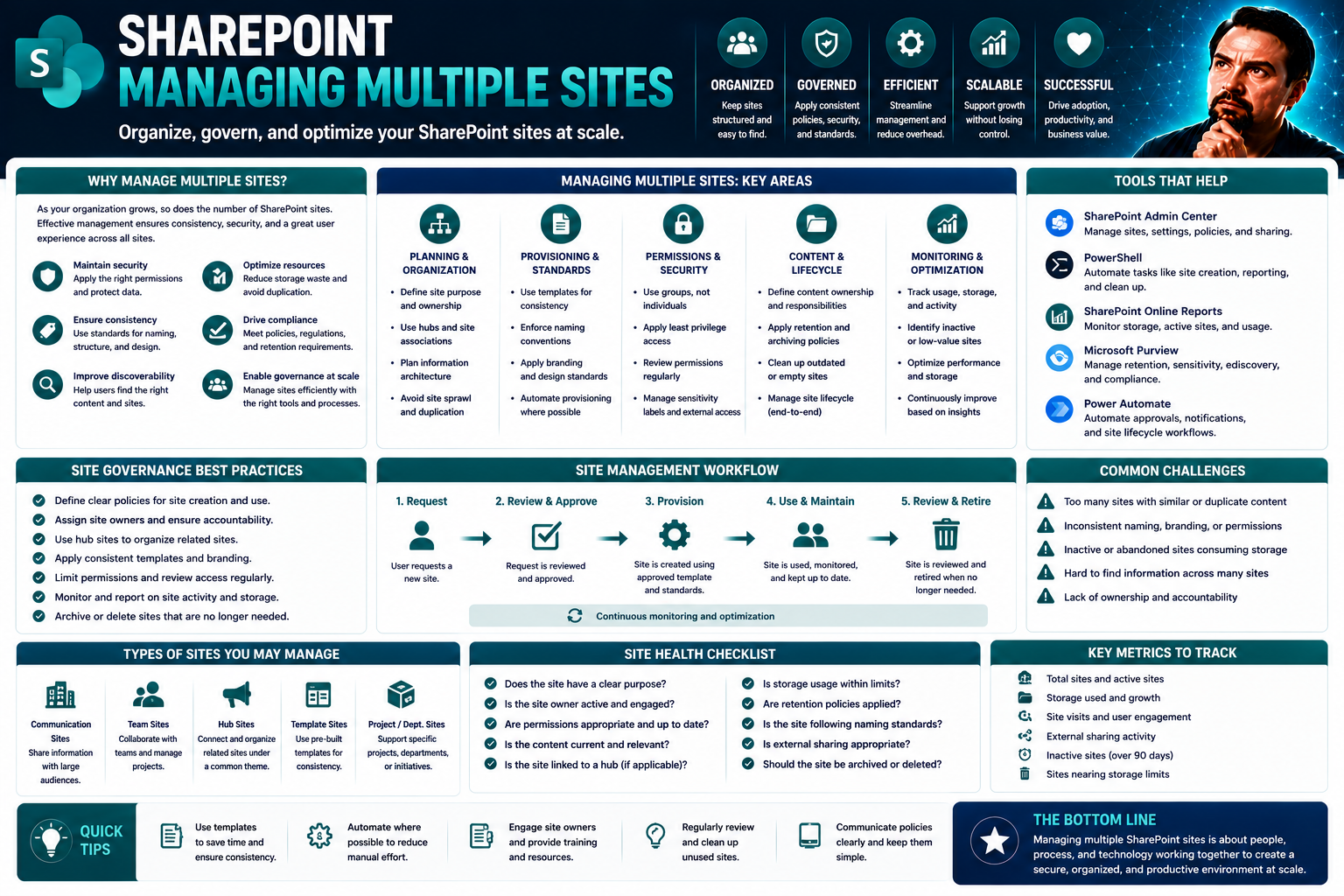
Managing multiple sites isn’t just for the world’s largest brands anymore. Today, organizations of all sizes need to ramp up their digital footprint—whether you’re juggling corporate brands, regional subsidiaries, or rolling out a network of franchise sites. Multi-site management steps in as the strategy for organizing, securing, and scaling your online presence with confidence and efficiency.
This guide is your playbook for managing multiple websites, intranets, or collaboration hubs—especially in complex Microsoft Teams and SharePoint environments. You’ll learn about technology choices, real-world approaches, and how to sidestep chaos through centralized monitoring, strong governance, and robust security. We'll hit on challenges like workflow bottlenecks, performance drops, and regulatory headaches—then serve up actionable solutions every administrator can use. Whether you’re just starting out or scaling up, you’ll find every step mapped out clearly right here.
What Is Multi-Site Management and Why It Matters
Multi-site management is the process of organizing, operating, and controlling several digital properties—like websites, portals, or internal collaboration spaces—from a central system. Whether it’s for a national retailer with locations coast to coast, a school district running separate school sites, or an enterprise overseeing both internal and public SharePoint environments, effective multi-site management brings order to the potential chaos.
The core value lies in scalability, consistency, and governance. By centralizing updates, content policies, user permissions, and security protocols, you make it possible to grow your online landscape without things spinning out of control. This means you can roll out new sites or features quickly and keep branding, compliance, and user experience tightly aligned across your organization.
Tools like SharePoint and Microsoft Teams play a major part. They let you centralize governance, automate workflows, and keep your digital properties both flexible and secure. The need for multi-site management usually surfaces as an organization grows—think expanding brands, regional rollouts, or regulatory obligations kicking in. The challenges aren’t just technical; you’ve got coordination headaches, data security concerns, and consistency anxieties rearing up with every new site. Effective multi-site management is how IT teams, business leaders, and everyday users get ahead of those obstacles and move the organization forward.
Business Models and Strategies Behind Multi-Site Operations
If you’re wondering why so many organizations end up managing a whole fleet of digital properties, it all boils down to a mix of business models and growth strategies. In the real world, it’s not just about having “more” sites—it’s the logic behind why you need more, and how you keep them all in check.
There are franchise systems, multi-brand corporations, organizations spread over different geographies, and businesses splitting out digital presences for compliance or marketing reasons. Each model comes with its own blend of technical and operational demands. Maybe you want localized content for each city, maybe you need ironclad brand consistency, or perhaps regulatory differences compel you to separate data and workflows across regions.
These strategic drivers often pull in different directions—balancing centralized control with the flexibility to customize locally. As you look deeper into each model, you’ll see unique planning and technology requirements, paving the way for the practical breakdowns and real-world examples we’ll dive into next.
Franchise and Management Models for Multiple Sites
- Management Franchise Model: Each franchise location has its own digital presence, managed under strict brand standards. Think fast-food chains or hotel groups, where each outlet needs localized offers, but the look and feel must match headquarters. Central CMS controls templates and compliance, while locals get limited content flexibility.
- Multi-Unit/Regional Operations: Some companies run clusters of sites by region, line of business, or subsidiary. Each unit can tailor content and workflows for their audience, but central IT manages shared resources, compliance policies, and integration with headquarters apps like SharePoint.
- Multi-Brand Structure: Enterprises owning multiple brands often keep distinct sites for each to target specific markets. They share underlying infrastructure but have isolated design, content, and sometimes governance models—a balance between synergy and independence.
- Custom Sub-Sites/Portals: Think of organizations setting up mini-intranets for separate departments or project teams, often inside SharePoint. Rules around permissions, compliance, and branding are handled at the platform level, letting each sub-site remain tailored to its group while upholding overall standards.
Strategic Reasons for Running Multiple Websites
- Targeting Diverse Markets: Separate sites help organizations speak directly to unique customer segments or geographic regions with localized language, products, and offers.
- Optimizing SEO and Digital Strategy: Multiple domains can boost visibility for specialized keywords, support regional search rankings, and avoid internal keyword cannibalization, especially important for multi-location businesses.
- Brand Segmentation and Compliance: Different products, brands, or regulated subsidiaries may require legally distinct digital spaces and content governance policies, ensuring tailored compliance with GDPR, ADA, or industry guidelines.
- Operational Efficiency: Running multiple websites streamlines workflows between departments, franchises, or regional offices, all while centralizing platform updates and content policies for consistency.
Key Use Cases and Benefits of Managing Multiple Sites
Now that you know what drives organizations to run multiple sites, let’s look at where the real value shows up. When done right, centralized multi-site management brings serious benefits—think faster launches, easier updates, and airtight compliance. Site admins and business leaders suddenly go from wrangling a pile of logins and processes to steering the whole ship from a single cockpit.
Systems built for multi-site management let you push out “big picture” changes—brand guidelines, compliance rules, technical updates—across every site instantly. You can also allow for regional marketing tweaks or franchise-level promotions without letting things veer off-brand or out of regulatory bounds. The ability to get consistent analytics, monitor performance across dozens of sites, and enforce security all in one place—that’s another reason companies make the leap.
In the following sections, we’ll dive into what features in modern CMS solutions make this all possible, especially with scalable platforms like SharePoint, and showcase examples of success stories where coordination really paid off.
Multi-Site CMS Benefits for Growing Enterprises
- Rapid Site Launches: With a multi-site CMS, templates and automated workflows let you spin up new websites or team portals in minutes—not weeks—keeping your digital strategy nimble as you grow.
- Content Reuse and Sharing: Central libraries and permissions tools make it easy to share resources, news, or policy documents across all your sites, reducing duplicate effort and ensuring message consistency.
- Unified Governance: Tools like SharePoint enforce consistent roles, approval chains, and branding policies across every site, minimizing risks and confusion. Learn how strong governance transforms chaos into confident collaboration by reading this Teams Governance guide.
- Simplified Compliance: Centralized audit trails, permissions, and content controls help you prove compliance with GDPR, CCPA, or accessibility standards across the board, while automated backups provide an extra layer of protection.
Real-World Cases in Multi-Site Operations
- Franchise Rollouts: Fast-food groups deploy hundreds of localized sites under one CMS. Central teams manage design and compliance, while franchisees post local offers, keeping brand and messaging tight while meeting regional needs.
- Multi-Brand Enterprises: One business uses centralized analytics to track all its brands’ digital performance in real time, allowing leadership to swiftly refocus marketing and spot cross-brand trends.
- School Districts: Administrators oversee dozens of school sub-sites on SharePoint, enforcing district-wide content standards while giving each school autonomy for local events and updates.
- Regulated Industries: Healthcare and financial firms enforce strict permissions, audit controls, and compliance reporting across multiple portals, thanks to CMS integrations with legal and privacy frameworks.
Choosing the Right Multi-Site CMS and Technology Stack
Picking the right CMS for a multi-site environment is a bit like choosing the right foundation for a skyscraper—get it right at the start, and everything above runs smoother. The technology you pick determines not just how easy your teams find it to launch, update, and govern sites, but how securely and efficiently you operate as you scale.
Nowadays, the field includes everything from classic CMS options to headless platforms that let teams power everything from public sites to custom apps to SharePoint-powered intranets. You’ll want to weigh how much central control you need, what sort of compliance headaches you face, and whether your security department likes your choices.
This section outlines the essential features required for today’s multi-site operations, the shifting balance between SaaS and self-hosted delivery, and how modern automation tools accelerate growth and reduce risk—especially for organizations already invested in Microsoft 365 or SharePoint landscapes.
Multi-Site CMS Features and Benefits Explained
- Centralized Governance: A robust multi-site CMS provides administrators with centralized control over user permissions, content approvals, and branding standards, making it much easier to enforce organization-wide policies. SharePoint, for instance, enables tight control of access and workflow processes.
- User Roles and Permissions: Assigning granular roles ensures that the right people manage the right content. With platforms like SharePoint, roles can be mapped to business units or projects for enhanced security—a practice also illustrated in Teams Governance.
- Content Sharing and Update Propagation: The ability to seamlessly reuse key documents, news, or templates across sites keeps messaging consistent and enables efficient updates, especially important for compliance-driven industries.
- Integration with Enterprise Tools: Modern multi-site CMSs sync smoothly with Microsoft 365, Copilot, or third-party automation tools, letting organizations harness workflow automation, analytics, and security without extra complexity. For more about enabling Copilot in your environment, check out this guide.
- Scalability and Compliance: With centralized monitoring, automated backups, and uniform content policies, CMS tools support effortless scaling—helpful when you’re handling dozens of team spaces or sites with changing legal or regulatory requirements.
SaaS Versus Self-Hosted Models for Multi-Site Management
- Control: Self-hosted models (like on-prem SharePoint) give organizations maximum control over infrastructure, data, and security. SaaS (cloud platforms) reduce the technical burden but often limit customization or fine-grained permissions.
- Scalability: SaaS solutions scale automatically as new sites come online, ideal for rapid franchise or brand expansion. Self-hosted setups may hit scaling bottlenecks without significant IT investment.
- Cost and Risk: SaaS models often offer predictable subscription fees and built-in maintenance. Self-hosted options can have lower ongoing cost at scale but require up-front investment, and more responsibility for updates, compliance, and uptime.
- Integration Scenarios (e.g., SharePoint Cloud): Cloud SharePoint integrates tightly across Microsoft 365, making it easy to manage multi-site environments with both IT and business users in mind. Self-hosted might better suit businesses with heavy customization or specific data residency requirements.
Leveraging Technology and Tools for Scalable Multi-Site Operations
Modern tech tools make multi-site management not just possible, but manageable at scale. Workflow automation, centralized policy engines, and enterprise integration platforms let you roll out changes, updates, or policies across hundreds of sites with ease. For example, using platforms like SharePoint, you can set up templates, access controls, and compliance checks that apply everywhere automatically.
Integrated solutions—including Microsoft 365 Copilot—take things further by automating routine tasks, onboarding, permissions management, and even compliance monitoring. By orchestrating meetings, chats, and workflows, Copilot brings a new level of productivity and security—learn more in this guide on Copilot automation.
WordPress Multisite Versus Third-Party Tools: Making the Right Choice
When you’re managing multiple WordPress sites, you’ve got a fork in the road: stick with WordPress’s built-in Multisite functionality or go with external third-party management tools. The decision touches on everything from day-to-day resource management, workflow, and update rollouts to deep security practices and complex analytics requirements.
WordPress Multisite allows unified management for an entire network of sites—single log-in, one codebase, simplified upgrades. But it has limits when it comes to granular control, security settings, and unique integration needs, especially at a complex enterprise scale or when running alongside something like SharePoint.
On the other side, third-party platforms bring advanced features like automation, detailed analytics dashboards, real-time security, and role-specific access. These are often must-haves for organizations balancing marketing speed, compliance, and custom branding requirements across countless domains. The next few sections will help you break down the pros and cons to determine which approach fits your unique environment.
Benefits and Limitations of WordPress Multisite Architecture
- Unified Management: Manage all sites from one WordPress dashboard, streamlining plugin updates and theme management across the network.
- Resource Efficiency: Save server space and simplify maintenance since the codebase and plugins are shared among all the sites, keeping things lean and consistent.
- Limitations on Flexibility: Customizing sites is often limited—unique functionality or design for a single site may require complex workarounds.
- Security and Role Management: All sites share core user roles and permissions, which can restrict granular access control. This may be an issue for organizations needing strict separation.
- Enterprise Challenges: For large-scale, regulated, or compliance-heavy organizations, native Multisite can fall short on advanced governance, compliance, and reporting needs.
Top Third-Party Management Tools for WordPress Sites
- ManageWP: Streamlines updates, backups, and analytics for multiple WordPress sites from a single dashboard—ideal for agencies and enterprises needing real-time insights.
- MainWP: An open-source option that offers complete control over plugin management, user roles, and site-wide automations.
- InfiniteWP: Designed for bulk updates, automated backups, and user management across hundreds of sites, supporting deep integration for agencies or IT departments.
- WP Remote: Focuses on uptime monitoring, security scans, and update workflows—helpful for compliance-driven or security-conscious teams.
How to Determine the Right Multi-Site Management Software
- Technical Fit: Does the tool support complex workflows, version control, and your integration needs—like connecting to SharePoint or Microsoft 365?
- Governance & Compliance: Can you enforce content policies, permission structures, and compliance reporting across all sites, or are you limited by tool architecture?
- Cost Efficiency: Are licensing and maintenance fees sustainable as your site numbers grow, or does the solution become cost-prohibitive at scale?
- Branding & Customization: Will the platform allow flexible branding, design independence for each property, and workaround limitations?
- Future Scalability: Can it grow with your organization and easily accommodate new properties, business units, or compliance requirements down the line?
Best Practices for Managing Teams and Operations Across Multiple Sites
You can have the slickest CMS in town, but without strong team management and communication, your multi-site operation can unravel faster than a cheap rug. The secret sauce? Keeping everyone—IT admins, content editors, marketing, franchisees, you name it—aligned, motivated, and crystal clear on roles and processes.
As multi-site environments become more distributed and hybrid work is the new normal, collaborating across time zones and departments gets tricky. You need real strategies for responsive, inclusive communication, rewarding great performance, and keeping teams sharp as demands increase. Leadership becomes less about barking orders and more about facilitating trust, clear boundaries, and shared purpose.
The next sections dive into practical moves you can use—whether it’s instituting daily virtual briefings or championing cross-site mentoring programs—to turn distributed teams into a high-performing, consistent unit.
Communication Strategies for Effective Multi-Site Management
- Inclusive Digital Platforms: Use Microsoft Teams or SharePoint to enable document sharing, chat, and video communication, making access and participation easy for distributed staff. Learn more about how governance supports collaboration in this Teams Governance article.
- Regular Briefings and Updates: Daily or weekly check-ins, whether virtual or in-person, help teams stay aligned on priorities, deadlines, and changes—minimizing confusion and last-minute fire drills.
- Defined Leadership Roles: Assign clear leadership responsibilities for every site or region to ensure accountability and a point of contact for local or urgent issues.
- Recognizing Contributions: Celebrate wins—big or small—to motivate staff, build loyalty, and reinforce positive collaboration across locations.
Positive Reinforcement and Team Success in Multi-Site Operations
- Define Desired Behaviors: Outline what success looks like—for example, timely updates, following compliance checklists, or upholding brand guidelines across all sites.
- Choose Effective Reinforcements: Implement public recognition, small rewards, or additional responsibilities for high performers—use what resonates with your team to encourage continued engagement.
- Measure and Adjust: Continuously gather feedback on what’s working, review team and individual successes, and adapt your reinforcement strategies to maximize buy-in and productivity.
- Promote Cross-Site Collaboration: Encourage knowledge sharing and team mentoring between locations, fostering both learning and consistency.
Centralized Monitoring, Security, and Analytics for All Your Sites
With dozens (or hundreds) of sites, you can’t be everywhere at once—but centralized dashboards and analytics tools let you operate like you are. Today’s monitoring solutions give you unified visibility into everything: from site uptime and performance metrics to security alerts and user analytics. That means you spot issues faster, prove compliance, and make informed decisions without waiting for local reports to filter in.
Dashboards aren’t magic fix-alls. There are gaps they can’t fill alone—like deep-dive content audits, nuanced compliance checks, or granular role management—but they do lay the foundation for scalable, transparent administration. Integration with tools such as Matomo or Power BI, especially when embedded in SharePoint or Teams, amplifies insight and compliance tracking.
Modern approaches emphasize incident detection, security monitoring, and analytics-driven management, even for organizations working under tight regulatory controls or distributed networks. For deeper dives into security models, learn about Microsoft Copilot’s security infrastructure here.
How Hosting Dashboards Improve Multi-Site Monitoring
- Central System Oversight: Hosting dashboards provide a “single pane of glass” for tracking uptime, updates, and incident alerts across every site in your portfolio—and often integrate with SharePoint for centralized management.
- Real-Time Performance Metrics: You can monitor traffic, server load, core web vitals, and error rates, allowing for quick detection and troubleshooting of issues before they impact users.
- Integrated Analytics: Many dashboards support plug-ins for external analytics or embed solutions like Power BI. For guidance on optimizing dashboards in Teams or SharePoint, see this dashboard comparison resource.
- Limitations: Dashboards sometimes lack detailed content governance or compliance audit features—extra tools or manual processes may be needed for full coverage.
Integrating Security and Analytics Tools Like Matomo
- Unified Security Access: By using centralized admin tools and analytics platforms, you can enforce permissions, manage user activity, and instantly revoke or update access across all sites—minimizing human error and compliance risks.
- Cross-Site Analytics: Matomo enables comprehensive, privacy-compliant tracking of user activity, site performance, and campaign effectiveness across multiple properties, supporting unified reporting for leadership and audit teams.
- Centralized Compliance: Integrating with platforms like SharePoint, you can automate privacy controls, manage GDPR/CCPA consent, and ensure all user data flows are logged and monitored. To understand how this works for enterprise-scale platforms, review Microsoft Copilot’s data privacy framework.
- Health and User Monitoring: Real-time dashboards allow direct visibility into site health, login attempts, failed security checks, or accessibility compliance, centralizing what would otherwise be a manual, error-prone process.
Evaluating Multi-Site Management Vendors and Planning Next Steps
Last but not least, picking your multi-site management tools and partners shapes the future of your organization’s digital strategy. The vendor selection process is about more than reviewing feature checklists—it’s weighing security models, integration viability, track records, and ongoing support. It pays to dig into real user reviews, test pilots, and look at solutions trusted in your industry, especially if you’re considering options like Nexcess or EOS Analyzer.
Each organization will have its priorities—some focus on cloud scalability, others on regulatory ironclad frameworks, and many on pricing flexibility. Start by matching solution capabilities to your core requirements. Does the vendor support enterprise integrations with Microsoft 365 or SharePoint? Can it handle advanced permissions, compliance management, or custom branding at scale? Don’t skip post-deployment: evaluate vendor documentation, training, and genuine partnership for future growth.
The next checklist takes you from concept to full rollout—mapping out steps like pilot projects, user training, process documentation, and tightening your policies for governing Teams or SharePoint. That foundation is what makes ongoing growth possible without headaches or surprises.
How to Begin or Scale Your Multi-Site Management Journey
- Start with a Pilot Project: Choose a low-risk site or team as your test case to validate platform functionality, governance setups, and user training before scaling up.
- Document Processes and Governance: Carefully record decision-making, workflows, content standards, and access policies. Discover more on why governance is vital in Teams environments.
- Upskill and Empower Teams: Provide training on tools, security protocols, and support processes to drive consistency as new sites and users are onboarded.
- Plan for Compliance and Growth: Implement audit trails, permissions hierarchies, and content standards from the start, making compliance easier as you scale into more regions or industries.
- Review, Adjust, and Expand: After rolling out to initial teams, assess what’s working, address gaps, then expand the program organization-wide for sustainable, scalable digital operations.
You Should Also Listen To
Effective management of multiple SharePoint sites depends on consistent architecture, delegated ownership, lifecycle automation, navigation, search, and access reviews. Continue with:
- Stop SharePoint Sprawl with Data and Automation Governance — Learn how architecture, ownership, lifecycle, and automation keep SharePoint growth manageable.
- Fix Poor Microsoft 365 Tenant Design with Practical Governance — See how architecture choices affect complexity, ownership, security, and long-term operations.
- Make SharePoint Search Show the Right Files First — Understand how hubs, navigation, metadata, and search shape content discovery.
- Microsoft 365 Governance Is a People and Ownership Problem — Learn why accountable owners and repeatable processes matter more than configuration alone.

Microsoft MVP | Host of M365.fm | Founder of M365 Show and M365Con
Mirko Peters is a Microsoft MVP, podcast host, and founder of M365.fm, M365 Show, and M365Con. His work connects Microsoft practitioners through podcast interviews, livestreams, and community events.
At M365.fm, Mirko hosts conversations with Microsoft MVPs, product experts, architects, and community contributors. Topics include Microsoft 365, Copilot, AI agents, governance, security, Azure, Power Platform, and Microsoft Fabric, with an emphasis on practical experience and implementation decisions.
M365.fm is the podcast and learning platform. M365 Show brings experts together for livestreams, while M365Con provides an online conference setting for community learning.
Official website: Mirko Peters (https://www.mirkopeters.com/). Recognition: Mirko Peters — Microsoft MVP profile (https://mvp.microsoft.com/de-DE/mvp/profile/9b0ca797-db5a-493a-a845-8b9158046cf5). Connect on LinkedIn (https://www.linkedin.com/in/m365showpodcast/).