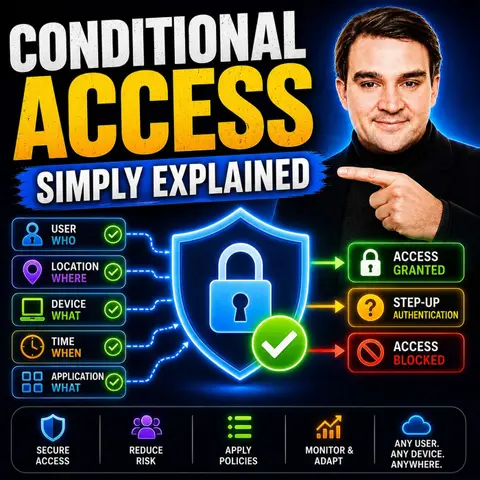
Mastering Zero Trust: How Conditional Access Drives Modern Security
Welcome to our deep dive into the architecture of modern digital protection. As organizations transition away from traditional perimeter-based network security, the perimeter has essentially dissolved into the cloud, moving straight to the user and the device. In an era where remote work is standard and cyber threats are increasingly sophisticated, securing corporate data requires a paradigm shift. Enter the world of Zero Trust—a framework that assumes breach and verifies every single access request explicitly. At the heart of this transformative approach is conditional access. By acting as a dynamic, intelligent security gatekeeper, conditional access evaluates real-time context before deciding whether to grant, restrict, or block entry to your most critical corporate assets. In this comprehensive guide, we are going to explore how conditional access forms the operational backbone of a Zero Trust model, breaking down its inner workings, tangible benefits, configuration best practices, and common deployment hurdles.
What Is Conditional Access?
Overview of CA
Conditional access (CA) is an advanced security strategy that controls who can access specific resources, when they can access them, and under what exact conditions. Rather than relying on a static password that can easily be phished, guessed, or stolen, conditional access tailors access based on a rich set of real-time signals. These signals include user identity, device health, physical or network location, risk level, and behavioral patterns. This dynamic approach allows organizations to make intelligent, context-aware decisions about granting access rather than operating on an all-or-nothing basis.
Here are some primary functions of conditional access:
| Function | Description |
|---|---|
| User Identity | Verifying users thoroughly before granting access. |
| Device Compliance | Ensuring devices meet organizational security standards. |
| Location Constraints | Limiting access based on geographic location or trusted network ranges. |
By evaluating these factors continuously, conditional access enhances security and safeguards sensitive information from unauthorized exposure.
Importance of CA in Security
In today's digital landscape, the importance of conditional access cannot be overstated. It plays a crucial role in maintaining a resilient security posture for organizations of all sizes. Conditional access supports regulatory compliance by enforcing granular access policies tailored to specific data classifications. It also provides comprehensive audit trails through access logs and policy enforcement records, making it significantly easier to pass compliance audits.
Conditional Access enforces the principle of Zero Trust by continuously evaluating trust based on real-time signals.
When you implement conditional access correctly, you can establish a proactive security rhythm:
- Analyze sign-in logs and access attempts regularly.
- Identify patterns such as failed sign-ins, impossible travel, or unusual access locations.
- Refine policies continuously based on insights gained from security telemetry.
This proactive approach helps mitigate risks and significantly enhances overall security. In the context of Microsoft Entra, conditional access allows organizations to enforce access policies based on specific conditions. It provides robust tools for evaluating and testing these policies to meet stringent security requirements while enhancing overall protection without frustrating everyday user access.
By relying on device compliance, conditional access determines access eligibility with surgical precision. Fully compliant corporate devices gain broad access, while unmanaged or non-compliant devices face strict restrictions or mandatory remediation steps. This flexibility ensures that you can adapt your security measures to meet your organization's unique operational needs.
How Conditional Access Works

Conditional access operates through a set of logically defined policies that evaluate various contextual signals before granting access to resources. Understanding the key components and access triggers of conditional access helps you appreciate its remarkable effectiveness in enhancing modern enterprise security.
Key Components
User Identity
User identity is a fundamental building block of conditional access. It verifies who is attempting to access corporate resources. This verification process includes checking user or group membership, which allows policies to target specific users, departments, or administrative roles. By doing so, you can ensure that only authorized individuals gain access to sensitive intellectual property and financial data.
Device Compliance
Device compliance is another critical aspect of conditional access. It ensures that devices meet specific security baselines before granting entry. For instance, conditional access checks for foundational security features like disk encryption, operating system updates, and active antivirus software. If a device does not comply with these enterprise standards, access is restricted. This approach maintains a secure ecosystem by preventing potentially infected or vulnerable personal devices from compromising the wider network.
Here’s a summary of the main components involved in conditional access policies:
| Component | Description |
|---|---|
| User or group membership | Policies can target specific users or security groups. |
| IP Location information | Trusted IP address ranges can be used for automated policy decisions. |
| Device | Specific platforms (iOS, Android, Windows) or device states can influence access. |
| Application | Different cloud applications can trigger distinct conditional access requirements. |
| Risk detection | Integration with Microsoft Entra ID Protection identifies and mitigates risky user behavior. |
| Microsoft Defender for Cloud Apps | Monitors and controls user application access in real-time. |
| Compliance guidance | Conditional access guides users on how to bring their devices into compliance. |
Access Triggers
Access triggers are the environmental conditions that activate specific conditional access policies. These triggers help determine whether to grant access, prompt for multi-factor authentication, restrict permissions, or outright block access based on specific criteria.
Location-Based Access
Location-based access is a common trigger in conditional access systems. It evaluates the geographic location or network boundary of the user attempting to sign in. If the login attempt originates from a trusted corporate network location, access may be granted smoothly. Conversely, if the attempt comes from an unrecognized foreign location, additional verification steps, such as high-assurance multi-factor authentication, may be required. This method enhances security by ensuring that access patterns align with normal business operations.
Risk Assessment
Risk assessment plays a vital role in real-time conditional access decisions. It evaluates various risk signals, such as anomalous login behavior, impossible travel speeds, or attempts originating from anonymous IP addresses. Conditional access policies can activate immediately based on these risk signals. For example, if a user logs in from an unusual location, the system may dynamically enforce multi-factor authentication or block the session entirely to prevent a potential account takeover.
Here’s a summary of common access trigger types:
| Access Trigger Type | Description |
|---|---|
| Risk signals | Evaluates signals such as IP location, unusual behavior, and compliance metrics. |
| Specific conditions | Policies activate when conditions are met, like login attempts from a new device or geolocation. |
| Actions | Grant, restrict, or block access based on risk evaluation, including enforcing MFA. |
By understanding how conditional access works under the hood, you can better implement these policies to strengthen your organization's overall security posture.
Benefits of Conditional Access
Enhanced Security
Implementing conditional access significantly enhances your organization's security posture. This approach ensures that only verified users operating on secure, managed devices can access sensitive company data. By minimizing unauthorized access vectors, you drastically reduce the risk of devastating data breaches. Conditional access employs multiple layers of contextual authentication, moving far beyond simple passwords to incorporate biometric verification, hardware keys, and device-based validation.
Here are some measurable improvements you can expect after implementing conditional access:
| Measurable Improvement | Description |
|---|---|
| Strengthened Security with Real-Time Risk Mitigation | Evaluates sign-ins against risk factors and responds automatically to threats. |
| Granular Control Enhances Compliance | Provides fine-grained control over access, helping organizations meet regulations. |
| Improved User Productivity and Experience | Challenges users only when risk is detected, maintaining a smooth workflow. |
| Transition to a True Zero Trust Posture | Evaluates each access request based on trust, reducing the attack surface. |
| Fewer Infosec Headaches and Lower Cost of Control | Simplifies IT infrastructure by automating access decisions and reducing overhead. |
Compliance with Regulations
Conditional access also plays a crucial role in helping organizations comply with various regulatory frameworks, such as GDPR, HIPAA, and SOC 2. By enforcing automated access control measures, you ensure that only authorized personnel can access sensitive personal and financial data. This automation relies on continuous evaluation of user identity, device status, and geographic location, providing documented proof of data governance.
Here are some key ways conditional access supports regulatory compliance:
- It enforces strict access control measures to ensure that only authorized users view sensitive data.
- It automates access decisions based on dynamic signals like user identity and device health status.
- This automation helps organizations adhere strictly to regulations like GDPR and HIPAA by enforcing protective policies consistently.
By implementing conditional access, you not only fortify your defenses but also streamline your regulatory compliance efforts, allowing your team to focus on core business growth.
Configuring Conditional Access Policies
Setting Up Policies
To effectively implement conditional access policies without causing operational chaos, follow these foundational steps:
- Plan your deployment: Understand your organization's security landscape and define the precise scope of the policy you want to build.
- Define user or group assignments: Identify who will be impacted by the policy. Always start by piloting policies with a small, tech-savvy IT group.
- Select cloud apps or actions: Choose which enterprise applications will trigger the policy. Focus first on high-value resources containing sensitive data.
- Set policy conditions: Determine when the policy will be enforced by considering factors like device state, risk level, and geographic location.
- Define access controls: Decide what security actions to take if conditions are met, such as requiring multi-factor authentication or blocking access.
- Enable or test the policy: Choose to test the policy in report-only mode first to evaluate its impact without disrupting live user access.
- Monitor and refine: After deployment, monitor policy logs closely and make adjustments based on user feedback and changing security requirements.
Testing and Monitoring
Testing and monitoring your conditional access policies before full enforcement is crucial to ensure they function as intended:
- Open your cloud identity management admin center.
- Navigate to the security section and select conditional access.
- Create a new policy and provide a descriptive, standardized name.
- Select the specific users or groups that will be targeted by the policy.
- Select the cloud resources and applications that the policy will protect.
- Configure your required access controls, such as session limits or MFA.
- Enable the policy in report-only mode to evaluate potential user friction safely.
Using report-only mode allows you to assess how the policy affects user access without applying hard blocks. This approach helps you analyze logs and prevent unexpected lockouts.
To ensure smooth implementation, keep these best practices in mind:
| Best Practice | Description |
|---|---|
| Zero-Trust Mindset | Deny access by default and only allow exceptions for verified, trusted users. |
| Granular Control | Combine multiple conditions for targeted access control and reduced friction. |
| Report-Only Mode | Test new policies in Report-Only mode before enforcement to avoid disruptions. |
| MFA and Device Compliance | Link user identity directly with device health and MFA for maximum security. |
| Risk-Based Policies | Implement automated policies based on real-time user risk levels. |
| Continuous Monitoring | Regularly review sign-in logs and policy telemetry to maintain effectiveness. |
Challenges and Solutions
Misconfigurations
Misconfigurations often pose significant challenges when deploying conditional access. These human errors can introduce unexpected security gaps into your environment. Here are some common misconfigurations to watch out for:
- Failing to Block Legacy Authentication: Allowing legacy protocols leaves your organization vulnerable because older protocols do not support multi-factor authentication.
- Flawed Location-Based Policies: If trusted IP ranges are not maintained properly, location policies can become ineffective or lock out legitimate travelers.
- Inconsistent Device Platform Policies: Failing to cover all operating systems can allow attackers to exploit unprotected device blind spots.
- Ignoring Risk Conditions: Failing to integrate risk-based policies misses an automated opportunity to stop automated credential stuffing attacks.
To mitigate these risks, conduct regular policy audits and peer reviews to ensure your configurations align with modern security frameworks.
User Resistance
User resistance is another common challenge during rollouts. Employees may feel frustrated by new security prompts if they perceive them as unnecessary obstacles to their daily workflow. Here are practical strategies to overcome this resistance:
- Implement Adaptive MFA: Use intelligent policies that only prompt users for verification when an anomaly or risk is detected.
- Simplify Onboarding: Provide clear, concise instructional guides to help employees register authentication methods quickly.
- Offer Flexible Authentication Options: Allow approved verification methods, such as authenticator apps and hardware tokens, to accommodate user preferences.
- Educate Early: Conduct internal awareness campaigns explaining why these security measures protect the entire organization from cyber threats.
- Balance Security with Usability: Apply friction selectively to high-risk apps while maintaining a smooth experience for standard productivity tools.
By proactively addressing user concerns and communicating clearly, you can foster a positive security culture across your organization.
In summary, conditional access is an absolute cornerstone for achieving modern enterprise security. By continuously evaluating user identity, device compliance, and real-time contextual signals, organizations can transition smoothly into a resilient Zero Trust architecture that minimizes risk without hindering productivity.
To continue your security journey, explore related topics and expert discussions. For a practical, simply-explained breakdown of these concepts, be sure to listen to the companion podcast episode, Conditional Access - Simply Explained, where industry experts discuss how to implement these strategies effectively in your own Microsoft 365 environment.
FAQ
What is Conditional Access?
Conditional Access is an intelligent security strategy that controls access to corporate resources based on real-time signals like user identity, device health, and location.
How does Conditional Access enhance security?
It enhances security by verifying users and checking device compliance prior to granting access, utilizing multi-factor authentication and adaptive controls to block unauthorized entry.
Can I customize Conditional Access policies?
Yes, you can fully customize conditional access policies to fit your organization's specific risk profile, targeting specific applications, user groups, and environmental conditions.
What are the key components of Conditional Access?
Core components include user identity verification, device compliance tracking, location awareness, application targeting, and real-time risk detection signals.
How does Conditional Access support compliance?
It enforces strict, automated access controls that ensure only authorized users access sensitive data, generating reliable audit logs for regulatory frameworks like GDPR and HIPAA.
What challenges might I face when implementing Conditional Access?
Common deployment hurdles include policy misconfigurations and initial user friction or resistance, both of which can be managed through report-only testing and clear employee communication.
Is Conditional Access suitable for small businesses?
Absolutely. Modern cloud security tools make conditional access accessible and vital for organizations of all sizes, protecting against increasingly automated cyber attacks.
How can I monitor the effectiveness of my Conditional Access policies?
You can track policy effectiveness by regularly reviewing sign-in logs, utilizing report-only mode telemetry, and analyzing user feedback to refine your security stance.
🎧 Listen to this episode
Want a practical explanation of Conditional Access? This episode breaks down the topic in clear language and shows why it matters for Microsoft 365, Azure, Power Platform, security, AI, and modern work.
Listen to this episode if you want to:
- Understand the key concepts behind Conditional Access
- See how it fits into the wider Microsoft technology ecosystem
- Learn where it can create practical value for your organization
You may also enjoy these related M365 FM episodes:
- Conditional Access and Identity as Code with Jonathan Hope [MVP]
- Fix Microsoft Entra ID Conditional Access and Identity Debt
- Fix Conditional Access Loopholes in Microsoft 365
- Conditional Access with Defender for Identity Signals
- AD Tiering and Privileged Access with Viktor Hedberg [MVP-MCT]
Discover more practical Microsoft conversations on M365 FM.

Microsoft MVP | Host of M365.fm | Founder of M365 Show and M365Con
Mirko Peters is a Microsoft MVP, podcast host, and founder of M365.fm, M365 Show, and M365Con. His work connects Microsoft practitioners through podcast interviews, livestreams, and community events.
At M365.fm, Mirko hosts conversations with Microsoft MVPs, product experts, architects, and community contributors. Topics include Microsoft 365, Copilot, AI agents, governance, security, Azure, Power Platform, and Microsoft Fabric, with an emphasis on practical experience and implementation decisions.
M365.fm is the podcast and learning platform. M365 Show brings experts together for livestreams, while M365Con provides an online conference setting for community learning.
Official website: Mirko Peters (https://www.mirkopeters.com/). Recognition: Mirko Peters — Microsoft MVP profile (https://mvp.microsoft.com/de-DE/mvp/profile/9b0ca797-db5a-493a-a845-8b9158046cf5). Connect on LinkedIn (https://www.linkedin.com/in/m365showpodcast/).

Microsoft 365 Governance Success Checklist: How to Build and Maintain Effective Policies