


 Apple Podcasts
 Spotify
 Youtube Music
 Spreaker
 Podchaser
 Amazon Music
 Conditional Access - Simply Explained
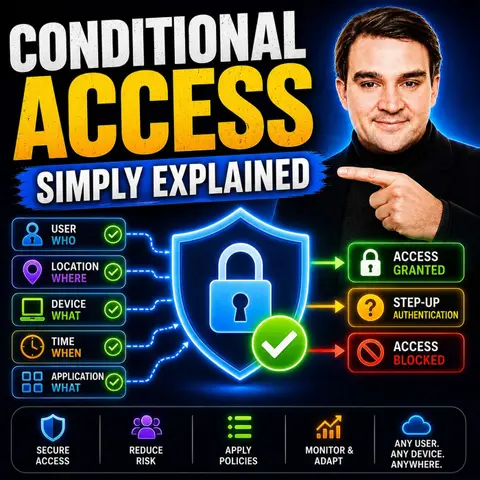
Conditional Access is one of the most powerful security features in Microsoft Entra, acting as Microsoft's Zero Trust policy engine for controlling who can access your applications, from which devices, under what conditions, and with which level of verification. Instead of simply checking a username and password, Conditional Access evaluates multiple signals in real time to make intelligent access decisions. In this episode of Microsoft Knowledge Nuggets, we explain Conditional Access in plain English and show why it's the foundation of modern identity security.
You'll learn how Conditional Access works using simple if-then policies—for example, if a user signs in from an unmanaged device or an unfamiliar location, then require Multi-Factor Authentication, block access, or enforce additional security controls. We cover the core building blocks including users and groups, applications, device compliance, trusted locations, sign-in risk, user risk, authentication strength, session controls, and report-only mode for safely testing new policies before deployment.
The episode also explores real-world scenarios such as protecting Microsoft 365, Azure, and SaaS applications, blocking legacy authentication, requiring compliant Intune-managed devices, enforcing stronger authentication for administrators, and enabling secure remote work without sacrificing productivity. You'll discover how Conditional Access integrates with Microsoft Entra ID, Microsoft Intune, Microsoft Defender for Cloud Apps, Identity Protection, and Privileged Identity Management (PIM) to deliver a comprehensive Zero Trust security strategy. We also discuss common deployment mistakes, licensing considerations, and best practices for rolling out policies safely across an organization.
In today's digital landscape, understanding conditional access is crucial for both individuals and organizations. This security measure plays a vital role in protecting sensitive information. As enterprises increasingly adopt conditional access systems, the growth rate has been impressive. For instance, markets in Japan, South Korea, and China have seen compound annual growth rates ranging from 5.5% to 8%. This trend highlights the demand for robust security solutions amid digital transformation and regulatory needs. By grasping how conditional access functions, you can better navigate the complexities of modern security.
Key Takeaways
- Conditional access controls who can access resources based on user identity, device health, and location.
- Implementing conditional access enhances security by verifying users and devices before granting access.
- Adopting a Zero Trust approach means continuously verifying access requests to minimize risks.
- Regularly review and update access policies to avoid misconfigurations that can compromise security.
- User training and clear communication can reduce resistance to new security measures like multi-factor authentication.
- Conditional access helps organizations comply with regulations by enforcing strict access controls.
- Testing policies in report-only mode allows you to assess their impact without disrupting user access.
- Gradually rolling out policies enables you to evaluate their effectiveness and make necessary adjustments.
What Is Conditional Access?
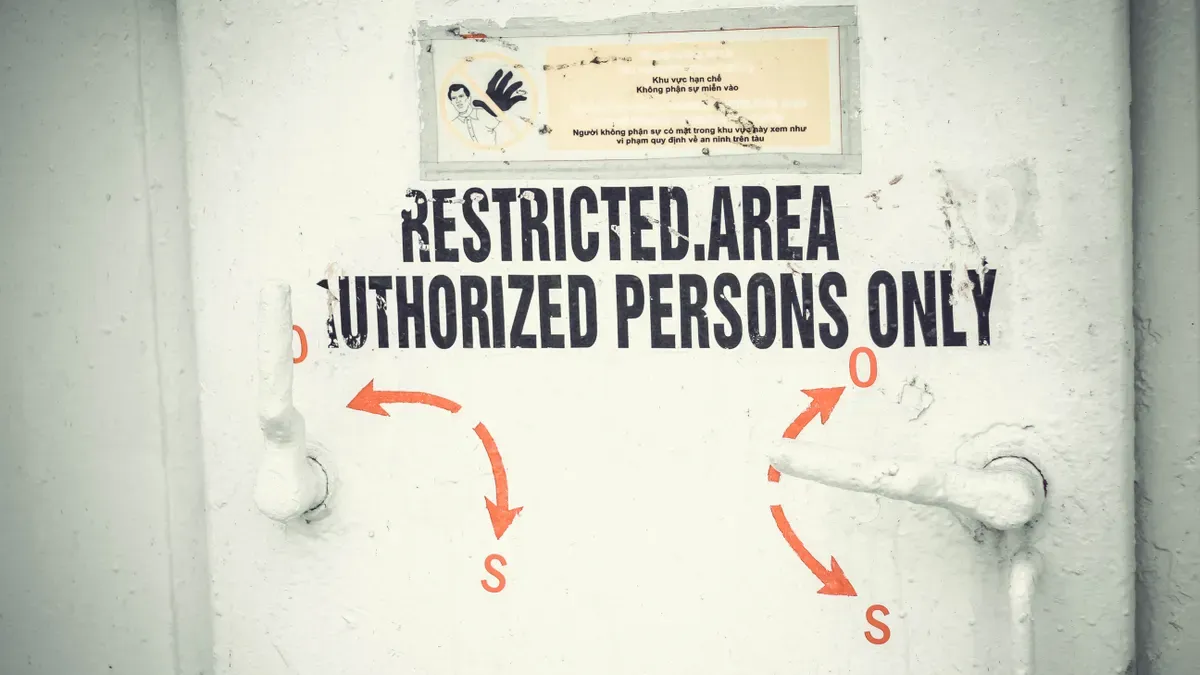
Overview of CA
Conditional access (CA) is a security strategy that controls who can access specific resources, when, and under what conditions. It tailors access based on real-time signals such as user identity, device health, location, risk, and behavior patterns. This approach allows organizations to make informed decisions about granting access.
Here are some primary functions of conditional access:
| Function | Description |
|---|---|
| User Identity | Verifying users before granting access. |
| Device Compliance | Ensuring devices meet security standards. |
| Location Constraints | Limiting access based on geographic location. |
By evaluating these factors, conditional access enhances security and protects sensitive information.
Importance of CA in Security
In today's digital landscape, the importance of conditional access cannot be overstated. It plays a crucial role in maintaining a strong security posture for organizations. Conditional access supports regulatory compliance by enforcing granular access policies. It also provides audit trails through access logs and policy enforcement records.
Conditional Access enforces the principle of Zero Trust by continuously evaluating trust based on real-time signals.
When you implement conditional access, you can expect several benefits:
- Analyze sign-in logs and access attempts.
- Identify patterns such as failed sign-ins or unusual access locations.
- Refine policies based on insights gained.
This proactive approach helps mitigate risks and enhances overall security. In the context of Microsoft Entra, conditional access allows organizations to enforce access policies based on specific conditions. It provides tools for evaluating and testing these policies to meet security requirements while enhancing security without disrupting user access.
By relying on device compliance, conditional access determines access eligibility. Compliant devices gain broader access, while non-compliant devices face restrictions. This flexibility ensures that you can adapt your security measures to meet your organization's unique needs.
How Conditional Access Works

Conditional access operates through a set of defined policies that evaluate various contextual signals before granting access to resources. Understanding the key components and access triggers of conditional access helps you appreciate its effectiveness in enhancing security.
Key Components
User Identity
User identity is a fundamental component of conditional access. It verifies who is attempting to access resources. This verification process includes checking user or group membership, which allows policies to target specific users or groups. By doing so, you can ensure that only authorized individuals gain access to sensitive information.
Device Compliance
Device compliance is another critical aspect of conditional access. It ensures that devices meet specific security standards before granting access. For instance, conditional access checks for features like encryption and antivirus software. If a device does not comply with these standards, access may be restricted. This approach helps maintain a secure environment by preventing potentially vulnerable devices from connecting to your network.
Here’s a summary of the main components involved in conditional access policies:
| Component | Description |
|---|---|
| User or group membership | Policies can target specific users or groups. |
| IP Location information | Trusted IP address ranges can be used for policy decisions. |
| Device | Specific platforms or device states can influence access. |
| Application | Different applications can trigger distinct conditional access policies. |
| Risk detection | Integration with Microsoft Entra ID Protection identifies and mitigates risky user behavior. |
| Microsoft Defender for Cloud Apps | Monitors and controls user application access in real-time. |
| Compliance guidance | Conditional access guides users on how to get their devices into compliance for access. |
Access Triggers
Access triggers are conditions that activate conditional access policies. These triggers help determine whether to grant, restrict, or block access based on specific criteria.
Location-Based Access
Location-based access is a common trigger in conditional access systems. It evaluates the geographic location of the user attempting to sign in. If the login attempt originates from a trusted location, access may be granted. Conversely, if the attempt comes from an unrecognized location, additional verification steps may be required. This method enhances security by ensuring that access aligns with expected user behavior.
Risk Assessment
Risk assessment plays a vital role in conditional access decisions. It evaluates various risk signals, such as unusual login behavior or attempts from new devices. Conditional access policies can activate based on these risk signals. For example, if a user logs in from a new device or location, the system may require multi-factor authentication (MFA) to verify their identity.
Here’s a summary of common access trigger types:
| Access Trigger Type | Description |
|---|---|
| Risk signals | Evaluates signals such as IP location, unusual behavior, and compliance metrics. |
| Specific conditions | Policies activate when conditions are met, like login attempts from a new device or geolocation. |
| Actions | Grant, restrict, or block access based on risk evaluation, including enforcing multi-factor authentication (MFA). |
By understanding how conditional access works, you can better implement these policies to enhance your organization's security posture. The combination of user identity verification, device compliance checks, and contextual access triggers creates a robust framework for protecting sensitive information.
Benefits of Conditional Access
Enhanced Security
Implementing conditional access significantly enhances your organization's security posture. This approach ensures that only verified users on secure devices can access company data. By minimizing unauthorized access, you reduce the risk of data breaches. Conditional access employs multiple layers of authentication, such as passwords, biometric data, and device-based verification. These layers collectively enhance security and create a robust defense against potential threats.
Here are some measurable improvements you can expect after implementing conditional access:
| Measurable Improvement | Description |
|---|---|
| Strengthened Security with Real-Time Risk Mitigation | Evaluates sign-ins against risk factors and responds automatically to threats, reducing the window of opportunity for attackers. |
| Granular Control Enhances Compliance | Provides fine-grained control over access, helping organizations meet compliance requirements and maintain an audit trail. |
| Improved User Productivity and Experience | Challenges users only when necessary, enhancing user experience and trust in security measures. |
| Transition to a True Zero Trust Posture | Evaluates each access request based on identity and device trustworthiness, significantly reducing the attack surface. |
| Fewer Infosec Headaches and Lower Cost of Control | Simplifies IT infrastructure by reducing reliance on on-premises solutions and automating access decisions, potentially lowering costs. |
Compliance with Regulations
Conditional access also plays a crucial role in helping organizations comply with various regulations, such as GDPR and HIPAA. By enforcing access control measures, you ensure that only authorized users can access sensitive data. This automation of access decisions is based on various signals, including user identity, device status, and geographic location. Such measures help you adhere to regulations by enforcing policies that protect sensitive information.
Here are some key ways conditional access supports compliance:
- It enforces access control measures to ensure that only authorized users can access sensitive data.
- It automates access decisions based on various signals such as user identity, device status, and geographic location.
- This automation helps organizations adhere to regulations like GDPR and HIPAA by enforcing policies that protect sensitive information.
By implementing conditional access, you not only enhance security but also simplify compliance efforts. This dual benefit allows you to focus on your core business while maintaining a strong security posture.
Configuring Conditional Access Policies
Setting Up Policies
To effectively implement conditional access policies, follow these steps:
- Plan a Conditional Access deployment: Understand your organization's security landscape. Define the scope of the policy you want to create.
- Define user or group assignments: Identify who will be impacted by the policy. Start with a small pilot group to test its effectiveness.
- Select cloud apps or actions: Choose which applications will trigger the policy. Focus on high-value resources that require additional protection.
- Set policy conditions: Determine when the policy will be enforced. Consider factors like device type and geographic location.
- Define access controls: Decide what actions to take if conditions are met. For example, you might require multi-factor authentication (MFA) for certain users.
- Enable or test the policy: Choose to enable the policy immediately or test it in report-only mode. This allows you to see how the policy would affect users without enforcing it.
- Monitor and refine: After deployment, monitor the policy's effectiveness. Make adjustments as necessary based on user feedback and security needs.
Testing and Monitoring
Testing and monitoring your conditional access policies is crucial to ensure they function as intended. Here’s how you can do it:
- Open the Microsoft Entra admin center.
- In the left navigation, under Entra ID, select Conditional access.
- On the Overview page, select + Create new policy.
- In the Name box, enter a descriptive name for your policy, such as "Sign in frequency."
- Under Assignments, select the users or groups that will be affected by the policy.
- On the Include tab, mark Select users and groups, then choose the appropriate users.
- Select the resources that the policy will apply to, such as Office 365.
- Under Access controls, specify the session controls, like sign-in frequency.
- Choose to enable the policy in report-only mode to evaluate its impact before full enforcement.
Using report-only mode allows you to assess how the policy affects user access without applying it. This approach helps you log results and analyze potential effects on user experience.
To ensure effective implementation, consider these best practices:
| Best Practice | Description |
|---|---|
| Zero-Trust Mindset | Deny access by default and only allow exceptions for verified users. |
| Granular Control | Combine multiple conditions for targeted access control, such as requiring MFA for high-risk scenarios. |
| Report-Only Mode | Test new policies in Report-Only mode before enforcing them to avoid disruptions. |
| MFA and Device Compliance | Link user identity with device compliance and MFA to enhance security. |
| Risk-Based Policies | Implement policies based on user risk levels to manage access effectively. |
| Continuous Monitoring | Regularly review sign-in logs and policy impacts to ensure effectiveness. |
By following these steps and best practices, you can create and manage conditional access policies that enhance your organization's security while maintaining user productivity.
Challenges and Solutions
Misconfigurations
Misconfigurations often pose significant challenges when implementing conditional access. These errors can introduce unnecessary risks to your security framework. Here are some common misconfigurations you might encounter:
- Blocking Legacy Authentication: Failing to block legacy authentication can leave your organization vulnerable. This method does not support multi-factor authentication (MFA) and is susceptible to attacks.
- Location-Based Policies: If not monitored carefully, location-based policies can be bypassed, allowing unauthorized access.
- Device Platform Policies: Inconsistent application of device platform policies may enable attackers to exploit security gaps.
- Neglecting Risk Conditions: Not utilizing risk conditions represents a missed opportunity to enhance security.
To mitigate these risks, you should regularly review and update your access control policies. Conduct audits to ensure that all configurations align with your security objectives. Implementing a robust monitoring system can help you identify and rectify misconfigurations promptly.
User Resistance
User resistance is another common challenge when rolling out conditional access. Employees may feel frustrated by new security measures, especially if they perceive them as obstacles to their workflow. Here are some strategies to overcome this resistance:
- Implement Adaptive MFA: Use policies that adjust prompts based on risk. This approach minimizes unnecessary steps for users.
- Simplify Onboarding: Provide clear guides and videos to help users set up MFA easily. This reduces the need for helpdesk support.
- Offer Multiple Authentication Methods: Allow users to choose from various authentication options. This enhances flexibility and accessibility.
- Train and Educate Early: Conduct awareness sessions to explain the importance of MFA. Share relatable real-world risks to foster understanding.
- Balance Security with Usability: Enforce MFA selectively on critical systems. This avoids unnecessary friction for users.
By addressing user concerns and providing adequate training, you can foster a culture of security awareness. This proactive approach not only enhances compliance but also improves overall user experience.
In summary, conditional access is vital for enhancing security in today's digital landscape. It evaluates user identity, device compliance, and contextual signals before granting access. This proactive approach helps organizations mitigate risks and comply with regulations.
Consider implementing tailored conditional access policies based on your specific risk profile. Here are some key takeaways:
- Identity management is central to modern security strategies.
- Zero Trust emphasizes continuous verification and least privilege access.
- Gradual rollout of policies allows you to assess their impact effectively.
Explore resources like Microsoft Entra Conditional Access tutorials to deepen your understanding. By adopting these practices, you can strengthen your security framework and protect sensitive information.
FAQ
What is Conditional Access?
Conditional Access is a security strategy that controls access to resources based on real-time signals like user identity, device compliance, and location. It helps organizations protect sensitive information effectively.
How does Conditional Access enhance security?
Conditional Access enhances security by verifying users and devices before granting access. It employs multiple authentication layers, reducing the risk of unauthorized access and data breaches.
Can I customize Conditional Access policies?
Yes, you can customize Conditional Access policies to fit your organization's needs. You can define specific conditions, user groups, and applications to tailor access controls effectively.
What are the key components of Conditional Access?
Key components include user identity verification, device compliance checks, and contextual signals like location and risk assessment. These elements work together to determine access eligibility.
How does Conditional Access support compliance?
Conditional Access helps organizations comply with regulations by enforcing access controls. It ensures that only authorized users access sensitive data, automating decisions based on various signals.
What challenges might I face when implementing Conditional Access?
Common challenges include misconfigurations and user resistance. Regular audits and user training can help mitigate these issues and ensure effective implementation.
Is Conditional Access suitable for small businesses?
Absolutely! Conditional Access is beneficial for businesses of all sizes. It provides essential security measures that protect sensitive information while maintaining user productivity.
How can I monitor the effectiveness of my Conditional Access policies?
You can monitor effectiveness by reviewing sign-in logs and access attempts. Regularly assess policy impacts and adjust based on user feedback and security needs.
🎧 Listen to this episode
Want a practical explanation of Conditional Access? This episode breaks down the topic in clear language and shows why it matters for Microsoft 365, Azure, Power Platform, security, AI, and modern work.
Listen to this episode if you want to:
- Understand the key concepts behind Conditional Access
- See how it fits into the wider Microsoft technology ecosystem
- Learn where it can create practical value for your organization
You may also enjoy these related M365 FM episodes:
- Conditional Access and Identity as Code with Jonathan Hope [MVP]
- Fix Microsoft Entra ID Conditional Access and Identity Debt
- Fix Conditional Access Loopholes in Microsoft 365
- Conditional Access with Defender for Identity Signals
- AD Tiering and Privileged Access with Viktor Hedberg [MVP-MCT]
Discover more practical Microsoft conversations on M365 FM.
🚀 Want to be part of m365.fm?
Then stop just listening… and start showing up.
👉 Connect with me on LinkedIn and let’s make something happen:
- 🎙️ Be a podcast guest and share your story
- 🎧 Host your own episode (yes, seriously)
- 💡 Pitch topics the community actually wants to hear
- 🌍 Build your personal brand in the Microsoft 365 space
This isn’t just a podcast — it’s a platform for people who take action.
🔥 Most people wait. The best ones don’t.
👉 Connect with me on LinkedIn and send me a message:
"I want in"
Let’s build something awesome 👊
1
00:00:00,000 --> 00:00:02,040
Imagine you sit down at your computer,
2
00:00:02,040 --> 00:00:04,120
type in your email address, punch in your password,
3
00:00:04,120 --> 00:00:04,940
and hit enter.
4
00:00:04,940 --> 00:00:06,900
There's that brief pause while the system decides
5
00:00:06,900 --> 00:00:08,040
if it's really you.
6
00:00:08,040 --> 00:00:10,760
Most folks assume that pause is just the password check.
7
00:00:10,760 --> 00:00:12,920
If the password matches, you're in, right?
8
00:00:12,920 --> 00:00:15,000
Actually no, a lot more happens behind the scenes
9
00:00:15,000 --> 00:00:16,240
than you probably realize.
10
00:00:16,240 --> 00:00:18,720
While you're waiting, Microsoft 365 runs a series
11
00:00:18,720 --> 00:00:19,760
of checks in the background.
12
00:00:19,760 --> 00:00:21,640
It looks at where you are, what device you're using,
13
00:00:21,640 --> 00:00:23,880
and whether this sign-in seems normal or suspicious.
14
00:00:23,880 --> 00:00:26,120
And it does all of that before it lets you through the door.
15
00:00:26,120 --> 00:00:27,760
By the end of this episode, you'll understand
16
00:00:27,760 --> 00:00:30,800
what conditional access is, how it works every single time
17
00:00:30,800 --> 00:00:33,400
you sign in, and why it's one of the most important security
18
00:00:33,400 --> 00:00:35,880
controls in your Microsoft 365 tenant.
19
00:00:35,880 --> 00:00:38,040
So let's start with the simplest definition.
20
00:00:38,040 --> 00:00:40,400
What actually is conditional access?
21
00:00:40,400 --> 00:00:42,040
Here's the definition in plain English.
22
00:00:42,040 --> 00:00:44,880
Conditional access is a policy engine that checks context
23
00:00:44,880 --> 00:00:46,400
before letting someone in.
24
00:00:46,400 --> 00:00:48,960
It doesn't just look at your password and say good enough.
25
00:00:48,960 --> 00:00:51,440
Instead, it asks extra questions about who you are
26
00:00:51,440 --> 00:00:53,640
and what's happening around your sign-in.
27
00:00:53,640 --> 00:00:55,360
Think of it like a nightclub bouncer.
28
00:00:55,360 --> 00:00:56,720
You show your ID at the door.
29
00:00:56,720 --> 00:00:58,200
That's your username and password.
30
00:00:58,200 --> 00:01:00,960
But a good bouncer doesn't just glance at it and wave you through.
31
00:01:00,960 --> 00:01:03,560
They check your name on the guest list, look at what you're wearing,
32
00:01:03,560 --> 00:01:06,120
and might even remember if you've caused trouble before.
33
00:01:06,120 --> 00:01:07,600
Conditional access does the same thing.
34
00:01:07,600 --> 00:01:10,440
It checks your identity against rules, sees where you're coming from,
35
00:01:10,440 --> 00:01:13,120
checks your device, and decides if everything looks right
36
00:01:13,120 --> 00:01:14,200
before letting you in.
37
00:01:14,200 --> 00:01:15,280
Now here's a key point.
38
00:01:15,280 --> 00:01:18,120
Conditional access runs after you've already typed your password.
39
00:01:18,120 --> 00:01:20,360
It's not a replacement for multi-factor authentication.
40
00:01:20,360 --> 00:01:21,640
It's an extra layer on top.
41
00:01:21,640 --> 00:01:24,080
Think of it as the second checkpoint after you've shown your ID
42
00:01:24,080 --> 00:01:25,120
at the front door.
43
00:01:25,120 --> 00:01:26,040
The logic is simple.
44
00:01:26,040 --> 00:01:28,400
If then, if a user tries to access a cloud app
45
00:01:28,400 --> 00:01:31,200
and they meet certain conditions, then enforce this rule.
46
00:01:31,200 --> 00:01:34,920
For example, if someone is trying to access outlook from outside the office,
47
00:01:34,920 --> 00:01:37,280
then require multi-factor authentication.
48
00:01:37,280 --> 00:01:40,680
That's the basic structure behind every conditional access policy.
49
00:01:40,680 --> 00:01:42,600
Why passwords aren't enough anymore?
50
00:01:42,600 --> 00:01:44,200
So why do we need this extra step?
51
00:01:44,200 --> 00:01:46,240
Because passwords get stolen every single day.
52
00:01:46,240 --> 00:01:48,920
Fishing attacks, data breaches, people reusing the same password
53
00:01:48,920 --> 00:01:52,600
across multiple sites, your password could be compromised right now
54
00:01:52,600 --> 00:01:53,600
and you would not even know it.
55
00:01:53,600 --> 00:01:54,880
And you might be thinking, well, that's fine.
56
00:01:54,880 --> 00:01:57,520
We have multi-factor authentication that protects us.
57
00:01:57,520 --> 00:01:59,200
And you are right, MFA does help a lot.
58
00:01:59,200 --> 00:02:00,680
But it is not a silver bullet.
59
00:02:00,680 --> 00:02:03,960
Imagine a hacker gets hold of one of your employees passwords.
60
00:02:03,960 --> 00:02:07,200
They try to sign in from a country you have never done business with.
61
00:02:07,200 --> 00:02:09,240
Using a device you have never seen before.
62
00:02:09,240 --> 00:02:11,720
MFA might stop them if it triggers a prompt.
63
00:02:11,720 --> 00:02:14,760
But what if the hacker also has access to that employee's phone?
64
00:02:14,760 --> 00:02:18,160
Or what if they are using a fishing attack that captures the MFA code too?
65
00:02:18,160 --> 00:02:20,520
Suddenly, MFA alone does not look so bulletproof.
66
00:02:20,520 --> 00:02:22,120
Here's a real-world example.
67
00:02:22,120 --> 00:02:24,480
A salesperson's credentials leak on the dark web.
68
00:02:24,480 --> 00:02:28,560
Without conditional access, an attacker can sign in from anywhere in the world.
69
00:02:28,560 --> 00:02:31,760
They can access email files, customer data, everything.
70
00:02:31,760 --> 00:02:33,560
And you would never know until it is too late.
71
00:02:33,560 --> 00:02:35,000
The old way was all or nothing.
72
00:02:35,000 --> 00:02:39,480
You gave a user a license and they could sign in from any device, any location, any network.
73
00:02:39,480 --> 00:02:43,200
No context, no intelligence, just a password check and then full access.
74
00:02:43,200 --> 00:02:45,120
Conditional access changes that completely.
75
00:02:45,120 --> 00:02:47,040
It adds context to every sign in.
76
00:02:47,040 --> 00:02:51,200
It looks at where you are, what device you are using, what app you are trying to open,
77
00:02:51,200 --> 00:02:54,040
how risky the sign in looks based on Microsoft's analysis.
78
00:02:54,040 --> 00:02:57,600
It turns a flat yes or no decision into a smart, layered judgment.
79
00:02:57,600 --> 00:03:00,480
The signals, what conditional access looks at?
80
00:03:00,480 --> 00:03:02,600
So what exactly does conditional access check?
81
00:03:02,600 --> 00:03:05,640
Let's break it down into the signals it uses to make its decision.
82
00:03:05,640 --> 00:03:07,400
Identity is the first signal.
83
00:03:07,400 --> 00:03:08,400
Who are you?
84
00:03:08,400 --> 00:03:12,160
Are you a regular employee, an admin with elevated privileges, or a guest from outside
85
00:03:12,160 --> 00:03:13,160
the company?
86
00:03:13,160 --> 00:03:16,960
Conditional access looks at your user account and what groups you belong to.
87
00:03:16,960 --> 00:03:20,600
An admin trying to sign in might face stricter rules than a standard user.
88
00:03:20,600 --> 00:03:23,320
A guest might be blocked from certain apps entirely.
89
00:03:23,320 --> 00:03:26,320
Your identity determines the baseline of what is allowed.
90
00:03:26,320 --> 00:03:27,320
Location is next.
91
00:03:27,320 --> 00:03:28,400
Where is this sign in coming from?
92
00:03:28,400 --> 00:03:32,080
If you are connecting from the office network, that is a trusted location.
93
00:03:32,080 --> 00:03:35,400
Conditional access knows the IP range of your company headquarters.
94
00:03:35,400 --> 00:03:38,600
Signing in from a coffee shop in another country raises a flag.
95
00:03:38,600 --> 00:03:42,160
If the system cannot even figure out where you are, that is another flag.
96
00:03:42,160 --> 00:03:44,800
Location is a powerful signal because it is hard to fake.
97
00:03:44,800 --> 00:03:45,880
Device also matters.
98
00:03:45,880 --> 00:03:47,120
What are you using to sign in?
99
00:03:47,120 --> 00:03:50,920
A company laptop managed by Intune and compliant with your security policies?
100
00:03:50,920 --> 00:03:54,040
Or a personal phone with no security controls at all?
101
00:03:54,040 --> 00:03:58,080
Conditional access can check whether the device is enrolled in management, has encryption enabled
102
00:03:58,080 --> 00:04:00,000
and is up to date on security patches.
103
00:04:00,000 --> 00:04:02,400
An unmanaged device might get blocked or limited.
104
00:04:02,400 --> 00:04:03,800
The application matters too.
105
00:04:03,800 --> 00:04:05,560
What app are you trying to reach?
106
00:04:05,560 --> 00:04:09,000
Outlook, SharePoint, Teams, a custom business application?
107
00:04:09,000 --> 00:04:11,280
Not all apps have the same security requirements.
108
00:04:11,280 --> 00:04:16,480
A finance system handling sensitive data might require stricter controls than a team collaboration
109
00:04:16,480 --> 00:04:17,480
space.
110
00:04:17,480 --> 00:04:20,440
Conditional access lets you set different rules for different apps.
111
00:04:20,440 --> 00:04:22,600
If you have the right license, there is another layer.
112
00:04:22,600 --> 00:04:23,600
Sign in risk.
113
00:04:23,600 --> 00:04:26,720
Microsoft uses machine learning to score every sign in in real time.
114
00:04:26,720 --> 00:04:28,600
It looks for suspicious patterns.
115
00:04:28,600 --> 00:04:29,600
Impossible travel.
116
00:04:29,600 --> 00:04:33,480
Where a user signs in from New York and then five minutes later from London.
117
00:04:33,480 --> 00:04:34,560
Anonymous IP addresses.
118
00:04:34,560 --> 00:04:36,560
Leaked credentials from known data breaches.
119
00:04:36,560 --> 00:04:40,560
The system assigns a risk level, low, medium or high, and conditional access can act on
120
00:04:40,560 --> 00:04:41,560
that.
121
00:04:41,560 --> 00:04:42,560
There is also user risk.
122
00:04:42,560 --> 00:04:43,880
This is different from sign in risk.
123
00:04:43,880 --> 00:04:45,680
User risk looks at the account itself.
124
00:04:45,680 --> 00:04:47,640
Has this user's password appeared in a breach?
125
00:04:47,640 --> 00:04:49,840
Has there been unusual activity over time?
126
00:04:49,840 --> 00:04:53,680
If the system detects that an account might be compromised, it can block access until
127
00:04:53,680 --> 00:04:55,400
the user resets their password.
128
00:04:55,400 --> 00:04:57,320
Finally, there is authentication context.
129
00:04:57,320 --> 00:05:01,080
This lets you attach extra security requirements to specific sensitive content.
130
00:05:01,080 --> 00:05:05,360
For example, anyone trying to access the finance SharePoint site must use a compliant device
131
00:05:05,360 --> 00:05:07,480
and a phishing-resistant MFA method.
132
00:05:07,480 --> 00:05:11,600
It protects your most valuable data without slowing down everything else.
133
00:05:11,600 --> 00:05:15,120
Once these signals are collected, the policy engine decides what to do.
134
00:05:15,120 --> 00:05:16,480
Let's see how that works.
135
00:05:16,480 --> 00:05:17,720
The decision engine.
136
00:05:17,720 --> 00:05:19,080
How policies work.
137
00:05:19,080 --> 00:05:22,040
The conditional access policy works like an if/then rule.
138
00:05:22,040 --> 00:05:25,320
You pick the signals as conditions, then decide what action to take.
139
00:05:25,320 --> 00:05:26,480
That's really all it is.
140
00:05:26,480 --> 00:05:28,360
So there are three main parts to a policy.
141
00:05:28,360 --> 00:05:31,920
The first part is assignments, who the policy applies to, which app they're trying to
142
00:05:31,920 --> 00:05:34,160
reach and what conditions trigger the rule.
143
00:05:34,160 --> 00:05:35,960
The second part is access controls.
144
00:05:35,960 --> 00:05:37,880
What happens when those conditions are met?
145
00:05:37,880 --> 00:05:43,000
Do you grant access, block it, or require something like MFA or a compliant device?
146
00:05:43,000 --> 00:05:46,560
The third part is session controls, and those manage what happens after someone is signed
147
00:05:46,560 --> 00:05:47,560
in.
148
00:05:47,560 --> 00:05:49,640
How often they need to reauthenticate.
149
00:05:49,640 --> 00:05:51,160
Let me give you a concrete example.
150
00:05:51,160 --> 00:05:55,640
If a user is in the sales group and is trying to access SharePoint from an unmanaged device,
151
00:05:55,640 --> 00:05:56,640
then block access.
152
00:05:56,640 --> 00:05:57,960
That's a complete policy right there.
153
00:05:57,960 --> 00:05:58,960
Who?
154
00:05:58,960 --> 00:05:59,960
What app?
155
00:05:59,960 --> 00:06:00,960
What condition?
156
00:06:00,960 --> 00:06:01,960
What action?
157
00:06:01,960 --> 00:06:02,960
Grant controls are flexible.
158
00:06:02,960 --> 00:06:03,960
You can require multiple things at once.
159
00:06:03,960 --> 00:06:07,240
Say you want a user to complete MFA and also use a compliant device.
160
00:06:07,240 --> 00:06:08,680
Both conditions must be met.
161
00:06:08,680 --> 00:06:10,440
Or you could say they need one or the other.
162
00:06:10,440 --> 00:06:11,760
The system lets you choose.
163
00:06:11,760 --> 00:06:13,320
Now block is the most powerful control.
164
00:06:13,320 --> 00:06:16,440
If any policy says block, block wins, there are no exceptions.
165
00:06:16,440 --> 00:06:18,440
For exclusions you explicitly said.
166
00:06:18,440 --> 00:06:22,800
That's why you need to be careful, one mistake, and you could lock out your entire organization.
167
00:06:22,800 --> 00:06:26,920
Before you turn a policy on, there's a critical feature you need to know about.
168
00:06:26,920 --> 00:06:28,240
Report only mode.
169
00:06:28,240 --> 00:06:31,640
This lets you see what a policy would do before it actually enforces anything.
170
00:06:31,640 --> 00:06:35,400
You can run a policy and report only for a week, check the sign-in logs, and see how many
171
00:06:35,400 --> 00:06:37,760
users would have been blocked or prompted for MFA.
172
00:06:37,760 --> 00:06:40,280
It's a safe way to test without breaking anything.
173
00:06:40,280 --> 00:06:43,600
Now that you understand the engine, let's talk about the most common policies every
174
00:06:43,600 --> 00:06:45,240
business should have.
175
00:06:45,240 --> 00:06:47,960
The big three, baseline policies for day one.
176
00:06:47,960 --> 00:06:50,000
So what should you actually set up first?
177
00:06:50,000 --> 00:06:53,960
Let me give you the three baseline policies that every business should have from day one.
178
00:06:53,960 --> 00:06:56,800
Not day 30, and not after an audit.
179
00:06:56,800 --> 00:06:58,760
Policy number one is the foundation.
180
00:06:58,760 --> 00:07:01,080
Require MFA for all users.
181
00:07:01,080 --> 00:07:02,400
Not just admins everyone.
182
00:07:02,400 --> 00:07:05,920
Every single person who signs into your tenant needs to prove who they are with a second
183
00:07:05,920 --> 00:07:06,920
factor.
184
00:07:06,920 --> 00:07:09,600
But here's the important part, not all MFA is created equal.
185
00:07:09,600 --> 00:07:12,120
You don't want people using SMS codes or voice calls.
186
00:07:12,120 --> 00:07:13,200
Those methods are weak.
187
00:07:13,200 --> 00:07:16,440
They can be intercepted, what you want is something stronger.
188
00:07:16,440 --> 00:07:20,400
Microsoft has something called authentication strengths that lets you pick exactly which
189
00:07:20,400 --> 00:07:21,640
methods are acceptable.
190
00:07:21,640 --> 00:07:26,880
The Microsoft Authenticator app, FIDO2 Security Keys, Windows Hello for Business, those are
191
00:07:26,880 --> 00:07:27,880
the good ones.
192
00:07:27,880 --> 00:07:32,560
So when you create your MFA policy, don't just check the box that says, "Require MFA,
193
00:07:32,560 --> 00:07:33,560
be specific."
194
00:07:33,560 --> 00:07:35,640
Choose the strong methods only.
195
00:07:35,640 --> 00:07:36,640
Policy number two.
196
00:07:36,640 --> 00:07:38,120
Block legacy authentication.
197
00:07:38,120 --> 00:07:39,720
This one sounds technical, but it's simple.
198
00:07:39,720 --> 00:07:43,160
There are old protocols that Microsoft 365 still supports.
199
00:07:43,160 --> 00:07:46,920
I'm app, SMTP, older versions of exchange active sync.
200
00:07:46,920 --> 00:07:50,760
These protocols were built before anyone thought about multi-factor authentication and
201
00:07:50,760 --> 00:07:51,760
they don't support it.
202
00:07:51,760 --> 00:07:55,760
So if an attacker gets a password, they can use one of these old protocols to sign in
203
00:07:55,760 --> 00:07:57,320
and completely bypass your MFA.
204
00:07:57,320 --> 00:07:58,320
That's a huge gap.
205
00:07:58,320 --> 00:07:59,720
The fix is straightforward.
206
00:07:59,720 --> 00:08:04,120
Create a conditional access policy that blocks all legacy authentication for all users.
207
00:08:04,120 --> 00:08:08,920
Unless you have a very specific business need for an old scanner or printer that uses SMTP,
208
00:08:08,920 --> 00:08:09,920
turn it off.
209
00:08:09,920 --> 00:08:12,920
It's one of the highest impact security controls you can enable.
210
00:08:12,920 --> 00:08:16,160
Machine number three, require compliant devices for admins.
211
00:08:16,160 --> 00:08:18,280
Admin accounts are the crown jewels of your tenant.
212
00:08:18,280 --> 00:08:22,280
If someone compromises a global admin account, they own everything, so you need to lock those
213
00:08:22,280 --> 00:08:24,560
accounts down harder than anyone else.
214
00:08:24,560 --> 00:08:28,840
This policy says that anyone with an admin role must use a company-owned device that meets
215
00:08:28,840 --> 00:08:33,720
your security requirements, enrolled in management, encryption enabled like Bitlocker, Defender
216
00:08:33,720 --> 00:08:36,000
running, and up-to-date on patches.
217
00:08:36,000 --> 00:08:39,800
If an admin tries to sign in from a personal laptop or an old machine that doesn't meet
218
00:08:39,800 --> 00:08:41,960
those standards, access is blocked.
219
00:08:41,960 --> 00:08:46,160
It's a simple way to make sure your most powerful accounts are also your most protected.
220
00:08:46,160 --> 00:08:49,080
Before I move on, I need to talk about something critical.
221
00:08:49,080 --> 00:08:50,320
Break-glass accounts.
222
00:08:50,320 --> 00:08:54,400
These are emergency admin accounts that you keep outside of your conditional access policies.
223
00:08:54,400 --> 00:08:55,640
You create at least two of them.
224
00:08:55,640 --> 00:09:00,400
They use long, complex passwords and phishing-resistant MFA like a FIDO-2 security key.
225
00:09:00,400 --> 00:09:04,200
You store the credentials securely, maybe in a safe or a locked cabinet.
226
00:09:04,200 --> 00:09:05,480
The purpose is simple.
227
00:09:05,480 --> 00:09:08,880
If you accidentally lock yourself out of your tenant with a bad policy, you can use a
228
00:09:08,880 --> 00:09:10,880
break-glass account to get back in.
229
00:09:10,880 --> 00:09:13,360
They are excluded from every conditional access policy.
230
00:09:13,360 --> 00:09:14,360
That's by design.
231
00:09:14,360 --> 00:09:17,480
Without them, you risk being locked out of your own system with no way back in.
232
00:09:17,480 --> 00:09:19,040
Why only three policies for day one?
233
00:09:19,040 --> 00:09:21,760
Because you want to focus on the highest impact controls first.
234
00:09:21,760 --> 00:09:23,640
These three close the biggest security gaps.
235
00:09:23,640 --> 00:09:27,920
MFA stops most credential theft, blocking legacy outs closes the back door.
236
00:09:27,920 --> 00:09:30,840
Compliant devices for admins protects your most sensitive accounts.
237
00:09:30,840 --> 00:09:34,560
You can fine tune later with more granular policies, but start here.
238
00:09:34,560 --> 00:09:35,560
Advanced policies.
239
00:09:35,560 --> 00:09:36,960
Risk and Personas.
240
00:09:36,960 --> 00:09:39,800
Since the basics are in place, you can add more advanced controls.
241
00:09:39,800 --> 00:09:42,720
That's where risk-based policies and Persona-based rules come in.
242
00:09:42,720 --> 00:09:46,600
Sign-in-risk policies use Microsoft's machine learning to watch every login attempt in real
243
00:09:46,600 --> 00:09:47,600
time.
244
00:09:47,600 --> 00:09:51,720
If someone tries to sign in from an anonymous IP address, or the system detects impossible
245
00:09:51,720 --> 00:09:56,000
travel, like a login from New York, and then tow-cure 10 minutes later, it scores that
246
00:09:56,000 --> 00:09:57,520
sign in as high risk.
247
00:09:57,520 --> 00:10:01,480
From there, you set a policy that says if the risk is high, block access, or force MFA
248
00:10:01,480 --> 00:10:02,480
immediately.
249
00:10:02,480 --> 00:10:06,080
The catch is you need an Entra IDP-2 license, but this is one of the most powerful controls
250
00:10:06,080 --> 00:10:09,160
you can add because it catches attacks that static rules miss.
251
00:10:09,160 --> 00:10:13,320
User-risk policies look at the account itself over time, not just one sign-in event.
252
00:10:13,320 --> 00:10:17,040
If Microsoft detects that a user's credentials have appeared in a known data breach, it marks
253
00:10:17,040 --> 00:10:18,160
that user as high risk.
254
00:10:18,160 --> 00:10:21,680
You can then set a policy that blocks access until they reset their password.
255
00:10:21,680 --> 00:10:23,200
And yes, that also needs P2.
256
00:10:23,200 --> 00:10:27,560
Together sign-in-risk and user-risk policies create a dynamic security layer that adapts
257
00:10:27,560 --> 00:10:28,880
to threats as they happen.
258
00:10:28,880 --> 00:10:31,640
Now, Persona-based policies address a different problem.
259
00:10:31,640 --> 00:10:34,440
Not everyone in your organization has the same security needs.
260
00:10:34,440 --> 00:10:37,720
Your admins need the strictest rules, while contractors and temporary staff might need
261
00:10:37,720 --> 00:10:39,040
limited access.
262
00:10:39,040 --> 00:10:43,040
And guests from outside your company need different controls entirely.
263
00:10:43,040 --> 00:10:46,560
Persona-based policies let you group users by role and apply the right level of protection.
264
00:10:46,560 --> 00:10:48,440
Here's a concrete example.
265
00:10:48,440 --> 00:10:51,960
Contractors often use their own devices that you don't manage, so you have no idea if they're
266
00:10:51,960 --> 00:10:54,560
running antivirus or keeping up with patches.
267
00:10:54,560 --> 00:10:57,880
Instead of giving them full access, you create a policy that limits them to browser only
268
00:10:57,880 --> 00:11:02,320
access, no desktop apps, no mobile apps, and even within the browser you restrict actions
269
00:11:02,320 --> 00:11:06,520
they can view and edit files but can't download or sync them to their own device.
270
00:11:06,520 --> 00:11:12,240
That way, contractors stay productive without exposing your data to unnecessary risk.
271
00:11:12,240 --> 00:11:16,560
Authentication contexts take this idea further by protecting specific content within an app
272
00:11:16,560 --> 00:11:17,960
instead of the whole app.
273
00:11:17,960 --> 00:11:21,720
For instance, your finance team has a sharepoint site with sensitive financial data.
274
00:11:21,720 --> 00:11:25,480
You can attach an authentication context to that site, so anyone who tries to access it
275
00:11:25,480 --> 00:11:30,440
must use a compliant device and phishing-resistant MFA, even if they're already signed into Microsoft
276
00:11:30,440 --> 00:11:31,440
365.
277
00:11:31,440 --> 00:11:34,560
It's precision targeting for your most sensitive information.
278
00:11:34,560 --> 00:11:38,320
Continuous access evaluation revokes access in near real time when something changes.
279
00:11:38,320 --> 00:11:42,960
If an admin disables an account or a device gets reported lost, the session ends immediately
280
00:11:42,960 --> 00:11:45,040
without waiting for the token to expire.
281
00:11:45,040 --> 00:11:47,440
That's critical for responding to incidents quickly.
282
00:11:47,440 --> 00:11:51,720
All of this sounds powerful, but how do you actually get started without breaking things?
283
00:11:51,720 --> 00:11:52,720
Getting started.
284
00:11:52,720 --> 00:11:55,040
From security defaults to custom policies.
285
00:11:55,040 --> 00:11:58,640
If you have a brand new tenant, you're not starting from zero because Microsoft enables
286
00:11:58,640 --> 00:12:02,280
something called security defaults by default.
287
00:12:02,280 --> 00:12:07,480
It's a basic set of protections that requires MFA for admins and blocks legacy authentication.
288
00:12:07,480 --> 00:12:10,000
It's a decent starting point, but it's limited.
289
00:12:10,000 --> 00:12:13,200
You can't customize it or target specific apps or users.
290
00:12:13,200 --> 00:12:15,360
It's a one-size-fits-all solution.
291
00:12:15,360 --> 00:12:20,520
The moment you create your first custom conditional access policy, security defaults automatically
292
00:12:20,520 --> 00:12:22,440
turn off, putting you in control.
293
00:12:22,440 --> 00:12:25,320
That's a good thing, but it also means you need to know what you're doing because you
294
00:12:25,320 --> 00:12:27,200
can't rely on the training wheels anymore.
295
00:12:27,200 --> 00:12:28,680
So here's how to do it safely.
296
00:12:28,680 --> 00:12:33,320
First, start with report-only mode for every new policy and let it run for at least a week.
297
00:12:33,320 --> 00:12:36,440
Then go into the sign-in logs and see what would have happened like how many users would
298
00:12:36,440 --> 00:12:38,760
have been blocked or prompted for MFA.
299
00:12:38,760 --> 00:12:42,920
That data tells you if your policy is too strict or too loose before you enforce it.
300
00:12:42,920 --> 00:12:46,800
Second, use the "what if" tool in the Entra Admin Center to test the policy against a
301
00:12:46,800 --> 00:12:50,000
specific user, app and location before turning it on.
302
00:12:50,000 --> 00:12:53,400
You can simulate exactly what would happen if someone tried to sign in from a coffee shop
303
00:12:53,400 --> 00:12:55,720
in another country using a personal device.
304
00:12:55,720 --> 00:12:58,800
It's a safe way to catch problems before they become real.
305
00:12:58,800 --> 00:13:00,920
Third, and this is critical.
306
00:13:00,920 --> 00:13:03,480
Create your break-glass accounts before you deploy any policies.
307
00:13:03,480 --> 00:13:07,800
I cannot stress this enough if you accidentally create a policy that blocks all admins and
308
00:13:07,800 --> 00:13:11,680
you haven't set up an emergency account that's excluded from everything you lock yourself
309
00:13:11,680 --> 00:13:13,040
out of your own tenant.
310
00:13:13,040 --> 00:13:17,400
The only way back in is to call Microsoft Support and prove you own the domain which can take
311
00:13:17,400 --> 00:13:18,400
days.
312
00:13:18,400 --> 00:13:22,720
So set up two break-glass accounts stored securely with phishing-resistant MFA.
313
00:13:22,720 --> 00:13:24,200
Do it before you start.
314
00:13:24,200 --> 00:13:26,480
Deploy in phases.
315
00:13:26,480 --> 00:13:29,440
Don't turn on a policy for everyone on day one.
316
00:13:29,440 --> 00:13:33,360
Start with a small test group, maybe the IT team and let it run for a few days.
317
00:13:33,360 --> 00:13:36,080
Check the logs to see if anyone got blocked unexpectedly.
318
00:13:36,080 --> 00:13:38,960
Then expand to a larger group and finally to all users.
319
00:13:38,960 --> 00:13:42,800
Each phase gives you a chance to catch issues before they affect the whole company.
320
00:13:42,800 --> 00:13:46,480
Monitor the sign-in logs throughout and if you see unexpected blocks adjust the policy
321
00:13:46,480 --> 00:13:48,640
before moving to the next phase.
322
00:13:48,640 --> 00:13:49,640
Recap.
323
00:13:49,640 --> 00:13:51,120
Why this matters for your business?
324
00:13:51,120 --> 00:13:53,000
So why does all of this matter?
325
00:13:53,000 --> 00:13:56,000
Global access is the bouncer at the door that doesn't just check your ID.
326
00:13:56,000 --> 00:13:57,240
It looks at everything.
327
00:13:57,240 --> 00:14:01,120
Who you are, where you're connecting from, what device you're using and whether your account
328
00:14:01,120 --> 00:14:02,960
looks like it's been compromised.
329
00:14:02,960 --> 00:14:07,800
It turns a simple yes or no password check into a smart decision based on the whole picture.
330
00:14:07,800 --> 00:14:11,320
Without it, anyone with a stolen password can walk right into your tenant from anywhere
331
00:14:11,320 --> 00:14:12,320
in the world.
332
00:14:12,320 --> 00:14:15,680
No questions asked and when you think about how many passwords get stolen every single
333
00:14:15,680 --> 00:14:17,400
day, that's a scary thought.
334
00:14:17,400 --> 00:14:20,400
The three baseline policies alone close the biggest gaps.
335
00:14:20,400 --> 00:14:22,680
MFA stops most credential theft-called.
336
00:14:22,680 --> 00:14:26,400
Locking legacy authentication closes a backdoor attackers love.
337
00:14:26,400 --> 00:14:30,080
Requiring compliant devices for admins protects your most sensitive accounts.
338
00:14:30,080 --> 00:14:33,760
Just those three policies raise your security floor dramatically and when you're ready
339
00:14:33,760 --> 00:14:38,680
to take it further, advance policies give you precise protection without killing productivity.
340
00:14:38,680 --> 00:14:41,520
Risk-based controls catch attacks in real time.
341
00:14:41,520 --> 00:14:44,600
Persona-based rules treat different users differently.
342
00:14:44,600 --> 00:14:48,200
Authentication contexts protect your most sensitive data with surgical accuracy.
343
00:14:48,200 --> 00:14:50,520
You can be both secure and flexible.
344
00:14:50,520 --> 00:14:53,440
So here's your homework, log into your Entra Admin Center.
345
00:14:53,440 --> 00:14:54,880
Go to conditional access.
346
00:14:54,880 --> 00:14:57,840
Check if you have at least those three baseline policies in place.
347
00:14:57,840 --> 00:15:00,600
If you don't, start with report only mode and build from there.
348
00:15:00,600 --> 00:15:03,040
Don't wait for an audit or a breach to take action.
349
00:15:03,040 --> 00:15:07,400
If this episode helped you see the big picture, subscribe to Microsoft Knowledge Nuggets for
350
00:15:07,400 --> 00:15:10,680
more plain English explanations of security and identity.
351
00:15:10,680 --> 00:15:13,920
And share it with someone who's just starting their Microsoft 365 journey.

Founder of m365.fm, m365.show and m365con.net
Mirko Peters is a Microsoft 365 expert, content creator, and founder of m365.fm, a platform dedicated to sharing practical insights on modern workplace technologies. His work focuses on Microsoft 365 governance, security, collaboration, and real-world implementation strategies.
Through his podcast and written content, Mirko provides hands-on guidance for IT professionals, architects, and business leaders navigating the complexities of Microsoft 365. He is known for translating complex topics into clear, actionable advice, often highlighting common mistakes and overlooked risks in real-world environments.
With a strong emphasis on community contribution and knowledge sharing, Mirko is actively building a platform that connects experts, shares experiences, and helps organizations get the most out of their Microsoft 365 investments.




