
MFA Fatigue Attack Explained: How Repeated Prompts Put Microsoft 365 and Azure Security at Risk
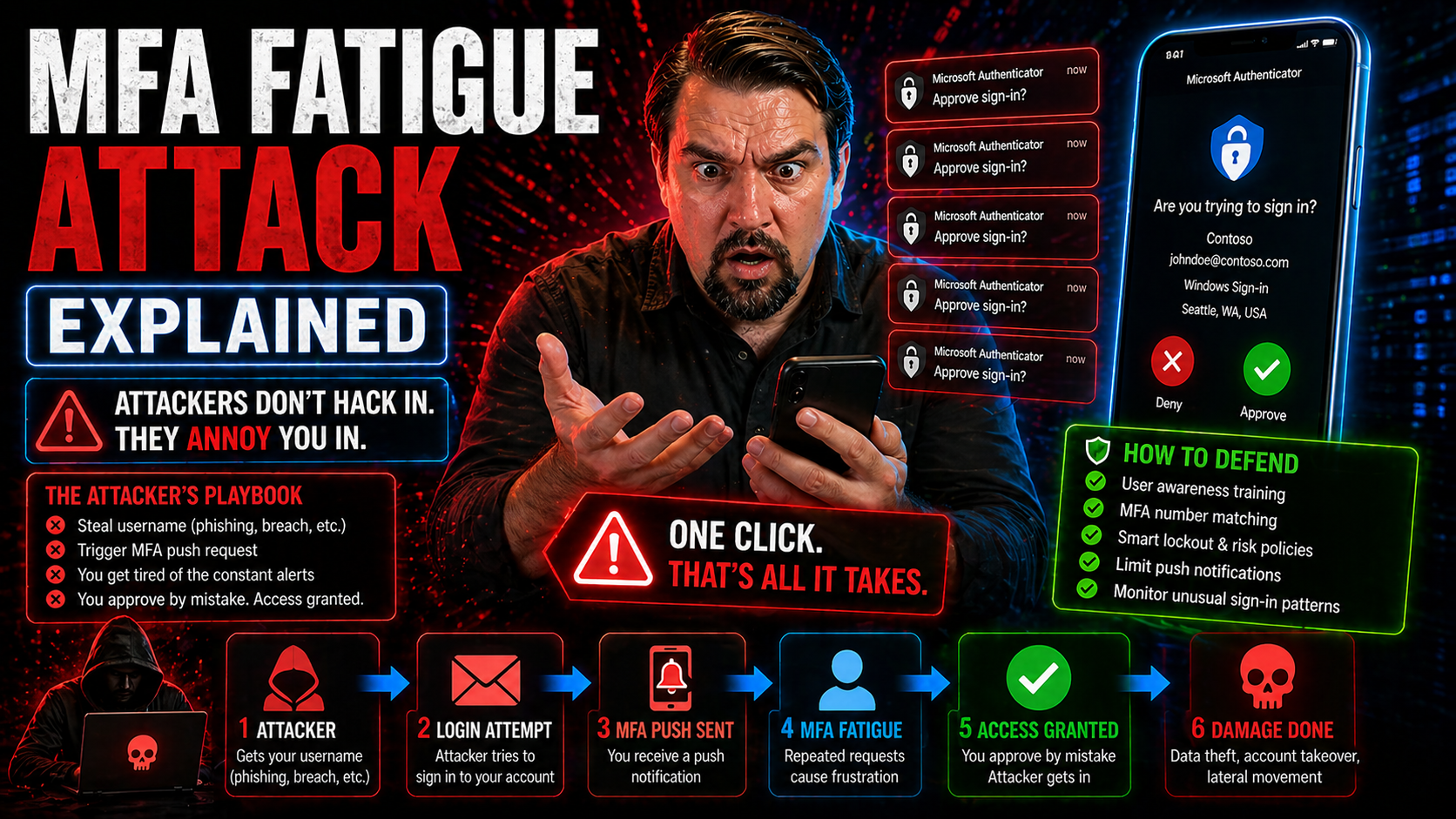
In today’s Microsoft-centric workplaces, multi-factor authentication (MFA) is supposed to be your front door lock—making sure cybercriminals can’t break in just by snagging your password. But now there’s a new trick: the MFA fatigue attack. This strategy bombards users with non-stop verification prompts, hoping someone eventually gets fed up and just hits “Approve.”
With more organizations running on Microsoft 365 and Azure, attackers are aiming straight at the cloud—where identity is the key to everything. What’s risky is that MFA fatigue attacks don’t break the system; they break your patience, sidestepping your defenses by wearing down actual people. This makes them a serious threat in both office and remote setups.
This article covers what these attacks are, how they really work, and why you need to think beyond traditional MFA to keep your digital house safe.
What Is an MFA Fatigue Attack and Why Should You Care?
MFA fatigue attacks are a type of engineering cyberattack where attackers abuse the multi-factor authentication process by flooding you with repeated login prompts. They’re called “fatigue” attacks because, after enough notifications, most users will eventually let their guard down and approve one—giving criminals access without a technical breach.
This approach differs from classic threats like password spraying or token theft. MFA fatigue attacks specifically rely on overwhelming you with prompts, exploiting the trust and habits built into push-based authentication. Unlike phishing, which tricks you into handing over credentials, these attacks count on decision fatigue and user error—especially common in large companies where prompt fatigue can go unnoticed at scale.
You may also hear terms like “MFA bombing” or “MFA spamming”—those are just subtypes using high volumes of requests to get the same result. This tactic is especially effective in environments like Microsoft 365 and Azure, where cloud access and single sign-on are everywhere. In one recent Microsoft 365 breach, attackers used MFA fatigue in combination with OAuth consent theft and session token abuse, allowing them to bypass even robust security controls.
Bottom line: if your organization relies on push notifications or weak MFA methods, you’re a prime target for these attacks. As more business happens outside the traditional office, the risk only grows. Understanding MFA fatigue is your first step to locking it down for good.
How MFA Fatigue Attacks Work in Practice
- Attack begins with stolen credentials: The attacker first obtains a valid username and password—often through phishing, infostealer malware, or purchasing from the dark web.
- Attacker initiates repeated MFA requests: Using the stolen login, they immediately attempt to sign in, which triggers the MFA system. But instead of stopping, they repeatedly send authentication prompts—sometimes dozens or hundreds in a row—targeting the victim’s push notification or phone app.
- User experiences constant interruptions: The target now faces a barrage of unexpected MFA prompts no matter where they are—at work, at home, possibly even late at night. It feels annoying, out of place, and exhausting.
- Cognitive fatigue and human nature kick in: As the flood continues, an otherwise careful user may become distracted, desensitized, or just plain frustrated. All it takes is one accidental tap or an intentional “just to make it stop” approval to break the protection.
- Attacker gains access to Microsoft 365/Azure resources: With the MFA approved, the attacker is in. From here, they can elevate privileges, exfiltrate data, or perform lateral movement—quickly establishing persistence. Real-world cases often combine this with advanced techniques like OAuth abuse or conditional access loopholes.
- Impact extends to the whole environment: If your team hasn’t set clear policies or is grappling with legacy exceptions, the damage can multiply. Learn more about cleaning up conditional access security debt to keep your defenses effective, not just on paper.
MFA fatigue attacks are effective because they exploit the weakest point in the chain: real people trying to get work done. The attack chain is simple, but the aftermath can be massive.
Understanding Multi-Factor Authentication and Its Vulnerabilities
Multi-factor authentication (MFA) is at the heart of most organizations’ security checks these days, especially for Microsoft 365 and Azure users. The big idea is pretty simple—you prove you’re really you by using multiple authentication factors, like a password plus something else (maybe your phone or thumbprint), instead of just one.
It works because attacking two or more factors is supposed to be much harder than guessing a single password. But here’s where reality kicks in: even with these extra steps, attackers are getting creative. Human habits, push fatigue, and the growing dependency on mobile devices give attackers a new path—one that has nothing to do with breaking codes and everything to do with manipulating you.
So, while MFA is a critical line of defense and a best practice for cloud security, it’s not invincible. As you’ll soon see, engineering attacks like MFA fatigue turn a strong security tool into a liability if users aren’t prepared and systems aren’t well-governed. If you want to make your MFA airtight without frustrating everyone on your team, check out guidance on effective Microsoft 365 security configurations to keep both users and data safe.
What Is Multi-Factor Authentication and How Does It Work?
Multi-factor authentication, or MFA, adds extra layers of identity proof, aiming to make sure you truly are who you claim to be. It requires users to provide two or more different types of evidence—these are called authentication factors—before they can access a system or account.
Instead of just plugging in a password, MFA also asks for a device code, fingerprint, or another confirmation. This simple upgrade defeats most basic credential attacks, which is why Microsoft, banks, and cloud services rely so heavily on it. When implemented well, MFA dramatically reduces unauthorized access and supports zero trust principles.
Types of Authentication Factors
- Something you know: This is your password or PIN. It’s a secret known only to you—but a weak password can easily get stolen.
- Something you have: Like a mobile device, hardware token, or security key. These are unique physical items in your possession and are typically used as a second step.
- Something you are: Biometrics such as fingerprint scans, facial recognition, or voice ID—these factors verify your physical identity, making them hard to fake or steal.
- App-based verification: Authenticator apps that generate or receive codes and push prompts, offering flexible and quick user responses.
- Security keys (FIDO2): Hardware keys using public-key cryptography; these are top-of-the-line for phishing and fatigue resistance, especially when paired with cloud platforms like Microsoft 365.
Attack Methods: From MFA Bombing to Social Engineering Tactics
It’s not enough to worry about just strong passwords anymore—attackers targeting your organization’s MFA know the real secret weapon is exploiting your team’s daily routines and their natural desire to get rid of annoyances. This section introduces the core methods driving successful MFA fatigue attacks, with a focus on the high-volume “bombing” technique and clever social engineering strategies.
In Microsoft-heavy environments, attackers use a mix of technology and psychology to bypass even the best security setups. They may start with a basic spamming approach—sending floods of authentication requests—or ramp up to trick users through targeted prompts and urgent social cues. With many admins busy fighting fires like Shadow IT, OAuth risk, and app sprawl, these tactics can slip in under the radar if you’re not alert.
We’ll break down how attackers blend tech methods with social hacks, exploiting everything from cloud prompt fatigue to user confusion. Want more ways to plug the leaks? Check out this guide on governing rogue apps and access risks in M365.
MFA Bombing and MFA Spamming Explained
MFA bombing—also called MFA spamming—is when an attacker repeatedly triggers MFA push requests to a user’s device. The goal is to overwhelm the person with so many notifications that they either get annoyed, confused, or simply give up and approve a fraudulent request.
Even with perfectly configured MFA on Microsoft accounts, this attack works because most systems allow multiple authentication attempts in a short period. The user faces a steady stream of prompts, leading to fatigue and eventual compliance. It’s not about brute force—it’s about brute annoyance.
How Attackers Exploit Human Behavior in MFA Fatigue Attacks
The real power behind MFA fatigue attacks isn’t just the repeated prompts—it’s the psychological manipulation. Attackers take advantage of your natural responses to stress, urgency, and frustration. They know if they disrupt your workday with enough notifications, you’re likely to act out of habit or irritation.
For example, an attacker might time their request floods during busy hours or late at night when users are tired. They may even follow up the spamming with a phishing message (“This is IT, please approve the MFA for urgent updates”) to nudge users into clicking Accept on a fraudulent login. Decision fatigue sets in, and just one mistake is all it takes.
Microsoft’s cloud ecosystem, where single sign-on and constant authentication requests are common, can make this even harder for users to spot. With workflows tied to apps like Teams, SharePoint, or Exchange, it’s easy for prompt-fatigue or alert desensitization to creep in—exactly what attackers bank on to slip past your defenses.
MFA Fatigue Risk for Remote and Hybrid Workforces
Now, with remote and hybrid work being the new normal, the game changes. Working from home, coffee shops, or hotels can leave people way more exposed to MFA fatigue attacks. When users switch between personal and work devices or log into Microsoft 365 from odd locations, attackers spot more opportunities to strike.
Your modern workforce is probably logging in from everywhere—home networks, public Wi-Fi, or mobile hotspots. Those connections aren’t always as secure as the ones in your office. Plus, personal devices might not have all the same protections, creating little cracks in your armor that attackers love to poke at.
On top of that, organizations juggling hybrid teams often struggle to keep access policies updated and enforce device compliance across every user and scenario. Too many exceptions or overbroad conditional access rules become loopholes for attackers, not just for users. Tightening up these policies and teaching remote workers to recognize fake prompts is crucial. For a deeper dive into baseline policies and zero trust rollouts, see guidance on creating inclusive and reliable conditional access in Microsoft 365.
Increased Attack Surface in Remote Settings
When your infrastructure is spread out—think home Wi-Fi, VPNs, and personally owned devices—it makes life easier for attackers looking to slip in unnoticed. BYOD (bring your own device) means IT teams lose visibility and control, and users may miss critical updates or install risky apps.
Unsecured networks, shared tablets, and unmanaged endpoints expand your attack surface. This is especially true for hybrid and remote workers signing into cloud systems from outside the secure office environment. Attackers actively target these users, knowing their defenses are weaker outside the organization’s perimeter.
Policies to Mitigate MFA Fatigue in Hybrid Teams
- Conditional access enforcement: Use Microsoft Entra or Azure AD policies to require verified locations, device compliance, or risk-based prompts before granting access. For hands-on strategies, explore the Entra ID Conditional Access Security Loop.
- Device compliance checks: Only allow access from devices meeting security standards. This reduces risk from outdated or unmanaged hardware.
- Zero Trust integration: Move to a Zero Trust model, combining identity, device health, and dynamic session controls. Practical design tips can be found in this podcast on Zero Trust by Design for Microsoft 365.
- Continuous training and awareness: Regularly educate teams on recognizing and reporting suspicious MFA activity, especially for remote and hybrid staff.
Detecting and Preventing MFA Fatigue Attacks: Best Practices
Once you know how MFA fatigue attacks work, the next step is learning how to spot—and stop—them before they lead to a disaster. Early detection is all about recognizing unusual spikes in MFA requests, high volumes of prompts for individual accounts, or login attempts from abnormal locations or devices.
In Microsoft environments, using detailed audit logs and real-time alerting through tools like Microsoft Purview or Entra ID can help security teams zero in on signs of trouble. Detection isn’t just about looking for brute force—MFA fatigue attacks can be subtle or spread out over days, requiring smarter analytics and context-driven monitoring.
Prevention combines technology and good habits. Risk-based authentication, number matching, and passwordless sign-in can limit abuse of legacy MFA methods. Meanwhile, user awareness training remains your best human firewall—people still need to know what a sketchy prompt looks like. To get hands-on with auditing and governance, check out step-by-step Microsoft Purview audit guidance and platform governance best practices.
Proven Prevention and Mitigation Practices for MFA Fatigue
- Adopt risk-based authentication: Deploy systems that look at login context (like location, time, or device) to trigger step-up security only when necessary, making it harder for attackers to spoof real user activity.
- Enable number matching and passwordless sign-in: Use push verification methods that require entering a number or touching a FIDO2 security key, instead of just hitting “Approve.” These approaches deter auto-approvals and reduce accidental confirmations.
- Tune notification settings: Fine-tune thresholds for alerts and escalations in Microsoft Defender and Entra ID, so suspicious volumes of MFA prompts get immediate attention from security teams.
- Elevate security awareness: Regularly run user training on spotting suspicious MFA prompts and on the importance of never approving unknown requests, especially for distributed teams.
- Harden conditional access policies: Review policies for outdated exceptions and move to enforce clear, inclusive rules. For guidance, explore the Entra ID Conditional Access Security Loop for disciplined policy lifecycle management.
Advanced Security Solutions: FIDO2, AI-Driven Protection, and Identity Security Platforms
If you want to go beyond simple fixes, it’s time to look at advanced, fatigue-resistant security solutions for your Microsoft 365 and Azure tenants. The first contender is FIDO2, a hardware-based authentication standard designed to stop both phishing and endless MFA prompts in their tracks. We’ll also look at how artificial intelligence (AI) and behavioral analytics identify strange login patterns and block suspicious requests automatically.
Unified identity security platforms, like Exabeam, take these defenses to the next level. They bring together identity detection, analytics, and rapid response inside large Microsoft environments. Each of these tools offers a unique advantage when your goal is to lock out both cybercriminals and user mistakes—before they happen, not after.
Stay tuned for specifics on FIDO2 deployment and AI-powered protection that proactively flags suspicious authentication requests, helping you move away from outdated prompt-based MFA and onto smarter, more secure systems.
Are FIDO2 Keys the Solution to MFA Fatigue?
FIDO2 keys are often seen as the gold standard in modern authentication. These physical security keys use public-key cryptography, making them almost immune to phishing and MFA fatigue attacks. When you use a FIDO2 key, there’s no push prompt to approve—just a quick tap or insertion of the key to prove your presence.
Microsoft 365 and Azure both support FIDO2 keys natively, so enterprises can roll them out with platform integration. Downsides? Deployment at scale may require investment in new hardware and some upskilling for users, but most security teams agree the trade-off is worth it for sensitive accounts and executives.
Using AI-Driven Security and Behavioral Analytics to Stop Attacks
Artificial intelligence is a powerful ally against MFA fatigue attacks. AI-driven security systems, like those in Microsoft Defender and Entra ID, automatically detect abnormal patterns in login attempts—flagging suspicious locations, impossible travel, or sudden burst of prompts.
Behavioral analytics adapts over time, learning what’s “normal” for each user and quickly spotting anything that doesn’t fit the pattern. These platforms not only pick up on known attack signals but can also reject repeated or unusual authentication requests before users ever see them. For continuous monitoring and compliance, see Microsoft Defender for Cloud monitoring best practices.
Exabeam and Unified Identity Security for Microsoft Environments
Exabeam is an example of a platform that unifies identity detection and response in Microsoft environments. By integrating with Microsoft 365 and Azure, Exabeam provides centralized visibility, advanced analytics, and automated containment for identity-based threats—MFA fatigue attacks included.
These platforms help security teams drive operational efficiencies and reduce response times by correlating identity events across the cloud. Instead of chasing every alert manually, SOC teams get prioritized, actionable insights into who’s under attack and how to mitigate it—using real-world attack detection playbooks tailored for Microsoft ecosystems.
FAQs, Expert Tips, and Next Steps to Defend Against Tomorrow’s Threats
By now, you’ve seen why MFA fatigue is climbing the risk charts—and you’re probably wondering what you can do next to keep your environment safe. This final section answers the most common questions about MFA fatigue attacks, hands you expert-backed recommendations, and points toward practical next steps.
Wondering if MFA is still effective? Curious how to tell a normal prompt from an attack? Or maybe you’re after expert advice for keeping Microsoft 365 users secure without making their lives miserable. We’ve covered it all, from detection and incident recovery to the technology and policies that turn a vulnerable setup into a fortress.
If you want an overview of essential settings and best practices to balance security with user comfort, explore this guide to ironclad Microsoft 365 security without annoying users. The following FAQs, expert tips, and summary give you a clear action plan for shutting down MFA fatigue—both today and as threats continue to evolve tomorrow.
Frequently Asked Questions About MFA Fatigue Attacks
- How can I spot signs of an MFA fatigue attack? Look for a sudden spike in MFA prompt activity, repeated requests outside work hours, or users complaining about “strange” notifications.
- Is MFA still effective? Yes—MFA remains a core security control, but prompt-based methods (especially push notifications) can be vulnerable without extra safeguards.
- What should users do if they get a flood of prompts? Decline and report them immediately. Never approve a request you didn’t initiate, and inform IT so they can take swift action.
- Can attackers get in without my password? Only if they’ve already compromised your credentials, but combining MFA fatigue tactics with phishing, token theft, or device hijacking increases their success rate.
Tips From Security Experts and Final Recommendations
- Roll out number matching and FIDO2 keys: Ditch the old “just tap approve” methods for phishing-resistant and fatigue-resistant tools.
- Enforce strict, inclusive conditional access policies: Stop hiding behind exclusions—review all policies for risk.
- Run regular user awareness sessions: Teach staff how to recognize and report suspicious MFA activity.
- Audit logs and monitor for anomalies: Use Microsoft Purview and Sentinel for advanced detection.
- Prepare an incident playbook: Know the steps for containment, investigation, and recovery before an attack hits.
Conclusion: Take Action Now Against Tomorrow’s Threats
Security reports show a rising tide: over 15% of major identity breaches in 2023 involved some form of MFA fatigue or push-based attack. Human decisions remain the linchpin—attackers win when defenses bank only on tech, not on readiness and awareness.
The lessons are clear. Combining technology (like FIDO2, AI analytics, and robust policy controls) with continuous user education gives organizations the edge. Success comes from proactive change: strong configurations, clear policies, and an incident response plan that leaves no room for fatigue or confusion.
Treat MFA fatigue as more than an annoyance—it’s an evolving attack vector targeting your users, your data, and your entire business. Act now, and stay ready for what comes next.

Microsoft MVP | Host of M365.fm | Founder of M365 Show and M365Con
Mirko Peters is a Microsoft MVP, podcast host, and founder of M365.fm, M365 Show, and M365Con. His work connects Microsoft practitioners through podcast interviews, livestreams, and community events.
At M365.fm, Mirko hosts conversations with Microsoft MVPs, product experts, architects, and community contributors. Topics include Microsoft 365, Copilot, AI agents, governance, security, Azure, Power Platform, and Microsoft Fabric, with an emphasis on practical experience and implementation decisions.
M365.fm is the podcast and learning platform. M365 Show brings experts together for livestreams, while M365Con provides an online conference setting for community learning.
Official website: Mirko Peters (https://www.mirkopeters.com/). Recognition: Mirko Peters — Microsoft MVP profile (https://mvp.microsoft.com/de-DE/mvp/profile/9b0ca797-db5a-493a-a845-8b9158046cf5). Connect on LinkedIn (https://www.linkedin.com/in/m365showpodcast/).




