
Refresh Token vs Access Token: What’s the Difference and Why It Matters in Microsoft Entra ID
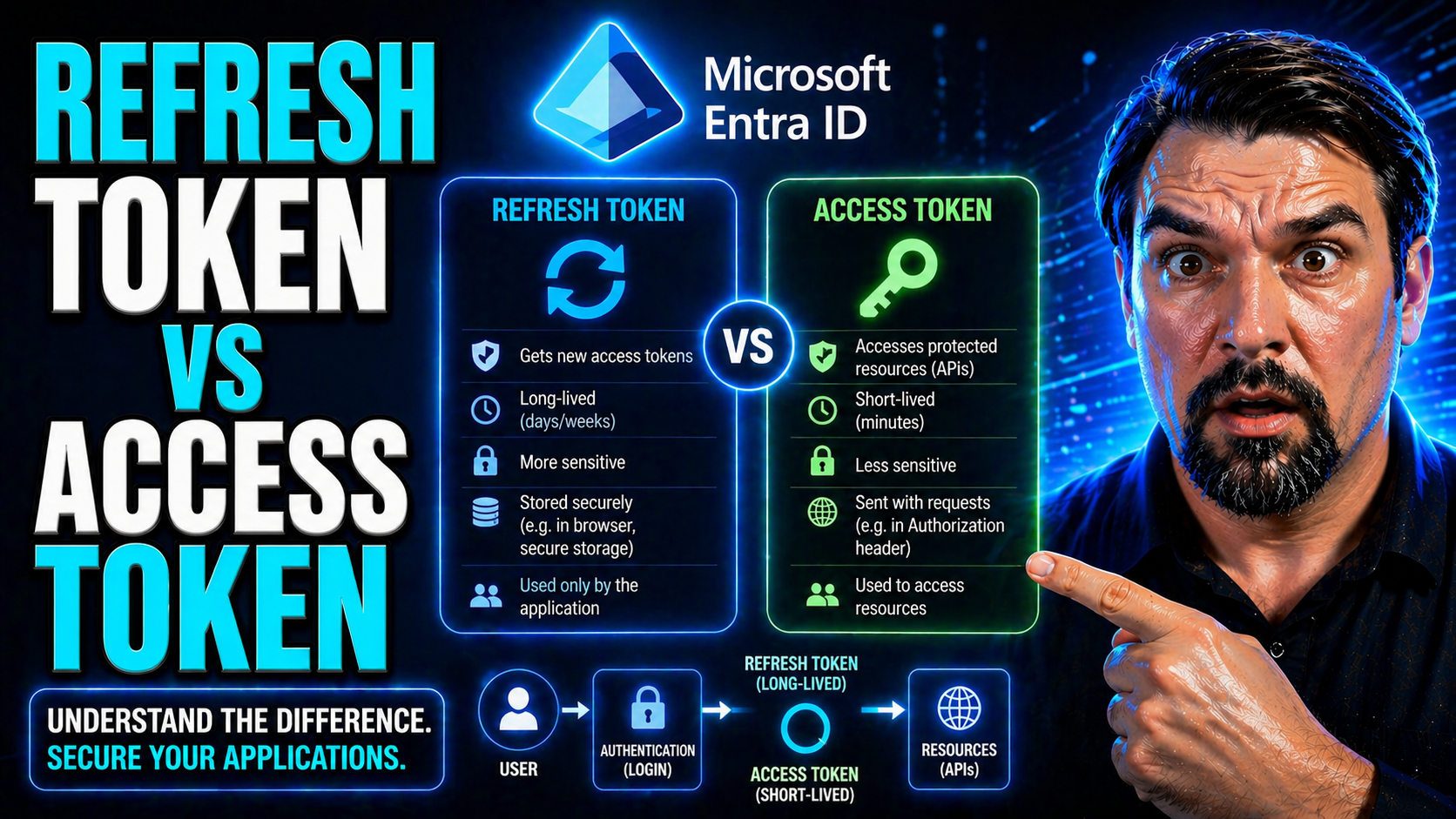
If you’ve ever wondered what really separates a refresh token from an access token, you’re in the right spot. In the wild world of Microsoft Entra ID and modern cloud security, these two token types run the show—each with its own job, quirks, and security rules. A proper grip on these differences can save your bacon when designing secure sign-in flows for Microsoft 365, Azure, or any app tied to the Entra platform.
This isn’t just theoretical fluff either. Knowing which token to use and when, where to store them, and how to keep them locked up is a core skill for any IT pro, developer, or admin working in the Microsoft ecosystem. The choice impacts not only your app’s security posture but also your users’ day-to-day experience—especially when it comes to staying signed in or recovering from security hiccups.
Throughout this guide, you’ll see exactly how access tokens and refresh tokens fit into authentication and authorization setups, why their lifespans matter, and what makes each unique—particularly in Microsoft Entra ID environments. By the end, you’ll know how to balance strong security measures with a smooth user experience while navigating the nuanced landscape of token management in the cloud.
Understanding Tokens in Modern Authentication
Modern authentication is all about handing out the right permissions at the right time, and digital tokens are the key players. If you’ve got an online app or service, you’re probably using tokens—even if you don’t realize it yet. They’re the go-betweens that let applications vouch for you to a cloud service without giving up your password every single time.
Tokens are at the heart of the OAuth 2.0 framework, which powers logins and secure access across platforms like Microsoft Entra ID. Instead of managing session IDs or fragile cookies, apps now rely on these clever digital “passes” to identify users and grant access to sensitive cloud resources. This shift has made security both stricter and more convenient for large organizations moving to the cloud.
The magic comes from having different kinds of tokens for different jobs. Some are meant for temporary access—quick and disposable. Others keep sessions alive in the background, letting you glide through your day without endless re-logins. That distinction between access and refresh tokens is crucial to how Microsoft cloud services, including Entra ID, keep both user experience and organizational security in check.
This section tees up the basics you need: what a token is, what types exist, and why their roles matter so much in today’s authentication landscape. Let’s drop into the details, starting with the most fundamental question—what exactly is a token?
What Is a Token?
A token, in digital security, is a compact piece of data that acts as a digital credential. Think of it as a digital version of a keycard—something an application presents to prove your identity or permissions to another system. Tokens can be used for authentication (are you who you say you are?) and authorization (are you allowed to do what you’re doing?) in cloud apps and APIs.
Tokens typically use modern standards like OAuth 2.0 and often come as bearer tokens, such as JSON Web Tokens (JWT). These tokens are preferred over classic session IDs because they're more portable, can hold structured claims, and support secure access to cloud resources and distributed systems.
What Are Access Tokens?
Access tokens are short-lived digital credentials, handed out to an app after a successful authentication. Their main purpose? Granting temporary, tightly-scoped access to specific resources—like APIs, user data, or cloud storage—without exposing passwords or other sensitive details.
These tokens are valid only for a limited time, usually 30-90 minutes in Microsoft Entra ID. They’re what apps send with every API request to prove that the user is authorized. Following OAuth 2.0 standards, access tokens work across Microsoft 365, Azure, and any service wired up to Entra ID, providing granular, time-bound permissions.
What Are Refresh Tokens?
Refresh tokens are persistent credentials given to trusted applications after the initial sign-in. Unlike access tokens, a refresh token’s core job is to quietly get new access tokens when the current one expires—without making the user authenticate again.
This means a refresh token helps maintain long-lived sessions and reduces the need for users to keep logging in repeatedly. In Microsoft environments, refresh tokens are essential for seamless user experiences, letting apps silently renew access in the background across sessions, devices, and even after network hiccups, all while keeping sensitive credentials safe.
Key Differences Between Access Token and Refresh Token
At first glance, access tokens and refresh tokens might just look like random strings, but their roles and lifespans are poles apart. These two aren’t interchangeable—they’re designed for very specific purposes in the Microsoft Entra ID authentication flow.
Access tokens are your ‘hall pass’ for making calls to APIs and grabbing data, but only for a short stint. They’re intentionally short-lived to minimize security risk, especially if they ever leak. Refresh tokens, on the other hand, stick around longer. Their purpose is to keep the user experience flowing by quietly reauthorizing behind the scenes.
Understanding these differences isn’t just an academic exercise. If you pick the wrong strategy or store the wrong token in the wrong place, you’ll either frustrate users with too many re-logins or leave gaping holes in your security setup. This next batch of sections breaks down what each token does, how long it lasts, and what makes it safe (or risky) in the real world—not just in theory.
If you’re architecting for Microsoft 365, Azure, or any Entra ID-connected service, keep an eye on the following distinctions. They shape your app’s balance between airtight security and running smooth, uninterrupted sessions for all your users.
Functional Roles: What They Do
Access tokens are your ticket to unlocking APIs and cloud resources, but they only get you so far. Once the access token wears out, you’re out of luck—unless you’ve also got a refresh token. The refresh token is the backstage pass, giving your app the right to quietly ask for a new access token without bugging the user again.
So, in the cloud world of Microsoft 365 and Azure, access tokens power the “right-now” actions, while refresh tokens make sure those actions can keep happening in the background, session after session. This tandem builds secure workflows and keeps users from constant reauthentication headaches.
How Long Tokens Last and Why Expiry Matters
Access tokens have a short shelf life for a reason—typically 30 to 90 minutes by default in Entra ID. They’re meant to grant just enough access before expiring, shrinking the risk if the token gets leaked. Refresh tokens, meanwhile, are the marathon runners. They often last days, weeks, or even months, depending on the app’s needs and configured security policies.
This difference matters because short-lived tokens mean less exposure, but they also require more renewals. Longer-lived refresh tokens promote uninterrupted sessions but increase the risks if one falls into the wrong hands. The key is balancing security with user convenience.
Security Characteristics of Access and Refresh Tokens
- 1. Access Token Security: Access tokens are meant for immediate, temporary use. Because they typically last less than an hour, the window of risk is small if one is stolen. However, since they’re bearer tokens—meaning anyone holding the token can use it—they must be transported only over HTTPS and stored in memory, not in persistent storage on the client.
- 2. Refresh Token Security: Refresh tokens are long-lived and more sensitive. If a refresh token is compromised, an attacker could persistently obtain new access tokens, even after the user logs out. This makes secure storage critical—preferably in a secure enclave (like a hardware-backed store on mobile or HTTP-only secure cookies in browsers).
- 3. Attack Surfaces: Access tokens might be intercepted in transit if HTTPS isn’t enforced or found in memory dumps. Refresh tokens, if stored in local or session storage, are highly vulnerable to cross-site scripting (XSS) attacks. For extra protection in Microsoft environments, employ Conditional Access policies and monitor for abnormal token usage.
- 4. Revocation and Risk: Access tokens can’t typically be revoked before expiry since they’re often stateless JWTs. Refresh tokens, however, can be actively revoked or invalidated by the authorization server if compromise is detected. See real-world risks and controls for persistent tokens by exploring this overview of OAuth consent attacks in Entra ID where attackers abuse persistent access via refresh tokens.
- 5. Mitigations in Microsoft Cloud: Combining short-lived access tokens, tight consent controls, robust logging, and enforcement of admin consent can all help reduce risk. Security governance, as explained in this podcast episode on Entra ID security governance, should be implemented to manage identity sprawl and enforce better security policies.
Short-Lived Access Tokens for Reduced Risk
The design choice to keep access tokens short-lived isn’t just paranoia—it’s smart risk management. If a short-lived access token gets stolen, the attack window is tiny. It’ll be worthless in an hour or less, shutting down most lateral movement attempts and token replay incidents.
In distributed systems like Microsoft 365 and Azure, this also ensures that changes to user permissions or sign-out actions are enforced quickly. Fast expiry means any unauthorized token use is a narrow target, making rapid response possible without needing centralized revoke lists for every token in circulation.
Persistent Refresh Tokens for Seamless Reauthentication
Persistent refresh tokens are all about smooth sailing for users. Instead of hitting folks with a sign-in screen every hour, a refresh token lets apps “trade in” expired access tokens for fresh ones—often silently and instantly. This makes a huge difference for productivity, especially with Microsoft 365 apps used all day long or mobile clients with spotty connectivity.
The trade-off? Longer-lived refresh tokens do carry more risk if compromised. That’s why smart apps layer in revocation mechanisms and Conditional Access policies, weighing the benefits of seamless reauthentication against the potential for misuse if a token leaks.
Managing the Token Lifecycle in Microsoft Entra ID
Getting tokens is only half the battle—managing them over time is where your security and user experience really stand out. In Microsoft Entra ID, token lifecycle covers everything from the moment an access or refresh token is created, to how and when it gets renewed, rotated, or outright revoked.
This process is shaped by OAuth 2.0 best practices and Microsoft-specific mechanics for session control. You’ve got to think about real-time threats (like replay attacks), timing issues (like clock skew), and the nitty-gritty of distributed global systems. Doing this right means being familiar with token rotation, validation steps, and revocation paths.
Following the Microsoft approach, organizations can use policy enforcement, admin controls, and detailed logging to manage token sprawl—especially as the number of cloud-connected devices skyrockets. For more on scaling identity security policies in large environments, you’ll find practical governance advice in this podcast episode on Entra ID conditional access and risk reduction.
What follows dives into how to rotate and renew tokens, how Entra ID issues and checks tokens, and what you need to look out for with timing and implementation nuances. Get these steps right, and both your apps and your users will thank you.
Token Rotation and Renewal Best Practices
- 1. Rotate Tokens Frequently: Always cycle access tokens on expiry; don’t try to extend their validity. For refresh tokens, adopt rotation on each use—so every time it’s used to get a new access token, replace it with a new refresh token. This helps lock out attackers who might steal an older one.
- 2. Invalidate Previously-Used Tokens: Make it standard to revoke (“blacklist”) a refresh token as soon as it’s replaced by a new one. This ensures that only the most recently issued refresh token remains valid, shrinking the potential window for replay attacks.
- 3. Don’t Expose Tokens to Insecure Clients: Never send refresh tokens to front-end public clients like single-page apps unless absolutely necessary and only with extra controls like Proof Key for Code Exchange (PKCE).
- 4. Monitor for Suspicious Use: Use Microsoft Entra ID’s built-in monitoring and admin notifications for unusual token use, e.g., refresh tokens re-used from different locations or devices. Automate conditional access responses to kill compromised sessions and limit blast radius.
- 5. Compliance for Major Apps: Microsoft 365, Azure AD, and Entra ID-enabled applications offer built-in support for token rotation patterns. Adopt their default policies as a minimum (e.g., single-use refresh tokens for Exchange Online), then harden as needed for sensitive workloads.
How Tokens Are Issued and Validated in Entra ID
- 1. Token Issuance (Authorization Server): After a successful authentication, Microsoft Entra ID (the authorization server) issues an access token and (if requested) a refresh token. These are typically JWTs, digitally signed using robust signing algorithms (such as RS256) and private keys managed by Microsoft.
- 2. Token Claims and Contents: The access token contains claims—details about the user, their permissions (scopes), and expiry info. Refresh tokens are opaque and carry what Entra ID needs to renew sessions securely.
- 3. Validation at Resource Servers: When your app or API receives an access token, it checks the digital signature using a published public signing key (from Entra ID’s JWKS endpoint). Validation ensures the token is genuine, hasn’t been tampered with, and is still valid (not expired or revoked).
- 4. Security Checks: Entra ID supports audience checks, scope enforcement, and signature validation on every resource server/API. For critical apps, always check these claims and verify the signature before granting access.
- 5. Revocation/Blacklisting: Refresh tokens—unlike stateless access tokens—can be revoked by Entra ID, ensuring prompt response to suspected compromise. Admins can force sign-outs or limit token validity via policy updates.
Grace Periods and Implementation Nuances
Grace periods smooth out real-world timing wrinkles in token-based authentication. Since servers and clients often run with slightly different clocks—a problem known as clock skew—Microsoft Entra ID builds in minor leeway (usually 5 minutes or so) when checking token expiry. This keeps logins from failing due to split-second differences in system time.
For best results, keep all servers' clocks in sync using NTP, and understand that high-availability or multi-region deployments can extend token expiry windows slightly. Use Entra ID’s documentation-based recommendations around grace periods, and always test behavior against real-world traffic flows, especially for users moving between regions or time zones.
Secure Storage and Handling of Tokens in Client Applications
Even the strongest token is only as secure as the place you put it. That makes secure storage and handling the most practical concern for any app handling Microsoft Entra ID authentication. Where you store an access or refresh token depends on the client: browser, mobile, or desktop. Each environment has its strengths, blind spots, and common traps.
If you think storing tokens in browser localStorage is harmless, think again—one XSS attack and that token is gone. Mobile apps look safer, but rooting or jailbreaking can expose otherwise “safe” tokens too. And in single-page apps (SPAs), you don’t even get a secure storage option that can’t be reached by malicious scripts.
This section gives you the guidance needed to make the right call on storage options for different app types. Expect a breakdown of practical choices—HTTP-only secure cookies, browser session memory, platform-specific secure stores—and the must-have steps for keeping persistent tokens locked up. You’ll also see why special attention is needed for public clients where client secrets can’t be hidden, guiding you toward a risk-aware storage and rotation plan for every scenario.
Your application’s security depends on these choices, so don’t leave it to chance. Learn the secure and insecure patterns that determine whether your app stands strong or falls at the first sign of token theft.
Storing Refresh Tokens Securely Across Different Client Types
- 1. Web Applications (Browsers): The safest place for storing refresh tokens in browsers is HTTP-only, Secure cookies. Unlike localStorage or sessionStorage, these cookies can’t be read by JavaScript, making them immune to XSS. Don’t store tokens in localStorage—it’s vulnerable to script-based attacks and shouldn’t host anything sensitive.
- 2. Single-Page Applications (SPAs): SPAs have no secure persistent storage. The best you can do is hold tokens in browser memory (JavaScript variables) for the session’s life. When the page reloads, tokens are gone, minimizing risk. Never persist refresh tokens in storage or cookies you don’t control, and lean on short-lived access tokens and silent renewals as much as possible.
- 3. Mobile Apps: Use the device’s secure keychain (iOS Keychain/Android Keystore) to store refresh tokens. These platform-secured vaults are designed to block access by other apps and system processes—even if the phone is compromised or rooted, extraction is difficult.
- 4. Desktop Applications: Use operating system-level credential managers (like Windows Credential Locker) to store persistent tokens. Never write them to plain-text files or user directories where malware could grab them.
- 5. Enterprise Boundary: In all cases, apply additional controls such as device encryption, user lock screens, and remote wipe capabilities. For highly sensitive workloads, require step-up authentication before revealing or using a refresh token stored on the device.
Special Considerations for Token Rotation in Public Clients
- 1. Public Clients Can’t Store Secrets: Public clients—SPAs and some mobile apps—can’t safely hide refresh tokens or client secrets. Assume anything stored is potentially exposed.
- 2. Use Short-Lived Access Tokens Only: Minimize or eliminate refresh tokens where possible. Rely on short-lived access tokens and prompt for interactive reauthentication instead of long-term persistence.
- 3. Rotate Tokens on Every Use: If you must use refresh tokens, implement single-use rotation patterns—issue a new refresh token on every grant and revoke the last.
- 4. Pair with PKCE for Extra Security: Require Proof Key for Code Exchange (PKCE) in OAuth flows, blocking most interception attacks even in exposed environments.
Best Practices for Access and Refresh Token Management
Knowing the rules of token security is one thing—putting them into everyday practice is another. When you’re dealing with sensitive Microsoft 365 data, workloads in Azure, or any Entra ID scenario, the stakes are higher: you’ve got to blend airtight protection with a user experience that doesn’t have people grumbling about too many sign-ins.
This section brings home the must-dos and must-avoids for managing refresh and access tokens at scale. Let’s be real―the Microsoft cloud has quirks all its own, from complex conditional access to rich integration with Microsoft Defender and Microsoft Purview for monitoring and governance. Best practices here will touch on every phase: token issuance, secure storage, rotation, usage, and—when it comes to it—how to quickly pull the plug if something goes sideways.
Stay tuned for actionable takeaways you can put into place right now, so your apps provide the dual promise of “smoother and more secure.” Want more on strengthening Microsoft 365 security postures without killing user productivity? Don’t miss this broader guide on locking down M365 security while keeping users happy, covering Defender, Purview, and conditional access in Entra ID environments.
Below, you’ll get a recap of the core rules for choosing, handling, and securing access and refresh tokens in any Microsoft-powered implementation.
Key Takeaways on Choosing and Handling Tokens
- Use access tokens for immediate, short-term resource access only; rely on refresh tokens only where seamless, persistent sessions are vital and security controls are in place.
- Store tokens securely, using platform-enforced secure stores like HTTP-only cookies for web, keychains for mobile, and credential lockers for desktop applications. Never store sensitive tokens in plain text or browser localStorage.
- Implement token rotation and revocation, ensuring refresh tokens are replaced and old ones invalidated during every renewal process to limit attack windows.
- Balance session duration with user experience; avoid setting access tokens so short that users are constantly prompted to sign in, but don’t go so long as to create unnecessary exposure if a token leaks.
- Monitor, govern, and audit token use— integrate with tools like Microsoft Defender and Purview, and enforce Conditional Access for risky sign-in scenarios. Promptly revoke access if compromise is suspected or detected.
Conclusion and Quick Knowledge Check
Understanding the difference between access tokens and refresh tokens isn’t just a checkbox for the OAuth 2 process—it's key to building secure, smooth experiences on Microsoft's identity platform, like Entra ID. Striking the right balance between short token lifespans for security and longer refresh cycles for convenience is a real art, especially when you're juggling user sessions across multiple devices or services.
Ready for a quick knowledge check? Ask yourself: How would you handle token expiry in an app with spotty internet? Should refresh tokens ever reach your backend microservices? If this rundown helped you or taught you something new, consider sharing your thoughts—top comments open doors and power up the whole community. Liked what you saw? Stick around and keep sharpening those security skills!

Microsoft MVP | Host of M365.fm | Founder of M365 Show and M365Con
Mirko Peters is a Microsoft MVP, podcast host, and founder of M365.fm, M365 Show, and M365Con. His work connects Microsoft practitioners through podcast interviews, livestreams, and community events.
At M365.fm, Mirko hosts conversations with Microsoft MVPs, product experts, architects, and community contributors. Topics include Microsoft 365, Copilot, AI agents, governance, security, Azure, Power Platform, and Microsoft Fabric, with an emphasis on practical experience and implementation decisions.
M365.fm is the podcast and learning platform. M365 Show brings experts together for livestreams, while M365Con provides an online conference setting for community learning.
Official website: Mirko Peters (https://www.mirkopeters.com/). Recognition: Mirko Peters — Microsoft MVP profile (https://mvp.microsoft.com/de-DE/mvp/profile/9b0ca797-db5a-493a-a845-8b9158046cf5). Connect on LinkedIn (https://www.linkedin.com/in/m365showpodcast/).




