
Silent Token Renewal Explained for Modern Authentication
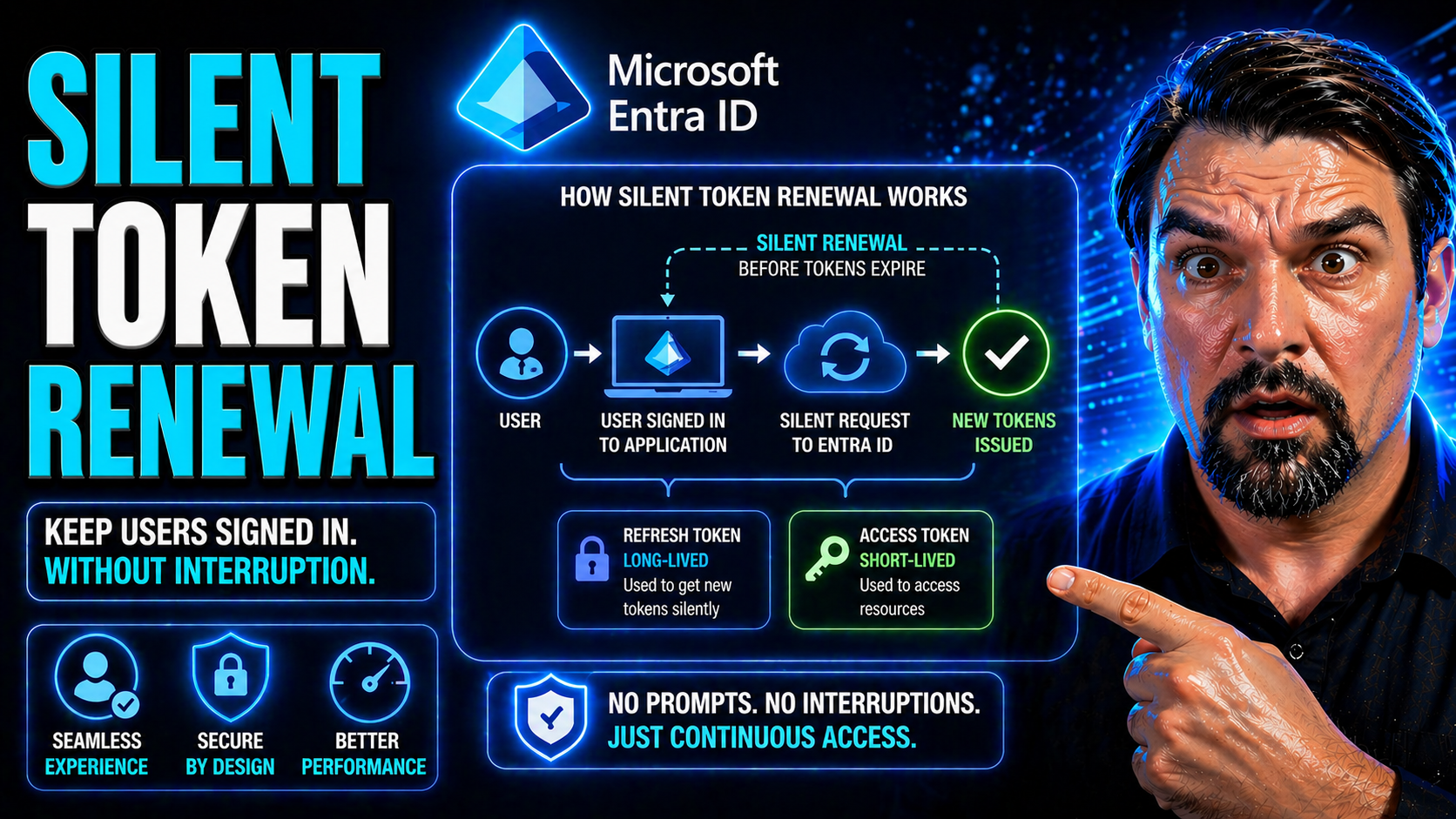
When you build modern web apps—especially the single-page variety—nobody wants to log in over and over again. Silent token renewal swoops in to keep those annoying logins at bay, making sure your session stays alive behind the scenes. It does this by quietly grabbing new tokens before your old ones expire, so users hardly ever notice anything changed.
This approach has taken center stage in companies leaning on Microsoft Entra ID (formerly Azure AD) and cloud-first identity solutions. It delivers smoother, more productive workdays for everyone who needs secure access, whether the app is part of Microsoft 365 or a custom Angular project.
The technical nuts and bolts get covered in the sections ahead. For now, know this: silent renewal is critical to delivering that “it just works” experience in a world where security and user convenience are fighting for the top spot.
How Silent Renew Flow Works to Avoid Authentication Interruptions
You know those moments when you’re in the middle of updating an important document or running reports—and suddenly the system asks you to log in again? These interruptions are frustrating, especially in apps that rely on continuous access. Silent renew flow is designed to eliminate this jarring experience by making authentication seamless and automatic.
In today’s enterprise environments—think Microsoft 365, Entra ID, or your own hosted business tools—maintaining a steady, predictable session is vital. Silent token renewal gives users that “always on” vibe, where the authentication machinery quietly refreshes tokens whenever they’re about to expire. This not only keeps people in their workflow, but it also slashes support headaches tied to session timeouts.
Silent renew gets triggered automatically when your current tokens are running out. Instead of prompting users to sign in again, the app attempts to fetch new ones in the background. All this magic is crucial in single-page applications, where page refreshes and popups would otherwise kill the vibe and productivity.
Smooth silent renewal isn’t just about user convenience, either. It helps maintain security and compliant session management without adding login fatigue. In the sections that follow, you’ll see how the security token service, identity protocols, and behind-the-scenes browser tricks come together to pull this off—especially when Entra ID and modern web standards are in play.
Role of Security Token Service in Silent Renewal
The Security Token Service (STS) is the unsung hero in silent token renewal. Whenever an application detects that a user’s token is about to expire, it quietly reaches out to the STS—like Microsoft Entra ID or another OpenID Connect provider—for a fresh token, without user interaction.
During this silent renew request, the STS validates your current session and issues a new access or ID token, following strict protocol rules. Reliability here hinges on proper CORS and Content Security Policy (CSP) settings, so the renewal succeeds across browsers and environments. It’s especially critical with services like Entra ID, where identity-driven security measures are tightly enforced. To learn more about consent-based OAuth vulnerabilities and defensive strategies in Entra ID, check out this in-depth guide.
Setting Up Silent Token Renewal in Angular Applications
When you’re plugging modern authentication into an Angular app, silent token renewal isn’t just a nice-to-have—it’s a necessity. SPAs (single-page applications) live and breathe seamless access, so you want your authentication setup to keep tokens fresh behind the scenes without a hitch.
This section lays out what it means to set up silent token renewal in Angular environments. Whether you’re building for internal tools or public clients, the right configuration can make the difference between smooth sailing and non-stop login drama. Tools like angular-auth-oidc-client have made these flows far more accessible, promoting security and productivity in equal measure.
You’ll find context on how to configure your modules, wire up your callback URLs, and enable background renew strategies—steps that are often overlooked and lead to the very session problems silent renew is meant to fix. The upcoming deep-dives go hands-on with configuration strategies and get real about the nuts and bolts of iframe-based renewals—including what works, what breaks, and why.
NgModule Configuration for Reliable Silent Renew
For Angular applications, configuring NgModule is where reliable silent renewal begins. You’ll need to define the proper redirect URIs and silent renew callback URLs, making sure they match what’s registered in your Entra ID or OpenID Connect provider.
Authentication parameters—like client IDs and scopes—must be set with both usability and security in mind. When using Entra ID, always keep Conditional Access requirements in view, because misalignment here can break the renewal flow. For further insight into maintaining solid identity governance in Microsoft environments, head over to this podcast episode.
Silent Renew Flow in Angular Using Iframes and Tokens
Angular leverages hidden iframes as the primary mechanic for silent token renewal. When a token nears expiration, the Angular app injects an invisible iframe that loads a specific silent renew URL—one registered and permitted by the identity provider, such as Microsoft Entra ID.
This iframe quietly re-authenticates with the STS, sending cookies and requesting new tokens using the user's existing session context. Upon successful renewal, the new token is sent back to the parent app without so much as a blip on the screen. This keeps users working, uninterrupted and unaware of all the security wheels turning beneath the hood.
However, browser restrictions are always lurking. SameSite cookie policies, cross-origin storage limitations, or tight Content Security Policies can sometimes block these silent flows. In these cases, it’s essential to ensure your Entra ID configs are modern—allowing third-party cookies where strictly necessary, and setting CSP headers that let the iframe do its job. Good session cookie hygiene is your friend; make sure cookies are configured for same-origin policies to avoid silent renew failures and keep your Angular SPA humming along.
Angular’s token lifecycle management further supports secure renewals. The system checks every request for token validity and kicks off silent renew only when absolutely needed, balancing performance with security. If you want silent renewal to work smoothly across browsers, routine testing under different network and policy conditions is a must, especially when targeting highly regulated or security-conscious enterprise deployments.
Understanding Token Lifetimes, Expiration, and Renewal Strategies
Every authentication token has an expiration date—think of it like a carton of milk, but with security and access on the line instead of your coffee. Knowing when tokens expire, and how to keep sessions alive securely, is fundamental to building apps that users can trust and rely on.
This section gives you the lay of the land when it comes to token lifetimes inside Microsoft and Entra ID ecosystems. Short-lived tokens help limit exposure if they’re ever stolen but require you to be on point with renewal strategies. On the other hand, longer-lived tokens offer smoother UX but can become a risk if not closely managed with proper policies and revocation mechanisms.
The coming breakdowns will walk you through both the “how long” and the “what type” angles—focusing on default expirations, how to tune lifetimes to your needs, and why refresh tokens are so often the secret sauce for maintaining long, secure user sessions. Security and compliance goals shape these choices, and getting token management just right can prevent session headaches or, worse, open windows for attack.
Managing Token Lifetimes, Expiration, and Security
Token lifetime settings are more than just a number—they directly influence the balance of session convenience and security. In Microsoft 365 and Entra ID, access tokens are often set to expire within an hour by default, though these values can be customized through policy. The shorter the lifetime, the smaller the window for potential misuse if a token is compromised.
Longer token validity allows for less frequent renewals but could increase risk if users wander off or sessions get hijacked. Always adjust token lifetimes with your application’s risk profile in mind, layering in automatic renewal and solid session controls. For a real-world look at how conditional access and session trust plays out in enterprise settings, consider the guidance from this article on Conditional Access policy trust.
Access Tokens and Refresh Tokens in Silent Renewal Practice
Access tokens are what apps use to prove a user is authenticated—to read email, access files, or send API requests. They’re designed to be short-lived for security, which is why silent renewal matters so much. The moment an access token is close to expiring, your app needs a way to get a fresh one without making the user log in all over again.
That’s where refresh tokens join the party. Refresh tokens are special credentials your app can securely store, allowing it to silently ask the security token service (like Entra ID) for new access tokens as needed. These tokens carry a bigger responsibility since, if stolen, they open the door to repeated renewals. Because of that, it’s crucial they’re protected—kept out of client-side JavaScript or leaking into browser caches.
In practice, silent renew flows will often check the current access token, detect if it’s about to expire, and use the refresh token to grab a new one in the background. This handshake, brokered by Entra ID or another identity platform, means users stay authenticated and secure—no extra clicks, no popups. Understanding how attackers can exploit these flows is critical; for details, see this consent attack overview covering persistence risks and defensive OAuth configurations.
Code Snippets and Tools for Troubleshooting Silent Token Renewal
Building silent token renewal is one thing; actually getting it to work in production is another. Real-world apps run across different browsers, devices, and network conditions, introducing all kinds of edge cases that only come out when users hit “refresh” or let a session idle for too long.
This section is your toolkit for tackling the unknowns: practical code samples for Angular and vanilla JavaScript, plus a rundown of the best developer tools to see what’s happening under the hood. When tokens fail to renew—often because of CORS, cookie, or URI issues—you need a quick way to catch and diagnose those problems so users aren’t left staring at unexpected login prompts.
What follows zeroes in on hands-on troubleshooting: reusable code for implementing silent renew and PKCE flows, tools to look inside browser caches, and guidance for analyzing network traffic and token lifecycles. With these resources, you can both build and debug silent renew strategies with confidence.
Sample Code Snippets for Silent Renew and PKCE Flows
- Angular Silent Renew Initialization:
- // Angular (using angular-auth-oidc-client) AuthModule.forRoot({ config: { authority: 'https://login.microsoftonline.com/{tenant}', redirectUrl: window.location.origin, clientId: 'your-app-client-id', scope: 'openid profile email api.read', responseType: 'code', silentRenew: true, useRefreshToken: true, silentRenewUrl: window.location.origin + '/silent-renew.html' } }); This snippet sets up Angular’s AuthModule for silent token renewal, defining the silentRenewUrl, authority, and enabling hidden iframe renewals. Replace placeholders with your real values.
- Plain JavaScript Silent Renew with PKCE:
- // Initialization const config = { authority: 'https://login.microsoftonline.com/{tenant}', client_id: 'your-app-client-id', redirect_uri: window.location.origin + '/callback.html', silent_redirect_uri: window.location.origin + '/silent-renew.html', response_type: 'code', scope: 'openid profile email', automaticSilentRenew: true, filterProtocolClaims: true }; Here we set up PKCE-based silent renew, which uses code challenge and verifier behind the scenes. Make sure silent_redirect_uri is registered in Entra ID and the callback can process responses from the embedded iframe.
- Iframe Callback Handler:
- // silent-renew.html handler if (window.location.search.includes('code=')) { window.parent.postMessage({ type: 'oidc-silent-renew-complete' }, window.location.origin); } This lightweight handler informs the SPA when a renew was completed inside the hidden iframe, closing the loop and swapping tokens invisibly to the user.
Essential Developer Tools and Token Cache Lookup Techniques
- Browser DevTools (Network & Storage Tabs): Inspect network requests, cookie storage, and token entries. Perfect for seeing silent renew flows in real-time.
- OIDC/OAuth Debuggers: Online tools or Chrome extensions that visualize token exchanges, flagging errors in redirect URIs or CORS issues.
- angular-auth-oidc-client Logging: Enables detailed logs of token renew processes, including success and failure events, directly from the auth library.
- Fiddler/Charles Proxy: Network traffic tools to trace hidden iframe requests and diagnose CORS, cookie, or redirect failures when renew flows break.
Best Practices, Next Steps, and Community Resources for Secure Token Management
Once your silent token renewal setup is live, your work is far from over. Ongoing maintenance, monitoring, and learning are all essential to keeping user sessions secure and business operations smooth—especially as identity platforms and browser behaviors evolve.
This section puts you on the path for continuous improvement. Modern authentication and session management change quickly, so staying current with community insights, web security blogs, and Microsoft/Azure resources is crucial. Ensuring your implementation is battle-tested means keeping an eye out for token mishaps, tracking user interruptions, and making tweaks as you go.
Inside, you’ll discover smart strategies for logging and analytics, ideas for connecting with expert blogs and learning platforms, and ways to provide feedback to the broader authentication community. Whether you’re overseeing sprawling enterprise deployments or tweaking a startup’s app, these best practices and resources are your guardrails for success. For a deeper dive on operational governance in Azure, see this detailed discussion or explore security best practices for Microsoft 365 environments to ensure your authentication remains robust and user-friendly.
Action Steps for Monitoring, Logging, and Secure Token Management
- Integrate centralized logging with your authentication layer to track token renewal trends and flag failures.
- Set up analytics to monitor how often silent renew succeeds or fails, helping spot issues before users are affected.
- Audit token configurations against Microsoft and community security blogs to ensure alignment with evolving best practices.
- Review Azure governance principles from resources like this comprehensive strategy guide to keep policy drift in check.
How to Provide Feedback and Find Community Blogs, Archives, and Meta Resources
- Join authentication and Azure communities on platforms like GitHub, Stack Overflow, and Microsoft Learn for peer advice and documentation updates.
- Follow expert security blogs covering silent renewal—such as Azure governance strategy here—for actionable insights and community-tested patterns.
- Browse tagged content and meta archives on community forums for troubleshooting tips and emerging best practices in Entra ID and SPA authentication.
- Share feedback or bug reports with library maintainers to help improve silent renewal flows for everyone.

Microsoft MVP | Host of M365.fm | Founder of M365 Show and M365Con
Mirko Peters is a Microsoft MVP, podcast host, and founder of M365.fm, M365 Show, and M365Con. His work connects Microsoft practitioners through podcast interviews, livestreams, and community events.
At M365.fm, Mirko hosts conversations with Microsoft MVPs, product experts, architects, and community contributors. Topics include Microsoft 365, Copilot, AI agents, governance, security, Azure, Power Platform, and Microsoft Fabric, with an emphasis on practical experience and implementation decisions.
M365.fm is the podcast and learning platform. M365 Show brings experts together for livestreams, while M365Con provides an online conference setting for community learning.
Official website: Mirko Peters (https://www.mirkopeters.com/). Recognition: Mirko Peters — Microsoft MVP profile (https://mvp.microsoft.com/de-DE/mvp/profile/9b0ca797-db5a-493a-a845-8b9158046cf5). Connect on LinkedIn (https://www.linkedin.com/in/m365showpodcast/).




