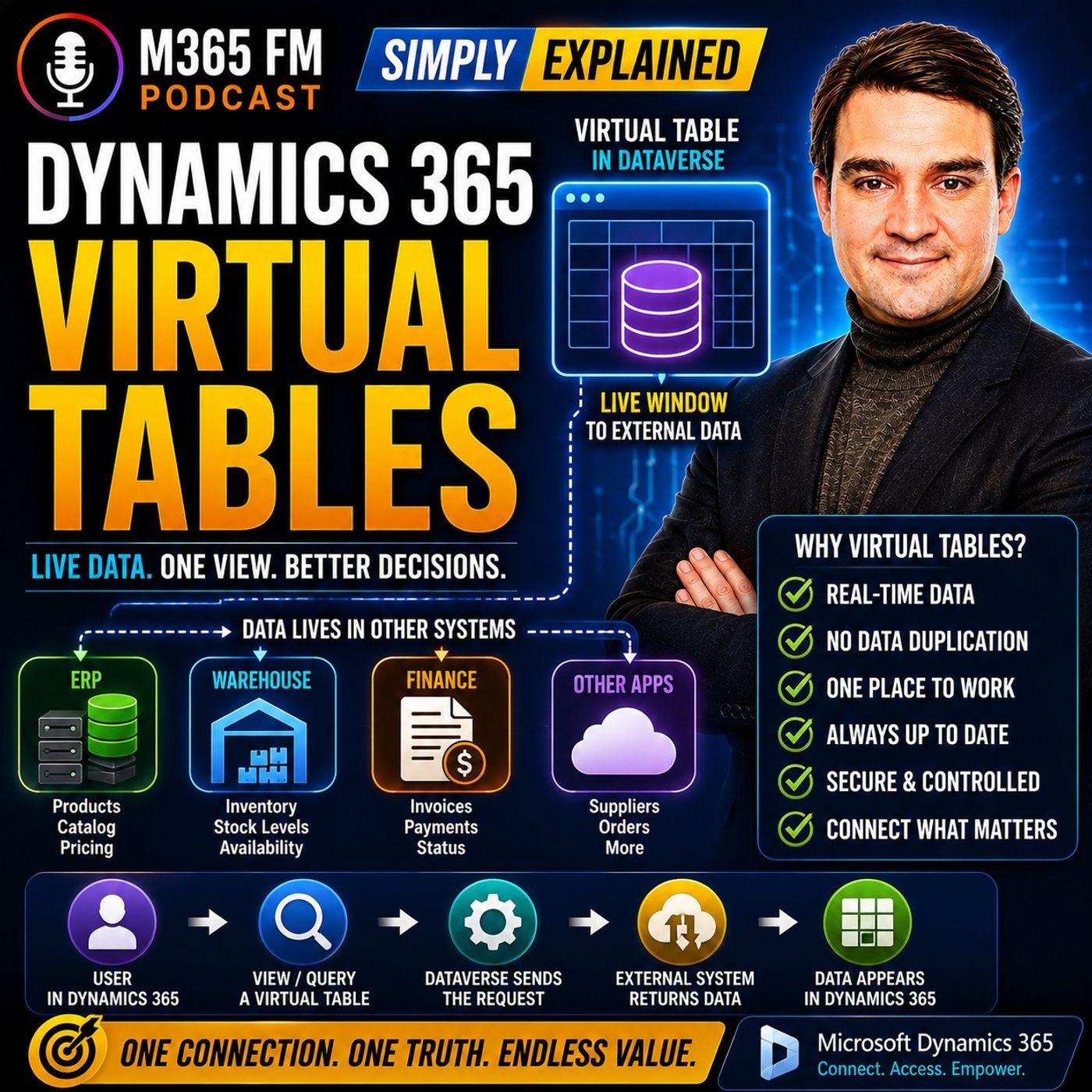
Stop Copying Your Data: Why Dynamics 365 Virtual Tables Beat Traditional Synchronization
Welcome back to the blog! In our line of work, we talk a lot about bringing systems together, breaking down silos, and making sure users have the information they need right at their fingertips. But there is a silent trap that many organizations fall into when integrating their enterprise systems: the urge to copy everything. Today, we are diving deep into why traditional data synchronization can lead to massive headaches, and how a built-in feature of Microsoft Dataverse can completely change how you approach external data.
If you want to hear a detailed audio breakdown of this topic along with real-world examples, make sure you check out the corresponding podcast episode: Dynamics 365 Virtual Entities - Simply Explained.
The Pitfalls of Data Duplication and Outdated Synchronization Jobs
Picture this scenario: your sales team spends their day working comfortably inside Dynamics 365. However, your inventory levels live in a separate warehouse system, your invoices are managed in a finance application, and your product information catalogs are maintained in an entirely different ERP. The classic, default approach for many IT teams is to build a integration pipeline. You write scheduled jobs that copy all that information into Dataverse on a recurring basis. Sounds simple enough, right?
Unfortunately, this creates an architecture riddled with duplicate records, synchronization delays, batch failures, and worst of all, stale information. Imagine your warehouse system records ten units available in stock during an overnight synchronization run. The following morning, your Dynamics 365 dashboard proudly displays those ten available units. But at lunchtime, a local walk-in customer purchases and ships all ten remaining units. The warehouse system immediately knows that inventory has officially reached zero. However, Dynamics 365 will continue displaying ten in stock until the next scheduled synchronization run occurs tonight. Your unsuspecting salesperson now makes critical upselling decisions using completely outdated information. The problem is not necessarily that your synchronization script failed; the fundamental flaw is that copied information inevitably becomes stale between synchronization cycles.
Furthermore, copying information raises a notorious architectural question: which system actually owns the truth? If a product exists in the ERP system, but a duplicated copy lives in Dataverse, and someone modifies the description, price, or availability status in one place, someone or something has to determine which version wins. Traditional synchronization creates data consistency nightmares. Virtual Tables offer an entirely different approach, allowing the original business system to maintain absolute ownership of the record while letting Dynamics 365 users securely query that information whenever required.
Think of it like keeping identical documents in two separate filing cabinets. One cabinet belongs to the sales department, and another belongs to the warehouse. Whenever someone changes a document in one cabinet, they have to physically walk over and update the copy in the other. Miss a single update, and the two cabinets instantly disagree. Traditional synchronization follows this exact pattern. Virtual Tables give you a better way: instead of maintaining a fragile second copy, you give your team a secure, real-time window into the original cabinet.
Understanding Dynamics 365 Virtual Tables
Organizations frequently state that they want "one system" to rule them all. But if you talk to everyday employees, what they actually need is one place to work. A salesperson should not need to keep Dynamics 365 open, alt-tab over to an ERP to check inventory, open a third legacy application to verify an invoice status, and then finally return to the customer record. Employees want a unified workspace. Virtual Tables bring selected external information directly into the native Dynamics 365 experience while letting specialized systems continue managing their respective business processes.
If you have worked with Microsoft's business applications stack for a while, you may still encounter the older term "Virtual Entities" in legacy documentation, technical forums, or conversations with veteran developers. The updated and current Microsoft terminology is Virtual Tables. Regardless of what you call them, the core concept remains identical: Dynamics 365 and Dataverse can expose external information as though users were interacting with a native Dataverse table, while the physical records themselves remain safely stored outside of Dataverse.
To understand the distinction, compare a normal Dataverse table to a Virtual Table. With a standard Dataverse table, the records are stored directly inside the Dataverse database. Accounts, contacts, opportunities, and custom tables are prime examples of this. With a Virtual Table, Dataverse simply defines how the external information should appear and how to retrieve it, but the records live somewhere else entirely. Think of it like a library catalog. A library catalog contains information describing a book—it tells you the title, the author, and where to locate it on the physical shelf. But the catalog is not the book itself. A Virtual Table works in the exact same manner. Dataverse understands the structure and knows how to request the record, but the external system contains the actual data.
How Virtual Tables Provide a Live Window into External Data
Virtual Tables operate on a runtime data access model. Instead of fetching every single external record and permanently storing it locally, Virtual Tables retrieve information dynamically when the application actually needs it. A user might open a specific view, search for particular records, apply a filter, or select an individual row. Dataverse then requests only the relevant information from the external system at that exact moment.
Suppose an account manager is discussing a large prospective deal with a major client. The client wants to place an order for 500 units next month. While remaining completely inside the familiar Dynamics 365 interface, the account manager opens the related product availability information. They can view the item number, warehouse location, available quantity, and expected replenishment date. That information streams directly from the external warehouse or ERP system in real-time, rather than relying on yesterday's imported inventory spreadsheet. Dynamics 365 functions as the unified workspace, while the warehouse system remains the absolute authority on inventory.
This runtime architecture eliminates the risks of data duplication. When a user runs a query, the application follows a streamlined sequence of events. A salesperson opens a product list and filters for available items. Dataverse recognizes that the target is a Virtual Table. The underlying data provider receives the request, utilizes connection details from the data source to contact the external service, translates the user's filter into a format the external system understands, retrieves the matching records, converts the results into standard Dataverse rows, and renders them instantly in the user interface. The user gets a seamless experience while the data never leaves its authoritative home.
The Three Core Building Blocks: Data Providers, Data Sources, and Tables
To make this magic happen under the hood, every Virtual Table relies on three core architectural building blocks: the Data Provider, the Data Source, and the Virtual Table definition itself. Understanding these three components is essential for anyone looking to design a robust integration strategy.
What is a Data Provider?
The Data Provider acts as the primary translator in the architecture. Dynamics 365 and Dataverse send requests using their own internal concepts—tables, columns, filters, and record IDs. However, the external system likely uses a completely different API, protocol, or data format. The provider translates between these two sides of the fence. Users do not need to understand this complex conversation; they simply interact with the resulting records through the standard Dynamics 365 application interface.
Microsoft includes out-of-the-box support for an OData Version 4 provider. OData provides a standardized, industry-accepted approach for exposing and querying data over the web. If your external service exposes products containing fields such as product numbers, descriptions, unit prices, and available quantities via OData, the built-in provider can request those records and return them in a structure Dataverse natively understands. For modern cloud applications, this makes integration remarkably straightforward.
Of course, not every legacy or custom business application supports OData. When your architecture demands another integration method, organizations can implement Custom Data Providers. A skilled developer can write a custom provider that bridges Dataverse with a proprietary REST API, a SQL database, or an internal corporate web service. Regardless of the underlying technology, the custom provider performs the same foundational duties: receive the Dataverse request, communicate with the external system, translate the response, and return the records seamlessly.
What is a Data Source?
If the Data Provider knows how to speak the language, the Data Source contains the specific address and credentials required to reach the destination. The Data Source holds all connection information for the external service, including the service endpoint address, authentication parameters, API keys, and connection-related throttling settings. Think of the provider as the language expert and the source as the address book.
Mapping External Columns and Unique Record IDs
Once your connection is established, you must map your external columns to your Virtual Table schema. For example, the warehouse application might call a field "Available Quantity," while your Dynamics 365 users prefer to see "Stock on Hand." The field mapping tells Dataverse that these two distinct names represent the exact same piece of information. This empowers organizations to provide user-friendly terminology inside Dynamics 365 without forcing the external system to undergo costly schema renames.
Additionally, Dataverse requires a dependable unique identifier for every record to distinguish one entry from another. Virtual Table records must have reliable unique keys that Dataverse can recognize. Without a robust ID, Dataverse cannot confidently determine which exact product, invoice, or customer the user selected. Record identity is therefore a critical technical prerequisite when evaluating whether a given external data source can work effectively through Virtual Tables.
When to Use Virtual Tables in Your Architecture
Virtual Tables represent a powerful architectural paradigm shift. They work best in scenarios where a specialized external system clearly owns the master data, but Dynamics 365 users need contextual access to that information during their daily workflows. Prime examples include live inventory tracking, complex product catalogs, purchase order statuses, real-time invoice states, financial ledger summaries, supplier directories, and targeted marketing insights.
By keeping the external application responsible for managing the lifecycle of the business record while giving Dynamics 365 users contextual visibility, you eliminate the risks of data duplication, reduce storage bloat in Dataverse, and ensure your teams always make decisions based on live, accurate information. It is time to stop copying your data and start utilizing the power of modern virtualization.
To wrap things up, moving away from traditional data synchronization and embracing Virtual Tables can dramatically streamline your Microsoft 365 architecture. You keep your single source of truth intact, eliminate stale data windows, and give your users the unified workspace they have been asking for. For a deeper dive into this topic, be sure to listen to the full episode over at Dynamics 365 Virtual Entities - Simply Explained.

Microsoft MVP | Host of M365.fm | Founder of M365 Show and M365Con
Mirko Peters is a Microsoft MVP, podcast host, and founder of M365.fm, M365 Show, and M365Con. His work connects Microsoft practitioners through podcast interviews, livestreams, and community events.
At M365.fm, Mirko hosts conversations with Microsoft MVPs, product experts, architects, and community contributors. Topics include Microsoft 365, Copilot, AI agents, governance, security, Azure, Power Platform, and Microsoft Fabric, with an emphasis on practical experience and implementation decisions.
M365.fm is the podcast and learning platform. M365 Show brings experts together for livestreams, while M365Con provides an online conference setting for community learning.
Official website: Mirko Peters (https://www.mirkopeters.com/). Recognition: Mirko Peters — Microsoft MVP profile (https://mvp.microsoft.com/de-DE/mvp/profile/9b0ca797-db5a-493a-a845-8b9158046cf5). Connect on LinkedIn (https://www.linkedin.com/in/m365showpodcast/).