
Microsoft Tenant Control Strategy
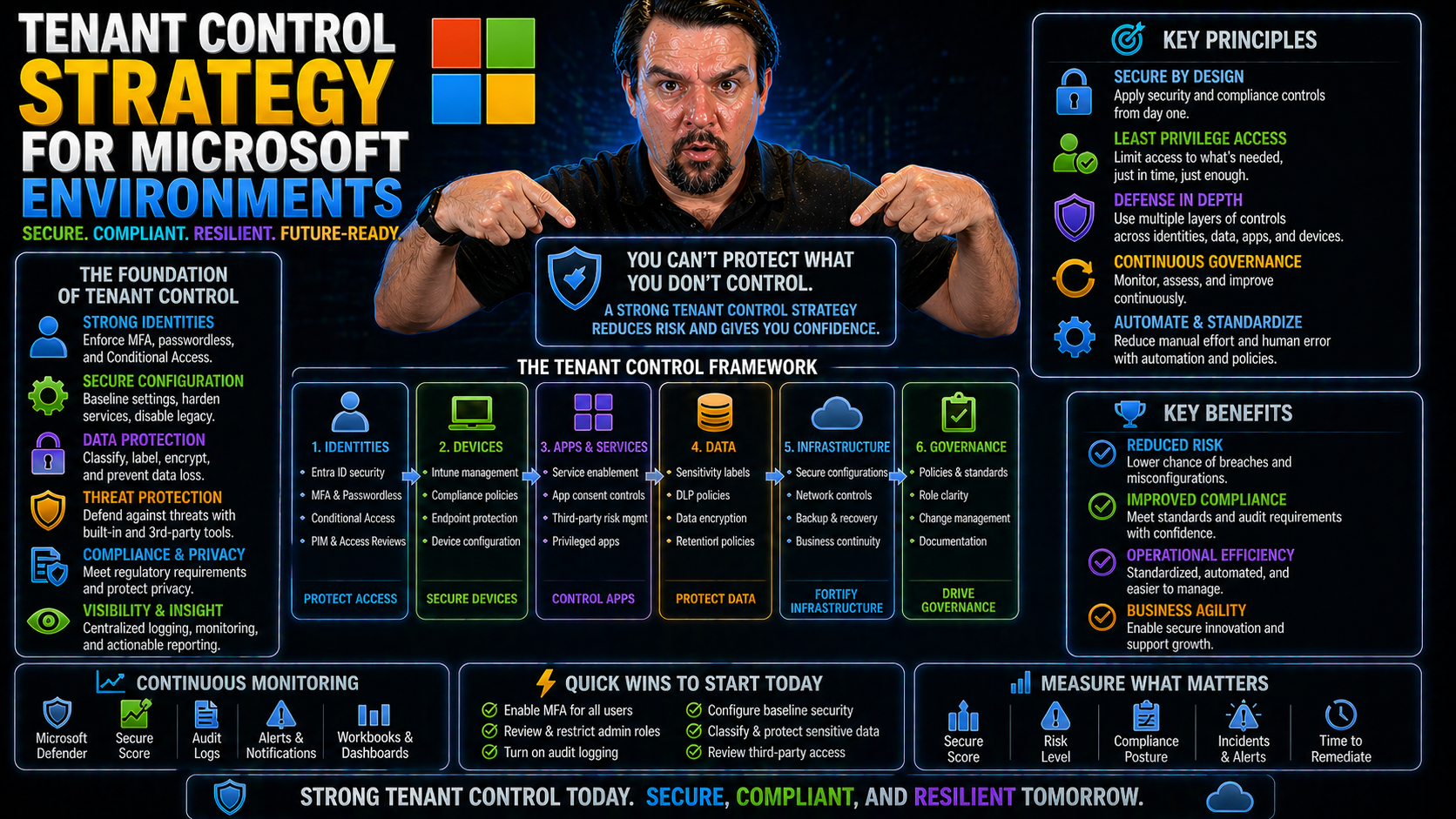
A tenant control strategy is simply your plan for managing and securing your organization's presence in Microsoft 365 and Azure. In these cloud environments, a "tenant" is your isolated slice of the Microsoft cloud—everything from users and data, to applications and settings lives inside this container.
Developing a strong tenant control strategy is essential for organizations of all shapes and sizes. Without good control, you can end up with security holes, runaway access, and compliance headaches down the road. With strict governance and the right settings, your tenant can stay safe, compliant, and ready for collaboration at scale.
This guide will walk you through what tenant control really means, the critical principles you’ll need, and step-by-step building blocks for rock-solid governance, so you can keep risk low, productivity high, and compliance on autopilot.
Tenant Control for Microsoft Environments — Definition
Tenant Control for Microsoft Environments is the set of policies, configurations and governance practices organizations use to manage and secure a Microsoft 365 or Azure Active Directory tenant. It defines who can create and manage resources, how identities and devices are protected, how data sharing and application access are governed, and how monitoring and compliance are enforced across the tenant.
Short Explanation: Implementing a tenant control strategy for Microsoft environments ensures consistent, least-privilege access and reduces risk from misconfiguration or unauthorized changes. Key components include identity and access management (conditional access, multi-factor authentication, privileged identity management), tenant and subscription-level configuration controls (resource and subscription boundaries, management groups), application and API governance (enterprise app consent policies, app permissions review), data protection (data loss prevention, sensitivity labels, encryption) and monitoring (audit logs, alerting, security posture assessments). Together these controls enable centralized governance, operational consistency, regulatory compliance and faster incident detection and response within Microsoft 365 and Azure tenants.8 Surprising Facts About Tenant Control Strategy for Microsoft Environments
- Strong tenant control can reduce lateral movement more effectively than many network segmentation projects—because modern Microsoft environments centralize identity and workloads, locking down tenant-level policies often prevents cross-tenant compromise.
- Tenant control strategy for Microsoft environments can significantly lower licensing costs by enabling centralized governance and reallocation of unused entitlements across subscriptions and tenants.
- Implementing tenant-level Conditional Access policies can block risky administrative actions before they reach resource-level controls, making prevention more efficient than reactive monitoring alone.
- Azure and Microsoft 365 tenants can use delegated administration models that let third-party vendors perform support without full tenant owner privileges—reducing risk while preserving operational flexibility.
- Tenant control enables automated compliance evidence collection across services (Azure, Intune, Defender, Exchange) so audits that once took weeks can be reduced to hours with the right policy orchestration.
- Misconfigured tenant trust relationships and guest access are a more common cause of cross-tenant data leakage than external-facing application vulnerabilities in many Microsoft environments.
- Centralized tenant configuration drift detection (guardrails for Security Baselines, Intune, and Azure Policy) can prevent systemic failures at scale; a single corrected policy can remediate thousands of endpoints or subscriptions.
- Tenant control strategy for Microsoft environments is not just security — it materially improves developer velocity by providing predictable platform boundaries and self-service capabilities while preserving governance.
Understanding Tenant Control in Microsoft 365 and Azure
When we talk about tenant control in Microsoft 365 and Azure, we're talking about managing everything that happens within your specific cloud environment. A ‘tenant’ in Microsoft’s world is your organization’s dedicated container—separated from other customers—where your users, data, and settings live. This setup is known as multi-tenant architecture, meaning many customers share the same physical infrastructure but are logically isolated from each other.
With so much critical data flying around your tenant—think emails, files, teams, apps, cloud identities—the need for granular control becomes obvious. You have to decide who gets access, what actions they’re allowed to take, and which resources they can see. This isn’t a “set it and forget it” operation; every permission and policy matters, because one mistake can put the whole shop at risk.
Effective tenant control starts with the basics: identity management, role assignments, data security settings, and compliance controls. But it goes further—requiring ongoing monitoring and regular auditing for suspicious activity or policy gaps. In highly regulated industries or larger enterprises, tenant control is vital for meeting legal requirements and passing audits.
In short, tenant control is the safety net that keeps your cloud environment locked down, compliant, and under your command—no matter how fast your organization grows or changes.
Common Mistakes About Tenant Control Strategy for Microsoft Environments
Below are frequent mistakes teams make when planning or operating a tenant control strategy for Microsoft environments, plus concise explanations and corrective actions.
1. Treating Tenant Control as a One-Time Project
Mistake: Designing and implementing controls once, then assuming they remain effective indefinitely. Correction: Establish a continuous governance cycle with periodic reviews, change control, and automated monitoring to adapt to new features, threats, and business changes.
2. Overcentralizing or Overrestricting Access
Mistake: Applying blanket restrictions that hinder productivity or force risky workarounds. Correction: Use least-privilege principles, role-based access controls, and just-in-time privilege elevation. Balance security with business needs by defining use-case-driven policies.
3. Ignoring Identity and Authentication Hardening
Mistake: Underestimating identity risk—weak MFA, legacy authentication left enabled, or unmanaged service accounts. Correction: Enforce strong MFA, block legacy authentication where possible, manage service principals and app registrations, and implement conditional access policies.
4. Failing to Segment Tenants and Workloads Properly
Mistake: Using a single tenant for unrelated business units or sensitive workloads without proper isolation. Correction: Define tenant boundaries based on trust, compliance, and administration needs; use separate tenants or robust cross-tenant governance patterns when necessary.
5. Not Defining Clear Ownership and Governance Roles
Mistake: Unclear responsibilities for tenant configuration, security, and lifecycle management. Correction: Document roles (tenant owners, security admins, subscription owners), establish approval processes, and maintain runbooks for common operations.
6. Neglecting Automation and Policy-as-Code
Mistake: Relying on manual changes that lead to drift and inconsistent enforcement. Correction: Automate guardrails using policy frameworks (e.g., Azure Policy, Microsoft Graph automation), infrastructure as code, and CI/CD for tenant configuration.
7. Overlooking Third-Party and App Integration Risks
Mistake: Allowing uncontrolled app registrations, excessive permissions for third-party apps, or unmanaged consent. Correction: Implement app consent policies, review and restrict permissions, require approved app lists, and monitor OAuth and delegated permissions.
8. Inadequate Monitoring, Logging, and Alerting
Mistake: Poor telemetry and slow detection of suspicious activity. Correction: Centralize logging (Azure AD logs, audit logs, activity logs), enable advanced threat detection (e.g., Defender for Cloud Apps), and configure meaningful alerts and runbooks for response.
9. Neglecting Cross-Tenant Collaboration and B2B Controls
Mistake: Allowing unmanaged external collaboration that exposes data inadvertently. Correction: Configure Azure AD B2B controls, entitlement management, and external collaboration settings to limit access and enforce conditional access for guests.
10. Inconsistent Compliance and Data Residency Considerations
Mistake: Failing to align tenant strategy with regulatory, contractual, or data residency requirements. Correction: Map compliance requirements to tenant design, apply data classification and retention policies, and use appropriate tenant/region placement.
11. No Plan for Tenant Lifecycle and Mergers/Acquisitions
Mistake: Lacking processes for onboarding, offboarding, consolidation, or divestiture of tenants. Correction: Define lifecycle processes, migration patterns, and remediation checklists for mergers, acquisitions, and divestitures.
12. Underestimating Cost and Licensing Impacts
Mistake: Designing tenant architecture without considering license tiers, cost of security features, or subscription sprawl. Correction: Evaluate licensing needs, cost optimization, and governance to avoid unnecessary expenses while meeting security requirements.
13. Poor Communication and Training for Administrators and Users
Mistake: Rolling out controls without educating admins and end users, causing confusion and shadow IT. Correction: Provide role-based training, publish clear policies and support channels, and involve stakeholders early in design decisions.
14. Relying Solely on Default Configurations
Mistake: Assuming out-of-the-box settings are sufficient for security and governance. Correction: Review and harden default settings, apply additional policies, and baseline configurations aligned to organizational risk profiles.
15. Ignoring Recovery and Incident Response Planning
Mistake: Not preparing for tenant compromise or misconfiguration incidents. Correction: Create and test incident response plans for tenant-level events, maintain backups for critical configurations, and practice tabletop exercises.
Key Principles of an Effective Tenant Control Strategy
- Least Privilege – Give users only the access they absolutely need, nothing more. In Microsoft 365 and Azure, this means using custom roles, group-based access, and just-in-time permissions over broad admin rights. It limits blast radius if an account is compromised.
- Zero Trust – Never trust by default, always verify. Even trusted users and devices must pass continual checks. Zero Trust by Design in Microsoft platforms means adaptive authentication, risk-based access controls, and tight session policies everywhere.
- Separation of Duties – Avoid letting one person hold all the keys. In practice, split admin tasks—backups, configuration, billing—across different trusted staff to close off abuse and mistakes.
- Visibility – You can’t protect what you can’t see. Make sure you have comprehensive logs and dashboards for sign-ins, file access, sharing, and configuration changes across Microsoft 365 and Azure.
- Auditing – Regularly check user activity with tools like Microsoft Purview Audit. Audits help uncover risky behavior, trace incidents, and demonstrate compliance. Upgrading to Purview Audit Premium is wise for regulated industries.
- Automation – Lean on automation for policy enforcement and reporting. Use scripts, policies, and alerting tools to reduce human error and react quickly to trouble, freeing up IT to focus on the tough stuff.
Building Blocks for Microsoft Tenant Governance
Once you grasp the principles, you’ll need to put them into practice with the right building blocks. In Microsoft environments, tenant governance boils down to how you identify people, grant access, safeguard data, and ensure compliance day-to-day.
This phase is less about high-level strategy and more about hands-on tools, settings, and workflows. You’ll manage roles, configure access controls, set up policies, and deploy monitoring solutions tailored to your organization’s needs. The right mix of settings and processes brings structure and accountability to your Microsoft 365 or Azure tenant.
Identity and access management forms the core of tenant governance, ensuring every user has appropriate rights and nothing extra. Data security and compliance fundamentals wrap a protective shield around your most sensitive assets, balancing security with usability.
Think of these governance building blocks as your toolkit—every tool has its place, from identity management and encryption to auditing and external sharing controls. In the next sections, we’ll dive deeper into these components, showing you exactly what to prioritize and how to implement controls that actually hold up to real-world challenges.
Identity and Access Management Fundamentals
- User Provisioning: Begin onboarding new users efficiently through automated processes in Microsoft Entra ID. Assign licenses, set roles, and validate user attributes, ensuring access aligns strictly with job responsibilities. Remove unused or inactive accounts through regular reviews to cut down on potential vulnerabilities.
- Multi-Factor Authentication (MFA) Policies: Enforce MFA for all users, especially for admins and external collaborators. A strong MFA policy (like using app-based authentication and adaptive risk checks) dramatically reduces the risk of account takeovers.
- Conditional Access: Set up rules restricting access to sensitive apps and data. With Microsoft Entra ID and Conditional Access, you can require sign-in only from managed devices or trusted locations and block risky behaviors. Continuously revisit policies to avoid “identity debt”—where outdated or overlapping rules leave security gaps, as discussed in the security loop podcast.
- Granular Permissions: Avoid one-size-fits-all access. Use group membership, role-based access controls, and just-in-time elevation to keep permissions tight. Regularly audit admin and privileged roles to catch drift or unconscious over-permissioning.
- Controlling External Sharing: Carefully manage if, how, and with whom data is shared outside your organization. Set up policies for guest accounts, monitor sharing invitations, and use Conditional Access and app consent to avoid shadow IT and runaway risk. You'll find more practical advice in the Conditional Access trust issues episode.
Data Security and Compliance Essentials
- Data Loss Prevention (DLP) Policies: Implement DLP controls across Microsoft 365, including Exchange, SharePoint, and OneDrive. This prevents leaks of sensitive data (like credit card numbers) through emails or documents. For automation and integrations, see best practices for DLP in the Power Platform here and a practical walkthrough here.
- Encryption Policies: Always encrypt data at rest and in transit using Microsoft 365’s built-in encryption for services like Exchange Online and Azure Storage. Apply Information Protection labels to classify and automatically protect files and emails.
- User Activity Auditing: Use Microsoft Purview Audit for comprehensive logging of user actions across the tenant. This enables forensic investigations, compliance audits, and detection of unusual or risky events. A full guide to Purview Audit and its tiers is provided here.
- Secure Sharing Controls: Enforce access expiration, watermarking, or download restrictions for shared documents. Ensure only approved users, guests, or groups can access or collaborate on files through robust policy and review.
- Compliance Alignment: Use native Microsoft tools for policy management, such as Compliance Manager, to keep up with GDPR, HIPAA, and other regulations. Schedule frequent compliance checks, especially when introducing new services or changes to tenant configuration.
Monitoring and Managing Shadow IT Risks
- Discover Shadow IT: Use tools like Microsoft Defender for Cloud Apps and Entra ID logs to spot unsanctioned apps, unexpected data connections, or rogue OAuth grants inside your tenant. For a practical, step-by-step guide, see this Shadow IT remediation plan.
- Assess and Prioritize Risks: Evaluate which shadow IT activities truly pose risks (like external sharing with unknown domains or access granted to deprecated apps). Flag high-risk apps for immediate action while educating users on safe practices.
- Control App Consent and External Access: Set up app consent policies to block or require approval for apps asking for broad permissions. Use Conditional Access and standardized approval workflows to contain guest access and limit external data flows.
- Mitigate Emerging Threats: Don't ignore modern challenges like AI agents running with human identities and excessive Graph API permissions. For cutting-edge strategies, check out AI agents and Shadow IT governance.
- Maintain Productivity without Sacrifice: Build policies and workflows that keep a lid on risk but don’t squash productivity. Short, time-bound remediation sprints and communication can help, as recommended in the linked guides.
Automation and Policy Enforcement in Tenant Control
- Automate Configuration Management: Use PowerShell scripts to standardize settings, manage users, and enforce compliance at scale across Microsoft 365 and Azure tenants. This reduces manual mistakes and speeds up routine changes.
- Policy Enforcement with Microsoft Purview: Leverage Microsoft Purview to build audit-ready policies for document management and data loss prevention. Set lifecycle rules, retention, and DLP for consistent data protection and compliance, especially in collaboration with business teams.
- Security Center Policies: Apply baseline policies in Microsoft 365 Defender and Azure Security Center to automate responses to detected threats, enforce password policies, and trigger alerts for suspicious activities.
- Incident Response Automation: Configure automated playbooks to investigate and remediate threats quickly—whether it’s revoking compromised sessions, disabling accounts, or locking down risky sharing.
- Continuous Monitoring and Alerts: Set up dashboards and automated alerting for critical changes—new admin assignment, external sharing, or violation of sensitive policies. This lets you respond proactively before issues spiral.
Continuous Improvement of Tenant Management Strategies
- Ongoing Training: Keep admins and key users up-to-date through regular security and governance workshops.
- Policy Reviews: Schedule frequent reviews of access rights, app consent, and DLP settings to adapt to evolving threats.
- Stakeholder Feedback: Gather feedback from end-users and business leaders to fine-tune control policies for both security and usability.
- Stay Current: Monitor Microsoft update announcements and community best practices to ensure your tenant management strategy stays ahead of changes and new features.
Common Pitfalls and Mistakes in Tenant Control
- Over-Permissioning: Granting broad access to users and admins instead of adopting least privilege principles can expose sensitive data and critical settings.
- Neglecting Guest Access: Failing to manage or monitor guest accounts—such as contractors or external partners—can create security gaps, especially if they linger unused or have misconfigured permissions.
- Ignoring Activity Logs: Without regular auditing, you’ll miss suspicious actions and compliance issues. Make full use of tools like Microsoft Purview Audit for proactive oversight.
- Misplaced Data Governance: Don’t rely on tools not meant for long-term app data, like building systems on SharePoint Lists. For complex scenarios, see why organizations should move to Dataverse in this governance guide.
- Fragmented Ownership: Splitting governance across silos leads to missed details and accountability gaps. A system-first approach ties all tools together and avoids critical governance failures.
Best Practices and Resources for Mastering Tenant Control Strategy
- Establish Clear Guardrails: Implement baseline policies for identity, access, DLP, and encryption from day one. Automate enforcement and review for effectiveness regularly.
- Enforce Least Privilege and Zero Trust: Use just-in-time role elevation, strict Conditional Access, and session monitoring to reduce attack surface. For Microsoft Copilot and Power Platform, apply advanced practices as outlined in this Copilot Purview governance guide.
- Automate and Monitor Everything: Lean on PowerShell, Microsoft Purview, and Security Center for continuous, reliable governance. Don’t let exception creep or manual gaps undermine your strategy.
- Design for Scale and Compliance: Use Azure Policy, RBAC with PIM, and managed landing zones to scale securely, as described in the Azure enterprise governance playbook.
- Tap Into Trusted Resources: Stay sharp with Microsoft Learn materials, official documentation, and hands-on podcasts like M365 FM for the freshest guidance, expert interviews, and step-by-step advice.
By following these best practices and leveraging expert resources, you’ll have a strong, adaptable tenant control strategy that stands up to today’s threats and tomorrow’s changes—keeping your data safe and your users productive.
Tenant Control Strategy for Microsoft Environments - Checklist
multi-tenant environment strategy for your organization
power platform and microsoft entra tenant governance
What is a tenant control strategy for Microsoft environments?
A tenant control strategy for Microsoft environments is a documented approach that defines how you will secure, configure, and manage multiple tenants and multiple environments such as production environment, development environment, and test environment across tenants. It includes decisions about microsoft 365 tenant structure, microsoft entra tenant governance, tenant configurations, use multiple environments for development and production, and policies for power platform environments and microsoft dataverse to enable secure and consistent operations at scale.
Why should my organization develop a tenant environment strategy?
Develop a tenant environment strategy to adopt consistent controls, reduce operational complexity, and support adoption of power platform and dynamics 365. A clear strategy for your organization helps you manage multi-tenant environments at scale, enforce security group policies across tenants, and provide predictable environments at scale for developers, admins, and business users.
How do I decide between single tenant and multi-tenant approaches?
Decide based on isolation needs, regulatory requirements, and cost. A single tenant offers strong isolation for sensitive workloads, while multi-tenant environments and multiple tenants enable standardized management and lower cost. Consider microsoft cloud constraints, production environment isolation needs, and how power platform admin and microsoft entra tenant governance will be implemented across multiple environments before selecting the tenant strategy.
What are the recommended types of environments to provision (production, test, development)?
Common types of environments include production environment, development environment, and test environment. For power platform environments you may also add sandbox or QA environments. Use multiple environments to separate deployment stages, protect microsoft dataverse data in production, and enable safe testing of power apps and power automate flows within a managed environment or platform center of excellence.
How can I secure and manage multi-tenant environments at scale?
Secure and manage multi-tenant environments at scale by applying microsoft entra tenant governance, centralized identity and access controls, security group memberships across tenants, conditional access policies, and automated configuration via tenant configuration management apis. Establish a platform center of excellence starter model to enforce security baselines and provide governance across environments and different tenants.
What role does Microsoft Entra play in tenant strategy?
Microsoft Entra provides identity and governance capabilities critical to tenant strategy, including cross-tenant trust models, conditional access, identity protection, and centralized role assignments. Using microsoft entra tenant governance helps you control access across tenants, manage guest access across multiple environments, and apply consistent security group and identity policies across multiple tenants.
How should I manage power platform adoption across tenants?
To manage adoption of power platform across tenants, create an adoption plan that includes environment strategy to adopt power platform, a platform center of excellence, governance policies for power apps and power automate, and tenant-level controls for power platform admin. Provide managed environment guidance, training, and templates to accelerate safe adoption across environments and different tenants.
Can I use tenant configuration management APIs to automate governance?
Yes. Tenant configuration management apis let you automate recurring tasks such as provisioning environments, applying policies across multiple environments, configuring microsoft 365 tenant settings, and enforcing security group roles. Automation helps you manage microsoft at scale and reduces human error when you manage multi-tenant environments at scale.
How do I handle data residency and compliance across different tenants?
Address data residency and compliance by mapping regulatory requirements to tenant and environment placement, using single tenant isolation for sensitive data when required, and configuring microsoft dataverse and dynamics 365 storage locations appropriately. Apply microsoft entra tenant governance and compliance controls across tenants and document the approach in your tenant strategy.
What is a platform center of excellence and why is it important?
A power platform center of excellence is a centralized team and set of practices that guide adoption of power platform, manage governance, create templates, and provide training. It helps enforce policies across power platform environments, ensures consistent deployment practices across tenants, and accelerates secure usage of power apps and power automate.
How do I manage identity and security groups across tenants and environments?
Manage identity and security groups by using microsoft entra features like cross-tenant access settings, Azure AD entitlement management, and centralized group lifecycle processes. Use automation to synchronize or provision security groups consistently across tenants and enforce role-based access in each environment to reduce risk within a tenant or across multiple tenants.
What are best practices for organizing multiple environments within a tenant?
Best practices include naming conventions that reflect environment purpose (development, test, production), separating environments for compliance and testing, applying environment-level policies for power platform environments, and using managed environment capabilities to control who can create and publish power apps. Document the lifecycle and promotion path between different environments to ensure consistency.
How should I approach tenant and environment cost management?
Approach cost management by consolidating where appropriate across multiple tenants, tagging resources and environments for chargeback, using standardized sizing for environments, and reviewing power platform and microsoft 365 licenses. Evaluate whether multiple tenants deliver sufficient business value versus the administrative overhead when you manage multiple tenants and environments at scale.
When should I use separate tenants for dynamics 365 or Microsoft 365 workloads?
Use separate tenants when regulatory isolation, distinct identity boundaries, or mergers/acquisitions require it. Dynamics 365 and microsoft 365 tenant separation can simplify compliance and minimize blast radius, but increases complexity for managing cross-tenant collaboration and synchronization. Weigh the trade-offs in your tenant strategy and consider microsoft entra tenant governance to manage access across tenants.
How do I update or change my tenant control strategy as the organization evolves?
Update your tenant control strategy by conducting periodic reviews tied to changes in business, regulatory, or technical requirements. Maintain a change management process, use tenant configuration management apis to apply updates consistently, and involve stakeholders such as power platform admin, security, and compliance teams. Continuously refine your strategy to support environments at scale and new adoption of power platform and related Microsoft Cloud services.
You Should Also Listen To
If you are exploring Microsoft tenant control strategy, these episodes add practical context for turning Microsoft 365 security and governance concepts into workable controls.
- Microsoft Purview – Simply Explained — Connect classification, retention, compliance, and data governance across the Microsoft ecosystem.
- Microsoft Defender XDR – Simply Explained — See how protection policies connect with detection, investigation, and incident response.
- Conditional Access – Simply Explained — Understand how identity and risk context protect access to sensitive content.
- Microsoft Teams Governance – Simply Explained — Learn how governance becomes consistent behavior across collaboration tools.
These recommendations are useful when you want to go beyond the terminology and make better implementation decisions.

Microsoft MVP | Host of M365.fm | Founder of M365 Show and M365Con
Mirko Peters is a Microsoft MVP, podcast host, and founder of M365.fm, M365 Show, and M365Con. His work connects Microsoft practitioners through podcast interviews, livestreams, and community events.
At M365.fm, Mirko hosts conversations with Microsoft MVPs, product experts, architects, and community contributors. Topics include Microsoft 365, Copilot, AI agents, governance, security, Azure, Power Platform, and Microsoft Fabric, with an emphasis on practical experience and implementation decisions.
M365.fm is the podcast and learning platform. M365 Show brings experts together for livestreams, while M365Con provides an online conference setting for community learning.
Official website: Mirko Peters (https://www.mirkopeters.com/). Recognition: Mirko Peters — Microsoft MVP profile (https://mvp.microsoft.com/de-DE/mvp/profile/9b0ca797-db5a-493a-a845-8b9158046cf5). Connect on LinkedIn (https://www.linkedin.com/in/m365showpodcast/).





