
Unlocking AI Innovation Safely: Managing the AI Governance Gap in Microsoft 365
Welcome back to the podcast! If you have been following our recent episodes, you know we have been deep-diving into the operational realities of modern cloud environments. Today, we are expanding on a topic that is keeping IT administrators, security professionals, and compliance officers up at night: the delicate balance between pushing the boundaries of AI innovation and maintaining rigorous control over your data. Specifically, we are looking at how tools like Microsoft 365 Copilot increase productivity while simultaneously introducing new attack surfaces and data exposure risks. If you want to dive deeper into how Teams environments are uniquely impacted by these shifts, be sure to listen to our related episode, Close the Microsoft Teams Channel Governance Gap.
As organizations race to adopt cutting-edge artificial intelligence, they often overlook the underlying infrastructure required to support it safely. In this post, we will unpack what the governance gap really means, why it happens, the security and compliance risks involved, and actionable strategies you can implement right now to close that gap.
Understanding the Governance Gap
What Is the Governance Gap?
The governance gap describes the difference between how organizations use Microsoft 365 and how they manage its security and compliance. Many companies adopt new tools like Microsoft 365 Copilot quickly, but their governance frameworks do not keep up. This gap appears when teams use Microsoft Teams and other services without clear rules or oversight.
- Most Fortune 500 companies now use Microsoft 365 Copilot, but only a small number have fully developed governance programs.
- Many organizations remain in the early stages of digital governance, with only 25% having a complete AI governance plan.
- The rapid growth of Microsoft 365 often outpaces the creation of strong governance in microsoft 365.
This gap means that while organizations enjoy the benefits of collaboration and AI, they may not have the controls needed to protect their data and users.
Why the Gap Matters
The governance gap has real consequences for organizations. Without strong governance in microsoft 365, teams face confusion and risk. Problems often arise because no one knows who is responsible for managing data or enforcing policies.
- Fragmented ownership leads to disputes instead of solutions.
- Siloed processes make it hard to manage Microsoft 365 as a whole, since each tool gets treated separately.
- Omissions in governance leave important data boundaries unclear, which can result in accidental data leaks.
Digital governance helps organizations avoid these problems by creating clear rules and responsibilities. When teams do not address the governance gap, they risk losing control over their information and processes.
Hidden Risks in Microsoft 365
Many risks in Microsoft 365 stay hidden until they cause trouble. For example, almost half of all accounts do not use multi-factor authentication, which leaves them open to attacks. The connected nature of Microsoft 365 means that ignoring one service, like SharePoint, can create problems in others, such as Teams or Exchange.
- Stale data builds up over time, leading to outdated information being used for important decisions.
- AI tools like Copilot may give wrong answers if they rely on old or irrelevant data.
- Organizations often do not understand how their data gets used, which makes it hard to improve governance in microsoft 365.
Most organizations do not find these risks until something goes wrong. Gaps in governance in microsoft 365 usually show up during audits or after a security incident. Teams often discover unmanaged content and oversharing only when compliance failures occur.
- Data sprawl grows as users create new Teams and sites every day.
- Compliance gaps become visible at critical moments, showing that digital governance was not proactive.
- Without clear standards, organizations react to problems instead of preventing them.
Note: Proactive digital governance in microsoft 365 helps organizations spot risks early and keep their data safe.
Causes of Governance Gaps in Microsoft 365
Rapid Adoption Without Planning
Many organizations move to microsoft 365 quickly to boost collaboration and productivity. They often skip the planning phase. This rush creates gaps in governance in microsoft 365. Teams may overshare files or set up channels without clear rules. Labels for sensitive data become inconsistent. Data loss prevention features might be enabled but not enforced. Retention policies can have gaps, and ownership of channels or files may remain unclear.
- Oversharing of documents and information
- Inconsistent labeling of sensitive data
- Data loss prevention enabled but not enforced
- Retention gaps across Teams and SharePoint
- Unclear ownership of channels and files
These issues make it hard to track who has access to what. They also increase the risk of accidental data leaks. Without a solid plan, organizations struggle to keep up with the pace of change in microsoft 365.
Shadow IT and Unmanaged Teams
Shadow IT happens when employees use apps or services without approval from the IT department. In microsoft 365 environments, this often means users create Teams or channels outside official processes. These unmanaged Teams can lead to security risks and compliance problems.
| Statistic | Value |
|---|---|
| Average number of unknown cloud services in a company | 975 |
| Average number of known cloud services in a company | 108 |
| Percentage of unsanctioned SaaS applications used by enterprises | 52% |
| Percentage of employees at Fortune 1000 companies using unapproved SaaS | 67% |
| Percentage of businesses encountering cyber incidents due to shadow IT | 11% |
| Estimated percentage of IT expenditure that is shadow IT | 30-40% |
| Percentage of employees acquiring technology without IT knowledge | 41% |
| Expected increase in employees acquiring technology without IT knowledge | 75% by 2027 |
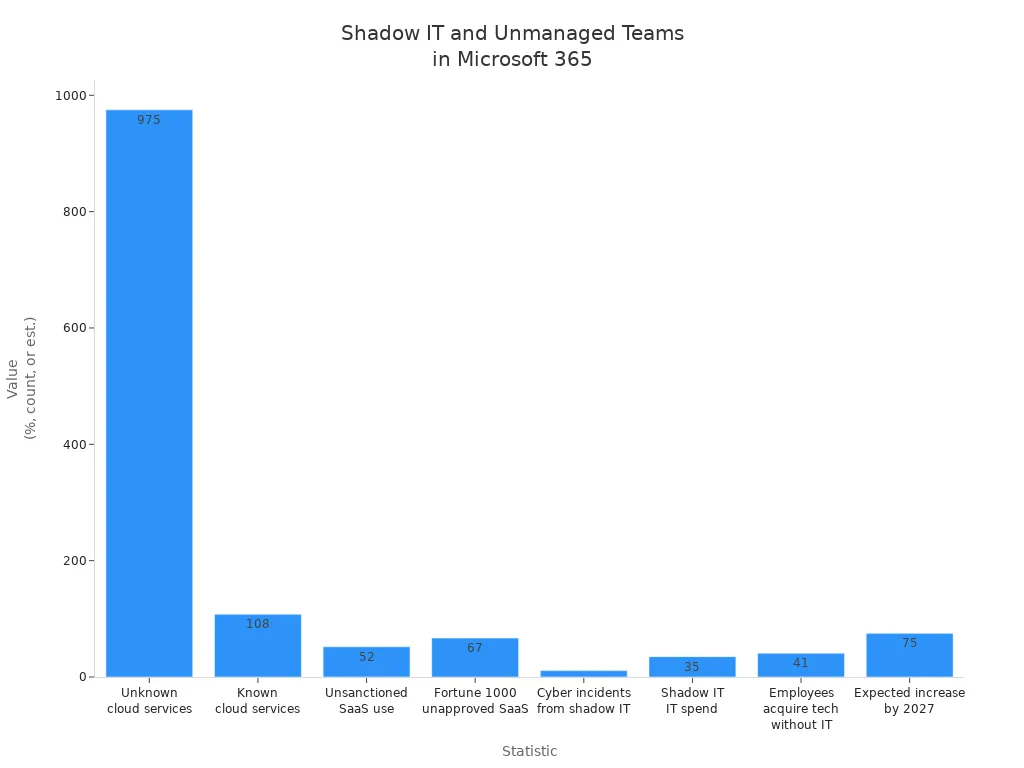
These numbers show that shadow IT is a major challenge for governance in microsoft 365. Unmanaged Teams can bypass data loss prevention and permissions management, making it difficult to protect sensitive information.
Inconsistent Policy Enforcement
Policy enforcement in microsoft 365 must be consistent to keep data safe. Many organizations face problems because they set up policies once and never review them. They may believe governance is a one-time project, but it requires ongoing attention.
- Policy configuration errors can cause multiple rules to detect the same data types.
- Some policy settings do not work with all versions of Outlook.
- External sharing conditions can affect policy tips in SharePoint Online and OneDrive for Business.
- MailTips and policy tips must be enabled for Outlook clients.
- Legacy Exchange Online data loss prevention policies should be updated to avoid issues.
Organizations sometimes forget to set up email authentication protocols like SPF, DKIM, and DMARC. They may leave anti-phishing and anti-spam policies at default settings. These missteps increase the risk of phishing and spoofing attacks. Regular reviews and updates help close the governance gap in microsoft 365.
Lack of Visibility and Reporting
Visibility and reporting play a crucial role in maintaining strong governance in microsoft 365. Many organizations struggle to track who accesses information, how data moves, and where sensitive files are stored. Without clear reporting, teams cannot identify risks or enforce data loss prevention policies. This lack of oversight leads to gaps that threaten security and compliance.
Teams often create channels in Microsoft Teams without proper monitoring. Administrators may not see which users share files or invite guests. When reporting tools do not provide real-time insights, unauthorized access can go unnoticed. Data loss prevention becomes less effective because teams cannot spot violations quickly. As a result, sensitive information may leave the organization without warning.
| Impact of Low Governance Maturity Levels | Description |
|---|---|
| Lack of Compliance Attention | Organizations at level 100 maturity show minimal focus on compliance, lacking necessary policies and procedures. |
| Risk of Data Breaches | Absence of controls and training increases the likelihood of sensitive data exposure and theft. |
| Increased Costs and Inefficiencies | Elevated eDiscovery costs and inefficiencies arise from unstructured information and excessive document search times. |
| Emergence of Shadow IT | Employees may create unauthorized document storage solutions, leading to governance challenges. |
| Unclear Accountability | Lack of clarity in information governance can result in uncontrolled data sprawl and loss risks. |
Teams that do not use reporting features in microsoft 365 face higher risks. They may miss signs of data sprawl or shadow IT. Unclear accountability makes it difficult to assign responsibility for data loss prevention. When organizations lack visibility, they spend more time searching for documents and less time protecting information.
Note: Regular reporting helps teams spot unusual activity and enforce data loss prevention policies. Administrators can use dashboards to track file sharing, guest access, and channel creation. These tools help organizations respond to threats before they become incidents.
Governance in Microsoft 365: Operational Challenges
Complexity of the Microsoft 365 Ecosystem
The Microsoft 365 ecosystem includes many applications, such as Teams, SharePoint, and OneDrive. Each tool offers unique features, but this variety creates challenges for organizations. Users must learn how to manage settings and connect different services. Administrators often find it difficult to keep track of all the changes and updates.
| Category | Description |
|---|---|
| Integration | Challenges in integrating various applications within the Microsoft 365 ecosystem. |
| Customer Support | Difficulties in obtaining timely and effective support for users navigating the ecosystem. |
| Design & Complexity | The intricate design of the platform complicates user experience and governance. |
| Privacy & Security | Concerns regarding data privacy and security due to the complexity of managing multiple applications. |
| Cost & Pricing | Issues related to understanding the pricing structure and managing costs effectively. |
| Performance & Compatibility | Challenges in ensuring compatibility and performance across different applications and services. |
Self-service features give employees more freedom, but they also make governance harder. Organizations must balance user independence with strong security and permissions controls. Effective governance helps protect data and ensures compliance with company policies.
Decentralized Administration
Many organizations use decentralized administration in Microsoft 365. This means different departments or teams manage their own settings and users. While this approach can speed up decision-making, it often leads to inconsistent security and permissions practices.
A fragmented approach increases the effort needed to monitor compliance. Administrators may not know who controls certain Teams or channels. Manual governance tasks become time-consuming and prone to mistakes. Continuous monitoring is essential to identify changes and maintain compliance across the organization.
- Continuous monitoring is essential for compliance.
- Managing settings across various tools is complex.
- Manual governance tasks are labor-intensive and prone to human error.
When organizations do not coordinate their efforts, they risk gaps in security and permissions. Regular reviews and clear communication help reduce these risks.
User and Access Management
User and access management forms the foundation of strong governance in Microsoft 365. Administrators must control who can access sensitive information and what actions they can perform. Best practices include enabling multi-factor authentication for all users. This step protects accounts from unauthorized access.
Secure password policies also play a key role. Weak passwords make it easier for attackers to gain entry. Admin accounts should always use multi-factor authentication because they have higher levels of access and risk. These steps help organizations maintain strong security and permissions.
- Enable multi-factor authentication for all users.
- Use secure password policies.
- Prioritize admin accounts for extra protection.
By following these practices, organizations reduce the risk of data breaches and improve their overall security and permissions posture. Ongoing governance processes ensure that user access remains appropriate as teams and projects change.
Lifecycle Management Issues
Lifecycle management in Microsoft 365 presents ongoing challenges for organizations. As teams create new channels and projects, administrators must keep track of every asset’s status and ownership. Without a structured process, Teams and channels can quickly become outdated or unmanaged, leading to security and compliance risks.
Orphaned Teams and Channels
Orphaned Teams and channels occur when no active owner remains to manage them. This situation often arises when employees leave the company or change roles. Without an owner, no one monitors membership, permissions, or content. Guests and external users may stay in Teams indefinitely, which increases the risk of unauthorized access. Orphaned channels can also hold sensitive or outdated information that no one reviews or deletes.
Owners play a key role in lifecycle management. They manage who can join or leave, set permissions, monitor activity, and ensure compliance with policies.
| Responsibility | Description |
|---|---|
| Team Membership Management | Owners manage who can join or leave the Team, including Guests. |
| Control Over Policies | Owners set permissions for creating channels and managing settings. |
| Lifecycle Management | Owners can edit, delete, renew, archive, or restore Teams. |
| Activity Monitoring | Owners track team activity to address issues promptly. |
| Data Management | Owners ensure data security and compliance with regulations. |
| Compliance Assurance | Owners ensure adherence to laws and organizational policies. |
| Collaboration Promotion | Owners encourage effective collaboration among team members. |
Data Sprawl
Data sprawl happens when information spreads across too many Teams and channels without oversight. Users create new spaces for every project or topic, but few get cleaned up or deleted. Over time, this leads to clutter, making it hard to find important documents or track where sensitive data lives.
Unchecked data sprawl increases the risk of accidental data leaks and raises eDiscovery costs. Administrators must use reporting tools to monitor growth and enforce retention policies. Regular audits and clear ownership assignments help control data sprawl. By keeping Teams and channels organized, organizations improve security, reduce costs, and support compliance efforts.
Security and Compliance Risks

Data Leakage and Unauthorized Access
Data leakage and unauthorized access remain top concerns for organizations using Microsoft 365. Many companies face these risks due to misconfigurations and over-permissioned access. When permissions drift, users may see or share information they should not. This can lead to accidental data exposure and create compliance incident risks.
| Risk Type | Description |
|---|---|
| Misconfigurations and over-permissioned access | Permissions can drift, leading to accidental data exposure and compliance risks. |
| Data sprawl and retention policy conflicts | Difficulty in managing data due to unclear retention policies can complicate audits. |
| Insider risks and shadow IT | Internal users may unintentionally create risks by sharing files or using unauthorized apps. |
| Visibility and auditability gaps | Lack of clarity on data access and changes can lead to compliance blind spots. |
In 2021, 85% of companies using Microsoft 365 experienced a security breach. The global average cost of a data breach in 2023 reached USD 4.45 million. These numbers show the serious financial impact of a single incident. In one case, a compromised user accessed OneDrive, SharePoint, and Teams for seven days without detection. The root cause was a failure in security operations. Logs were collected but not reviewed, so no alerts were triggered. In another incident, a misconfiguration in Microsoft Azure exposed thousands of customer accounts and databases. This happened because a third-party partner made an error.
Regulatory Compliance Failures
Regulatory compliance failures can have severe consequences for organizations. When teams do not follow rules for handling sensitive data, they may face fines or legal action. Unclear retention policies and data sprawl make it hard to prove compliance during audits. A compliance incident often reveals these gaps too late.
Many organizations struggle to keep up with changing regulations. They may not update policies or train employees on new requirements. This increases the risk of a compliance incident. Visibility and auditability gaps make it difficult to track who accessed or changed important information. Without clear records, organizations cannot show that they followed the law.
Insider Threats and Human Error
Insider threats and human error play a major role in governance gaps within Microsoft 365. Employees may accidentally share sensitive files or use unauthorized apps. These actions can lead to data leaks and intellectual property theft. The complexity of managing data across multiple platforms increases these risks.
- Insider threats and human error are major factors leading to governance gaps in Microsoft 365.
- These issues can result in serious consequences such as data leaks and intellectual property theft.
- The complexity of managing data across multiple platforms increases the risks associated with insider threats.
Audit and Monitoring Gaps
Audit and monitoring gaps in Microsoft 365 create serious challenges for organizations. Many teams believe that once they set up their environment, their work is done. In reality, ongoing monitoring is essential for strong security and compliance. Without regular audits, organizations cannot see who accesses sensitive data or when changes occur.
AI Governance Gap in Microsoft 365
AI-Driven Content and Security
The rise of artificial intelligence in Microsoft 365 has changed how organizations manage content and security. Microsoft 365 Copilot generates documents, emails, and meeting notes at a rapid pace. This increase in AI-driven content can create challenges for governance. Many organizations find that AI-generated files do not follow a uniform structure. This lack of consistency makes it harder to manage, search, and audit information.
AI tools also add to the volume of data. Employees may feel overwhelmed by the amount of new content, which can hide important insights. The integration of AI with collaboration platforms sometimes leads to accidental sharing of sensitive information. Microsoft 365 Copilot can access and search across large amounts of organizational data, which increases the risk of data exposure. Security teams must adapt their strategies to address these new challenges and close the ai governance gap.
- AI-generated content may lack a uniform structure, complicating management and auditing.
- Increased data volume can lead to information overload, hiding critical insights.
- Integration with collaboration tools raises the risk of unintentional sharing of sensitive data.
- Rapid AI adoption can overwhelm employees, leading to resistance.
Automation and Workflow Risks
Automation tools like Power Automate help organizations streamline tasks in Microsoft 365. These tools can also introduce new risks if not managed carefully. Security vulnerabilities may appear when automated workflows lack proper oversight. Limited visibility into automation actions can create blind spots. Sensitive data might move outside the organization without anyone noticing.
Microsoft 365 Copilot can help monitor these workflows, but organizations must set up strict access controls. Role-based access control limits who can create or change automated flows. Data loss prevention policies stop sensitive information from leaving secure environments. Continuous auditing and robust monitoring ensure that every action is logged and reviewed. Disabling unnecessary automation tools reduces the attack surface and helps close the ai governance gap.
New Attack Surfaces
The integration of AI in Microsoft 365 has created new attack surfaces for organizations. Microsoft 365 Copilot can access sensitive data across the platform, which increases the risk of exposure if not properly managed. Security teams now have new responsibilities. They must focus on protecting the data used by AI applications and monitoring how AI interacts with organizational information.
| Key Findings | Description |
|---|---|
| Increased Risk | User adoption of generative AI has led to a rise in data security incidents, nearly doubling from 27% in 2023 to 40% in 2024. |
| New Responsibilities | The integration of AI has reshaped the responsibilities of data security teams, focusing on the security of data used by AI applications. |
| Data Exposure | Microsoft 365 Copilot can access and search sensitive data across an organization, increasing the risk of exposure. |
Balancing Innovation and Control
Organizations face a challenge when they introduce AI tools in Microsoft 365. They want to encourage innovation, but they must also keep control over security and compliance. Leaders need to find a balance that allows teams to use new technology without putting data at risk.
Many organizations start by defining clear objectives. They set goals that match their AI vision with business needs. This step helps everyone understand why the organization uses AI and what they hope to achieve. Teams also invest in scalable infrastructure. This means they build systems that can grow as AI use increases. Strong infrastructure supports efficient AI operations and reduces the risk of slowdowns or failures. High-quality data is another key factor. Teams must keep their data accurate and up to date. They enforce strong governance policies to make sure only the right people can access sensitive information.
- Define clear objectives that align AI vision with business goals.
- Invest in scalable infrastructure to support efficient AI operations.
- Maintain high-quality data and enforce strong governance policies.
Closing the Governance Gap: Strategies and Best Practices
Clear Governance Policies
Organizations must start by establishing clear governance policies. These policies define how teams manage information, set permissions, and protect sensitive data. Leaders create rules for channel creation, guest access, and document sharing. They also clarify roles and responsibilities for every team member. A governance board oversees these policies and ensures accountability.
Automated Policy Enforcement
Automated policy enforcement strengthens governance in microsoft 365. Teams use tools to set rules for data protection, access control, and compliance. Automation ensures policies apply consistently across all channels and teams. Microsoft 365 copilot enables context-aware governance at scale, monitoring content from creation to expiration.
Lifecycle and Access Management
Lifecycle and access management play a vital role in governance in microsoft 365. Teams must plan for every phase, from creation to decommissioning. Administrators analyze needs and define processes for each lifecycle stage. Standardized templates simplify team setup and approval workflows.
Advanced Reporting and Visibility
Strong governance in Microsoft 365 depends on advanced reporting and clear visibility. Organizations need to know who accesses data, when changes happen, and where sensitive information lives. Without this insight, teams cannot spot risks or enforce policies effectively.
Real-World Examples and Success Stories

Financial Services Case Study
A large financial services company faced challenges with data security and compliance in Microsoft 365. The company managed thousands of client records and needed to protect sensitive information. Teams often created new channels without clear rules. This led to confusion about who could access important files.
Manufacturing Case Study
A global manufacturing firm struggled with data sprawl and orphaned Teams. Employees created new Teams for every project, but many channels became inactive after the projects ended. Sensitive design files and contracts remained in these unused channels. The company worried about data leaks and high eDiscovery costs.
Building a Sustainable Governance Framework
Continuous Improvement
A sustainable governance framework in Microsoft 365 requires ongoing attention. Teams must review policies and processes regularly. Technology changes quickly, so organizations need to adapt their governance strategies. They should schedule periodic audits to check for gaps or outdated rules. Administrators can use feedback from users to improve workflows and address pain points.
Aligning Governance with Business Goals
Governance should support the overall goals of the business. Leaders must connect governance policies to the company’s mission and values. For example, a company that values innovation should allow flexible collaboration while protecting sensitive data. Teams need to understand how governance helps them reach their objectives.
Measuring Success
Measuring the success of governance efforts helps organizations improve. Teams should track key metrics, such as the number of policy violations, time to resolve incidents, and user adoption rates. Dashboards and reports provide clear data for decision-making.
Microsoft 365 Data Governance Checklist
Focus: identify and remediate the governance gap in Microsoft 365.
FAQ: microsoft 365 governance: robust governance framework for collaboration and data protection
What is the "governance gap in Microsoft 365"?
The "governance gap in Microsoft 365" refers to the disparity between the platform's built-in governance capabilities and an organization's actual governance needs — covering architecture, governance controls, data lifecycle, permission management, and effective data governance across Microsoft 365. It appears when governance practices, policies, or enforcement are insufficient to manage enterprise data, unstructured data, cloud collaboration, ai agents like Microsoft 365 Copilot, or security risks introduced by user behavior and integrations.
Why does a governance gap emerge in Microsoft 365 environments?
A governance gap emerges because Microsoft 365 is highly flexible and expansive: many data sources, collaboration tools, and third-party apps mean governance decisions are complex. Organizations often lack a microsoft 365 governance framework, consistent policies for data protection and retention, clear roles for governance capabilities, or adequate security controls. Rapid adoption, ai innovation (including microsoft 365 copilot and ai agents), and decentralized collaboration exacerbate the gap.
How does the governance gap affect collaboration and collaboration governance?
A governance gap undermines collaboration governance by creating inconsistent access controls, unclear ownership of sites and teams, and unmanaged sharing that risks sensitive data exposure. It affects business value from collaboration by reducing trust in data quality and making cross-team collaboration brittle. Proper governance is required to balance open collaboration with security and compliance.
What are common signs that our organization has a governance gap in Microsoft 365?
Common signs include uncontrolled sharing of sensitive data, inconsistent retention and data lifecycle practices, orphaned teams and sites, proliferation of duplicate data sources, lack of visibility across enterprise data, sporadic application of governance best practices, and weak orchestration of governance capabilities like Microsoft Purview and security controls.
How should we start closing the governance gap — what is a practical governance plan?
Begin with an assessment of the environment and organization's data to map data sources, unstructured data locations, and collaboration patterns. Define governance goals and a microsoft 365 governance framework that covers permission models, data protection, data retention, and data quality. Prioritize actions: implement access controls, enforce classification and labeling with Microsoft Purview, create lifecycle rules, formalize governance roles, and adopt automation where possible for scale.
What role does Microsoft Purview play in addressing the governance gap?
Microsoft Purview provides core governance capabilities for classification, labeling, data loss prevention (DLP), and retention across Microsoft 365. It helps establish effective data governance by enabling policies for sensitive data, data protection, and retention management, improving visibility into data within the environment, and supporting compliance and governance best practices.
How do ai agents and Microsoft 365 Copilot affect governance requirements?
AI agents and Microsoft 365 Copilot introduce new governance considerations such as data used for model prompts, privacy of organization's data, access to enterprise data sources, and auditability of ai systems. Proper governance must include controls around ai innovation, limitations on data exposure, monitoring of ai-driven actions, and policies to protect sensitive data while enabling business value from ai systems.
What governance controls should we apply to permissions and access in Microsoft 365?
Apply a least-privilege model with role-based access control, conditional access policies, regular access reviews, and just-in-time access where possible. Implement governance practices to manage guest access, external sharing, and group lifecycle, and use automation to enforce consistent permission settings across teams and sites to protect enterprise data.
How can we protect sensitive data and ensure data quality across Microsoft 365?
Protect sensitive data by classifying and labeling content, deploying DLP policies, encrypting data in transit and at rest, and limiting sharing of sensitive data. Improve data quality by defining metadata standards, automating data lifecycle policies, consolidating duplicate data sources, and applying governance best practices to ensure reliable and trustworthy enterprise data.
What limitations should we be aware of when implementing governance in Microsoft 365?
Limitations include platform boundaries, integration gaps with third-party apps, user adoption challenges, and complexities introduced by unstructured data. Technical constraints in automating certain governance processes and the need for continuous tuning of policies (especially with ai agents) mean governance is ongoing rather than a one-time project.
How do governance practices differ for cloud-first vs traditional on-premises environments?
Cloud-first environments require governance that emphasizes dynamic permission models, automated data lifecycle controls, and real-time monitoring, while traditional on-premises governance often focused on static perimeters and manual processes. Effective data governance across Microsoft 365 must adapt to the cloud's scale, the distributed nature of collaboration, and the prevalence of unstructured data.
What governance best practices improve readiness for audits and compliance?
Best practices include documenting governance decisions, implementing consistent classification and retention policies, centralizing audit logs, enforcing DLP and encryption, conducting periodic access reviews, and using Microsoft Purview for compliance reporting. A documented microsoft 365 governance framework and robust governance framework increase readiness and demonstrate control over enterprise data.
Who should own governance in a Microsoft 365 deployment — IT, security, or the business?
Ownership should be shared: IT provides platform architecture and automation, security enforces security controls and microsoft 365 security practices, and business units drive data stewardship and governance decisions about business value and data lifecycle. A cross-functional governance council is a key governance capability to coordinate policies and governance practices across the organization.
How can we measure progress in closing the governance gap?
Measure progress with metrics such as reduced number of unmanaged sites, percentage of labeled sensitive data, frequency of policy violations, time to remediate incidents, results of access reviews, data quality indicators, and coverage of automated governance controls. Regular reporting against these metrics shows improvement in governance capabilities across Microsoft 365.
What are recommended next steps to build a sustainable Microsoft 365 governance framework?
Create a phased roadmap that includes discovery of data and collaboration patterns, defining policies for data protection and retention, deploying Microsoft Purview and security controls, establishing governance roles and automation, training users on governance best practices, and setting continuous monitoring and improvement to adapt to new requirements and ai systems.
In conclusion, addressing the AI governance gap in Microsoft 365 is not a one-time project; it is an ongoing commitment to visibility, control, and secure collaboration. By deploying automated tooling, defining clear ownership, and leveraging advanced compliance capabilities, organizations can embrace innovation without compromising their security posture. To explore these themes further and learn actionable steps for your own environment, make sure to listen to our companion episode, Close the Microsoft Teams Channel Governance Gap.

Microsoft MVP | Host of M365.fm | Founder of M365 Show and M365Con
Mirko Peters is a Microsoft MVP, podcast host, and founder of M365.fm, M365 Show, and M365Con. His work connects Microsoft practitioners through podcast interviews, livestreams, and community events.
At M365.fm, Mirko hosts conversations with Microsoft MVPs, product experts, architects, and community contributors. Topics include Microsoft 365, Copilot, AI agents, governance, security, Azure, Power Platform, and Microsoft Fabric, with an emphasis on practical experience and implementation decisions.
M365.fm is the podcast and learning platform. M365 Show brings experts together for livestreams, while M365Con provides an online conference setting for community learning.
Official website: Mirko Peters (https://www.mirkopeters.com/). Recognition: Mirko Peters — Microsoft MVP profile (https://mvp.microsoft.com/de-DE/mvp/profile/9b0ca797-db5a-493a-a845-8b9158046cf5). Connect on LinkedIn (https://www.linkedin.com/in/m365showpodcast/).





