
Microsoft Entra B2B Guide
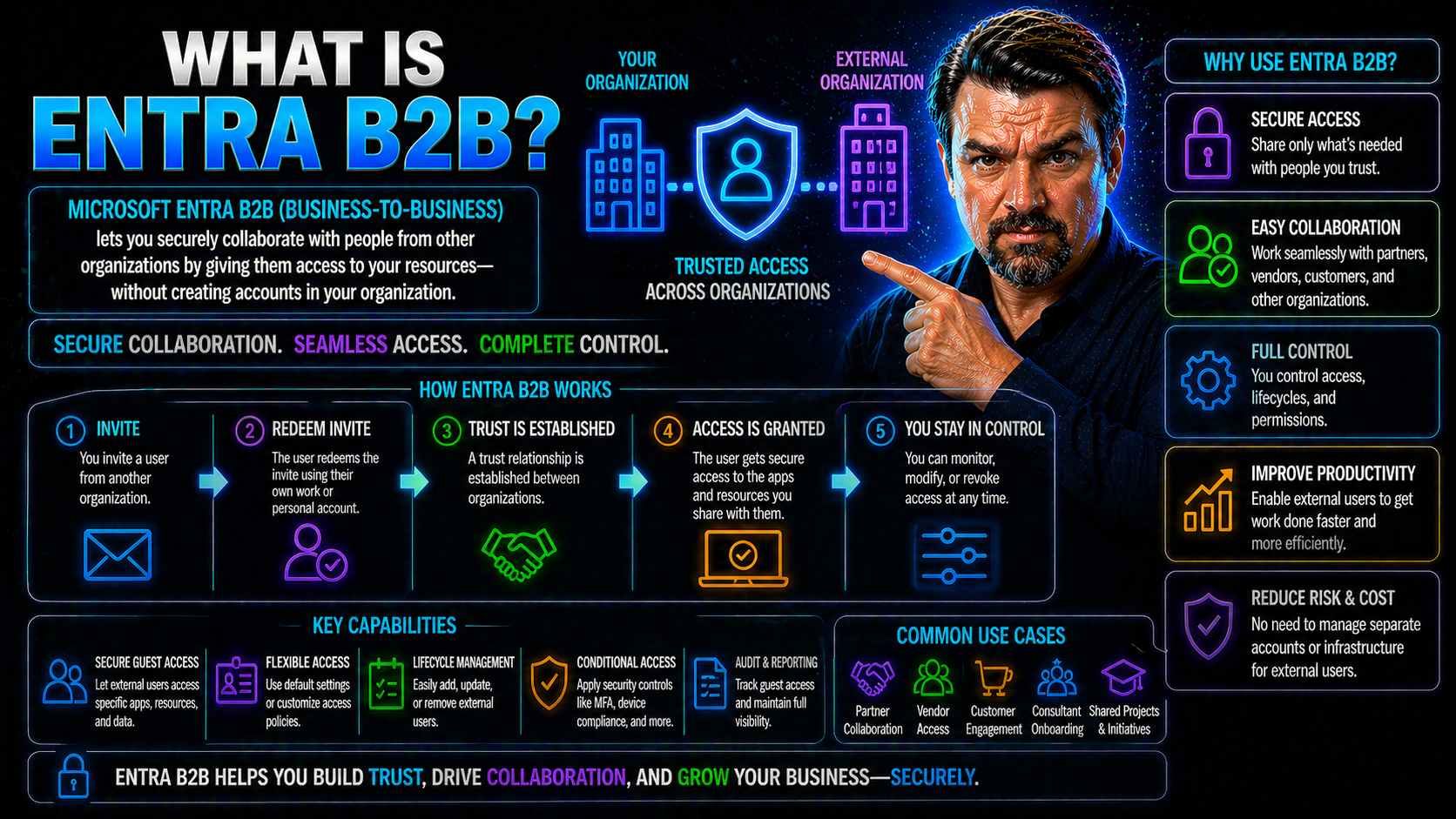
Microsoft Entra B2B (Business-to-Business) is a security platform designed by Microsoft to help organizations safely collaborate with partners, contractors, and vendors outside their own company. It takes the heavy lifting out of cross-company teamwork by allowing secure access to resources and apps—without the need to create new accounts or handle extra admin stress.
With Entra B2B, you can invite users from any organization to work alongside your internal teams, all while keeping tight controls on who gets in and what they can see. This tool plays a vital role in today’s digital business world, where seamless and secure external collaboration isn’t just nice to have—it’s table stakes for getting things done.
At its core, Entra B2B makes it easy and safe to bring people together, breaking down the old walls of “us versus them” and letting organizations work as one, even across company lines. If you need to enable enterprise-grade security for people coming in from the outside, Entra B2B is how you do it right.
Introduction to Microsoft B2B Entra Collaboration
Microsoft B2B Entra Collaboration is all about helping companies open their digital front doors safely. Entra B2B, formerly known as Azure AD B2B, lets you invite users from just about any external organization to securely access your company’s resources while using their own existing credentials. It’s Microsoft’s answer to the complex, modern world where business doesn’t stay inside the four walls of your headquarters.
Instead of the old, clunky way of making a new user account for every external partner, Entra B2B lets you “borrow” their existing identity. They keep their login from their home organization—whether that’s a work, school, or even a third-party identity—but you stay in control over what they access in your environment.
This approach slashes administrative work, makes onboarding partners a walk in the park, and gives both sides clarity about security boundaries. Microsoft Entra B2B stands out compared to legacy models by delivering instant, policy-driven trust—and by supporting everything from multifactor authentication and guest access reviews, to customizable onboarding flows.
Today, embracing external collaboration is survival mode for most organizations. Whether you’re sharing documents in Teams, co-developing on SharePoint, or running a global supply chain, Entra B2B brings the right mix of convenience and security so your business can move at the speed of trust.
Collaborate With External Identities Across Organizations
With Entra B2B, you can let partners, vendors, or consultants join your digital workspace without giving up control or spending your weekends managing user accounts. Organizations simply invite external users—whether they’re from another business or entirely different IT system—and those users access shared resources using their own accounts.
This magic happens through “guest user” support. You don’t need to issue new usernames and passwords, nor do you have to worry about the risks of orphaned accounts after a project wraps up. Instead, the identity and password stay on the guest’s home system, and you set the access boundaries right on your end.
Entra B2B supports a variety of identities, not just Microsoft Entra ID (previously called Azure AD). Whether your partner prefers a Google identity, SAML provider, or even a legacy on-premises Active Directory account, you get compatibility. This flexibility is vital for multi-tenant organizations and those juggling cloud with on-prem infrastructure.
By reducing manual work and streamlining compliance, Entra B2B makes cross-organization collaboration safe and practical. You control permissions, automate expiring access, and cut down the risk of “too many cooks in the kitchen”—no matter how big and sprawling your business network gets.
How Microsoft Entra B2B Works for Guest Users and Authentication
Microsoft Entra B2B was built to make it easy—and secure—for external users to join your organization’s digital ecosystem. The journey starts the moment a guest is invited. They receive an invite to join, redeem it, and get access to shared resources—often using the credentials they already have with their employer or another trusted provider.
At every step, Microsoft Entra B2B puts a heavy focus on security. Guest users aren’t just thrown into your environment; they’re guided through authentication and any multifactor checks you require. But it’s not all about keeping the gates locked. The platform also streamlines the process so first-time guests or repeat collaborators don’t get stuck in confusing onboarding steps.
Behind the scenes, authentication models, sign-in experiences, and security policies (like MFA) can be tailored to both your risk appetite and compliance requirements. The result? You get robust protection and a user experience that makes working across company boundaries smooth instead of stressful.
In the next sections, we’ll break down the technical flow—covering the guest user journey, authentication licensing, and how Entra B2B links with Microsoft 365 apps to keep everything both welcoming and locked down.
Guest Users Multifactor Authentication and Redemption Experience
The journey for a guest user in Entra B2B usually starts with an email invitation. The guest receives a link that takes them to a secure sign-up or redemption page, where they can verify their identity—typically using the credentials from their own company or identity provider. This process means they don’t need a new password for your environment, keeping things simple for everyone involved.
Once the invitation is redeemed, it’s time to step up security. Most organizations require multifactor authentication (MFA), adding a second layer of protection—like an SMS code or app approval—on top of the basic password. Here’s the slick part: if the guest’s home organization already enforces MFA, Entra B2B can “trust” that existing process. No need for double MFA prompts, reducing friction for your partners.
For first-time users, the sign-in and redemption experience is clear and straightforward—but robust. If your guest doesn’t have a compatible identity provider with MFA, Microsoft Entra will prompt for a one-time passcode or an alternative secure method, so nobody slips through the cracks.
Returning guest users get an even smoother ride: their credentials are recognized, and as long as they meet your policies, MFA steps are fast and familiar. The goal is always to protect your assets—without making external partners jump through unnecessary hoops. For more on why a disciplined identity lifecycle is key, check the insights in Identity as a Control Plane or examine risks around guest account sprawl and why lifecycle management matters for security.
Multifactor Authentication Licensing for Guest Users
One of the big questions admins ask is whether you need to buy extra licenses for every guest just to enable multifactor authentication (MFA). With Entra B2B, the answer is refreshingly simple: in most cases, you do not need to purchase separate MFA licenses for external guest users.
Here’s how the trust model works: if the guest’s home organization already requires MFA, you can trust that enforcement when they access your resources. If they don’t, Entra B2B gives you the option to require additional MFA at your end, all covered under your licensing. This maintains strong security without running up extra license costs or causing an identity management mess. For a deeper dive into clear policy enforcement, see Conditional Access and Identity Debt.
Seamless Secure Access to Microsoft 365 Apps
With Entra B2B, your guest users don’t just get through the front door—they can collaborate right alongside your internal teams in Microsoft 365 apps like SharePoint Online, OneDrive, and Teams. The access is seamless: as soon as the invitation is redeemed and policies are met, guests can view, upload, or work on files in shared libraries, jump into Teams channels and meetings, and even co-author documents in real time.
Organizations keep precise control over what guests can do. You decide which Teams or SharePoint sites external users see, apply least privilege rules, and set clear boundaries so nobody gets more access than they need to get work done. Everything is policy-driven and can be audited and reviewed as projects progress.
For environments leveraging the Power Platform or Copilot integrations, Entra B2B extends that reach, supporting external contributors without undermining data governance. When it comes to monitoring external sharing and preventing leaks, you’ll want to consider advanced auditing and automation—get practical security tips from Stopping Blind External Sharing and governance insights from Dataverse vs SharePoint for App Development.
The bottom line: guests work with your teams as real collaborators, but you maintain all the guardrails—and you never have to worry about external users flying under the radar or running wild in your tenant.
Setup Configuration in the Microsoft Entra Admin Center
Getting started with Entra B2B is straightforward in the Microsoft Entra Admin Center. First, admins head to the External Identities section to set up external collaboration settings. Decide which domains or organizations can be invited, then configure organizational-level policies—like whether guests need multifactor authentication or if auto-approval is allowed.
You’ll set directory-wide settings for collaboration restrictions, invitation management, and guest user rights. Review and adjust global admin controls to fit your organization’s risk and compliance posture. Tuning these options ensures a secure B2B environment with just the right balance of flexibility and oversight for your business goals.
Policies for Apps and Managing Guest Limited Administrator Access
Securing your apps when guests come knocking is a balancing act—be open enough for smooth teamwork, but tight enough to lock out trouble. Entra B2B provides a strong toolkit for this, letting you assign granular permissions and define who can see or alter what across Microsoft 365 and other integrated apps.
One powerful concept is the “guest-limited administrator,” where external users get specific, controlled privileges to carry out defined tasks without compromising sensitive resources or broader administrative rights. These role settings, combined with robust policies, help you avoid accidental over-permissioning.
Conditional Access plays a starring role in this story. Through thoughtful policies, you decide when, how, and from where guests can access resources—whether it’s restricting login to certain networks, requiring MFA, or forcing access reviews after a set time. By treating these controls as a strategic shield rather than a nuisance, you not only stop the “bad actors” but also empower legitimate collaborators to do their work safely.
We’ll dig into best practices for conditional access and policy design in the next section, but for a look at why consistent, inclusive policy baselines matter, check Conditional Access Policy Trust Issues and read up on the long-term risks of unmanaged guest accounts at The Hidden Danger of M365 Guest Accounts.
Conditional Access for Secure Guest Management
- Require Multifactor Authentication (MFA): Enforce MFA for all guest users to ensure every access is truly secure—even if the guest’s home organization doesn’t require it.
- Restrict Access by Network Location: Allow guest logins only from approved locations (like specific countries or IP ranges) to dramatically cut down risk.
- Limit Access Duration: Implement time-boxed access, so guest permissions automatically expire after the project or engagement ends.
- Review Permissions Regularly: Schedule access reviews, especially for high-privilege roles, to promptly remove unnecessary rights and shrink your attack surface.
- Monitor and Audit Guest Activity: Keep an eye on guest sign-ins and actions for compliance and early threat detection—see strategies from Identity Lifecycle Management for details.
Identity Providers Integrate and Azure B2B Federation
Microsoft Entra B2B is built for flexibility, supporting not just Microsoft identities but also external identity providers through federation. This means you can partner up with organizations running their own Entra ID tenants, but you’re equally covered if your partners use Google Workspace, SAML-based providers, or even on-premises Active Directory via hybrid federation.
Federation allows guests to authenticate using their own home credentials, with policies set on your side so you’re not taking unnecessary security risks. With Azure B2B federation, the external organization doesn’t need to build or manage a new set of identities—everyone logs in as themselves, and you maintain all your compliance and audit boundaries.
For hybrid environments, Entra B2B can bridge the gap, extending secure collaboration from cloud to on-prem by integrating with Active Directory Federation Services (ADFS). This prevents identity silos and makes collaboration smoother—even when your partners aren’t fully cloud-based.
From a practical standpoint, integrating external identity providers reduces friction, builds trust faster, and streamlines your administrative workload. You can welcome outside collaborators without sacrificing the security or compliance posture your business depends on.
Microsoft B2B Entra Advanced Features and Direct Connect Compared
If you’re looking to take your external collaboration strategy up a notch, Microsoft Entra B2B doesn’t stop at the basics. Newer capabilities like B2B Direct Connect are pushing the envelope, making it possible to set up deep, cross-tenant connections for partners who need more than standard guest access. These advanced features are tailored for organizations juggling multiple tenants or complex partner ecosystems, where traditional B2B might not offer enough control or efficiency.
In the following sections, we’ll break down the technical differences between standard B2B collaboration and Direct Connect—and walk through a real-world scenario to show how these features keep boundaries tight while letting collaboration flow across even the largest global organizations.
Cross-Tenant Access for External Tenants
Cross-tenant access is a next-generation capability in Microsoft Entra B2B, designed for companies that frequently interact with external tenants—whether for joint ventures, mergers, or global partner networks. With cross-tenant policies, you define exactly how users from other Entra tenants can access your resources, and vice versa, all while keeping your organization’s security perimeter intact.
These policies let you decide which users, groups, or even app workloads are allowed to cross boundaries. They also control what level of trust you extend to external tenants—including whether you honor their security claims (like MFA status) or enforce additional checks at your end.
This setup respects organizational boundaries: your admin team controls who and what comes in or goes out, and you can audit every action to stick to compliance mandates. Cross-tenant access policies make it possible to scale secure external collaboration without losing oversight or letting sensitive data leak into the wrong hands.
For multi-tenant enterprises and regulated industries, these controls strike the right balance—empowering collaboration when it matters, while locking down the gates when you need to protect your crown jewels.
Scenario: Global Pharmaceuticals Using Workforce Tenants
- Partner Onboarding: The global pharma company uses Entra B2B invitations to rapidly onboard partner researchers, manufacturing suppliers, and contract staff, minimizing onboarding delay and errors.
- Custom Policies: Cross-tenant access policies are set for each partner organization, applying different controls for research, compliance, and supply chain collaboration.
- Lifecycle Management: As projects end, regular access reviews and time-limited guest accounts ensure that external users are removed promptly, reducing risk and fulfilling compliance requirements.
- Ongoing Oversight: The company audits all external user access for compliance reporting and keeps tight boundaries between workforce tenants, ensuring each external user sees only what’s required for their role.
Customize Invitation Emails and Self-Service Sign-Up for Guests
First impressions matter—and that goes double when inviting new partners or customers into your digital world. Microsoft Entra B2B makes it easy for admins to customize guest invitation emails, adding your company’s logo, brand colors, and tailored messaging that sets the tone for professional collaboration from the very start.
Customizing these emails means guests know right away who’s inviting them, what the expectations are, and how to get started with as little confusion as possible. This isn’t just a cosmetic boost—it cuts down on support tickets and failed onboarding attempts, since everyone has the right info from the outset.
On top of personalized invites, Entra B2B supports self-service sign-up experiences. Prospective guests can register themselves through a branded portal, providing any required justification or compliance acknowledgments before being automatically provisioned. This automation shaves hours (or days) off onboarding and assures you’re only letting in those who meet your requirements.
By combining email customization and streamlined self-service onboarding, organizations can elevate the guest experience, maintain a consistent brand, and reduce admin headaches—all while keeping security and compliance front and center.
Best Practices for Secure and Efficient B2B Collaboration
- Time-Box Guest Access: Always set expiration dates for guest accounts to avoid lingering access after projects wrap—see lifecycle management tips in Guest Account Risk Prevention.
- Enforce Least Privilege: Assign the minimum permissions necessary for guests, keeping sensitive info on a strict need-to-know basis.
- Regular Access Reviews: Schedule periodic audits and entitlement reviews, catching risky or forgotten accounts before they can cause trouble.
- Monitor External Sharing: Use advanced auditing and alerting (as outlined in Stopping Blind External Sharing) to track what data leaves your org and spot leaks early.
- Document and Update Policies: Keep your B2B collaboration policies current and visible to staff, so everyone knows the rules around inviting, managing, and offboarding guests.
Managing Invitations, Delayed Invites, and CSV Upload Support
- Delayed Invitations: Schedule guest invitations ahead of time, so new users can be onboarded in bulk for major projects without a manual rush on kickoff day.
- CSV Uploads: Use the admin center’s CSV import feature for fast, accurate bulk guest onboarding—especially handy for events, partner migrations, or multi-organization rollouts.
- UPN Matching: Ensure quick access for returning guests by matching the invite to an existing user principal name (UPN), avoiding duplicate or ‘extra’ accounts floating in your directory.
- User Lifecycle Management: Regularly review and remove outdated guests—automated scripts and periodic access certifications help you keep your Entra B2B user base current and secure.
You Should Also Listen To
If you are researching Microsoft Entra B2B, these episodes add practical context on architecture, security, governance, and implementation:
- Microsoft AI Agent Harness – Simply Explained — Understand orchestration, guardrails, evaluation, and reliable AI workflows.
- Microsoft Defender XDR – Simply Explained — Connect identity and AI decisions with security monitoring and response.
- Microsoft Teams Governance – The Illusion of Control — Learn how governance, ownership, and policy reduce operational risk.
- Azure Virtual Network – Simply Explained — Understand the architecture context behind cloud connectivity.

Microsoft MVP | Host of M365.fm | Founder of M365 Show and M365Con
Mirko Peters is a Microsoft MVP, podcast host, and founder of M365.fm, M365 Show, and M365Con. His work connects Microsoft practitioners through podcast interviews, livestreams, and community events.
At M365.fm, Mirko hosts conversations with Microsoft MVPs, product experts, architects, and community contributors. Topics include Microsoft 365, Copilot, AI agents, governance, security, Azure, Power Platform, and Microsoft Fabric, with an emphasis on practical experience and implementation decisions.
M365.fm is the podcast and learning platform. M365 Show brings experts together for livestreams, while M365Con provides an online conference setting for community learning.
Official website: Mirko Peters (https://www.mirkopeters.com/). Recognition: Mirko Peters — Microsoft MVP profile (https://mvp.microsoft.com/de-DE/mvp/profile/9b0ca797-db5a-493a-a845-8b9158046cf5). Connect on LinkedIn (https://www.linkedin.com/in/m365showpodcast/).





