


 Apple Podcasts
 Spotify
 Youtube Music
 Spreaker
 Podchaser
 Amazon Music
 Microsoft Partner Journey: From Enrollment to Growth
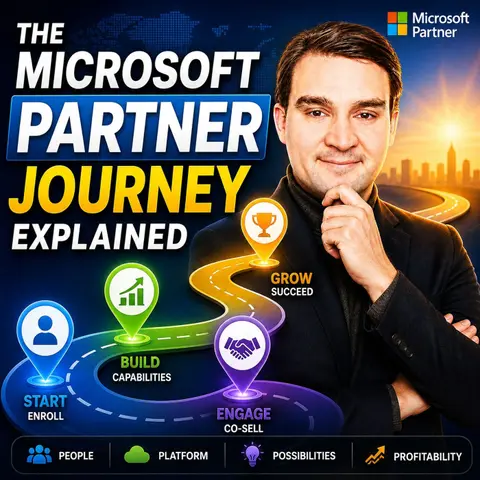

The Microsoft Partner journey is about far more than registering as a reseller—it’s a structured path toward building a profitable, trusted, and strategic business within the Microsoft ecosystem. In this episode of Microsoft Knowledge Nuggets on M365 FM, Mirko Peters explains every stage of the Microsoft Partner Journey, from becoming a new partner to achieving advanced solution designations, specializations, and long-term business growth. You'll discover how partners create value by combining technical expertise, customer success, and recurring services rather than simply selling Microsoft licenses.
The episode walks through the key milestones every Microsoft partner encounters, including joining the Microsoft AI Cloud Partner Program, building technical capabilities, earning certifications, publishing solutions, developing managed services, and aligning with Microsoft's strategic solution areas. You'll learn why competencies alone are no longer enough and how successful partners differentiate themselves through specialization, measurable customer outcomes, and deep expertise in Microsoft 365, Azure, Security, Business Applications, Data & AI, and AI-powered solutions.
Beyond technical skills, the discussion explores the business side of the partner ecosystem. Learn how incentives, Marketplace, co-selling opportunities, customer success, recurring revenue, and thought leadership contribute to long-term profitability. The episode also explains how AI, Microsoft Copilot, and cloud transformation are reshaping the partner landscape, creating new opportunities for consultants, MSPs, ISVs, systems integrators, and independent Microsoft experts willing to evolve their business models.
Quick answer: The Microsoft partner journey moves from enrollment and capability building to customer value, specialization, marketplace presence, and sustainable growth. This episode explains the key decisions at each stage so organizations can turn program participation into a focused business strategy.
The Microsoft Partner Journey is a vital path for organizations aiming to collaborate with Microsoft. This journey opens doors to various partnership types, each tailored to meet your business needs. By joining the Microsoft Partner Program, you gain access to resources that enhance your capabilities and drive growth.
For example, partners benefit from marketing support, technical assistance, and software licenses. In fact, 90% of partners report a positive return on investment from their benefits package. Embracing this journey can lead to significant opportunities, although challenges may arise along the way.
Key Takeaways
- The Microsoft Partner Journey offers various partnership types tailored to business needs.
- Joining the Microsoft Partner Program provides access to valuable resources like training and marketing support.
- Partners can achieve a Solutions Partner designation by meeting specific customer outcome criteria.
- Engaging with customers and focusing on their success can lead to higher revenue and stronger relationships.
- Utilizing the Microsoft Partner Center effectively helps manage partnerships and track performance.
- Obtaining advanced specializations enhances credibility and opens doors to new business opportunities.
- Avoid common mistakes like skipping attribution setup and pursuing irrelevant certifications to maximize success.
- Active participation in the partner program can lead to significant growth and collaboration opportunities.
Microsoft Partner Program Overview
The Microsoft Partner Program serves as a crucial framework for organizations looking to collaborate with Microsoft. This program has evolved significantly, especially with the introduction of the Microsoft AI Cloud Partner Program (MAICPP). This evolution reflects a shift towards cloud solutions, enabling partners to deliver innovative applications and services tailored to their customers' needs.
Types of Microsoft Partnerships
Understanding the different types of partnerships available can help you choose the right path for your organization. Here are the primary types of partnerships within the Microsoft ecosystem:
Solutions Partner
Solutions Partners focus on delivering specific solutions that address customer challenges. They often develop software or services that integrate with Microsoft products. This partnership type emphasizes measurable customer outcomes, allowing you to showcase your expertise in solving real-world problems.
Managed Service Provider
Managed Service Providers (MSPs) offer ongoing management and support for Microsoft technologies. They help businesses optimize their IT infrastructure and ensure smooth operations. By becoming an MSP, you can provide value-added services that enhance customer satisfaction and loyalty.
Independent Software Vendor
Independent Software Vendors (ISVs) create software applications that run on Microsoft platforms. They leverage Microsoft's technology to build and sell their products. This partnership allows you to tap into a vast market and benefit from Microsoft's extensive resources.
| Partner Type | Revenue Model | Primary Focus | Common Overlaps | Example |
|---|---|---|---|---|
| Software Development Companies (SDCs) | Licensing & SaaS subscriptions | Software development. | Partners with Channel Partners and SIs for deployment and integration. | DocuSign offers e-signature solutions integrated with Microsoft Teams and Outlook. |
| System Integrators (SIs) | Consulting & projects | System design and integration. | May collaborate with SDCs for product capabilities and Channel Partners for licensing and support. | Accenture implements Microsoft Cloud solutions for enterprise clients. |
| Channel Partners | Subscription, support, monthly contracts, products and services | Cloud licensing and services, IT operations and support, resale with added value. | Partners to bundle and implement SDC products and SI services. | CDW offers Microsoft software and hardware to resellers and end customers. |
Benefits of the Microsoft Partner Program
Joining the Microsoft Partner Program provides numerous advantages that can significantly impact your business growth. Here are some key benefits:
Access to Resources
As a partner, you gain access to a wealth of resources, including training materials, technical support, and marketing tools. These resources empower you to enhance your capabilities and better serve your customers.
Marketing Support
Microsoft offers robust marketing support to help you promote your solutions effectively. You can leverage co-marketing opportunities, access to promotional materials, and guidance on best practices to increase your visibility in the market.
Networking Opportunities
The program fosters a vibrant partner ecosystem, allowing you to connect with other partners and Microsoft teams. Engaging in networking opportunities can lead to collaborations, knowledge sharing, and access to exclusive events that can further your business objectives.
The Microsoft AI Cloud Partner Program represents a transformative approach to partnership. It emphasizes measurable customer outcomes and encourages partners to actively engage with their customers. By focusing on cloud consumption and adoption, you can drive business transformation and achieve sustainable growth.
Joining the Microsoft Partner Program
Joining the Microsoft Partner Program is an essential step for organizations looking to leverage Microsoft's resources and expertise. The registration process is straightforward, but it requires careful attention to detail. Here’s how to get started:
Registration Process
To enroll in the Microsoft Partner Program, follow these key steps:
- Create a Microsoft Entra ID tenant: If your company does not have one, create a free Azure AD (Entra ID) tenant at portal.azure.com.
- Enroll at partner.microsoft.com: Sign in with your work account and complete the enrollment form.
- Accept the Microsoft Partner Agreement (MPA): Review and accept the MPA in Partner Center.
- Set up your Partner Center profile: Complete your business profile in Partner Center.
- Set up attribution immediately: Set up PAL on every Azure customer subscription from Day 1.
Before you begin, ensure you have the necessary documentation and prerequisites. Here’s what you need:
- Go to the registration page at
https://aka.ms/partnercenterregistration. - Sign in with a Microsoft account (a personal Microsoft account is allowed at this step).
- Select the relevant partner program based on your business focus.
- Choose the country or region where your business is located.
- Provide your company details, including a DUNS number if available.
- Upload a legal document showing your company name and address.
- Accept the App Developer Agreement and pay the one-time registration fee.
Setting Up Your Partner Profile
Once you complete the registration, setting up your partner profile is crucial. This profile represents your organization within the Microsoft ecosystem. Here are the steps to set it up effectively:
- Create a free Partner Center account by selecting 'Become a partner'.
- Provide basic organizational details: Include your company name, address, and legal contact information.
- Confirm company details and validate credentials, which may include submitting business registration numbers.
- Agree to the program's terms and conditions.
- Complete the profile setup in Partner Center.
- Maintain compliance with program rules and track your Partner Capability Score (PCS).
Your company information will undergo a verification process with Microsoft. Ensure that the primary contact and legal contact are specified accurately. The company name must match official documents, and addresses should be validated.
Active engagement with customers is vital for your success as a Microsoft partner. Judson Althoff, Executive Vice President at Microsoft, emphasizes that successful organizations view skilling as a core strategy. This approach empowers teams and drives innovation, creating lasting value for customers. Engaging with customers through training and support can lead to higher revenue and stronger relationships. For instance, services-led partners generate $8.45 in additional revenue for every $1 of Microsoft revenue. This statistic highlights the importance of active engagement in driving business growth.
By following these steps and focusing on customer engagement, you can set a solid foundation for your first 365 days as a partner. This period is crucial for establishing relationships and maximizing the benefits of the Microsoft Partner Program.
Navigating the Partner Center

The Microsoft Partner Center serves as a central hub for managing your partnership with Microsoft. This platform offers a variety of features and tools designed to streamline your operations and enhance your engagement with customers. Understanding how to navigate the Partner Center effectively can significantly impact your success as a partner.
Key Features and Tools
Here are some of the primary features and tools available in the Microsoft Partner Center:
| Feature/Tool | Description |
|---|---|
| Account Management | Manage your Microsoft account and users. |
| Customer Engagement | Engage with customers effectively. |
| Incentive Programs | Enroll in various incentive programs. |
| Subscription Management | Manage customer subscriptions seamlessly. |
| Billing | Bill and get paid for services provided. |
| Support | Contact support for assistance. |
| Marketing Resources | Access marketing resources to promote services. |
| Microsoft Marketplace | Publish or explore offers on a catalog of services and applications. |
These features empower you to manage your partnership efficiently. For instance, the Account Management tool allows you to oversee user access and permissions, ensuring that your team can collaborate effectively. The Customer Engagement feature helps you maintain strong relationships with clients, which is crucial for driving cloud consumption and adoption.
Managing Your Partnership Effectively
To maximize the benefits of the Microsoft Partner Program, you must actively manage your partnership through the Partner Center. Here are some essential strategies:
| Feature | Description |
|---|---|
| Manage Your Membership | Register, renew, and update your partner profile. |
| Access Resources | Get exclusive training materials, marketing resources, and technical docs. |
| Customer Management | Manage customer subscriptions, licenses, and billing. |
| Sales Insights | Track sales performance and customer engagement metrics. |
| Support | Access technical support and troubleshooting assistance. |
| Incentives and Competencies | Manage competencies and utilize incentive programs for success. |
By utilizing these tools, you can track your performance and ensure that you meet the criteria for designations and specializations. For example, the Sales Insights feature allows you to analyze your sales data, helping you identify trends and areas for improvement.
Engaging with the resources available in the Partner Center not only enhances your operational efficiency but also positions you for growth within the Microsoft ecosystem. Remember, active participation and effective management of your partnership can lead to greater opportunities and success.
Achieving Solutions Partner Designation
Importance of Customer Outcomes
To achieve the solutions partner designation, you must meet specific criteria set by Microsoft. These criteria ensure that you deliver value to your customers and demonstrate your capabilities effectively. Here are the key requirements:
- Microsoft Marketplace: Your solutions must be co-sell eligible.
- Technical Review: Solutions must pass a technical review audit that assesses interoperability with Business Applications.
- Customer Success: You need to meet commercial performance thresholds, such as generating USD 1 million in marketplace billed sales or USD 4 million in partner-influenced revenue over the past twelve months. Additionally, your solutions must achieve a customer satisfaction rating of at least 4.5 or provide two referenceable customer artifacts.
These criteria emphasize the importance of customer outcomes in your partnership with Microsoft. The Partner Capability Score (PCS) plays a crucial role in this process. This score evaluates your capabilities in key areas, including performance, skilling, and customer success metrics. To earn the solutions partner designation, you must score at least 70 points in one solution area. This score reflects your ability to engage with customers effectively and drive measurable outcomes.
Microsoft considers several measurable customer outcomes when awarding the solutions partner designation. These outcomes include:
- Deployment of solutions
- Adoption rates among users
- Ongoing usage of Microsoft 365 solutions
Additionally, Microsoft evaluates partners through customer success validation, which may involve audits and customer references. This process ensures that you not only meet the technical requirements but also deliver real value to your customers.
By focusing on these criteria and the importance of customer engagement, you can position your organization for success within the Microsoft ecosystem. Achieving the solutions partner designation not only enhances your credibility but also opens doors to new opportunities for growth and collaboration.
Advanced Specializations and Incentives
Unlocking Greater Opportunities
Obtaining advanced specializations within the Microsoft Partner Program can significantly enhance your business prospects. These specializations allow you to demonstrate your expertise in specific areas, which can build customer trust and credibility. When you showcase your skills, you differentiate yourself in a competitive market. This differentiation can lead to increased customer engagement and higher revenue.
Here are some of the key benefits of obtaining advanced specializations:
- Enhanced Credibility: Specializations validate your skills and knowledge, making you a trusted partner for customers.
- Increased Visibility: Microsoft promotes partners with specializations, giving you greater exposure to potential customers.
- Access to Exclusive Resources: Specializations often come with additional resources, training, and support from Microsoft, which can help you grow your business.
To give you a clearer picture, here are some of the advanced specialization areas available to Microsoft partners, along with their requirements:
| Specialization Area | Requirements |
|---|---|
| AI Business Solutions | Solutions Partner designation for Business Applications or Modern Work. |
| Business Applications | Business Intelligence, Finance, Intelligent Automation, Low Code Application Development, Microsoft Copilot. |
| Security | Solutions Partner designation for Security. Specializations include Cloud Security, Data Security, Digital Sovereignty, Identity and Access Management, Microsoft Copilot, Threat Protection. |
| General Requirements | Solutions Partner designation, performance thresholds, specific certifications, and either a third-party ISSI audit (Azure) or customer references (non-Azure). |
| Cost and Time | Earning a specialization typically takes 3-6 months and costs $2,400-$3,600 for Azure audit fees. |
| ROI | A single ECIF-funded engagement can return 10-50x the audit cost. |
| Current Partner Statistics | Fewer than 5% of Microsoft's 400,000+ partners hold even one specialization. |
In addition to the benefits of specializations, Microsoft offers various incentives to partners who achieve these designations. These incentives can further enhance your business growth and profitability. Here are some types of incentives available:
| Incentive Type | Description | Requirements |
|---|---|---|
| Envisioning Workshops | Pre-sales engagements paying $8,000, designed to demonstrate value in a customer's production environment. | Active Microsoft Security Partner designation |
| Sentinel Accelerator | Rewards partners for driving Sentinel adoption past 50 GB/day ingestion with payments based on usage. | Threat Protection Specialization |
| Defender for Cloud Accelerator | Rewards sustained growth in MDC consumption. | Cloud Security Specialization |
| CSP Accelerator: Defender & Purview | Post-sale incentive for deploying Defender and Purview suites. | At least one Microsoft Security Specialization |
| ECIF (End Customer Investment Funds) | Provides customer-specific investment funding that can exceed $100,000 per deal. | Advanced Specialization required |
By pursuing advanced specializations and taking advantage of these incentives, you can unlock greater opportunities for your business. This strategy not only enhances your market position but also supports your customers' transformation journeys.
Common Mistakes to Avoid
Engaging with Microsoft
When you engage with the Microsoft Partner Program, avoiding common mistakes can significantly enhance your success. Here are some frequent pitfalls that partners encounter:
- Skipping attribution setup: Failing to set up attribution can lead to a lack of visibility regarding customer impact.
- Pursuing fundamental certifications: Focusing on certifications that do not contribute to earning points can waste valuable resources.
- Only setting up one attribution method: This limits your ability to access additional incentives.
- Not enrolling in Microsoft Commerce Incentives: This oversight prevents you from earning potential rewards.
- Ignoring co-op funds: These funds can expire if not claimed, resulting in lost opportunities.
- Writing generic Statements of Work: Such documents may not qualify for incentive programs.
- Not tracking claim deadlines: Missing deadlines can lead to forfeited benefits.
- Believing a Partner Development Manager is necessary: While helpful, you can succeed without one.
- Trying to pursue all solution areas: Focus on one area to maximize your effectiveness.
- Not reading the incentive guide: This can lead to missing out on significant benefits.
To navigate the program successfully, consider these strategies:
| Strategy | Description |
|---|---|
| Optimize AppSource Listing | Ensure your AppSource consulting listing is complete and optimized to increase visibility. |
Additionally, organizations that choose partners without long-term support plans often struggle with configuration drift, security gaps, and feature underutilization. Sustainable success requires ongoing partnership.
A Microsoft 365 partner should align with your communication preferences, decision-making styles, and organizational culture. Poor fit creates friction and can hinder progress.
Overlooking change management can also be detrimental. It risks low user engagement, productivity loss, and resistance to new tools. Partners must address these human factors to ensure smooth transitions.
Understanding the varying capabilities of Microsoft 365 partners is essential. Some focus on licensing, while others specialize in consulting or strategic transformation. Recognizing these differences can help you choose the right partner for your needs.
Engaging effectively with Microsoft representatives can enhance your success. Building meaningful relationships increases brand visibility and leads to tailored support. Participating in regional industry events allows for personalized connections with potential clients, addressing their specific challenges.
By avoiding these common mistakes and implementing effective strategies, you can navigate the Microsoft Partner Program with confidence and achieve your business goals.
Understanding the Microsoft Partner Journey is essential for organizations looking to thrive in the Microsoft ecosystem. This journey offers various partnership types, each with unique benefits. For instance, achieving Solutions Partner designations helps you differentiate from competitors and demonstrates your commitment to customer success.
To begin your partnership, follow these steps:
- Sign in to Partner Center
- Navigate to Membership > Programs
- Select Support Services designation
- Review your current status on the Support Services designation dashboard
- Complete Performance Assessment
- Complete Customer Success Survey
- Complete Capability Assessment
- Enrollment Confirmation
By taking these steps, you can unlock access to new features and enhance your sales through the Microsoft Marketplace. Start exploring the program today to maximize your potential as a Microsoft partner!
FAQ
What is the Microsoft Partner Program?
The Microsoft Partner Program allows organizations to collaborate with Microsoft. It provides resources, support, and opportunities for growth, enabling partners to deliver innovative solutions to customers.
How do I join the Microsoft Partner Program?
To join, create a Microsoft Entra ID tenant, enroll at partner.microsoft.com, accept the Microsoft Partner Agreement, and set up your Partner Center profile.
What are the benefits of being a Microsoft partner?
As a Microsoft partner, you gain access to resources, marketing support, and networking opportunities. These benefits help you enhance your capabilities and drive business growth.
What is the Solutions Partner designation?
The Solutions Partner designation recognizes partners who meet specific criteria based on customer outcomes and performance. It highlights your expertise in delivering valuable solutions to clients.
How can I achieve Advanced Specializations?
To achieve Advanced Specializations, you must first earn the Solutions Partner designation. Then, meet additional requirements, including performance thresholds and specific certifications in your area of expertise.
What common mistakes should I avoid as a partner?
Avoid skipping attribution setup, pursuing irrelevant certifications, and ignoring co-op funds. These mistakes can hinder your success and limit your access to valuable resources and incentives.
How does the Partner Capability Score work?
The Partner Capability Score evaluates your performance, skilling, and customer success metrics. A higher score increases your chances of earning designations and unlocking additional benefits within the program.
Can I access support as a Microsoft partner?
Yes, Microsoft provides technical support to partners through the Partner Center. You can contact support for assistance with various issues related to your partnership and customer engagements.
🎧 Listen to this episode
Want a practical explanation of Microsoft Partner Journey? This episode breaks down the topic in clear language and shows why it matters for Microsoft 365, Azure, Power Platform, security, AI, and modern work.
Listen to this episode if you want to:
- Understand the key concepts behind Microsoft Partner Journey
- See how it fits into the wider Microsoft technology ecosystem
- Learn where it can create practical value for your organization
You may also enjoy these related M365 FM episodes:
- The FY26 Partner Designation Restructuring Is Coming — Most Partners Aren't Ready
- How to Become a High-Performing Microsoft Partner
- How to Build a Winning Microsoft Partner Strategy
- Microsoft Entra External ID for Digital Trust and Growth
- Turn Dynamics 365 into a Business Growth Engine
Discover more practical Microsoft conversations on M365 FM.
Last reviewed: July 2026.
Who Should Listen
This episode is for Microsoft practitioners, architects, business leaders, and partners who need a practical foundation before making implementation, governance, or growth decisions.
🎧 You Should Also Listen To
- High-Performing Microsoft Partner — A practical next step for extending this topic.
- Microsoft Partner Strategy — A practical next step for extending this topic.
- Microsoft Marketplace — A practical next step for extending this topic.
🚀 Want to be part of m365.fm?
Then stop just listening… and start showing up.
👉 Connect with me on LinkedIn and let’s make something happen:
- 🎙️ Be a podcast guest and share your story
- 🎧 Host your own episode (yes, seriously)
- 💡 Pitch topics the community actually wants to hear
- 🌍 Build your personal brand in the Microsoft 365 space
This isn’t just a podcast — it’s a platform for people who take action.
🔥 Most people wait. The best ones don’t.
👉 Connect with me on LinkedIn and send me a message:
"I want in"
Let’s build something awesome 👊
1
00:00:00,000 --> 00:00:02,260
Here's the thing, most partners don't see coming.
2
00:00:02,260 --> 00:00:04,680
You think the partner journey is about climbing tiers,
3
00:00:04,680 --> 00:00:07,500
silver to gold, gold to something shinier.
4
00:00:07,500 --> 00:00:08,900
That used to be how it worked,
5
00:00:08,900 --> 00:00:10,560
and most people still think that way,
6
00:00:10,560 --> 00:00:12,320
but the program doesn't work like that anymore.
7
00:00:12,320 --> 00:00:14,020
The real question is, what each badge actually
8
00:00:14,020 --> 00:00:15,280
unlocks for your business.
9
00:00:15,280 --> 00:00:16,960
You see a designation and you want it,
10
00:00:16,960 --> 00:00:18,620
Microsoft announces a new program
11
00:00:18,620 --> 00:00:20,120
and you rush to enroll.
12
00:00:20,120 --> 00:00:21,560
But nobody stops to ask,
13
00:00:21,560 --> 00:00:23,760
what does this actually do for my business?
14
00:00:23,760 --> 00:00:25,440
Here's the gap you need to understand.
15
00:00:25,440 --> 00:00:28,220
The program changed completely in 2022,
16
00:00:28,220 --> 00:00:29,400
silver and gold are gone.
17
00:00:29,400 --> 00:00:32,740
The Microsoft Cloud Partner Program launched in October 2022,
18
00:00:32,740 --> 00:00:36,440
then rebranded to the AI Cloud Partner Program in July 2023.
19
00:00:36,440 --> 00:00:39,420
But most partners are still operating like it's 2021,
20
00:00:39,420 --> 00:00:42,000
thinking in terms of old competencies and old benefits,
21
00:00:42,000 --> 00:00:43,480
and that's costing them real money.
22
00:00:43,480 --> 00:00:45,080
So here's what we're covering today.
23
00:00:45,080 --> 00:00:47,240
The partner journey has three distinct layers,
24
00:00:47,240 --> 00:00:49,300
not a ladder with rungs, but three layers,
25
00:00:49,300 --> 00:00:52,660
membership, solutions, partner designation, and specialization.
26
00:00:52,660 --> 00:00:54,560
Each layer unlocks something different
27
00:00:54,560 --> 00:00:56,960
and most partners never get past layer one.
28
00:00:56,960 --> 00:00:58,240
Stick with this.
29
00:00:58,240 --> 00:01:01,320
It changes how you think about your partnership with Microsoft.
30
00:01:01,320 --> 00:01:04,560
Why the program changed and why it matters?
31
00:01:04,560 --> 00:01:06,340
Silver and gold are officially gone.
32
00:01:06,340 --> 00:01:08,680
The last renewals hit January 2025.
33
00:01:08,680 --> 00:01:11,160
If you're still running on legacy silver or gold benefits,
34
00:01:11,160 --> 00:01:13,800
your incentives run through September 2025,
35
00:01:13,800 --> 00:01:17,200
and then that's it, no more renewals, no more extensions.
36
00:01:17,200 --> 00:01:19,240
The old program is done, Microsoft killed it
37
00:01:19,240 --> 00:01:21,440
because the old model measured the wrong thing.
38
00:01:21,440 --> 00:01:23,200
Silver and gold were about inputs.
39
00:01:23,200 --> 00:01:25,920
How many search your team holds, how many exams they passed,
40
00:01:25,920 --> 00:01:27,400
how many competencies you stacked.
41
00:01:27,400 --> 00:01:28,800
It was a checkbox game.
42
00:01:28,800 --> 00:01:30,480
You could load up on certifications,
43
00:01:30,480 --> 00:01:33,680
never deliver a thing, and still call yourself a gold partner.
44
00:01:33,680 --> 00:01:35,600
The new model measures outputs.
45
00:01:35,600 --> 00:01:38,480
Not what your team knows, but what your customers actually do.
46
00:01:38,480 --> 00:01:40,580
How much of the Microsoft cloud are they consuming?
47
00:01:40,580 --> 00:01:41,880
Are they using what you sold them?
48
00:01:41,880 --> 00:01:42,720
Are they growing?
49
00:01:42,720 --> 00:01:43,560
That's what matters now.
50
00:01:43,560 --> 00:01:47,520
Microsoft retired the Microsoft Partner Network in October 2022,
51
00:01:47,520 --> 00:01:49,880
launching the Microsoft Cloud Partner Program,
52
00:01:49,880 --> 00:01:53,920
then rebranded to the AI Cloud Partner Program in July 2023.
53
00:01:53,920 --> 00:01:56,640
The name changed, but the direction stayed the same.
54
00:01:56,640 --> 00:01:58,960
Everything now points to customer outcomes.
55
00:01:58,960 --> 00:02:00,640
Why does this shift matter to you?
56
00:02:00,640 --> 00:02:02,960
The rules for getting recognized change completely.
57
00:02:02,960 --> 00:02:04,720
You can't coast on old certifications,
58
00:02:04,720 --> 00:02:07,240
you can't rest on deals you close three years ago.
59
00:02:07,240 --> 00:02:08,960
The program is designed to measure
60
00:02:08,960 --> 00:02:11,360
what you're doing right now with real customers
61
00:02:11,360 --> 00:02:12,480
in the Microsoft Cloud.
62
00:02:12,480 --> 00:02:15,240
If you're not driving consumption, you're not progressing.
63
00:02:15,240 --> 00:02:17,680
So what does the new journey actually look like?
64
00:02:17,680 --> 00:02:21,120
It starts with the layer most partners skip past too fast.
65
00:02:21,120 --> 00:02:24,120
The membership layer, where most partners start install.
66
00:02:24,120 --> 00:02:25,400
Membership is the entry point.
67
00:02:25,400 --> 00:02:26,480
You go to partner.
68
00:02:26,480 --> 00:02:29,720
Microsoft.com, fill out a form, get an MPN ID,
69
00:02:29,720 --> 00:02:30,360
and that's it.
70
00:02:30,360 --> 00:02:33,120
You're a Microsoft partner with access to marketing resources
71
00:02:33,120 --> 00:02:35,360
and Microsoft learn but not much else.
72
00:02:35,360 --> 00:02:37,960
You're in the system, but you're not really doing anything yet.
73
00:02:37,960 --> 00:02:40,800
From there, Microsoft offers three paid membership bundles
74
00:02:40,800 --> 00:02:45,800
starting at about $3.50 a year for Partner Launch, $925 for Partner Success Core,
75
00:02:45,800 --> 00:02:49,800
and $4,125 for Partner Success Expanded.
76
00:02:49,800 --> 00:02:51,920
Each one unlocks more product benefits.
77
00:02:51,920 --> 00:02:55,120
Launch gives you starter Azure credits and small license bundles.
78
00:02:55,120 --> 00:02:57,160
Enough to poke around, build a demo environment,
79
00:02:57,160 --> 00:02:58,640
maybe train a couple people.
80
00:02:58,640 --> 00:03:02,240
Core bumps that up to roughly $2,400 in Azure credits per year,
81
00:03:02,240 --> 00:03:06,400
plus 15 user grounds for things like Microsoft 365 Business Premium,
82
00:03:06,400 --> 00:03:08,600
Dynamics 365 Defender and Entra ID.
83
00:03:08,600 --> 00:03:10,360
It's a solid package for a small team.
84
00:03:10,360 --> 00:03:13,240
Expanded provides significantly higher quantities across the board
85
00:03:13,240 --> 00:03:15,800
with more Azure credits, more user licenses,
86
00:03:15,800 --> 00:03:17,480
and more sandbox environments.
87
00:03:17,480 --> 00:03:19,120
It's the bundle that starts to look like
88
00:03:19,120 --> 00:03:21,880
what old silver partners used to get.
89
00:03:21,880 --> 00:03:22,760
But here's the problem.
90
00:03:22,760 --> 00:03:26,040
Most partners stop here buying the cheapest bundle and calling it a day.
91
00:03:26,040 --> 00:03:27,440
They never move past membership,
92
00:03:27,440 --> 00:03:29,960
and membership alone doesn't unlock the real economics,
93
00:03:29,960 --> 00:03:32,720
no backend incentives, no co-op funding, no MDF.
94
00:03:32,720 --> 00:03:34,040
You're getting product benefits,
95
00:03:34,040 --> 00:03:36,920
but you're not getting paid for the business you're bringing to Microsoft.
96
00:03:36,920 --> 00:03:39,800
To get to the real money, you need to move to the next layer,
97
00:03:39,800 --> 00:03:41,840
the solutions partner designation.
98
00:03:41,840 --> 00:03:44,360
What a solutions partner designation actually requires.
99
00:03:44,360 --> 00:03:46,640
So what does it take to get a solutions partner designation?
100
00:03:46,640 --> 00:03:49,760
It all comes down to one number, your partner capability score.
101
00:03:49,760 --> 00:03:51,200
You need 70 points out of 100,
102
00:03:51,200 --> 00:03:53,360
with at least one point in every single symmetric.
103
00:03:53,360 --> 00:03:54,720
You can't have a zero anywhere.
104
00:03:54,720 --> 00:03:57,360
Score 90 points total, but have a zero in one category.
105
00:03:57,360 --> 00:03:59,440
You don't qualify, that's the rule.
106
00:03:59,440 --> 00:04:01,200
Your score comes from three categories.
107
00:04:01,200 --> 00:04:04,640
Performance, worth 20 points, measuring net customer ads.
108
00:04:04,640 --> 00:04:07,520
Are you bringing new customers into the Microsoft ecosystem?
109
00:04:07,520 --> 00:04:10,640
Skilling worth 25 points based on your team's intermediate
110
00:04:10,640 --> 00:04:12,840
and advanced certifications.
111
00:04:12,840 --> 00:04:16,480
And customer success worth 55 points, more than half your entire score.
112
00:04:16,480 --> 00:04:18,640
Customer success breaks into two pieces,
113
00:04:18,640 --> 00:04:21,760
usage growth, which tracks whether your existing customers are using
114
00:04:21,760 --> 00:04:23,760
more of the Microsoft cloud than last year,
115
00:04:23,760 --> 00:04:27,400
and deployments, which measures whether you're landing new workloads with active use,
116
00:04:27,400 --> 00:04:30,600
meaning more than 40% of licenses are actually being used.
117
00:04:30,600 --> 00:04:32,600
That 40% threshold is the shelf way killer.
118
00:04:32,600 --> 00:04:35,080
Microsoft doesn't want you selling licenses that sit in a drawer.
119
00:04:35,080 --> 00:04:36,360
They want you driving real consumption.
120
00:04:36,360 --> 00:04:38,960
This is the biggest shift from silver and gold.
121
00:04:38,960 --> 00:04:42,920
In the old program, you could load up on certifications, stack competencies,
122
00:04:42,920 --> 00:04:46,000
and never worry about whether your customers actually use the products.
123
00:04:46,000 --> 00:04:49,920
You could be a gold partner with 135 people and zero customer adoption.
124
00:04:49,920 --> 00:04:50,960
That doesn't work anymore.
125
00:04:50,960 --> 00:04:54,160
You can't ignore usage growth and expect to hold a designation.
126
00:04:54,160 --> 00:04:59,520
The cost to hold a solutions partner designation is $4,730 per year per designation.
127
00:04:59,520 --> 00:05:04,000
Two designations cost 9,160, three cost 14,090.
128
00:05:04,000 --> 00:05:07,080
It adds up, but the incentives you unlock at this layer
129
00:05:07,080 --> 00:05:09,880
more than cover the cost if you're driving real business.
130
00:05:09,880 --> 00:05:11,360
Here's how the timing works.
131
00:05:11,360 --> 00:05:13,600
If you're not yet enrolled in a solution area,
132
00:05:13,600 --> 00:05:17,560
your qualification window is the current month plus the previous five full months,
133
00:05:17,560 --> 00:05:19,000
a rolling six month window.
134
00:05:19,000 --> 00:05:23,640
If you're already enrolled, your window is your anniversary date plus a 30 day renewal window.
135
00:05:23,640 --> 00:05:27,040
Once you qualify and purchase, the designation is valid for 13 months,
136
00:05:27,040 --> 00:05:28,760
including that one month renewal window.
137
00:05:28,760 --> 00:05:31,400
So you've got about a year before you need to re-qualify.
138
00:05:31,400 --> 00:05:34,760
The designation you pursue depends on which solution area fits your business.
139
00:05:34,760 --> 00:05:37,720
So let's look at what those areas actually are.
140
00:05:37,720 --> 00:05:40,720
The six solution areas and the consolidation coming.
141
00:05:40,720 --> 00:05:42,640
Here's the thing about the six designations.
142
00:05:42,640 --> 00:05:45,360
Today you've got six solutions partner designations.
143
00:05:45,360 --> 00:05:48,800
Business applications, data and AI, digital and app innovation,
144
00:05:48,800 --> 00:05:51,080
infrastructure, security and modern work.
145
00:05:51,080 --> 00:05:55,280
Three of those are Azure aligned, meaning data and AI, digital and app innovation
146
00:05:55,280 --> 00:05:59,040
and infrastructure all tied directly to Azure workloads.
147
00:05:59,040 --> 00:06:03,840
The other three are non-Azure business applications maps to Dynamics 365,
148
00:06:03,840 --> 00:06:07,800
modern work maps to Microsoft 365 and security sits across both.
149
00:06:07,800 --> 00:06:10,080
Now here's something coming that most partners don't know about.
150
00:06:10,080 --> 00:06:15,160
In FY26, Microsoft is consolidating from six solution areas down to three commercial solution areas.
151
00:06:15,160 --> 00:06:19,000
They haven't published the exact new names yet, but the direction is clear.
152
00:06:19,000 --> 00:06:22,080
Fewer, broader areas that align to customer demand.
153
00:06:22,080 --> 00:06:26,480
The idea is to make it easier for you to match your capabilities to what the market actually wants.
154
00:06:26,480 --> 00:06:29,520
For most partners, the smart play is to start with modern work.
155
00:06:29,520 --> 00:06:34,640
You're already selling Microsoft 365 and you already have customers using Exchange Teams SharePoint.
156
00:06:34,640 --> 00:06:38,400
The path to a modern work designation is the shortest because you're already doing the work
157
00:06:38,400 --> 00:06:39,880
and just need to formalize it.
158
00:06:39,880 --> 00:06:41,640
From there, pick one second designation.
159
00:06:41,640 --> 00:06:45,680
If you're strong in Azure, go with infrastructure or data and AI.
160
00:06:45,680 --> 00:06:48,280
If you're seeing demand around security, go with security,
161
00:06:48,280 --> 00:06:52,320
instead of chasing all six at once, pick two, get good at them and build from there.
162
00:06:52,320 --> 00:06:54,080
Once you know which designation to pursue,
163
00:06:54,080 --> 00:06:56,760
the next question is what it actually unlocks for you?
164
00:06:56,760 --> 00:06:58,440
What solutions partner unlocks?
165
00:06:58,440 --> 00:06:59,760
Benefits and incentives.
166
00:06:59,760 --> 00:07:03,320
So you've done the work, hit the 70 point threshold and bought the designation.
167
00:07:03,320 --> 00:07:04,640
Let's look at what you actually get.
168
00:07:04,640 --> 00:07:05,720
First, the big one.
169
00:07:05,720 --> 00:07:07,840
Solutions partner turns on backend incentives,
170
00:07:07,840 --> 00:07:11,400
which are residual payments from Microsoft on top of what you make from licensing.
171
00:07:11,400 --> 00:07:15,400
On eligible workloads, you typically get 4% to 20% backend incentives,
172
00:07:15,400 --> 00:07:17,680
depending on what you're selling, which program is active.
173
00:07:17,680 --> 00:07:18,800
This is not margin.
174
00:07:18,800 --> 00:07:22,320
Margin is the discount you get from your distributor when you buy a license.
175
00:07:22,320 --> 00:07:24,640
While backend incentives come from Microsoft directly,
176
00:07:24,640 --> 00:07:27,840
based on what your customers consume, then there are the product benefits.
177
00:07:27,840 --> 00:07:29,800
If you hold a modern work or security designation,
178
00:07:29,800 --> 00:07:34,560
you get 100 Microsoft 365 E3 or E5 licenses to run your own business,
179
00:07:34,560 --> 00:07:38,440
plus somewhere between $500 and $1,000 per month in Azure credits,
180
00:07:38,440 --> 00:07:40,520
depending on the designation.
181
00:07:40,520 --> 00:07:43,560
You also get 50 hours of technical pre-sales and deployment support.
182
00:07:43,560 --> 00:07:45,400
That means when you're in a complex deal,
183
00:07:45,400 --> 00:07:48,440
you can bring in Microsoft architects to help design the solution.
184
00:07:48,440 --> 00:07:51,280
That alone is worth more than the cost of the designation.
185
00:07:51,280 --> 00:07:53,520
You also get access to go-to-market resources like
186
00:07:53,520 --> 00:07:57,080
Cossal eligibility, partner badging and marketplace listing.
187
00:07:57,080 --> 00:08:00,000
These are the things that make you visible to Microsoft's own sales teams.
188
00:08:00,000 --> 00:08:02,200
Without a designation, you're invisible to them,
189
00:08:02,200 --> 00:08:04,360
but with one, you show up in their systems.
190
00:08:04,360 --> 00:08:05,920
And there's the internal use rights piece,
191
00:08:05,920 --> 00:08:09,840
and you can run your own business on Microsoft's stack at a fraction of the cost.
192
00:08:09,840 --> 00:08:11,160
And that's not a small thing.
193
00:08:11,160 --> 00:08:15,840
If you're a 50 person firm, having 103 E3 licenses covers your entire staff,
194
00:08:15,840 --> 00:08:18,640
your Azure credits cover your dev and test environments,
195
00:08:18,640 --> 00:08:21,920
and your dynamic sandboxes let you build practice demos.
196
00:08:21,920 --> 00:08:24,960
You're essentially running your business on Microsoft's time.
197
00:08:24,960 --> 00:08:26,120
Now here's the catch.
198
00:08:26,120 --> 00:08:28,520
Backend incentives accrue in six months increments,
199
00:08:28,520 --> 00:08:30,800
and how you get paid depends on volume.
200
00:08:30,800 --> 00:08:32,800
For earnings under $10,000 per period,
201
00:08:32,800 --> 00:08:35,320
Microsoft just cuts you a check every six months,
202
00:08:35,320 --> 00:08:37,480
simple and straightforward, no strings attached.
203
00:08:37,480 --> 00:08:39,760
For earnings over $10,000, it splits.
204
00:08:39,760 --> 00:08:43,360
60% comes as a check, and 40% goes into a co-op bucket,
205
00:08:43,360 --> 00:08:44,880
which is market development funds.
206
00:08:44,880 --> 00:08:47,280
You have six months to spend that money on approved activities
207
00:08:47,280 --> 00:08:49,840
like marketing events, digital campaigns, certifications,
208
00:08:49,840 --> 00:08:53,000
ignite tickets and hotel and travel for Microsoft led events.
209
00:08:53,000 --> 00:08:55,000
If you don't spend it, Microsoft takes it back.
210
00:08:55,000 --> 00:08:57,480
Most partners have MDF sitting in that bucket right now,
211
00:08:57,480 --> 00:08:58,320
and don't even know it.
212
00:08:58,320 --> 00:09:01,600
There's a link in Partner Center under co-op management that shows your balance.
213
00:09:01,600 --> 00:09:05,080
If you've never clicked it, go check because you might be leaving money on the table.
214
00:09:05,080 --> 00:09:07,600
But the real money, the kind that changes your business,
215
00:09:07,600 --> 00:09:10,360
doesn't start until you move to the next layer.
216
00:09:10,360 --> 00:09:12,600
Specializations where the economics change.
217
00:09:12,600 --> 00:09:15,960
Specializations sit on top of your solutions partner designation.
218
00:09:15,960 --> 00:09:18,480
They approve of deep expertise in a specific scenario,
219
00:09:18,480 --> 00:09:20,440
not broad capability but auditable,
220
00:09:20,440 --> 00:09:23,400
verifiable depths that Microsoft or a third party validates.
221
00:09:23,400 --> 00:09:25,160
This isn't a check box exercise.
222
00:09:25,160 --> 00:09:27,080
The requirements are different from designations.
223
00:09:27,080 --> 00:09:30,160
Designations are self-reported through your partner capability score.
224
00:09:30,160 --> 00:09:32,040
Specializations, those get audited,
225
00:09:32,040 --> 00:09:34,000
you need to show real customer deployments,
226
00:09:34,000 --> 00:09:37,200
real consumption, real outcomes, how many can you stack?
227
00:09:37,200 --> 00:09:40,840
For Azure, data and AI, digital and app innovation infrastructure,
228
00:09:40,840 --> 00:09:43,840
you can count up to five for extra benefits per solution area.
229
00:09:43,840 --> 00:09:46,320
For business applications, modern work and security,
230
00:09:46,320 --> 00:09:47,680
the cap is three per area.
231
00:09:47,680 --> 00:09:49,080
So you can't just collect them all.
232
00:09:49,080 --> 00:09:51,560
You have to be strategic about which ones you pursue.
233
00:09:51,560 --> 00:09:53,360
Advanced specialization is the top tier.
234
00:09:53,360 --> 00:09:55,640
That's where Microsoft allocates the real resources,
235
00:09:55,640 --> 00:09:58,240
deployment funds, assessment money, bounties.
236
00:09:58,240 --> 00:09:59,400
These are not small numbers.
237
00:09:59,400 --> 00:10:00,880
Here's the math that matters.
238
00:10:00,880 --> 00:10:02,760
On a $100,000 Azure deal,
239
00:10:02,760 --> 00:10:06,800
a solutions partner might earn about $21,000 in first year incentives.
240
00:10:06,800 --> 00:10:08,600
That's back end incentives on the consumption
241
00:10:08,600 --> 00:10:10,600
plus whatever programs they're enrolled in.
242
00:10:10,600 --> 00:10:11,480
Decent, right?
243
00:10:11,480 --> 00:10:13,520
An advanced specialized partner on the same deal
244
00:10:13,520 --> 00:10:16,080
can earn up to $81,000 in the first year.
245
00:10:16,080 --> 00:10:18,600
The difference is $60,000 on a single deal.
246
00:10:18,600 --> 00:10:19,960
That's not a rounding error.
247
00:10:19,960 --> 00:10:22,200
It's the difference between a good year and a great year.
248
00:10:22,200 --> 00:10:23,720
Where does that extra money come from?
249
00:10:23,720 --> 00:10:26,040
Deployment funds that pay you to do the migration?
250
00:10:26,040 --> 00:10:29,080
Assessment fees that pay you to evaluate the customer's environment.
251
00:10:29,080 --> 00:10:31,040
Bounties that pay you for net new workloads
252
00:10:31,040 --> 00:10:34,400
all stacked on top of the back end incentives you're already earning.
253
00:10:34,400 --> 00:10:38,280
That math is why every partner we work with gets pushed towards specialization.
254
00:10:38,280 --> 00:10:39,720
The designation gets you in the game.
255
00:10:39,720 --> 00:10:42,080
The specialization lets you win it.
256
00:10:42,080 --> 00:10:45,760
The real economics, co-op, MDF, and what you're leaving on the table.
257
00:10:45,760 --> 00:10:48,120
Let's get specific about how co-op actually works
258
00:10:48,120 --> 00:10:50,960
because this is where most partners leave money on the table
259
00:10:50,960 --> 00:10:52,280
without realizing it.
260
00:10:52,280 --> 00:10:53,360
Here's the mechanics.
261
00:10:53,360 --> 00:10:55,800
Back end incentives accrue in six month increments.
262
00:10:55,800 --> 00:10:58,880
Microsoft tracks everything you earn across your eligible workloads
263
00:10:58,880 --> 00:11:01,320
at the end of each six month period they look at your total.
264
00:11:01,320 --> 00:11:03,880
If you're under $10,000 they cut you a check.
265
00:11:03,880 --> 00:11:07,360
Straight payment, no MDF bucket, no co-op to manage.
266
00:11:07,360 --> 00:11:08,720
You get the cash you move on.
267
00:11:08,720 --> 00:11:10,320
If you're over 10,000 it splits.
268
00:11:10,320 --> 00:11:11,920
60% comes as a check.
269
00:11:11,920 --> 00:11:15,760
That's the deposit from Microsoft that shows up in your bank account with no explanation.
270
00:11:15,760 --> 00:11:19,680
The other 40% goes into your MDF bucket, market development funds,
271
00:11:19,680 --> 00:11:21,280
and you have six months to spend it.
272
00:11:21,280 --> 00:11:22,480
What can you spend it on?
273
00:11:22,480 --> 00:11:25,440
Marketing events, digital campaigns, certifications for your team,
274
00:11:25,440 --> 00:11:28,480
ignite tickets, hotel and travel for Microsoft lead events,
275
00:11:28,480 --> 00:11:29,760
pretty broad list.
276
00:11:29,760 --> 00:11:31,920
Microsoft wants you using this money to drive more business,
277
00:11:31,920 --> 00:11:33,120
not just pocketing it.
278
00:11:33,120 --> 00:11:34,800
Here's what happens if you don't spend it.
279
00:11:34,800 --> 00:11:36,080
Microsoft takes it back.
280
00:11:36,080 --> 00:11:37,040
End of story.
281
00:11:37,040 --> 00:11:38,880
You lose that money that was sitting in your bucket,
282
00:11:38,880 --> 00:11:40,400
earmarked for your business.
283
00:11:40,400 --> 00:11:40,960
Gone.
284
00:11:40,960 --> 00:11:42,000
And Microsoft keeps it.
285
00:11:42,000 --> 00:11:44,320
Now here's the part that surprises most partners.
286
00:11:44,320 --> 00:11:46,720
Most of you have MDF sitting in that bucket right now
287
00:11:46,720 --> 00:11:47,680
and you don't even know it.
288
00:11:47,680 --> 00:11:50,880
There's a page and partner center under co-op management that shows your balance.
289
00:11:50,880 --> 00:11:54,160
It's one of those links buried deep enough that most people never find it.
290
00:11:54,160 --> 00:11:55,040
But it's there.
291
00:11:55,040 --> 00:11:56,000
And the money is real.
292
00:11:56,000 --> 00:11:59,360
This is cash that funds your go-to-market without touching your P&L.
293
00:11:59,360 --> 00:12:01,200
You can run a marketing campaign,
294
00:12:01,200 --> 00:12:04,400
send your team to ignite, pay for certifications,
295
00:12:04,400 --> 00:12:06,080
all on Microsoft's dime.
296
00:12:06,080 --> 00:12:09,600
But only if you know it's there and only if you spend it before the clock runs out.
297
00:12:09,600 --> 00:12:12,720
So how do you actually build a plan to move through these layers
298
00:12:12,720 --> 00:12:14,960
and make sure you're not leaving money behind?
299
00:12:14,960 --> 00:12:16,720
Building your journey roadmap.
300
00:12:16,720 --> 00:12:17,680
Where to start?
301
00:12:17,680 --> 00:12:19,280
Start by logging into partner center
302
00:12:19,280 --> 00:12:21,440
and pulling up your current partner capability score.
303
00:12:21,440 --> 00:12:23,600
That's your baseline and you can't plan a route
304
00:12:23,600 --> 00:12:25,040
if you don't know where you're standing.
305
00:12:25,040 --> 00:12:27,040
See where you're strong and where you're weak.
306
00:12:27,040 --> 00:12:29,200
If your customer success score is dragging,
307
00:12:29,200 --> 00:12:30,800
that's the place to invest first.
308
00:12:30,800 --> 00:12:32,880
Now pick one solution area to pursue.
309
00:12:32,880 --> 00:12:34,480
Modern work is the easiest entry point
310
00:12:34,480 --> 00:12:36,880
because you're already selling Microsoft 365
311
00:12:36,880 --> 00:12:38,880
and your customers are already using exchange,
312
00:12:38,880 --> 00:12:40,080
teams and SharePoint.
313
00:12:40,080 --> 00:12:42,400
The path to a modern work designation is the shortest
314
00:12:42,400 --> 00:12:43,840
because you're already doing the work.
315
00:12:43,840 --> 00:12:45,280
You just need to formalize it.
316
00:12:45,280 --> 00:12:46,720
Here's the shift most people miss.
317
00:12:46,720 --> 00:12:48,800
Customer success is worth 55 points,
318
00:12:48,800 --> 00:12:50,800
which is more than half of your total score.
319
00:12:50,800 --> 00:12:53,200
So focus on usage growth and deployments
320
00:12:53,200 --> 00:12:56,080
instead of spending all your energy chasing new logos.
321
00:12:56,080 --> 00:12:59,200
Get your existing customers actually consuming what they've bought.
322
00:12:59,200 --> 00:13:01,440
That alone will move your score more than anything else.
323
00:13:01,440 --> 00:13:03,040
Once you hold the designation,
324
00:13:03,040 --> 00:13:04,800
enroll in MCI engagements.
325
00:13:04,800 --> 00:13:07,600
That's where you see what programs you're actually eligible for.
326
00:13:07,600 --> 00:13:09,760
Microsoft has dozens of incentive programs
327
00:13:09,760 --> 00:13:11,200
running at any given time.
328
00:13:11,200 --> 00:13:14,160
Deployment funds, assessment offers, bounties,
329
00:13:14,160 --> 00:13:15,200
but you have to enroll.
330
00:13:15,200 --> 00:13:16,320
They don't just show up.
331
00:13:16,320 --> 00:13:18,400
Then start targeting your first specialization.
332
00:13:18,400 --> 00:13:20,560
Look at the requirements and build a six month plan
333
00:13:20,560 --> 00:13:22,160
around what customer deployments you need,
334
00:13:22,160 --> 00:13:23,360
what consumption targets hit,
335
00:13:23,360 --> 00:13:25,440
and what certifications your team has to earn.
336
00:13:25,440 --> 00:13:27,120
Map it out and start working toward it.
337
00:13:27,120 --> 00:13:29,120
The partners who win are the ones who build a system,
338
00:13:29,120 --> 00:13:30,960
not the ones who chase every new program.
339
00:13:30,960 --> 00:13:32,800
You don't need to enroll in everything.
340
00:13:32,800 --> 00:13:34,240
You need a repeatable process.
341
00:13:34,240 --> 00:13:37,120
Sign one person in your org to own MCI engagements.
342
00:13:37,120 --> 00:13:39,440
They track renewals, check for eligible programs,
343
00:13:39,440 --> 00:13:41,520
and make sure you're not leaving money on the table.
344
00:13:41,520 --> 00:13:43,520
One person, that's all it takes.
345
00:13:43,520 --> 00:13:44,880
The one thing that separates partners
346
00:13:44,880 --> 00:13:46,640
who scale from partners who store.
347
00:13:46,640 --> 00:13:47,760
So here's where we land.
348
00:13:47,760 --> 00:13:50,480
The partner journey is three layers, not a ladder.
349
00:13:50,480 --> 00:13:54,240
Membership, Solutions Partner Designation, and Specialization.
350
00:13:54,240 --> 00:13:56,080
Each layer unlocks something different,
351
00:13:56,080 --> 00:13:58,080
and most partners stop at layer 102
352
00:13:58,080 --> 00:13:59,840
and wonder why their incentives don't grow.
353
00:13:59,840 --> 00:14:01,600
The difference between a Solutions Partner
354
00:14:01,600 --> 00:14:04,320
and an Advanced Specialized Partner on a single deal
355
00:14:04,320 --> 00:14:06,000
can be $60,000.
356
00:14:06,000 --> 00:14:07,360
That's not a small gap.
357
00:14:07,360 --> 00:14:09,440
That's the difference between a good year and a great year.
358
00:14:09,440 --> 00:14:11,440
And it's sitting there for the partners who do the work.
359
00:14:11,440 --> 00:14:12,480
Here's your homework.
360
00:14:12,480 --> 00:14:14,480
This week, log into Partner Center,
361
00:14:14,480 --> 00:14:16,240
check your partner capability score
362
00:14:16,240 --> 00:14:19,040
and look at your MDF balance under co-op management.
363
00:14:19,040 --> 00:14:20,960
If you're over $10,000 in earnings,
364
00:14:20,960 --> 00:14:22,240
you have co-op dollars sitting there.
365
00:14:22,240 --> 00:14:24,560
Spend them before Microsoft takes them back.
366
00:14:24,560 --> 00:14:26,400
Start with the first layer we covered.
367
00:14:26,400 --> 00:14:29,200
Membership, if you're not even there yet, that's where you begin.
368
00:14:29,200 --> 00:14:30,880
If you are, move to the next layer.
369
00:14:30,880 --> 00:14:33,040
Pick one solution area, build your score,
370
00:14:33,040 --> 00:14:36,640
get the designation, and then start targeting your first specialization.
371
00:14:36,640 --> 00:14:38,240
And if you want the full breakdown
372
00:14:38,240 --> 00:14:39,920
of how to plan your specialization path,
373
00:14:39,920 --> 00:14:41,120
that's the next video.
374
00:14:41,120 --> 00:14:43,120
We'll walk through the specific requirements,
375
00:14:43,120 --> 00:14:44,640
the timelines and the strategy
376
00:14:44,640 --> 00:14:46,880
for picking the right specialization for your business.

Founder of m365.fm, m365.show and m365con.net
Mirko Peters is a Microsoft 365 expert, content creator, and founder of m365.fm, a platform dedicated to sharing practical insights on modern workplace technologies. His work focuses on Microsoft 365 governance, security, collaboration, and real-world implementation strategies.
Through his podcast and written content, Mirko provides hands-on guidance for IT professionals, architects, and business leaders navigating the complexities of Microsoft 365. He is known for translating complex topics into clear, actionable advice, often highlighting common mistakes and overlooked risks in real-world environments.
With a strong emphasis on community contribution and knowledge sharing, Mirko is actively building a platform that connects experts, shares experiences, and helps organizations get the most out of their Microsoft 365 investments.




