
Call Analytics Basics: What Every Business Needs to Know
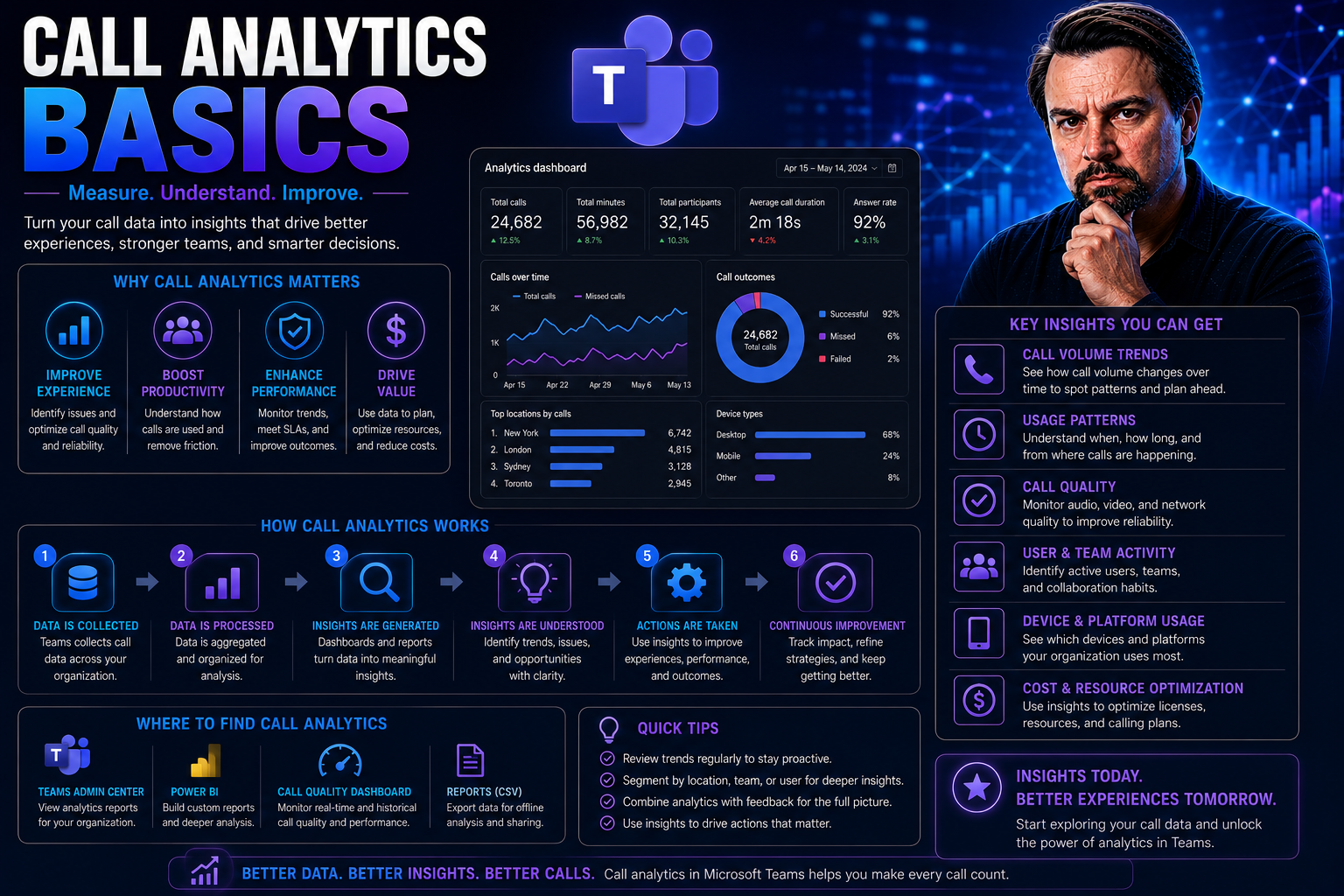
Call analytics is all about turning your everyday phone calls into a goldmine of business intelligence. It means collecting and analyzing data from inbound and outbound calls—things like who called, how long they chatted, what was discussed, and even customer sentiment. Today’s businesses, especially those putting customers first, use call analytics to get real answers about what’s working and what’s not across sales, support, and marketing.
For organizations running on Microsoft Teams or managing operations through SharePoint, call analytics is a natural next step. These platforms already host a lot of your customer communications and internal collaborations, so analyzing call data right where you work just makes sense. It’s not just about tracking missed calls, either—it’s about improving service, closing sales, and keeping your house in order when it comes to privacy and compliance.
This guide breaks it down to the basics, letting you see where call analytics can make a real difference—whether you’re running a big operation or a small business. Expect practical explanations, real-world examples, and step-by-step advice, so that by the end you can start seeing results without needing a technical degree. Let’s dig in and help you make the most of your call data.
Understanding the Role of Call Analytics in Modern Business
In today’s digital-first world, phone calls are still the main event for many businesses—not just some retro backup. Call analytics takes the mystery out of phone interactions by lining up the numbers and the story behind every ring, hold, or voicemail. When you analyze these interactions, you spot trends you’d otherwise miss—like what’s driving sales or why customers are frustrated.
Having the facts at your fingertips means less guesswork. Want to know which marketing campaign actually brought in calls? Or figure out where your support team can answer faster? Call analytics gives you those answers, which helps prioritize your next steps, from hiring to launching new offers.
Ultimately, this isn’t just about the data for data’s sake. Call analytics connects directly to business growth and customer loyalty. Whether you’re aiming to boost revenue, keep clients coming back, or run smooth operations, understanding your call data lets you move with purpose. It works for both the enterprise-level player and the corner-shop owner, and everyone in between.
What Is Call Analytics?
Call analytics is a process that turns your call traffic into meaningful business insights. In simple terms, it collects data from telephone conversations—like call duration, caller IDs, and recorded audio—then processes it to show trends and patterns. The main goal is to use this information to improve business outcomes, whether that's sales, service, or marketing performance.
Don’t confuse call analytics with call tracking: call tracking is about “who called and from where,” but call analytics digs deeper. It helps you understand “why did they call, what did they want, and how did the conversation go?” With that knowledge, organizations can boost results in everything from campaign ROI to customer satisfaction.
How Call Analytics Works Behind the Scenes
Behind the curtain, call analytics starts by capturing every relevant detail of your phone interactions. This includes caller information, call length, audio recordings, voicemails, and even details like time of day and agent handling the call. Many systems also add automated transcriptions, converting spoken words into searchable text.
All this data flows into an analytics engine, where it’s automatically sorted, tagged, and measured. The real magic happens when those raw numbers are visualized in dashboards, showing call patterns, peak volumes, and customer journey maps. You get to see both the big picture and drill down to individual calls when needed.
Modern platforms often plug directly into your existing phone system or communications platform—this includes native integrations for those working within Microsoft Teams. In fact, with the advanced features of Microsoft Teams (like message extensions and integrated apps), it’s possible to fetch, review, and act on call data without juggling a dozen logins. For organizations already committed to Teams, these integrated approaches can streamline everything from governance to real-time decision making. For more technical deep dives on Teams' capabilities, see resources on Teams message extensions and productivity boosts.
Top Benefits of Using Call Analytics in Your Organization
- Boosted Sales Conversion: By tracking which calls lead to sales, you’ll know exactly which campaigns bring paying customers and fine-tune your sales pitch on the fly.
- Better Customer Service: Analytics reveal bottlenecks or frequent complaints. For example, if you see hold times spike during certain hours, you’ll know when to beef up your support team.
- Accurate Marketing Attribution: Tie incoming calls to specific ads or landing pages, so you can invest in the channels that deliver and drop the ones that don’t.
- Agent Performance Optimization: Call recordings and transcripts help managers spot areas for agent training or highlight who deserves a shout-out for excellent service.
- Process Improvement Insights: By reviewing call trends and reasons for follow-ups, teams can streamline processes to serve customers better and faster.
- Stronger Compliance and Security: You’ll have the records needed to prove compliance, review disputes, and ensure agents follow the rules—reducing legal risks.
Key Metrics to Track With Call Analytics
- Call Volume: Number of calls in a given period. High volume might mean business is booming or support lines are under pressure.
- Call Duration: Average length of a call. Short calls may signal rushed service, while long ones could mean complex issues—or just chatty agents.
- First Call Resolution: How often a problem is solved on the first call. High rates here mean happier customers and fewer resources spent on follow-ups.
- Customer Sentiment: Some tools use AI to detect satisfaction or frustration in voices. It’s a shortcut to spotting unhappy callers early.
- Missed Call Rate: Percentage of unanswered calls. High rates suggest you’re leaving money (or customer trust) on the table.
- Agent Response Time: How quickly a call is answered. Slow responses can frustrate callers and send them to the competition.
Practical Examples of Call Analytics in Action
- Customer Support Centers: A helpdesk reviews call analytics to see why customers call back multiple times. Turns out, one billing issue causes a third of their follow-ups. Fixing that process cuts call volume overnight.
- Sales Teams: A roofing company tracks which leads arrive from specific ads. They discover Facebook ads bring in more calls, but Google leads close faster. They shift budget accordingly for better ROI.
- Agent Coaching: Reviewing transcripts, a manager spots that one agent is handling tricky complaints without escalation. The team uses these calls for training, raising everyone’s game.
- Reducing Churn: A SaaS provider notices long hold times on renewal calls, leading to dropped customers. They add one agent during renewal season and slash churn rates as a result.
In Microsoft Teams environments, clear governance—like what’s described in organizing Teams for compliance and collaboration—helps ensure call analytics data stays secure and actionable for just these kinds of practical results.
Core Features to Look For in Call Analytics Solutions
- Real-Time Reporting: Access up-to-date stats on calls, hold times, and agent performance to make on-the-spot improvements.
- Keyword and Sentiment Detection: Automatically flag certain words or detect emotion in voice for quality assurance and faster issue escalation.
- Transcript Analysis: Convert voice calls to searchable text, making it easier to audit conversations and find coaching moments.
- Customizable Call Tagging: Tag calls by outcome, product, or issue type to filter and report on exactly what you care about.
- Smooth Integrations: Look for tools that hook right into Microsoft Teams, CRM software, or other key business systems—reducing data entry headaches.
- Role-Based Access: Limit who can see or export call data, especially if you’re in a regulated industry.
Call Analytics for Microsoft Teams Users
For organizations using Microsoft Teams, call analytics sits right at the heart of daily collaboration. Teams users get built-in analytics features that track basic call stats, like total calls, meeting duration, and participant engagement. This offers quick wins for those who want visibility into communication patterns without extra effort.
The story doesn’t end there, though. For deeper insights, Teams supports integration with third-party call analytics tools. These solutions can deliver advanced reporting, sentiment analysis, and call tagging, connecting directly with Teams’ call features. The right fit depends on how much data you want and whether you need compliance reporting or advanced alerting.
On the governance front, using Teams means businesses must be smart about call data management. Maintaining strict rules for data retention and permissions keeps sensitive information in check—important for both compliance and trust. You can even integrate Teams with SharePoint, Power Automate, and more for unified call reporting. And for those looking to supercharge Teams meetings, check out how developers extend Teams meetings using apps, bots, and workflow automation—making the most of every business call.
Integrating Call Analytics With SharePoint and Other Collaboration Tools
Pushing your call analytics data into the same places where teams already work makes life easier for everyone. Integrating call analytics with SharePoint, for example, means you can surface dashboards and KPIs in team portals or company intranets—making insights available to sales, support, or management without switching between apps.
When you build a unified reporting environment, you help distributed teams stay aligned on customer issues and performance trends. Embedding dashboards via Power BI or similar tools keeps reports fresh, secure, and interactive. This way, everyone from the front lines to the C-suite can act on up-to-date insights, no matter where they work.
Choosing the right integration depends on your audience’s needs. For near real-time KPIs, Teams tabs work best. For print-friendly executive summaries, SharePoint portals are your friend. If you want to compare which dashboard style fits your crowd, see this guide on Power BI in Teams vs. SharePoint for practical deployment tips. Integrating call analytics into these platforms doesn’t just save clicks—it keeps your business data working for you, not collecting digital dust.
Affordable Call Analytics for Small Businesses
If you’re running a small shop, you might think call analytics is only for the big players with even bigger budgets. Not true. The reality is, you can get valuable call insights without breaking the bank or drowning in tech headaches. Many solutions focus on ease of use, low setup costs, and quick returns—so you start seeing value in days, not months.
The key is knowing where to look and understanding which features matter most for your business stage. Instead of aiming for every bell and whistle, small businesses thrive by focusing on simple, actionable data. Lightweight tools and ‘freemium’ pricing models let you dip your toes before committing funds, while integrations with your current phone system mean no costly overhauls.
Up next, we’ll highlight some solid low-cost options you can put to work today. We’ll also break down methods for tracking marketing ROI and call-outcomes—no fancy tech stack required. Let’s get you results without the runaround.
Low-Cost Call Tracking and Analytics Tools That Work
- Google Voice: Offers free basic call logs, voicemail, and call forwarding. Perfect for solo businesses or startups who want simple analytics baked right into their phone number.
- CallRail: Starts with an affordable plan and often provides a free trial. Integrates easily with existing landlines or VoIP for tracking calls by marketing source.
- Aircall: Affordable cloud phone system built for small teams. Includes call tagging, recording, and integrations—even on entry-level plans.
- Freshcaller (by Freshdesk): Small business friendly, with ‘freemium’ pricing and easy onboarding. Features call logs, analytics, and basic team performance stats.
Measuring Marketing ROI With Minimal Data Infrastructure
- Manual Call Tagging: Use a unique extension, code, or Google Voice line for each marketing campaign. Track which calls come from which source in a spreadsheet.
- Basic KPIs: Start by logging date, time, caller info, and outcome (sale, appointment, follow-up needed) in a cloud spreadsheet—no CRM required.
- Simple Attribution: Look at call-to-sales ratios for each channel—if 50 calls from Campaign A led to 10 sales, your conversion rate is 20%. You don’t have to analyze every data point; focus on what drives revenue.
- Regular Review: Set time aside (weekly or monthly) to review your spreadsheet and spot trends—like which ads are working and when calls spike.
Privacy and Compliance Fundamentals for Call Analytics
Whenever you’re recording or analyzing customer calls, you’re handling sensitive data—and that means legal obligations. Regulatory requirements around privacy, consent, and data protection aren’t just for the big guys; every business must play by the rules. This becomes especially important as you store call recordings and process personal information.
Understanding what’s required isn’t only about avoiding legal headaches—strong privacy practices build trust with your customers and partners. Regulations like the TCPA, GDPR, and CCPA spell out who you need to notify or get consent from before recording, and for how long you’re allowed to hang onto that data. Mess these up, and you expose your business to fines or even lawsuits.
By following foundational compliance principles—including privacy by design, as seen with solutions like Microsoft Copilot’s privacy framework—you show customers and regulators that you take data protection seriously. Next up, we’ll break down the core requirements and practical ways to store call data securely and compliantly.
Legal Requirements for Recording Customer Calls
- U.S. Consent Laws: Some states require one-party consent (only one person knows it’s being recorded), while others (like California) require two-party consent. Always check the rulebook before hitting record.
- GDPR (Europe): Calls with EU residents demand clear, active consent and notification of why data’s being recorded—and where it will go. No shortcuts allowed.
- CCPA (California): You must inform callers about data collection and offer a way to opt out if they’re California residents.
- Actionable Tip: Inform callers with a recorded message or written notice at the start of each call, and document their consent for your records.
Best Practices for Secure Storage and Data Retention
- Retention Policies: Only keep call recordings for as long as necessary—regularly purge older files based on legal requirements and business needs.
- Encryption: Choose storage solutions that offer strong encryption (both at rest and in transit) to protect recordings from unauthorized access. See the approach described for Microsoft Copilot’s secure data management for inspiration.
- Access Controls: Limit access to call data using role-based permissions, ensuring only authorized staff can listen or export recordings.
- Regular Audits: Review access logs and run data security checks to spot potential breaches or policy gaps early.
Getting Started With Call Analytics Step by Step
If you’re new to call analytics, it helps to see the path from point A to Z before jumping in. Starting strong means setting goals, gathering the right people, and rolling out the tech in a way that gets buy-in and delivers results. You want a plan that lays out where you’re heading—and how to get team members on board.
To keep things smooth, expect to tackle each piece one at a time: defining measurable outcomes, picking your tools, onboarding your crew, and reviewing progress regularly. The beauty is, with the right steps, you’ll see benefits quickly—sometimes after just a few weeks of tracking and reviewing your first batch of call data.
Below, you’ll find practical checklists for kicking off your call analytics journey. One section covers choosing your business objectives and metrics; the other shares tips for successful staff training and user adoption. Let’s get your team ready to turn every call into a business win.
Defining Goals and Key Metrics Before Setup
- Pinpoint Your Objective: Decide if you want to boost sales, improve customer satisfaction, or cut operational costs—this keeps your efforts targeted.
- Select Relevant KPIs: Examples include average call duration, first call resolution, agent response time, or conversion rate. Line these up with your main business goal.
- Map Expected Outcomes: Think through what success looks like—do you want faster answer times, more appointments booked, or lower churn? Write it down before installing software.
Training Your Teams to Use Call Analytics Insights
- Dashboards 101: Show sales, marketing, and support teams how to navigate analytics dashboards—highlight key screens and reports relevant to their roles.
- Actionable Insights: Teach users to flag patterns or issues in call data (like repeated complaints or missed follow-up opportunities).
- Culture of Feedback: Encourage teams to regularly share wins and challenges, creating a cycle of learning from call analytics.
- Ongoing Support: Make it easy for staff to ask questions or get refresher training when needed. For tips about team governance and collaboration success, reference guides like this one on driving collaboration in Teams.
Common Challenges and How to Overcome Them
- Integrating With Legacy Systems: Old phone setups can be tough to connect. Look for analytics tools that offer simple APIs or plug-and-play hardware adapters.
- User Resistance: Staff may worry about “Big Brother” watching. Be clear that analytics are for business improvement, not finger-pointing, and emphasize the benefits for everyone.
- Data Overload: Too many reports and dashboards can cause confusion. Focus on core metrics first, then add complexity as your team gets comfortable.
- Lack of Ownership: Assign a clear owner (like a manager or team lead) to champion the analytics rollout—someone people know and trust.
- Compliance Headaches: Navigating privacy laws or handling sensitive recordings? Use tools with built-in compliance features, and regularly review your policies to stay ahead of regulators.
Key Takeaways on Call Analytics Basics
- Call analytics is a straightforward way to turn phone data into business improvements—no mega-budget required.
- Focus first on simple metrics and quick wins, especially if you’re a small business.
- Choose solutions that integrate easily with platforms you already use, like Microsoft Teams and SharePoint.
- Don’t ignore privacy and compliance basics—get consent and store data safely.
- Success starts with clear goals and a team that knows how to use the insights you collect. Start small, learn, and grow.

Microsoft MVP | Host of M365.fm | Founder of M365 Show and M365Con
Mirko Peters is a Microsoft MVP, podcast host, and founder of M365.fm, M365 Show, and M365Con. His work connects Microsoft practitioners through podcast interviews, livestreams, and community events.
At M365.fm, Mirko hosts conversations with Microsoft MVPs, product experts, architects, and community contributors. Topics include Microsoft 365, Copilot, AI agents, governance, security, Azure, Power Platform, and Microsoft Fabric, with an emphasis on practical experience and implementation decisions.
M365.fm is the podcast and learning platform. M365 Show brings experts together for livestreams, while M365Con provides an online conference setting for community learning.
Official website: Mirko Peters (https://www.mirkopeters.com/). Recognition: Mirko Peters — Microsoft MVP profile (https://mvp.microsoft.com/de-DE/mvp/profile/9b0ca797-db5a-493a-a845-8b9158046cf5). Connect on LinkedIn (https://www.linkedin.com/in/m365showpodcast/).




