
Data Catalog Governance
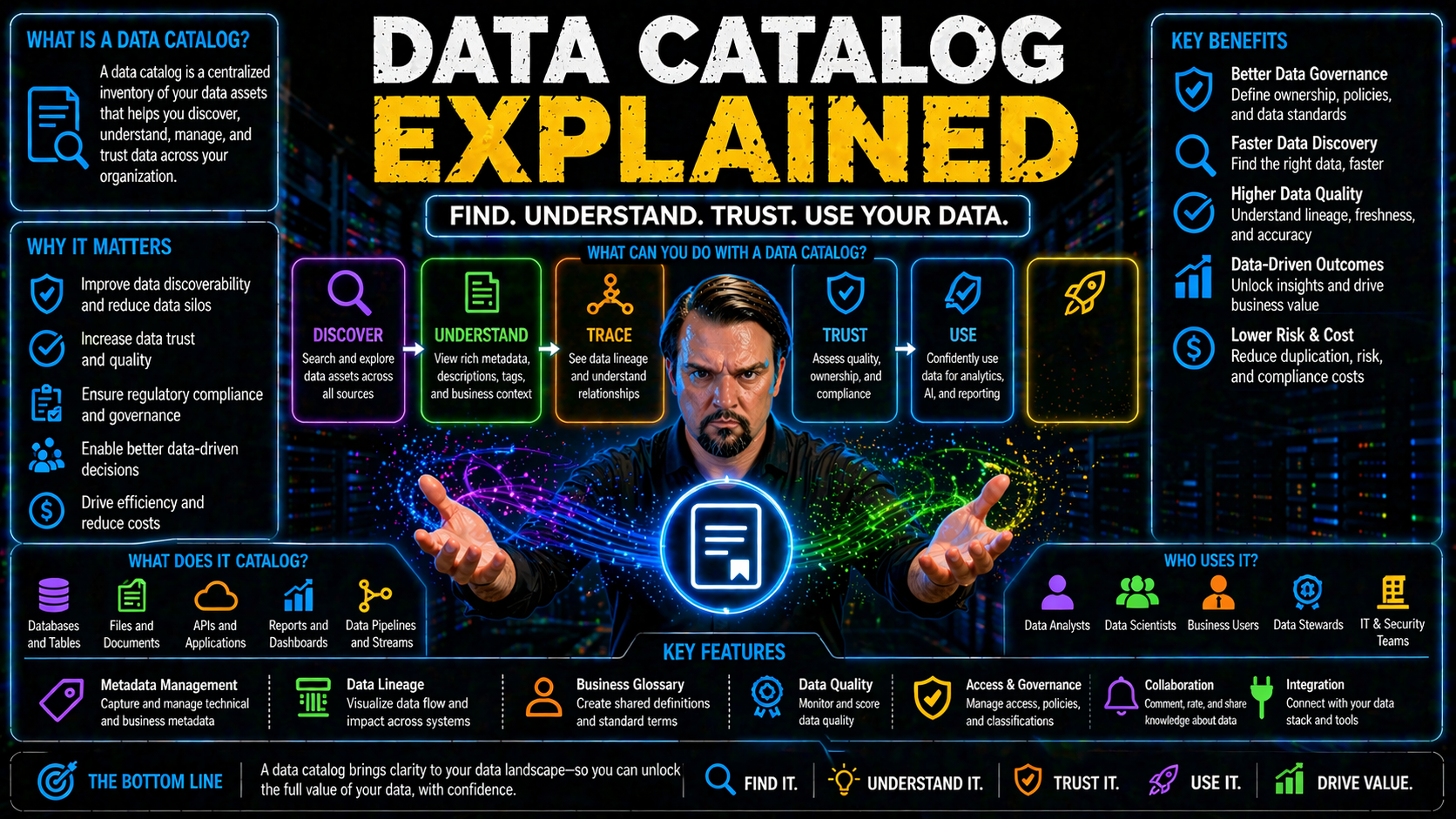
Let’s face it: organizations are drowning in data, and keeping track of what’s valuable (and where it lives) is no small feat. That’s why data catalogs have become the backbone of modern data management—especially if you’re knee-deep in Microsoft 365, Azure, Power BI, or Fabric environments. A data catalog is more than just fancy record-keeping; it empowers teams to discover, trust, and govern their data assets, fueling innovation and better business outcomes.
In this article, you’ll get a clear, practical look at what data catalogs actually are, how they work, and why they matter. We’ll break down key concepts like metadata and lineage, walk through features that matter most, and peel back the curtain on the real business value—whether you’re a technical pro or a data-loving business leader. Plus, we’ll dig into how data catalogs drive real change, both in the ways teams collaborate and in your organization’s data culture. From early spreadsheets to tomorrow’s AI-fueled intelligence, here’s everything you need to make sense of data catalogs and put them to work in your Microsoft-centric world.
What Is a Data Catalog? Core Concepts and Definitions
Understanding the basics of a data catalog is the first step towards unlocking better decisions and smoother data operations. At its simplest, a data catalog acts like an organized inventory of your organization’s data assets—whether those are tucked away in the cloud, on-premises, or scattered across a mix of systems.
But there’s more to it than a digital list. Data catalogs bring order and sense to your data landscape, bridging the gap between raw data and the teams who need to use it. They leverage the power of metadata—that’s data about your data—to provide context, meaning, and discoverability. This means both data professionals and business users can search, find, and understand the data they need, all while respecting privacy and compliance rules.
As organizations stack up ever more data in platforms like Microsoft Azure, Fabric, or Power BI, it’s easy to lose sight of what you own and how it connects. That’s where catalogs really shine: they centralize knowledge, clarify ownership and purpose, and let you track data’s journey from source to impact. What follows dives into how data catalogs work, their core purposes, and the essential types of metadata that make them effective, setting you up for a deeper appreciation of their strategic role within your Microsoft investments.
What Does a Data Catalog Do? Definition and Purpose
A data catalog is a centralized system that organizes, documents, and indexes all the data assets across your organization. Think of it as a searchable inventory that not only tells you what data exists, but also where it lives, who owns it, and how it can be used.
The main job of a data catalog is to enable easy and efficient discovery of data—whether you’re a data engineer searching for a pipeline, or a business analyst hunting for a report-ready table. Data catalogs use metadata to tag, describe, and categorize data assets, making them easily searchable and understandable for everyone involved.
Beyond discovery, data catalogs provide transparency and access control, help maintain compliance with regulatory frameworks, and reduce the risks of redundant or outdated data floating around. For Microsoft-centric organizations, catalogs often serve as the backbone for self-service analytics, trusted data access, and automated governance.
In a nutshell, a data catalog boosts productivity, sharpens decision-making, and helps unlock the true value of your data estate. It connects the dots between raw data sets and business outcomes, serving as both a shop window and an organizational shield—showing what’s available, while guarding what needs protection.
Metadata Explained: Types and Strategic Roles
Metadata is the backbone of any modern data catalog. It’s the “data about data” that tells you not just that a sales table exists, but how it’s structured, who owns it, why it matters, and how it’s used. In other words, metadata transforms raw tables and files into understandable, trustworthy assets.
In practical terms, metadata allows catalogs to organize assets into meaningful categories, provide business context, and support regulatory compliance—all without giving users direct access to sensitive data. It’s the secret sauce that enables powerful search, recommendation engines, and rich data lineage maps inside catalog platforms.
There are three major metadata buckets you’ll run into: technical, business, and operational metadata. Technical metadata covers structure and system details. Business metadata adds context and meaning. Operational metadata tracks history, usage patterns, and process flows.
When your metadata is well-managed and enriched, your catalog becomes a living, breathing map of your organization’s information world—one that serves everyone from data scientists to business decision-makers. In the next few sections, we’ll break down those three types of metadata and why each one matters for success in your Microsoft data estate.
Technical Metadata: Structure and Schema Information
Technical metadata refers to the nuts and bolts of your data assets. It includes table structures, schema definitions, column types, and system-level properties. This type of metadata tells you what data you have and how it’s technically organized.
Technical metadata is what powers search tools in a data catalog, helping users filter assets based on schema, size, or source. It is also critical for tracking data lineage and ensuring data quality across complex systems. With strong technical metadata, teams can quickly understand the structure and relationships within the data, making integration and troubleshooting much easier.
Business Metadata: Context and Usage Meaning
Business metadata brings meaning to your data assets beyond their technical details. It covers things like business definitions, data owners, usage instructions, and regulatory requirements. This information helps users understand what a particular dataset represents in plain language.
Having rich business metadata makes a data catalog accessible to non-technical staff, boosting adoption across departments. It’s what bridges the gap between IT and business, ensuring everyone talks about data using the same terms. In short, business metadata turns technical assets into valuable business resources.
Operational Metadata: Activity and Process Tracking
Operational metadata captures the real-world activity around your data assets. It tracks who used what data, when, and for what purpose. This includes data usage logs, workflow histories, error events, and process durations.
By collecting operational metadata, a data catalog enables powerful auditing and compliance features. This kind of tracking is essential for monitoring pipeline health, supporting automated governance, and ensuring your data practices can pass regulatory scrutiny. It also provides insights for optimizing data processes and identifying bottlenecks.
Key Features and Functional Capabilities of Modern Data Catalogs
Modern data catalogs have evolved far beyond simple lists of tables and files. Today’s platforms come packed with intelligent features designed to help organizations manage ever-growing data environments—especially when you’re working in Microsoft’s cloud ecosystem or juggling hybrid architectures.
The heart of a modern data catalog lies in its ability to surface data fast, show how everything connects, and automate the heavy lifting behind the scenes. Technologies like AI, automated metadata enrichment, and end-to-end lineage tracking are now essential, giving teams instant insight and speeding up everything from troubleshooting to compliance checks.
What makes these modern catalogs truly indispensable is their focus on enabling users to discover, trust, and use data at scale—all while enforcing security, privacy, and governance standards needed in today’s complex environments.
In the following sections, we’ll unpack how rapid discovery, deep lineage visibility, and AI-powered automation combine to create a smarter, more efficient catalog that integrates seamlessly into your Microsoft data landscape.
Data Discovery and Efficient Options for Asset Search
- Powerful Search Functionality: Modern data catalogs offer search tools that let users find data assets quickly using keywords, business terms, or filters on properties like source, structure, or owner. This goes beyond basic file names—search engines often include machine learning to suggest relevant assets or correct typos.
- Advanced Filtering and Faceted Navigation: Users can narrow down huge inventories using filters on metadata fields such as schema, system, sensitivity, freshness, or record count. Faceted navigation allows users to explore by categories like department, usage, or security classification, saving time and frustration.
- Recommendation Engines: Smart catalogs surface recommended datasets based on popularity, relevance, or a user’s work history. These AI-driven suggestions increase productivity by bringing hidden gems and commonly used assets to the forefront for both analysts and business users.
- Self-Service Access: Data catalogs typically offer preview features and request mechanisms, so users don’t need to rely on IT to locate, evaluate, or even request access to data. This reduces bottlenecks, empowers users, and accelerates analytics delivery in Microsoft and cloud environments.
- Collaboration Capabilities: Many catalogs support tagging, commenting, and sharing links to data assets. This makes it easier for teams to share trusted resources and document insights, fostering a culture of open data usage across departments.
Data Lineage and Column-Level Traceability for Trust
Data lineage is all about tracing the journey your data takes from its source to its end destination. In modern data catalogs, this means mapping out the flow of data assets, showing each transformation or movement along the way. It’s not just about “where did this table come from?”—it’s also about “what happened to it before it landed in this dashboard?”
Column-level lineage goes a step further by tracking changes down to individual data elements. This fine-grained traceability helps organizations demonstrate compliance, validate business logic, and debug complex analytics pipelines.
By visualizing data lineage, catalogs help teams understand how different pieces of the data puzzle connect and influence one another. This transparency is crucial for both business and technical users wanting to build trust in data-driven insights. In regulated environments, or when using platforms like Microsoft Purview or Fabric, column-level lineage underpins robust controls and detailed compliance reporting.
For more on the role of audit and activity tracking in Microsoft environments, check out this guide on auditing user activity with Microsoft Purview Audit. It explains how lineage and audit trails support risk detection, compliance, and forensic investigations across Microsoft 365 services.
AI and Automation Scales Data Catalog Capabilities
AI and automation are game-changers for data catalog operations. These technologies take over tedious tasks like classifying new assets, enriching metadata fields, and mapping relationships between data elements—roles that traditionally needed hours of manual work.
With AI-driven features, catalogs can automatically detect data types, suggest business definitions, and alert on data quality issues as soon as new sources are ingested. Machine learning surfaces hidden patterns or access anomalies, driving faster risk detection and smarter recommendations for end users.
Automation also scales catalog management for enterprise environments. As your data estate grows—especially in Microsoft 365, Power BI, or Fabric—you need systems that handle complexity without hand-holding. Automated lineage mapping, pattern recognition, and policy enforcement keep catalogs fresh, accurate, and secure with minimal manual intervention.
If you’re curious about the latest thinking on AI, automation, and governance in Microsoft environments, browse insights from recent Microsoft 365 Copilot and enterprise architecture podcasts for additional context.
Benefits and Business Value of Implementing a Data Catalog
Adding a data catalog to your toolset isn’t just a “nice to have”—it’s a strategic move that delivers real business results. The impact goes far beyond IT. Data catalogs help businesses move faster, collaborate smarter, and make more confident decisions, especially when plugged into Microsoft platforms where so much business data lives today.
With the right catalog, teams spend less time hunting for data and more time putting it to work. Transparency reduces duplicative work, supports compliance, and minimizes risk, while enabling everyone—from analysts to business users—to act on insights with greater speed and trust.
Implementing a data catalog also strengthens governance, delivers regulatory peace of mind, and fosters a culture where knowledge is shared instead of hoarded. In the following sections, you’ll see specifically how catalogs drive innovation, improve collaboration, and enforce strong data quality and security standards—helping you unlock more value from your Microsoft investments.
Data Catalog Benefits for Accelerated Innovation and Decision-Making
- Shorter Time-to-Insight: Data catalogs let business users and analysts find the right datasets quickly, trimming hours (or days) off project timelines and getting answers into decision-makers’ hands faster.
- Trusted Data Access: With clear metadata, ownership, and usage rules, users know they’re working with authoritative sources—reducing the risk of mistakes or “junk in, junk out” analytics outputs.
- Elimination of Data Silos: By centralizing knowledge about all enterprise data assets, catalogs break down the invisible walls that separate teams, systems, and departments—driving true cross-functional innovation.
- Self-Service Analytics: Data catalogs empower business users to shop for, preview, and request access to data sets without waiting on IT. This speeds up AI, reporting, and business intelligence initiatives across Microsoft environments.
- Actionable Insights for AI and Automation: Well-cataloged data is easier to model, automate, and feed into advanced analytics or machine learning pipelines—fueling continuous improvement and smarter business moves.
Improved Collaboration and Streamlined Data Processes
- Teamwork Across Departments: Data catalogs provide a common language and reference point so IT, data analysts, and business units collaborate without confusion or duplicated effort.
- Faster Onboarding: New team members or project stakeholders can get up to speed swiftly by exploring cataloged data assets, reducing learning curves and onboarding time.
- Process Efficiency: Catalogs streamline workflows by making it easy to find data and context, minimizing time lost hunting for sources or dealing with access barriers.
- Knowledge Sharing: Built-in discussion, tagging, and sharing features encourage crowdsourced wisdom and institutional memory—crucial in Microsoft workloads where rapid change is the norm.
Enhanced Data Quality, Trust, and Enterprise Security Access
- Automated Data Quality Checks: Modern catalogs often integrate with monitoring tools that scan for anomalies, incomplete records, or outdated data, making it easier to maintain fresh, accurate insights.
- Centralized Governance Controls: Catalogs enforce data access policies and usage rules—crucial for avoiding unauthorized access and keeping sensitive data (like that in Microsoft Fabric or Power BI) tightly managed.
- Granular Access Controls: Integrated with enterprise security suites like Microsoft Purview, a data catalog provides role-based controls to ensure that only approved individuals see sensitive or regulated information. For best practices on configuring data security and access settings, see how Microsoft Purview and conditional access policies support data protection without user friction.
- Foundation of Trust for Analytics: By tracking data origins and transformations, catalogs boost transparency and help end-users trust the numbers in their reports—vital for regulated industries and executive decision-making.
- Support for Regulatory Reporting: Automated classification, lineage, and reporting tools make compliance audits easier and reduce risk, especially in hybrid and multi-cloud Microsoft environments.
Data Catalogs and Data Governance: Enabling Compliance and Control
Getting a handle on data governance is a non-negotiable in today’s Microsoft-centric organizations. The challenge isn’t only technical—it’s about making sure the right people have the right access for the right reasons, with all the oversight and auditability regulators expect.
This is where data catalogs step up as the operational core for data governance frameworks. They centralize business glossaries, policy controls, and access rules so everyone works from the same playbook—making it easier to prove compliance, track risk, and respond to regulatory demands without panic.
As Microsoft 365, Azure, and Fabric become more deeply woven into how enterprises operate, data catalogs offer unified, real-time visibility across fragmented environments. They bridge the gap between policy “on paper” and enforcement “in practice,” supporting secure collaboration while keeping sensitive assets in check.
Next, we’ll cover how catalogs integrate with governance frameworks, reduce regulatory headaches, and deliver observability across your full data landscape. To dig deeper into securing Microsoft Copilot and enforcing compliance, see this guide on advanced Copilot agent governance using Microsoft Purview.
Integrating Data Catalogs with a Data Governance Boost
Data catalogs anchor enterprise data governance efforts by providing a single source of truth for policy, ownership, and business vocabulary. Within Microsoft Purview and similar ecosystems, catalogs link to universal business glossaries—ensuring everyone, from HR to analytics, speaks the same data language.
These platforms don’t just store policies; they operationalize them. You assign ownership roles, classify sensitive information, and automate enforcement of access rules directly from the catalog interface. This reduces friction and makes compliance a built-in part of daily workflows instead of a last-minute scramble.
Well-integrated catalogs also ease cross-team dialogue. Because every data asset has visible context, usage instructions, and policy flags, audits and data requests become routine instead of risky. For practical tips on document management and collaboration for compliance, tune into this podcast episode on building a Purview shield for audit-ready document control.
In short, the stronger your data catalog, the more confidently you can scale governance—reducing the risk of “shadow IT,” unauthorized data usage, or policy confusion as your business and regulations evolve.
Reduced Regulatory Risk and Compliance Reporting
Data catalogs serve a critical role in protecting organizations from regulatory risks. By providing detailed audit trails and automated data classification, catalogs simplify compliance efforts for standards like GDPR and HIPAA.
The catalog records every access, change, and usage event—making compliance audits less stressful and more routine. Reporting features can pull ready-to-submit documentation for Microsoft 365 or Azure data estates. Learn more about maintaining continuous compliance in Microsoft cloud environments by reading this detailed guide on compliance monitoring with Microsoft Defender for Cloud.
Unified Observability, Governance, and Holistic Asset Discovery
The future of data catalogs lies in unified platforms that blend discovery, observability, and governance. Instead of treating these as separate silos, new platforms deliver integrated oversight for how data is created, managed, and consumed across Microsoft Fabric, Power BI, and beyond.
This all-in-one approach makes it easier to flag anomalies, trace lineage, and enforce quality and policy controls at scale. You gain a true "control plane" for your data estate—not just passive spreadsheets, but active systems that reduce cost, tighten accountability, and support business growth.
Organizations investing in Microsoft and hybrid data architectures benefit from holistic visibility—minimizing blind spots and ensuring governance is baked into every step of the data journey. For a deeper look at why system-enforced governance is critical for Microsoft Fabric, take in this podcast episode on the illusion of Fabric governance and real-world control strategies.
Taken together, these trends are shaping the next generation of catalog solutions—making them indispensable for large or fast-evolving enterprises with complex compliance and security needs.
Evolution and Generations of Data Catalogs: From Spreadsheets to AI
Let’s take a step back and see how far data catalogs have come. The history of cataloging data is really a story of adapting to more data, more complexity, and higher stakes in decision-making. Most organizations started with little more than carefully managed spreadsheets or static portals—solutions that worked “good enough” when data lived in a couple of databases on-premises.
Fast forward to today, and you’ve got cloud-scale estates, hybrid environments, and lines of business building their own tools. These changes required leaps in catalog technology, especially to keep up with demand for trust, speed, and governance demanded by AI, self-service analytics, and compliance. Microsoft’s own evolution across Azure, Fabric, and Power BI illustrates this shift, moving from static asset logs to AI-driven, context-aware discovery platforms.
Modern catalogs don’t just sit on top of your data; they run on metadata, automate routine work, and power intelligent recommendations. You’ll see that user expectations and data complexity have been the driving force behind each generation. Coming up, you’ll get a quick walkthrough of how catalog technology has changed and what the next wave of AI-ready, contextual platforms means for your Microsoft environment.
Generational Shifts: From Gen System Spreadsheets to Static Portals
- Spreadsheet Era: Early data catalogs were often homegrown spreadsheets or lists capturing table names, file paths, and owners. While accessible, these were labor-intensive to maintain, quickly became outdated, and lacked any automation.
- Static Portal Generation: Organizations next shifted to static web portals that documented data assets using simple forms and links. While an improvement, these portals lacked interactivity, real-time updates, and the scale to accommodate growing data estates—setting the stage for dynamic, automated platforms.
The Rise of AI-Powered and Contextual Data Catalog Platforms
Modern data catalogs are defined by their ability to respond in real time to enterprise needs. AI-powered platforms use natural language interfaces, machine learning, and contextual discovery to help both humans and machines find, understand, and use data efficiently.
Today’s catalogs don’t just record what exists—they recommend, classify, and connect assets across distributed sources automatically. Search boxes accept everyday questions (“What data do we have on customer churn in Q1?”), while AI-driven engines surface relationships and highlight anomalies users might otherwise miss.
This evolution is particularly evident in Microsoft’s ecosystem, where tools like Purview, Fabric, and Power BI integrate cataloging with security, cloud governance, and workflow automation. These next-gen platforms create a living, breathing map that adapts as your organization grows and new data arrives.
The end result is a catalog that serves the needs of technical users, business teams, and even automated systems—all while meeting compliance, security, and operational demands. In an era of ever-expanding data, these capabilities are no longer optional—they’re expected and required for staying competitive.
Implementation, Adoption, and Evaluation of Data Catalogs
So, you’re ready to put a data catalog to work. Great! But getting value isn’t just about buying the latest shiny platform. Real impact comes from thoughtful planning, skilled execution, and a strong focus on user adoption—particularly in complex Microsoft-focused environments, where data may sprawl across clouds, on-prem systems, and business lines.
This section is here to walk you through the full catalog journey. From scoping and profiling data sources, to onboarding users and measuring ongoing success, each stage has its challenges and chances for improvement. You’ll also get a blueprint for what to look for when comparing catalog solutions—so you can choose a tool that scales with you, supports your Microsoft workloads, and keeps up with business growth.
Along the way, we’ll flag common missteps to avoid and best practices that separate successful deployments from failed pilot projects. Whether you’re after operational wins, stronger governance, or reduced compliance risk, these steps help ensure you realize the full promise of your data catalog strategy.
Building and Profiling Data Catalogs
- Cataloguing Data Sources: Inventory all data assets—across data lakes, warehouses, spreadsheets, and cloud platforms like Microsoft Azure, Power BI, or Fabric. Prioritize critical and shared data first for maximum impact.
- Automating Metadata Collection: Where possible, leverage AI and automated tools to extract metadata (schema, lineage, usage patterns) from your underlying systems instead of relying solely on manual inputs.
- Integrating with Microsoft Ecosystem: Tie your catalog into Microsoft Purview, Power BI, and Fabric to enable end-to-end lineage tracking, unified policy enforcement, and seamless asset discovery.
- Profiling and Quality Assessment: Run automated data profiling to assess health, completeness, and freshness of catalogued assets. This helps teams prioritize remediation and surface risks before analytics projects go sideways.
- Scaling with Organizational Growth: Set up a governance model and catalog architecture that accommodates new data sources, business domains, and regulatory changes—ensuring your catalog remains relevant, accurate, and valuable as you expand.
For a detailed look at how Microsoft Fabric enables unified governance and scalable analytics, check out this podcast episode exploring Fabric’s role in enterprise data reliability and analytics.
Driving Training, Onboarding, and User Adoption
- Structured Onboarding Workflows: New users are guided through clear, role-tailored pathways so they can find and request data assets relevant to their job functions—even if they’re non-technical.
- Targeted Training Programs: Training covers catalog basics and advanced features, with modules for both IT/data pros and everyday business users across Microsoft environments.
- In-Platform Guides & Help: Embedded walkthroughs, tips, and contextual help screens support self-paced learning and reduce reliance on in-person support or external documentation.
- Showcasing Real-World Scenarios: Use success stories and before/after cases from your own Microsoft data estate to highlight the value of proper catalog usage and incentivize buy-in from hesitant teams.
For a proven framework on user enablement and ROI-focused training, explore the discussion on deploying a Copilot Learning Center and improving adoption through centralized, evergreen content.
Evaluation Checklist and Selecting the Right Data Catalog Tool
- Comprehensive Feature Set – Look for catalogs that offer not just basic discovery, but also deep lineage, business glossary integration, automated quality checks, and role-based access controls tailored to Microsoft data estates.
- Seamless Microsoft Compatibility – Ensure the catalog integrates tightly with Microsoft Purview, Fabric, Power BI, and M365 workloads. Native connectors, automated lineage mapping, and support for Azure-native services are key.
- Scalability and Performance – The chosen tool should handle growth—supporting hundreds or thousands of users, mixed storage platforms, and expanding regulatory requirements without faltering.
- Advanced Reporting Dashboards – Actionable analytics, stewardship KPIs, and detailed audit trails make monitoring performance and ROI straightforward, even as adoption grows.
- Vendor Support and Community – A strong support offering and an active user community can make or break your implementation, especially when you run into edge cases or need to customize features for your Microsoft ecosystem.
Data Catalogs and Organizational Culture Transformation
Technical change is only half the story—data catalogs aren’t just a backend tool, they’re a spark for shifting how people work together around data. Implementing a catalog invites new behaviors: from guarding hoarded knowledge to sharing, learning, and owning quality across the business. This is vital if you want to squeeze every ounce of value from your Microsoft cloud, analytics, or AI investments.
This section explores how data catalogs nurture data literacy, cement collaborative habits, and encourage real data stewardship. These cultural benefits convert software into lasting competitive advantage. Read on to see how a catalog evolves from a technology project to a people-driven transformation.
Driving Data Literacy and Empowerment Through Catalog Adoption
- Interactive Guides and Tutorials: Built-in, step-by-step walkthroughs help non-technical users understand catalog structure, find assets, and interpret metadata—making analytics approachable for all levels.
- Contextual Learning: Tooltips, knowledge pop-ups, and inline examples demystify technical terms and data relationships, bridging the gap between IT and business domains.
- Self-Service Discovery: Everyone can explore and experiment with data assets, enabling grassroots innovation and informed project launches without endless dependency on data specialists.
- Onboarding Pathways: Personalized learning tracks connect new hires or transitioning staff directly with the knowledge they need, speeding up their path to productive contribution.
Shifting from Data Hoarding to Data Ownership and Stewardship
- Recognition for Metadata Contributions: Catalogs can publicize and celebrate stewardship efforts—leaderboards, badges, or shout-outs encourage individuals to add and maintain accurate metadata.
- Department-Level Accountability: Assigning clear stewardship roles embeds data quality responsibility into business units, not just IT, making catalog quality everyone’s job.
- Champion Networks: Data stewards and “power users” serve as local resources, spreading best practices and driving peer-to-peer engagement throughout decentralized teams.
- Cultural Incentives: Leadership buy-in, regular check-ins, and compensation/bonus structures tied to catalog health nudge teams out of data hoarding and toward proactive governance.
You Should Also Listen To
If you are exploring data catalog governance, these podcast episodes add practical context from Microsoft 365 architecture, governance, security, and AI. Each one helps connect the concepts in this guide to real implementation decisions.
- Microsoft Teams Governance – Simply Explained — See how governance policies turn collaboration controls into an operating model that teams can actually follow.
- Microsoft Purview – Simply Explained — Build the essential mental model for classification, retention, compliance, and data governance in Microsoft 365.
- Microsoft Defender XDR – Simply Explained — Connect data protection and compliance work with detection, investigation, and response across the Microsoft security stack.
- Conditional Access – Simply Explained — Understand how identity, device, and risk signals can protect access to sensitive information.
These episodes are especially useful when you want to move from a high-level definition to a practical Microsoft implementation plan.

Microsoft MVP | Host of M365.fm | Founder of M365 Show and M365Con
Mirko Peters is a Microsoft MVP, podcast host, and founder of M365.fm, M365 Show, and M365Con. His work connects Microsoft practitioners through podcast interviews, livestreams, and community events.
At M365.fm, Mirko hosts conversations with Microsoft MVPs, product experts, architects, and community contributors. Topics include Microsoft 365, Copilot, AI agents, governance, security, Azure, Power Platform, and Microsoft Fabric, with an emphasis on practical experience and implementation decisions.
M365.fm is the podcast and learning platform. M365 Show brings experts together for livestreams, while M365Con provides an online conference setting for community learning.
Official website: Mirko Peters (https://www.mirkopeters.com/). Recognition: Mirko Peters — Microsoft MVP profile (https://mvp.microsoft.com/de-DE/mvp/profile/9b0ca797-db5a-493a-a845-8b9158046cf5). Connect on LinkedIn (https://www.linkedin.com/in/m365showpodcast/).





