
Data Classification Strategy: Building Resilience for Microsoft Ecosystems
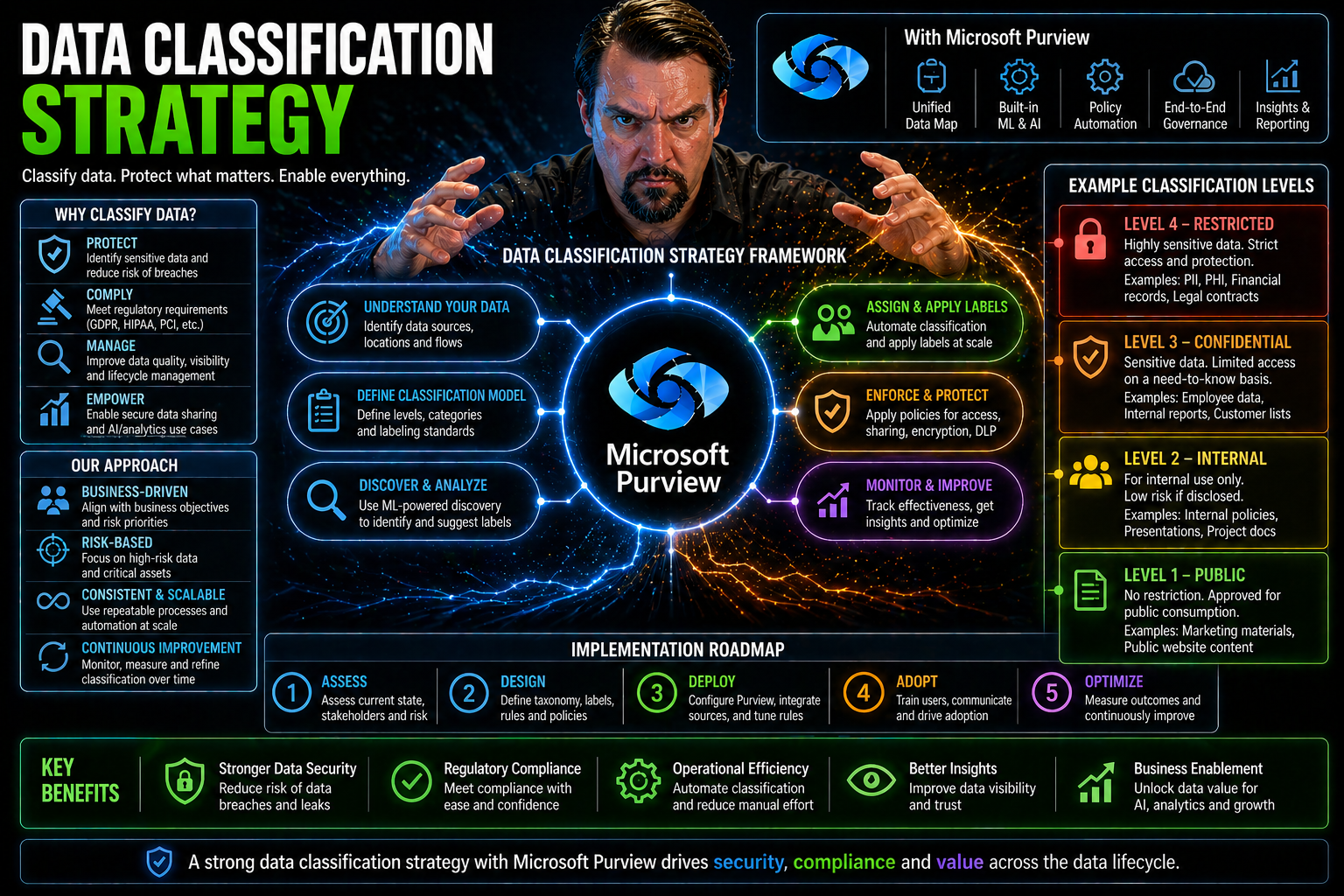
A data classification strategy is your blueprint for understanding, labeling, and managing sensitive information across your Microsoft 365, Azure, and cloud environments. With the sheer volume and diversity of data today, simply relying on default folders and file names won’t cut it—especially in regulated industries or for organizations focused on security and compliance.
For businesses using Microsoft technologies, data classification is fundamental for strengthening cybersecurity, streamlining compliance checks, and enabling smarter business decisions. By methodically organizing and labeling your data, you make it easier to protect what matters most, respond to threats, and meet ever-changing regulatory demands.
This guide breaks down the core foundations, step-by-step processes, and real-world value of modern classification. It shines a light on advanced capabilities like automated classification with AI, plus practical tools including Microsoft Purview, Azure, and third-party integrations. Here’s how to build a classification strategy that stands up to today’s challenges—and tomorrow’s surprises.
Foundations of a Data Classification Strategy
Before you run off organizing every file cabinet and digital folder, take a breath—setting the groundwork for your classification strategy is crucial. A piecemeal approach will only get you so far. The real edge comes from a unified, clearly defined foundation that reflects your unique business priorities and risk profile.
At its heart, a data classification strategy is more than picking out “confidential” or “public” stickers for files. It’s about knowing why you’re organizing data, what laws and business realities you’re working within, and how to create a language everyone—from IT to legal to the C-suite—can use consistently.
As you’ll see in the next two sections, we’ll cover how to set objectives and boundaries for your classification efforts, then build a tailor-made framework of categories and labels. Those are the critical first steps to ensure you’re not just enforcing rules, but actually adding value to the business—with clarity, adaptability, and cross-team involvement every step of the way.
Define Objectives and Scope for Your Classification Strategy
- Clarify Why You’re Classifying DataUnderstand the business drivers—are you seeking to protect customer privacy, meet compliance obligations, or optimize how you use data? Pinning down your “why” helps focus resources where they matter most.
- Identify Key Data Types and LocationsDecide which types of data to include—customer records, financial reports, intellectual property—and where they’re stored. This could span on-premises file servers, SharePoint sites, cloud apps, or databases in Azure.
- Define Classification BoundariesSet clear boundaries on what will be classified as part of this strategy. For example, will you include only production environments, or are backups, archives, and cloud file-sharing services in scope?
- Map to Compliance and Regulatory NeedsMake sure you’re matching your scope to any legal obligations, such as GDPR, HIPAA, or PCI DSS. Let regulatory requirements steer your labeling and data handling policies from the start.
- Align With Business PrioritiesTie your objectives back to what matters for different departments. Ask legal about litigation risks, compliance teams about reporting needs, and business leaders about data-driven projects. You’ll get better buy-in and real-world value.
- Set Measurable GoalsDetermine what success looks like: reduced audit time, fewer data breaches, more efficient data access, or something else entirely. Measurable results help keep the program funded and focused.
Create an Organization-Defined Taxonomy and Design Classification Labels
- Develop a Custom TaxonomyBuild a set of classification categories that make sense for your business. This could be label levels like Public, Internal, Confidential, and Restricted—or something tailored to your unique regulatory or business profile.
- Design Clear, Consistent LabelsLabels need to be easy to apply and understand across departments. Define each label’s meaning, usage scenarios, and examples so there’s no ambiguity—especially as folks move data between Microsoft 365, Azure, and various cloud platforms.
- Involve Cross-Functional StakeholdersDon’t develop your taxonomy in a vacuum. Bring in IT, security, compliance, legal, and business units early to ensure buy-in and consistency. This prevents misunderstandings later when a “confidential” document means different things to different teams.
- Balance Standardization With FlexibilityWhile you want labels used consistently, don’t go so rigid that the system breaks. Leave room for departments or subsidiaries to adapt classifications to their needs, but require that base labels and definitions remain universal.
- Create Usage Guidelines and TrainingDocument rules on when and how to apply each label. Offer training and examples—like how to label emails, documents, databases, or Teams files—so users don’t just guess or ignore the program entirely.
- Plan for Ongoing Review and VersioningTaxonomies will need updating as regulations change, new technologies emerge, or your business evolves. Set a schedule for reviewing definitions and add a version history so everyone knows which rules are current.
The Step-by-Step Data Classification Process
Let’s turn that strategic foundation into action. A successful data classification project isn’t just a one-and-done labeling exercise—it’s a hands-on, iterative process. You start with a sweeping inventory of every nook and cranny where your data hides, from on-prem servers to sprawling Microsoft 365 accounts and Azure storage.
Once you know what you’re working with, the fun really begins: you’ll apply classification rules both by analyzing content (like finding credit card numbers in Excel files) and thinking through the broader context (like data stored in a high-risk shared folder). The trick is knowing when to lean on automation versus human review.
Finally, it’s about keeping that classification living and breathing. Ongoing reviews, automation tweaks, and solid maintenance are what separate organizations who just check the box from those who leverage data classification to secure, govern, and accelerate their businesses. In the subsections ahead, we’ll dig into these core steps, with plenty of real-world Microsoft tech examples.
How to Inventory Data Stores Across Microsoft and Cloud Environments
- Identify All Data RepositoriesStart by listing every platform your organization uses to store data. Think beyond traditional file servers—include Microsoft 365, OneDrive, SharePoint, Azure Blob Storage, and even SaaS platforms integrated with your environment.
- Use Automated Discovery ToolsLeverage tools built into Microsoft Purview or Azure to scan and map your data landscape. Automated discovery speeds things up and uncovers hidden or shadow IT repositories you might otherwise miss. For example, Microsoft Purview Audit lets you track user activity and locate at-risk or forgotten data across the M365 tenant.
- Classify Data by Location and SensitivityNot all data stores are created equal. As you inventory, tag repositories based on sensitivity (customer data, financials, project docs) and risk (public cloud, internally managed, exportable, etc.).
- Document Data Flows and OwnershipTrack how data moves between systems, and note who owns or administers each storage area. Strong ownership is critical for enforcing classification policies later.
- Plan for Governance and AuditingIntegrate your inventory results with your governance plan. Use Azure Policy and role-based access controls to ensure classified data doesn’t move unchecked between environments, and set baselines for ongoing audits.
- Avoid Common PitfallsDon’t overlook cloud integrations, temporary project sites, or archived data. Missing these can undermine your entire classification strategy and expose you to risk down the road.
Classify Data Using Content-Based and Context-Based Approaches
Data doesn’t always fit neatly into boxes—so your classification approach shouldn’t either. This step brings together two powerful ways to determine data sensitivity: looking at what’s inside the file (content-based) and assessing where or how the data is stored or accessed (context-based).
Content-based classification focuses on data itself—think scanning files for credit card numbers, social security numbers, or company trade secrets. These patterns can be found using automated tools like Microsoft Purview to quickly label and flag sensitive information at scale.
Context-based classification, on the other hand, takes a step back. Here, you assess factors like file location, who accesses it, or even the application used. For example, a shared document on a public Teams site likely calls for different controls than the same data locked in a finance-only SharePoint.
Most organizations do best with a hybrid approach: let automation handle clear-cut content types while bringing in human judgment for ambiguous or high-risk data scenarios. Doing both strengthens overall security and makes it easier to meet regulatory and audit requirements across Microsoft’s cloud and hybrid environments.
Implement and Maintain Data Classification Systems for Ongoing Success
- Deploy the Right TechnologyChoose classification tools that integrate natively with Microsoft 365, Azure, and your existing IT stack. This can include Microsoft Purview for label automation, Power Platform DLP policies, and connectors for legacy file servers.
- Set Up Flexible, Enforceable PoliciesDefine how data should be classified, who can change labels, and what to do when regulations evolve. Make policies flexible enough for business growth, but strict enough to keep sensitive data in bounds. For Power Platform users, see best practices on Power Platform DLP.
- Provide Staff Training and SupportProvide hands-on training so employees understand labeling basics, spotting misclassified content, and reporting issues. This ensures policies aren’t ignored or misapplied across business units.
- Automate Monitoring and AuditingSet up alerts for mislabeling and anomalous data access. Use tools like Microsoft 365 DLP and ongoing audits to keep your classification system honest, effective, and up to date.
- Continuously Update Classification LogicBusiness needs change, new regulations arrive, and technology evolves. Regularly review and refine your classification schemes to close gaps, reduce false positives, and maintain compliance as your organization grows.
- Automate Classification Where PossibleDon’t try to scale manually—automate routine labeling and detection with Microsoft Copilot, Power Automate, or third-party AI-driven tools to free up human energy for the cases that need it most.
Benefits and Business Value of Data Classification
If you’re wondering why all this classification effort matters, the answer is simple: the business gains are real and far-reaching. A thorough classification program boosts security by targeting defenses to the data that’s most valuable or at risk, making it tougher for attackers to find or exploit sensitive assets.
Better organization doesn’t just help security—it smooths regulatory audits and compliance reporting, saving you headaches and potentially expensive setbacks. You’ll also see operational speed-ups: more effective data management, easier cloud migrations, and faster analytics. The next few sections explain these advantages in detail, helping you build a solid case for continued investment and executive support.
How Data Classification Enhances Security and Mitigates Risk
- Enables Targeted Security ControlsBy marking sensitive data—like financial records or customer information—you can apply stricter controls only where they’re needed. That means encryption, access restrictions, or monitoring policies follow the data, reducing exposure risk if files are accidentally shared.
- Reduces the Attack SurfaceWhen you know which data is high-value, you can prioritize patching, limit access, and monitor more closely. Attackers looking to exploit Microsoft 365 environments often target misclassified content, as shown in real-world breaches detailed at Microsoft 365 attack chain.
- Accelerates Incident ResponseClearly labeled data means that, in the event of a breach or suspicious activity, incident response teams can quickly gauge the impact and prioritize their efforts—saving valuable hours and protecting business reputation.
- Integrates With Microsoft Security InfrastructureMicrosoft Purview, Entra ID, and Defender all support classification-based rules for DLP and access policies. This lets you bind security measures directly to classification labels, as explained for Power Platform DLP policies.
- Prevents Unauthorized Access and Data BreachesLimiting who can work with or move classified data restricts the impact of insider threats and accidental disclosures. When rules are tied to clear labels, sensitive files don’t wander into public teams or get mistakenly emailed outside the company.
Supporting Governance and Compliance With Audit-Ready Classification Reporting
Robust data classification enables compliance with regulations like GDPR, HIPAA, and PCI DSS by making data handling transparent and traceable. Audit-ready reporting means you can show—at any point—which information is sensitive, who can access it, and how it’s protected.
Systems like Microsoft Purview help automate documentation and retention policies, reducing manual error and compliance drift. For more depth, review how compliance drift in Microsoft 365 can be identified and avoided, and how audit-ready ECM with Purview and SharePoint supports passing external inspections and maintaining customer trust.
Improving Data Management and Accelerating Analytics Through Classification
Labeling data makes it easier to discover, organize, and reduce redundant storage—streamlining both operations and cloud migrations. Well-structured classification clears a path for faster analytics projects, powering tools like Power BI and Microsoft Fabric.
Consider how Microsoft Fabric leverages strong data labeling and governance for trustworthy business intelligence. Classification forms the bedrock for digital transformation by providing clarity and structure to all your enterprise data.
Advanced Classification Techniques and Capabilities
Data classification isn’t stuck in the manual past—it’s a fast-moving field with an arsenal of intelligent tools and techniques at your disposal. Modern organizations are turning to automation, artificial intelligence, and hybrid workflows to scale their programs and keep pace with business complexity and regulatory change.
Here, we’ll get into how you can harness AI to automate label assignment at scale, plug in metadata-driven policies for dynamic controls, and combine machine accuracy with the nuance of human judgment. Advanced capabilities like real-time policy enforcement and seamless Microsoft integration will also help future-proof your classification journey.
In the next sections, we’ll spell out exactly which features to look for in enterprise-grade classification solutions, especially those that play nicely across the Microsoft stack—keeping your strategy robust, relevant, and ready for anything.
Leveraging Automated and Hybrid Classification With Metadata-Driven Policies
- Automate Discovery of Sensitive InformationModern tools like Microsoft Purview can scan vast troves of data for patterns—credit card numbers, bank info, PII—and automatically apply sensitivity labels. This slashes manual workload and boosts coverage across sprawling environments, as seen with Power Platform and Microsoft Copilot.
- Apply Metadata-Driven PoliciesClassification rules powered by metadata (e.g., author, department, document type) make it easier to keep policies consistent and adaptive. These rules allow for real-time updates as data moves, morphs, or migrates between apps.
- Blend AI Tools With Human OversightAutomated systems handle volume, but you’ll still need humans for edge cases, ambiguous content, or disputed labels. A hybrid model combines machine speed with business context, reducing both false positives and missed risks. Want more? Dive into how advanced Copilot agent governance uses these models.
- Extend Classification to AI-Generated ContentAs more content is produced by AI, policies must detect and label this data, too. Monitor and govern AI-driven processes using platforms like Microsoft Copilot and constantly audit for unauthorized exposure. Governance strategies from Purview and Sentinel show how to keep AI in check.
- Automate Across the Data LifecycleSet policies for reclassifying, declassifying, or securely deleting data based on age, retention requirements, or business context—supporting dynamic information lifecycle management and compliance.
Key Capabilities to Expect From Modern Classification Systems
- Robust Discovery and MappingTop systems automate the identification of all structured and unstructured data, no matter where it lives. They reveal hidden data and flag risky areas, a necessity across complex Microsoft 365 and Azure environments.
- Flexible Policy EnforcementExpect granular rules—who can label, view, or alter data—anchored to business logic. Look for real-time enforcement and automated remediation that stops problems before they start, something platforms like SharePoint and Power Apps governance tackle head-on.
- Integration With Governance and Security SuitesSeamless tie-ins with Microsoft Purview, Azure Policy, Defender, and even Power Automate ensure that labels trigger the right technical controls, retention policies, and DLP as soon as a label hits the file.
- Lifecycle Management and Cost ControlData shouldn’t sit forever—look for tools that automate declassification, archival, or deletion as content ages or loses sensitivity. This avoids hoarding and controls costs, especially in new environments like Microsoft Fabric (reference effective Fabric governance strategies).
- Comprehensive Dashboarding and ReportingYou want to see what’s classified, where, and how policies are enforced. Dashboards should cover audit logs, classification accuracy, data risk, and even financial performance.
Tools, Platforms, and Brand-Specific Solutions for Data Classification
Choosing the right tools can make or break your data classification experience. Microsoft’s own ecosystem—between Purview, Azure, and Microsoft 365—is rich with features to automate, monitor, and scale your strategy, both for compliance and operational excellence.
Whether you’re a Microsoft loyalist or integrating with other platforms, you’ll need solutions that support real-time classification, strong reporting, and AI-powered risk detection. This section previews how Microsoft Purview and Azure enable unified governance, and why advanced machine-learning SIEMs like Singularity™ are increasingly vital for boosting security posture.
Next, we explore hands-on ways to implement these tools, addressing both initial setup and integration best practices. We’ll also spotlight unique features that help you safeguard sensitive data as your business and compliance demands evolve.
Integrating Data Classification With Microsoft Purview and Azure
- Centralize Data Governance With PurviewMicrosoft Purview acts as the command center for classification, allowing you to define, apply, and monitor labels across Microsoft 365, Azure, and on-premises sources. It’s the glue for holistic classification policy.
- Set Up Automated Classification and DLPWith Purview, you can automate sensitivity label assignment based on patterns or metadata, and enforce Data Loss Prevention (DLP) policies to prevent data leaks. Explore best practices at advanced Copilot agent governance for complex scenarios.
- Integrate With Azure Policy and RBACIn Azure, use Policy, Role-Based Access Control (RBAC), and Privileged Identity Management (PIM) to keep classified data locked down and accessible only to the right folks. Learn why this matters for secure, scalable operations at Azure governance strategy.
- Enable Monitoring and Audit TrailsUse audit capabilities in Purview to monitor label use, policy changes, and user activity. Upgraded Purview Audit plans, as detailed here, offer extended data retention and richer signals for compliance-heavy industries.
- Prevent Document Chaos With ECM Best PracticesAvoid information sprawl and chaos by combining Purview with SharePoint ECM strategies. For practical tips, check out document management and compliance using Purview.
- Automate Lifecycle and Retention ManagementAlign classification with retention and deletion policies, ensuring labels automatically trigger archival or removal as data ages or moves through the pipeline. This supports compliance and minimizes storage bloat.
Using Singularity™ SIEM for AI-Driven, Smarter Machine Security
SentinelOne’s Singularity™ SIEM stands out by infusing your Microsoft classification strategy with advanced AI-powered threat detection and autonomous response. It uses machine learning to automatically correlate classification labels with anomalous activity—finding suspicious access, data movement, or potential breaches before they spiral.
Seamless integration lets Singularity™ pull in Microsoft and Azure classification data, enhancing context around security events. By combining dynamic labeling with real-time machine intelligence, it strengthens your whole data protection setup—ideal for organizations needing defense-in-depth and proactive incident management.
Ongoing Management and Strategic Evolution of Data Classification
Let’s be honest, no data classification strategy stays perfect forever. Your business will keep shifting, new apps pop up, regulations get rewritten, and ambitious employees will always find creative ways to break the rules. The trick isn’t just to build a strong classification foundation, but to keep evolving it.
Continuous feedback, periodic audits, and clear communication across business units are how you stay ahead. Ongoing review isn’t about red tape—it’s how you spot what’s working, where users slide off track, and what needs tweaking to align with current priorities or new business goals.
The next sections cover how to capture feedback, use it to fuel practical updates, and build governance routines that future-proof your classification investment—so you’re not stuck firefighting issues that could’ve been caught months earlier.
Using Feedback to Refine and Advance Your Classification Approach
- Collect Audit and Dashboard InsightsRegular reviews expose trends in mislabeling or policy gaps, providing you a roadmap for targeted improvements.
- Engage End-Users and Data StewardsListen to feedback from folks labeling data and those consuming reports. Their input surfaces pain points that dashboards miss, crucial for tuning your classification language and process.
- Analyze Security Incidents and Near MissesInvestigate events where classification failed or succeeded. Each incident is a chance to patch up rules for the future, just like risk boards discuss for AI as explained in Responsible AI governance.
- Connect Updates to Business StrategyUse ongoing findings to update policies in sync with evolving business needs, mergers, market shifts, or regulatory changes. It’s about staying relevant.
Ensuring Long-Term Classification Success With Governance and Review
- Institutionalize Scheduled AuditsDon’t “set and forget.” Schedule regular cross-functional audits to review label usage, policy adherence, and gaps in coverage. Adjust classification as needed based on audit results.
- Establish Cross-Departmental OwnershipAssign clear roles for data stewards, IT leaders, and business managers. Each owns a piece of the puzzle—accountability prevents drift and ensures policy is living, not just a document on the shelf.
- Sync With Broader Governance and Security InitiativesAlign classification reviews with enterprise risk, privacy, and security boards, so you’re not operating in a silo. For securing AI workflows or handling new compliance, integrate the lessons from Copilot governance.
- Update Policies for Regulatory and Technology ChangesBuild in a trigger for reviewing classification rules when new laws, platforms, or business units are added. Thorough documentation and change management make sure updates don’t disrupt core processes.
- Monitor Metrics and Drive AccountabilityUse dashboards to track percentage of data classified, audit findings, and incident response times. But don’t stop at visibility—tie accountability to teams, combining transparency with real consequences as discussed for IT showback and governance.
- Iterate and LearnClassification is a continuous cycle—review, refine, and adapt. Build feedback into quarterly reviews and recognize teams who champion accuracy and compliance.
Frequently Asked Questions and Strategic Guidance
Starting or overhauling a data classification strategy often raises more questions than answers. Whether you’re new to Microsoft’s suite, managing a complex estate, or just want to confirm you’re on the right track, this section aims to clear up common confusion.
Here, you’ll find quick, authoritative responses to sticky topics like classification steps, pitfalls, and best practices. It’s also a home for establishing clear sensitivity levels and providing actionable advice for refining policies—so your classification initiative starts strong and stays resilient as business and technology shifts.
Read on for proven guidance that covers both the “day one” basics and the evolving challenges of modern information management.
Data Classification FAQs and Step-by-Step Best Practices
- What is data classification and why is it important?Data classification is the structured process of categorizing information based on sensitivity, regulatory requirements, or business value. It’s key for securing sensitive data, enabling compliance, and improving operational efficiency—especially across Microsoft 365 and Azure.
- What are the main steps in a classification project?1) Set objectives and scope. 2) Build an organization-specific taxonomy. 3) Inventory all data sources (including cloud, hybrid, and legacy systems). 4) Apply content- and context-based labels. 5) Continuously monitor, update, and enforce.
- How do you avoid common pitfalls?Key mistakes include failing to involve stakeholders across departments, not accounting for cloud/app migrations, or letting classification become a “check-box” exercise. Always review user feedback, update as regulations or business models change, and ensure policies are enforced—not optional.
- Which best practices work for Microsoft environments?Use Microsoft Purview for label automation. Integrate classification with DLP and security policies. Rely on audit-ready dashboards and set up scheduled cross-team reviews.
- How can you measure the effectiveness of your program?Track KPIs like percentage of data classified, labeling accuracy, audit pass rates, and incident response time. Efficient classification also reduces eDiscovery costs and breach risks, creating measurable ROI.
How to Define Data Levels and Essential Classification Practices
- Standardize Sensitivity LevelsMost organizations use levels like “Public,” “Internal,” “Confidential,” and “Highly Sensitive.” Each gets a clear, documented definition customized to your regulatory landscape.
- Document Labeling GuidelinesProvide real-world examples for how to apply each label to email, documents, chat, or databases. Consistency is key for audit success.
- Automate Where PossibleRely on Microsoft Purview to auto-apply and update labels, especially for high-volume or regulated environments.
- Review Regularly and Involve Key RolesData stewards, compliance officers, and IT must collaborate on quarterly or semi-annual policy reviews.

Microsoft MVP | Host of M365.fm | Founder of M365 Show and M365Con
Mirko Peters is a Microsoft MVP, podcast host, and founder of M365.fm, M365 Show, and M365Con. His work connects Microsoft practitioners through podcast interviews, livestreams, and community events.
At M365.fm, Mirko hosts conversations with Microsoft MVPs, product experts, architects, and community contributors. Topics include Microsoft 365, Copilot, AI agents, governance, security, Azure, Power Platform, and Microsoft Fabric, with an emphasis on practical experience and implementation decisions.
M365.fm is the podcast and learning platform. M365 Show brings experts together for livestreams, while M365Con provides an online conference setting for community learning.
Official website: Mirko Peters (https://www.mirkopeters.com/). Recognition: Mirko Peters — Microsoft MVP profile (https://mvp.microsoft.com/de-DE/mvp/profile/9b0ca797-db5a-493a-a845-8b9158046cf5). Connect on LinkedIn (https://www.linkedin.com/in/m365showpodcast/).




