
Data Lifecycle Architecture: A Framework for Modern Organizations
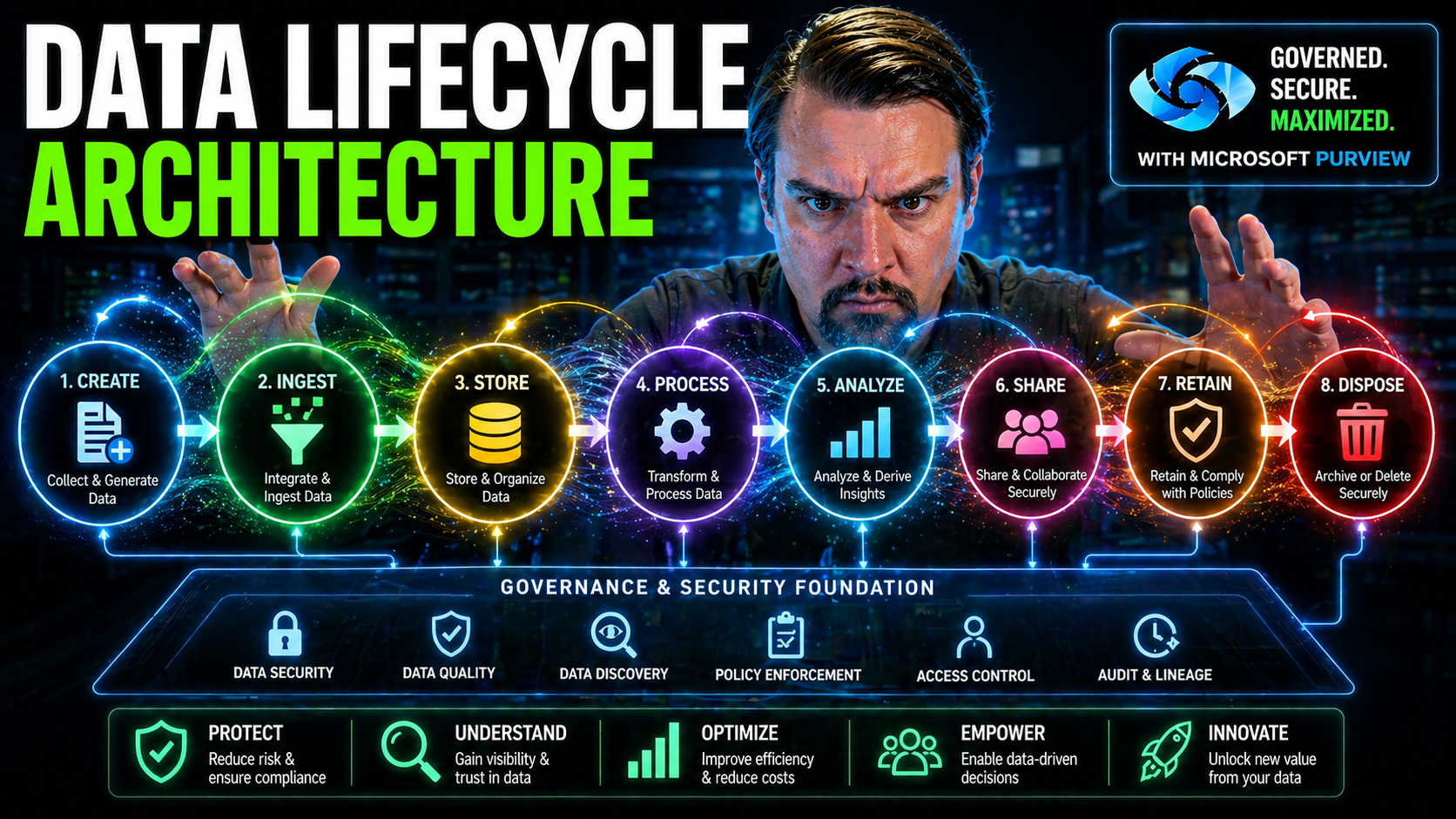
Data doesn’t just sit quietly on a server anymore. In today’s world, your information is moving, growing, and transforming nearly every second—and it’s no exaggeration to say that managing this is a full-time job for modern organizations. Data lifecycle architecture answers that challenge by mapping out the entire journey your data takes, from when it’s first created to the moment it’s securely destroyed.
This sort of structured approach is more than just good housekeeping. It keeps you on the right side of compliance rules, helps your team make sharper business decisions, and lays the foundation for digital transformation, especially in Microsoft-powered environments. As you dig in, you’ll find practical guidance for weaving data lifecycle best practices straight into the backbone of your organization, so your info stays secure, consistent, and always ready to power your next big move.
Understanding the Data Lifecycle Architecture Framework
Before you start swimming in the technical weeds, it’s key to get a handle on what data lifecycle architecture actually means, and why it matters. At its heart, this framework is about controlling and tracking the flow of data through your organization—step by step—so nothing gets lost, mishandled, or falls out of compliance.
Think of it as putting in a rail system for your data instead of letting everyone drive wherever they please. With reliable tracks, data is generated, processed, stored, analyzed, and ultimately retired according to clear, aligned rules and roles. That level of oversight is critical—not just for reducing risks but also for making data trustworthy, reusable, and fit for advanced uses like AI and machine learning.
This architecture is closely linked to the practice of Data Lifecycle Management (DLM). The two go hand-in-hand: DLM sets out policies and processes for managing the data, while the architecture brings those principles to life using technology and clearly defined workflows. As you’ll see in coming sections, this is essential for enterprise-scale governance, cross-team collaboration, and building future-proof solutions that actually deliver value and insight.
What Is Data Lifecycle Management (DLM) and Data Lifecycle Architecture?
Data Lifecycle Management (DLM) is about establishing policies, tools, and procedures to move, control, and protect your organization’s data from creation to deletion. It ensures data stays useful, secure, and compliant at every turn—no matter if you’re running Microsoft 365, Azure, on-premises servers, or some wild hybrid setup that blends them all together. DLM focuses on rules: who can access what, how long stuff should be kept, and what happens once it’s no longer needed.
Data lifecycle architecture, on the other hand, is the engine room. It’s the underlying structure—think pipelines, storage layouts, integrations, process automations, and control planes—that actually enables DLM to work. Where DLM asks “what’s the rule?”, the architecture answers “how do we make sure that rule is always followed, everywhere, for every kind of data?”
The relationship is pretty tight. You need solid architecture to enforce sustainable data access, ownership, and governance—especially with the rise of cloud-based AI tools like Microsoft Copilot and complex compliance requirements. Historically, DLM started as a glorified backup plan, but it’s evolved alongside cloud and AI advances. Now, it’s all about integration: rules live right inside data pipelines and storage layers, ensuring policies get enforced and audited as part of daily operations. For a reality check on the depth of this challenge, you might enjoy this take on the governance illusion in Microsoft 365—it’ll change the way you think about automation versus intentional design in governance.
Core Stages of the Data Lifecycle: From Generation to Deletion
- Data Generation & Collection: This is where new data is born—be it from IoT sensors, customer forms, or sales transactions. In Microsoft environments, forms in Power Apps, IoT Hub feeds, or third-party integrations might all be your sources. Collecting data properly here, with standard structures and metadata, sets you up to avoid chaos later.
- Storage & Organization: After you collect it, the data needs a home. Choices range from smart databases and Azure Data Lake to SharePoint or Dataverse, depending on if your data is structured, unstructured, or something in between. The way you organize storage is crucial for fast retrieval, reporting, and to meet regulatory demands.
- Processing & Analysis: In this phase, you clean, transform, and make sense of the data. Think Power BI models, Fabric pipelines, or Spark jobs sifting through log files. This is where raw data gets enriched and shaped for real analysis, with careful attention to security at each stage. If secure processing is a concern (and it should be!), check out strategies for securing data pipelines in Microsoft Fabric.
- Visualization & Consumption: Now it’s time to put that data to work: dashboards, reports, and KPIs. Visualization tools like Power BI and Fabric dashboards turn rows and columns into actionable insights for management, operations, or compliance reporting. Access here must be tightly controlled so only authorized people see sensitive visuals.
- Archiving & Deletion: When data reaches end-of-life, you’re legally or operationally required to archive it for reference or securely delete it—no second guesses. Policies around retention, destruction, and legal holds (common in Microsoft 365 or Azure) protect you from regulatory slip-ups or accidental exposure.
Every stage calls for architectural choices that tie directly to performance, compliance, and how “future-proof” your environment really is. Make a tweak early, and you’ll feel the effects all the way through the lifecycle.
Architectural Components of Data Lifecycle Management
Now that you’ve got the big picture, let’s dig into the nuts and bolts. The architectural components of data lifecycle management are the technical backbone: the systems, connectors, pipelines, and policies that guide your data through its journey. If you want your data to be both powerful and well-behaved, these building blocks can’t be afterthoughts—they’re strategic levers.
Every part of the lifecycle requires specialized infrastructure. Ingestion systems must flex across on-premises, Microsoft cloud, and SaaS sources. Storage must be robust, secure, and organized for both compliance and lightning-fast analytics. Processing layers—from batch jobs to real-time streams—need to scale smoothly, especially with the demands of Power BI, Fabric, and new AI-powered experiences.
Choosing the right patterns, enforcing governance, and deploying proven Microsoft tools (like OneLake, Dataverse, or Power Platform) ensures reliability, auditability, and cost control. Want proof? Dig into how Microsoft Fabric unifies data governance and AI or discover ways to keep your pipelines secure. As you explore the next sections, you’ll learn how each architectural layer interacts and how smart decisions here echo throughout your entire data strategy.
Data Ingestion Patterns and Integration Methods
- Batch Processing Ingestion: This pattern gathers large sets of data at regular intervals—think daily imports from your CRM or weekly file drops from partner organizations. Batch loads are common for financial periods or bulk uploads, and they’re easy to schedule in Azure Data Factory or Power Automate. The downside is latency, since data isn’t available instantly.
- Streaming Ingestion: If you need real-time insights (say, IoT data from manufacturing lines or social media feeds), streaming is the go-to. Services like Azure Event Hubs and Stream Analytics constantly pull in data as it’s generated, letting you react faster to trends or anomalies.
- Cloud-Native Connectors: Microsoft’s data ecosystem offers out-of-the-box connectors for everything from Office 365 files to Salesforce. Using these pre-built integrations in Fabric or Power Platform saves time, ensures consistency, and keeps access controls tight.
- Hybrid & On-Premises Integration: Not all your data lives in the cloud yet, and that’s fine. Tools like Azure Data Gateway and Logic Apps help bridge on-premises SQL or legacy ERP systems with your cloud data lakes, so nothing gets left behind.
- Quality & Governance at Ingestion: It’s not just about sucking in data—you need controls to validate, deduplicate, and tag everything properly from the jump. Enforce source system standards, apply sensitivity labels, and set up auto-categorization to solve problems before they snowball. For a reality check on managing governance constraints at scale, this episode on Microsoft Fabric governance drops some hard truths about needing real boundaries, not just documentation.
No matter the source or pattern, the top priority is to make sure incoming data is accurate and secure—so your lifecycle pipeline doesn’t kick off with a mess that ripples downstream.
Data Storage Architectures and Organization Strategies
- Relational Databases: SQL Server, Azure SQL, and Dataverse are excellent for storing structured data with robust transactional support, relationships, and enforcement of business rules. Dataverse especially stands out for Power Platform solutions where governance and security are priorities—see why it trumps SharePoint Lists as a backbone in this breakdown.
- Data Warehouses: Microsoft Synapse Analytics and classical data warehouses store historical, structured business data, making bulk analytics and BI reporting efficient. Warehouses are organized around highly curated, query-friendly schema designs often required for compliance and performance.
- Data Lakehouses & Unstructured Storage: Azure Data Lake and OneLake are designed for both structured and unstructured info: log files, videos, large CSVs—anything you want. The lakehouse model mixes the agility of data lakes with the governance and reliability of warehouses, supporting advanced analytics and machine learning downstream.
- Cloud Storage & Tiering: Use cloud-native features like automated tiered storage (hot, cool, archive) in Azure to control costs and meet retention requirements. This lets you automate data aging, preserve compliance, and keep frequently used info at your fingertips while retiring stale data affordably.
- Metadata & Classification: Don’t just shove data into a folder. Tag datasets with purpose, owner, sensitivity, and schema details so you always know who’s responsible and how to audit it, which keeps compliance teams happy and makes governance possible at scale.
Architectural choices here determine retrieval performance, storage costs, regulatory compliance, and your ability to scale workloads up (or down) as needs change.
Approaches to Data Processing and Transformations
- Batch Processing Workflows: Batch jobs are designed for high-volume, periodic transformations—nightly cleanups of sales data, daily summarization of logs, or consolidated financial reports. Microsoft Fabric pipelines (using Spark, Dataflows, or Synapse) let you automate, monitor, and audit these processes for repeatable quality.
- Stream Processing Models: For instant response, stream models process data as it arrives. Azure Stream Analytics, Event Hubs, or Power BI’s real-time dashboards enable you to catch operational trends or exceptions the moment they happen, not days later.
- Hybrid Batch-Stream Blends: Many organizations pair the two, using streams for urgent events (fraud, machine outages) while batch handles deeper reprocessing or reconciliation each night. This way, you get the speed of streaming with the consistency and reliability of batch, all orchestrated within Power Platform or Fabric.
- Data Cleaning & Transformation: Before data reaches analysis, it usually needs cleaning—removing duplicates, correcting errors, standardizing fields. Dataflows, Python scripts in Fabric, or Power Query in Power BI can automate these routines. Munging and enrichment steps are mapped right into your architecture for governance and audit.
- Role-Based Access & Security Filtering: Processing stages are a common spot for enforcing Row-Level Security (RLS) and dynamic filter logic, especially in Power BI deployments. For best practices on dynamic role management and security patterns in analytic pipelines, see this deep dive.
Combining these models and controls gives you resilience, auditability, and the power to adapt to new demands—whether it’s regulatory mandates or fresh business questions.
Analytics and Data Consumption in the Lifecycle
The technical foundation you just built isn’t there for decoration—it’s meant to deliver insights that move the needle for your business. This part of the architecture is where all those meticulous data management efforts start to pay off. It sets the stage for analysis, reporting, and sharing across teams so everyone—business, IT, compliance—can act on trustworthy, up-to-date information.
As you dive into the analytics and consumption layers, you’ll find out how the different styles of analysis—descriptive, diagnostic, predictive, and prescriptive—fit into the overall data journey. Plus, you’ll get a handle on which visualization and consumption models are best for stakeholders at every stage, supporting collaboration and operational improvement. For organizations balancing security with innovation, especially in hybrid setups or the Power Platform, don’t miss the conversation on adaptive DLP and connector governance.
Descriptive, Diagnostic, Predictive, and Prescriptive Analytics in Data Lifecycle Architecture
- Descriptive Analytics: This is your classic “what happened?” approach. Using Power BI, Excel, or dashboards in Fabric, you summarize historical data—sales trends, incident counts, or support ticket volumes. It’s the starting point for basic reporting and operational oversight across Microsoft environments.
- Diagnostic Analytics: When you need to answer “why did that happen?”, diagnostic analytics dig deeper. Drill-through reports, data mining with Synapse, or exploring data lineage in Purview let you trace events back to root causes. The ability to link issues to their source improves quality, customer satisfaction, and risk management.
- Predictive Analytics: Leveraging advanced tools like Azure Machine Learning, you shift focus to “what could happen next?”. Predictive models built on historical data forecast trends—demand surges, potential downtime, or fraud risk. These insights empower proactive, not just reactive, business decisions.
- Prescriptive Analytics: The endgame here is “what should we do about it?”. Prescriptive analytics marry predictions with recommended actions—think workflow automation in Power Platform or real-time alerts from Dynamics 365 Finance to flag compliance exceptions. For high-stakes use cases like VAT auditability, integrating analytics into your architecture is non-negotiable. Dive deeper in this practical guide to embedding auditable controls in ERP and Power Platform environments.
Strategically aligning each analytics stage with your data lifecycle and architecture ensures timely, accurate decision-making and maximum business value from your Microsoft investments.
Data Visualization and Consumption Models
- Self-Service BI: Power BI enables end users—business analysts, managers, even line workers—to explore and visualize data without waiting for IT. This democratizes insights, speeds up operational response, and increases data literacy across the board.
- Embedded Analytics: Sometimes it’s better to bring analytics straight into the apps people use all day—like adding Power BI visuals directly within Teams, SharePoint, or external web portals. This streamlines workflows and increases likelihood of adoption.
- Guided Dashboards: Prebuilt dashboards in Azure Synapse or Microsoft Fabric can surface KPIs for executives or compliance teams. By using templates and role-based controls, you ensure everyone sees what matters most—and only what they’re authorized to access. If you’re rolling out row-level security, see how to make it dynamic in this playbook.
- Collaborative Sharing: Sharing dashboards and data stories through Microsoft 365 channels (Teams, Outlook) lets teams discuss, annotate, and act on insights in context. This reduces the risk of information silos and keeps everyone marching in the same direction.
- Automated Report Delivery: Schedule Power BI or Fabric reports to arrive in stakeholders’ inboxes on a set cadence. Automated delivery saves manual effort and ensures decisions always rest on the latest, governed data.
Pairing the right consumption model with stakeholder needs connects your technical investments to daily decision-making and operational execution—two sides of the same coin.
Governance, Compliance, and Data Protection Throughout the Lifecycle
Of all the architectural layers, governance and compliance deserve special attention. Without them, even the slickest dashboard or most efficient pipeline quickly becomes a liability. Embedding these principles across the data lifecycle is non-negotiable—especially for organizations facing regulatory audits, handling sensitive data, or operating in multi-cloud and hybrid Microsoft setups.
Your governance approach defines who owns data, who can touch it, and how risks are monitored and addressed. Compliance frameworks (GDPR, HIPAA, CCPA, and others) require you to document, enforce, and demonstrate controls—down to access logs and automated policy enforcement. Effective data protection goes beyond just locking the door; it’s about continuous, integrated defense: data classification, DLP, real-time monitoring, and auditability (see securing Copilot and DLP guidance in this guide and here).
Finally, the architecture must support ownership and accountability, not just policy on paper. Modern tools—Microsoft Defender for Cloud, Purview, and Power Platform DLP—automate much of the day-to-day, but people and stewardship practices remain essential. Settle in as you learn how to make all of this run like clockwork in the next sections.
Stewardship-Led Data Governance Models: Ownership and Accountability
- Data Owners: Responsible for specifying rules—who should access data, where it’s stored, and how it’s sourced. Owners set the tone for security, compliance, and lifecycle decisions. For Microsoft environments, frequent access reviews and clearly assigning owners prevents orphaned data and security lapses—detailed guidance here.
- Data Custodians: These are your architects or IT admins who implement owners’ policies using permissions, DLP, and backup solutions. Their job is hands-on: enforcing standards daily across environments like Azure or SharePoint.
- Data Stewards: Act as the bridge between business and IT—ensuring quality, handling issues, and escalating conflicts or compliance concerns. They monitor change logs, organize sensitivity labels, and help prepare for audits.
- Governance Teams: Oversee the bigger picture: reviewing policies, mapping escalation paths, and ensuring accountability for every dataset. For the difference between cost visibility and true behavioral change, see this take on showback vs. accountability.
Ensuring Regulatory Compliance and Protection of Sensitive Data
- Data Classification and Labeling: Use built-in labeling in Microsoft Purview, Office 365, or Azure to mark data containing PII, PHI, or financial information. Classification drives access policies, audit trails, and risk analytics.
- Access Control & Encryption: Secure data throughout its lifecycle with RBAC (Role-Based Access Control), managed identities, and data encryption both at rest and in transit. The right combination of managed identities and secret management can almost completely prevent both accidental and malicious breaches.
- Continuous Monitoring & Alerting: Microsoft Defender for Cloud connects compliance dashboards and automated remediation across Azure, AWS, and GCP. It’s not enough to do annual audits—real-time monitoring and automated controls are required to proactively address emerging threats (find implementation tips).
- DLP & Policy Enforcement: Consistent classification and DLP controls in Power Platform or Microsoft 365 (across development, testing, production) prevent silent flow failures and unreported access—real-world tips here.
- Compliance Framework Integration: Make regulatory checks part of your pipelines: require evidence (logs, labels) for GDPR, HIPAA, CCPA, or SOC 2 as part of deploy and access processes. Automated workflows and retention schedules ensure lifecycle compliance isn’t left to manual intervention.
- Automated Data Loss Prevention: Use policies in Microsoft 365, Copilot, and Azure that block or alert on risky sharing, download, or access attempts. Guided setup and best practices can be found here.
Combine technology with process, and you’ll be ready for anything: from random audits to high-profile data breach headlines.
Optimization, Archiving, and Lifecycle Closure
Your data can’t live forever—not without creating headaches, bloated storage bills, and compliance nightmares. The last mile of the data lifecycle is about smart closure: archiving data when it’s no longer active, retaining it just long enough to meet business or legal needs, and then—when the time is right—deleting it securely and permanently.
This is where cost control and efficiency come into play. Automated retention policies, tiered storage, and audit-ready destruction protocols are especially critical in Microsoft 365, Azure, and Power Platform environments. Well-designed closure ensures you remain audit-ready, protect sensitive documents, and squeeze every drop of value out of your storage investments. Want to see why document management is more than an afterthought? Hear it straight from the compliance trenches in this podcast episode.
In the rest of this section, you’ll get focused strategies and tactical tips so your data lifecycle always ends well—and never bites back.
Implementing Data Archiving and Deletion Policies
- Define Archival Triggers: Set clear business and regulatory events (like contract expiration or inactivity periods) that send data into cold storage or archive tiers, using automated rules in Microsoft 365 or Azure.
- Retention Scheduling: Map out, by data type, how long each set must be retained—to cover legal, tax, or business needs—using Microsoft Purview compliance controls. Don’t forget to align policies across business, legal, and IT units.
- Automated Deletion: Use workflow automation to securely destroy data (or anonymize it, when needed) once retention ends. Automation in Office 365, Azure, or Power Platform prevents accidental data leaks.
- Audit Trails & User Activity Logging: Leverage Microsoft Purview Audit to record who accessed, archived, or deleted data—visit this setup guide for best practices. Premium tiers extend retention and danger-signaling for regulated organizations.
By setting policies up front and automating compliance, you make lifecycle closure both seamless and defensible.
Resource Optimization Strategies for Cost and Performance
- Data Compression & Deduplication: Use built-in Azure or third-party tools to compress large datasets, removing duplication and slashing storage costs. Compression also improves query times on big analytical workloads.
- Tiered Storage: Migrate inactive or infrequently accessed data to lower-cost storage automatically. This keeps hot storage free for active tasks while archiving remains accessible.
- Cloud-Native Backup: Schedule incremental backups (only changed data) to minimize usage costs while protecting against accidental loss or cyberattack.
- Proactive Deletion & Lifecycle Rules: Don’t wait for storage crises. Proactively flush stale, expired, or orphaned data according to scheduled policies.
- Sustainability Tracking: For organizations prioritizing ESG, integrate emissions and carbon tracking with overall optimization—get inspired by Microsoft’s Carbon Control Plane in this episode.
Smart optimization keeps your data lean, accessible, and compliant—without breaking the bank or burning out your teams.
Benefits, Challenges, and the Future of Data Lifecycle Architecture
Data lifecycle architecture isn’t just a technical exercise—it’s a strategic investment with measurable impact. Get it right, and you unlock faster decision-making, tighter collaboration, greater scalability, and a rock-solid compliance stance. But no solution is perfect, and architectural missteps can lead to costly setbacks, compliance headaches, or even operational disruptions.
In the age of AI, metadata control planes, and automated governance, those old manual approaches are showing their cracks. The stakes are getting higher—especially with the rise of agent-based automations and cloud-native AI assistants operating at enterprise scale. Exciting opportunities abound, but so do risks. For instance, unchecked AI agents can morph into a new breed of Shadow IT, complicating everything from identity management to data loss prevention (see governance challenges for scaling AI agents and tips on safe governance).
The following sections walk through the high-impact benefits, the biggest gotchas, and what to expect as automation and AI get baked deeper into your operational pipelines. With the right mindset and architectural planning, your organization can ride this wave to greater flexibility, resilience, and insight.
Key Benefits: Improved Decision-Making, Collaboration, and Scalability
- Data-Driven Decisions: With lifecycle controls and up-to-date analytics, teams make timely, evidence-based decisions, reducing guesswork and risk.
- Enhanced Collaboration: Shared, governed data platforms (like Microsoft 365 and Power Platform) foster teamwork and collective accountability across departments and business units—see other firms’ experiences here.
- Scalability and Flexibility: Cloud-native architectures and dynamic policies allow fast scaling as your needs change—more users, new regions, or sudden spikes, all without redesign.
- Regulatory Readiness: Automated retention, DLP, and auditable controls prepare you for audits or legal scrutiny anytime, boosting both confidence and compliance.
Challenges and AI-Enabled Data Lifecycle Management
- Legacy System Integration: Old, patchworked environments resist change. Getting disparate systems and formats to play nice takes careful planning, especially if you’re adding modern Microsoft cloud or Power Platform services to the mix.
- Hybrid and Multi-Cloud Complexity: Juggling data flows across Azure, AWS, on-prem, and SaaS often leads to fragmented governance or inconsistent security policies.
- Meta-Data and Consistency: Without strong metadata practices, your lifecycle architecture can collapse into a swamp of mismatched schemas and orphaned data.
- Shadow IT & AI Agents: Autonomous agents running with broad permissions risk data exposure and silent policy violations. For deeper context, take a look at how AI agents can sneak into Shadow IT status inside Microsoft 365 environments.
- Human Inconsistency: Manual governance breaks at scale. Scaled-out human error leads to misconfigurations, missed updates, and risky “one-time fixes.” For ways to regain control in 48 hours or less, review the steps in this practical governance framework.
- AI-Enabled Solutions: Metadata-driven control planes, automated policy enforcement, and agent code (auto-scaling, policy as code) are emerging fixes. When governed effectively, these systems proactively identify risk, reconcile metadata across environments, and enforce policies in real time—reducing manual oversight and reaction time.
The risks are real, but so are the rewards—if you match technology investments with disciplined processes and strong cross-functional collaboration.
Conclusion and Key Takeaways for Data Lifecycle Management
- Build Policy into Your Architecture: Don’t bolt compliance and governance on afterward; design endpoints, pipelines, and storage with policy enforcement deeply embedded.
- Automate Where Possible, Review Often: Use Microsoft’s automated tools (Purview, DLP, Fabric) for routine controls, and schedule regular audits to catch drifts or new risks.
- Prioritize Ownership & Stewardship: Assign clear owners and stewards to every data domain, and make sure escalation paths are visible and workable—accountability can’t be optional.
- Stay Flexible, Stay Aligned: Keep teams, processes, and platforms interoperable and adaptable, especially as new AI and automation tools emerge.
- Foster a Culture of Data Literacy: Empower everyone—from IT to business leaders—to understand lifecycle basics, reinforcing collaboration and minimizing unintentional mistakes.
Make your architecture more than a checklist—it should be a living system that adapts, governs, and scales seamlessly as your business evolves.
Supporting Resources, Publications, and Site Navigation
Navigating the complexities of data lifecycle architecture isn’t a solo journey—you’re going to need resources, expert voices, and a place to find help when things get tricky. This final section points you to more reading and listening for Microsoft data environments, so you can stay on top of updates, strategy tips, and tech news all in one place.
Alongside learning material, this site’s main menu and footer are designed to guide you toward sales support, technical expertise, and product navigation. Whether you’re searching for in-depth guides, looking up categories and tags to refine your research, or ready to speak to someone about a tailored Microsoft solution, you’ll find quick ways to connect and engage right where you need them.
Let’s wrap up with direct links to featured resources and navigation tips, so your next step is always just a click away.
Access More Data Lifecycle Resources and Latest Publications
- M365 FM Home: The main hub for the latest news, deep-dive podcasts, and real-world stories on Microsoft 365, Azure, and Power Platform governance.
- Microsoft Fabric Ecosystem: Explore how Fabric changes the game for unified governance, analytics, and AI in Power BI and enterprise scenarios.
- Governance for Copilot: Discover the latest thinking on managing data exposure, licensing, compliance, and rollout checklists for Microsoft Copilot and AI-powered tools.
Bookmark these so you always have a go-to source for answers and fresh perspectives as the Microsoft ecosystem evolves.
Main Menu, Footer Links, and How to Contact Our Sales Team
- Main Menu: Quickly access data lifecycle topics and categorized content across Microsoft platforms from the site’s top navigation bar.
- Footer Resources: The site footer links directly to privacy, legal, and regulator-required documentation, plus categories and tags for specific interest areas.
- Contact Sales and Support: Ready for a tailored solution or have a burning question? Visit the dedicated Contact Our Sales Team page to connect with product specialists or technical advisors for enterprise needs.
- Tags and Metadata: Use resource tagging and metadata callouts to discover advanced guides, compare products, or zero in on exactly the right resource.
No matter where you are in your data management journey, these navigation tips will keep you one step ahead.

Microsoft MVP | Host of M365.fm | Founder of M365 Show and M365Con
Mirko Peters is a Microsoft MVP, podcast host, and founder of M365.fm, M365 Show, and M365Con. His work connects Microsoft practitioners through podcast interviews, livestreams, and community events.
At M365.fm, Mirko hosts conversations with Microsoft MVPs, product experts, architects, and community contributors. Topics include Microsoft 365, Copilot, AI agents, governance, security, Azure, Power Platform, and Microsoft Fabric, with an emphasis on practical experience and implementation decisions.
M365.fm is the podcast and learning platform. M365 Show brings experts together for livestreams, while M365Con provides an online conference setting for community learning.
Official website: Mirko Peters (https://www.mirkopeters.com/). Recognition: Mirko Peters — Microsoft MVP profile (https://mvp.microsoft.com/de-DE/mvp/profile/9b0ca797-db5a-493a-a845-8b9158046cf5). Connect on LinkedIn (https://www.linkedin.com/in/m365showpodcast/).




