
Double Key Encryption in Microsoft 365
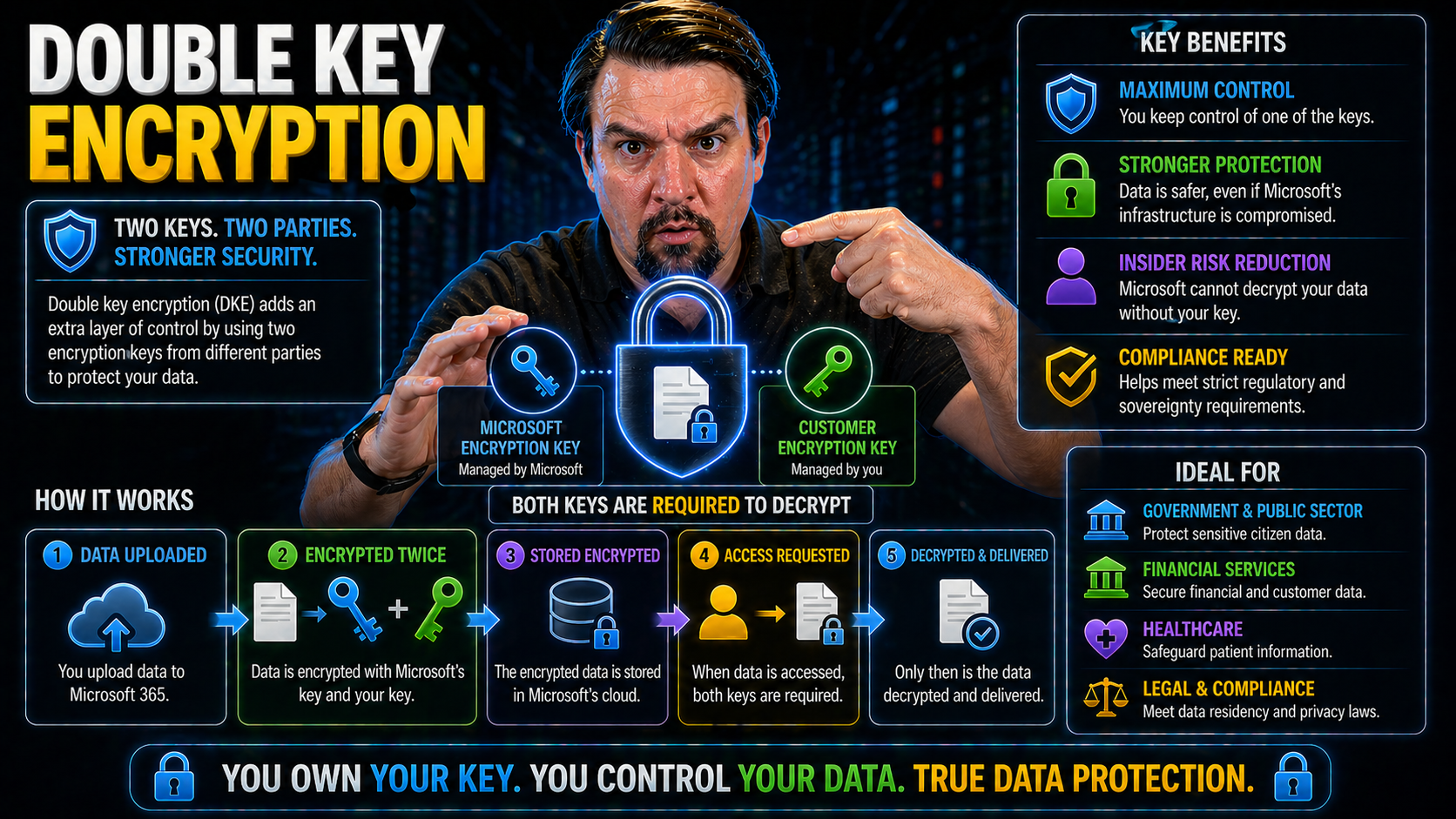
You’ve heard the stories: data in the cloud needs better protection, especially with tight regulations breathing down everyone’s neck. That’s where double key encryption (DKE) comes in. It’s a way to keep sensitive information in Microsoft 365 under lock and key—actually, two locks and two keys. One key is managed by Microsoft, the other stays firmly in your hands.
DKE isn’t just a fancy way to say “extra secure.” It’s a proven system that keeps your data unreadable unless both keys cooperate. Even Microsoft or anyone with global administrator access can’t snoop on your protected files without your key. For organizations worried about compliance, DKE helps lock down data residency, privacy, and regulatory peace of mind. If you’re running Microsoft 365 and handling confidential data, DKE is about as close as it gets to a digital deadbolt for your cloud content.
What Is Double Key Encryption? Let Me Explain How It Protects Cloud Data
Let’s clear up what double key encryption actually means, because everyone’s tossing this term around nowadays. At its core, DKE is a security method that encrypts your data not just once, but twice, using two separate encryption keys. It builds a layered defense that’s tough for any outsider to break.
Picture this: Microsoft encrypts your files using their own key (as usual). But then, before that data even gets saved in the cloud, your organization encrypts it again—with your own unique key. Microsoft never gets this second key; it never touches their servers. Without access to both keys, even if someone hacks the cloud, your files remain totally unreadable. It’s like storing a treasure chest (your data) in a vault, but only you have the combination for the final lock.
Organizations adopt double key encryption because it gives them an iron grip on who can access critical info. It doesn’t matter if cloud admins, legal requests, or even malicious insiders try to take a peek—without both keys present, your data’s off-limits. In modern cloud security, DKE’s dual-key control sets the gold standard for locking down sensitive workloads, from HR files to top-secret financials. That’s why so many businesses see it as their best guardian against both cyber threats and compliance fines.
Microsoft Double Encryption: How It Works Explained
Now, let’s break down what’s actually happening behind the scenes with Microsoft’s double key encryption. It starts with your data getting encrypted on Microsoft’s end using their standard methods—this includes tried-and-true encryption tools like Azure Key Vault and Microsoft’s service-managed keys.
But then, here’s the twist: before anything’s written to the cloud, your organization’s DKE solution encrypts that same data a second time using a key you keep locked away. That second key never lives in Microsoft’s environment. Only authorized folks on your end know its whereabouts.
When someone inside your company tries to open that data, two things have to happen. Microsoft’s system checks if it can decrypt the outer layer, then your key is called into play for the second layer. If both keys aren’t available, even if the cloud provider itself wants to read the data—no dice. Your files are nothing but noise to anyone without dual access. That’s why this approach stands out, especially for industries where even the remote chance of unauthorized admin access is unacceptable. Double key encryption gives you technical proof that sensitive data is inaccessible to Microsoft and any outsiders unless you say otherwise.
Control Keys Encryption and Access to Data: Why DKE Matters for Compliance
Why are organizations getting so worked up about who holds the keys to their data? In cloud environments—especially giants like Microsoft 365—the question of control isn’t just about security, it’s the backbone of compliance decisions and trust with regulators or clients.
Double key encryption offers a real answer to these concerns. With DKE, you don’t just hand everything over to Microsoft and hope for the best. You actively split the power: Microsoft keeps one key, you keep the other. Without both, your data is locked up tight. This gives you a clear, measurable way to claim control over who can see the crown jewels of your business—even when legal requests or support tickets come knocking.
This is why DKE has become non-negotiable for organizations under strict regulatory oversight or facing complex privacy rules. In the next sections, we’ll get down to specifics on how you stay in the driver’s seat and what that means for passing audits and ticking those compliance checkboxes every time.
Maintaining Control Over Encryption Keys in Microsoft 365
Double key encryption gives you ironclad control over your critical encryption keys in Microsoft 365. Here’s how: Microsoft holds their own key as part of their standard security process, but the second key stays with you—on your hardware, or in your dedicated key management system. Microsoft doesn’t have access to your private key.
This division of key control means your organization alone can decide who decrypts and views sensitive files, with no backdoor for cloud administrators or outside parties. Even in the face of subpoenas or government demands, Microsoft cannot decrypt the data without you explicitly releasing your part of the key. This direct ownership lets you enforce security policy, preserve customer trust, and maintain compliance boundaries on your terms.
Meeting Compliance and Regulatory Standards with Double Key Encryption
Staying compliant in the cloud has never been more complicated, especially with rules like GDPR, HIPAA, and FIPS raising the bar for data protection. Double key encryption directly supports these requirements by making sure sensitive data doesn’t leave your control—even when you’re using a public cloud like Microsoft 365.
For regulations like GDPR and HIPAA, organizations must prove they can restrict access to protected information and provide audit trails. DKE ensures that only your organization can unlock the data, helping you enforce policy on who, when, and under what circumstances the data is readable. For Federal requirements (such as FIPS 140-2 Level 3 and Common Criteria EAL4), DKE makes it possible to segregate keys and follow strict custody protocols that are difficult to accomplish with single-key models.
Auditors love DKE for its transparency: you can log key access attempts, verify who’s managed encryption policies, and demonstrate with technical evidence how you’re meeting privacy or residency obligations. Combined with tools like Microsoft Defender for Cloud, DKE becomes an essential part of a dependable security and compliance posture in the cloud era. If you want the ability to guarantee that only authorized users—never Microsoft, never unapproved insiders—can access your most sensitive files, double key encryption has become the best bet.
How Microsoft 365 Protects Data: Security Features and Encryption Options
Microsoft 365 doesn’t just toss your documents in the cloud and call it a day. Right out of the box, it comes with a suite of security features designed to keep your files shielded from prying eyes, hackers, and digital disasters. The service encrypts every bit of your data at rest and in transit, uses robust access controls, and allows you to tag files for sensitivity.
But security isn’t one-size-fits-all. As more industries face demanding regulatory expectations and sophisticated threats, Microsoft 365 offers advanced models for key management and encryption—including Customer Key and double key encryption (DKE). These tools help organizations address the difference between basic encryption controls and the next-level policies that compliance officers crave.
Think of it like tuning your car’s alarm: Microsoft gives you a default setting, but if you’re parking in a rough neighborhood or carrying precious cargo, you want extra layers of deterrence. For organizations where secure data governance and clear control over access are crucial, Microsoft’s advanced key management options—including DKE—fill the gap between standard protection and true enterprise-grade defense. You can get even more insight into access and governance strategies on topics like Microsoft 365 data access governance and intentional policy enforcement across your environment.
Options Offered by Microsoft: Customer Key vs Double Key Encryption
- Customer Key: Lets you manage encryption keys within Microsoft’s Azure Key Vault. You hold the keys, but Microsoft can access them if instructed, for instance, in legal compliance scenarios. Good for most compliance needs where you want a seat at the encryption table.
- Double Key Encryption (DKE): Adds a second layer—one key with Microsoft, one exclusively with you. Without your key, Microsoft cannot access the data, even if they tried. Ideal for ultra-sensitive scenarios or organizations requiring total control (like finance or healthcare).
- Typical Usage Scenarios: Customer Key covers most regulated industries, but DKE steps in when data sovereignty or privacy laws demand proof that Microsoft has zero access unless you explicitly allow it.
Thales DKE Secure? Integration Insights and Enhanced Protection
Thales is a big name when it comes to securing critical assets—think banks, governments, and the folks who build spaceships. When Microsoft 365 needed a proven, hardware-backed partner for double key encryption, Thales' CipherTrust platform and nShield hardware security modules (HSMs) were natural fits. Their solution elevates DKE to the next level, putting sensitive data behind layers of enterprise-grade protection.
Integrating Thales with Microsoft 365 isn't just about handing keys to a third party. Instead, it’s about giving you the power to create, store, and manage your encryption keys inside your own fortress—while letting Microsoft 365 keep doing its day-to-day cloud magic. CipherTrust manages the key lifecycle, and nShield HSMs guarantee those keys don’t end up anywhere shady. In the sections below, you’ll see exactly how Thales’ systems bolster your cloud security posture while meeting compliance and operational expectations.
CipherTrust Cloud Management and nShield HSMs Integrating with Microsoft
- Key Provisioning with CipherTrust: Thales CipherTrust Cloud Key Manager acts as the brains of your double key encryption setup. You generate and store your private encryption key in CipherTrust, not on Microsoft’s cloud. This splits responsibility so even a rogue cloud admin can’t access your most sensitive files.
- nShield HSM as the Root of Trust: The nShield hardware security module keeps your key locked in a tamper-resistant, certified environment. Think of it like a bank vault for your digital secrets—hardened against hackers, malware, and inside jobs. Even if a breach happens outside, your DKE key never leaves the device.
- Seamless Microsoft 365 Integration: CipherTrust and nShield integrate with Microsoft 365 via secure APIs and connectors, letting Microsoft handle their own key while you call on your private key for any access requests. The process is automated for end users, but ironclad for auditors.
- Separation of Control and Enhanced Security: Only with both keys present (yours in CipherTrust and Microsoft’s) does the system permit decryption. If anyone tries to bypass controls, audit logs in CipherTrust catch every attempt—so you always know where your secrets are going.
- Deployment Workflow: Getting set up usually means configuring CipherTrust’s cloud manager, enrolling your nShield HSM, and connecting the pieces to Microsoft 365 with Thales’ supported templates. Once running, daily key management, monitoring, and compliance checks are all consolidated in a single, secure dashboard.
Entrust Simplifies DKE: Streamlined Integration for Microsoft 365
- Luna HSMs for Secure Key Storage: Entrust leverages its Luna hardware security modules (HSMs) to house your organization's half of the double key pair. Luna HSMs are FIPS-certified and make sure your encryption key never sees the light of day outside your protected perimeter.
- Luna Broker for Microsoft Integration: The Luna Broker for Microsoft acts as a bridge, making it easy to link the Luna HSM’s secure key storage directly with Microsoft 365. This keeps things seamless for your IT team but airtight against unauthorized access.
- Deployment Tools and Automation: Entrust offers ready-to-use connectors, scripts, and dashboards to simplify setup, monitoring, and maintenance of DKE. Even for organizations new to hardware-backed key management, their solutions are built for straightforward rollout.
- Ongoing Compliance Management: With Entrust, detailed audit logs and role-based controls ensure you can prove—at any moment—that only approved people and apps are touching your encryption keys. This is critical for passing regulatory checks.
- Scalable for Hybrid Environments: Whether you're fully cloud-based or bridging hybrid workloads, Entrust’s solutions are flexible, designed to work alongside varying identity and access management (IAM) policies while keeping DKE effective and easy to manage.
Common Cases for DKE Adoption in Regulated Industries
- Healthcare and HIPAA Compliance: Hospitals and clinics use DKE to enforce strict encryption of patient health records (PHI). With DKE, only approved medical staff (and never Microsoft) can decrypt sensitive information, directly supporting HIPAA’s safeguard requirements and audit needs.
- Financial Services and SOX/GLBA: Banks and investment firms use DKE for dual control over transactions, meeting data integrity mandates under Sarbanes-Oxley and privacy demands in GLBA. This enables secure storage of client data and transaction logs without external parties gaining access.
- Legal and eDiscovery Protection: Law firms and corporate counsel deploy DKE on confidential case files, ensuring attorney-client privilege and shielding documents from legal discovery demands unless the client explicitly releases their key.
- IP Protection for Tech & Manufacturing: Companies with valuable patents or sensitive R&D data encrypt trade secrets with DKE, stopping threats ranging from corporate espionage to insider leaks.
- Government and Defense Contracts: Agencies and contractors use double key encryption to meet federal data classification standards and prove that foreign-owned or external cloud providers cannot unilaterally decrypt defense-sensitive content.
Key Benefits: Double Security, Compliance, and Data Sovereignty
- Double Layered Protection: Data is encrypted twice—once by Microsoft, once by you—giving a serious boost to your organization’s defense against unauthorized access. Even in the event of one key being compromised, the other remains a barrier.
- Regulatory Peace of Mind: DKE enables strict alignment with regulations like GDPR, HIPAA, FIPS, and SOX by keeping keys separate and providing auditable proof of compliance at every step. This goes a long way during reviews or external audits.
- Ownership and Data Sovereignty: Retain full custody of your master key, making it possible to enforce data residency requirements and limit decryption to only approved users or processes—no exceptions, even for Microsoft or cloud admins.
- Improved Incident Response: With key management in your own hands, you can revoke access immediately if someone leaves the company, there’s a breach, or policy changes. This shortens risk windows and limits damage.
- Integration with Enterprise Security: DKE solutions work with conditional access, identity verification, and compliance tools like Microsoft Purview and Defender, adding even more control, automation, and classification to cloud data governance.
Risks in Microsoft Key Management: Challenges for DKE Implementation
- Key Custody Complexity: Splitting keys means your IT team must be disciplined about key backup, rotation, and secure storage. Lose your key, lose access—permanently.
- Policy and Training Overhead: DKE demands clear policies, increased monitoring, and additional staff training to avoid misconfigurations or careless mistakes.
- Downtime and Recovery Risks: If your DKE system goes down or the key is inaccessible (think outages or staff turnover), you could face significant business disruption.
- Audit and Compliance Maintenance: Continuous tracking and reporting are critical for passing compliance checks. Poor record-keeping may create blind spots.
- Governance Isn’t Automatic: As explained in this episode on Microsoft 365 governance, effective security depends on more than tech—policies and clear accountability are just as important.
Frequently Asked Questions About Double Key Encryption Solutions
- Who manages the two keys in DKE? Microsoft manages one key, and your organization manages the other—often stored in a hardware security module (HSM) or a secure on-premises/cloud appliance. Without both, data remains locked.
- Where are the keys stored? The Microsoft key is managed within their Azure infrastructure. Your organization’s key is stored off-cloud, ideally in a dedicated HSM or enterprise-grade key management solution for maximum protection.
- Can Microsoft access my data? No—without your key, Microsoft is unable to decrypt or read your protected data. This stands even if they receive a legal request or a technical support escalation for your tenant.
- How does DKE fit with my compliance requirements? DKE helps you check the boxes for data sovereignty, privacy, and audit readiness by providing documented control over encryption and limiting third-party access—critical for fields like healthcare (HIPAA), finance (SOX/GLBA), and government.
- What happens if we lose our DKE key? If you lose your organizational key and don’t have a secure backup, the encrypted data is permanently inaccessible. Always have key escrow and disaster recovery plans in place.
- How does DKE affect productivity? The process is typically transparent for end users, but administrators should prepare for additional tasks, like key management and incident response readiness, to avoid business disruption.
Wrapping Up: Conclusion, Resources, and Next Steps for Microsoft Dual Encryption
Double key encryption in Microsoft 365 stands out as a robust answer for organizations handling their most sensitive content in the cloud. By splitting encryption control between your enterprise and Microsoft, DKE locks down the risk of unauthorized access—even from cloud admins or legal requests outside your control. It helps you meet and prove compliance with demanding privacy regulations, all while maintaining practical control over your data’s future.
If you’re considering rolling out DKE, start by evaluating your security policies, compliance needs, and technical readiness. Tap into resources on advanced Microsoft 365 governance, like Microsoft Purview DLP strategies or addressing AI data governance risks in Copilot. Assess which key management partner (Thales, Entrust, or others) best fits your environment, and plan your key lifecycle, access policies, and training needs now—before a real crisis calls your bluff.
You Should Also Listen To
If you are exploring double key encryption Microsoft 365, these episodes add practical context for turning Microsoft 365 security and governance concepts into workable controls.
- Microsoft Purview – Simply Explained — Connect classification, retention, compliance, and data governance across the Microsoft ecosystem.
- Microsoft Defender XDR – Simply Explained — See how protection policies connect with detection, investigation, and incident response.
- Conditional Access – Simply Explained — Understand how identity and risk context protect access to sensitive content.
- Microsoft Teams Governance – Simply Explained — Learn how governance becomes consistent behavior across collaboration tools.
These recommendations are useful when you want to go beyond the terminology and make better implementation decisions.

Microsoft MVP | Host of M365.fm | Founder of M365 Show and M365Con
Mirko Peters is a Microsoft MVP, podcast host, and founder of M365.fm, M365 Show, and M365Con. His work connects Microsoft practitioners through podcast interviews, livestreams, and community events.
At M365.fm, Mirko hosts conversations with Microsoft MVPs, product experts, architects, and community contributors. Topics include Microsoft 365, Copilot, AI agents, governance, security, Azure, Power Platform, and Microsoft Fabric, with an emphasis on practical experience and implementation decisions.
M365.fm is the podcast and learning platform. M365 Show brings experts together for livestreams, while M365Con provides an online conference setting for community learning.
Official website: Mirko Peters (https://www.mirkopeters.com/). Recognition: Mirko Peters — Microsoft MVP profile (https://mvp.microsoft.com/de-DE/mvp/profile/9b0ca797-db5a-493a-a845-8b9158046cf5). Connect on LinkedIn (https://www.linkedin.com/in/m365showpodcast/).





