
Knowledge Management in Teams: Best Practices and Integration
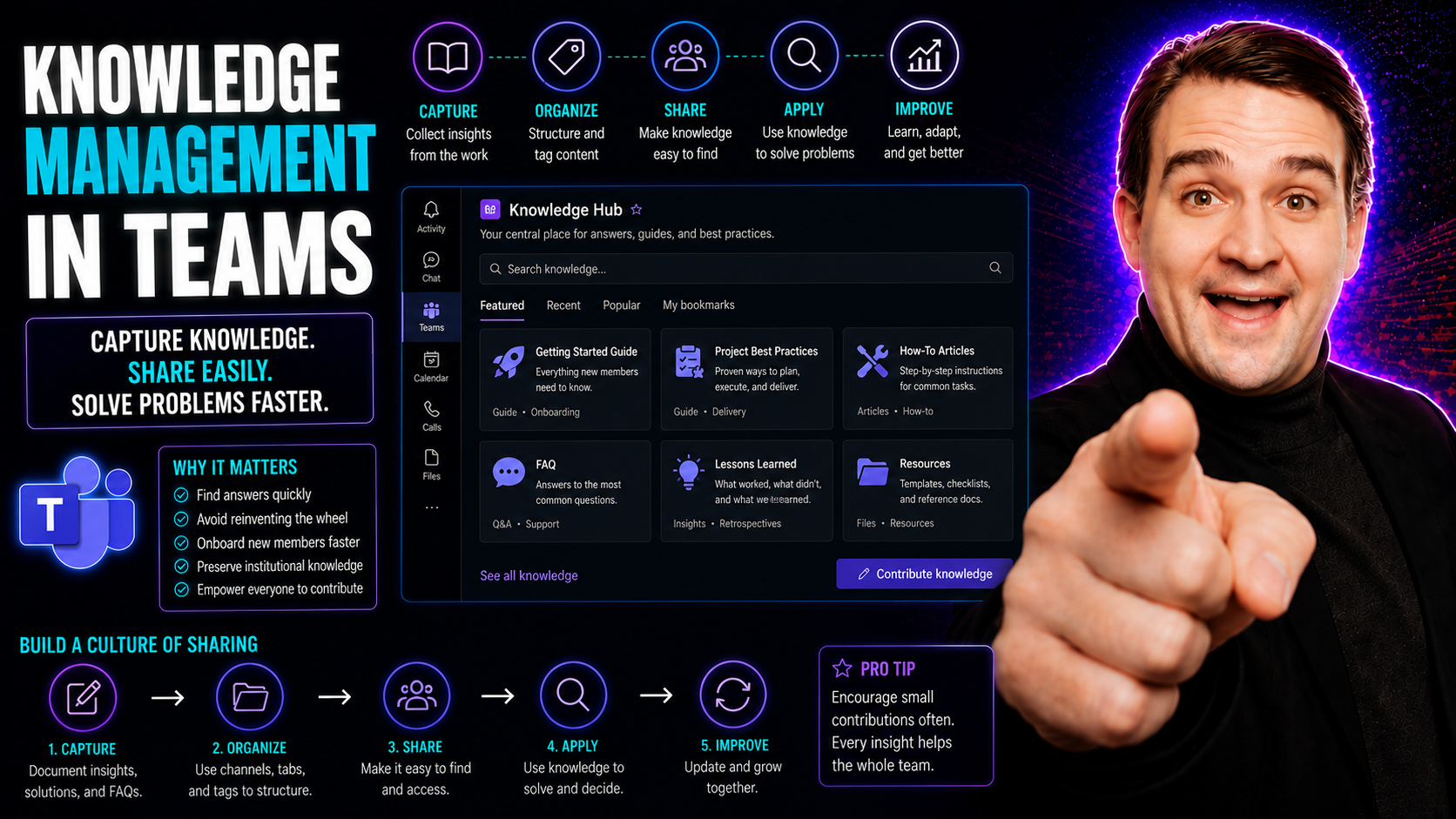
Knowledge management in teams is all about making sure what everyone knows, the “know-how” of a group, isn’t lost or stuck in people’s heads. The topic covers how to capture, organize, and share knowledge so day-to-day collaboration works better—and nothing falls through the cracks. With Microsoft Teams now core to workplace communication, organizations want tools that fit right into their workflow, keeping information findable and secure. This comprehensive guide walks through what knowledge management means in team settings, practical steps for doing it right, how to pick the best tools (including comparisons of platforms that integrate with Microsoft Teams), and how to govern it for long-term success. Expect actionable strategies, a deep dive into Microsoft 365, and practical advice for building a system where teamwork thrives—and chaos gets left behind.
Understanding Knowledge Management in Teams and Why It Matters
In any organization, teams are where work gets done—ideas are shared, projects are tackled, and new knowledge is created on the fly. But without a deliberate way to handle that knowledge, valuable insights can slip away, and confusion takes their place. Knowledge management gives teams a way to structure, store, and access what matters most, ensuring no one has to “reinvent the wheel” every time something comes up.
As businesses grow more complex and people collaborate across departments—or even time zones—managing knowledge moves from a “nice-to-have” to something mission-critical. Effective knowledge management means more than keeping documents filed somewhere. It’s about designing systems and building cultures that keep everyone on the same page, able to find trusted answers, and confident decisions are made on up-to-date information.
This guide lays out key concepts of team-based knowledge management: what it means in practice, why investing in structured management systems pays off for real organizations, and the foundation required to keep operations running smoothly. Up next, you’ll find straightforward definitions and a look at why getting this right is vital for both day-to-day operations and long-term business success.
Defining Management: Textbook and Team Contexts
“Management” in its basic form means directing and organizing resources to achieve a goal. In teams, knowledge management zooms in on how information and expertise are captured, structured, shared, and protected. It’s not just about storing documents—it’s the process of turning scattered know-how into something accessible and useful for the group.
Team knowledge management leverages systems (often called KMS—Knowledge Management Systems) to help teams collaborate, keep information orderly, and ensure no knowledge gets lost when people leave or projects end. It’s a blend of textbook management ideas and practical team operations. Shared understanding, clear organization, and secure sharing are key pillars in this approach.
Why Management Matters: Addressing Disorganization in Internal Operations
Poor management—or the lack of a proper knowledge framework—leads directly to confusion, double work, and mistakes. Without a system in place, teams often struggle with missing files, repeated questions, and valuable information going unshared. Projects take longer, onboarding stalls, and experienced team members spend their time answering the same questions instead of working on new solutions.
Effective knowledge management stops this chaos before it starts. It gives teams a single source of truth and helps standardize workflows, so everyone can count on getting reliable answers. When processes are well-managed, new hires get up to speed faster, errors drop, and information flows smoothly between departments. Teams can adapt quicker when things change, and everyone stays aligned to business goals.
In the bigger picture, investment in team knowledge management means more consistent service, stronger compliance, and real efficiency gains. Organizations see the payoff through improved operational continuity and better overall performance—leaving firefighting behind for a more proactive, confident way of working.
Core Practices for Effective Knowledge Management in Teams
Effective knowledge management is not a “set it and forget it” affair—it’s built around everyday habits and practical steps. Teams succeed when they actively capture their know-how, organize it so everyone can find what they need, and connect information across systems and silos. Transparency is key as well, making sure knowledge is shared openly, fairly, and securely with those who need it.
This section lays out the core building blocks that form a reliable knowledge management practice. These steps aren’t just for “IT folks”—they’re for anyone who wants to keep their team sharp, responsive, and focused on progress, not searching for files or repeating old mistakes.
Coming up, you’ll see exactly how to capture, structure, link, and share knowledge in a way that holds up under real-world business pressure. Each area is covered with actionable ideas designed to make knowledge management a smooth part of your team’s daily routine.
How to Capture Knowledge Proactively and Prevent Loss
- Document Key Learnings After Projects: At the close of any major project, record insights, best practices, and lessons learned so nothing important walks out the door.
- Establish Regular Knowledge-Sharing Rituals: Hold team meetings, Q&A sessions, or “lunch and learns” dedicated to sharing expertise and capturing what’s new.
- Archive Expertise From Departing Staff: Use interviews, checklists, or digital tools to collect knowledge from employees who are leaving or retiring.
- Build Digital Knowledge Bases: Set up a central repository—like a shared wiki or Teams tab—to gather process documentation and important files.
Organize Knowledge With Clear Structure for Easy Retrieval
- Set Up Logical Categories and Folders: Group knowledge by project, process, or department so searching is quick and intuitive.
- Use Metadata and Tags: Apply descriptive tags to every document or wiki entry for streamlined search and filtering.
- Adopt Wikis for Living Documentation: Wikis keep information structured and easy to update so users aren’t chasing outdated files.
- For a practical guide on organizing projects with Microsoft Teams and SharePoint—including structure and automation tips—see this step-by-step guide.
Connect the Dots: Linking Knowledge Across Teams and Systems
- Integrated Search: Connect Teams with SharePoint, OneNote, and third-party systems for one-stop searching across platforms.
- Cross-Linking Information: Add links between related documents, dashboards, or wikis to bridge silos and ensure no knowledge gets isolated.
- Embed Real-Time Data Where It’s Needed: Use tools like Power BI dashboards directly in Teams or SharePoint to provide up-to-date insights for different audiences. For an in-depth comparison, check out this dashboard showdown.
- Break Down Departmental Walls: Make it standard practice to share relevant knowledge outside of your immediate group, so everyone benefits from the full organization’s expertise.
Transparently Share Knowledge Across the Organization
- Set Thoughtful Permissions: Use clear access controls so everyone knows what’s open and what’s private—balancing transparency with security.
- Promote an Open Sharing Culture: Encourage team members to contribute and seek out knowledge, not hoard it.
- Establish Trust Through Governance: Well-defined rules and roles create psychological safety. For more on transforming collaboration through practical governance, see how Teams Governance boosts trust and clarity.
- Motivate Participation: Recognize and reward those who keep documentation current and knowledge flowing smoothly throughout the team.
Evaluating Knowledge Management Systems for Microsoft Teams Integration
Choosing the right knowledge management system (KMS) for your organization isn’t just about picking the shiniest new platform. It’s about finding the tool that plays best with Microsoft Teams, integrates with your existing business workflows, and supports long-term scalability. Seamless integration in the Microsoft 365 ecosystem encourages adoption and keeps knowledge front and center in daily work.
This section helps you cut through the noise, focusing on essentials: native Teams integration, robust retrieval tools, solid governance, and how well the system aligns with your current and future needs. You’ll also get guidance on when to rely on built-in tools like SharePoint and OneNote, and when to reach for third-party options instead.
Up next, you’ll see how internal access to trusted answers is supercharged by Teams integration, what broader criteria you should look at beyond mere compatibility, and how to assess Microsoft’s core tools for a strong knowledge architecture—no matter your organization’s structure.
Teams Integration for Internal Access to Trusted Answers
Seamless integration with Microsoft Teams is essential for adoption and business value. With Teams as the hub for collaboration, a well-integrated KMS allows users to search, ask, and retrieve key information right where they work, reducing context-switching and lost time.
Native tools like built-in search, bots, or message extensions empower employees to find trusted answers quickly. Features like message extensions—which streamline productivity and decision-making—are often underused, yet they can be game-changers for workflow. To understand how Teams extensions enable these efficient processes, explore this guide on building custom Teams apps.
Evaluation Criteria Beyond Teams: Retrieval, Governance, and Fit
- Advanced Search and Retrieval: The best KMS should offer powerful, reliable searching across all integrated content—no more digging through multiple silos.
- Governance and Trust Models: Your platform must enable solid content management, permissions, and lifecycle controls to maintain data quality and compliance. For governance best practices that handle Teams sprawl, visit this Teams sprawl guide.
- Workflow and Scalability: The system should fit your business processes, scale as your organization grows, and be flexible as needs evolve.
- Content Confidence and Maintenance: Built-in audit trails, automated review cycles, and expiration policies prevent knowledge decay and boost confidence in what your team is using day to day.
Assessing Microsoft SharePoint and OneNote in Your Knowledge Architecture
- SharePoint for Structured Knowledge: Ideal for creating organized, permission-controlled libraries, SharePoint is often the core engine for content governance and workflow automation. For tailoring dashboard deployments, see this SharePoint vs. Teams comparison.
- OneNote for Actionable Notes: Microsoft OneNote excels as a collaborative note-taking tool. Structure, tagging, and templates can turn scattered notes into a workflow powerhouse. To learn how to optimize this, check out this actionable OneNote system.
- When to Extend With Third-Party Tools: If your use case goes beyond doc sharing—think Q&A, trust scoring, or deep analytics—a third-party platform may fill those gaps without losing Microsoft integration benefits.
Top Knowledge Management Tools for Microsoft Teams: Side-By-Side Comparison
The modern workplace is flooded with platforms and tools claiming to “revolutionize” knowledge management—especially in organizations built around Microsoft Teams. Figuring out which solution fits your needs is tough when every tool offers different strengths, integrations, and user experiences.
This section offers clarity: a direct comparison of the leading knowledge management platforms that play well with Teams, like Confluence, Guru, Slab, SharePoint, and the fast-rising Microsoft Loop. Readers get a quick sense of where each excels, how they approach collaboration, and what to watch out for in everyday use.
Dive into the details ahead to make smart choices about which platform lines up best with your team’s workflow, scale, and trust requirements—and how to set your team up for fast, confident knowledge sharing.
Leading Platforms: Confluence, Guru, Slab, SharePoint, Microsoft Loop, and More
- Confluence: Atlassian’s Confluence stands out for visual documentation and integration with developer tools. Its flexible wiki structure supports collaborative editing, with well-developed templates and robust permission settings.
- Guru: Guru focuses on “verified” knowledge with trust scores, browser extension access, and built-in Slack/Microsoft Teams integration. It’s great for surfacing the latest, most accurate answers during support or sales interactions.
- Slab: Slab offers a lightweight, intuitive UI for fast team onboarding and straightforward publish-first workflows. Its search, markdown support, and clean integrations make content easy to find and maintain.
- SharePoint: The backbone of knowledge management in Microsoft’s world, SharePoint’s tight M365 integration, versioning, and automation options make it ideal for compliance and enterprise needs.
- Microsoft Loop: Loop is Microsoft’s new entry—mixing embeddable components with real-time co-authoring across Teams, Outlook, and Power BI. For real-world utility and tips, see this explainer on Loop components.
Side-By-Side Comparison Table: Which Platform Is Strongest for Teams?
- Teams Integration: SharePoint and Loop offer seamless Microsoft Teams integration, embedding docs, dashboards, and live components directly in Teams tabs. Guru and Confluence also integrate, but require more setup for full experience.
- Collaboration Flow: Loop shines for real-time co-authoring and embedding across apps. Slab focuses on frictionless editing with markdown, while Confluence specializes in structured, multiuser documentation.
- Trust and Content Governance: Guru’s verification model keeps answers current and trusted. SharePoint enables strict lifecycle and permissions policies. Confluence and Slab offer granular controls but require manual upkeep.
- Scalability: SharePoint is built to scale for global enterprises, handling content sprawl, retention, and compliance. Loop and Guru are lighter-weight but excel for distributed, fast-moving teams. Slab is ideal for startups or SMBs looking for simple scaling without heavy admin.
- Workflow Match: Choose SharePoint for regulated environments, Guru for sales/support, Loop for mixed-media and quick decisions, Slab for lean teams, or Confluence for complex process documentation.
How to Prioritize the Right Platform for Your Team’s Collaboration Needs
- Company Size and Complexity: SharePoint or Confluence suit large enterprises; Loop, Guru, or Slab work better for agile teams or growing organizations.
- Workflow Preferences: Go with Loop or Slab for real-time editing and clean interfaces, or Guru if instant information retrieval is top priority.
- Content Trust and Verification: Guru shines when accuracy is mission-critical; SharePoint’s governance supports highly regulated industries.
- Adoption Strategy: Prioritize tools that play nicely with existing systems and that users find approachable for quick wins and lasting engagement.
Advanced Strategies and Future Trends in Team Knowledge Management
The world of knowledge management keeps shifting, and the biggest changes on the horizon come from new digital tools—especially artificial intelligence. AI-powered assistants like Microsoft Copilot are starting to change how teams capture, organize, and use information, making knowledge management less of a chore and more of a business driver.
This section explores the possibilities brought by Microsoft Copilot, smarter automation, and the expanding Power Platform within Microsoft 365. For IT leaders and admins chasing strategic advantage, future-proofing knowledge management means staying ahead of these trends, experimenting early, and building systems flexible enough to adapt as new features appear.
What follows are practical insights into leveraging AI and Copilot, plus a look at what’s next for knowledge management strategy—because in a world that never stands still, the right approach today should still work tomorrow.
Integrating Copilot for Enhanced Knowledge Management with AI
- Automated Documentation and Capture: Copilot automates meeting summaries, decision logs, and key project notes, so critical knowledge gets captured with less manual effort. For more on using clear prompts, see this Copilot prompt guide.
- Smarter, Faster Search: AI-driven search in Teams surfaces the exact policy, file, or answer needed—even in large, sprawling knowledge bases. This helps teams reduce time spent hunting for information.
- Governance and Security: Copilot honors security, compliance, and data governance settings, ensuring confidential knowledge stays protected. To maximize AI adoption while keeping your organization secure, read this Microsoft Copilot deployment guide.
- Practical Integration: Teams users experience real-world productivity gains as Copilot retrieves previous chats, action items, or background context on demand. Examples and tips are covered in these Copilot scenarios in Teams.
- Establishing an AI Policy: Organizations need clear guidelines for how AI-generated knowledge should be trusted, reviewed, and maintained—so results stay consistent and credible over time.
What’s Next for Microsoft 365 Knowledge Management Strategies
- Power Platform for Knowledge Workflows: Low-code automation with Power Automate and Power Apps can streamline content lifecycle, onboarding, and review cycles for growing teams.
- Content Hub Developments: Microsoft is evolving centralized content services, making knowledge easier to manage at scale and giving admins new policy options.
- Continuous Strategy Updates: With new Teams, SharePoint, and Loop features appearing fast, best practices will keep shifting—staying informed and adapting is the only way to keep up.
Overcoming Management Challenges (and Practical Recommendations)
No system is perfect—teams face plenty of hurdles as they try to keep knowledge findable, current, and trusted. Problems like poor adoption, information getting siloed in one department, or content growing outdated over time are common, but they don’t have to be a roadblock.
This section highlights the roadblocks most teams encounter, along with proven, practical solutions to get knowledge management back on track. With the right tools, governance, and team habits, even deeply disorganized setups can be transformed into smooth, high-confidence knowledge operations.
If you’re tired of chasing answers or cleaning up after avoidable mistakes, the strategies ahead offer a real path toward clarity, consistency, and collaborative success.
Solving Common Knowledge Management Challenges in Teams
- Low Engagement and Adoption: Make knowledge sharing an everyday habit, not a yearly chore—embed it into team meetings and workflows, and automate routine capture where possible.
- Siloed Information: Use strong governance and automation (see this sprawl fix guide) to connect systems and make knowledge broadly accessible, while protecting sensitive content.
- Outdated or Redundant Content: Schedule regular content reviews, assign ownership, and automate expiration policies so knowledge stays accurate and relevant.
- Lack of Clear Governance: Set explicit roles, permissions, and standards for who can create, edit, or retire knowledge—building trust and accountability across teams.
Final Thoughts: Transforming Chaos Into Clarity with Your Management System KMS
Every team faces information overload at some point, but the difference between chaos and clarity is a well-governed knowledge management system. By combining structure, the right technology, and clear ownership, teams can move away from confusion and toward confident, cost-saving collaboration.
With good governance—like what’s described in this overview of Teams Governance—organizations build trust, protect sensitive data, and empower users to do their best work. Investing in a modern KMS isn’t just about staying organized; it’s about enabling smarter, faster, and more resilient teamwork for the future.
Measuring the Impact of Knowledge Management on Team Performance
Most organizations put time and resources into knowledge management, but too few actually measure whether it’s paying off. Defining and tracking the right metrics lets teams show real ROI, justify future investments, and spot what’s working (or what needs a fix).
This section bridges that critical gap: readers learn which KPIs to monitor, why those numbers matter, and how robust knowledge management connects directly to higher-level business goals. With data in hand, it becomes much easier to improve processes and prove the value of knowledge practices to leadership.
In the sections ahead, you’ll find tangible ways to measure knowledge utilization and clear examples of how operational knowledge management can move the needle on productivity, compliance, and even employee retention.
Key Metrics and KPIs for Team Knowledge Utilization
- Reduced Onboarding Time: Track how long it takes for new hires to become productive using available knowledge bases and resources.
- Faster Time to Resolution: Measure the speed at which support issues, incidents, or common questions are resolved using team knowledge.
- Lower Content Duplication: Spot and reduce redundant documents or conflicting answers, which signals better organization and search.
- Improved Search Success Rates: Use analytics to gauge how often users find what they need (versus dead-ends or repeated queries).
Linking Knowledge Management Directly to Business Outcomes
- Boosted Innovation Speed: When knowledge is findable, teams can iterate faster, bringing new products or updates to market ahead of competitors.
- Employee Retention: Accessible, trusted knowledge makes roles less frustrating and helps keep valuable staff engaged and loyal.
- Reduced Compliance Risks: Audit trails, clear review cycles, and structured content support regulatory requirements and lower error rates.
- Higher Productivity and Efficiency: Fewer repeated tasks, less time tracking down information, and more time spent advancing team goals—all add to the bottom line.
You Should Also Listen To
If you are researching knowledge management in Teams, these episodes add practical context on collaboration, architecture, and governance:
- Microsoft Teams Governance – The Illusion of Control — Learn how ownership, lifecycle, and policy choices keep collaboration manageable.
- Teams Telephony – Simply Explained — Understand the communication architecture behind reliable Teams work.
- Azure AI Foundry – Simply Explained — See how modern AI and automation solutions are built and governed.
- Microsoft Defender XDR – Simply Explained — Connect collaboration design with security visibility and response.

Microsoft MVP | Host of M365.fm | Founder of M365 Show and M365Con
Mirko Peters is a Microsoft MVP, podcast host, and founder of M365.fm, M365 Show, and M365Con. His work connects Microsoft practitioners through podcast interviews, livestreams, and community events.
At M365.fm, Mirko hosts conversations with Microsoft MVPs, product experts, architects, and community contributors. Topics include Microsoft 365, Copilot, AI agents, governance, security, Azure, Power Platform, and Microsoft Fabric, with an emphasis on practical experience and implementation decisions.
M365.fm is the podcast and learning platform. M365 Show brings experts together for livestreams, while M365Con provides an online conference setting for community learning.
Official website: Mirko Peters (https://www.mirkopeters.com/). Recognition: Mirko Peters — Microsoft MVP profile (https://mvp.microsoft.com/de-DE/mvp/profile/9b0ca797-db5a-493a-a845-8b9158046cf5). Connect on LinkedIn (https://www.linkedin.com/in/m365showpodcast/).





