Why Traditional Jump Servers Are Becoming Obsolete
Welcome back to the blog! If you have ever managed infrastructure in the cloud, you are undoubtedly familiar with the legacy ritual of setting up a jump box, or bastion host. For decades, these virtual machines served as the gatekeepers to our internal networks, acting as the single stepping stone between the wide-open internet and our sensitive backend infrastructure. But as cyber threats grow increasingly sophisticated, holding onto these traditional administrative pathways is becoming a massive liability. In this comprehensive post, we are going to dive deep into why legacy jump servers are rapidly becoming obsolete, the security flaws inherent in old-school architectures, and how modern PaaS solutions like Azure Bastion are fundamentally transforming administrative access.
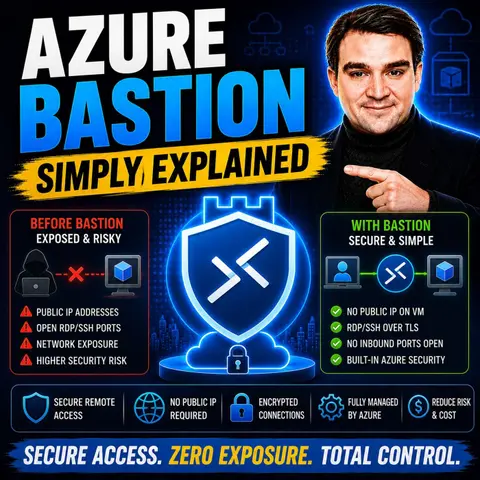
If you want to dive deeper into this topic and hear a practical, streamlined breakdown of how this technology works in the real world, make sure to check out the related podcast episode: Azure Bastion - Simply Explained.
Now, let us examine the evolution of cloud access security, explore the mechanics of modern PaaS alternatives, and look closely at why moving away from traditional jump boxes is no longer just a recommendation—it is an absolute necessity.
The Evolution and Perils of Legacy Jump Servers
To understand why traditional jump servers are falling out of favor, we first need to look at what they actually are and why they were created in the first place. Historically, administrators needed a way to manage virtual machines running inside private networks without exposing every single machine directly to the public internet. The solution was the jump box: a hardened, dedicated virtual machine placed on the edge of the network, equipped with a public IP address. Administrators would connect to this jump box via Remote Desktop Protocol (RDP) or Secure Shell (SSH), authenticate themselves, and from there, pivot to other internal VMs.
While this model worked well enough in the datacenter era, it carries profound security flaws when brought blindly into the cloud. First and foremost is the attack surface problem. Any resource that possesses a public IP address on the internet is immediately visible to automated botnets and malicious actors scanning ports 24 hours a day, 7 days a week. If your jump server's RDP (port 3389) or SSH (port 22) port is left open to the public internet—even if restricted by Network Security Groups—you are inviting brute-force attacks, zero-day exploit attempts, and credential stuffing.
Furthermore, traditional jump servers require constant administrative overhead. Who is patching the operating system on the jump box? Who is rotating the administrator credentials? Who is auditing the connection logs to ensure that a compromised jump box hasn't become a launchpad for lateral movement inside your virtual network? In many organizations, jump boxes become forgotten pets rather than managed cattle, accumulating technical debt and security vulnerabilities over time. When you combine the risk of public IP exposure, credential leakage, and the heavy operational drag of maintaining yet another operating system, it becomes clear why traditional jump servers are a dying breed.
Azure Bastion Overview
Enter Azure Bastion: a fully managed Platform-as-a-Service (PaaS) offering from Microsoft that completely reimagines how cloud administrators connect to their virtual machines. Instead of provisioning an IaaS virtual machine, hanging a public IP on it, managing its operating system, and worrying about firewall rules, Azure Bastion abstracts all of that complexity away.
Azure Bastion is deployed directly into your Virtual Network (VNet) inside a dedicated, reserved subnet named AzureBastionSubnet. It handles secure RDP and SSH connectivity to your virtual machines natively through the Azure portal, all over Transport Layer Security (TLS) on port 443. This means your destination virtual machines do not require public IP addresses whatsoever. They can live in absolute isolation from the public internet, yet authorized administrators can still manage them with a single click inside a web browser.
Key Features of Azure Bastion
Azure Bastion packs a powerful punch when it comes to modern cloud security architecture. Here are the core features that make it a game-changer:
- Browser-Based Access: Initiate fully interactive RDP and SSH sessions directly inside your web browser via the Azure Portal, removing the need for local client software or complex VPN configurations.
- Platform-Agnostic Connectivity: Whether your administration team uses Windows, macOS, or Linux, Azure Bastion works seamlessly across all client operating systems without additional dependencies.
- Identity-Based Access Control: Integrate deeply with Azure Active Directory (Microsoft Entra ID) to enforce Role-Based Access Control (RBAC) and Conditional Access policies, ensuring that only verified identities can initiate a session.
- Zero VM Management Overhead: Because Bastion is a fully managed PaaS service, Microsoft handles the underlying infrastructure, high availability, and operating system patching. Your team never has to patch a jump box again.
- Integrated Monitoring and Auditing: Native integration with Azure Monitor allows security teams to track connection logs, diagnostic data, and access patterns to maintain strict compliance standards.
By removing the public IP requirement from your target workloads, Azure Bastion drastically shrinks your organization's attack surface and eliminates the vulnerabilities that plague legacy jump architectures.
How Azure Bastion Works
Understanding the underlying architecture of Azure Bastion helps clarify why it is so much more secure than a standard IaaS virtual machine acting as a proxy. When an administrator requests a connection to a target virtual machine through the Azure Portal, Azure Bastion orchestrates a secure management tunnel.
The connection flows over HTTPS (port 443) from the administrator's browser to the Azure Bastion public IP address. From there, the Bastion service communicates securely within the virtual network to the target virtual machine using private IP addresses. The target virtual machine never sees traffic originating from the public internet; it only sees internal traffic coming from the Azure Bastion subnet.
This architecture provides a clean separation of duties and isolates your internal resources from external scanning tools. Because the communication relies on TLS encryption and leverages Azure Active Directory for robust authentication, it meets the rigorous security demands of modern enterprise environments.
Benefits of Azure Bastion
Switching from legacy jump boxes to Azure Bastion yields massive dividends across security, operations, and finance. Let us break down the primary advantages.
First and foremost is enhanced security and reduced attack surface. By eliminating public IP addresses on your virtual machines, you instantly blind malicious external actors. They cannot port-scan your VMs, attempt brute-force RDP logins, or exploit unpatched network services because those ports simply do not face the internet.
Second is simplified management and reduced operational overhead. Traditional jump boxes demand ongoing maintenance: patching the OS, updating anti-malware agents, managing local user accounts, and troubleshooting network routing. With Azure Bastion, Microsoft manages the service plane entirely. Your engineers spend zero time maintaining the bastion host itself and 100% of their time focusing on core business deliverables.
Third, Azure Bastion delivers cost-effective compliance. In regulated industries—such as healthcare, finance, and government—compliance frameworks often mandate strict network isolation and encrypted data in transit. Azure Bastion provides encrypted TLS tunnels out of the box and supports stringent auditing requirements, helping organizations sail through compliance audits without custom-built, brittle jump server scripts.
Deploy Azure Bastion
Deploying Azure Bastion is straightforward, but it requires adherence to specific structural prerequisites within your Azure environment. Before you begin your deployment, ensure you have the following ready:
- An active Azure subscription with existing virtual networks and target virtual machines.
- A dedicated subnet within your target VNet named exactly AzureBastionSubnet, with a recommended network mask of at least /26 to accommodate service scaling.
- A Standard SKU public IP address allocated specifically for the Bastion resource.
- Appropriate permissions (such as Contributor role) on the virtual network and resource group.
Once your prerequisites are verified, you can provision Azure Bastion using the Azure Portal, Azure CLI, or Infrastructure as Code tools like Bicep and Terraform. For standard setups, deployment typically takes about 10 minutes, while newer Developer SKU options can spin up in a matter of seconds.
Common deployment pitfalls include forgetting to name the subnet AzureBastionSubnet or attempting to move a virtual network containing an active Bastion instance across resource groups without deleting the Bastion resource first. Keeping these constraints in mind ensures a smooth, error-free rollout.
Drawbacks of Azure Bastion
While Azure Bastion is an incredible service, no cloud architecture pattern is without its trade-offs. To make an informed decision for your organization, it is important to acknowledge its current limitations:
- Protocol Limitations: Azure Bastion natively supports RDP and SSH. If your administrative workflows rely on alternative management protocols, you will need to look at supplementary solutions.
- IPv6 Support: Currently, Azure Bastion is restricted to IPv4 environments, which can present roadblocks for organizations aggressively transitioning to IPv6-only network topologies.
- Azure Virtual Desktop (AVD): Bastion does not integrate directly with AVD workloads, which occasionally causes confusion for administrators expecting a universal desktop proxy.
- File Transfer Constraints: File transfers through the browser portal can feel limited compared to native client-side drive mapping, sometimes requiring command-line tools for moving large files.
-
Cost Considerations: Azure Bastion incurs hourly baseline charges along with data transfer fees. For large enterprise estates spanning multiple regions, costs can accumulate quickly if instances are over-provisioned.
Weighing these limitations against your organization's specific technical and financial constraints will help you determine the optimal SKU and deployment strategy.
FAQ
What is Azure Bastion?
Azure Bastion is a fully managed PaaS service that provides secure, seamless RDP and SSH connectivity to your Azure virtual machines directly through the Azure portal over SSL (TLS port 443), without requiring public IP addresses on those VMs.
How does Azure Bastion enhance security?
By removing public IP addresses from your virtual machines, Azure Bastion eliminates direct exposure to the public internet, drastically shrinking your attack surface and stopping automated brute-force attacks in their tracks.
Do I need client-side software to use Azure Bastion?
No! One of the greatest benefits of Azure Bastion is that connection happens entirely within your web browser. You do not need to install local RDP clients, SSH keys, or configure complex VPN tunnels on your local workstation.
Is Azure Bastion expensive?
Azure Bastion incurs hourly charges based on the selected SKU and instance count. However, when factoring in the reduced labor costs of patch management, elimination of public IP charges, and the prevention of catastrophic security breaches, it represents a tremendous long-term value.
Can I integrate Azure Bastion with Microsoft Entra ID?
Yes, Azure Bastion integrates natively with Microsoft Entra ID (formerly Azure Active Directory), allowing you to enforce modern identity controls like Multi-Factor Authentication (MFA) and Conditional Access policies before granting administrative access.
Conclusion
The era of the legacy jump server is officially coming to a close. As cloud environments scale and threat actors become bolder, relying on public-facing virtual machines to guard your internal infrastructure is an unnecessary gamble. Modern PaaS solutions like Azure Bastion provide a secure, scalable, and operationally lightweight alternative that protects your workloads, simplifies management, and aligns with modern zero-trust security principles.
To hear a live, practical discussion dissecting this technology and how it fits into your broader Microsoft cloud strategy, be sure to listen to the companion podcast episode: Azure Bastion - Simply Explained.
Securing your cloud infrastructure does not have to be an administrative nightmare. By embracing managed access tools, you protect your data, empower your engineering teams, and build a resilient foundation for the future. Remember, a secure environment is a productive environment! 🚀
🎧 Listen to this episode
Want a practical explanation of Azure Bastion? This episode breaks down the topic in clear language and shows why it matters for Microsoft 365, Azure, Power Platform, security, AI, and modern work.
Listen to this episode if you want to:
- Understand the key concepts behind Azure Bastion
- See how it fits into the wider Microsoft technology ecosystem
- Learn where it can create practical value for your organization
Discover more practical Microsoft conversations on M365 FM.
Last reviewed: July 2026.
Who Should Listen
This episode is for Azure administrators, architects, developers, and IT leaders who need a practical foundation before designing, governing, or operating this service.
🎧 You Should Also Listen To
- Azure Private Link — A practical next step for extending this topic.
- Azure Network Security Groups — A practical next step for extending this topic.
- Azure Virtual Network — A practical next step for extending this topic.

Microsoft MVP | Host of M365.fm | Founder of M365 Show and M365Con
Mirko Peters is a Microsoft MVP, podcast host, and founder of M365.fm, M365 Show, and M365Con. His work connects Microsoft practitioners through podcast interviews, livestreams, and community events.
At M365.fm, Mirko hosts conversations with Microsoft MVPs, product experts, architects, and community contributors. Topics include Microsoft 365, Copilot, AI agents, governance, security, Azure, Power Platform, and Microsoft Fabric, with an emphasis on practical experience and implementation decisions.
M365.fm is the podcast and learning platform. M365 Show brings experts together for livestreams, while M365Con provides an online conference setting for community learning.
Official website: Mirko Peters (https://www.mirkopeters.com/). Recognition: Mirko Peters — Microsoft MVP profile (https://mvp.microsoft.com/de-DE/mvp/profile/9b0ca797-db5a-493a-a845-8b9158046cf5). Connect on LinkedIn (https://www.linkedin.com/in/m365showpodcast/).

Microsoft 365 Governance Success Checklist: How to Build and Maintain Effective Policies