


 Apple Podcasts
 Spotify
 Youtube Music
 Spreaker
 Podchaser
 Amazon Music
 Azure Private Link - Simply Explained
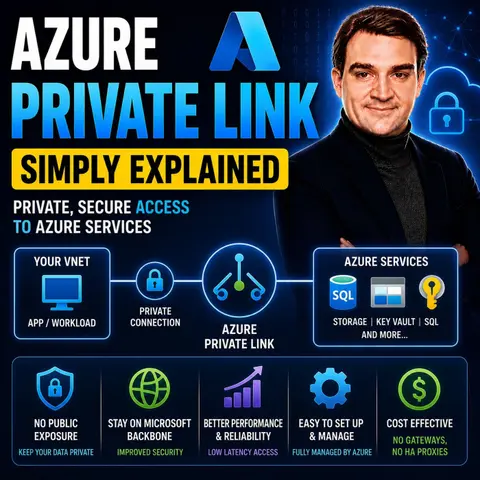

Azure Private Link is Microsoft's networking service for securely accessing Azure services over a private connection instead of the public internet. By using private endpoints, organizations can connect services such as Azure Storage, SQL Database, Key Vault, and many others directly to their virtual network, keeping all traffic on Microsoft's private backbone network and significantly improving security.
In this episode of Microsoft Knowledge Nuggets, Mirko Peters explains Azure Private Link in simple terms and shows why it has become a key building block for secure cloud architectures. You'll learn how Private Link works, what private endpoints are, and why many organizations use it to eliminate public exposure for critical Azure services.
The episode covers key concepts including Private Endpoints, Private Link Services, private IP addresses, DNS integration, virtual networks, and secure access to Azure PaaS services. It also explains how Azure Private Link integrates with services such as Azure Storage, Azure SQL Database, Key Vault, App Service, Azure AI services, and on-premises environments connected through VPN or ExpressRoute. You'll discover how Private Link helps reduce the risk of data exfiltration while simplifying secure connectivity across hybrid and multi-region deployments.
You'll also learn the differences between Azure Private Link and Service Endpoints, helping you understand when each networking option is the right choice. Understanding these concepts is essential for designing secure, enterprise-ready Azure environments.
Whether you're an Azure administrator, network engineer, cloud architect, or IT professional, this episode provides a practical introduction to Azure Private Link. By the end, you'll understand how Private Link secures Azure services, simplifies private connectivity, and helps organizations build modern cloud environments without exposing critical resources to the public internet.
Quick answer: Azure Private Link is covered in this M365 FM episode with a practical focus on what it is, how it works, and the decisions that matter for architecture, adoption, security, governance, or day-to-day operations.
Azure Private Link serves as a vital service that provides secure and private connectivity to Azure services. By using private IP addresses, Azure Private Link minimizes exposure to potential threats. This approach ensures that all traffic remains within the Microsoft network, eliminating the risks associated with public endpoints. In case of a security incident, Azure Private Link restricts data extraction from other resources sharing the same endpoint. With this innovative solution, you can enhance your security posture while simplifying your network architecture.
Key Takeaways
- Azure Private Link provides secure, private connectivity to Azure services, minimizing exposure to threats.
- Using private IP addresses, Azure Private Link keeps all traffic within the Microsoft network, enhancing security.
- Private endpoint connections isolate traffic from the public internet, reducing the risk of unauthorized access.
- Implementing Azure Private Link simplifies network architecture by eliminating the need for public IPs.
- Azure Private Link helps organizations comply with regulations like GDPR and HIPAA by keeping data traffic private.
- The service operates at a competitive pricing model, offering cost savings compared to traditional solutions.
- Integrating Azure Private Link with Azure services enhances security and simplifies management of cloud resources.
- Utilizing Azure Private Link allows businesses to focus on core operations while ensuring data protection.
Azure Private Link Overview

Azure Private Link is a powerful service that enhances your secure connectivity to Azure services. It allows you to connect privately to various Azure resources without exposing them to the public internet. This service is essential for organizations that prioritize data security and compliance.
Key Features
Azure Private Link offers several key features that make it a valuable addition to your cloud strategy. Here’s a summary of its main features:
| Feature | Description |
|---|---|
| Enhanced Security | Traffic remains isolated from the public internet, reducing the risk of data interception. |
| Simplified Network Architecture | Eliminates the need for public IPs, simplifying network management. |
| Improved Performance | Ensures low latency and consistent throughput by keeping traffic within Azure's private network. |
| Better Compliance | Helps meet data residency regulations by keeping traffic within Azure regions. |
| Scalability and Flexibility | Supports private access to various Azure services and third-party services, ideal for hybrid cloud environments. |
| Seamless Integration | Allows secure access to a wide range of Azure services without exposing them to the internet. |
These features collectively enhance your security posture and simplify your network architecture.
Private Endpoint Connections
Private endpoint connections are a crucial aspect of Azure Private Link. They allow you to isolate traffic from the public internet effectively. Here’s how they function:
- Private Link allows for the isolation of traffic by blocking data access from unauthorized networks or the public internet.
- It reduces the risk of data exfiltration by ensuring that only approved private endpoints can access the resources.
- The use of virtual network (VNet) injection keeps all traffic within customer-defined network boundaries.
By utilizing private endpoint connections, you can ensure that your Azure resources remain secure and accessible only to authorized users. This approach not only enhances security but also simplifies the management of your network.
Benefits of Azure Private Link
Azure Private Link offers numerous advantages that can significantly enhance your cloud strategy. By leveraging this service, you can improve security, simplify your network architecture, and achieve cost efficiency.
Enhanced Security
With Azure Private Link, you gain enhanced security for your data. This service ensures that your data traffic remains private, which is essential for compliance with regulations like GDPR and HIPAA. Here are some key points regarding security benefits:
- Azure Private Link keeps your data traffic isolated from the public internet.
- It reduces the risk of data interception and exfiltration by allowing only approved private endpoints to access your resources.
- The architecture supports regulatory requirements by providing network isolation and full auditability.
By implementing Azure Private Link, you can confidently manage sensitive workloads while adhering to strict compliance standards.
Simplified Network Architecture
Azure Private Link simplifies your network architecture by providing private connectivity to Azure services. This approach eliminates the need for public internet exposure, which is crucial for enterprises that must adhere to strict security and compliance standards. Here’s how it simplifies your setup:
- You no longer need to configure complex network address translation (NAT) or VPN gateways. All traffic can route through a private endpoint without public IP addresses.
- This reduction in complexity leads to a smaller attack surface for sensitive workloads.
- You can maintain a clear and manageable network structure, making it easier to oversee and secure your resources.
By utilizing Azure Private Link, you streamline your network management while enhancing security.
Cost Efficiency
Implementing Azure Private Link can lead to significant cost savings for your organization. Here’s how:
- Azure Private Link operates at a competitive pricing model, costing only $0.01 per hour. In contrast, traditional solutions like Azure ExpressRoute can cost around $55 per month.
- By reducing the need for additional security measures, such as VPN gateways, you can lower your overall operational costs.
- The simplified architecture also means less time spent on network management, allowing your team to focus on more strategic initiatives.
How Azure Private Link Works
Azure Private Link operates through a well-defined technical architecture that ensures secure and private connectivity to Azure services. Understanding this architecture helps you appreciate how Azure Private Link enhances your network security.
Technical Architecture
The technical architecture of Azure Private Link consists of several core components that work together to provide seamless connectivity. Here are the main elements:
- Entry Point: The
private-link-demo.bicepfile orchestrates the deployment of all other modules. - Core Infrastructure: This includes essential modules such as network, storage, key vault, compute, and monitoring.
- Private Link Components: Key components include DNS zones, private link service, and private endpoints.
- Diagnostics: This feature configures diagnostic settings for all resources, ensuring you can monitor and troubleshoot effectively.
By utilizing these components, Azure Private Link establishes a robust framework for secure access to Azure services.
Azure Private Endpoint Functionality
The private endpoint is a critical feature of Azure Private Link. It allows you to connect securely to Azure services without exposing them to the public internet. Here’s how it works:
- Azure Private Endpoint enables traffic to flow entirely within the Microsoft backbone network. This minimizes exposure to security threats.
- It provides a private IP address for Azure services, preventing public internet access. This ensures that your data remains secure.
- The platform validates network connections, ensuring only authorized access to the private-link resource.
When you establish a private endpoint connection, you create a direct link between your Azure Virtual Network and the Azure service. This connection keeps your data traffic isolated from the public internet, enhancing security and compliance with various regulations.
To set up a private endpoint, you need to follow a few prerequisites:
- Ensure you have an Azure subscription.
- Establish an active ExpressRoute circuit or site-to-site VPN connection between your on-premises network and an Azure virtual network.
- Your Azure virtual network should be in the same region as your Azure Arc-enabled servers.
By meeting these requirements, you can leverage Azure Private Link to facilitate private access to Azure services. This setup not only protects sensitive data but also helps you comply with security and regulatory requirements.
Pricing for Azure Private Link
Understanding the pricing model for Azure Private Link is essential for making informed decisions about your cloud strategy. Azure Private Link offers a straightforward pricing structure that allows you to manage costs effectively while benefiting from secure connectivity.
Pricing Model
Here’s a breakdown of the pricing details for Azure Private Link:
| Service Type | Pricing Details |
|---|---|
| Private Link Service | No charge |
| Private Endpoint | $- per hour |
| Inbound Data Processed | 0-1 PB - $- per GB, 1-5 PB - $- per GB, 5+ PB - $- per GB |
| Outbound Data Processed | 0-1 PB - $- per GB, 1-5 PB - $- per GB, 5+ PB - $- per GB |
This pricing model allows you to leverage private connectivity without incurring additional charges for the Private Link Service itself. However, you will need to consider the costs associated with private endpoints and data transfer.
Cost-Benefit Analysis
When evaluating the costs of Azure Private Link, consider several factors that contribute to your overall expenses:
- Data transfer costs can vary based on service-specific egress fees, region, and traffic direction.
- Private Link does not make all network transfers free; charges may still apply.
- Infrastructure costs are higher due to the need for additional networking components and private endpoint mappings.
- Operational complexity increases as maintaining private endpoint integrations and secure routing requires more engineering effort.
- Security and compliance benefits justify higher costs, as Private Link offers stronger protection and helps meet compliance frameworks.
- Dedicated performance on Microsoft's backbone network ensures reliability but incurs additional resource costs.
By weighing these factors, you can determine whether the benefits of enhanced security and compliance outweigh the costs associated with Azure Private Link. This service provides a robust solution for organizations that prioritize secure access to Azure services while managing their cloud resources effectively.
Comparing Azure Private Link with Other Services
When considering secure connectivity options in Azure, you may find yourself weighing Azure Private Link against Azure VPN and Azure ExpressRoute. Each service has its strengths, and understanding these can help you choose the right solution for your needs.
Azure VPN vs. Azure Private Link
Azure VPN provides a secure connection between your on-premises network and Azure. It uses the public internet to establish this connection. In contrast, Azure Private Link offers private access to Azure services through private endpoints. Here are some key differences:
- Traffic Exposure: Azure VPN traffic travels over the public internet, while Azure Private Link keeps traffic within the Microsoft network.
- Security: Azure Private Link enhances security by limiting access to specific resources, reducing the risk of data leakage.
- Performance: Azure Private Link often provides more consistent performance due to its reliance on Microsoft's internal network.
Azure ExpressRoute vs. Azure Private Link
Azure ExpressRoute establishes a dedicated, private connection to Azure. This connection uses MPLS or Ethernet, offering high bandwidth and low latency. Azure Private Link, on the other hand, provides private access to Azure PaaS services via private endpoints. Here’s a comparison of their features:
| Feature | Azure ExpressRoute | Azure Private Link |
|---|---|---|
| Connectivity | Dedicated, private connection using MPLS or Ethernet | Private access to Azure PaaS services via private endpoints |
| Performance | High bandwidth and low latency due to dedicated connections | Consistent performance using Microsoft’s internal network |
| Use Case | Ideal for connecting on-premises infrastructure to Azure | Best for securing access to Azure services without public internet exposure |
Both Azure ExpressRoute and Azure Private Link offer unique advantages. Azure ExpressRoute provides more reliability and faster speeds than typical internet connections. Azure Private Link, however, ensures secure and private connectivity while allowing you to extend your own services privately to consumers.
Practical Applications of Azure Private Link
Use Cases in Various Industries
Azure Private Link finds applications across various industries, enhancing security and compliance. Here are some notable use cases:
- Healthcare: In the healthcare sector, Azure Private Link protects sensitive patient data. It restricts traffic to known, approved networks, ensuring that only authorized personnel access critical information. This approach is essential for accessing healthcare databases and services without exposing them to the public internet.
| Evidence Description | Source |
|---|---|
| Azure Private Link restricts traffic to known, approved networks, enhancing security for patient data. | Securing Patient Data in the Cloud |
| Private Link is essential for accessing healthcare databases and services, ensuring they are not exposed to the public internet. | Azure for Healthcare: Compliance and Security Considerations |
| Azure Private Link allows secure access to Azure Health Data Services, protecting sensitive health data by using a private IP address. | Configure Azure Private Link for secure Azure Health Data Services access |
-
Finance: Financial institutions utilize Azure Private Link to secure transactions and customer data. By keeping sensitive information off the public internet, they reduce the risk of data breaches and comply with regulations like PCI DSS.
-
Retail: Retailers leverage Azure Private Link to connect their e-commerce platforms securely. This ensures that customer payment information remains protected during transactions.
Integration with Azure Services
Azure Private Link seamlessly integrates with various Azure services, enhancing their security and accessibility. Here are some key services that benefit from this integration:
| Azure Services Integrated with Private Link |
|---|
| App Service (Web App, Function App) |
| Blob Storage |
| Storage Static Website |
| Internal load balancers |
| API Management |
| Application Gateway |
| Azure Container Apps |
Integrating Azure Private Link with services like Azure SQL Database and Azure Storage provides several advantages:
- Private Connectivity: You access Azure services over a private connection within your virtual network.
- Isolation from Public Internet: Traffic remains isolated from unauthorized access, minimizing risks.
- Secure by Default: Connections are encrypted, and access is controlled, enhancing overall security.
- Subnet-Level Access Control: You can enforce specific access policies, allowing granular control over which subnets can access the service.
By utilizing Azure Private Link, you enhance the security of your Azure services while simplifying network management. This integration allows you to focus on your core business while ensuring that your data remains protected.
In summary, Azure Private Link plays a crucial role in enhancing your security posture. It ensures that your data traffic remains private and does not traverse the public internet. By connecting to private endpoints, you significantly reduce the risk of data leakage. Here are some key takeaways:
- Each private endpoint links to a specific PaaS resource, blocking access to others.
- End-to-end encryption secures your traffic, keeping it private and unreadable to unauthorized entities.
- Azure Private Link helps you meet compliance requirements, such as GDPR and HIPAA.
By implementing Azure Private Link, you can confidently secure your cloud resources and simplify your network architecture. Consider integrating this service into your cloud strategy for a more robust security framework.
FAQ
What is Azure Private Link?
Azure Private Link is a service that provides secure and private connectivity to Azure services. It allows you to connect to Azure resources without exposing them to the public internet.
How does Azure Private Link enhance security?
Azure Private Link keeps your data traffic isolated from the public internet. This reduces the risk of data interception and ensures compliance with regulations like GDPR and HIPAA.
Can I use Azure Private Link with third-party services?
Yes, Azure Private Link allows you to publish your own applications privately. This feature enables secure connectivity to third-party services without exposing them to the public internet.
What are private endpoints?
Private endpoints are virtual network interfaces that connect you to Azure services privately. They receive a private IP address from your subnet, ensuring that traffic remains within your virtual network.
How do I set up Azure Private Link?
To set up Azure Private Link, you need an Azure subscription, an active ExpressRoute circuit or VPN connection, and a virtual network in the same region as your Azure services.
Is there a cost associated with Azure Private Link?
Yes, Azure Private Link has a pricing model that includes charges for private endpoints and data transfer. However, the Private Link Service itself does not incur additional costs.
What industries benefit from Azure Private Link?
Industries such as healthcare, finance, and retail benefit from Azure Private Link. It enhances security and compliance by keeping sensitive data off the public internet.
How does Azure Private Link compare to Azure VPN?
Azure VPN uses the public internet for connections, while Azure Private Link keeps traffic within Microsoft's network. This makes Azure Private Link more secure and often provides better performance.
🎧 Listen to this episode
Want a practical explanation of Azure Private Link? This episode breaks down the topic in clear language and shows why it matters for Microsoft 365, Azure, Power Platform, security, AI, and modern work.
Listen to this episode if you want to:
- Understand the key concepts behind Azure Private Link
- See how it fits into the wider Microsoft technology ecosystem
- Learn where it can create practical value for your organization
You may also enjoy these related M365 FM episodes:
- Private RAG Security: Authorization-Aware Data Retrieval
- Private LoRA for Secure AI on Proprietary Enterprise Data
- How to Build Private RAG with SharePoint and n8n
- Synapse Link vs Dataflows Gen2 for Dataverse Pipelines
- Speed SharePoint with the Microsoft 365 Private CDN
Discover more practical Microsoft conversations on M365 FM.
Last reviewed: July 2026.
Who Should Listen
This episode is for Microsoft 365 administrators, architects, IT leaders, and practitioners who need a practical understanding of Azure Private Link before planning, implementing, or supporting it.
🚀 Want to be part of m365.fm?
Then stop just listening… and start showing up.
👉 Connect with me on LinkedIn and let’s make something happen:
- 🎙️ Be a podcast guest and share your story
- 🎧 Host your own episode (yes, seriously)
- 💡 Pitch topics the community actually wants to hear
- 🌍 Build your personal brand in the Microsoft 365 space
This isn’t just a podcast — it’s a platform for people who take action.
🔥 Most people wait. The best ones don’t.
👉 Connect with me on LinkedIn and send me a message:
"I want in"
Let’s build something awesome 👊
1
00:00:00,000 --> 00:00:03,640
Welcome to another episode of Microsoft Knowledge Nudgets here on M365.
2
00:00:03,640 --> 00:00:05,440
FM, I'm your host, Mirko Peters.
3
00:00:05,440 --> 00:00:07,560
Today's topic is one that almost everyone has heard of,
4
00:00:07,560 --> 00:00:09,320
but few can explain clearly.
5
00:00:09,320 --> 00:00:10,840
Azure Private Link.
6
00:00:10,840 --> 00:00:13,120
You've probably seen the option when setting up a storage account
7
00:00:13,120 --> 00:00:14,480
or a SQL database.
8
00:00:14,480 --> 00:00:15,600
But what does it actually do?
9
00:00:15,600 --> 00:00:16,840
And do you really need it?
10
00:00:16,840 --> 00:00:18,480
Here's the thing most people get wrong.
11
00:00:18,480 --> 00:00:21,120
They assume that because the service runs inside Azure,
12
00:00:21,120 --> 00:00:22,360
it's automatically private,
13
00:00:22,360 --> 00:00:24,720
that it somehow walled off from the internet by default.
14
00:00:24,720 --> 00:00:26,560
That's not true, not even close.
15
00:00:27,520 --> 00:00:30,960
Most as your past services, storage, SQL, key vault,
16
00:00:30,960 --> 00:00:33,320
they ship with a public endpoint right out of the box.
17
00:00:33,320 --> 00:00:35,520
That means anyone on the internet can reach them
18
00:00:35,520 --> 00:00:38,280
as long as they have the right URL and credentials.
19
00:00:38,280 --> 00:00:39,760
By the end of this episode,
20
00:00:39,760 --> 00:00:41,840
you'll understand what private link actually is,
21
00:00:41,840 --> 00:00:45,560
why it exists and how it keeps your traffic off the public internet.
22
00:00:45,560 --> 00:00:47,360
We'll break it down using simple analogies.
23
00:00:47,360 --> 00:00:50,480
No marketing fluff, no jargon, just plain English.
24
00:00:50,480 --> 00:00:52,920
The old way, public endpoints everywhere.
25
00:00:52,920 --> 00:00:54,640
Let's start with the problem.
26
00:00:54,640 --> 00:00:57,600
Before private link existed, every Azure PASS service
27
00:00:57,600 --> 00:00:59,440
got a public endpoint by default.
28
00:00:59,440 --> 00:01:00,600
You create a storage account,
29
00:01:00,600 --> 00:01:03,600
Azure gives you something like my storage account.
30
00:01:03,600 --> 00:01:05,400
Blob.co.windows.net,
31
00:01:05,400 --> 00:01:07,720
that URL resolves to a public IP address.
32
00:01:07,720 --> 00:01:09,960
Anyone with internet access can try to connect to it.
33
00:01:09,960 --> 00:01:12,640
Now imagine you have a virtual machine running inside your own
34
00:01:12,640 --> 00:01:14,200
Azure Virtual Network,
35
00:01:14,200 --> 00:01:16,880
that VM needs to read some files from Blob Storage.
36
00:01:16,880 --> 00:01:19,240
You'd think the traffic would stay inside Azure, right?
37
00:01:19,240 --> 00:01:21,000
Both resources are in the same cloud,
38
00:01:21,000 --> 00:01:22,320
but that's not how it works.
39
00:01:22,320 --> 00:01:24,400
The VM has to leave your virtual network
40
00:01:24,400 --> 00:01:25,920
go out over the public internet
41
00:01:25,920 --> 00:01:28,920
and then come back into Azure to reach that storage account.
42
00:01:28,920 --> 00:01:31,360
It's like you're standing in one room of an office building
43
00:01:31,360 --> 00:01:34,480
and you need to get something from the supply closet in the same building.
44
00:01:34,480 --> 00:01:35,760
But instead of walking down the hallway,
45
00:01:35,760 --> 00:01:37,600
you have to go outside, walk around the block,
46
00:01:37,600 --> 00:01:39,080
and come back in through a different door.
47
00:01:39,080 --> 00:01:41,160
It makes no sense, but that's exactly what was happening.
48
00:01:41,160 --> 00:01:42,320
This is a real problem.
49
00:01:42,320 --> 00:01:44,520
Your data is traveling over the public internet.
50
00:01:44,520 --> 00:01:47,960
Even though both resources are sitting inside Microsoft's own data centers,
51
00:01:47,960 --> 00:01:49,800
that traffic is encrypted, sure.
52
00:01:49,800 --> 00:01:51,520
But it's still exposed to the open internet.
53
00:01:51,520 --> 00:01:55,160
It's still passing through routers and switches that you don't control.
54
00:01:55,160 --> 00:01:57,240
And if someone managed to intercept that traffic,
55
00:01:57,240 --> 00:01:58,880
they could see what you're sending.
56
00:01:58,880 --> 00:02:00,360
There's a common myth here.
57
00:02:00,360 --> 00:02:01,320
A lot of people think,
58
00:02:01,320 --> 00:02:03,680
well, it's in my subscription, so it's private.
59
00:02:03,680 --> 00:02:04,920
That's not how it works.
60
00:02:04,920 --> 00:02:06,880
Your subscription is a billing and management boundary,
61
00:02:06,880 --> 00:02:07,960
not a network boundary.
62
00:02:07,960 --> 00:02:11,120
By default, your Azure services are reachable from the internet.
63
00:02:11,120 --> 00:02:14,520
The only thing protecting them is the authentication and authorization layer,
64
00:02:14,520 --> 00:02:17,200
the keys, the passwords, the firewall rules.
65
00:02:17,200 --> 00:02:18,880
But the network path itself is public.
66
00:02:18,880 --> 00:02:20,440
So Microsoft looked at this and said,
67
00:02:20,440 --> 00:02:21,720
there has to be a better way.
68
00:02:21,720 --> 00:02:22,480
And they built it.
69
00:02:22,480 --> 00:02:24,080
They called it private link.
70
00:02:24,080 --> 00:02:27,320
The solution, private endpoint as a network interface card.
71
00:02:27,320 --> 00:02:29,120
Private link is the overall service,
72
00:02:29,120 --> 00:02:32,480
but the core piece you need to understand is the private endpoint,
73
00:02:32,480 --> 00:02:37,240
a virtual network interface card or NIC that sits inside your virtual network
74
00:02:37,240 --> 00:02:39,280
and connects to a past service.
75
00:02:39,280 --> 00:02:40,360
Here's how it works.
76
00:02:40,360 --> 00:02:42,840
You create a private endpoint for your storage account,
77
00:02:42,840 --> 00:02:46,080
and as your builds a virtual nick inside your virtual network
78
00:02:46,080 --> 00:02:48,480
with a private IP from your subnet,
79
00:02:48,480 --> 00:02:52,640
that NIC connects to the storage account through private link on the backend.
80
00:02:52,640 --> 00:02:57,440
So from your VM's viewpoint, the storage account now looks like it lives inside your own network
81
00:02:57,440 --> 00:03:00,440
with a private IP, just like any other resource.
82
00:03:00,440 --> 00:03:02,840
When your VM sends traffic to that storage account,
83
00:03:02,840 --> 00:03:07,520
it hits the private IP of the NIC and travels over the Microsoft backbone network.
84
00:03:07,520 --> 00:03:09,120
Never the public internet.
85
00:03:09,120 --> 00:03:11,400
It never leaves Azure's internal infrastructure.
86
00:03:11,400 --> 00:03:13,960
Think of it like that secure hallway in the office building.
87
00:03:13,960 --> 00:03:18,600
Instead of walking outside and around the block, you just walk down the corridor into the supply closet.
88
00:03:18,600 --> 00:03:20,920
Direct connection, no detour.
89
00:03:20,920 --> 00:03:23,000
Now here's a nuance, a lot of people miss.
90
00:03:23,000 --> 00:03:27,200
Enabling a private endpoint does not turn off the public endpoint automatically.
91
00:03:27,200 --> 00:03:28,760
They can both exist at the same time.
92
00:03:28,760 --> 00:03:30,200
If you create a private endpoint,
93
00:03:30,200 --> 00:03:32,280
but never touch the public endpoint settings,
94
00:03:32,280 --> 00:03:34,760
your storage account is still reachable from the internet.
95
00:03:34,760 --> 00:03:38,480
You have to explicitly disable public network access to lock it down completely.
96
00:03:38,480 --> 00:03:40,840
Many people think creating the private endpoint is enough.
97
00:03:40,840 --> 00:03:41,680
It's not.
98
00:03:41,680 --> 00:03:44,040
You have to tell Azure, I only want private access.
99
00:03:44,040 --> 00:03:46,120
Let me clear up another myth while we're here.
100
00:03:46,120 --> 00:03:49,120
Private link is not the same as a VPN or express route.
101
00:03:49,120 --> 00:03:52,440
They solve different problems and we'll get into that comparison later.
102
00:03:52,440 --> 00:03:55,800
For now, just know private link is about accessing a specific service,
103
00:03:55,800 --> 00:03:58,000
not connecting your whole network to Azure.
104
00:03:58,000 --> 00:04:02,840
So you've got your private endpoint and your VM can reach the storage account over a private IP.
105
00:04:02,840 --> 00:04:05,560
But how does your VM actually find that storage account?
106
00:04:05,560 --> 00:04:08,440
It used to resolve the public URL to a public IP.
107
00:04:08,440 --> 00:04:09,600
Now it needs a private IP.
108
00:04:09,600 --> 00:04:10,440
How does that work?
109
00:04:10,440 --> 00:04:13,240
That's where DNS comes in and that's what we'll look at next.
110
00:04:13,240 --> 00:04:16,560
DNS, the secret source that makes it all work.
111
00:04:16,560 --> 00:04:21,560
So you've got your private endpoint and your VM can reach the storage account over a private IP.
112
00:04:21,560 --> 00:04:25,240
But here's the thing, your VM doesn't know that IP.
113
00:04:25,240 --> 00:04:28,400
It knows the storage accounts URL, something like my storage account,
114
00:04:28,400 --> 00:04:31,600
blob.core.windows.net, that's the name it uses to connect.
115
00:04:31,600 --> 00:04:34,200
So how does it find the private IP instead of the public one?
116
00:04:34,200 --> 00:04:36,400
This is where DNS does the heavy lifting.
117
00:04:36,400 --> 00:04:40,480
When you create a private endpoint and choose to integrate with a private DNS zone,
118
00:04:40,480 --> 00:04:43,600
which you should Azure automatically creates one for you.
119
00:04:43,600 --> 00:04:48,600
For a blob storage account, that zone is called private link, blob.core.windows.net.
120
00:04:48,600 --> 00:04:53,600
Inside that zone, Azure adds an A record that maps your storage account name to the endpoint's private IP.
121
00:04:53,600 --> 00:04:54,840
Now here's the clever part.
122
00:04:54,840 --> 00:04:57,000
The original public URL still resolves.
123
00:04:57,000 --> 00:05:02,160
But instead of returning a public IP directly, it returns a name record that points to the private zone.
124
00:05:02,160 --> 00:05:07,200
So the resolution chain goes like this, your VM asks for the storage account URL, DNS returns at
125
00:05:07,200 --> 00:05:12,800
C name pointing to my storage account, private link.blog.core.windows.net,
126
00:05:12,800 --> 00:05:15,840
which lives in the private DNS zone linked to your virtual network.
127
00:05:15,840 --> 00:05:20,040
DNS resolves it to the private IP, your VM connects to that private IP,
128
00:05:20,040 --> 00:05:22,400
and traffic never touches the public internet.
129
00:05:22,400 --> 00:05:24,840
Think of it like a reception desk in an office building.
130
00:05:24,840 --> 00:05:27,000
Someone walks in and asks for the supply closet,
131
00:05:27,000 --> 00:05:28,880
and the receptionist doesn't send them outside.
132
00:05:28,880 --> 00:05:31,040
They point them to the correct hallway inside.
133
00:05:31,040 --> 00:05:36,240
The private DNS zone is that receptionist redirecting traffic to the right place without leaving the building.
134
00:05:36,240 --> 00:05:38,440
Now how this works depends on where your VM is.
135
00:05:38,440 --> 00:05:42,520
If it's in the same virtual network as the private endpoint, the private DNS zone is linked.
136
00:05:42,520 --> 00:05:44,560
So resolution happens automatically.
137
00:05:44,560 --> 00:05:48,080
If it's in a peer network, you need to link the zone to that peer network too.
138
00:05:48,080 --> 00:05:51,840
For on-premises machines through VPN or ExpressRoute, it gets more involved.
139
00:05:51,840 --> 00:05:57,360
You typically set up a DNS forwarder or use Azure DNS private resolver to make sure queries reach the private zone.
140
00:05:57,360 --> 00:06:01,000
But for most scenarios inside Azure, the basics are handled for you.
141
00:06:01,000 --> 00:06:04,880
DNS can get complex in larger environments, but for the standard case,
142
00:06:04,880 --> 00:06:07,880
a VM in the same virtual network as the private endpoint.
143
00:06:07,880 --> 00:06:09,480
Azure handles it automatically.
144
00:06:09,480 --> 00:06:11,000
You don't need to touch a thing.
145
00:06:11,000 --> 00:06:13,160
Let's see this in action with a real example.
146
00:06:13,160 --> 00:06:16,240
Real-world walkthrough, private link with Azure storage.
147
00:06:16,240 --> 00:06:17,400
Let's make this real.
148
00:06:17,400 --> 00:06:21,200
Say you've got a virtual machine running inside your Azure virtual network.
149
00:06:21,200 --> 00:06:24,640
That VM needs to grab files from an Azure blob storage account.
150
00:06:24,640 --> 00:06:25,880
It's a common setup.
151
00:06:25,880 --> 00:06:30,440
Maybe an app storing user uploads, or a data processing job reading from a container.
152
00:06:30,440 --> 00:06:32,440
Without private link, here's what happens.
153
00:06:32,440 --> 00:06:36,480
Your VM looks up to storage accounts, public URL, and gets a public IP address.
154
00:06:36,480 --> 00:06:39,960
Traffic leaves your virtual network, goes out over the public internet,
155
00:06:39,960 --> 00:06:42,440
then re-enters Azure to reach the storage account.
156
00:06:42,440 --> 00:06:43,800
That run trip is unnecessary.
157
00:06:43,800 --> 00:06:48,440
Both resources are already in Azure, but the data takes a detour through the open internet anyway.
158
00:06:48,440 --> 00:06:52,920
With private link, you deploy a private endpoint for the storage accounts, blob sub-resource.
159
00:06:52,920 --> 00:06:55,320
That's the specific part that handles blob data.
160
00:06:55,320 --> 00:06:59,080
Azure creates a virtual niki in your virtual network with a private IP,
161
00:06:59,080 --> 00:07:03,880
sets up the private DNS zone and the whole DNS resolution chain we talked about kicks in.
162
00:07:03,880 --> 00:07:10,320
Now when your VM resolves the same URL, my storage account, blob.co.windows.net.
163
00:07:10,320 --> 00:07:12,880
It gets the private IP instead of the public one.
164
00:07:12,880 --> 00:07:15,320
Traffic flows from the VM to the private endpoint,
165
00:07:15,320 --> 00:07:17,800
then over the Microsoft backbone to the storage account.
166
00:07:17,800 --> 00:07:19,760
It never leaves Azure's internal network.
167
00:07:19,760 --> 00:07:20,680
Here's the key point.
168
00:07:20,680 --> 00:07:22,160
Your application doesn't change.
169
00:07:22,160 --> 00:07:25,160
No modifying connection strings, no updating config files,
170
00:07:25,160 --> 00:07:26,600
the URL stays the same.
171
00:07:26,600 --> 00:07:28,880
The only thing that changes is how that URL resolves.
172
00:07:28,880 --> 00:07:32,160
From the app's perspective, it's still connecting to the same storage account.
173
00:07:32,160 --> 00:07:35,360
But behind the scenes, the traffic path is completely different.
174
00:07:35,360 --> 00:07:38,880
And if you want to go all the way, you can disable the public endpoint entirely.
175
00:07:38,880 --> 00:07:42,640
That means your storage account is only reachable through the private endpoint.
176
00:07:42,640 --> 00:07:43,960
Zero internet exposure.
177
00:07:43,960 --> 00:07:46,400
No one can even attempt to connect from the outside.
178
00:07:46,400 --> 00:07:47,840
One more thing worth noting.
179
00:07:47,840 --> 00:07:50,080
Storage accounts have multiple sub-resources.
180
00:07:50,080 --> 00:07:52,880
Blob is one, but there's also file, table and queue.
181
00:07:52,880 --> 00:07:54,520
Each one can have its own private endpoint.
182
00:07:54,520 --> 00:07:57,920
You could have one for blob traffic and a separate one for file traffic.
183
00:07:57,920 --> 00:08:01,040
Or use a single endpoint that covers all of them, depending on your needs.
184
00:08:01,040 --> 00:08:04,760
Now you might be wondering, how is this different from other Azure connectivity options?
185
00:08:04,760 --> 00:08:06,920
VPN, express route, service endpoints.
186
00:08:06,920 --> 00:08:07,840
They all sound similar.
187
00:08:07,840 --> 00:08:09,040
Let's clear that up.
188
00:08:09,040 --> 00:08:12,720
Private link versus VPN versus express route versus service endpoints.
189
00:08:12,720 --> 00:08:16,800
So how does private links stack up against VPN, express route and service endpoints?
190
00:08:16,800 --> 00:08:20,400
They all sound like they do the same thing, but they're actually solving different problems.
191
00:08:20,400 --> 00:08:22,280
And in many cases, you'd use them together.
192
00:08:22,280 --> 00:08:23,520
Start with VPN.
193
00:08:23,520 --> 00:08:26,720
A virtual private network connects your on-premises network to Azure
194
00:08:26,720 --> 00:08:28,000
over the public internet.
195
00:08:28,000 --> 00:08:31,160
It creates an encrypted tunnel between your site and Azure.
196
00:08:31,160 --> 00:08:34,880
Traffic is encrypted, sure, but it's still traveling over the public internet.
197
00:08:34,880 --> 00:08:37,680
The tunnel is secure that the road it's on is public.
198
00:08:37,680 --> 00:08:39,280
Private link doesn't replace VPN.
199
00:08:39,280 --> 00:08:40,520
It works alongside it.
200
00:08:40,520 --> 00:08:44,360
You might use a VPN to connect your office to Azure, then use private link to access your
201
00:08:44,360 --> 00:08:47,040
storage account privately from that connection.
202
00:08:47,040 --> 00:08:48,040
Express route is different.
203
00:08:48,040 --> 00:08:52,200
It gives you a dedicated private circuit from your data center to Azure.
204
00:08:52,200 --> 00:08:53,920
Traffic never touches the public internet at all.
205
00:08:53,920 --> 00:08:58,360
It's like having your own private road straight into Microsoft's network, but here's the catch.
206
00:08:58,360 --> 00:09:01,760
Express route alone doesn't give you private access to past services.
207
00:09:01,760 --> 00:09:05,680
It connects your network to Azure, but your storage account still has a public endpoint.
208
00:09:05,680 --> 00:09:10,120
You'd combine express route with private link to get true private access to those services.
209
00:09:10,120 --> 00:09:11,960
Service endpoints are an older technology.
210
00:09:11,960 --> 00:09:16,040
They let you restrict access to an Azure service, so only traffic from your virtual network
211
00:09:16,040 --> 00:09:17,040
can reach it.
212
00:09:17,040 --> 00:09:19,600
But here's the thing, the service still has a public endpoint.
213
00:09:19,600 --> 00:09:23,720
You're just adding a firewall rule that says, only allow traffic from this vnet.
214
00:09:23,720 --> 00:09:26,440
The endpoint itself is still exposed to the internet.
215
00:09:26,440 --> 00:09:29,680
Private link is more secure because the endpoint is truly inside your vnet.
216
00:09:29,680 --> 00:09:31,000
It has a private IP.
217
00:09:31,000 --> 00:09:32,480
There's no public endpoint to attack.
218
00:09:32,480 --> 00:09:33,840
Let me give you a simple way to think about it.
219
00:09:33,840 --> 00:09:36,680
VPN is a secure tunnel through a public road.
220
00:09:36,680 --> 00:09:39,040
Express route is a private road that goes straight to Azure.
221
00:09:39,040 --> 00:09:42,320
Service endpoints are a guard at the public gate who checks IDs.
222
00:09:42,320 --> 00:09:44,560
Private link is a direct hallway inside the building.
223
00:09:44,560 --> 00:09:46,040
You never go outside at all.
224
00:09:46,040 --> 00:09:47,440
So which one should you use?
225
00:09:47,440 --> 00:09:48,520
It depends.
226
00:09:48,520 --> 00:09:52,760
For connecting your office to Azure, VPN or express route are your options.
227
00:09:52,760 --> 00:09:56,320
For accessing past services privately, private link is the gold standard.
228
00:09:56,320 --> 00:09:58,680
And for the strongest security, combine them.
229
00:09:58,680 --> 00:10:02,320
Express route to get your traffic into Azure privately, then private link to access your
230
00:10:02,320 --> 00:10:03,960
services privately from there.
231
00:10:03,960 --> 00:10:06,360
But private link isn't just for Microsoft services.
232
00:10:06,360 --> 00:10:10,640
You can also use it for your own applications, private link service, hosting your own private
233
00:10:10,640 --> 00:10:11,640
endpoints.
234
00:10:11,640 --> 00:10:13,520
Here's something a lot of people miss.
235
00:10:13,520 --> 00:10:16,160
Private link isn't just for consuming Azure services.
236
00:10:16,160 --> 00:10:19,160
You can also use it to expose your own applications to the world.
237
00:10:19,160 --> 00:10:21,520
That's exactly what private link service was built for.
238
00:10:21,520 --> 00:10:22,960
Imagine your as-sass provider.
239
00:10:22,960 --> 00:10:26,200
You've got an application running on virtual machines behind a standard load balancer
240
00:10:26,200 --> 00:10:27,880
and your customers need access.
241
00:10:27,880 --> 00:10:29,760
Traditionally, you had two options.
242
00:10:29,760 --> 00:10:33,800
Expose everything to the internet or set up a VPN between your network and theirs.
243
00:10:33,800 --> 00:10:35,400
Both have big downsides.
244
00:10:35,400 --> 00:10:40,480
Public exposure opens you up to security risks and VPNs are complex to manage and maintain.
245
00:10:40,480 --> 00:10:42,240
Private link service cuts through that.
246
00:10:42,240 --> 00:10:45,760
You create the service, attach it to your standard load balancer, and then your customers
247
00:10:45,760 --> 00:10:48,560
can create a private endpoint in their own virtual network.
248
00:10:48,560 --> 00:10:50,520
Private endpoint connects directly to your service.
249
00:10:50,520 --> 00:10:53,680
No peering, no VPN and absolutely no public exposure.
250
00:10:53,680 --> 00:10:57,880
The traffic travels from their private endpoint across the Microsoft backbone straight to your
251
00:10:57,880 --> 00:10:58,880
service.
252
00:10:58,880 --> 00:10:59,880
It never touches the internet.
253
00:10:59,880 --> 00:11:04,240
Your service gets a globally unique alias, something like my app, guid.region.
254
00:11:04,240 --> 00:11:06,320
Azure, private link service.
255
00:11:06,320 --> 00:11:08,600
That alias is what customers use to connect.
256
00:11:08,600 --> 00:11:10,840
And you're in full control over who can see it.
257
00:11:10,840 --> 00:11:15,040
You can restrict visibility by our back roles, specific subscriptions, or let anyone with
258
00:11:15,040 --> 00:11:17,120
the alias request a connection.
259
00:11:17,120 --> 00:11:20,960
Every connection request comes to you for manual approval so you always know exactly who's
260
00:11:20,960 --> 00:11:21,960
connecting.
261
00:11:21,960 --> 00:11:25,680
For SAS providers, this is a huge shift instead of opening firewall rules or managing
262
00:11:25,680 --> 00:11:29,280
complex VPN configurations, you just hand your customer the alias.
263
00:11:29,280 --> 00:11:32,520
They create a private endpoint, you approve it, and that's it.
264
00:11:32,520 --> 00:11:33,520
Done.
265
00:11:33,520 --> 00:11:35,040
One limitation though.
266
00:11:35,040 --> 00:11:38,120
Private link service only works with standard load balancer is not basic.
267
00:11:38,120 --> 00:11:40,920
If you're still on a basic load balancer, you'll need to upgrade first.
268
00:11:40,920 --> 00:11:44,760
That's a small price to pay for the security and simplicity you get in return.
269
00:11:44,760 --> 00:11:46,360
Now all the security sounds great.
270
00:11:46,360 --> 00:11:49,760
But what does it actually mean for your compliance needs and your budget?
271
00:11:49,760 --> 00:11:51,840
Security, compliance, and cost considerations.
272
00:11:51,840 --> 00:11:55,040
Let's talk about what private link really means for your compliance requirements and your
273
00:11:55,040 --> 00:11:56,200
wallet.
274
00:11:56,200 --> 00:11:57,640
First, the security side.
275
00:11:57,640 --> 00:12:01,280
Private link reduces your attack service by eliminating public endpoints entirely.
276
00:12:01,280 --> 00:12:02,280
That's the headline benefit.
277
00:12:02,280 --> 00:12:06,000
Instead of a storage account or SQL database reachable from anywhere on the internet, you've
278
00:12:06,000 --> 00:12:09,560
got a resource that only responds to traffic from inside your virtual network.
279
00:12:09,560 --> 00:12:12,120
No public IP to scan, no open port to probe.
280
00:12:12,120 --> 00:12:14,080
The attack service shrinks dramatically.
281
00:12:14,080 --> 00:12:17,600
There's another benefit that doesn't get enough attention, data leakage prevention, each
282
00:12:17,600 --> 00:12:20,640
private endpoint maps to a specific resource instance.
283
00:12:20,640 --> 00:12:23,880
Not the whole service, not every storage account in your subscription.
284
00:12:23,880 --> 00:12:24,880
Just that one.
285
00:12:24,880 --> 00:12:28,440
So if someone compromises a workload in your virtual network, they can't use that private
286
00:12:28,440 --> 00:12:31,000
endpoint to reach other storage accounts.
287
00:12:31,000 --> 00:12:33,120
They're locked to the one resource you approved.
288
00:12:33,120 --> 00:12:35,640
For security teams, that containment is a big deal.
289
00:12:35,640 --> 00:12:38,640
On the compliance front, private link checks a lot of boxes.
290
00:12:38,640 --> 00:12:43,200
Regulations like HIPAA, GDPR, and PCI often require that sensitive data never travels
291
00:12:43,200 --> 00:12:44,720
over public networks.
292
00:12:44,720 --> 00:12:46,920
Private link gives you a clean way to prove that.
293
00:12:46,920 --> 00:12:50,760
Your traffic stays on the Microsoft backbone and you can point to the audit logs and say,
294
00:12:50,760 --> 00:12:52,000
"Here's the proof."
295
00:12:52,000 --> 00:12:55,320
For regulated industries, that alone can justify the investment.
296
00:12:55,320 --> 00:12:58,280
Now let's talk about cost because this is where people get surprised.
297
00:12:58,280 --> 00:12:59,320
Private link is not free.
298
00:12:59,320 --> 00:13:03,600
You pay a per hour charge for each private endpoint plus data processing fees for the traffic
299
00:13:03,600 --> 00:13:04,920
that flows through it.
300
00:13:04,920 --> 00:13:08,520
Depending on your usage, it can be two to three times more expensive than using a public
301
00:13:08,520 --> 00:13:10,200
endpoint with firewall rules.
302
00:13:10,200 --> 00:13:12,880
That adds up quickly, especially if you have many endpoints.
303
00:13:12,880 --> 00:13:14,480
So here's the honest take.
304
00:13:14,480 --> 00:13:16,400
Private link isn't always the right choice.
305
00:13:16,400 --> 00:13:20,600
If you're running a dev or test environment with no sensitive data, public endpoints with
306
00:13:20,600 --> 00:13:23,040
proper firewall rules are probably fine.
307
00:13:23,040 --> 00:13:26,560
If you're hosting a public website meant to be accessible from the internet, private link
308
00:13:26,560 --> 00:13:27,640
doesn't help you.
309
00:13:27,640 --> 00:13:31,740
But for production workloads in regulated industries, finance, healthcare, government, private
310
00:13:31,740 --> 00:13:32,740
link is often mandatory.
311
00:13:32,740 --> 00:13:34,840
It's the cost of doing business securely.
312
00:13:34,840 --> 00:13:38,640
Now before you implement this, there are a few gotchas to watch out for.
313
00:13:38,640 --> 00:13:39,640
Implementation gotchas.
314
00:13:39,640 --> 00:13:40,960
What beginners miss?
315
00:13:40,960 --> 00:13:42,440
Let me save you some headaches.
316
00:13:42,440 --> 00:13:46,320
There are the most common mistakes people make when they first set up private link.
317
00:13:46,320 --> 00:13:49,840
First up, you have to disable the public endpoint after creating the private endpoint.
318
00:13:49,840 --> 00:13:51,040
This is the biggest gotcha.
319
00:13:51,040 --> 00:13:55,080
A lot of people create the private endpoint and assume that's enough, but it's not.
320
00:13:55,080 --> 00:13:58,480
The public endpoint stays active by default, which means your traffic can still go over
321
00:13:58,480 --> 00:13:59,480
the internet.
322
00:13:59,480 --> 00:14:03,600
You have to go into the networking settings and explicitly turn off public network access.
323
00:14:03,600 --> 00:14:06,240
If you skip the step, you haven't actually secured anything.
324
00:14:06,240 --> 00:14:09,880
Next, DNS resolution for on-premises clients requires extra setup.
325
00:14:09,880 --> 00:14:14,560
If you've got machines in your office connecting through a VPN or express route, they won't automatically
326
00:14:14,560 --> 00:14:16,560
resolve your private endpoints IP.
327
00:14:16,560 --> 00:14:21,240
The private DNS zone is linked to your Azure virtual network, not to your on-premises DNS
328
00:14:21,240 --> 00:14:22,240
servers.
329
00:14:22,240 --> 00:14:26,120
You need to set up a DNS forwarder or use Azure DNS private resolver to make those queries
330
00:14:26,120 --> 00:14:27,120
reach the private zone.
331
00:14:27,120 --> 00:14:31,120
A lot of people overlook this and then wonder why their on-premises apps can't connect.
332
00:14:31,120 --> 00:14:34,240
Also, private endpoints don't magically work across regions.
333
00:14:34,240 --> 00:14:38,000
If your virtual network is in West Europe and you create a private endpoint for a storage
334
00:14:38,000 --> 00:14:39,840
account in East US, it won't work.
335
00:14:39,840 --> 00:14:43,600
The private endpoint has to be in the same region as the virtual network.
336
00:14:43,600 --> 00:14:47,280
The past service can be in a different region, but the endpoint itself must match the vnet's
337
00:14:47,280 --> 00:14:49,520
region, plan accordingly.
338
00:14:49,520 --> 00:14:53,960
One more thing, network security groups affect the private endpoint, NIC.
339
00:14:53,960 --> 00:14:56,440
The private endpoint creates a virtual ennick in your subnet.
340
00:14:56,440 --> 00:15:01,080
That NIC is subject to the same NSG rules as anything else in that subnet.
341
00:15:01,080 --> 00:15:04,360
If you block traffic to the NIC subnet, the endpoint won't work.
342
00:15:04,360 --> 00:15:06,880
Make sure your NSG rules allow the traffic you need.
343
00:15:06,880 --> 00:15:10,680
The most common mistake overall, creating the endpoint but forgetting to update DNS for
344
00:15:10,680 --> 00:15:11,680
on-prem users.
345
00:15:11,680 --> 00:15:13,560
You set everything up perfectly in Azure.
346
00:15:13,560 --> 00:15:17,180
Your VMs can reach the storage account privately, but your on-premises team calls and says
347
00:15:17,180 --> 00:15:18,180
nothing works.
348
00:15:18,180 --> 00:15:21,360
That's because their DNS servers don't know about the private zone.
349
00:15:21,360 --> 00:15:24,280
Fix that first and you'll save yourself a lot of troubleshooting.
350
00:15:24,280 --> 00:15:26,360
Let's wrap up with a simple takeaway.
351
00:15:26,360 --> 00:15:27,880
Here's what you need to remember.
352
00:15:27,880 --> 00:15:31,760
Azure Private Link lets you place private endpoints inside your virtual network.
353
00:15:31,760 --> 00:15:36,240
Those endpoints connect to past services like storage and SQL over the Microsoft backbone.
354
00:15:36,240 --> 00:15:38,920
Next stays off the public internet, that's the core idea.
355
00:15:38,920 --> 00:15:41,200
You don't need to remember every detail we covered today.
356
00:15:41,200 --> 00:15:42,400
Just understand this one thing.
357
00:15:42,400 --> 00:15:43,960
Azure services don't have to be public.
358
00:15:43,960 --> 00:15:46,480
By default they are, but they don't have to be.
359
00:15:46,480 --> 00:15:48,240
Private Link gives you a way to change that.
360
00:15:48,240 --> 00:15:49,660
Here's your challenge.
361
00:15:49,660 --> 00:15:54,680
Next time you deploy an Azure service that holds sensitive data, ask yourself one question.
362
00:15:54,680 --> 00:15:56,080
Should this be reachable from the internet?
363
00:15:56,080 --> 00:15:57,920
If the answer is no, you know what to do.
364
00:15:57,920 --> 00:16:01,760
If this episode helped you connect the dots, share it with a colleague who's new to Azure
365
00:16:01,760 --> 00:16:02,920
and hit subscribe.
366
00:16:02,920 --> 00:16:07,080
Next time we'll look at how to combine private link with ExpressRoot for maximum security.

Founder of m365.fm, m365.show and m365con.net
Mirko Peters is a Microsoft 365 expert, content creator, and founder of m365.fm, a platform dedicated to sharing practical insights on modern workplace technologies. His work focuses on Microsoft 365 governance, security, collaboration, and real-world implementation strategies.
Through his podcast and written content, Mirko provides hands-on guidance for IT professionals, architects, and business leaders navigating the complexities of Microsoft 365. He is known for translating complex topics into clear, actionable advice, often highlighting common mistakes and overlooked risks in real-world environments.
With a strong emphasis on community contribution and knowledge sharing, Mirko is actively building a platform that connects experts, shares experiences, and helps organizations get the most out of their Microsoft 365 investments.




