Apple Podcasts
 Spotify
 Youtube Music
 Spreaker
 Podchaser
 Amazon Music
 Azure Virtual Network - Simply Explained
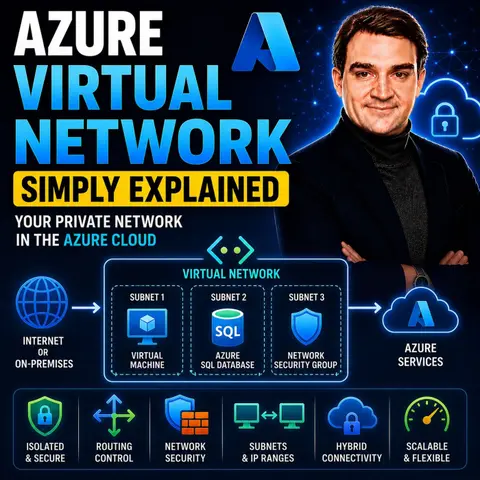
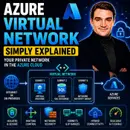
Azure Virtual Network (VNet) is the foundation of networking in Microsoft Azure, allowing organizations to create secure, isolated private networks for their cloud resources. Just like a traditional network in a datacenter, a VNet enables virtual machines, applications, databases, and other Azure services to communicate securely while giving you full control over IP addressing, routing, and network security.
In this episode of Microsoft Knowledge Nuggets, Mirko Peters explains Azure Virtual Network in simple terms and shows why every Azure professional should understand this core networking service. You'll learn how VNets provide the foundation for nearly every Azure deployment and how they enable secure communication between cloud resources, on-premises environments, and users.
The episode covers key concepts including subnets, IP address spaces, network interfaces, route tables, network security groups (NSGs), VNet peering, DNS, and hybrid connectivity. It also explains how Azure Virtual Network integrates with services such as Azure VPN Gateway, ExpressRoute, Azure Firewall, Load Balancer, Private Link, Azure Bastion, and Azure Kubernetes Service to build secure and scalable cloud architectures.
You'll also discover how VNets support hybrid cloud scenarios, multi-region deployments, and secure communication between Azure services. Understanding how to design and structure virtual networks is essential for creating reliable, high-performing, and secure cloud environments.
Whether you're an Azure administrator, network engineer, cloud architect, or IT professional, this episode provides a practical introduction to Azure Virtual Network and modern cloud networking. By the end, you'll understand how VNets form the backbone of Azure infrastructure and how they enable secure, flexible, and scalable connectivity for applications and services in the cloud.
Quick answer: Azure Virtual Network is covered in this M365 FM episode with a practical focus on what it is, how it works, and the decisions that matter for architecture, adoption, security, governance, or day-to-day operations.
Azure Virtual Networks serve as a fundamental component of cloud networking. They create secure and isolated environments for your resources in Azure. With a VNet, you can manage connectivity and control security settings effectively. Understanding the benefits of Azure Virtual Networks is crucial for optimizing your cloud experience. These networks allow you to deploy various workloads while ensuring that your data remains protected and organized.
Key Takeaways
- Azure Virtual Networks (VNets) create secure and isolated environments for your cloud resources.
- Proper planning of address space and subnetting enhances security and resource management.
- Network Security Groups (NSGs) act as firewalls, controlling traffic to protect your resources.
- Azure VNets support multi-region deployments, ensuring secure communication across locations.
- Using Azure's consumption-based pricing model can save costs compared to traditional networking.
- Regularly review NSG rules to adapt to changing security needs and protect your network.
- Integrating Azure VNets with services like VPN Gateway and ExpressRoute enhances connectivity and security.
- VNet Peering allows multiple VNets to communicate securely, facilitating resource sharing without public exposure.
What Is Azure Virtual Network?

Definition
An Azure Virtual Network (VNet) is your private network in the cloud. It serves as the essential component for creating a secure environment within Azure. With a VNet, you can connect your Azure resources, the internet, and even your on-premises networks. This setup allows for secure communication among all these elements. By using Azure VNets, you can isolate your resources, ensuring they remain protected from unauthorized access. This isolation is similar to traditional on-premises networks, where segmentation helps keep resources secure.
Key Components
Understanding the key components of an Azure Virtual Network is crucial for effective management. Here are the main elements that make up a VNet:
- Address Space: Defines the range of IP addresses available for resources in the network.
- Subnets: Divides the address space into smaller segments for specific workloads or security zones.
- Routing: Manages how traffic is directed within the network.
- Security Features: Includes Network Security Groups (NSGs) and Azure Firewall for traffic filtering and protection.
- Integration with Azure Services: Connects with other Azure services for enhanced functionality.
Segmentation within Azure VNets is accomplished through subnetting. This process divides the VNet into smaller segments, each with distinct IP address ranges and security policies. This enhances the isolation of resources, allowing you to create clear boundaries between different workloads. For example, you can host web servers in one subnet and databases in another, minimizing public exposure and improving security.
Azure VNets also support multi-region deployments, enabling global organizations to maintain secure communication across various locations. Microsoft’s global network infrastructure ensures that traffic between Azure resources remains on a private backbone. This setup enhances performance and reliability, making it easier for you to manage your cloud resources effectively.
Benefits of Azure Virtual Network

Azure Virtual Networks offer numerous benefits that enhance your cloud experience. Understanding these advantages can help you design a more secure and efficient environment for your resources.
Security Features
Network Isolation
One of the primary benefits of Azure Virtual Networks is network isolation. By creating a private network, you ensure that your resources remain secure from unauthorized access. This isolation mimics traditional on-premises networks, where segmentation is crucial for security. You can define your own IP address space and create subnets to further enhance this isolation. Each subnet can host different types of resources, allowing you to manage security policies effectively.
Security Groups
Azure provides robust security features through Network Security Groups (NSGs). These act as digital firewalls that control network traffic. NSGs help prevent unauthorized access by regulating inbound and outbound traffic. Implementing best practices with NSGs enhances the security of your Azure resources. Here are some key benefits of using NSGs:
- They allow you to create specific rules for traffic filtering.
- You can apply these rules at both the subnet and network interface levels.
- NSGs enable you to monitor and log traffic, providing insights into potential threats.
Tip: Regularly review and update your NSG rules to adapt to changing security needs.
In addition to NSGs, Azure offers unique security features compared to other cloud providers. The following table highlights some of these features:
| Feature | Description |
|---|---|
| Azure Firewall | A managed firewall with built-in threat intelligence, supporting application and network rules. |
| VNet Encryption | Encrypts data in transit between VMs, protecting against eavesdropping without application changes. |
| Azure DDoS Protection | Provides always-on monitoring and automatic attack mitigation, essential for internet-facing workloads. |
| Azure Bastion | Secures RDP/SSH access to VMs without public IP exposure, eliminating the need for jump boxes. |
| Network Security Groups (NSGs) | Stateful security rules at the subnet and NIC level, allowing for detailed traffic filtering. |
| Traffic Mirroring | Enables network traffic mirroring for deep packet inspection and compliance auditing. |
Scalability
Azure Virtual Networks are designed to scale with your needs. You can easily expand your network as your organization grows. Here are some recommendations for ensuring scalability:
| Recommendation | Benefit |
|---|---|
| Size virtual networks and subnets according to your scaling strategy. Choose fewer, larger virtual networks to accommodate redundancy as a mitigation strategy for failures. | By overprovisioning, you can ensure that the network scales efficiently without experiencing address-space limitations. |
| Use the Standard IP SKU for better reliability support through availability zones. | This SKU helps ensure that communication within a public IP address remains operational during zone failures. |
With Azure's global infrastructure, you can deploy resources across multiple regions while maintaining secure communication. This flexibility allows you to meet the demands of a growing user base without compromising performance.
Cost-Effectiveness
Deploying Azure Virtual Networks can be more cost-effective than traditional networking solutions. The consumption-based pricing model allows you to pay only for the connections you use. This eliminates the need for expensive dedicated circuits and reduces operational complexity.
Note: The economic case for Azure Virtual WAN strengthens as deployment scale increases. The operational savings from unified management, automated routing, and eliminated hardware ownership compound over time, making the consumption-based pricing model increasingly attractive.
Communication in Azure
Internal Communication
Azure Virtual Networks (VNets) facilitate secure internal communication between your resources. You can deploy virtual machines (VMs) and other Azure resources within a VNet, ensuring that they communicate securely. Here are some key features that enhance internal communication:
- Virtual Network Service Endpoints: These extend your private address space to Azure services, securing them within the VNet.
- Virtual Network Peering: This feature connects multiple VNets, allowing resources to communicate across regions without exposing traffic to the public internet.
- Network Security Groups (NSGs): Implement stateful security rules to filter traffic based on various parameters, enhancing security.
- Azure Firewall: A managed firewall that provides centralized traffic control and threat intelligence.
- VNet Encryption: Encrypts data in transit between VMs, protecting against eavesdropping.
These features ensure that your internal communications remain private and secure. Azure employs logical isolation and encapsulation techniques to maintain data privacy. For instance, Azure segments its management and customer planes, ensuring that internal service teams use the same isolation techniques as customers. This approach maintains security across the board.
External Communication
When it comes to external communication, Azure Virtual Networks support various protocols to ensure secure connectivity. Here are some of the protocols you can use:
- Border Gateway Protocol (BGP): This protocol shares routing details with external networks, establishing connectivity.
- IPsec/IKE Tunnels: These provide secure communication between Azure and your internal network.
- Generic Routing Encapsulation (GRE): This protocol encapsulates traffic, ensuring that only intended traffic reaches its destination.
Azure also employs strict access controls to limit network access to VMs. This ensures that only specified connections are allowed, preventing unauthorized traffic from reaching your resources. Additionally, Azure uses traffic verification mechanisms to ensure that the traffic is legitimate and properly routed.
The following table summarizes how Azure ensures data privacy during both internal and external communications:
| Mechanism | Description |
|---|---|
| Logical Isolation | Azure segments its management and customer planes, ensuring that internal service teams use the same isolation techniques as customers, maintaining security. |
| Encapsulation | Traffic is encapsulated using GRE, ensuring that only intended traffic reaches its destination, with verification at each step to prevent unauthorized access. |
| Access Controls | Strict access controls limit network access to VMs, ensuring that only specified connections are allowed, and preventing unauthorized traffic from reaching VMs. |
| SpoofGuard | This feature verifies the source and destination of encapsulated traffic, preventing IP address spoofing and ensuring that only valid communications occur. |
| Network Segmentation | Azure VNet uses unique identifiers to ensure that service teams operate within their own address spaces, preventing overlap and ensuring isolation between different tenants. |
| Traffic Verification | The Azure network fabric verifies encapsulated traffic at both the sending and receiving ends, ensuring that the traffic is legitimate and properly routed. |
With these features, Azure ensures that both internal and external communications remain secure and efficient.
Traffic Control in Azure
Effective traffic control is essential for maintaining security and optimizing performance within Azure Virtual Networks. You can manage how data flows in and out of your resources using two primary tools: Network Security Groups (NSGs) and Route Tables.
Network Security Groups
Network Security Groups play a vital role in controlling traffic within Azure Virtual Networks. They allow you to set specific rules that dictate which traffic can enter or leave your Azure resources. These rules are based on parameters like source, destination, port, and protocol. By defining these rules, you ensure that only authorized traffic is allowed, which is crucial for maintaining security and managing network flow effectively.
You can apply NSGs at both the subnet and network interface levels. This flexibility allows you to tailor your security measures according to your needs. For example, you might want to allow web traffic to a public-facing server while restricting access to sensitive databases. Implementing NSGs helps prevent unauthorized access and ensures that network traffic is appropriately filtered.
Tip: Regularly review and update your NSG rules to adapt to changing security needs. This practice helps you stay ahead of potential threats.
Route Tables
Route Tables are another essential component for managing traffic flow in Azure Virtual Networks. They enable custom routing, allowing you to direct traffic between subnets, network virtual appliances, and gateways. Here are some key functions of Route Tables:
- Traffic Management: You can define routes to control traffic flow between subnets, ensuring secure communication.
- Integration of Network Virtual Appliances: Route Tables allow for the incorporation of NVAs, directing traffic through them for enhanced security.
- Hybrid Cloud Connectivity: They facilitate communication between on-premises networks and Azure, supporting hybrid cloud architectures.
Using Route Tables enhances security and optimizes performance by managing communication between different services. For instance, you can route traffic through a firewall to inspect and filter it before it reaches its destination.
To ensure effective traffic filtering, consider these best practices:
- Use virtual network flow logs for comprehensive traffic visibility.
- Logically segment subnets to enhance security and manageability.
- Avoid broad allow rules to prevent security vulnerabilities.
- Implement network access controls between subnets using NSGs.
- Adopt a Zero Trust approach to validate trust at the time of access.
By leveraging NSGs and Route Tables, you can maintain a secure and efficient Azure environment. These tools empower you to control traffic flow, ensuring that your resources remain protected while optimizing performance.
Integration with Azure Services
Azure Virtual Networks (VNets) seamlessly integrate with various Azure services, enhancing your cloud experience. This integration allows you to create secure and efficient environments for your applications and data.
VPN Gateway
The VPN Gateway enables secure connectivity between your on-premises networks and Azure Virtual Networks. This service is particularly beneficial for small and medium-sized enterprises (SMEs) that face challenges with limited IT resources and budget constraints. Here are some key features of the VPN Gateway:
- Site-to-Site (S2S): This connection links entire corporate networks, allowing secure communication between on-premises and Azure.
- Point-to-Site (P2S): This option allows individual remote workers to securely access Azure resources via a VPN tunnel from their devices.
The VPN Gateway provides a straightforward, cost-effective, and scalable solution for securing access to local and SaaS resources.
| Connection Type | Description |
|---|---|
| Site-to-Site (S2S) | Links entire corporate networks for secure communication between on-premises and Azure. |
| Point-to-Site (P2S) | Allows individual remote workers to securely access Azure resources via a VPN tunnel from their devices. |
ExpressRoute
ExpressRoute offers a dedicated private connection between your on-premises networks and Azure. This service enhances security and performance by bypassing the public internet. Organizations can benefit from high throughput and low latency, making it ideal for demanding workloads. Here are some performance benchmarks for ExpressRoute connections:
| Bandwidth Speed |
|---|
| 50 Mbps |
| 100 Mbps |
| 200 Mbps |
| 500 Mbps |
| 1 Gbps |
| 10 Gbps |
| 100 Gbps |
With ExpressRoute, you gain a reliable and secure connection that supports your hybrid cloud strategy.
VNet Peering
VNet Peering allows multiple virtual networks in Azure to communicate securely and share resources as if they were part of the same network. This capability is essential for businesses aiming to expand globally. You can achieve high-performance, low-latency connections that facilitate seamless resource sharing across different regions.
"We utilize Global VNet Peering to connect Region A to the Region B Spoke. This keeps traffic on Microsoft's private fiber backbone."
With VNet Peering, you can enjoy:
- High-performance connections
- Low-latency communication
- Seamless resource sharing across regions
Integrating Azure VNets with services like Azure Kubernetes Service or Azure App Service enhances your cloud capabilities. For example, Azure App Service allows web applications to connect to VNet resources as if they were within the network. This integration ensures that your applications can securely access necessary resources.
| Azure Service | Integration Method | Key Features |
|---|---|---|
| Azure App Service | VNet Integration through subnet delegation | Allows web applications to connect to VNet resources as if they were within the network. |
| Azure Kubernetes Service | VNet integration varies by network plugin (Azure CNI or kubenet) | Azure CNI assigns VNet IPs to pods; kubenet uses NAT for VNet connectivity. |
By leveraging these integrations, you can create a robust and secure cloud environment tailored to your organization's needs.
In summary, Azure Virtual Networks provide a secure and isolated environment for your cloud resources. You learned about their key components, benefits, and how they facilitate communication and traffic control. Here are some key takeaways:
- Azure VNets offer isolated, segmented, and highly connectable networks.
- Proper CIDR planning and subnet segmentation optimize security.
- Network Security Groups (NSGs) control traffic effectively.
To deepen your understanding, consider exploring these resources:
- A brief introduction to Azure Virtual Networks and basic networking concepts.
- A guide on architecture best practices for Azure VNets.
- An in-depth article on Azure VNets, focusing on NSG traffic filtering and Azure Firewall.
For implementation, follow these steps:
- Learn about Azure Virtual Network concepts and best practices.
- Create a virtual network and deploy VMs to it.
- Follow a training module on designing Azure networking infrastructure.
By taking these steps, you can harness the full potential of Azure for your organization.
FAQ
What is an Azure Virtual Network?
An Azure Virtual Network is your private network in the cloud. It allows you to connect Azure resources securely and manage their communication effectively.
How do I create a well-designed virtual network?
To create a well-designed virtual network, plan your address space, define subnets, and implement security features like Network Security Groups. This ensures efficient resource management and security.
Can I connect my on-premises network to Azure?
Yes, you can connect your on-premises network to Azure using VPN Gateway or ExpressRoute. These options provide secure communication between your local network and Azure resources.
What are Network Security Groups?
Network Security Groups (NSGs) act as firewalls for your Azure resources. They control inbound and outbound traffic based on defined rules, enhancing your network's security.
How does VNet Peering work?
VNet Peering connects multiple Azure Virtual Networks, allowing them to communicate securely. This feature enables resource sharing without exposing traffic to the public internet.
What is the cost of using Azure Virtual Networks?
Azure Virtual Networks operate on a consumption-based pricing model. You pay only for the connections and resources you use, making it a cost-effective solution for cloud networking.
How can I ensure my Azure network is scalable?
To ensure scalability, plan your address space wisely and use the Standard IP SKU. This approach allows you to expand your network as your organization grows.
What is the role of Route Tables in Azure?
Route Tables manage traffic flow within Azure Virtual Networks. They define how data routes between subnets and external networks, optimizing performance and security.
🎧 Listen to this episode
Want a practical explanation of Azure Virtual Network? This episode breaks down the topic in clear language and shows why it matters for Microsoft 365, Azure, Power Platform, security, AI, and modern work.
Listen to this episode if you want to:
- Understand the key concepts behind Azure Virtual Network
- See how it fits into the wider Microsoft technology ecosystem
- Learn where it can create practical value for your organization
You may also enjoy these related M365 FM episodes:
- Azure Network Security Groups - Simply Explained
- Azure Virtual Desktop - Simply Explained
- Azure Virtual WAN - Simply Explained
- Azure Virtual Desktop vs Windows 365 with Dieter Kempeneers [MVP] & Dominiek Verham [MVP]
- Reduce the Multi-Cloud Network Tax Across Azure, AWS, and GCP
Discover more practical Microsoft conversations on M365 FM.
Last reviewed: July 2026.
Who Should Listen
This episode is for Microsoft 365 administrators, architects, IT leaders, and practitioners who need a practical understanding of Azure Virtual Network before planning, implementing, or supporting it.
🚀 Want to be part of m365.fm?
Then stop just listening… and start showing up.
👉 Connect with me on LinkedIn and let’s make something happen:
- 🎙️ Be a podcast guest and share your story
- 🎧 Host your own episode (yes, seriously)
- 💡 Pitch topics the community actually wants to hear
- 🌍 Build your personal brand in the Microsoft 365 space
This isn’t just a podcast — it’s a platform for people who take action.
🔥 Most people wait. The best ones don’t.
👉 Connect with me on LinkedIn and send me a message:
"I want in"
Let’s build something awesome 👊
1
00:00:00,000 --> 00:00:01,460
What is an Azure Virtual Network?
2
00:00:01,460 --> 00:00:04,260
Most people hear that term and think it's just another setting you flip on
3
00:00:04,260 --> 00:00:06,200
when you're deploying a virtual machine,
4
00:00:06,200 --> 00:00:09,060
something you check a box for and then forget about.
5
00:00:09,060 --> 00:00:10,020
But here's the truth,
6
00:00:10,020 --> 00:00:12,420
an Azure Virtual Network isn't just a setting.
7
00:00:12,420 --> 00:00:15,020
It's the foundation of everything you build in Azure.
8
00:00:15,020 --> 00:00:16,120
Every virtual machine,
9
00:00:16,120 --> 00:00:16,860
every database,
10
00:00:16,860 --> 00:00:17,620
every app service,
11
00:00:17,620 --> 00:00:18,900
every function you deploy,
12
00:00:18,900 --> 00:00:20,260
they all sit inside one.
13
00:00:20,260 --> 00:00:22,140
And if you don't understand how they work,
14
00:00:22,140 --> 00:00:23,380
you're flying blind.
15
00:00:23,380 --> 00:00:24,380
By the end of this episode,
16
00:00:24,380 --> 00:00:26,540
you'll understand what a VNet actually is,
17
00:00:26,540 --> 00:00:27,420
how it works,
18
00:00:27,420 --> 00:00:29,980
and why every single resource you deploy depends on it.
19
00:00:29,980 --> 00:00:31,100
We'll cover what a VNet is,
20
00:00:31,100 --> 00:00:32,140
how IP addresses work,
21
00:00:32,140 --> 00:00:33,140
subnet security,
22
00:00:33,140 --> 00:00:33,660
routing,
23
00:00:33,660 --> 00:00:35,180
and how to connect VNet together,
24
00:00:35,180 --> 00:00:37,260
grab your coffee and let's dive in.
25
00:00:37,260 --> 00:00:38,140
What is a VNet?
26
00:00:38,140 --> 00:00:39,540
The private cloud network.
27
00:00:39,540 --> 00:00:41,500
Let's start with the simplest definition.
28
00:00:41,500 --> 00:00:43,100
An Azure Virtual Network,
29
00:00:43,100 --> 00:00:44,420
or VNet for short,
30
00:00:44,420 --> 00:00:46,940
is your own private network inside Azure.
31
00:00:46,940 --> 00:00:48,820
Think of it like a private office building.
32
00:00:48,820 --> 00:00:50,180
Only people you allow can get in,
33
00:00:50,180 --> 00:00:52,020
you control who comes through the door,
34
00:00:52,020 --> 00:00:54,820
who gets to which floor and who's locked out entirely.
35
00:00:54,820 --> 00:00:56,020
Before VNet's existed,
36
00:00:56,020 --> 00:00:57,020
things were different.
37
00:00:57,020 --> 00:00:58,700
You deploy a virtual machine in the cloud,
38
00:00:58,700 --> 00:01:01,420
and it was basically exposed to the internet by default.
39
00:01:01,420 --> 00:01:02,940
No private network around it.
40
00:01:02,940 --> 00:01:05,020
Anyone who knew the IP address could try to connect.
41
00:01:05,020 --> 00:01:07,260
But that was a security nightmare, what changed?
42
00:01:07,260 --> 00:01:08,820
Azure gave you the ability to create
43
00:01:08,820 --> 00:01:10,700
isolated private network spaces.
44
00:01:10,700 --> 00:01:11,860
You define a boundary.
45
00:01:11,860 --> 00:01:13,180
You decide what goes inside it.
46
00:01:13,180 --> 00:01:14,820
Nothing outside that boundary can get in
47
00:01:14,820 --> 00:01:16,580
unless you explicitly allow it.
48
00:01:16,580 --> 00:01:17,700
One thing to know upfront,
49
00:01:17,700 --> 00:01:19,980
your VNet lives in a specific Azure region.
50
00:01:19,980 --> 00:01:20,820
It's not global.
51
00:01:20,820 --> 00:01:22,260
Create a VNet in West Europe,
52
00:01:22,260 --> 00:01:23,540
and that's where it stays.
53
00:01:23,540 --> 00:01:25,780
Resources in a different region can't just hop into it.
54
00:01:25,780 --> 00:01:27,300
They'd need their own VNet,
55
00:01:27,300 --> 00:01:28,740
or you'd need to connect them later.
56
00:01:28,740 --> 00:01:29,780
When you create a VNet,
57
00:01:29,780 --> 00:01:31,820
you define the IP address space yourself.
58
00:01:31,820 --> 00:01:33,060
Azure doesn't pick it for you.
59
00:01:33,060 --> 00:01:35,980
You decide the range of IP addresses your resources will use.
60
00:01:35,980 --> 00:01:37,140
That's a big responsibility,
61
00:01:37,140 --> 00:01:39,500
and we'll talk about how to get it right in the next section.
62
00:01:39,500 --> 00:01:40,660
Here's the key point.
63
00:01:40,660 --> 00:01:42,340
VNet's are the foundation.
64
00:01:42,340 --> 00:01:45,860
Every virtual machine, every database, every app service,
65
00:01:45,860 --> 00:01:48,620
every Azure function you deploy sits inside one.
66
00:01:48,620 --> 00:01:51,620
Without a VNet, your resources have no private network context.
67
00:01:51,620 --> 00:01:53,740
They're just floating in the cloud with no boundaries,
68
00:01:53,740 --> 00:01:55,580
no isolation, no security.
69
00:01:55,580 --> 00:01:56,780
So what does this mean for you?
70
00:01:56,780 --> 00:01:58,180
If you're building anything in Azure,
71
00:01:58,180 --> 00:01:59,940
start with a VNet first,
72
00:01:59,940 --> 00:02:01,660
not after you've deployed your resources.
73
00:02:01,660 --> 00:02:04,260
Before your VNet is the land you're building on,
74
00:02:04,260 --> 00:02:06,460
you wouldn't build a house without buying the land first, right?
75
00:02:06,460 --> 00:02:07,460
Same idea.
76
00:02:07,460 --> 00:02:10,740
IP addressing and CIDR choosing your address space.
77
00:02:10,740 --> 00:02:12,180
So let's dive in.
78
00:02:12,180 --> 00:02:13,180
When you create a VNet,
79
00:02:13,180 --> 00:02:15,500
the first big decision is picking an IP range.
80
00:02:15,500 --> 00:02:17,260
You do that using CIDR notation.
81
00:02:17,260 --> 00:02:20,100
CIDR is short for classless interdomain routing,
82
00:02:20,100 --> 00:02:21,900
but all that really means is you're saying,
83
00:02:21,900 --> 00:02:23,940
"I need this many IP addresses."
84
00:02:23,940 --> 00:02:24,980
Why does this matter?
85
00:02:24,980 --> 00:02:27,180
Because the range you choose determines
86
00:02:27,180 --> 00:02:30,100
how many resources you can fit in your virtual network.
87
00:02:30,100 --> 00:02:30,940
Here's how it works.
88
00:02:30,940 --> 00:02:34,500
CIDR uses a slash and a number like 16 or 24.
89
00:02:34,500 --> 00:02:36,820
That number tells you the size of the address space.
90
00:02:36,820 --> 00:02:40,220
A 16 gives you about 65,000 IP addresses.
91
00:02:40,220 --> 00:02:41,060
That's a lot.
92
00:02:41,060 --> 00:02:43,060
A 24 gives you about 250,
93
00:02:43,060 --> 00:02:46,140
which is perfect for a small team or a single application tier.
94
00:02:46,140 --> 00:02:47,540
So when you're designing your VNet,
95
00:02:47,540 --> 00:02:50,220
you need to think about how many resources you'll have
96
00:02:50,220 --> 00:02:51,460
and how you want to group them.
97
00:02:51,460 --> 00:02:53,620
Now you can't just pick any IP range.
98
00:02:53,620 --> 00:02:56,180
Azure follows the RFC 1918 standard,
99
00:02:56,180 --> 00:02:59,460
which sets aside private IP ranges for internal networks.
100
00:02:59,460 --> 00:03:00,540
You have three options.
101
00:03:00,540 --> 00:03:02,660
The 10.xx-dx range is the largest
102
00:03:02,660 --> 00:03:04,260
given you plenty of room to grow.
103
00:03:04,260 --> 00:03:08,300
The 172.xx-dx range is a bit smaller, but still useful.
104
00:03:08,300 --> 00:03:11,940
And the 192.168x-dx range is the one you probably have
105
00:03:11,940 --> 00:03:13,060
at home on your router.
106
00:03:13,060 --> 00:03:13,820
Here's the thing.
107
00:03:13,820 --> 00:03:15,940
Your VNet's address space cannot overlap
108
00:03:15,940 --> 00:03:17,980
with any other network you plan to connect to.
109
00:03:17,980 --> 00:03:19,100
This is a common mistake.
110
00:03:19,100 --> 00:03:20,940
Many people pick a range that looks familiar,
111
00:03:20,940 --> 00:03:23,860
only to find out later that it conflicts with their corporate network.
112
00:03:23,860 --> 00:03:27,900
So if your company's office network uses 10.0.0 to RFC 1918,
113
00:03:27,900 --> 00:03:29,580
don't use that same range in Azure.
114
00:03:29,580 --> 00:03:31,300
If you try to connect them later,
115
00:03:31,300 --> 00:03:33,740
they'll clash and traffic won't know where to go.
116
00:03:33,740 --> 00:03:35,100
Let me give you a concrete example.
117
00:03:35,100 --> 00:03:37,300
Imagine you're building a hybrid setup
118
00:03:37,300 --> 00:03:40,060
where Azure connects back to your on-premises data center
119
00:03:40,060 --> 00:03:42,620
and your data center uses 10.0, 20.0,
120
00:03:42,620 --> 00:03:44,220
and San Josejo 16.
121
00:03:44,220 --> 00:03:46,060
If you create a VNet with the same range,
122
00:03:46,060 --> 00:03:48,780
you'll have two networks fighting over the same IPs.
123
00:03:48,780 --> 00:03:49,860
Think about it.
124
00:03:49,860 --> 00:03:51,740
Two networks using the same IP range
125
00:03:51,740 --> 00:03:53,140
can't communicate properly.
126
00:03:53,140 --> 00:03:55,180
It's like two houses with the same address.
127
00:03:55,180 --> 00:03:56,300
The mail gets confused.
128
00:03:56,300 --> 00:03:58,580
That's a problem you don't want to solve after the fact,
129
00:03:58,580 --> 00:04:00,580
so plan ahead and pick a unique range.
130
00:04:00,580 --> 00:04:01,740
And here's a planning tip.
131
00:04:01,740 --> 00:04:03,780
Choose a larger range than you think you need.
132
00:04:03,780 --> 00:04:05,700
You might think you'll only need a 24 now,
133
00:04:05,700 --> 00:04:08,900
but as your application grows, you'll wish you had a 16.
134
00:04:08,900 --> 00:04:10,420
You can't easily change it later.
135
00:04:10,420 --> 00:04:13,060
Once your VNet is created and you've deployed resources,
136
00:04:13,060 --> 00:04:14,940
changing the address space is messy.
137
00:04:14,940 --> 00:04:17,220
It's possible, but it's not something you want to do
138
00:04:17,220 --> 00:04:18,260
on a live system.
139
00:04:18,260 --> 00:04:19,620
So give yourself room to grow.
140
00:04:19,620 --> 00:04:20,780
What does this mean for you?
141
00:04:20,780 --> 00:04:23,140
Think of your VNet's address space like buying land.
142
00:04:23,140 --> 00:04:24,580
Get enough for future growth.
143
00:04:24,580 --> 00:04:27,100
If you think you need a small plot by a medium one,
144
00:04:27,100 --> 00:04:28,340
you'll thank yourself later.
145
00:04:28,340 --> 00:04:29,540
That's the key takeaway.
146
00:04:29,540 --> 00:04:32,700
Plan your address space with future growth in mind.
147
00:04:32,700 --> 00:04:33,580
Subnets?
148
00:04:33,580 --> 00:04:34,900
Dividing your network.
149
00:04:34,900 --> 00:04:37,660
So you've got your VNet and you've picked your address space.
150
00:04:37,660 --> 00:04:38,500
Now what?
151
00:04:38,500 --> 00:04:39,940
You don't just dump everything into one big pool.
152
00:04:39,940 --> 00:04:41,020
That's where subnets come in.
153
00:04:41,020 --> 00:04:43,220
Subnets are one of the fundamental building blocks
154
00:04:43,220 --> 00:04:44,260
of your VNet.
155
00:04:44,260 --> 00:04:46,540
They let you organize and secure your resources.
156
00:04:46,540 --> 00:04:49,940
A subnet is a smaller section of your VNet's address space.
157
00:04:49,940 --> 00:04:53,140
If your VNet is the building, subnets are the individual rooms.
158
00:04:53,140 --> 00:04:55,380
You wouldn't put your server room, your reception desk,
159
00:04:55,380 --> 00:04:57,780
and your break room all in the same open space, right?
160
00:04:57,780 --> 00:04:58,540
Same idea here.
161
00:04:58,540 --> 00:05:00,620
It's a simple concept, but it makes a huge difference
162
00:05:00,620 --> 00:05:02,140
in how you manage your network.
163
00:05:02,140 --> 00:05:04,060
Different resources go in different subnets.
164
00:05:04,060 --> 00:05:07,620
Your web servers go in one subnet, your databases in another,
165
00:05:07,620 --> 00:05:09,420
and your application logic in a third.
166
00:05:09,420 --> 00:05:09,940
Why?
167
00:05:09,940 --> 00:05:10,540
Two reasons.
168
00:05:10,540 --> 00:05:11,940
Security and organization.
169
00:05:11,940 --> 00:05:14,340
Let's talk about security first, because that's usually
170
00:05:14,340 --> 00:05:15,220
the most important.
171
00:05:15,220 --> 00:05:16,260
Security first.
172
00:05:16,260 --> 00:05:17,940
If someone breaks into your web server,
173
00:05:17,940 --> 00:05:20,540
you don't want them to have direct access to your database.
174
00:05:20,540 --> 00:05:22,580
Separate subnets create a natural barrier.
175
00:05:22,580 --> 00:05:24,420
The attacker would have to cross that boundary
176
00:05:24,420 --> 00:05:26,380
and you can control exactly what crosses.
177
00:05:26,380 --> 00:05:27,980
You can also use network security groups
178
00:05:27,980 --> 00:05:29,700
to control traffic between subnets.
179
00:05:29,700 --> 00:05:31,260
That's a topic for another video.
180
00:05:31,260 --> 00:05:32,780
But it's worth knowing that subnets
181
00:05:32,780 --> 00:05:34,860
are the foundation for that security.
182
00:05:34,860 --> 00:05:36,020
Organization second.
183
00:05:36,020 --> 00:05:38,780
When everything has its place, managing it is easier.
184
00:05:38,780 --> 00:05:41,580
You know which subnet contains your front end resources
185
00:05:41,580 --> 00:05:43,420
and which one holds your back end data.
186
00:05:43,420 --> 00:05:46,500
You can apply policies and rules to the whole subnet at once
187
00:05:46,500 --> 00:05:48,980
instead of configuring each resource individually.
188
00:05:48,980 --> 00:05:51,060
That saves time and reduces errors.
189
00:05:51,060 --> 00:05:53,340
Now here's a detail that catches people off guard.
190
00:05:53,340 --> 00:05:55,900
Azure reserves five IP addresses in each subnet
191
00:05:55,900 --> 00:05:58,420
for its own internal purposes like routing and DNS.
192
00:05:58,420 --> 00:06:00,700
So if you create a subnet with a 24 range
193
00:06:00,700 --> 00:06:02,500
giving you two and 56 addresses,
194
00:06:02,500 --> 00:06:04,780
you actually only get two and 51 usable ones.
195
00:06:04,780 --> 00:06:05,860
It's a common gotcha.
196
00:06:05,860 --> 00:06:08,140
You plan for two and 56, but you only get two and 51.
197
00:06:08,140 --> 00:06:10,700
So always add a little extra when you size your subnets.
198
00:06:10,700 --> 00:06:13,580
The good news is you can add subnets after creating the vnet.
199
00:06:13,580 --> 00:06:16,500
You're not locked into the ones you set up during creation.
200
00:06:16,500 --> 00:06:18,580
So if you realize you need a separate subnet
201
00:06:18,580 --> 00:06:20,660
for management tools or monitoring systems,
202
00:06:20,660 --> 00:06:22,180
add it later, no problem,
203
00:06:22,180 --> 00:06:24,420
but it's still better to plan them upfront.
204
00:06:24,420 --> 00:06:26,020
Adding subnets later is possible,
205
00:06:26,020 --> 00:06:27,700
but you might need to move resources around
206
00:06:27,700 --> 00:06:29,060
which can be disruptive.
207
00:06:29,060 --> 00:06:30,340
But here's the best practice.
208
00:06:30,340 --> 00:06:32,020
Use separate subnets for different tiers
209
00:06:32,020 --> 00:06:33,340
of your application from the start.
210
00:06:33,340 --> 00:06:34,940
Think about your application architecture.
211
00:06:34,940 --> 00:06:36,940
Typically you have a front end tier
212
00:06:36,940 --> 00:06:39,220
that handles user requests, a back end tier
213
00:06:39,220 --> 00:06:41,820
that processes business logic and a data tier
214
00:06:41,820 --> 00:06:43,020
that stores information.
215
00:06:43,020 --> 00:06:44,540
Each of these should have its own subnet.
216
00:06:44,540 --> 00:06:46,060
Don't wait until you're in production
217
00:06:46,060 --> 00:06:47,740
to realize you need to split things apart.
218
00:06:47,740 --> 00:06:50,260
That's a lot harder when resources are already deployed.
219
00:06:50,260 --> 00:06:51,180
What does this mean for you?
220
00:06:51,180 --> 00:06:54,220
Subnets are how you keep your network organized and secure.
221
00:06:54,220 --> 00:06:55,540
They're the rooms in your building.
222
00:06:55,540 --> 00:06:57,140
Plan them early and give each tier
223
00:06:57,140 --> 00:06:58,540
of your application its own space.
224
00:06:58,540 --> 00:07:01,100
That's how you keep your network clean and secure.
225
00:07:01,100 --> 00:07:03,700
Public first private IPs, who can see what?
226
00:07:03,700 --> 00:07:05,380
Let's talk about IP addresses
227
00:07:05,380 --> 00:07:07,420
because not all IP addresses are the same.
228
00:07:07,420 --> 00:07:09,500
When you deploy a resource inside a VNet
229
00:07:09,500 --> 00:07:11,740
it gets a private IP address by default.
230
00:07:11,740 --> 00:07:14,220
That's the address it uses to talk to other resources
231
00:07:14,220 --> 00:07:15,380
inside the VNet.
232
00:07:15,380 --> 00:07:17,180
Think of it like an internal phone extension.
233
00:07:17,180 --> 00:07:19,100
Only people inside the building can reach it.
234
00:07:19,100 --> 00:07:21,740
Private IPs are only accessible from inside the VNet
235
00:07:21,740 --> 00:07:23,500
or from networks connected to it.
236
00:07:23,500 --> 00:07:25,100
If you're sitting at home on your laptop
237
00:07:25,100 --> 00:07:27,460
you can't reach a private IP in Azure.
238
00:07:27,460 --> 00:07:30,420
It's not on the internet, it's inside your private network.
239
00:07:30,420 --> 00:07:32,820
So how do you make a resource reachable from the internet?
240
00:07:32,820 --> 00:07:34,220
You give it a public IP address.
241
00:07:34,220 --> 00:07:36,340
That's the address visible to the outside world.
242
00:07:36,340 --> 00:07:37,780
Like having a published phone number
243
00:07:37,780 --> 00:07:39,300
instead of an internal extension.
244
00:07:39,300 --> 00:07:40,580
Here's the key thing.
245
00:07:40,580 --> 00:07:41,860
Public IPs are optional.
246
00:07:41,860 --> 00:07:43,020
You assign them explicitly
247
00:07:43,020 --> 00:07:45,940
because Azure never gives your resources a public IP
248
00:07:45,940 --> 00:07:47,100
unless you ask for it.
249
00:07:47,100 --> 00:07:49,020
That's by design, the default should be private
250
00:07:49,020 --> 00:07:50,860
and public should be a deliberate choice.
251
00:07:50,860 --> 00:07:52,980
And this is where a lot of beginners make a mistake there.
252
00:07:52,980 --> 00:07:54,700
They give public IPs to everything.
253
00:07:54,700 --> 00:07:56,980
Their web server, their database, their back-end API,
254
00:07:56,980 --> 00:07:57,700
all get one.
255
00:07:57,700 --> 00:07:58,700
That's a security risk.
256
00:07:58,700 --> 00:08:01,100
Your database doesn't need to be reachable from the internet
257
00:08:01,100 --> 00:08:03,220
and neither does your back-end API.
258
00:08:03,220 --> 00:08:06,140
Only the front-end resources that users actually interact with
259
00:08:06,140 --> 00:08:07,620
should have public IPs.
260
00:08:07,620 --> 00:08:09,420
Now public IPs come in two flavors.
261
00:08:09,420 --> 00:08:10,780
Static and dynamic.
262
00:08:10,780 --> 00:08:12,580
A static public IP stays the same
263
00:08:12,580 --> 00:08:14,580
even if you stop and restart the resource.
264
00:08:14,580 --> 00:08:16,060
A dynamic public IP can change.
265
00:08:16,060 --> 00:08:17,500
If you're running a production application,
266
00:08:17,500 --> 00:08:19,300
you probably want static IPs
267
00:08:19,300 --> 00:08:20,900
so your users can always find you.
268
00:08:20,900 --> 00:08:23,660
If you're testing something, dynamic might be fine.
269
00:08:23,660 --> 00:08:26,060
You can also use something called a public IP prefix
270
00:08:26,060 --> 00:08:28,180
which lets you reserve a block of addresses.
271
00:08:28,180 --> 00:08:31,500
Instead of creating them one at a time, you reserve a range
272
00:08:31,500 --> 00:08:34,100
and then assign individual addresses from that range.
273
00:08:34,100 --> 00:08:37,220
Useful if you know you're going to need multiple public IPs
274
00:08:37,220 --> 00:08:38,140
for a project.
275
00:08:38,140 --> 00:08:39,260
What does this mean for you?
276
00:08:39,260 --> 00:08:40,820
Private IPs are the safety fault.
277
00:08:40,820 --> 00:08:42,300
They're the internal phone extension.
278
00:08:42,300 --> 00:08:44,220
Public IPs are a deliberate choice you make
279
00:08:44,220 --> 00:08:46,540
only when you need something reachable from the outside.
280
00:08:46,540 --> 00:08:49,300
And when you do need them, think about whether you need static
281
00:08:49,300 --> 00:08:51,940
or dynamic and whether a prefix makes sense.
282
00:08:51,940 --> 00:08:54,060
Network security groups controlling traffic.
283
00:08:54,060 --> 00:08:56,300
So you've got your vnet, your subnets,
284
00:08:56,300 --> 00:08:57,620
your IP addresses sorted out.
285
00:08:57,620 --> 00:09:00,700
But how do you actually control what traffic is allowed in and out?
286
00:09:00,700 --> 00:09:02,900
That's where network security groups come in.
287
00:09:02,900 --> 00:09:05,700
And NSG is the gatekeeper that controls what traffic enters
288
00:09:05,700 --> 00:09:06,980
and leaves your resources.
289
00:09:06,980 --> 00:09:09,940
Think of it as a bouncer at the door of a club, checking IDs,
290
00:09:09,940 --> 00:09:12,380
looking at the guest list, and turning away anyone
291
00:09:12,380 --> 00:09:13,420
who shouldn't be there.
292
00:09:13,420 --> 00:09:15,940
Every piece of traffic that tries to reach your resource
293
00:09:15,940 --> 00:09:17,980
has to go through this bouncer first.
294
00:09:17,980 --> 00:09:19,620
NSG's work with rules.
295
00:09:19,620 --> 00:09:23,140
Each rule says either allow or deny based on four things.
296
00:09:23,140 --> 00:09:25,860
The source IP address, the destination IP address,
297
00:09:25,860 --> 00:09:27,420
the port number, and the protocol.
298
00:09:27,420 --> 00:09:30,260
So you can say allow traffic from my office IP address
299
00:09:30,260 --> 00:09:34,980
on port 443 or deny all traffic from the internet on port 22.
300
00:09:34,980 --> 00:09:36,140
That kind of control.
301
00:09:36,140 --> 00:09:37,460
Now here's a powerful feature.
302
00:09:37,460 --> 00:09:42,140
You can attach an NSG to a subnet or directly to a single VM's network interface.
303
00:09:42,140 --> 00:09:45,780
If you attach it to a subnet, that NSG applies to everything inside,
304
00:09:45,780 --> 00:09:48,940
every VM, every database, every resource, it's a blanket policy.
305
00:09:48,940 --> 00:09:51,700
If you attach it to a specific VM's network interface,
306
00:09:51,700 --> 00:09:53,660
it only applies to that one machine.
307
00:09:53,660 --> 00:09:55,020
You can even do both.
308
00:09:55,020 --> 00:10:00,140
A subnet level NSG for broad rules and the NIC level NSG for exceptions.
309
00:10:00,140 --> 00:10:02,780
The default rules that Azure creates are pretty sensible.
310
00:10:02,780 --> 00:10:04,620
They allow all traffic within the vnet,
311
00:10:04,620 --> 00:10:06,380
so your resources can talk to each other.
312
00:10:06,380 --> 00:10:08,340
And they deny all traffic from the internet,
313
00:10:08,340 --> 00:10:10,620
so nothing from outside can reach your resources
314
00:10:10,620 --> 00:10:12,460
unless you explicitly allow it.
315
00:10:12,460 --> 00:10:13,500
That's a good starting point.
316
00:10:13,500 --> 00:10:14,700
Let me give you a common example.
317
00:10:14,700 --> 00:10:16,460
Say you're managing a Linux virtual machine
318
00:10:16,460 --> 00:10:18,220
and you need to SSH into it.
319
00:10:18,220 --> 00:10:21,380
You'd create an NSG rule that allows inbound traffic on port 22,
320
00:10:21,380 --> 00:10:23,660
but you don't want to allow SSH from everywhere.
321
00:10:23,660 --> 00:10:24,860
That's asking for trouble.
322
00:10:24,860 --> 00:10:26,740
So you restrict it to your own IP address,
323
00:10:26,740 --> 00:10:30,060
so only you can SSH in and everyone else gets blocked.
324
00:10:30,060 --> 00:10:33,500
Same idea for RDP on port 3389 for Windows machines.
325
00:10:33,500 --> 00:10:34,660
What does this mean for you?
326
00:10:34,660 --> 00:10:37,340
NSGs are your first line of defense and the best part.
327
00:10:37,340 --> 00:10:38,220
They're free.
328
00:10:38,220 --> 00:10:39,580
There's no extra cost for using them,
329
00:10:39,580 --> 00:10:41,500
so there's no excuse not to set them up.
330
00:10:41,500 --> 00:10:42,940
Every subnet, every resource,
331
00:10:42,940 --> 00:10:44,300
should have an NSG attached.
332
00:10:44,300 --> 00:10:47,260
Start with the NIOL and only open what you need.
333
00:10:47,260 --> 00:10:49,740
Root tables and routing, directing traffic.
334
00:10:49,740 --> 00:10:51,100
Now let's talk about routing,
335
00:10:51,100 --> 00:10:53,420
because once you've decided what traffic is allowed,
336
00:10:53,420 --> 00:10:55,100
you need to decide where it actually goes.
337
00:10:55,100 --> 00:10:58,700
Here's the thing, Azure automatically creates system routes for every subnet.
338
00:10:58,700 --> 00:11:00,060
You don't have to do anything.
339
00:11:00,060 --> 00:11:03,260
Think of it like a default GPS that knows the basic roads.
340
00:11:03,260 --> 00:11:05,900
Traffic within the VNet, traffic to PIRD VNet,
341
00:11:05,900 --> 00:11:07,340
traffic to the internet.
342
00:11:07,340 --> 00:11:08,780
It all just works out of the box,
343
00:11:08,780 --> 00:11:11,900
but sometimes the default GPS doesn't take you where you want to go.
344
00:11:11,900 --> 00:11:14,620
That's when you need user-defined routes or UDRs.
345
00:11:14,620 --> 00:11:16,620
These let you override Azure system routes
346
00:11:16,620 --> 00:11:18,700
and take control of the path traffic follows.
347
00:11:18,700 --> 00:11:19,500
How does it work?
348
00:11:19,500 --> 00:11:20,540
You create a root table.
349
00:11:20,540 --> 00:11:21,900
You add your custom routes.
350
00:11:21,900 --> 00:11:24,140
Then you associate that root table with a subnet.
351
00:11:24,140 --> 00:11:26,940
From that point on, traffic leaving that subnet follows your rules
352
00:11:26,940 --> 00:11:28,060
instead of the defaults.
353
00:11:28,060 --> 00:11:29,580
Let me give you a concrete example.
354
00:11:29,580 --> 00:11:33,260
Say you want all internet traffic from your VNet to go to a firewall first.
355
00:11:33,260 --> 00:11:34,620
Maybe you need to inspect it,
356
00:11:34,620 --> 00:11:36,460
log it, block malicious sites.
357
00:11:36,460 --> 00:11:39,260
The default system route sends internet traffic directly out.
358
00:11:39,260 --> 00:11:40,380
That's not what you want.
359
00:11:40,380 --> 00:11:43,340
So you create a route that says any traffic going to 0.0,
360
00:11:43,340 --> 00:11:44,940
be it routes on 0.0, 0.0,
361
00:11:44,940 --> 00:11:46,540
which means anywhere on the internet
362
00:11:46,540 --> 00:11:48,300
should go to the firewall instead.
363
00:11:48,300 --> 00:11:49,660
That's a user-defined route.
364
00:11:49,660 --> 00:11:52,220
Root tables use something called next hop.
365
00:11:52,220 --> 00:11:54,540
That's the destination where traffic gets sent next.
366
00:11:54,540 --> 00:11:55,420
You have a few options.
367
00:11:55,420 --> 00:11:57,980
You can send it to a virtual appliance like a firewall
368
00:11:57,980 --> 00:12:00,380
you can send it to a virtual network gateway
369
00:12:00,380 --> 00:12:02,620
which is how you connect to on-premises networks.
370
00:12:02,620 --> 00:12:04,460
You can send it directly to the internet
371
00:12:04,460 --> 00:12:05,820
or you can send it to none
372
00:12:05,820 --> 00:12:07,980
which basically drops the traffic.
373
00:12:07,980 --> 00:12:11,260
The key thing to understand is that routing is how you control
374
00:12:11,260 --> 00:12:13,500
the path traffic takes through your network.
375
00:12:13,500 --> 00:12:15,020
System routes are a good default
376
00:12:15,020 --> 00:12:17,180
but they're not always right for your situation.
377
00:12:17,180 --> 00:12:19,100
If you need traffic to go through an inspection point
378
00:12:19,100 --> 00:12:20,540
or to a specific gateway
379
00:12:20,540 --> 00:12:21,980
or to be blocked entirely,
380
00:12:21,980 --> 00:12:23,340
you need user-defined routes.
381
00:12:23,340 --> 00:12:24,700
What does this mean for you?
382
00:12:24,700 --> 00:12:26,780
Rooting is how you tell traffic where to go.
383
00:12:26,780 --> 00:12:28,940
And you have the power to override Azure's defaults
384
00:12:28,940 --> 00:12:30,140
whenever you need to.
385
00:12:30,140 --> 00:12:32,860
Start with the system routes, understand what they do
386
00:12:32,860 --> 00:12:36,300
and then add custom routes when your architecture demands it.
387
00:12:36,300 --> 00:12:38,300
VNet Peering, connecting networks.
388
00:12:38,300 --> 00:12:40,460
So far we've been talking about a single VNet.
389
00:12:40,460 --> 00:12:42,140
One building, one private network.
390
00:12:42,140 --> 00:12:43,900
But what happens when you have multiple VNets?
391
00:12:43,900 --> 00:12:45,740
Maybe you've got one for your production environment
392
00:12:45,740 --> 00:12:46,860
and another for testing.
393
00:12:46,860 --> 00:12:48,620
Or maybe you're running applications
394
00:12:48,620 --> 00:12:50,140
in different Azure regions.
395
00:12:50,140 --> 00:12:52,300
By default these VNets are completely isolated.
396
00:12:52,300 --> 00:12:53,420
They can't talk to each other.
397
00:12:53,420 --> 00:12:55,580
They're like separate buildings with no roads between them.
398
00:12:55,580 --> 00:12:57,100
That's where VNet Peering comes in.
399
00:12:57,100 --> 00:12:59,260
It lets you connect two VNets privately.
400
00:12:59,260 --> 00:13:00,380
And I mean privately,
401
00:13:00,380 --> 00:13:03,740
traffic between Peered VNets stays on the Microsoft backbone network.
402
00:13:03,740 --> 00:13:05,260
It never touches the public internet.
403
00:13:05,260 --> 00:13:07,260
That means low latency, high bandwidth,
404
00:13:07,260 --> 00:13:09,020
and no exposure to outside threats.
405
00:13:09,020 --> 00:13:10,780
Here's something that surprises people.
406
00:13:10,780 --> 00:13:12,780
Peering works across regions too.
407
00:13:12,780 --> 00:13:14,140
That's called global peering.
408
00:13:14,140 --> 00:13:15,580
You can have a VNet in West Europe
409
00:13:15,580 --> 00:13:17,500
peered with a VNet in Southeast Asia
410
00:13:17,500 --> 00:13:20,460
and traffic between them stays on Microsoft's private network.
411
00:13:20,460 --> 00:13:22,060
No VPN gateways, no public IPs,
412
00:13:22,060 --> 00:13:23,500
just a direct private connection.
413
00:13:23,500 --> 00:13:25,740
But there's a rule you absolutely cannot break.
414
00:13:25,740 --> 00:13:28,540
Peered VNets must have non-overlapping address spaces.
415
00:13:28,540 --> 00:13:32,940
If both VNets try to use the 10.0.0 on zero, 16 range,
416
00:13:32,940 --> 00:13:34,140
they can't be peered.
417
00:13:34,140 --> 00:13:35,660
The IP addresses would clash
418
00:13:35,660 --> 00:13:38,780
and Azure wouldn't know which network a packet belongs to.
419
00:13:38,780 --> 00:13:40,540
So remember that earlier planning tip
420
00:13:40,540 --> 00:13:42,620
about choosing your address space carefully.
421
00:13:42,620 --> 00:13:43,580
This is why.
422
00:13:43,580 --> 00:13:45,740
If you think you might peer VNet later,
423
00:13:45,740 --> 00:13:48,380
make sure their ranges don't overlap from the start.
424
00:13:48,380 --> 00:13:50,220
Now here's a detail that trips people up.
425
00:13:50,220 --> 00:13:51,260
Peering is non-transitive.
426
00:13:51,260 --> 00:13:51,980
What does that mean?
427
00:13:51,980 --> 00:13:54,140
Let's say VNet A is peered with VNet B
428
00:13:54,140 --> 00:13:56,220
and VNet B is peered with VNet C.
429
00:13:56,220 --> 00:13:59,020
VNet A does not automatically reach VNet C through B.
430
00:13:59,020 --> 00:14:00,220
They're not connected.
431
00:14:00,220 --> 00:14:03,100
Each peering is a direct link between exactly two VNets.
432
00:14:03,100 --> 00:14:04,380
If you want A to talk to C,
433
00:14:04,380 --> 00:14:06,380
you need a separate peering between A and C.
434
00:14:06,380 --> 00:14:07,820
So how do you handle this at scale?
435
00:14:07,820 --> 00:14:09,420
You use a hub and spoke architecture.
436
00:14:09,420 --> 00:14:10,700
One central VNet, the hub,
437
00:14:10,700 --> 00:14:11,900
is peered with many other VNets.
438
00:14:11,900 --> 00:14:12,860
The spokes.
439
00:14:12,860 --> 00:14:14,460
The hub might contain shared services
440
00:14:14,460 --> 00:14:17,260
like a firewall, a VPN gateway or monitoring tools.
441
00:14:17,260 --> 00:14:19,500
The spokes contain your individual workloads.
442
00:14:19,500 --> 00:14:21,100
Each spoke peers directly with the hub
443
00:14:21,100 --> 00:14:22,940
but spokes don't peer with each other.
444
00:14:22,940 --> 00:14:24,460
If a spoke needs to reach another spoke,
445
00:14:24,460 --> 00:14:25,900
traffic goes through the hub.
446
00:14:25,900 --> 00:14:27,180
That keeps things organized
447
00:14:27,180 --> 00:14:30,060
and gives you a central place to apply security policies.
448
00:14:30,060 --> 00:14:31,260
What does this mean for you?
449
00:14:31,260 --> 00:14:32,700
Peering is how you build networks
450
00:14:32,700 --> 00:14:34,620
that span multiple VNets and regions.
451
00:14:34,620 --> 00:14:36,140
It's the bridge between your buildings,
452
00:14:36,140 --> 00:14:38,460
plan your address spaces so they don't overlap.
453
00:14:38,460 --> 00:14:40,300
Remember that peering isn't transitive
454
00:14:40,300 --> 00:14:41,900
and consider a hub and spoke design
455
00:14:41,900 --> 00:14:43,740
when you start growing beyond a single VNet.
456
00:14:43,740 --> 00:14:45,500
How it all connects?
457
00:14:45,500 --> 00:14:46,540
The big picture.
458
00:14:46,540 --> 00:14:49,260
So let's step back and see how these pieces actually fit together.
459
00:14:49,260 --> 00:14:50,380
That's where the real power is.
460
00:14:50,380 --> 00:14:51,660
You start with a VNet.
461
00:14:51,660 --> 00:14:53,260
That's your private space in Azure.
462
00:14:53,260 --> 00:14:54,300
Think of it as your land.
463
00:14:54,300 --> 00:14:56,140
Inside that land, you create subnets.
464
00:14:56,140 --> 00:14:57,340
Those are your rooms.
465
00:14:57,340 --> 00:14:59,020
One for web servers, one for databases,
466
00:14:59,020 --> 00:15:00,540
one for management tools.
467
00:15:00,540 --> 00:15:02,780
Each subnet gets its own block of addresses carved
468
00:15:02,780 --> 00:15:04,540
from the VNet's address space.
469
00:15:04,540 --> 00:15:06,700
Then you add security, network security groups
470
00:15:06,700 --> 00:15:08,140
attached to your subnets.
471
00:15:08,140 --> 00:15:10,700
They control what traffic is allowed in and out.
472
00:15:10,700 --> 00:15:12,860
Your web subnet allows traffic from the internet
473
00:15:12,860 --> 00:15:14,140
on port 443.
474
00:15:14,140 --> 00:15:15,980
Your database subnet only allows traffic
475
00:15:15,980 --> 00:15:18,380
from the web subnet on port 1933.
476
00:15:18,380 --> 00:15:20,860
The bouncer at each door knows exactly who is allowed.
477
00:15:20,860 --> 00:15:22,060
Next, you set up routing.
478
00:15:22,060 --> 00:15:24,060
Maybe you want all outbound internet traffic
479
00:15:24,060 --> 00:15:26,140
to go through a firewall for inspection.
480
00:15:26,140 --> 00:15:28,300
You create a root table, add a custom root
481
00:15:28,300 --> 00:15:29,740
and link it to your subnets.
482
00:15:29,740 --> 00:15:31,660
Now traffic follows the path you designed
483
00:15:31,660 --> 00:15:33,180
instead of Azure's default.
484
00:15:33,180 --> 00:15:35,340
And finally, you connect everything together.
485
00:15:35,340 --> 00:15:37,340
You peer your VNet with other VNets.
486
00:15:37,340 --> 00:15:40,140
Maybe a hub VNet that holds your firewall and shared services.
487
00:15:40,140 --> 00:15:42,780
Now, your application spans multiple networks
488
00:15:42,780 --> 00:15:45,740
but it all works as one connected system.
489
00:15:45,740 --> 00:15:47,020
Here's the aha moment.
490
00:15:47,020 --> 00:15:48,540
None of these pieces work in isolation.
491
00:15:48,540 --> 00:15:50,460
A VNet without subnets is just empty space.
492
00:15:50,460 --> 00:15:52,380
Subnets without NSGs are wide open.
493
00:15:52,380 --> 00:15:55,660
Roting without a clear design sends traffic to the wrong place.
494
00:15:55,660 --> 00:15:57,900
Peering without planning creates address conflicts.
495
00:15:57,900 --> 00:15:58,860
They are a system.
496
00:15:58,860 --> 00:16:00,300
Each piece depends on the others.
497
00:16:00,300 --> 00:16:01,900
Let me give you a concrete example.
498
00:16:01,900 --> 00:16:03,260
Imagine a web application.
499
00:16:03,260 --> 00:16:05,820
Your web server sit in a public subnet with an NSG
500
00:16:05,820 --> 00:16:07,980
that allows HTTPS traffic from the internet.
501
00:16:07,980 --> 00:16:10,380
Your application server sit in a private subnet
502
00:16:10,380 --> 00:16:12,700
that only accepts traffic from the web subnet.
503
00:16:12,700 --> 00:16:14,780
Your database sits in another private subnet
504
00:16:14,780 --> 00:16:17,340
that only accepts traffic from the app subnet.
505
00:16:17,340 --> 00:16:19,340
A root table forces all outbound traffic
506
00:16:19,340 --> 00:16:22,220
through a firewall in the hub VNet for logging and inspection.
507
00:16:22,220 --> 00:16:24,700
And the whole thing is peered with your corporate network
508
00:16:24,700 --> 00:16:26,380
so your internal team can manage it.
509
00:16:26,380 --> 00:16:28,540
That's the real value, not any single feature.
510
00:16:28,540 --> 00:16:30,060
It's how they all work together.
511
00:16:30,060 --> 00:16:32,700
20 years ago, you would buy separate servers,
512
00:16:32,700 --> 00:16:36,300
configure physical routers, and manage firewalls per device.
513
00:16:36,300 --> 00:16:38,220
Everything was manual, slow and expensive
514
00:16:38,220 --> 00:16:40,380
as your gives you all of this as a service.
515
00:16:40,380 --> 00:16:42,780
You define it with a few clicks or a script,
516
00:16:42,780 --> 00:16:43,980
and it just works.
517
00:16:43,980 --> 00:16:45,180
What does this mean for you?
518
00:16:45,180 --> 00:16:47,340
Once you see how these pieces fit together
519
00:16:47,340 --> 00:16:49,340
as your networking becomes predictable,
520
00:16:49,340 --> 00:16:51,340
you are not guessing, you are designing.
521
00:16:51,340 --> 00:16:53,740
And when something breaks, you know exactly where to look
522
00:16:53,740 --> 00:16:55,500
because you understand the system.
523
00:16:55,500 --> 00:16:57,980
So here is what I want you to take away from this episode.
524
00:16:57,980 --> 00:17:00,460
First, the most important step you can take.
525
00:17:00,460 --> 00:17:02,620
Create a VNet with a well-planned address space
526
00:17:02,620 --> 00:17:03,820
before you deploy anything.
527
00:17:03,820 --> 00:17:06,220
That single decision affects everything downstream.
528
00:17:06,220 --> 00:17:09,340
Second, use subnets to separate your application tiers.
529
00:17:09,340 --> 00:17:11,260
Web servers, app servers, databases,
530
00:17:11,260 --> 00:17:13,980
give each one its own room. And third, start with NSGs.
531
00:17:13,980 --> 00:17:15,660
They are free. They are powerful.
532
00:17:15,660 --> 00:17:18,380
And they dramatically improve your security from day one.
533
00:17:18,380 --> 00:17:21,260
Your VNet is the foundation of everything you build in Azure.
534
00:17:21,260 --> 00:17:23,500
Get it right, and everything else gets easier.
535
00:17:23,500 --> 00:17:25,340
Get it wrong, and you will spend your whole time
536
00:17:25,340 --> 00:17:26,380
fighting your network.
537
00:17:26,380 --> 00:17:28,460
Subscribe on your favorite podcast platform
538
00:17:28,460 --> 00:17:30,860
and share this with someone who is starting their Azure journey.
539
00:17:30,860 --> 00:17:32,460
Drop a comment if something clicked.
540
00:17:32,460 --> 00:17:34,460
I will see you in the next episode.

Founder of m365.fm, m365.show and m365con.net
Mirko Peters is a Microsoft 365 expert, content creator, and founder of m365.fm, a platform dedicated to sharing practical insights on modern workplace technologies. His work focuses on Microsoft 365 governance, security, collaboration, and real-world implementation strategies.
Through his podcast and written content, Mirko provides hands-on guidance for IT professionals, architects, and business leaders navigating the complexities of Microsoft 365. He is known for translating complex topics into clear, actionable advice, often highlighting common mistakes and overlooked risks in real-world environments.
With a strong emphasis on community contribution and knowledge sharing, Mirko is actively building a platform that connects experts, shares experiences, and helps organizations get the most out of their Microsoft 365 investments.