

 Apple Podcasts
 Spotify
 Youtube Music
 Spreaker
 Podchaser
 Amazon Music
 Power Apps - Simply Explained
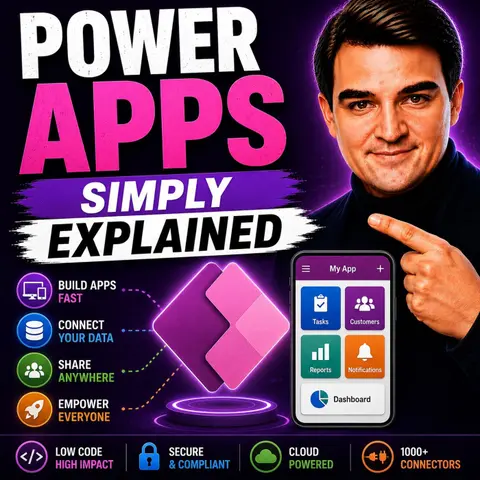
Power Apps is Microsoft's low-code application platform that enables organizations to build custom business applications quickly without the complexity of traditional software development. In this episode of Microsoft Knowledge Nuggets, Mirko Peters explains Power Apps in simple terms, showing how businesses can transform manual, paper-based, or spreadsheet-driven processes into modern, secure, and scalable applications.
You'll learn how Power Apps fits into the Microsoft Power Platform alongside Power Automate, Power BI, Dataverse, and Power Pages, and why it's become one of the fastest ways to deliver business solutions. The episode explains the different types of Power Apps, including Canvas Apps and Model-Driven Apps, when to use each approach, and how they integrate with Microsoft 365 services such as SharePoint, Teams, Excel, Outlook, Dynamics 365, and Azure.
The episode also explores practical business scenarios such as employee onboarding, asset management, inspections, help desk solutions, inventory tracking, approval processes, and field service applications. You'll discover how Power Apps empowers both citizen developers and professional developers to collaborate while maintaining enterprise-grade governance, security, scalability, and compliance. It also highlights how Microsoft Copilot and AI-powered features are accelerating app development by generating forms, logic, and user experiences from natural language prompts.
Whether you're an IT administrator, business analyst, developer, or Power Platform enthusiast, this episode provides a clear introduction to Power Apps and explains how low-code development enables organizations to build modern business applications faster, reduce development costs, and drive digital transformation across Microsoft 365 and the wider Microsoft ecosystem.
Quick answer: Power Apps is covered in this M365 FM episode with a practical focus on what it is, how it works, and the decisions that matter for architecture, adoption, security, governance, or day-to-day operations.
Are you looking to streamline your business processes? Power Apps by Microsoft might be just what you need! This low-code platform allows you to create custom business applications without needing extensive coding skills. With Power Apps, you can modernize your workflows and empower yourself and your team as citizen developers. Recent reports show that organizations using Power Apps have improved operational efficiency and reduced turnaround times. By automating manual tasks, such as expense reporting, you can simplify operations and enhance data management. It’s time to explore how Power Apps can transform your business!
Key Takeaways
- Power Apps is a low-code platform that allows anyone to create custom business applications without extensive coding skills.
- The platform integrates seamlessly with other Microsoft services, enhancing collaboration and data management across your organization.
- Power Apps supports various application types, including inventory management and employee onboarding, making it versatile for different business needs.
- Using Power Apps can significantly reduce development time, allowing you to create applications in days instead of months.
- Automation features in Power Apps help streamline workflows, reduce human errors, and improve overall efficiency.
- Microsoft Copilot assists in app creation by generating components based on natural language descriptions, making development easier for non-technical users.
- Power Apps enhances collaboration by empowering business users to participate in app development, reducing reliance on IT teams.
- Organizations can save time and costs by automating repetitive tasks and improving operational efficiency with Power Apps.
Power Apps Overview
Key Features of Microsoft Power Apps
Power Apps serves as a powerful tool for creating custom business applications. It allows you to build apps that fit your specific needs without requiring extensive coding knowledge. This flexibility makes it a go-to solution for many organizations looking to enhance their operational efficiency.
As part of the Microsoft Power Platform, Power Apps works seamlessly with other Microsoft services, such as Power Automate and Power BI. This integration allows you to create comprehensive solutions that streamline processes across your organization.
Here are some key features that set Microsoft Power Apps apart from other low-code platforms:
| Feature | Description |
|---|---|
| Integration Capabilities | Integrates with a vast ecosystem of 1000+ connectors, enabling seamless connectivity across Microsoft and third-party services. |
| User-Friendly Interface | Power Apps simplifies app development through an intuitive visual interface, making it accessible for business users. |
| Advanced Functionalities | Enables automation of repetitive processes and provides a WYSIWYG development experience for early user feedback. |
With these features, you can easily connect your apps to various data sources, automate workflows, and create user-friendly interfaces that enhance user experience.
Moreover, Power Apps integrates closely with other components of the Microsoft Power Platform. For instance, it connects directly to Power Automate, allowing you to trigger workflows from app actions. Additionally, Microsoft Dataverse provides a secure and scalable data platform for your applications, supporting relational data and enterprise-level governance.
| Integration Component | Description |
|---|---|
| Power Automate | Power Apps connects directly to Power Automate, allowing users to easily trigger workflows from app actions. |
| Microsoft Dataverse | Provides a secure and scalable data platform for Power Apps, supporting relational data and enterprise-level governance. |
This integration not only enhances the functionality of your applications but also ensures that you can manage data effectively across different platforms.
In terms of application types, Power Apps supports a wide range of business needs. Here are some common applications developed using Power Apps:
| Application Type | Description | Real-world Example | Benefits |
|---|---|---|---|
| Instant quote generation | Customized applications for generating accurate quotes with automated calculations. | Regal Beloit | Efficiency, Accuracy, Integration with CRM systems, Time-savings |
| Inventory management app | Streamlined tracking and management of inventory with real-time updates. | Electrolock | Enhanced visibility, Automation, Compliance, Scalability |
| Interview process application | Simplified scheduling and tracking of candidates during the hiring process. | Microsoft | Efficient hiring, Enhanced collaboration, Data-driven decisions |
| Patient management app | Centralized management of patient data and appointments. | Leonard Cheshire | Secure communication, Patient engagement, Compliance |
| Employee onboarding app | Streamlined onboarding processes for new hires. | Sonae | Enhanced employee experience, Compliance, Analytics |
| Service request app | Efficient management of service requests and issue resolution. | Autoglass | Improved customer satisfaction, Real-time updates, Cost savings |
| Crisis management app | Coordinated response efforts during emergencies. | N/A | Swift response, Public safety, Resource mobilization |
These examples illustrate how versatile Power Apps can be in addressing various business challenges. Whether you need to manage inventory, streamline hiring, or enhance customer service, Power Apps provides the tools to create effective solutions.
How Power Apps Work
Development Models
Power Apps offers three main development models, each catering to different user skill levels and application needs. Understanding these models helps you choose the right approach for your projects. Here’s a quick overview:
| Development Model | User Skill Level | Customization Level | Complexity Level |
|---|---|---|---|
| Canvas Apps | Beginner to Intermediate | High | Low |
| Model-Driven Apps | Intermediate to Advanced | Low | High |
| Portals | Intermediate | Medium | Medium |
Canvas Apps give you the freedom to design your app from scratch. You can drag and drop elements, making it perfect for those who want a high level of customization without diving deep into coding. If you're just starting out, this model is user-friendly and allows for creativity.
Model-Driven Apps, on the other hand, focus on your data structure. They automatically generate forms and navigation based on the data you define. This model is ideal for complex applications where data relationships are crucial. If you have a solid understanding of your data, this approach can save you time and effort.
Portals allow external users to interact with your data. They are great for scenarios where you need to provide access to customers or partners. This model strikes a balance between customization and complexity.
User Interface Design
Creating an intuitive user interface is key to ensuring your app is user-friendly. Here are some best practices to keep in mind:
- Use Display Mode to disable buttons after submission. This prevents users from submitting multiple times.
- Implement loading spinners to indicate processing. This enhances user confidence during data operations.
- Design notifications to provide clear feedback on user actions, such as successful submissions or errors.
- Maintain consistency through reusable components. This ensures uniformity across your app.
With the introduction of Microsoft Copilot, the app creation process has become even more accessible. Copilot helps you by generating app structures, which reduces the blank-page problem. You can describe what you need in natural language, and Copilot translates that into app components. This feature makes it easier for less technical users to create and edit apps, allowing you to focus on your business needs rather than getting bogged down in technical details.
By following these guidelines and leveraging the capabilities of Microsoft Copilot, you can create effective and engaging applications that meet your organization’s needs.
Benefits of Microsoft Power Apps
Increased Collaboration
Power Apps significantly enhances collaboration within your organization. Unlike traditional development platforms, Power Apps allows non-developers to participate in the app development process. This shift reduces your reliance on IT teams and fosters a more inclusive environment. Here’s how Power Apps promotes collaboration:
- Empowerment of Business Users: You can create applications that meet your specific needs without waiting for IT support. This empowerment leads to quicker solutions.
- Streamlined Workflows: By automating repetitive tasks, Power Apps encourages teamwork. You and your colleagues can focus on more strategic initiatives rather than getting bogged down in manual processes.
- Integration with Existing Data Sources: Power Apps connects seamlessly with your current systems, making it easier for teams to collaborate on projects. This integration helps you find better solutions through shared insights.
Collaboration at every step fosters a sense of ownership among team members. When everyone contributes, you build stronger relationships and improve overall productivity.
Rapid Application Development
One of the standout benefits of Power Apps is its ability to facilitate rapid application development. You can create and deploy applications much faster than with conventional coding methods. Here’s what makes it so efficient:
- Visual Editor and Pre-Made Components: Power Apps provides a user-friendly visual editor that allows you to drag and drop elements. This feature speeds up the development process, enabling you to prototype and launch applications quickly.
- Reduced Development Time: With Power Apps, you can save significant time. Traditional coding often involves extensive tasks like database design, which can take weeks or even months. In contrast, Power Apps allows you to develop applications in a fraction of that time.
- Cost Savings: Organizations using Power Apps can save up to 250 hours per year per user. This efficiency comes from automated processes and streamlined workflows. Additionally, there’s a reported 50% reduction in app development time, allowing your team to focus on higher-value initiatives.
Here’s a quick look at how Power Apps improves productivity across various use cases:
| Use Case | Evidence of Improved Productivity |
|---|---|
| Field Service Management | Enhanced team efficiency and customer satisfaction through faster issue resolution. |
| Sales Pipeline Management | Improved efficiency and increased win rates through centralized data and automated reminders. |
| Workflow Automation | Reduced human error and allowed focus on strategic tasks by automating repetitive workflows. |
| Complex Workflow Simplification | Time savings and error reduction by automating tasks and centralizing data for faster decisions. |
By addressing specific business challenges, Power Apps helps you overcome lengthy approval processes, high-code complexities, and inefficient manual tasks. You can adapt quickly to changing business needs, ensuring your organization remains competitive.
Real-World Applications of Power Apps
Power Apps has made a significant impact across various industries, helping organizations streamline their operations and enhance productivity. Here are some key sectors where you can see Power Apps in action:
-
Healthcare: Hospitals and clinics use Power Apps to improve patient management and communication. Custom applications help healthcare providers track patient data, schedule appointments, and manage records efficiently. This leads to better patient care and faster response times.
-
Manufacturing: Companies in this sector utilize Power Apps for inventory management and equipment tracking. By automating these processes, they reduce errors and improve overall efficiency on the production floor.
-
Retail: Retailers leverage Power Apps to manage customer interactions and streamline sales processes. Custom apps can help track inventory levels, manage orders, and enhance customer service.
-
Education: Schools and universities use Power Apps to manage student information and streamline administrative tasks. This allows educators to focus more on teaching and less on paperwork.
To give you a clearer picture, let’s look at some successful implementations of Power Apps:
| Industry | Case Study Example | Benefits Achieved |
|---|---|---|
| Healthcare | A hospital developed a patient management app. | Improved communication between staff and patients, leading to faster care delivery. |
| Manufacturing | A factory created an inventory tracking app. | Reduced stock discrepancies and improved order fulfillment times. |
| Retail | A retail chain implemented a sales tracking app. | Enhanced customer service and increased sales through better data insights. |
| Education | A university built an app for managing student records. | Streamlined administrative processes, allowing staff to focus on student engagement. |
Small and medium-sized businesses also find great value in Power Apps. They use it to create custom applications that fit their unique needs without the burden of extensive coding. Here’s how they benefit:
| Functionality | Benefit |
|---|---|
| Low-code development | Enables businesses to create custom applications without extensive coding knowledge, reducing costs. |
| Automation | Automates repetitive tasks, reduces errors, and improves collaboration and workflows. |
| Mobile accessibility | Allows employees to access applications from anywhere, increasing efficiency and productivity. |
| Scalability | Businesses can start small and expand applications as needs evolve. |
| Security | Role-based access control ensures sensitive data is accessible only to authorized personnel. |
In the healthcare industry, Power Apps has been a game-changer. It enhances communication between patients and providers, centralizes patient data, and facilitates custom app development for scheduling and record management. This leads to improved productivity and better patient care.
Implementing Power Apps does come with challenges, but organizations can overcome them with a structured strategy. Key steps include assessing current applications, mapping business objectives, and continuously monitoring performance. By following these steps, you can ensure a smooth implementation process.
Power Apps continues to evolve, and its integration with other Microsoft services enhances its functionality. This makes it a powerful tool for automating workflows and managing data effectively across departments.
Power Apps can truly transform how you develop business applications. This low-code platform empowers you to create tailored solutions that meet your unique needs. By automating processes, enhancing collaboration, and improving data visibility, you can streamline your operations effectively.
Consider these key factors when exploring Power Apps for your organization:
- Rapid development allows you to create applications in days, not months.
- Automation reduces human errors and boosts efficiency.
- Integration with various data sources simplifies access and management.
Dive into Power Apps today and discover how it can elevate your business processes!
FAQ
What is Power Apps?
Power Apps is a low-code platform by Microsoft that lets you create custom business applications without extensive coding skills. It helps streamline processes and empowers users to build apps tailored to their needs.
Who can use Power Apps?
Anyone can use Power Apps! It's designed for both technical and non-technical users, often referred to as citizen developers. You can create apps without needing a background in programming.
What types of apps can I create?
You can create various apps, including Canvas Apps for custom designs and Model-Driven Apps focused on data. Use Power Apps for inventory management, expense tracking, customer service, and more.
How does Power Apps integrate with other Microsoft services?
Power Apps integrates seamlessly with Microsoft services like SharePoint, Teams, and Outlook. It also connects to over 300 external systems, enhancing collaboration and data management across platforms.
Is there a cost associated with Power Apps?
Yes, Power Apps has different pricing plans based on your needs. You can choose from per-app or per-user plans, allowing flexibility depending on how many apps you want to create and use.
Can I use Power Apps on mobile devices?
Absolutely! Power Apps is mobile-friendly, allowing you to access your applications on smartphones and tablets. This feature ensures you can manage tasks and workflows on the go.
What is Microsoft Copilot in Power Apps?
Microsoft Copilot is an AI-driven feature that assists you in app creation. You can describe your app in natural language, and Copilot generates the necessary components, making development easier and faster.
How can I get started with Power Apps?
To get started, sign up for a Power Apps account through the Microsoft website. Explore tutorials and templates to familiarize yourself with the platform and begin building your first app!
🎧 Listen to this episode
Want a practical explanation of Power Apps? This episode breaks down the topic in clear language and shows why it matters for Microsoft 365, Azure, Power Platform, security, AI, and modern work.
Listen to this episode if you want to:
- Understand the key concepts behind Power Apps
- See how it fits into the wider Microsoft technology ecosystem
- Learn where it can create practical value for your organization
You may also enjoy these related M365 FM episodes:
- Microsoft Defender for Cloud Apps - Simply Explained
- Azure Container Apps - Simply Explained
- Azure Logic Apps - Simply Explained
- Canvas Apps vs Model-Driven Apps - Simply Explained
- Power Apps Code Apps - Simply Explained
Discover more practical Microsoft conversations on M365 FM.
Last reviewed: July 2026.
Who Should Listen
This episode is for Microsoft 365 administrators, architects, IT leaders, and practitioners who need a practical understanding of Power Apps before planning, implementing, or supporting it.
🎧 You Should Also Listen To
- Power Platform — See how Power Apps fits into the wider low-code platform.
- Power Automate — Connect apps with workflow automation and approvals.
- Dataverse Security — Understand data and security decisions behind Power Apps.
🚀 Want to be part of m365.fm?
Then stop just listening… and start showing up.
👉 Connect with me on LinkedIn and let’s make something happen:
- 🎙️ Be a podcast guest and share your story
- 🎧 Host your own episode (yes, seriously)
- 💡 Pitch topics the community actually wants to hear
- 🌍 Build your personal brand in the Microsoft 365 space
This isn’t just a podcast — it’s a platform for people who take action.
🔥 Most people wait. The best ones don’t.
👉 Connect with me on LinkedIn and send me a message:
"I want in"
Let’s build something awesome 👊
1
00:00:00,000 --> 00:00:05,760
You've got a problem at work, maybe it's tracking equipment, managing requests, or just replacing that messy spreadsheet everyone hates.
2
00:00:05,760 --> 00:00:10,320
The obvious fix is a simple app, but hiring a developer takes months, so you sit on it.
3
00:00:10,320 --> 00:00:11,640
That's where Power Apps comes in.
4
00:00:11,640 --> 00:00:14,880
It's Microsoft's tool for building apps without writing code from scratch.
5
00:00:14,880 --> 00:00:18,320
By the end of this episode, you'll understand what Power Apps actually is,
6
00:00:18,320 --> 00:00:22,280
the two main types of apps, how AI is changing everything in 2026,
7
00:00:22,280 --> 00:00:26,880
and whether it's even right for you, plain English, no marketing fluff, just the facts.
8
00:00:26,880 --> 00:00:28,720
What Power Apps actually is.
9
00:00:28,720 --> 00:00:30,080
So what is Power Apps really?
10
00:00:30,080 --> 00:00:33,520
It's part of a bigger family called the Microsoft Power Platform.
11
00:00:33,520 --> 00:00:37,240
Think of the Power Platform as a workshop with different tools for different jobs.
12
00:00:37,240 --> 00:00:41,720
Power Automate handles automation, things like sending emails when something changes.
13
00:00:41,720 --> 00:00:43,760
Power BI is for analytics and dashboards.
14
00:00:43,760 --> 00:00:46,720
Power Pages lets you build external websites for customers.
15
00:00:46,720 --> 00:00:49,520
And Power Apps, that's the tool for building custom business apps.
16
00:00:49,520 --> 00:00:50,960
Here's the simplest definition.
17
00:00:50,960 --> 00:00:54,600
You design a user interface with buttons, text boxes and images,
18
00:00:54,600 --> 00:00:57,920
connect it to your data, and define how it all works together.
19
00:00:57,920 --> 00:01:00,400
And you do all of this without writing traditional code.
20
00:01:00,400 --> 00:01:03,160
You're not typing out JavaScript or CEO or anything like that.
21
00:01:03,160 --> 00:01:05,040
You're pointing, clicking, dragging and dropping.
22
00:01:05,040 --> 00:01:07,360
The formula bar looks a lot like Excel functions.
23
00:01:07,360 --> 00:01:10,640
So if you've ever written a formula in a spreadsheet, you're already halfway there.
24
00:01:10,640 --> 00:01:15,480
But here's where the real Power Lies, the apps you build can tap directly into Microsoft 365,
25
00:01:15,480 --> 00:01:19,880
SharePoint lists, Teams, channels, Outlook contacts, OneDrive files, all of it connects.
26
00:01:19,880 --> 00:01:21,360
And it's not just Microsoft stuff.
27
00:01:21,360 --> 00:01:26,080
There are hundreds of connectors for things like Salesforce, SQL databases, and even Google services.
28
00:01:26,080 --> 00:01:27,680
So your app isn't sitting in a silo.
29
00:01:27,680 --> 00:01:30,040
It's pulling data from wherever your business already keeps it.
30
00:01:30,040 --> 00:01:31,120
Let's make this real.
31
00:01:31,120 --> 00:01:33,760
Imagine a sales team that needs a quick expense tracker.
32
00:01:33,760 --> 00:01:38,920
The old way, someone files a ticket with IT, waits weeks, maybe months, for a developer to build something.
33
00:01:38,920 --> 00:01:40,080
The Power Apps way?
34
00:01:40,080 --> 00:01:43,960
Someone on the sales team opens Power Apps, connects to an Excel sheet in OneDrive,
35
00:01:43,960 --> 00:01:45,960
and within minutes they have a working app.
36
00:01:45,960 --> 00:01:49,840
They can submit expenses, attach receipts, and track approvals all from their phone.
37
00:01:49,840 --> 00:01:51,760
No developer needed.
38
00:01:51,760 --> 00:01:56,120
Now, I said you don't need to be a programmer, and that's true, but it helps to understand the basics.
39
00:01:56,120 --> 00:01:59,200
Power Apps is what the industry calls a low-code platform.
40
00:01:59,200 --> 00:02:02,160
Low-code means you're writing less code, not zero code.
41
00:02:02,160 --> 00:02:04,200
You might still type some formulas, but they're simple.
42
00:02:04,200 --> 00:02:09,280
Things like filter this list to show only items from today or add up these numbers.
43
00:02:09,280 --> 00:02:11,680
If you can use Excel, you can use Power Apps.
44
00:02:11,680 --> 00:02:13,360
The real value isn't any single feature.
45
00:02:13,360 --> 00:02:14,240
It's the integration.
46
00:02:14,240 --> 00:02:18,840
Your app lives inside Teams, pulls data from SharePoint, sends notifications through Outlook,
47
00:02:18,840 --> 00:02:21,400
and uses the same security that protects your email.
48
00:02:21,400 --> 00:02:25,280
That integration is what makes Power Apps different from a random app builder you find online.
49
00:02:25,280 --> 00:02:30,600
It's built for the Microsoft world, and that world is where most businesses already live.
50
00:02:30,600 --> 00:02:32,600
Canvas apps versus model-driven apps.
51
00:02:32,600 --> 00:02:34,080
So not all Power Apps are the same.
52
00:02:34,080 --> 00:02:37,400
There are two main types, and they serve very different purposes.
53
00:02:37,400 --> 00:02:40,480
Knowing the difference is what helps you pick the right app for the job.
54
00:02:40,480 --> 00:02:42,160
First up, Canvas Apps.
55
00:02:42,160 --> 00:02:46,280
You start with a completely blank screen, then you drag and drop buttons, text boxes, images,
56
00:02:46,280 --> 00:02:48,920
drop downs, whatever you need onto that canvas.
57
00:02:48,920 --> 00:02:54,240
You have total control over where everything goes, what colors to use, what fonts, what spacing,
58
00:02:54,240 --> 00:02:56,000
nothing happens automatically.
59
00:02:56,000 --> 00:02:57,880
Imagine you're designing a custom poster.
60
00:02:57,880 --> 00:03:01,840
You pick exactly where the title sits, which picture goes in the corner, how big the text is,
61
00:03:01,840 --> 00:03:02,840
you're the designer.
62
00:03:02,840 --> 00:03:06,960
That kind of flexibility is great when you need a specific look or a unique experience.
63
00:03:06,960 --> 00:03:11,600
Canvas apps work best for simple interfaces, custom forms, dashboards, and apps built for
64
00:03:11,600 --> 00:03:12,600
specific tasks.
65
00:03:12,600 --> 00:03:16,480
Think inspection checklists for a warehouse, quick approval forms for time off requests,
66
00:03:16,480 --> 00:03:18,360
or a mobile app for tracking deliveries.
67
00:03:18,360 --> 00:03:20,000
If you can picture it, you can build it.
68
00:03:20,000 --> 00:03:21,560
But that freedom comes with a trade-off.
69
00:03:21,560 --> 00:03:25,120
As you control every pixel, Canvas apps can struggle when you're working with large amounts
70
00:03:25,120 --> 00:03:26,120
of data.
71
00:03:26,120 --> 00:03:30,400
Thousands of records with complex relationships between them, a canvas app can get slow or messy.
72
00:03:30,400 --> 00:03:32,200
That's when you want the second type.
73
00:03:32,200 --> 00:03:33,680
Model-driven apps work differently.
74
00:03:33,680 --> 00:03:36,000
Instead of a blank canvas, you start with your data.
75
00:03:36,000 --> 00:03:41,560
You define tables and relationships, basically database tables, and the app builds its own interface
76
00:03:41,560 --> 00:03:42,880
around that structure.
77
00:03:42,880 --> 00:03:44,040
Layout becomes automatic.
78
00:03:44,040 --> 00:03:47,680
You get standard views, forms, and navigation based on the data you defined.
79
00:03:47,680 --> 00:03:48,680
You don't drag buttons.
80
00:03:48,680 --> 00:03:52,240
You tell the app what data to show, and it figures out the interface for you.
81
00:03:52,240 --> 00:03:54,600
A model-driven app is like a filing system.
82
00:03:54,600 --> 00:03:58,640
You organize the folders and the labels, and the cabinet arranges everything neatly.
83
00:03:58,640 --> 00:03:59,840
You're not designing the cabinet.
84
00:03:59,840 --> 00:04:01,640
You're designing what goes inside it.
85
00:04:01,640 --> 00:04:05,800
Model-driven apps are best for complex data management, internal admin tools, and apps with
86
00:04:05,800 --> 00:04:07,800
lots of records and relationships.
87
00:04:07,800 --> 00:04:12,120
Things like a customer management system, a project tracking database, or an HR portal
88
00:04:12,120 --> 00:04:15,520
that links employee records, departments, and job histories together.
89
00:04:15,520 --> 00:04:16,520
So which one do you use?
90
00:04:16,520 --> 00:04:17,840
Here's a simple way to decide.
91
00:04:17,840 --> 00:04:22,280
Choose canvas apps when the look and feel matters more, when you need to control every pixel.
92
00:04:22,280 --> 00:04:26,320
Choose model-driven apps when handling lots of data, and complex relationships is more important
93
00:04:26,320 --> 00:04:27,800
than visual design.
94
00:04:27,800 --> 00:04:30,240
And here's the thing, you're not stuck picking one forever.
95
00:04:30,240 --> 00:04:32,320
A single solution can include both types.
96
00:04:32,320 --> 00:04:36,200
You might have a model-driven app for backend data management and a canvas app for mobile field
97
00:04:36,200 --> 00:04:37,200
workers.
98
00:04:37,200 --> 00:04:39,400
They share the same data and work together seamlessly.
99
00:04:39,400 --> 00:04:41,080
That's the real power of this platform.
100
00:04:41,080 --> 00:04:44,480
You mix and match based on what each person actually needs.
101
00:04:44,480 --> 00:04:46,720
The data foundation, dataverse, and connectors.
102
00:04:46,720 --> 00:04:48,200
The app needs data.
103
00:04:48,200 --> 00:04:51,000
Without it, you just have a pretty screen with nothing to do.
104
00:04:51,000 --> 00:04:53,800
Power apps can connect to almost anything you throw at it.
105
00:04:53,800 --> 00:04:56,680
But the way you connect matters, and one option stands out above the rest.
106
00:04:56,680 --> 00:04:58,160
That option is dataverse.
107
00:04:58,160 --> 00:05:01,360
Its Microsoft's cloud database built right into the power platform.
108
00:05:01,360 --> 00:05:03,080
Think of it as a smart storage system.
109
00:05:03,080 --> 00:05:06,360
Data lives in tables, kind of like Excel sheets, but much smarter.
110
00:05:06,360 --> 00:05:09,560
Each table has columns, rows, relationships, and rules.
111
00:05:09,560 --> 00:05:13,360
You can say things like, every expense must belong to a department, or a customer can
112
00:05:13,360 --> 00:05:15,240
have multiple orders.
113
00:05:15,240 --> 00:05:18,760
Dataverse understands those relationships and enforces them automatically.
114
00:05:18,760 --> 00:05:20,760
It also handles security at the row level.
115
00:05:20,760 --> 00:05:24,120
One person sees only their own records while a manager sees everything.
116
00:05:24,120 --> 00:05:26,760
That's built in, not something you code from scratch.
117
00:05:26,760 --> 00:05:29,000
Dataverse works hand in hand with model-driven apps.
118
00:05:29,000 --> 00:05:31,560
In fact, model-driven apps require it.
119
00:05:31,560 --> 00:05:35,920
If you're building a model-driven app, dataverse is your only option for the main data store.
120
00:05:35,920 --> 00:05:38,440
And that's by design, the two are built for each other.
121
00:05:38,440 --> 00:05:41,720
Dataverse gives model-driven apps the structure they need to generate those automatic
122
00:05:41,720 --> 00:05:43,480
forms and views automatically.
123
00:05:43,480 --> 00:05:45,840
But you're not locked into dataverse, not even close.
124
00:05:45,840 --> 00:05:48,000
Power Apps has over 300 connectors.
125
00:05:48,000 --> 00:05:51,040
That's 300 different ways to plug into existing data.
126
00:05:51,040 --> 00:05:55,800
SharePoint lists excel files on one drive, SQL databases, Salesforce, Google Drive, Dropbox,
127
00:05:55,800 --> 00:05:58,080
even old school systems like Oracle and SAP.
128
00:05:58,080 --> 00:06:01,080
If your data lives somewhere, there's probably a connector for it.
129
00:06:01,080 --> 00:06:02,440
Here's where the choice matters.
130
00:06:02,440 --> 00:06:04,200
Canvas apps can use any connector you want.
131
00:06:04,200 --> 00:06:08,160
You can build a Canvas app that pulls from a SharePoint list, writes to an Excel file,
132
00:06:08,160 --> 00:06:11,120
and pulls in customer data from Salesforce all at once.
133
00:06:11,120 --> 00:06:14,640
People-driven apps, on the other hand, require dataverse for their core tables.
134
00:06:14,640 --> 00:06:18,120
They can still reference external data through virtual tables, but the primary store has
135
00:06:18,120 --> 00:06:19,120
to be dataverse.
136
00:06:19,120 --> 00:06:20,360
Let's make this practical.
137
00:06:20,360 --> 00:06:23,760
Say you're a small team with a SharePoint list tracking equipment check-outs.
138
00:06:23,760 --> 00:06:25,360
You don't need dataverse yet.
139
00:06:25,360 --> 00:06:29,160
Open Power Apps, connect to that list and build a simple Canvas app in minutes.
140
00:06:29,160 --> 00:06:33,280
It works, it's fast, and it costs nothing extra because you already have SharePoint.
141
00:06:33,280 --> 00:06:35,160
But as your team grows, you start needing more.
142
00:06:35,160 --> 00:06:38,320
You want to track who has what when it's due back which department owns it.
143
00:06:38,320 --> 00:06:40,560
The SharePoint list gets messy fast.
144
00:06:40,560 --> 00:06:41,560
You just get confusing.
145
00:06:41,560 --> 00:06:43,080
That's when you migrate to dataverse.
146
00:06:43,080 --> 00:06:47,120
Move the data over, rebuild your app on top of it, and suddenly everything is cleaner,
147
00:06:47,120 --> 00:06:48,480
faster, and more secure.
148
00:06:48,480 --> 00:06:49,680
The key takeaway is simple.
149
00:06:49,680 --> 00:06:52,800
You do not need to be a database expert to use Power Apps.
150
00:06:52,800 --> 00:06:55,520
The platform handles the complexity behind the scenes.
151
00:06:55,520 --> 00:07:00,600
Connect to a SharePoint list and Power Apps figures out the columns and data types automatically.
152
00:07:00,600 --> 00:07:03,880
Build on dataverse, and it creates tables and relationships as you go.
153
00:07:03,880 --> 00:07:06,560
You're not writing SQL queries or designing schemas.
154
00:07:06,560 --> 00:07:09,080
You're pointing at your data and saying, "Use this."
155
00:07:09,080 --> 00:07:11,000
Everything else just works.
156
00:07:11,000 --> 00:07:15,280
The ecosystem, where Power Apps lives, Power Apps isn't a standalone tool.
157
00:07:15,280 --> 00:07:18,680
It's part of the Microsoft 365 family and that's its biggest advantage.
158
00:07:18,680 --> 00:07:21,480
The apps you build live right where your people already work.
159
00:07:21,480 --> 00:07:22,680
You build everything at make.
160
00:07:22,680 --> 00:07:24,560
PowerApps.com, that's the central hub.
161
00:07:24,560 --> 00:07:27,680
Once you publish an app, users can get to it a few different ways.
162
00:07:27,680 --> 00:07:29,600
From a browser, just like any website.
163
00:07:29,600 --> 00:07:34,000
From the Power Apps mobile app on their phone, or embedded directly inside Microsoft Teams.
164
00:07:34,000 --> 00:07:37,480
And that last way, inside Teams is what makes it powerful.
165
00:07:37,480 --> 00:07:38,880
Your team doesn't have to switch tools.
166
00:07:38,880 --> 00:07:43,440
Any open Teams, click a tab, and your app is right there next to their chats and meetings.
167
00:07:43,440 --> 00:07:44,880
Sharing an app is straightforward.
168
00:07:44,880 --> 00:07:48,200
You invite people by email the same way you'd share a document in SharePoint.
169
00:07:48,200 --> 00:07:50,960
You can add the app to a Teams channel tab with a few clicks.
170
00:07:50,960 --> 00:07:55,640
Or embedded on a SharePoint page using a simple web part, no complex deployment, no installers,
171
00:07:55,640 --> 00:07:57,080
no app stores to submit to.
172
00:07:57,080 --> 00:07:59,800
You build it, you share it, and people just use it.
173
00:07:59,800 --> 00:08:03,200
Security is one area where Power Apps stands out from other no-code tools.
174
00:08:03,200 --> 00:08:05,840
It uses Microsoft Enter ID for access control.
175
00:08:05,840 --> 00:08:09,920
The same system that protects your email, your files, and your Teams.
176
00:08:09,920 --> 00:08:13,360
Think of Enter ID as the reception desk that checks who you are before letting you into
177
00:08:13,360 --> 00:08:14,360
the building.
178
00:08:14,360 --> 00:08:17,480
When someone opens your app, Enter ID verifies their identity.
179
00:08:17,480 --> 00:08:18,880
Are they, who they say they are?
180
00:08:18,880 --> 00:08:19,880
Do they have permission?
181
00:08:19,880 --> 00:08:21,800
Yes means they get in, no means they don't.
182
00:08:21,800 --> 00:08:22,800
What this means?
183
00:08:22,800 --> 00:08:25,560
You don't need to manage separate logins or passwords.
184
00:08:25,560 --> 00:08:27,680
Your users don't need to create new accounts.
185
00:08:27,680 --> 00:08:32,280
They use their existing work identity, the same one they use for Outlook and SharePoint.
186
00:08:32,280 --> 00:08:33,280
That's it.
187
00:08:33,280 --> 00:08:37,120
If everything is connected, you can control access at a granular level.
188
00:08:37,120 --> 00:08:39,560
This person can view records but not edit them.
189
00:08:39,560 --> 00:08:42,560
That person can approve expenses but not create them.
190
00:08:42,560 --> 00:08:45,720
All managed through the same system your IT team already knows.
191
00:08:45,720 --> 00:08:49,480
For IT administrators, the Power Platform Admin Center serves as the control room.
192
00:08:49,480 --> 00:08:53,720
From here, Admin's can create separate environments for development, testing, and production.
193
00:08:53,720 --> 00:08:56,400
You don't build your app directly in the live production environment.
194
00:08:56,400 --> 00:09:00,600
You build in dev, test and test, and only push to prod when everything works.
195
00:09:00,600 --> 00:09:03,240
Admin's can also enforce data loss prevention policies.
196
00:09:03,240 --> 00:09:06,000
For example, you can use certain connectors from being used together.
197
00:09:06,000 --> 00:09:09,760
For example, you might want to prevent an app from copying data from your internal database
198
00:09:09,760 --> 00:09:11,440
to a public cloud service.
199
00:09:11,440 --> 00:09:14,280
That kind of block takes just a few clicks in the Admin Center.
200
00:09:14,280 --> 00:09:15,600
For beginners, here's the good news.
201
00:09:15,600 --> 00:09:19,040
You can start in a free trial environment that's completely separate from your organization's
202
00:09:19,040 --> 00:09:20,440
production systems.
203
00:09:20,440 --> 00:09:23,080
Nothing you build will accidentally break anything important.
204
00:09:23,080 --> 00:09:26,960
You can experiment, make mistakes, delete things, start over.
205
00:09:26,960 --> 00:09:30,080
When you're ready, you move your app to a proper environment with all the security and
206
00:09:30,080 --> 00:09:31,480
governance in place.
207
00:09:31,480 --> 00:09:33,480
Your Power Apps is not a standalone tool.
208
00:09:33,480 --> 00:09:35,120
It's part of a connected platform.
209
00:09:35,120 --> 00:09:37,680
Your app uses the same identity system as your email.
210
00:09:37,680 --> 00:09:40,240
It lives inside the same tools your team already uses.
211
00:09:40,240 --> 00:09:43,640
It follows the same security rules, your IT team already enforces.
212
00:09:43,640 --> 00:09:47,600
That integration is what makes it different, and that's what makes it powerful.
213
00:09:47,600 --> 00:09:49,600
Building your first app, no code required.
214
00:09:49,600 --> 00:09:52,920
The fastest way to understand Power Apps is to build something simple.
215
00:09:52,920 --> 00:09:56,200
Not write about it, not watch someone else do it, actually build it yourself.
216
00:09:56,200 --> 00:09:59,600
And you can go from zero to a working app in under 10 minutes.
217
00:09:59,600 --> 00:10:03,960
There are two common starting points, an Excel file or a SharePoint list.
218
00:10:03,960 --> 00:10:05,120
Both work the same way.
219
00:10:05,120 --> 00:10:09,200
You pick your data source, click Create App, and Power Apps generates a three screen app
220
00:10:09,200 --> 00:10:10,200
automatically.
221
00:10:10,200 --> 00:10:14,360
A browse screen where you see all your records, a detailed screen where you view one record
222
00:10:14,360 --> 00:10:18,200
at a time, and an edit screen where you add or change information.
223
00:10:18,200 --> 00:10:20,560
Three screens generated in seconds ready to run.
224
00:10:20,560 --> 00:10:22,200
Here's what that looks like in practice.
225
00:10:22,200 --> 00:10:24,720
Say you're a manager with a team roster in Excel.
226
00:10:24,720 --> 00:10:27,640
You open the file, make sure your data is formatted as a table.
227
00:10:27,640 --> 00:10:31,200
It's important, Power Apps needs a table, not just a range of cells.
228
00:10:31,200 --> 00:10:33,440
You save it to one drive, then you go to make.
229
00:10:33,440 --> 00:10:38,240
Power Apps.com, choose Start from Excel, find your file, and click Connect.
230
00:10:38,240 --> 00:10:42,160
Power Apps reads the table structure, identifies the columns, and builds your three screen
231
00:10:42,160 --> 00:10:43,160
app.
232
00:10:43,160 --> 00:10:46,040
You hit Play, and suddenly that spreadsheet is a mobile friendly app.
233
00:10:46,040 --> 00:10:49,960
You can scroll through your team, tap a name to see details, edit assignments, add new
234
00:10:49,960 --> 00:10:53,880
people, all from your phone, or without writing a single line of code.
235
00:10:53,880 --> 00:10:56,680
You can run it immediately and you can customize it too.
236
00:10:56,680 --> 00:11:00,160
Change the colors to match your company brand, add a button that sends an email, rearrange
237
00:11:00,160 --> 00:11:02,920
the field so the most important information appears first.
238
00:11:02,920 --> 00:11:06,200
The formula bar at the top of the screen looks a lot like Excel functions.
239
00:11:06,200 --> 00:11:11,640
If you've ever written Esau-Sum-A1-A10 in a spreadsheet, you already understand the basics.
240
00:11:11,640 --> 00:11:14,120
The syntax is similar, the logic is the same.
241
00:11:14,120 --> 00:11:18,160
Power Apps calls it PowerFX, and it's designed to feel familiar to anyone who's used Excel.
242
00:11:18,160 --> 00:11:19,320
Let me give you a real example.
243
00:11:19,320 --> 00:11:23,520
I know a manager who had a team roster in Excel with names, departments, certifications,
244
00:11:23,520 --> 00:11:24,520
and expiration dates.
245
00:11:24,520 --> 00:11:28,280
Every week, someone had to manually check which certifications were expiring soon.
246
00:11:28,280 --> 00:11:30,000
It was tedious and error-prone.
247
00:11:30,000 --> 00:11:34,480
They converted the spreadsheet to a table, connected it to Power Apps, and within 10 minutes
248
00:11:34,480 --> 00:11:38,120
had an app that showed only the people with expiring certifications.
249
00:11:38,120 --> 00:11:40,920
No more manual checking, no more mystery nules, 10 minutes.
250
00:11:40,920 --> 00:11:42,320
That's the low-code idea right there.
251
00:11:42,320 --> 00:11:44,520
You're not writing thousands of lines of code.
252
00:11:44,520 --> 00:11:46,120
You're not learning a programming language.
253
00:11:46,120 --> 00:11:49,280
You're pointing at your data, clicking a button and getting a working app.
254
00:11:49,280 --> 00:11:51,200
The platform handles the heavy lifting.
255
00:11:51,200 --> 00:11:54,360
You handle the business logic, and the best part, if you change your mind later,
256
00:11:54,360 --> 00:11:58,400
you can add a new field, change the layout, connect to a different data source.
257
00:11:58,400 --> 00:11:59,760
It's all point and click.
258
00:11:59,760 --> 00:12:00,960
AI takes over.
259
00:12:00,960 --> 00:12:02,560
Copilot in Power Apps.
260
00:12:02,560 --> 00:12:04,560
So here's where it gets really interesting.
261
00:12:04,560 --> 00:12:08,240
In 2026, Microsoft brought huge AI changes to Power Apps.
262
00:12:08,240 --> 00:12:12,480
Copilot is now built directly into the platform, not as an add-on or a separate tool you have
263
00:12:12,480 --> 00:12:13,480
to enable.
264
00:12:13,480 --> 00:12:15,880
It's right there inside the app builder ready to help.
265
00:12:15,880 --> 00:12:20,720
In the past, building an app meant dragging controls onto a canvas, configuring properties
266
00:12:20,720 --> 00:12:22,080
and writing formulas.
267
00:12:22,080 --> 00:12:23,320
Copilot changes that.
268
00:12:23,320 --> 00:12:27,720
Now, inside the app builder, you describe what you want in natural language, like create
269
00:12:27,720 --> 00:12:32,040
an expense tracking app with categories, approval workflows and a dashboard showing monthly
270
00:12:32,040 --> 00:12:33,520
totals.
271
00:12:33,520 --> 00:12:37,920
And Copilot generates the app structure, tables, screens and navigation.
272
00:12:37,920 --> 00:12:39,160
You don't design the interface.
273
00:12:39,160 --> 00:12:41,720
You describe the outcome and Copilot builds it.
274
00:12:41,720 --> 00:12:44,040
But it goes further than just building apps.
275
00:12:44,040 --> 00:12:48,320
Inside running apps, Copilot understands the data context, what data you're looking at,
276
00:12:48,320 --> 00:12:50,120
what fields exist and how they connect.
277
00:12:50,120 --> 00:12:54,960
So instead of clicking through views and filtering columns, you can ask questions conversationally,
278
00:12:54,960 --> 00:12:56,720
say, show me overview projects.
279
00:12:56,720 --> 00:13:01,160
Copilot understands that overdue means beyond the deadline and filters the data instantly.
280
00:13:01,160 --> 00:13:03,360
No column hunting or custom views required.
281
00:13:03,360 --> 00:13:05,120
Copilot can also summarize records.
282
00:13:05,120 --> 00:13:08,640
Imagine opening a customer record and seeing a one paragraph summary at the top.
283
00:13:08,640 --> 00:13:12,720
Who they are, what they've ordered recently, whether there are any open issues.
284
00:13:12,720 --> 00:13:15,840
Copilot generates that summary automatically by reading the data.
285
00:13:15,840 --> 00:13:19,880
Instead of scrolling through dozens of fields, the important information is right there.
286
00:13:19,880 --> 00:13:24,400
It can generate charts too, just say, visualize this data by risk level and a chart appears
287
00:13:24,400 --> 00:13:26,840
instantly ready for your next meeting.
288
00:13:26,840 --> 00:13:31,560
With the 2026 wave 1 release, Copilot became generally available in model driven apps.
289
00:13:31,560 --> 00:13:33,960
No longer a preview, but production ready.
290
00:13:33,960 --> 00:13:39,240
It also introduced autonomous agents, AI-powered helpers that handle routine tasks automatically.
291
00:13:39,240 --> 00:13:43,120
For example, scheduling project review meetings when all approvals are complete.
292
00:13:43,120 --> 00:13:46,800
The agent checks calendars across the team, finds a common time slot, creates the meeting
293
00:13:46,800 --> 00:13:48,600
and attaches the relevant context.
294
00:13:48,600 --> 00:13:52,080
If there's a conflict it can't resolve, it escalates to a human.
295
00:13:52,080 --> 00:13:53,720
The agent doesn't replace people.
296
00:13:53,720 --> 00:13:57,440
It handles the tedious coordination so people can focus on decisions.
297
00:13:57,440 --> 00:13:59,880
Here's a concrete example from Microsoft's own demo.
298
00:13:59,880 --> 00:14:04,160
A finance manager opens a project review app and asks, "has anyone flagged concerns about
299
00:14:04,160 --> 00:14:07,680
the platform modernization timeline in recent emails or meetings?"
300
00:14:07,680 --> 00:14:12,200
Copilot searches across the user's work, emails, teams messages, meeting notes, and surfaces
301
00:14:12,200 --> 00:14:16,360
are thread from last week, where an engineering lead mentioned a dependency that could push
302
00:14:16,360 --> 00:14:18,160
the delivery window.
303
00:14:18,160 --> 00:14:22,840
That context, which lives outside the app entirely, is now right there alongside the data.
304
00:14:22,840 --> 00:14:25,680
No manual searching or switching tools, just the answer.
305
00:14:25,680 --> 00:14:27,160
For beginners, this is huge.
306
00:14:27,160 --> 00:14:31,080
You don't need to learn complex formulas or understand database queries, just describe
307
00:14:31,080 --> 00:14:34,520
what you want in plain English, and the AI handles the technical work.
308
00:14:34,520 --> 00:14:37,920
The formula bar is still there if you want to fine tune things, but for most people most
309
00:14:37,920 --> 00:14:40,560
of the time asking in plain English is enough.
310
00:14:40,560 --> 00:14:43,320
Beyond Copilot, Claude Code and External Eye.
311
00:14:43,320 --> 00:14:45,560
Copilot isn't the only AI game in town.
312
00:14:45,560 --> 00:14:49,640
Microsoft has embraced third party tools, and the biggest news in 2026 is that Claude Code
313
00:14:49,640 --> 00:14:52,760
from Anthropic is now supported for Power Apps development.
314
00:14:52,760 --> 00:14:53,760
Here's how it works.
315
00:14:53,760 --> 00:14:57,920
Instead of using the Visual Designer Inside Power Apps Studio, you open a terminal and type
316
00:14:57,920 --> 00:15:02,240
something like "Generate Canvas App" followed by a description of what you need.
317
00:15:02,240 --> 00:15:04,840
Claude Code creates an "App Power" "Yarmul" file.
318
00:15:04,840 --> 00:15:09,680
The format "Power Apps" uses behind the scenes and pushes it directly into your environment.
319
00:15:09,680 --> 00:15:12,960
You don't drag a single button or configure a single property, you just describe the app
320
00:15:12,960 --> 00:15:14,200
and the AI builds it.
321
00:15:14,200 --> 00:15:15,840
This goes way beyond simple apps.
322
00:15:15,840 --> 00:15:20,560
Claude Code can write complex PowerFX formulas that would take a human developer hours to figure
323
00:15:20,560 --> 00:15:26,360
out, create generative pages, custom React-based components inside model-driven apps, and handle
324
00:15:26,360 --> 00:15:31,120
multi-file reasoning, understanding how different parts of your app connect and making changes
325
00:15:31,120 --> 00:15:33,520
across multiple files at once.
326
00:15:33,520 --> 00:15:35,200
Let me give you a real-world example.
327
00:15:35,200 --> 00:15:39,440
Say you have a project dashboard with a gantachart, you want to add interactive hovercards,
328
00:15:39,440 --> 00:15:43,720
so when someone hovers over a task they see budget details, risk level, and upcoming milestones.
329
00:15:43,720 --> 00:15:47,720
In the old world, that's a development project that requires a front-end developer who knows
330
00:15:47,720 --> 00:15:49,080
React and TypeScript.
331
00:15:49,080 --> 00:15:55,720
With Claude Code, you type "Add Hovercards" with budget and risk level.
332
00:15:55,720 --> 00:16:00,560
The AI analyzes your existing code, proposes a plan, generates the enhancement, and pushes
333
00:16:00,560 --> 00:16:01,560
it live.
334
00:16:01,560 --> 00:16:04,440
You review, approve, and deploy minutes instead of days.
335
00:16:04,440 --> 00:16:05,960
Now I have to give you the caveat.
336
00:16:05,960 --> 00:16:08,720
These features are still in preview as of mid-2026.
337
00:16:08,720 --> 00:16:09,720
They are powerful.
338
00:16:09,720 --> 00:16:14,040
Early adopters report significant productivity gains, but Microsoft explicitly says they're
339
00:16:14,040 --> 00:16:16,640
not yet recommended for production critical apps.
340
00:16:16,640 --> 00:16:20,320
The generated code should be reviewed for security, accessibility, and compliance.
341
00:16:20,320 --> 00:16:24,600
The AI makes a best effort, but you're still responsible for what gets deployed.
342
00:16:24,600 --> 00:16:29,040
The bigger trend is this, the line between low-code and pro-code is blurring fast.
343
00:16:29,040 --> 00:16:31,360
In the past, you chose a path.
344
00:16:31,360 --> 00:16:36,760
Low-code meant drag and drop with limited flexibility, but fast results, while pro-code meant full-control
345
00:16:36,760 --> 00:16:38,280
but slow and expensive.
346
00:16:38,280 --> 00:16:39,960
With AI is a raising that distinction.
347
00:16:39,960 --> 00:16:41,880
You describe what you need in plain English.
348
00:16:41,880 --> 00:16:45,200
The AI generates the technical work and you focus on the business problem.
349
00:16:45,200 --> 00:16:49,160
Whether you call yourself a citizen developer or a professional developer, the workflow is
350
00:16:49,160 --> 00:16:50,960
starting to look the same.
351
00:16:50,960 --> 00:16:52,600
When should you use Power Apps?
352
00:16:52,600 --> 00:16:54,760
So when should you actually use Power Apps?
353
00:16:54,760 --> 00:16:57,120
It's powerful, but it's not the right tool for everything.
354
00:16:57,120 --> 00:17:00,960
Like any tool, it has specific strengths, and knowing when to pick it up is just as important
355
00:17:00,960 --> 00:17:02,480
as knowing how to use it.
356
00:17:02,480 --> 00:17:05,320
Power Apps really works best for internal business apps.
357
00:17:05,320 --> 00:17:08,920
Like forms, approvals, data entry, and process tracking for your employees.
358
00:17:08,920 --> 00:17:13,320
If your users are inside your organization and need to view, create, or update data, Power
359
00:17:13,320 --> 00:17:15,080
Apps is probably your answer.
360
00:17:15,080 --> 00:17:19,120
The sweet spot, small to medium complexity apps that would take weeks with traditional development
361
00:17:19,120 --> 00:17:21,120
but can be done in hours or days here.
362
00:17:21,120 --> 00:17:24,640
On the other hand, skip Power Apps for public-facing websites.
363
00:17:24,640 --> 00:17:30,160
If customers or partners need access from outside your organization, use Power Pages instead.
364
00:17:30,160 --> 00:17:31,440
That's what it's built for.
365
00:17:31,440 --> 00:17:34,640
Real-time apps with sub-second performance, not the best fit.
366
00:17:34,640 --> 00:17:38,120
Some high-performance graphics or complex animations, probably not.
367
00:17:38,120 --> 00:17:40,400
Power Apps is a business tool, not a game engine.
368
00:17:40,400 --> 00:17:41,880
Let's compare with alternatives.
369
00:17:41,880 --> 00:17:46,200
There are no code tools like Lovable that build stunning external websites in minutes.
370
00:17:46,200 --> 00:17:50,360
They look great, and they're fast, but they lack what makes Power Apps special.
371
00:17:50,360 --> 00:17:55,520
Microsoft's data security, the ecosystem integration with Teams, SharePoint, and Outlook plus the
372
00:17:55,520 --> 00:17:58,040
identity management through EntraID.
373
00:17:58,040 --> 00:18:02,520
If your data lives inside Microsoft 365 and you need tight security, Power Apps wins
374
00:18:02,520 --> 00:18:03,520
every time.
375
00:18:03,520 --> 00:18:07,800
If you're building a customer-facing website where design matters more than security integration,
376
00:18:07,800 --> 00:18:09,480
Lovable might be the better choice.
377
00:18:09,480 --> 00:18:10,560
Here's my final thought.
378
00:18:10,560 --> 00:18:14,240
You don't need to be a programmer to use Power Apps, but understanding basic data structures
379
00:18:14,240 --> 00:18:15,240
helps a lot.
380
00:18:15,240 --> 00:18:17,440
Things like tables, relationships, and what a primary key is.
381
00:18:17,440 --> 00:18:21,600
You don't need to be a database administrator, but the more you understand how data works,
382
00:18:21,600 --> 00:18:23,160
the better your apps will be.
383
00:18:23,160 --> 00:18:24,680
Think of it like driving a car.
384
00:18:24,680 --> 00:18:27,880
You don't need to be a mechanic, but knowing what the dashboard lights mean makes you a
385
00:18:27,880 --> 00:18:29,040
better driver.
386
00:18:29,040 --> 00:18:30,480
Your next step is simple.
387
00:18:30,480 --> 00:18:34,360
Sign up for a free Power Apps trial and pick a small problem you actually have at work.
388
00:18:34,360 --> 00:18:38,280
Maybe it's tracking equipment, managing vacation requests, or replacing that spreadsheet you
389
00:18:38,280 --> 00:18:39,600
update every Friday.
390
00:18:39,600 --> 00:18:40,600
Build your first app.
391
00:18:40,600 --> 00:18:42,760
It doesn't have to be perfect, just functional.
392
00:18:42,760 --> 00:18:47,520
You'll learn more in 30 minutes of building than in three hours of watching tutorials.
393
00:18:47,520 --> 00:18:49,280
So that's Power Apps in 2026.
394
00:18:49,280 --> 00:18:52,280
It's Microsoft's low-code platform for building custom business apps.
395
00:18:52,280 --> 00:18:57,640
Canvas apps give you flexible design control and model-driven apps handle complex data management.
396
00:18:57,640 --> 00:19:02,160
Both connect to hundreds of data sources, work inside teams and SharePoint, and now include
397
00:19:02,160 --> 00:19:04,320
AI that writes apps for you.
398
00:19:04,320 --> 00:19:07,480
The real power isn't any single feature as it's the integration.
399
00:19:07,480 --> 00:19:09,520
Your app lives where your people already work.
400
00:19:09,520 --> 00:19:12,520
Subscribe for more plain English breakdowns of Microsoft tools.
401
00:19:12,520 --> 00:19:14,760
And drop a comment with what you'd like explained next.

Founder of m365.fm, m365.show and m365con.net
Mirko Peters is a Microsoft 365 expert, content creator, and founder of m365.fm, a platform dedicated to sharing practical insights on modern workplace technologies. His work focuses on Microsoft 365 governance, security, collaboration, and real-world implementation strategies.
Through his podcast and written content, Mirko provides hands-on guidance for IT professionals, architects, and business leaders navigating the complexities of Microsoft 365. He is known for translating complex topics into clear, actionable advice, often highlighting common mistakes and overlooked risks in real-world environments.
With a strong emphasis on community contribution and knowledge sharing, Mirko is actively building a platform that connects experts, shares experiences, and helps organizations get the most out of their Microsoft 365 investments.


