


 Apple Podcasts
 Spotify
 Youtube Music
 Spreaker
 Podchaser
 Amazon Music
 Azure Chaos Studio - Simply Explained
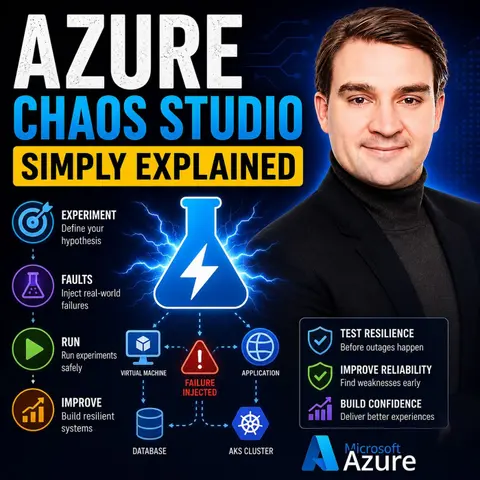

Azure Chaos Studio is Microsoft's chaos engineering service that helps organizations build more resilient cloud applications by safely simulating failures before they happen in the real world. Instead of waiting for an outage to expose weaknesses, you intentionally create controlled disruptions to test how your systems respond and recover.
Think of it like a fire drill for your Azure environment. You practice failures in a safe, controlled way so your applications, monitoring, and recovery processes are ready when an actual incident occurs. Azure Chaos Studio can simulate virtual machine failures, network latency, CPU stress, service outages, and many other real-world scenarios.
In this episode, you'll learn why modern cloud systems need more than high availability and backups—they need proven resilience. Chaos engineering helps validate your architecture, uncover hidden dependencies, and identify weaknesses that traditional testing often misses.
You'll also discover how chaos experiments are designed around clear hypotheses. Rather than randomly breaking infrastructure, you define an expected outcome, inject a fault, monitor the results, and use the findings to improve your environment. This allows teams to strengthen applications while minimizing operational risk.
Whether you're an Azure administrator, cloud architect, DevOps engineer, or IT leader, Azure Chaos Studio is becoming an essential tool for building reliable cloud-native solutions. The goal isn't to create failures—it's to ensure your applications continue running when failures inevitably occur.
By the end of this episode, you'll understand what Azure Chaos Studio is, how chaos engineering works, when to use it, and why testing failure is one of the most effective ways to build resilient, enterprise-ready Azure environments.
Quick answer: Azure Chaos Studio is the focus of this M365 FM episode, which explains what it does, where it fits in the Microsoft ecosystem, and the architecture, security, governance, or operational choices that matter before teams adopt or manage it.
Azure Chaos Studio plays a vital role in chaos engineering. This service allows you to intentionally create controlled disruptions in your cloud applications. Such an approach helps identify vulnerabilities before they lead to actual failures. Unlike traditional testing methods, which often react to issues after they occur, Azure Chaos Studio enables you to simulate real-world scenarios. This proactive strategy enhances your cloud resilience. By validating architecture and incident response processes, you can prepare your systems for unexpected disruptions.
Key Takeaways
- Azure Chaos Studio helps identify vulnerabilities in cloud applications by simulating controlled disruptions.
- Using chaos engineering improves system reliability and reduces unexpected failures.
- Conducting chaos experiments enhances incident response, allowing for quicker recovery during actual failures.
- Integrate Azure Chaos Studio with existing Azure services for seamless chaos testing across your cloud environment.
- Start chaos experiments in a test environment to minimize risks before moving to production.
- Regular chaos testing fosters a culture of continuous improvement and proactive failure mitigation.
- Utilize pre-built experiment templates to simplify the chaos engineering process for beginners.
- Monitor key metrics to track improvements in system resilience and ensure your applications remain robust.
What Is Chaos Studio?

Purpose and Benefits
Azure Chaos Studio serves as a managed chaos engineering service. Its primary purpose is to validate how applications behave under failure conditions. By simulating controlled disruptions across various components of your cloud infrastructure, you can identify resilience gaps before they impact your end users. Here are some key benefits of using Azure Chaos Studio:
- Improved Reliability: Uncovering and fixing weaknesses makes your systems less likely to fail unexpectedly.
- Reduced Downtime: Better preparedness for actual incidents minimizes the impact on users and your bottom line.
- Increased Confidence: Knowing your systems can withstand various disruptions boosts overall confidence.
- Faster Incident Response: Chaos experiments refine incident response procedures, ensuring quicker recovery during failures.
Key Concepts of Chaos Engineering
Chaos engineering involves deliberately introducing controlled failures into a system. This practice ensures that your applications can handle disruptions effectively. It is essential for resilience testing, as it allows you to validate how your applications respond to various failure scenarios. Azure Chaos Studio implements these principles by providing a managed service that enables you to conduct experiments. You can choose from preconfigured scenarios or create custom setups, ensuring comprehensive resilience testing across both preproduction and production environments.
Azure Chaos Studio enables you to conduct controlled fault injections into your cloud services. This core principle of chaos engineering helps identify vulnerabilities, improve service resilience, and promote proactive management of operations. Additionally, it aligns with Azure's Well-Architected Framework, ensuring that your applications and infrastructure are robust and secure.
- Facilitates controlled fault injections to identify weaknesses.
- Enhances service resilience through regular chaos experiments.
- Integrates with operational dashboards for meaningful insights.
- Supports continuous learning and improvement in incident response and monitoring.
By embracing chaos engineering through Azure Chaos Studio, you transform failure from a feared event into a valuable learning opportunity. This proactive approach empowers you to build resilient, reliable cloud solutions.
Features of Azure Chaos Studio
Experimentation Capabilities
Azure Chaos Studio offers robust experimentation capabilities that allow you to simulate various failure scenarios. This feature is crucial for understanding how your applications respond to disruptions. Here’s a breakdown of what you can expect:
| Concept | Description |
|---|---|
| Targets | Azure resources that can be subjected to faults (e.g., VMs, AKS clusters). |
| Capabilities | Specific faults that can be injected (e.g., shutdown, CPU pressure). |
| Experiments | Definitions of which faults to inject into which targets and in what order. |
With these capabilities, you can conduct chaos experiments that mimic real-world conditions. This proactive approach helps you identify weaknesses in your systems before they lead to actual failures.
Integration with Azure Services
One of the standout features of Azure Chaos Studio is its seamless integration with various Microsoft Azure services. This integration enhances your ability to conduct chaos experiments effectively. Here’s a list of Azure services that work natively with Azure Chaos Studio:
| Azure Services |
|---|
| Azure Kubernetes Service (AKS) |
| Azure Virtual Machines |
| Azure App Service |
| Azure Cosmos DB |
| Azure Functions |
| Azure Service Bus |
By integrating with these services, Azure Chaos Studio allows you to perform controlled fault injections across your entire cloud environment. This capability ensures that your applications remain resilient and reliable, even during unexpected disruptions.
The advantages of this integration include:
| Advantage | Description |
|---|---|
| Fully-managed service | Chaos Studio operates like any other Azure service, eliminating the need for management tasks. |
| Seamless integration | Integrates with Azure Policy and Azure Active Directory for secure access management. |
| Controlled fault injection | Allows for orchestrated fault injection, enhancing system resilience and reliability. |
| Flexibility and control | Users can cancel and roll back faults, ensuring authorized access to fault injection. |
User-Friendly Interface
Azure Chaos Studio features a user-friendly interface designed for both beginners and advanced users. This accessibility encourages teams to adopt chaos engineering practices without feeling overwhelmed. Here are some key interface features:
| Feature | Description |
|---|---|
| Fault Injection | Offers a variety of faults to simulate real-world disruptions, such as CPU and memory pressure. |
| Monitoring and Analysis | Integrates with Azure Monitor and Log Analytics for tracking metrics and understanding system behavior. |
| Experiment Automation | Provides tools for automating chaos experiments, allowing for continuous testing and improvement. |
| Pre-built Experiment Templates | Offers templates for common scenarios, making it easy for beginners to start with chaos engineering. |
These features make it simple for you to set up and execute chaos experiments, enhancing your observability and understanding of system behavior under stress.
Deploying Azure Chaos Studio
Prerequisites for Setup
Before you deploy Azure Chaos Studio, ensure you meet the necessary prerequisites. Here’s what you need to set up:
- A managed identity is required for Azure Chaos Studio.
- Set up a Network Security Group (NSG) to allow inbound and outbound traffic for Chaos Studio.
- Create a virtual network and subnets for your Virtual Machine, Kubernetes Service, and Azure SQL Database.
- You will also need additional subnets named
ChaosStudioContainerSubnetandChaosStudioRelaySubnet, each with specific configurations for the container subnet.
Step-by-Step Deployment
Deploying Azure Chaos Studio involves several steps. Follow this ordered list to ensure a smooth setup:
- Ensure the 'Microsoft.Chaos' Azure Resource Provider is enabled in your subscription.
- Select your subscription and register the 'Microsoft.Chaos' resource provider.
- Create a User-Managed Identity for security purposes.
- Complete the necessary parameters for the User-Managed Identity setup.
- Set up Application Insights for metadata storage.
- Specify parameters for the Application Insights deployment.
- Search for and select 'Azure Chaos Studio' in the Azure Portal.
- Onboard resources by selecting the targets you want to use.
- Choose the Azure resources as targets, ensuring the installation of the Chaos Studio Agent where necessary.
- Remember that non-Azure services rely on a service-direct scenario without agent dependency.
Best Practices for Implementation
To ensure successful implementation of Azure Chaos Studio, consider these best practices:
- Pilot: Start with a test environment to practice chaos experiments before moving to production.
- Hypotheses: Develop resilience hypotheses based on your application architecture to guide your experiments.
- Drill: Plan and execute drills to test your hypotheses. Ensure monitoring is in place and analyze results afterward.
- Automation: Integrate chaos validation into your CI/CD pipeline to enhance resilience.
By following these steps and best practices, you can effectively deploy Azure Chaos Studio and leverage chaos testing to improve your cloud applications' resilience. This proactive approach allows you to conduct controlled fault injection and custom experimentation, ensuring your systems can withstand unexpected disruptions while maintaining continuous monitoring.
Practical Applications of Chaos Engineering

Real-World Use Cases
Organizations across various industries have successfully utilized Azure Chaos Studio to enhance their systems. Here are some notable use cases:
| Use Case | Description |
|---|---|
| Incident Reproduction | Reproduce past incidents to understand failures and prevent recurrence. |
| Game Day Simulations | Simulate high load scenarios to prepare for peak events and ensure application resilience. |
| Business Continuity and Disaster Recovery | Conduct drills to ensure quick recovery and data preservation during disasters. |
| Chaos Experiments in CI/CD Pipelines | Integrate chaos testing into CI/CD pipelines to assess resilience of new code changes. |
| Service Resilience Validation | Validate Azure services' resilience by injecting faults and observing responses. |
| Security and Compliance Testing | Simulate attacks or failures to test security and compliance aspects of applications. |
These use cases demonstrate how chaos engineering can help you identify weaknesses and improve your systems.
Benefits for Development Teams
Using Azure Chaos Studio offers several benefits for development teams. Here’s how it can enhance your workflow:
| Benefit | Description |
|---|---|
| Improved System Resilience | Conducting chaos experiments helps teams identify and fix flaws before they cause disruptions. |
| Enhanced Testing Environments | Simulates real-world issues to prepare systems for unexpected events, reducing downtime. |
| Proactive Failure Mitigation | Allows teams to address potential problems before they escalate into serious issues. |
| Cost-effective Infrastructure | Fully managed platform that integrates with existing Azure resources, reducing additional costs. |
| Customized Chaos Scenarios | Tailors experiments to specific operational needs, allowing for targeted testing. |
| Continuous Improvement Cycle | Regular evaluations and testing ensure systems adapt to new challenges and maintain performance. |
These benefits empower you to create more reliable applications and foster a culture of continuous improvement.
Enhancing System Reliability
Azure Chaos Studio plays a crucial role in enhancing system reliability. By conducting chaos experiments, you can measure improvements in your systems. Here are some key metrics to consider:
| Metric | Description |
|---|---|
| Incident Rate | Frequency of outages or service degradations. |
| Capacity Utilization (%) | Measurement of how much of the system's resources are being used. |
| Service Level Objectives (%) | Target or goal for the level of service a system should provide, expressed as a percentage. |
| Service Level Agreement (%) | Contract defining the level of service promised to customers, usually uptime or response time. |
| Service Level Indicator (%) | Measurable metrics used to assess whether an SLO is being met, like latency or error rate. |
| Error Budget Usage (%) | Amount of the allowed error budget consumed within a certain period. |
By focusing on these metrics, you can track the chaos experiment outcomes and ensure your systems remain resilient.
Resilience of cloud applications requires collaboration between the cloud provider and the cloud consumer. At Microsoft, we embody this ethos with Azure Chaos Studio, a fully-managed chaos engineering experimentation platform for accelerating the discovery of hard-to-find problems, from late-stage development through production.
Challenges in Chaos Engineering
Common Pitfalls
When implementing chaos engineering, you may encounter several common pitfalls. Awareness of these challenges can help you navigate the chaos engineering landscape more effectively. Here are some pitfalls to watch out for:
- Complexity and Risk: Chaos engineering requires careful planning. Without it, you risk negatively impacting users and your business.
- Requires Expertise: Skilled engineers are essential. They need to understand system architecture and the potential impacts of failures.
- Time-Consuming: Designing and analyzing chaos experiments can take significant time and resources.
- False Sense of Security: Chaos engineering cannot identify all failure scenarios. You still need traditional testing methods to cover all bases.
- Organizational Resistance: Fear of disruptions may lead to reluctance in adopting chaos engineering practices.
Mitigating Risks During Experiments
To ensure successful chaos experiments, you should implement strategies to mitigate risks. Here are some effective approaches:
| Strategy | Description |
|---|---|
| Minimize the blast radius | Determine the blast radius using metrics like affected users and workload quantities. Schedule experiments during non-peak times and ensure backup systems are available for restorations. |
| Combine different types of tests | Running various tests together can reveal reliability issues not visible in isolation. Start in non-production environments to explore failure modes safely before moving to production. |
| Use fault injection and chaos engineering | Regularly run chaos experiments to evaluate test scope and inject faults into reliable components. Contain the blast radius and set expectations for fault injections. |
Azure Chaos Studio provides tools to help minimize the impact of experiments on production systems. It automates experiments to inject controlled failures and supports running GameDays and Chaos Days for simulating catastrophic events. Starting small and gradually increasing complexity is encouraged, focusing on minimizing the blast radius during experiments.
By understanding these challenges and implementing effective strategies, you can achieve operational excellence in your chaos engineering efforts. This proactive approach not only enhances your systems' resilience but also fosters a culture of continuous improvement within your organization.
In summary, Azure Chaos Studio empowers you to enhance the resilience of your cloud applications. By simulating real-world disruptions, you can identify vulnerabilities and improve your systems before actual incidents occur. Organizations that adopt chaos engineering practices, such as those using Azure Chaos Studio, have reported significant improvements in failover capabilities and cost efficiency. For instance, a global SaaS loyalty platform achieved seamless failover while maintaining real-time data integrity.
Embrace Azure Chaos Studio to proactively test your systems. This approach not only strengthens your applications but also ensures business continuity during unforeseen disruptions. Start your journey towards a more resilient cloud environment today!
FAQ
What is Azure Chaos Studio?
Azure Chaos Studio is a chaos orchestration tool that helps you simulate controlled disruptions in your cloud applications. It enhances resilience by identifying vulnerabilities before they lead to actual failures.
How do I get started with Azure Chaos Studio?
To start, create an Azure account and set up Azure Chaos Studio in the Azure portal. Follow the deployment steps outlined in the documentation to configure your environment.
Can I use Azure Chaos Studio in production?
Yes, you can use Azure Chaos Studio in production. However, ensure you follow best practices to minimize risks and monitor the impact of your chaos experiments.
What types of faults can I simulate?
You can simulate various faults, including virtual machine shutdowns, network latency, and application failures. This flexibility allows you to test your applications under realistic conditions.
How does Azure Chaos Studio support observability and analysis?
Azure Chaos Studio integrates with Azure Monitor and Log Analytics. This integration provides insights into system behavior during chaos experiments, enhancing your observability and analysis capabilities.
Is there a cost associated with using Azure Chaos Studio?
Azure Chaos Studio operates on a pay-as-you-go model. You pay for the resources consumed during chaos experiments, making it cost-effective for organizations of all sizes.
Can I automate chaos experiments?
Yes, you can automate chaos experiments by integrating Azure Chaos Studio into your CI/CD pipelines. This automation ensures continuous testing and validation of your applications' resilience.
What resources can I target with Azure Chaos Studio?
You can target various Azure resources, including Azure Virtual Machines, Azure Kubernetes Service, and Azure App Service. This versatility allows you to conduct comprehensive chaos experiments across your cloud environment.
🎧 Listen to this episode
Want a practical explanation of Azure Chaos Studio? This episode breaks down the topic in clear language and shows why it matters for Microsoft 365, Azure, Power Platform, security, AI, and modern work.
Listen to this episode if you want to:
- Understand the key concepts behind Azure Chaos Studio
- See how it fits into the wider Microsoft technology ecosystem
- Learn where it can create practical value for your organization
You may also enjoy these related M365 FM episodes:
- Copilot Studio AI Agents and RAG with Nilüfer Doğan [MVP]
- Multi-Agent AI with Copilot Studio and David Lorenzo Lopez [MVP]
- Agentic AI with Copilot Studio and Dataverse MCP with Nathan Rose [MVP]
- Scaling Copilot Studio with Isha Kapoor [MVP]
- Will Copilot Studio Replace Low-Code Developers?
Discover more practical Microsoft conversations on M365 FM.
Last reviewed: July 2026.
Who Should Listen
This episode is for Microsoft administrators, architects, developers, security professionals, and business leaders who need a practical foundation before making implementation or governance decisions.
🎧 You Should Also Listen To
- Infrastructure as Code — A closely related next step that adds useful context and practical depth.
- Azure Resource Manager — A closely related next step that adds useful context and practical depth.
- Azure DevOps — A closely related next step that adds useful context and practical depth.
🚀 Want to be part of m365.fm?
Then stop just listening… and start showing up.
👉 Connect with me on LinkedIn and let’s make something happen:
- 🎙️ Be a podcast guest and share your story
- 🎧 Host your own episode (yes, seriously)
- 💡 Pitch topics the community actually wants to hear
- 🌍 Build your personal brand in the Microsoft 365 space
This isn’t just a podcast — it’s a platform for people who take action.
🔥 Most people wait. The best ones don’t.
👉 Connect with me on LinkedIn and send me a message:
"I want in"
Let’s build something awesome 👊
1
00:00:00,000 --> 00:00:02,300
Welcome to another episode of Microsoft Knowledge Nuggets.
2
00:00:02,300 --> 00:00:03,540
I'm your host, Mirko Peters.
3
00:00:03,540 --> 00:00:06,000
What if you could break your own cloud apps on purpose
4
00:00:06,000 --> 00:00:08,160
in a controlled way to make them stronger?
5
00:00:08,160 --> 00:00:10,520
Sounds backwards, but it's the same logic firefighters use
6
00:00:10,520 --> 00:00:11,920
when they set a controlled burn.
7
00:00:11,920 --> 00:00:14,720
They start small fires on purpose to clear out dry brush.
8
00:00:14,720 --> 00:00:17,320
So when a real wildfire comes, there's nothing left to burn.
9
00:00:17,320 --> 00:00:19,560
That's what Azure Chaos Studio does for your cloud apps.
10
00:00:19,560 --> 00:00:20,640
By the end of this episode,
11
00:00:20,640 --> 00:00:22,440
you'll understand what the service is,
12
00:00:22,440 --> 00:00:23,720
why you'd want to use it,
13
00:00:23,720 --> 00:00:25,320
and how it helps you build systems
14
00:00:25,320 --> 00:00:27,360
that don't fall over when things go wrong.
15
00:00:27,360 --> 00:00:30,360
So grab your coffee and let's start with the problem.
16
00:00:30,360 --> 00:00:31,520
The problem.
17
00:00:31,520 --> 00:00:33,720
Why traditional testing isn't enough?
18
00:00:33,720 --> 00:00:35,680
Here's the thing about traditional testing.
19
00:00:35,680 --> 00:00:37,240
It checks whether your software works
20
00:00:37,240 --> 00:00:39,280
as designed under normal conditions.
21
00:00:39,280 --> 00:00:40,640
You write a test, run it,
22
00:00:40,640 --> 00:00:42,600
and if the output matches, you pass.
23
00:00:42,600 --> 00:00:43,640
Great for catching bugs,
24
00:00:43,640 --> 00:00:45,040
but it misses how your system behaves
25
00:00:45,040 --> 00:00:46,680
when something unexpected fails,
26
00:00:46,680 --> 00:00:49,440
like a network timeout, a virtual machine that dies,
27
00:00:49,440 --> 00:00:51,440
or an entire availability zone going dark.
28
00:00:51,440 --> 00:00:53,960
Modern cloud apps aren't simple anymore.
29
00:00:53,960 --> 00:00:56,040
They're distributed systems that talk to databases,
30
00:00:56,040 --> 00:00:58,360
caches, identity services, third party APIs,
31
00:00:58,360 --> 00:00:59,360
and other microservices,
32
00:00:59,360 --> 00:01:01,720
and all those pieces have hidden dependencies.
33
00:01:01,720 --> 00:01:04,280
One small failure can cascade through the whole system.
34
00:01:04,280 --> 00:01:05,960
A database gets slow, the app times out,
35
00:01:05,960 --> 00:01:07,440
the load balancer marks it unhealthy,
36
00:01:07,440 --> 00:01:09,560
traffic reroutes, other instances get overwhelmed,
37
00:01:09,560 --> 00:01:11,680
and suddenly your entire application is down.
38
00:01:11,680 --> 00:01:13,160
Traditional testing doesn't catch that
39
00:01:13,160 --> 00:01:14,760
because it tests in perfect conditions
40
00:01:14,760 --> 00:01:17,240
with everything available, zero network latency,
41
00:01:17,240 --> 00:01:19,880
and no one shutting down VMs during your test run.
42
00:01:19,880 --> 00:01:22,080
So you deploy to production feeling confident,
43
00:01:22,080 --> 00:01:23,360
then reality hits,
44
00:01:23,360 --> 00:01:24,920
and that false confidence is dangerous
45
00:01:24,920 --> 00:01:27,680
because it's the difference between knowing your system works
46
00:01:27,680 --> 00:01:29,120
and knowing it survives.
47
00:01:29,120 --> 00:01:31,120
And that's where chaos engineering comes in.
48
00:01:31,120 --> 00:01:32,880
What chaos engineering actually is?
49
00:01:32,880 --> 00:01:34,880
Chaos engineering is a practical method.
50
00:01:34,880 --> 00:01:37,520
You inject real controlled failures into your system
51
00:01:37,520 --> 00:01:38,800
and observe how it reacts.
52
00:01:38,800 --> 00:01:40,800
This doesn't happen in a lab or a simulation.
53
00:01:40,800 --> 00:01:42,600
It happens on your actual resources.
54
00:01:42,600 --> 00:01:44,920
The idea is simple, you start with a hypothesis.
55
00:01:44,920 --> 00:01:47,080
Something like, if we lose one virtual machine,
56
00:01:47,080 --> 00:01:48,880
the load balancer should keep routing traffic
57
00:01:48,880 --> 00:01:50,400
to the remaining instances.
58
00:01:50,400 --> 00:01:51,560
Then you run an experiment,
59
00:01:51,560 --> 00:01:53,480
you shut down that VM and watch what happens.
60
00:01:53,480 --> 00:01:54,960
Does the load balancer do its job?
61
00:01:54,960 --> 00:01:55,840
Does the app stay up?
62
00:01:55,840 --> 00:01:57,320
Do your alerts fire correctly?
63
00:01:57,320 --> 00:01:59,960
You measure everything and then you fix what breaks.
64
00:01:59,960 --> 00:02:03,800
Here's the thing, chaos engineering is not random destruction.
65
00:02:03,800 --> 00:02:05,840
It's not a developer walking into the server room
66
00:02:05,840 --> 00:02:07,360
and pulling cables for fun.
67
00:02:07,360 --> 00:02:09,960
It's scientific, repeatable, and safety constrained.
68
00:02:09,960 --> 00:02:12,160
You define the blast radius and control exactly
69
00:02:12,160 --> 00:02:14,240
what fails when and for how long.
70
00:02:14,240 --> 00:02:15,880
And most importantly, you learn from it.
71
00:02:15,880 --> 00:02:17,480
Every experiment gives you evidence.
72
00:02:17,480 --> 00:02:19,040
Either your hypothesis was right
73
00:02:19,040 --> 00:02:20,640
and your system is resilient,
74
00:02:20,640 --> 00:02:23,000
or it was wrong and you found a weakness to fix.
75
00:02:23,000 --> 00:02:24,160
Either way, you win.
76
00:02:24,160 --> 00:02:26,880
The challenge is that building your own chaos engineering tooling
77
00:02:26,880 --> 00:02:27,400
is hard.
78
00:02:27,400 --> 00:02:30,600
You'd need to write scripts to shut down VMs, inject CPU pressure,
79
00:02:30,600 --> 00:02:33,400
block network traffic, and orchestrate all that safely
80
00:02:33,400 --> 00:02:34,240
and repeatedly.
81
00:02:34,240 --> 00:02:35,280
That's a lot of work.
82
00:02:35,280 --> 00:02:38,080
And that's exactly why Azure built a managed service to handle it.
83
00:02:38,080 --> 00:02:39,800
Introducing Azure Chaos Studio.
84
00:02:39,800 --> 00:02:42,040
Azure Chaos Studio is a fully managed service
85
00:02:42,040 --> 00:02:45,080
for running chaos experiments directly on your Azure resources.
86
00:02:45,080 --> 00:02:47,360
No custom scripts, no third party tools,
87
00:02:47,360 --> 00:02:49,840
no building your own failure injection platform.
88
00:02:49,840 --> 00:02:52,040
It's all in the Azure portal ready to go.
89
00:02:52,040 --> 00:02:53,080
Here's how it works.
90
00:02:53,080 --> 00:02:55,520
Chaos Studio gives you two ways to inject faults.
91
00:02:55,520 --> 00:02:58,560
Service direct faults run through the Azure control plane itself.
92
00:02:58,560 --> 00:03:00,560
You tell Chaos Studio to shut down a VM
93
00:03:00,560 --> 00:03:02,480
and it does it through Azure's own APIs.
94
00:03:02,480 --> 00:03:03,920
No agent needed.
95
00:03:03,920 --> 00:03:05,920
Agent-based faults install a small agent
96
00:03:05,920 --> 00:03:07,360
inside your virtual machine.
97
00:03:07,360 --> 00:03:09,720
Then it can crank up the CPU to 100%,
98
00:03:09,720 --> 00:03:12,360
fill up memory or kill a specific process.
99
00:03:12,360 --> 00:03:14,120
These let you simulate problems that happen
100
00:03:14,120 --> 00:03:17,000
inside the operating system, not just at the resource level.
101
00:03:17,000 --> 00:03:18,000
Here's an analogy.
102
00:03:18,000 --> 00:03:19,960
Imagine you own a large office building.
103
00:03:19,960 --> 00:03:22,320
You want to know if your fire escapes actually work.
104
00:03:22,320 --> 00:03:24,240
Waiting for a real fire is a terrible idea.
105
00:03:24,240 --> 00:03:25,960
So you hire a dedicated disaster crew.
106
00:03:25,960 --> 00:03:27,520
They come in, block off a stairwell,
107
00:03:27,520 --> 00:03:29,240
simulate smoke on the third floor
108
00:03:29,240 --> 00:03:30,440
and watch how people react.
109
00:03:30,440 --> 00:03:31,480
That's Chaos Studio.
110
00:03:31,480 --> 00:03:32,840
It's your disaster crew.
111
00:03:32,840 --> 00:03:34,760
You call them in, they run the drill,
112
00:03:34,760 --> 00:03:36,600
and you learn whether your building is safe
113
00:03:36,600 --> 00:03:38,440
before the real emergency hits.
114
00:03:38,440 --> 00:03:41,840
Chaos Studio supports a wide range of Azure resources.
115
00:03:41,840 --> 00:03:44,440
Virtual machines, VM scale sets,
116
00:03:44,440 --> 00:03:46,440
Azure Kubernetes service clusters,
117
00:03:46,440 --> 00:03:49,240
Azure Cosmos DB, Azure cache for readers,
118
00:03:49,240 --> 00:03:51,400
network security groups, and more.
119
00:03:51,400 --> 00:03:52,560
The fault library keeps growing.
120
00:03:52,560 --> 00:03:54,680
So whether you're running a simple two-tier app
121
00:03:54,680 --> 00:03:57,360
or a complex microservices architecture on AKS,
122
00:03:57,360 --> 00:03:58,280
you can test it.
123
00:03:58,280 --> 00:03:59,120
Here's the good news.
124
00:03:59,120 --> 00:04:01,080
You don't need to build any custom tooling.
125
00:04:01,080 --> 00:04:03,120
Everything is available through the Azure portal,
126
00:04:03,120 --> 00:04:05,920
the CLI, REST APIs, ARM templates, or BICEP.
127
00:04:05,920 --> 00:04:07,560
You can define your experiments as code
128
00:04:07,560 --> 00:04:09,760
and integrate them into your deployment pipelines.
129
00:04:09,760 --> 00:04:11,120
But let's not get ahead of ourselves.
130
00:04:11,120 --> 00:04:12,680
First, let's break down how these experiments
131
00:04:12,680 --> 00:04:14,240
are actually structured.
132
00:04:14,240 --> 00:04:17,160
The building blocks, targets, steps, branches, actions.
133
00:04:17,160 --> 00:04:19,240
Every chaos experiment starts with targets.
134
00:04:19,240 --> 00:04:20,200
What is a target?
135
00:04:20,200 --> 00:04:23,040
It's simply an Azure resource you want to run faults against.
136
00:04:23,040 --> 00:04:25,400
You open Chaos Studio, find your resource,
137
00:04:25,400 --> 00:04:28,720
a VM, a scale set, an AKS cluster, and you onboard it.
138
00:04:28,720 --> 00:04:30,600
That means you tell Chaos Studio,
139
00:04:30,600 --> 00:04:32,840
this resource is available for experiments.
140
00:04:32,840 --> 00:04:34,040
Here's the key.
141
00:04:34,040 --> 00:04:35,320
When you onboard a target,
142
00:04:35,320 --> 00:04:37,560
you also pick which faults you're willing to allow
143
00:04:37,560 --> 00:04:38,320
on that resource.
144
00:04:38,320 --> 00:04:39,360
You don't enable everything.
145
00:04:39,360 --> 00:04:41,320
You choose CPU pressure, yes.
146
00:04:41,320 --> 00:04:42,400
Full VM shutdown?
147
00:04:42,400 --> 00:04:43,480
Maybe not for production?
148
00:04:43,480 --> 00:04:44,320
You decide.
149
00:04:44,320 --> 00:04:46,960
Once your targets are onboarded, you create an experiment.
150
00:04:46,960 --> 00:04:48,480
Think of an experiment as a blueprint.
151
00:04:48,480 --> 00:04:50,600
It describes exactly what failures to inject
152
00:04:50,600 --> 00:04:53,640
in what order, against which targets, and for how long.
153
00:04:53,640 --> 00:04:55,280
You don't just say break something.
154
00:04:55,280 --> 00:04:57,440
You define the entire scenario upfront.
155
00:04:57,440 --> 00:04:58,960
Experiments have a simple structure.
156
00:04:58,960 --> 00:05:00,640
Steps, branches, and actions.
157
00:05:00,640 --> 00:05:02,040
Steps run one after another.
158
00:05:02,040 --> 00:05:04,720
Step one finishes, then step two starts, then step three.
159
00:05:04,720 --> 00:05:06,360
This is how you model a timeline.
160
00:05:06,360 --> 00:05:08,560
First, degrade the network, then stress the CPU,
161
00:05:08,560 --> 00:05:09,800
then shut down a VM.
162
00:05:09,800 --> 00:05:11,760
Each step is a phase in your scenario.
163
00:05:11,760 --> 00:05:14,480
Inside each step, you can have one or more branches.
164
00:05:14,480 --> 00:05:15,760
Here's where things get interesting.
165
00:05:15,760 --> 00:05:17,240
Branches run in parallel.
166
00:05:17,240 --> 00:05:19,120
So inside step one, you could have branch A
167
00:05:19,120 --> 00:05:21,120
adding latency to your database and branch B
168
00:05:21,120 --> 00:05:24,440
cranking up CPU on your web servers, both at the same time.
169
00:05:24,440 --> 00:05:27,000
This lets you simulate complex, multi-fault scenarios
170
00:05:27,000 --> 00:05:28,680
that mirror real-world incidents.
171
00:05:28,680 --> 00:05:29,760
Then you have actions.
172
00:05:29,760 --> 00:05:31,320
Actions are the actual faults.
173
00:05:31,320 --> 00:05:34,920
CPU pressure, memory exhaustion, VM shutdown, network delay,
174
00:05:34,920 --> 00:05:36,800
DNS block, process kill.
175
00:05:36,800 --> 00:05:39,920
Each action targets a specific resource or group of resources.
176
00:05:39,920 --> 00:05:41,520
And again, you can only use actions
177
00:05:41,520 --> 00:05:43,320
that you've enabled on that target.
178
00:05:43,320 --> 00:05:44,240
That's your safety net.
179
00:05:44,240 --> 00:05:46,280
If you didn't enable VM shutdown on a target,
180
00:05:46,280 --> 00:05:48,320
the experiment simply won't run that action.
181
00:05:48,320 --> 00:05:51,080
So the workflow looks like this, onboard your targets.
182
00:05:51,080 --> 00:05:52,920
Enable the faults you're comfortable with.
183
00:05:52,920 --> 00:05:55,560
Create an experiment with steps, branches, and actions.
184
00:05:55,560 --> 00:05:56,240
Then run it.
185
00:05:56,240 --> 00:05:57,600
But before we get into running one,
186
00:05:57,600 --> 00:05:59,240
there's something important to understand.
187
00:05:59,240 --> 00:06:00,840
When chaos studio runs an experiment,
188
00:06:00,840 --> 00:06:02,120
it's not simulating anything.
189
00:06:02,120 --> 00:06:04,120
It's actually doing these things to your resources.
190
00:06:04,120 --> 00:06:06,200
CPU pressure is real CPU pressure.
191
00:06:06,200 --> 00:06:07,720
A VM shutdown is a real shutdown.
192
00:06:07,720 --> 00:06:08,600
That's the whole point.
193
00:06:08,600 --> 00:06:10,160
You're testing how your system behaves
194
00:06:10,160 --> 00:06:11,720
under actual failure conditions.
195
00:06:11,720 --> 00:06:13,080
And that means you need to be careful.
196
00:06:13,080 --> 00:06:14,560
So let's walk through a real experiment
197
00:06:14,560 --> 00:06:16,240
and see how it all comes together.
198
00:06:16,240 --> 00:06:18,240
Running your first chaos experiment.
199
00:06:18,240 --> 00:06:19,240
Let's make this real.
200
00:06:19,240 --> 00:06:21,040
Imagine you have a web application running
201
00:06:21,040 --> 00:06:23,440
on three virtual machines inside a virtual machine
202
00:06:23,440 --> 00:06:24,320
scale set.
203
00:06:24,320 --> 00:06:26,760
Each VM leaves in a different availability zone.
204
00:06:26,760 --> 00:06:28,920
You have a load balancer in front distributing traffic
205
00:06:28,920 --> 00:06:30,040
across all three.
206
00:06:30,040 --> 00:06:31,760
The hypothesis is simple.
207
00:06:31,760 --> 00:06:34,040
If we lose an entire availability zone,
208
00:06:34,040 --> 00:06:35,880
the load balancer should reroute traffic
209
00:06:35,880 --> 00:06:39,120
to the remaining two VMs and the application stays available.
210
00:06:39,120 --> 00:06:41,440
So you design an experiment with two steps.
211
00:06:41,440 --> 00:06:46,120
Step one, stress two of the three VMs with 95% CPU for five minutes.
212
00:06:46,120 --> 00:06:49,760
That simulates a noisy neighbor scenario or a runaway process.
213
00:06:49,760 --> 00:06:53,040
Step two, abruptly shut down all the VMs in zone two.
214
00:06:53,040 --> 00:06:55,120
That simulates a real zone outage.
215
00:06:55,120 --> 00:06:57,520
You run the experiment and then you watch what happens.
216
00:06:57,520 --> 00:06:58,560
Here's what you'd see.
217
00:06:58,560 --> 00:07:02,400
In the first five minutes, two VMs, spike to 100% CPU,
218
00:07:02,400 --> 00:07:04,040
the third one stays normal because you didn't
219
00:07:04,040 --> 00:07:04,640
target it.
220
00:07:04,640 --> 00:07:06,160
You're monitoring dashboards light up.
221
00:07:06,160 --> 00:07:07,040
Alerts fire.
222
00:07:07,040 --> 00:07:09,840
The load balancer notices that those two VMs are struggling,
223
00:07:09,840 --> 00:07:11,440
but because they're still technically running,
224
00:07:11,440 --> 00:07:12,800
it keeps sending them traffic.
225
00:07:12,800 --> 00:07:14,760
Your app slows down but doesn't go offline.
226
00:07:14,760 --> 00:07:15,520
That's interesting.
227
00:07:15,520 --> 00:07:16,920
You learn something already.
228
00:07:16,920 --> 00:07:18,120
Then step two kicks in.
229
00:07:18,120 --> 00:07:20,920
The VMs in zone two are abruptly shut down, not gracefully,
230
00:07:20,920 --> 00:07:21,680
not with a warning.
231
00:07:21,680 --> 00:07:22,560
They just disappear.
232
00:07:22,560 --> 00:07:25,720
One of those two stressed VMs was in that zone, so it's gone.
233
00:07:25,720 --> 00:07:27,720
The load balancer sees the health probe fail,
234
00:07:27,720 --> 00:07:29,320
removes it from the back end pool,
235
00:07:29,320 --> 00:07:31,640
and routes all traffic to the remaining healthy VMs.
236
00:07:31,640 --> 00:07:32,480
Your app stays up.
237
00:07:32,480 --> 00:07:34,040
The hypothesis holds.
238
00:07:34,040 --> 00:07:35,920
But here's what you might not expect.
239
00:07:35,920 --> 00:07:38,680
The remaining VMs now have to handle 100% of the traffic.
240
00:07:38,680 --> 00:07:41,040
If you didn't have enough capacity to absorb that load,
241
00:07:41,040 --> 00:07:42,360
you'd see latency spike.
242
00:07:42,360 --> 00:07:44,280
Maybe the app stays technically online,
243
00:07:44,280 --> 00:07:45,600
but users feel the pain.
244
00:07:45,600 --> 00:07:46,480
That's a finding.
245
00:07:46,480 --> 00:07:49,000
You now know you need either more headroom or faster
246
00:07:49,000 --> 00:07:49,880
auto scaling.
247
00:07:49,880 --> 00:07:51,640
And remember, this isn't a simulation.
248
00:07:51,640 --> 00:07:53,560
When chaos studio runs this experiment,
249
00:07:53,560 --> 00:07:56,400
those VMs actually hit 95% CPU.
250
00:07:56,400 --> 00:07:58,160
That zone two shut down is a real shut down.
251
00:07:58,160 --> 00:08:00,360
The VMs stop the load balancer rebalances,
252
00:08:00,360 --> 00:08:02,480
and your application either survives or it doesn't.
253
00:08:02,480 --> 00:08:03,320
That's the whole point.
254
00:08:03,320 --> 00:08:04,200
You're not guessing.
255
00:08:04,200 --> 00:08:07,600
You're watching real behavior under real failure conditions.
256
00:08:07,600 --> 00:08:10,080
You learn whether your app stays up or falls over.
257
00:08:10,080 --> 00:08:12,240
And if it falls over, you fix it before your customers ever
258
00:08:12,240 --> 00:08:13,040
see it happen.
259
00:08:13,040 --> 00:08:15,320
But this power comes with responsibility.
260
00:08:15,320 --> 00:08:16,880
You need to be careful.
261
00:08:16,880 --> 00:08:19,600
Safety first, avoiding unplanned outages.
262
00:08:19,600 --> 00:08:22,520
Chaos studio has multiple safety mechanisms built in.
263
00:08:22,520 --> 00:08:24,240
And before you run your first experiment,
264
00:08:24,240 --> 00:08:26,200
you need to understand every single one.
265
00:08:26,200 --> 00:08:28,720
The first safety layer is identity and permissions.
266
00:08:28,720 --> 00:08:30,760
Every experiment you create gets its own system
267
00:08:30,760 --> 00:08:32,280
assigned managed identity.
268
00:08:32,280 --> 00:08:35,040
But that identity starts with zero permissions by default.
269
00:08:35,040 --> 00:08:38,160
You have to explicitly granted access to the resources it needs.
270
00:08:38,160 --> 00:08:40,400
And you grant the minimum permissions required.
271
00:08:40,400 --> 00:08:43,680
If an experiment only needs to stress CPU on two VMs,
272
00:08:43,680 --> 00:08:46,080
you scope the permissions down tight instead of allowing
273
00:08:46,080 --> 00:08:48,200
it to shut down everything in the resource group.
274
00:08:48,200 --> 00:08:50,560
Then there's the fault enablement I mentioned earlier.
275
00:08:50,560 --> 00:08:53,160
When you onboard a target, you choose exactly which faults
276
00:08:53,160 --> 00:08:54,240
you're willing to allow.
277
00:08:54,240 --> 00:08:56,880
If you never enable VM shut down on a production scale set,
278
00:08:56,880 --> 00:08:59,520
no experiment can shut down those VMs,
279
00:08:59,520 --> 00:09:01,720
even if someone targets them by accident.
280
00:09:01,720 --> 00:09:04,160
It's a hard block that requires you to deliberately opt
281
00:09:04,160 --> 00:09:05,440
into each fault type.
282
00:09:05,440 --> 00:09:07,600
Now about where to start and the answer is simple.
283
00:09:07,600 --> 00:09:10,160
Start small and start in a non-production environment.
284
00:09:10,160 --> 00:09:12,600
Run your first experiments in dev or staging,
285
00:09:12,600 --> 00:09:14,880
test with a single VM and a single fault,
286
00:09:14,880 --> 00:09:17,720
and validate that your monitoring works, your alerts fire,
287
00:09:17,720 --> 00:09:20,240
and you can cancel the experiment if something goes wrong.
288
00:09:20,240 --> 00:09:23,360
Only after you've built that confidence in a safe environment,
289
00:09:23,360 --> 00:09:25,480
should you even think about touching production.
290
00:09:25,480 --> 00:09:27,000
Microsoft has a warning about this
291
00:09:27,000 --> 00:09:28,320
that I want to share directly.
292
00:09:28,320 --> 00:09:30,840
They call it a resume in generating event.
293
00:09:30,840 --> 00:09:32,600
If you run a chaos experiment in production
294
00:09:32,600 --> 00:09:35,480
without proper safeguards and it takes down your entire application,
295
00:09:35,480 --> 00:09:37,440
that's the kind of mistake that could get you fired.
296
00:09:37,440 --> 00:09:38,600
That's not hyperbole.
297
00:09:38,600 --> 00:09:40,680
Chaos Studio is powerful because it actually
298
00:09:40,680 --> 00:09:43,960
does things to your resources, so use that power wisely.
299
00:09:43,960 --> 00:09:46,760
The last safety net is monitoring and cancellation.
300
00:09:46,760 --> 00:09:50,120
While an experiment runs, you can watch the progress in real time.
301
00:09:50,120 --> 00:09:53,000
You see which steps completed, which branches are active,
302
00:09:53,000 --> 00:09:54,840
and which actions are executing.
303
00:09:54,840 --> 00:09:57,640
If something looks wrong, you hit cancel and the experiment
304
00:09:57,640 --> 00:09:58,760
stops immediately.
305
00:09:58,760 --> 00:10:01,600
The resources that were affected stay in whatever state they're in,
306
00:10:01,600 --> 00:10:03,040
but no new faults get injected.
307
00:10:03,040 --> 00:10:05,760
So keep your dashboards open and your finger on the cancel button.
308
00:10:05,760 --> 00:10:08,520
Start small, be deliberate, and respect the power of the tool.
309
00:10:08,520 --> 00:10:11,080
So now that you know how to stay safe, the question is,
310
00:10:11,080 --> 00:10:13,680
where should you actually run these experiments?
311
00:10:13,680 --> 00:10:15,760
Shifting left versus shifting right.
312
00:10:15,760 --> 00:10:18,120
So where do you actually run these experiments?
313
00:10:18,120 --> 00:10:21,120
There are two main approaches and most teams use both.
314
00:10:21,120 --> 00:10:23,320
The first is shifting left.
315
00:10:23,320 --> 00:10:26,720
You run chaos experiments early in your development life cycle.
316
00:10:26,720 --> 00:10:29,240
As soon as code gets deployed to a test environment,
317
00:10:29,240 --> 00:10:32,640
you hit it with faults and make it part of your CICD pipeline.
318
00:10:32,640 --> 00:10:35,800
The pipeline deploys the app runs a chaos experiment to stress it,
319
00:10:35,800 --> 00:10:39,560
checks that it survives, and only then promotes the build to the next stage.
320
00:10:39,560 --> 00:10:43,800
Think of it as a quality gate, just like unit tests or security scans.
321
00:10:43,800 --> 00:10:47,800
If the app can't handle a VM shutdown in staging, it doesn't go to production.
322
00:10:47,800 --> 00:10:51,880
The second approach is shifting right, which means running experiments in production.
323
00:10:51,880 --> 00:10:54,240
And yes, that sounds terrifying, but hear me out.
324
00:10:54,240 --> 00:10:55,200
You don't start there.
325
00:10:55,200 --> 00:10:58,960
You only shift right after you've built confidence in non-production environments.
326
00:10:58,960 --> 00:11:01,360
You begin with small, limited experiments.
327
00:11:01,360 --> 00:11:04,960
Maybe you stress CPU on one instance during a low traffic period.
328
00:11:04,960 --> 00:11:07,000
You watch closely, you learn, and then you expand.
329
00:11:07,000 --> 00:11:10,320
Maybe you shut down a single VM in production during business hours
330
00:11:10,320 --> 00:11:13,320
and validate that your load balancer actually re-route traffic,
331
00:11:13,320 --> 00:11:15,080
that your users don't notice a thing,
332
00:11:15,080 --> 00:11:16,960
and that your monitoring catches it all.
333
00:11:16,960 --> 00:11:19,960
Over time, you build up to more aggressive experiments.
334
00:11:19,960 --> 00:11:22,600
There's a third approach that sits in the middle, game days.
335
00:11:22,600 --> 00:11:24,720
A game day is a scheduled chaos drill,
336
00:11:24,720 --> 00:11:28,040
where you bring together your development team, operations team, security team,
337
00:11:28,040 --> 00:11:30,280
everyone who would be involved in a real incident.
338
00:11:30,280 --> 00:11:33,080
You run a chaos experiment and practice your incident response.
339
00:11:33,080 --> 00:11:35,160
Who gets the alert, who makes the call to escalate?
340
00:11:35,160 --> 00:11:36,280
What's the communication chain?
341
00:11:36,280 --> 00:11:38,280
How fast can you diagnose the issue?
342
00:11:38,280 --> 00:11:40,440
Game days test the technology, but more importantly,
343
00:11:40,440 --> 00:11:42,720
they test the people and processes around it.
344
00:11:42,720 --> 00:11:46,920
The key idea across all three approaches is that chaos engineering is not a one-time test.
345
00:11:46,920 --> 00:11:50,360
You don't run one experiment, declare your system resilient, and move on.
346
00:11:50,360 --> 00:11:54,160
Systems change, code changes, configurations change, dependencies change.
347
00:11:54,160 --> 00:11:56,600
What was resilient last month might be fragile today.
348
00:11:56,600 --> 00:11:59,600
The goal is continuous resilience validation.
349
00:11:59,600 --> 00:12:03,680
You run experiments regularly, integrate them into your release process,
350
00:12:03,680 --> 00:12:05,680
and make them part of your operational rhythm.
351
00:12:05,680 --> 00:12:08,040
So what's the real value of all this effort?
352
00:12:08,040 --> 00:12:10,160
The real value, building confidence.
353
00:12:10,160 --> 00:12:12,080
Chaos engineering does more than find bugs.
354
00:12:12,080 --> 00:12:14,640
It builds confidence, and that's a completely different thing.
355
00:12:14,640 --> 00:12:16,160
A bug is a specific defect.
356
00:12:16,160 --> 00:12:18,480
You fix it and move on, but confidence is a feeling
357
00:12:18,480 --> 00:12:21,440
it's knowing your system can survive the unexpected,
358
00:12:21,440 --> 00:12:24,800
and you can't get that from unit tests or integration tests alone.
359
00:12:24,800 --> 00:12:28,600
You get it from watching your system handle a real failure and come out the other side.
360
00:12:28,600 --> 00:12:31,880
This process forces you to improve things you might otherwise ignore.
361
00:12:31,880 --> 00:12:33,120
You're monitoring, for example.
362
00:12:33,120 --> 00:12:37,720
When you run a chaos experiment, you quickly discover whether your dashboards show the right metrics,
363
00:12:37,720 --> 00:12:40,040
whether your alerts fire at the right thresholds,
364
00:12:40,040 --> 00:12:43,120
and whether your on-call team gets notified in time.
365
00:12:43,120 --> 00:12:45,800
If you can't see the failure happening, you can't respond to it.
366
00:12:45,800 --> 00:12:47,640
Chaos experiments expose those gaps.
367
00:12:47,640 --> 00:12:49,480
They also uncover hidden assumptions.
368
00:12:49,480 --> 00:12:51,120
Every architect has said something like,
369
00:12:51,120 --> 00:12:55,640
"If the database goes down, the app should just cache the last known data and keep running."
370
00:12:55,640 --> 00:12:58,000
That sounds good on a whiteboard, but does it actually work?
371
00:12:58,000 --> 00:12:59,080
Have you ever tested it?
372
00:12:59,080 --> 00:13:01,920
Chaos experiments answer that question with real evidence.
373
00:13:01,920 --> 00:13:03,800
You shut down the database and watch what happens.
374
00:13:03,800 --> 00:13:05,480
Maybe the app handles it gracefully.
375
00:13:05,480 --> 00:13:08,600
Maybe it crashes, either way you learn something you didn't know before.
376
00:13:08,600 --> 00:13:12,480
Chaos engineering is most powerful when you combine it with other resilience practices.
377
00:13:12,480 --> 00:13:14,000
Load testing, for example.
378
00:13:14,000 --> 00:13:17,760
You can stress your system with simulated traffic and inject faults at the same time,
379
00:13:17,760 --> 00:13:21,040
and that's a much more realistic test than either one alone.
380
00:13:21,040 --> 00:13:24,680
Tools like Azure Monitor and Application Insights give you the data to understand
381
00:13:24,680 --> 00:13:26,160
what happened during the experiment.
382
00:13:26,160 --> 00:13:28,520
Together they form a full resilience toolkit.
383
00:13:28,520 --> 00:13:31,400
Load testing tells you if your system can handle the traffic.
384
00:13:31,400 --> 00:13:33,960
Chaos engineering tells you if it can survive the failures.
385
00:13:33,960 --> 00:13:35,800
The result is fewer surprises.
386
00:13:35,800 --> 00:13:39,320
When a real outage happens, you've already seen something like it before.
387
00:13:39,320 --> 00:13:42,720
Your runbooks are tested, your team knows what to do, and your monitoring is tuned.
388
00:13:42,720 --> 00:13:43,920
You recover faster.
389
00:13:43,920 --> 00:13:45,200
Your user's barely noticed.
390
00:13:45,200 --> 00:13:46,400
That's the whole point.
391
00:13:46,400 --> 00:13:49,480
Not to break things for fun, but to build systems that don't break easily.
392
00:13:49,480 --> 00:13:53,040
And when they do break, to recover so fast nobody remembers it happened.
393
00:13:53,040 --> 00:13:54,680
So that's Azure Chaos Studio.
394
00:13:54,680 --> 00:13:58,000
It lets you test your systems resilience by injecting controlled failures
395
00:13:58,000 --> 00:14:00,400
before your customers ever experience them.
396
00:14:00,400 --> 00:14:03,840
If this episode made sense of another piece of the Microsoft Cloud puzzle,
397
00:14:03,840 --> 00:14:07,200
hit subscribe and share it with someone starting their cloud journey.
398
00:14:07,200 --> 00:14:08,040
They'll thank you later.

Founder of m365.fm, m365.show and m365con.net
Mirko Peters is a Microsoft 365 expert, content creator, and founder of m365.fm, a platform dedicated to sharing practical insights on modern workplace technologies. His work focuses on Microsoft 365 governance, security, collaboration, and real-world implementation strategies.
Through his podcast and written content, Mirko provides hands-on guidance for IT professionals, architects, and business leaders navigating the complexities of Microsoft 365. He is known for translating complex topics into clear, actionable advice, often highlighting common mistakes and overlooked risks in real-world environments.
With a strong emphasis on community contribution and knowledge sharing, Mirko is actively building a platform that connects experts, shares experiences, and helps organizations get the most out of their Microsoft 365 investments.


