
AVD vs Windows 365: Choosing the Right Virtual Desktop Strategy for the AI Era with Dieter Kempeneers [MVP] & Dominiek Verham [MVP]
![AVD vs Windows 365: Choosing the Right Virtual Desktop Strategy for the AI Era with Dieter Kempeneers [MVP] & Dominiek Verham [MVP]](https://metaimg.podpage.com/s3L4067IRGsRbdH_lkpWF01fs6ilcs4xaikoLELvnHY/eyJoIjo2MzAsIm0iOiJibHVyIiwidSI6Imh0dHBzOi8vaW1nLnlvdXR1YmUuY29tL3ZpL2psT1pjU19jZ3QwL21heHJlc2RlZmF1bHQuanBnIiwidTIiOiJodHRwczovL2Qzd281d29qdnV2N2wuY2xvdWRmcm9udC5uZXQvdF9yc3NfaXR1bmVzX3NxdWFyZV8xNDAwL2ltYWdlcy5zcHJlYWtlci5jb20vb3JpZ2luYWwvMDM2OWNhOTlkNTliYjIzY2QwZmExYTVhNDM4NzQyNDMuanBnIiwidyI6MTIwMH0.webp "AVD vs Windows 365: Choosing the Right Virtual Desktop Strategy for the AI Era with Dieter Kempeneers [MVP] & Dominiek Verham [MVP]")
![AVD vs Windows 365: Choosing the Right Virtual Desktop Strategy for the AI Era with Dieter Kempeneers [MVP] & Dominiek Verham [MVP]](https://img.youtube.com/vi/jlOZcS_cgt0/maxresdefault.jpg "AVD vs Windows 365: Choosing the Right Virtual Desktop Strategy for the AI Era with Dieter Kempeneers [MVP] & Dominiek Verham [MVP]")
In this episode of the M365.fm Podcast, Mirko Peters is joined by Microsoft MVPs Dieter Kempeneers and Dominiek Verham for an in-depth discussion about Azure Virtual Desktop (AVD), Windows 365, and the future of cloud-delivered desktops. While these technologies often appear similar, they solve different business challenges, and choosing the right platform requires understanding architecture, licensing, management, security, and long-term operational goals.
Together, they explain the fundamental differences between Azure Virtual Desktop and Windows 365, when each solution makes sense, and how organizations can avoid common mistakes during planning and deployment. The conversation explores real-world customer scenarios, from small businesses looking for simplicity to large enterprises requiring maximum flexibility, scalability, and cost optimization.
The episode also covers Microsoft Intune integration, identity management with Microsoft Entra ID, security best practices, disaster recovery, business continuity, profile management, and how modern Cloud PCs fit into today's hybrid work environment. You'll learn how IT administrators can simplify desktop management while improving the end-user experience across multiple devices and locations.


In today's fast-paced digital world, organizations are rapidly adopting virtual desktop solutions to enhance productivity and support remote work. The virtual desktop market is projected to grow at a CAGR of 12.5% from 2025 to 2035, reaching approximately USD 59.02 billion by 2035. This growth reflects the increasing need for flexible and secure work environments.
Moreover, AI technologies are transforming the landscape of virtual desktop infrastructure (VDI). AI-driven automation reduces downtime and improves user satisfaction, while enhancing security by detecting unusual user activity. As businesses navigate the complexities of the AI era, choosing the right virtual desktop strategy becomes crucial for success.
Key Takeaways
- Azure Virtual Desktop (AVD) offers a full Windows experience with flexibility for various business needs.
- Windows 365 provides a simple cloud PC experience, allowing access from anywhere with minimal setup.
- AVD is ideal for large organizations needing extensive control and scalability for complex IT environments.
- Windows 365 suits small and medium-sized businesses that prefer ease of management and predictable costs.
- AVD's pricing is based on usage, which can lead to variable costs, while Windows 365 has a fixed monthly fee per user.
- Managing AVD requires more IT resources and expertise compared to the simplified management of Windows 365.
- Combining AVD and Windows 365 can create a powerful hybrid solution that meets diverse business needs.
- Both solutions enhance productivity and support remote work, making them valuable in today's digital landscape.
AVD and Windows 365 Overview
Azure Virtual Desktop (AVD)
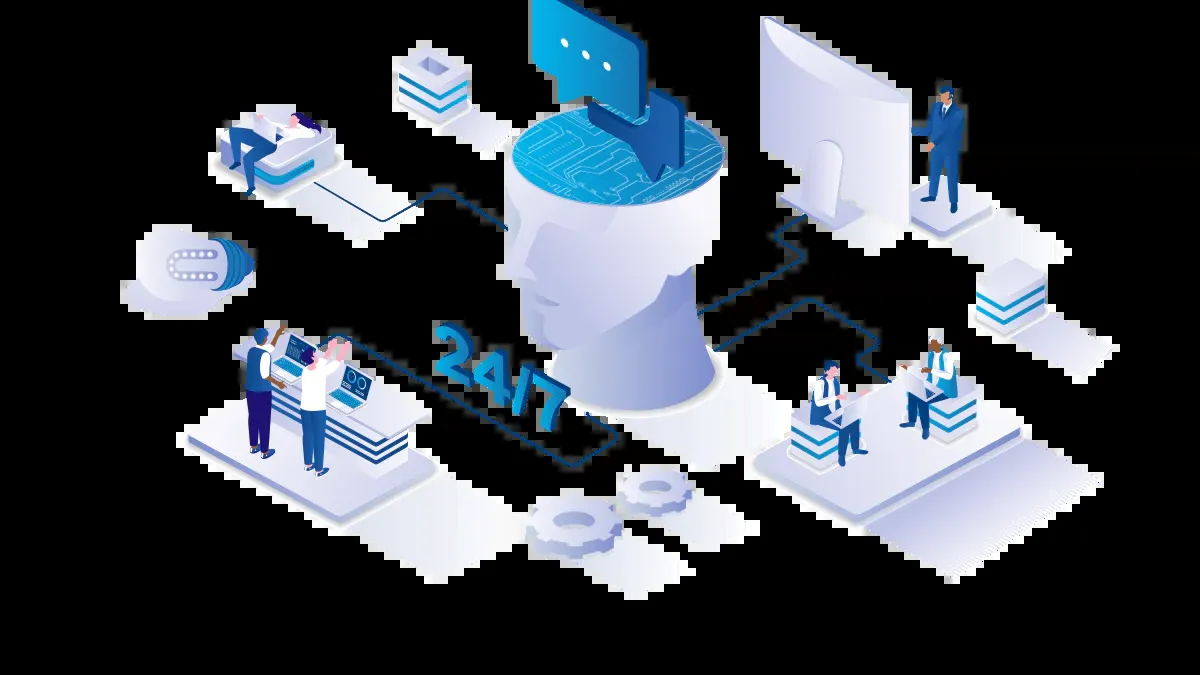
Azure Virtual Desktop (AVD) is a comprehensive virtual desktop solution that provides a full Windows experience. You can choose between Windows 11, Windows 10, or Windows Server, allowing for both single-session and multi-session configurations. AVD stands out for its flexibility and scalability, making it suitable for various business needs. Here are some of its key features:
| Feature | Description |
|---|---|
| Full Windows Experience | Delivers a full Windows experience with Windows 11, Windows 10, or Windows Server. |
| Microsoft 365 Optimization | Optimizes Microsoft 365 Apps for enterprise use in multi-user virtual scenarios. |
| Flexible Deployment | Allows hosting desktops and apps on-premises or in Azure, with options for hybrid configurations. |
| Autoscale | Automatically adjusts capacity based on demand, helping to manage costs effectively. |
| Simplified Management | Provides a unified management experience across different Windows and Windows Server operating systems. |
AVD's ability to integrate with existing Azure services enhances its appeal. You can leverage the power of the cloud to create a robust virtual desktop environment that meets your organization's specific requirements.
Windows 365
Windows 365 offers a different approach to virtual desktops. It provides a cloud PC experience that allows you to access your Windows desktop from anywhere with minimal setup. This solution is particularly beneficial for organizations that may not have extensive Azure expertise. Here are some unique capabilities of Windows 365:
| Unique Capability | Windows 365 | Traditional VDI |
|---|---|---|
| Cost | Eliminates upfront hardware costs | Requires significant hardware investment |
| Scalability | Easily scales resources as needed | Scaling can be complex and costly |
| Management | Simplified management | Often requires extensive IT resources |
| Security | Leverages Microsoft cloud security | Security depends on local infrastructure |
| Accessibility | Access from anywhere with internet | Limited to on-premises access |
Windows 365 simplifies the deployment process, allowing IT teams to provision secure desktops in just minutes. This ease of use, combined with predictable monthly licensing, makes it an attractive option for many businesses. As you consider your virtual desktop strategy, think about how each solution aligns with your organization's goals in the AI era.
Operating Models of Virtual Desktop Solutions
AVD Operating Model
The Azure Virtual Desktop (AVD) operating model gives you extensive control over your virtual desktop infrastructure. You can configure pooled or personal desktops, manage session hosts, and adjust resource allocation based on your organization's needs. This flexibility allows you to create a tailored environment that meets specific performance requirements.
Here are some key features of the AVD operating model:
- Infrastructure Management: Managed by your IT teams, allowing for detailed customization.
- Multi-Session Support: AVD supports multi-user environments, enhancing resource efficiency.
- Scalability: You can scale resources dynamically, which is ideal for large organizations with fluctuating demands.
However, this level of control comes with increased complexity. Your IT team must handle updates, maintenance, and capacity planning. This can lead to a heavier administrative burden, especially if your organization lacks the necessary expertise.
Windows 365 Model
In contrast, Windows 365 simplifies the virtual desktop experience. This model provides a managed service where Microsoft handles the underlying infrastructure. You can manage your Cloud PCs similarly to physical laptops, which reduces the need for extensive IT resources.
Key aspects of the Windows 365 operating model include:
- Infrastructure Management: Microsoft manages the service, allowing you to focus on user needs rather than backend complexities.
- Customization: While customization options are limited, this model emphasizes ease of use and management.
- User Experience: Each user enjoys a consistent personal desktop experience, which enhances productivity.
The simplicity of Windows 365 makes it an attractive option for organizations that may not have extensive Azure expertise. However, this model may not offer the same level of flexibility as AVD.
| Feature | Windows 365 | Azure Virtual Desktop |
|---|---|---|
| Customization | Limited options, focusing on ease of use and management. | Highly customizable, allowing specific configurations for diverse needs. |
| Scalability | Scales by adding Cloud PCs, less flexible for multi-user scenarios. | Greater scalability with support for multi-user sessions, ideal for large organizations. |
| Support and Maintenance | Microsoft handles most tasks, reducing IT burden but less control. | IT manages updates and maintenance, offering more control but increasing complexity. |
| User Experience | Consistent personal desktop experience for each user. | Flexible experience with shared desktops, potential performance variations due to concurrent users. |
Use Cases for VDI Solutions
Ideal Use Cases for AVD
Azure Virtual Desktop (AVD) shines in several scenarios, particularly for organizations with complex IT needs. Here are some ideal use cases:
Healthcare: AVD supports healthcare organizations by implementing Zero Trust security models. This ensures that sensitive data remains secure in the cloud rather than on potentially insecure local devices. The built-in authentication and access controls align with industry standards, making AVD suitable for regulated sectors.
Finance: Similar to healthcare, financial institutions benefit from AVD's robust security features. The ability to manage sensitive data securely while providing employees with remote access enhances operational efficiency.
Public Sector: Government agencies can leverage AVD to provide secure access to applications and data. The flexibility of AVD allows these organizations to adapt to changing demands while maintaining compliance with regulations.
AVD's flexible resource allocation and multi-session capabilities make it ideal for large organizations. You can scale resources up or down as needed without purchasing new hardware. This pay-per-use model enhances cost control by aligning spending with actual usage.
Ideal Use Cases for Windows 365
Windows 365 is particularly well-suited for small and medium-sized businesses (SMBs) that require simplicity and ease of management. Here are some scenarios where Windows 365 excels:
Cloud-based Access: Windows 365 operates entirely in the cloud, allowing users to access their PCs from any device. This flexibility supports remote work and hybrid work models effectively.
Scalability: As your business grows, Windows 365 allows you to adjust your workforce without the need for new hardware. This scalability is crucial for organizations that experience fluctuating demands.
Increased Computing Power: Specialized roles within your organization can access powerful applications from anywhere. This capability enhances productivity and supports various business functions.
Simplified IT Management: IT departments can manage cloud PCs easily without the complexities of traditional virtualization. This simplicity reduces the administrative burden on your team.
Flexible Pricing Tiers: Windows 365 offers different plans, including Basic, Standard, and Premium options. This flexibility allows you to choose a plan that aligns with your business needs and budget.
Cost Structures and Pricing
AVD Pricing Model
When considering Azure Virtual Desktop (AVD), you encounter a consumption-based pricing model. This means you pay for what you use, which can lead to variable costs. The primary components of AVD pricing include licensing and infrastructure costs.
Here’s a breakdown of the licensing options available for AVD:
| License | Azure Virtual Desktop access included? |
|---|---|
| Microsoft 365 E3 / E5 | Yes |
| Microsoft 365 F3 | Yes |
| Microsoft 365 Business Premium | Yes |
| Windows 11/10 Enterprise E3 / E5 (per user) | Yes |
| Windows 11/10 VDA per user | Yes |
| External users (per-user access pricing) | |
| Full desktops and apps | $10.00/user/month |
| Apps only | $5.50/user/month |
The infrastructure costs typically represent the largest expense. These costs include compute, storage, and networking. Compute costs depend on the virtual machine (VM) series and size you select. You can optimize these costs by choosing the right VM configuration based on your organization's needs.
Windows 365 Pricing
In contrast, Windows 365 offers a fixed per-user, per-month pricing model. This structure provides predictability in your operational expenses. You know exactly what you will pay each month, which simplifies budgeting.
Here’s a comparison of the pricing models:
| Feature | Azure Virtual Desktop (AVD) | Windows 365 Cloud PC |
|---|---|---|
| Pricing Model | Consumption-Based (PAYG) | Fixed Per-User/Per-Month |
| Cost Structure | Variable OpEx | Predictable OpEx |
Windows 365 also eliminates the need for significant upfront hardware investments. This solution allows you to scale your resources easily as your business grows. The simplicity of Windows 365 makes it an attractive option for organizations looking for a straightforward virtual desktop solution.
Both AVD and Windows 365 have their advantages. AVD provides flexibility and control, while Windows 365 offers simplicity and predictability. Your choice will depend on your organization's specific needs, budget, and long-term strategy.
Management Complexity in Virtual Desktop Strategy
Managing AVD
Managing Azure Virtual Desktop (AVD) can present several challenges for your IT team. The complexity of AVD requires a deep understanding of Azure services and infrastructure. Here are some key administrative challenges you might face:
- Steep Learning Curve: You may struggle with the intricacies of Azure services, especially without dedicated specialists.
- Cost Unpredictability: The consumption-based pricing model can lead to fluctuating expenses, complicating long-term budget predictions.
- Management Complexity: Significant time may be spent on resource management rather than focusing on user needs and business outcomes.
- Ongoing Administration: Continuous management, performance optimization, and security monitoring are necessary for effective operation.
To effectively manage AVD, consider implementing best practices. For instance, you should evaluate your existing infrastructure and map out migration paths to AVD. Choosing the right resources, such as VM sizes and storage configurations, is crucial. Additionally, using tools like the Azure Pricing Calculator can help you estimate costs and understand total cost of ownership (TCO).
Managing Windows 365
In contrast, managing Windows 365 simplifies the virtual desktop experience. Microsoft handles much of the underlying infrastructure, allowing you to focus on user needs. Here are some management tools and features that make administration easier:
| Feature | Description |
|---|---|
| Automate management tasks | Schedule and automate repetitive user or mailbox management activities, simplifying admin workload. |
| Template-based management | Use preconfigured templates to standardize actions, reducing manual errors and ensuring consistency. |
| Microsoft 365 delegation | Assign custom roles to delegate tasks without full admin rights, allowing for distributed workload. |
| Virtual tenant | Divide your organization into virtual tenants for focused management, enhancing security and efficiency. |
Windows 365 also offers an intuitive admin dashboard that provides a straightforward interface for aligning tenants with compliance best practices. This simplicity reduces the administrative burden on your team, making it ideal for organizations with limited IT resources.
| Feature | Azure Virtual Desktop (AVD) | Windows 365 |
|---|---|---|
| Management Complexity | Requires in-depth management of VMs, networking, etc. | Simplified management with dedicated Cloud PCs |
| Operational Overhead | Higher due to extensive configuration options | Lower, managed by Microsoft |
| Ideal for | Organizations needing deep control and flexibility | Organizations with limited IT resources |
Hybrid Solutions and Integration
Combining AVD and Windows 365
Combining Azure Virtual Desktop (AVD) and Windows 365 creates a powerful hybrid solution that meets diverse business needs. This approach allows you to leverage the strengths of both platforms. You can provide users with the flexibility of AVD while enjoying the simplicity of Windows 365.
By integrating these solutions, you can enhance user experience and operational efficiency. For example, you might use AVD for resource-intensive applications while deploying Windows 365 for everyday tasks. This combination allows you to optimize costs and improve performance across your organization.
Integration Strategies
Integrating AVD and Windows 365 with your existing IT infrastructure requires careful planning. Here are some key technical requirements to consider:
- Utilize Azure Arc to deploy AVD components.
- Register on-premises machines with the Azure Virtual Desktop service in Azure.
- Maintain a local Active Directory on-premises or as Infrastructure as a Service (IaaS) in Azure, as Azure AD Directory Services isn’t supported.
- Synchronize your local Active Directory to Azure Active Directory.
- Ensure network connectivity to an Azure virtual network (vNet) to allow Windows 365 Cloud PCs to join Active Directory like traditional workstations.
- Configure Hybrid Azure AD Join and install supporting connectors on-premises.
- Plan and configure network access and internet access.
Integrating AVD and Windows 365 also involves aligning with existing management tools. The following table outlines key integration components:
| Integration Component | Description |
|---|---|
| Azure Active Directory (Azure AD) | Manages user authentication and authorization for Windows 365. |
| Microsoft Intune | A cloud-based service for managing and securing Cloud PCs, including device configuration and app management. |
| Microsoft Endpoint Configuration Manager | Integrates with existing on-premises infrastructure for unified management alongside cloud tools. |
| Management integration | Provides a unified toolchain for policy enforcement, inventory, and reporting across AVD and Windows 365. |
You can also implement security measures such as Conditional Access and Multi-Factor Authentication (MFA) to protect your hybrid environment. Azure Virtual Desktop integrates directly with Microsoft’s identity and security capabilities. This integration allows you to apply familiar controls across your desktop environments, ensuring consistent security policies.
However, organizations may face challenges when integrating these solutions. Delivery capacity issues can arise if partners lack available engineering resources. Complexity in design and operation can lead to increased support costs. Careful migration planning is essential to avoid complications when transitioning from legacy platforms.
By strategically combining AVD and Windows 365, you can create a robust hybrid solution that supports global collaboration and enhances productivity in your organization.
Choosing between Azure Virtual Desktop (AVD) and Windows 365 requires careful consideration of your organization's needs. Here are some key takeaways:
| Feature | Azure Virtual Desktop | Windows 365 |
|---|---|---|
| Deployment Type | Virtual desktop infrastructure (VDI) on Azure | Desktop-as-a-Service (cloud PC) |
| User Model | Multi-session, shared desktops | Single-user, dedicated desktops |
| Management | Full control over virtual machines | Simplified via Microsoft portal |
| Scalability | High — supports custom scaling | Linear — per-user provisioning |
| Pricing | Usage-based (Azure resources) | Fixed monthly cost per user |
| IT Involvement | Requires setup and maintenance | Minimal — managed by Microsoft |
| Best For | Enterprises, complex environments | SMBs, lean IT teams |
Evaluate your need for flexibility, control, and simplicity. AVD suits large deployments needing scalability, while Windows 365 offers a straightforward, predictable cost structure. As AI and cloud computing evolve, both solutions will adapt, ensuring you can support your workforce effectively in the future. 🌐
FAQ
What is a virtual desktop strategy?
A virtual desktop strategy involves using virtual desktop infrastructure (VDI) to deliver desktop environments to users. This approach enhances flexibility, security, and management of cloud desktops, allowing you to optimize your work experience.
How does AVD ensure high availability?
Azure Virtual Desktop (AVD) provides high availability through its autoscaling feature. This capability automatically adjusts resources based on demand, ensuring that users have consistent access to their cloud PC without interruptions.
What are the benefits of using Windows 365?
Windows 365 offers a simplified cloud PC experience. You can access your desktop from anywhere, enjoy predictable monthly costs, and reduce IT management complexity, making it ideal for organizations with limited resources.
Can I integrate AVD with existing IT infrastructure?
Yes, you can integrate AVD with your existing IT infrastructure. This integration allows you to leverage current resources while enhancing your virtual desktop strategy with cloud capabilities and high availability.
What types of businesses benefit from VDI?
Both small and large businesses benefit from VDI. Organizations with remote workforces, fluctuating demands, or specific security needs find that VDI solutions like AVD and Windows 365 enhance productivity and user experience.
How does VDI improve work efficiency?
VDI improves work efficiency by providing users with secure, remote access to their desktops and applications. This flexibility allows employees to work from anywhere, enhancing collaboration and productivity.
What is the difference between AVD and Windows 365?
AVD offers extensive customization and control over virtual desktops, while Windows 365 focuses on simplicity and ease of management. Your choice depends on your organization's specific needs and virtual desktop strategy.
How can I ensure the security of my cloud desktop?
To ensure the security of your cloud desktop, implement strong identity management practices, use multi-factor authentication, and regularly update your security policies. Both AVD and Windows 365 provide built-in security features to enhance protection.
🚀 Want to be part of m365.fm?
Then stop just listening… and start showing up.
👉 Connect with me on LinkedIn and let’s make something happen:
- 🎙️ Be a podcast guest and share your story
- 🎧 Host your own episode (yes, seriously)
- 💡 Pitch topics the community actually wants to hear
- 🌍 Build your personal brand in the Microsoft 365 space
This isn’t just a podcast — it’s a platform for people who take action.
🔥 Most people wait. The best ones don’t.
👉 Connect with me on LinkedIn and send me a message:
"I want in"
Let’s build something awesome 👊
1
00:00:00,000 --> 00:00:12,000
Yeah, welcome back to the MC65 and podcast to show where we deep dive into Microsoft technologies with experts building real world solutions every day.
2
00:00:12,000 --> 00:00:25,000
Today we are talking about one of the hottest topics and modern IT infrastructure virtual desktops organizations are rethinking how employees access applications and data remote workers here to stay.
3
00:00:25,000 --> 00:00:47,000
I hope security requirements continue to increase and IPOCs are being to reshape endpoint computing by with Microsoft growing portfolio, including Azure virtual desktop window 365 cloud PCs Microsoft into Microsoft enter ID and Microsoft 365 many organizations struggle to understand which solution.
4
00:00:47,000 --> 00:00:57,000
We live that their business joining me today are two people who spent their days designing exactly these environments, data come for us and Dominic are.
5
00:00:57,000 --> 00:01:14,000
Cloud solution architect specialized in Azure virtual desktop and Windows 365 today we are helped organization design be great and optimized virtual desktop environments across hybrid and cloud infrastructure today we separate marketing from reality discuss architecture.
6
00:01:14,000 --> 00:01:29,000
Discussion cost optimized security AI co pilot window 365 for online disaster recover automation and the next five years desktop computing might look data and Dominic welcome to the MC65 podcast.
7
00:01:29,000 --> 00:01:32,000
Thank you.
8
00:01:32,000 --> 00:01:42,000
So can you tell us about a little bit about yourself and how did you get into the Microsoft infrastructure topic.
9
00:01:42,000 --> 00:01:44,000
Should I start.
10
00:01:44,000 --> 00:01:46,000
Yeah.
11
00:01:46,000 --> 00:01:48,000
So yes, my name is Dita.
12
00:01:48,000 --> 00:01:50,000
I'm a cloud solutions architect.
13
00:01:50,000 --> 00:01:57,000
I've been in the VDI space for I think over 12 years started back in the central data all of our years at one is as well.
14
00:01:57,000 --> 00:02:03,000
Windows virtual desktop Azure virtual desktop now Windows 365 and so came along into you.
15
00:02:03,000 --> 00:02:13,000
And remote app was something that I was always very passionate about first time I saw it I was like, whoa, is this magic. So that's how I transition to the space.
16
00:02:13,000 --> 00:02:21,000
And then a couple of years ago I was recognized for all my effort and I got my identity award for both catchings.
17
00:02:21,000 --> 00:02:23,000
Congratulations.
18
00:02:23,000 --> 00:02:34,000
Very cool. My name is W. I probably active in computing and technology for about 20 plus years now.
19
00:02:34,000 --> 00:02:45,000
I started out with windows server operating systems and via where Citrix a little bit of the rest and multi products on the side.
20
00:02:45,000 --> 00:02:54,000
Yeah, I think about 10 years ago I slowly transitioned to everything that you know impacts the local workspace.
21
00:02:54,000 --> 00:03:03,000
I really like the idea of virtual desktop. So it was really interested in remote desktop services going over to a VD.
22
00:03:03,000 --> 00:03:16,000
And of course, from the 365 came out I was really into Windows 365 and I just started my journey of you know sharing all that knowledge of my blogs and the 365 community and such.
23
00:03:16,000 --> 00:03:27,000
Yeah, they got to know a lot of people in the tech community as well. Even with the data of course you can find us presenting a very few of these together about just the topic.
24
00:03:27,000 --> 00:03:35,000
Yeah, so either how would you explain a for you to someone you.
25
00:03:35,000 --> 00:03:45,000
How I would explain a VD to someone new it's like a virtual computer running in the cloud that you can access from anywhere.
26
00:03:45,000 --> 00:03:56,000
Is that fit. I think that is the name actually. And if I would extend that to us, Windows 365 is just what the difference between both of them.
27
00:03:56,000 --> 00:04:15,000
And then the thing is for that in fact, focus people like smile a lot of things themselves like build a lot of things themselves while Windows 365 is also a virtual desktop accessible from anywhere with more focus towards and to experience and keeping things simple.
28
00:04:15,000 --> 00:04:20,000
Okay, and Dominic, what did you think why why Microsoft build it?
29
00:04:20,000 --> 00:04:26,000
If you are within 365 or you can take both.
30
00:04:26,000 --> 00:04:44,000
Okay, I think it's more of you know, Microsoft taking more of the products to the cloud, of course, into Azure remote just some services was already a thing so we could already give our virtual nest homes to our end users.
31
00:04:44,000 --> 00:04:53,000
Just implement a lot of really cool features, the conditional access saying you're in gallery images and such and all that comes into play.
32
00:04:53,000 --> 00:04:59,000
But you know, if you're going to deploy a VD there's just a lot of technical knowledge that you need to have.
33
00:04:59,000 --> 00:05:07,000
And if you look at Windows 365, that's just all of the goodness that A VD brings, but it's made really simple.
34
00:05:07,000 --> 00:05:13,000
So in hands on into the experience, then you're probably already good to go with the blowing when this is about to happen.
35
00:05:13,000 --> 00:05:16,000
See, and that's really amazing.
36
00:05:16,000 --> 00:05:24,000
Yeah, I also think that to add on that like Windows virtual desktop, it's existed for a while ago.
37
00:05:24,000 --> 00:05:33,000
I have a while before Windows 365 for the thing and then go with hit us and I think that was like a big push on Microsoft to start.
38
00:05:33,000 --> 00:05:42,000
Like heavily investing on Windows 365 because like the whole world was looking for a solution to access that work resources from anywhere.
39
00:05:42,000 --> 00:05:48,000
And I think that cost because it's a big shift to works those platforms as well.
40
00:05:48,000 --> 00:05:55,000
Okay, and what would when we talk about Azure virtual desktop, what problem do is it solve?
41
00:05:55,000 --> 00:06:00,000
What will you say to your customer?
42
00:06:00,000 --> 00:06:08,000
If you're currently like a short who is doing a lot of on-prem stuff, you will rely on a VPN solution.
43
00:06:08,000 --> 00:06:14,000
I know Microsoft has sort of similar solutions nowadays as well, but one of the true.
44
00:06:14,000 --> 00:06:22,000
Fortes of photos platform is this access your resources using secure conditional access without the need to manage a VPN.
45
00:06:22,000 --> 00:06:33,000
Also, if you deploy those virtual less solutions on prem or you always tell yourself you're responsible for maintaining the gateway to license and you get license and still a requirement of course.
46
00:06:33,000 --> 00:06:39,000
But the gateway and all that room and abilities that often come up with to party vanvers, it's you need to be on top of it.
47
00:06:39,000 --> 00:06:43,000
You need to patch it very soon very quickly.
48
00:06:43,000 --> 00:06:51,000
And I think with Windows 365 and AVD Microsoft does a very good job in taking care of that for you.
49
00:06:51,000 --> 00:06:57,000
It's a lot more than power than we have at our company.
50
00:06:57,000 --> 00:07:06,000
That's really good answer, but I can add to on top of that because I just learned recently, you know, and this is probably especially for the dutchies.
51
00:07:06,000 --> 00:07:11,000
If the Dutch people watch this, there's actually a lot in the Netherlands, it's called the bad day.
52
00:07:11,000 --> 00:07:22,000
And it basically says if you are self-employed, you know, you're going to work for a company, then that company cannot provide tools for you to work on physical tools.
53
00:07:22,000 --> 00:07:37,000
So you need to have your own desktop to work from and how cool is it that you can just use your own desktop to connect into that virtual desktop, that is managed and made date by the company that you're working for and then you're able to perform your work that way.
54
00:07:37,000 --> 00:07:41,000
But also, so business needs.
55
00:07:41,000 --> 00:07:49,000
Yeah, I'm also in the GABA community, so I hope a little of some people from Netherlands, listen.
56
00:07:49,000 --> 00:07:58,000
But I can imagine that it also holds true for other companies, a part of the countries, but I'm unsure, but it's especially true for the Netherlands.
57
00:07:58,000 --> 00:08:16,000
Yeah, we had your virtual desktop, had some core components. I think we can do the start with data, I say, short walk through to the core components and then we switch the first, start with data.
58
00:08:16,000 --> 00:08:19,000
What are host pools?
59
00:08:19,000 --> 00:08:30,000
A host pool is like a combination of different hosts, so a host or better called session host is like a virtual machine.
60
00:08:30,000 --> 00:08:43,000
When all your users or single user or multi users, we have both those flavors in a video will have on to so they do that work on those machines and a host pool is a combination of those host.
61
00:08:43,000 --> 00:08:49,000
Most of the time you built a host pools for a specific purpose.
62
00:08:49,000 --> 00:08:51,000
That's what a host pool is.
63
00:08:51,000 --> 00:08:54,000
And the only what's the session hosts.
64
00:08:54,000 --> 00:09:02,000
You can think about that as a virtual machine running in Azure primarily, but now with agent can also run it locally.
65
00:09:02,000 --> 00:09:11,000
And that's where you use actually signed into so that provides their work, the desktop.
66
00:09:11,000 --> 00:09:16,000
And what does the workspace mean?
67
00:09:16,000 --> 00:09:29,000
A workspace is like a logical combination of different application groups. So like you can configure a desktop to be an application group, you can configure a set of remote applications.
68
00:09:29,000 --> 00:09:38,000
And a workspace can combine multiple of those application hooks it just to visualize it's together for an end user.
69
00:09:38,000 --> 00:09:43,000
I can already imagine the next question what's an application group.
70
00:09:43,000 --> 00:09:44,000
Yeah.
71
00:09:44,000 --> 00:09:46,000
Yes.
72
00:09:46,000 --> 00:09:56,000
Well, application group is basically my, you know, if you go to deploy a full desktop or, you know, specific applications to end users.
73
00:09:56,000 --> 00:10:02,000
Yeah, then I have all my research, but I never heard before is FS FS logics.
74
00:10:02,000 --> 00:10:10,000
I don't talk about that.
75
00:10:10,000 --> 00:10:28,000
If you ask me like the biggest issue that companies face with virtual desktop solutions in general are profile management on its profile management back in the days that sit weeks and stuff profiles always are a big issue.
76
00:10:28,000 --> 00:10:35,000
And FS logics is like basically the modern solution for Microsoft to provide a profile management solution in the back in the days on RDS.
77
00:10:35,000 --> 00:10:38,000
They have like user profile disks.
78
00:10:38,000 --> 00:10:45,000
And they acquired FS logics because FS logics was a way better solution than you be these back in a day were.
79
00:10:45,000 --> 00:10:51,000
And FS logics to this day still being used on the APD but also on other platforms as well.
80
00:10:51,000 --> 00:10:59,000
So it's Windows 365 Microsoft is taking another turn and because they're with Windows 365 or more looking at like a managed platform.
81
00:10:59,000 --> 00:11:14,000
So in Windows 365 if you use like the flex shared mode, you can not use FS logics, but it's like an other profile management solution and it's called user experiencing.
82
00:11:14,000 --> 00:11:22,000
So these solutions are for profile management, but they serve a different platform.
83
00:11:22,000 --> 00:11:40,000
Yeah, that really the question why would actually implement something like FS logics for you know the people who don't know it is especially with multi session operating systems that multiple people sign into that same server if you will, but session most.
84
00:11:40,000 --> 00:11:50,000
So if you have a pool post pool that we discussed earlier, then on one day you can go and serve one and choose a server 73 for example.
85
00:11:50,000 --> 00:11:56,000
And the last thing that you want to need is to figure out all of these applications again with the first runs and so on.
86
00:11:56,000 --> 00:12:07,000
So with FS logics in place it just gathers all of those settings and it doesn't matter to which server that you're signing into your settings will basically follow the animals.
87
00:12:07,000 --> 00:12:17,000
And there are also error files and a net app files who will explore the first part of the second one.
88
00:12:17,000 --> 00:12:22,000
So they're basically serving the same purpose.
89
00:12:22,000 --> 00:12:28,000
I think nowadays, well, you have also Internet files that use either files in the back ends.
90
00:12:28,000 --> 00:12:34,000
That's specifically a configuration that you need to do with the net up files.
91
00:12:34,000 --> 00:12:45,000
It's basically just a location where you deploy like a storage account to host the share that will host the profiles that you use for as much as basically it.
92
00:12:45,000 --> 00:13:00,000
And if you need a lot of performance or you use profiles that require accessing a lot of small files for specific applications, a lot of written right actions to like a set small files especially.
93
00:13:00,000 --> 00:13:05,000
You need a lot of IOics and as a net up files might be this better solution here.
94
00:13:05,000 --> 00:13:14,000
And even cost effective right if you have a demand for a large storage, then you might want to compare is as a file still the way to go.
95
00:13:14,000 --> 00:13:24,000
So you know, open to like to go with that.
96
00:13:24,000 --> 00:13:29,000
Farts to just see what it does and get the correct solution placed.
97
00:13:29,000 --> 00:13:36,000
The very important thing to know as well is that the I have to get are also dependent on the storage that you choose.
98
00:13:36,000 --> 00:13:39,000
So the higher your storage volume is the more I have to do.
99
00:13:39,000 --> 00:13:54,000
You deploy a very, very big volume. But yeah, during a group of concepts most of the time you only have like a couple of people connecting and testing so it's not that important most of the time at that stage in the projects.
100
00:13:54,000 --> 00:14:02,000
Yeah, and then we have also Microsoft Entraadi and iTunes who will take what.
101
00:14:02,000 --> 00:14:15,000
So these of course, I that provider so that's where you use or count will live and if you connect your local desktop or your cabb see to identify or to manage it of course.
102
00:14:15,000 --> 00:14:21,000
Then that's an entry ID for you. That's also a conditional accessing limit and all of that good stuff.
103
00:14:21,000 --> 00:14:36,000
But if you look at Microsoft engine that your management engine right there so that actually you know that makes use of all the pilot to get all of the configuration into the desktop that you need and it could be device configuration profiles.
104
00:14:36,000 --> 00:14:51,000
So you put all of the settings right in there it also wanted to fulfill clients you know with device compliance policies which you also put in some apps corporate applications and deploy those at scale to all of those connected to the desktop.
105
00:14:51,000 --> 00:15:02,000
And it doesn't matter if that's a cloud disease or physical desktop and nowadays even personal host pools and DVD.
106
00:15:02,000 --> 00:15:14,000
And now we have a lot of I think puzzle pieces how we fit this together to get a role image.
107
00:15:14,000 --> 00:15:16,000
To have what?
108
00:15:16,000 --> 00:15:23,000
Yeah, how we fit all these these puzzle pieces together together the role image.
109
00:15:23,000 --> 00:15:31,000
So the goal, the architecture in totally mean.
110
00:15:31,000 --> 00:15:45,000
I think that's just there's a number of ways to go about this right so first my advice would be if I don't express you right I would just decide if you want to go with a D or win the 365.
111
00:15:45,000 --> 00:15:59,000
So just decide the right solution for your business use case looking at the image that you're using you know wins 11 and just get layering applications on it there are couple of ways to do so.
112
00:15:59,000 --> 00:16:09,000
So first off if you're going ministry 65 or even you know you could make use of gallery images and those are already optimized by Microsoft.
113
00:16:09,000 --> 00:16:25,000
So they that they're you know don't know necessary background processes going on and you could just either later on additional applications into that image so people get their applications that way.
114
00:16:25,000 --> 00:16:50,000
You can go in msa x app attached or use a third party solution liquid where for example you know flags happens to really good solution that also bottles application is injected in there so that there's just numerous ways to go about this my personal problems wouldn't be to go for a golden image because if you go like a golden image of custom image if you will.
115
00:16:50,000 --> 00:17:19,000
You just need to have an additional virtual machine in Azure and get all of the you know your operating system in there your updates in there then get all your applications and customizations in there which you also need to be aware of all the customization optimizing that image you need to still need to capture that one and deploy it once they're once that's configured so yes you can do so but you need to be aware of you know the extra work that you're taking on.
116
00:17:19,000 --> 00:17:26,000
And especially the responsibility of keeping it up to date over time so that's something you need to be aware of.
117
00:17:26,000 --> 00:17:39,000
Yeah, I'm just a question but it's like going acceptable in images or in my opinion a thing of the past you can still use in combination with the windows cc5 support as supported as well.
118
00:17:39,000 --> 00:18:04,000
So the companies that rely on those legacy things it's still possible but I think there are more modern solutions to deploy updates to the boy applications to assert an image everything starts with an image but if you have to choose to be a custom golden image or the Microsoft provide windows 11 image I would always choose for the windows 11 image if the new case is allowed.
119
00:18:04,000 --> 00:18:18,000
If I can still touch base on that one because you know this is really there because now it's saying you shouldn't do it is but if you're going that way there's a really cool solution by Microsoft which is using custom image templates.
120
00:18:18,000 --> 00:18:44,000
And if you're going that route then you know Microsoft actually helps you with that tool which is getting all of the configuration in there and it actually build that golden image for you so it uses actual image builder it gets that image in there does all of the customizations for you it captures it and then you can start using it on either windows 365 or evening.
121
00:18:44,000 --> 00:19:04,000
Yeah so let's try something a little fight so either I give you the role the puzzle desktop guy and the only year of the pool session host so let's try sell every product to each other.
122
00:19:04,000 --> 00:19:24,000
Okay well if I'm the the pool session guy the pool host pool guy then of course I'm going to win because we're talking a dd and if you're going to a personal desk of some a dd that's quite cost expensive and we all like to keep some money in a pocket so it's easy I win.
123
00:19:24,000 --> 00:19:52,000
On my end it's easy as well like personal that's no you don't have any noisy neighbors if you for example have 20 people on a single host and one person opens power the eye the whole how the whole host goes down like 20 people are impacted by them and if you go single session single desktop person desktop the other small persistent environment I connect to the same the M adg department can do whatever I want on it and it's my machine and no one else.
124
00:19:52,000 --> 00:20:00,000
As to connect with it.
125
00:20:00,000 --> 00:20:21,000
Yeah then yeah we have a lot a lot about the A4E but there's a little bit newer or new product they call the windows 365 and I think yeah I'm also many people a little bit confused about this so let's clear that up.
126
00:20:21,000 --> 00:20:29,000
What exactly is windows 365 and how is it different what what did you think.
127
00:20:29,000 --> 00:20:48,000
That's a really good question if you look at as a virtual desktop because that's what we're comparing to you need to think about that is magic an entire platform so everything from storage to the virtual machines to security networking everything that comes into play right so.
128
00:20:48,000 --> 00:21:17,000
And you're looking at platform as a service if you will but windows 365 that's service on its own and it really simplifies the way that you can deliver those virtual desktops to your end users and it does that by basically uses in tune to manage all of those settings on those cloud is these.
129
00:21:17,000 --> 00:21:27,000
And it is still uses and for identity things and it's just a lot more easy to implement and there's a couple of.
130
00:21:27,000 --> 00:21:42,000
And you can use you know a couple of solutions that you can have a look at especially in the US you know there's government especially for government agencies but there's also a business which is so really just ready to use.
131
00:21:42,000 --> 00:22:08,000
And you can see it just the play it and it's not much configuration that you should want to apply to it because it's can still manage it a little bit by engine but not too much enterprise is probably the default flash cloud we see experience that you can deploy to your end users and that's more of a per user for month or per user per year type of license that you have going on.
132
00:22:08,000 --> 00:22:37,000
So you don't want to use that that's a two big of a commitment you can still use a concurrency based licensing scheme a concurrency means you know looking at the department of like 30 users but only 10 users sign in maximum at the same time you know then your concurrency is set at 10 and then you can actually use windows 365 fraud line which is now called flex by the way you can implement that and save a lot on cost.
133
00:22:37,000 --> 00:23:02,000
For that so there's just a lot of things that you can use windows 365 for even for BCD purposes you know this windows 365 reserves and skew out at the at the moment and that just solves the issue like person which is is on the road a lot but he or she forgot their personal laptop you know or it just breaks down
134
00:23:02,000 --> 00:23:14,000
while they're abroad then how cool is it that you can just use that skew assigned to the end user and the employees that are reserved for the CC so they can work on it.
135
00:23:14,000 --> 00:23:19,000
So yeah that's just a lot of things that is reduced when it's 365 for.
136
00:23:19,000 --> 00:23:38,000
It's also important to note that for edge of virtual desktop you need that specific VDI skill set while the windows 365 most of the time if you have someone managing those physical endpoints using in tune they can do a full set of windows 365 like 30 minutes to an hour without having any prior knowledge of it.
137
00:23:38,000 --> 00:23:45,000
It's crazy why 30 minutes of deploying VDI solution within your company it's really cool.
138
00:23:45,000 --> 00:24:10,000
Yeah I have a look and you say before cloud it's how do the cloud PC work especially when I look at reddit there are five five topics that identity storage performance persistent and and license licensing here also a topic how does this work.
139
00:24:10,000 --> 00:24:21,000
It's a little bit like Dominic explained already with windows 365 Microsoft takes care of all the hosting stuff for you so all the storage in the back ends.
140
00:24:21,000 --> 00:24:36,000
It's all managed by Microsoft you don't have to worry about it while in the view with windows 365 just by license and it's to a group basically and the cloud PCs are provision automatically.
141
00:24:36,000 --> 00:24:54,000
It really is that simple and I kind of like I kind of like the Microsoft in continues down this simplicity path right looking at networking for example if you're going to do a BD then there's just a network design that you need to be aware of and secure your solution right.
142
00:24:54,000 --> 00:25:13,000
365 of course you can do something is calling a and see so you still can make use of a vnet with a subnet and just call your cloud PCs within that subnet but it's not really required right so if you don't need to connect to your existing corporate network.
143
00:25:13,000 --> 00:25:23,000
You can also make use of a Microsoft hosted network and that's just really simple in the provision policy just hit the bottom and that's all the risk to the networking part of it.
144
00:25:23,000 --> 00:25:34,000
Microsoft just takes care of everything for you and you still have the option to put it to site VPN and still able to be connected to your corporate network.
145
00:25:34,000 --> 00:25:43,000
So it's really simplicity and cost you know licensing models that's what I just refer to.
146
00:25:43,000 --> 00:26:12,000
So you can imagine this so you are interested in like a virtual desktop and you come to us and you ask about as a virtual desktop for example you say hey I like I want as a virtual desktop or we need to 65 and start talking to you about a V and the discussion quickly shifts away from a V to words and as you landing zone and you're like hey I have nothing on as yet or I just did some point and click on Azure but it's not really government well.
147
00:26:12,000 --> 00:26:31,000
And you realize okay before I can deploy a VD I need to fully Azure I fully feature as a landing zone it will cost additional consultants here additional money additional resource not related to a V but require to use a V and then with when is 65 I can just tell you hey you want a virtual desktop here you go no as an requirements.
148
00:26:31,000 --> 00:26:38,000
Oh you have Azure we can tie into Azure like them except but it's not requirement at all.
149
00:26:38,000 --> 00:27:01,000
So I think I pay for the licensing and I also pay I think for for a special part of performance like the CPU or under and for computing or something and then I pay extra for the star which right no no for Windows 65 you pay a license and the license exists.
150
00:27:01,000 --> 00:27:16,000
So all for combination of CPU memory and this space so all those resources are included in the cost so you have for example a basic license with or CPU 16 gigs of memory with I think to one of them.
151
00:27:16,000 --> 00:27:30,000
56 gigs of storage which you have more expensive license as well with H CPU I think notice it goes up high in memory amounts already 64 gigs or more and I think up to two terabytes of this storage that you can.
152
00:27:30,000 --> 00:27:48,000
Yeah, and it just a single license fee so for a customer it has the advantage that they know upfront we were going to pay this and it won't exceed that amount of money while with a VD it's consumption based so.
153
00:27:48,000 --> 00:28:03,000
So I pay only a monthly price and don't have to care.
154
00:28:03,000 --> 00:28:19,000
And if you compare that to a VD for example because that's really cool to highlight those differences if you can develop a VD you know that's probably a single site when you start so all of these components they have like a runtime cost you pay as you go.
155
00:28:19,000 --> 00:28:29,000
But you still need to take care of the make an estimate of the network that you consume but you know the data that is sent.
156
00:28:29,000 --> 00:28:55,000
We're going to be excited also part of the licensing itself and then there's also BCDR right you know what happens to something fails or you know region isn't available at that point or data center isn't available then you probably to you know build it twice and when 365 to even simplify that which is looking at one of those BCDR add on as well so yeah.
157
00:28:55,000 --> 00:29:23,000
And now that we're not licensing we can also address like the big elephant in the room so with a VD you have a lot of options and flexibility to do cost optimization and that's not possible with windows 365 enterprise or likes dedicated you now have flex shared which provides a lot of cost efficiency but like powering down the M to save cost that's not possible when the 65.
158
00:29:23,000 --> 00:29:51,000
The downside is you need that skill set to configure everything Microsoft provides some options out of the box nowadays as well but still you need to know what you're dealing with and what you're doing and depending on the business case or the use case that you have for your virtual desktops for example you use that uses auto cats that's a launches like a rendering job that takes like 60 hours to complete it's very hard to shut down those the M so cost wise you can won't be a lot to save.
159
00:29:51,000 --> 00:30:05,000
So with a VD cost optimization is possible if you know what you're doing you have the right skill set and with windows 65 just hey doesn't matter what you do on it this is what you pay and no one knows.
160
00:30:05,000 --> 00:30:20,000
Yeah and they have also I see an option at Microsoft that you can enable GPUs so who needed gamer or engineers to see ID I don't know a ID developer for who is this option.
161
00:30:20,000 --> 00:30:49,000
So the GPUs are needs on the expensive site let's say it's as it is but if you compare the if you look at what it's meant for it's not for gaming books not at all so if you compare it with a regular gaming PC and that's what what I see with when I talk with customers that's what they all do so they compare it with a regular desktop or a laptop that they can out can hand out to their employee to do that work on that's not what is meant for if you look at.
162
00:30:49,000 --> 00:31:12,000
Companies who invest like a lot I can save a lot of money in GPU power for data centers for their own data centers it requires a lot of expensive licenses to run those GPUs in those data centers as well and if you then look at the cost of windows 65 GPUs it's it's a
163
00:31:12,000 --> 00:31:28,000
usually a fairly price it's still expensive that's why I say you have to look at the use cases also those GPUs in your own data centers after a smile of time and a fly if you have to replace them and we all know the current cost of hardware expensive.
164
00:31:28,000 --> 00:31:40,000
We have to find a maintenance window where you can replace everything and with the necessary five days GPUs it's in the price but Microsoft takes care of all the back and stuff for you.
165
00:31:40,000 --> 00:31:56,000
If the GPU options as well but it's not I don't often compare them one to one because I think in my opinion they have a little different use case.
166
00:31:56,000 --> 00:32:07,000
I think actually deployed when the 365 clopisies with GPU at your customer base right what was that use case there where they use it for an application.
167
00:32:07,000 --> 00:32:22,000
Yes yes yes so it was a company that did like a lot of rendering for buildings and like landshades and they just said they actually came to us for a VD and they said hey we want a VD we want GPU power can help us or it's like yes I can definitely do that.
168
00:32:22,000 --> 00:32:44,000
Now we did like a calculation and we compared a VD with the 65 I think it was the next year the super task you and the conclusion there was that because the end of the jobs took such a long time to run we weren't able to shut down the ends and the price difference between the two was very limited.
169
00:32:44,000 --> 00:33:13,000
I think in the end the multi during cost of the was still a little bit cheaper that's excluding all the operation cost and the set of course of course and because of the set of cost of windows 365 was so cheap in comparison with the one for a VD they went with windows 365 because by the time we would make up for that price difference for the project the VD environment was up for renewal or rearchitecture and so.
170
00:33:13,000 --> 00:33:38,000
Awesome and yeah I had a co pilot plus laptop that's broken after today's guarantee I need a new one so if anyone hardware supplier here list I need a new one but yeah also on windows 365 there's also co pilot plus what is that.
171
00:33:38,000 --> 00:33:59,000
But with the window if you look at co pilot plus right so that does actually like a PC but not every PC is a co pilot plus PC why is that because there are a couple of clients that are the heart when he's the fulfill in order to be considered as a co pilot plus PC.
172
00:33:59,000 --> 00:34:28,000
One of the things is like it needs an NPU for with a minimal amount of performance I think it was for 40 table for some like that but if that's on the chip itself then yeah it supports a couple of AI features on windows 11 so the really cool thing is I think actually what was most on that one before and at the time there were 18 AI features out there that you could.
173
00:34:28,000 --> 00:34:32,000
Use one to have a physical.
174
00:34:32,000 --> 00:34:51,000
And then I just checked it it's still 80 now accounted 17 so one I don't know where that will one but yeah it's it's a 70 now but you're right even when 365 at this point you can make an.
175
00:34:51,000 --> 00:35:01,000
And then you can enable to start with the from the program as might so calls it and basically what happens then is you don't get a.
176
00:35:01,000 --> 00:35:20,000
A cloud PC that's running on a system that has a local amp you install of it it's not what's carrying the one or using the one that you're connecting from the local one that you're connecting from instead it makes use of the hybrid compute framework and basically what happens is you know if you look at all those layers.
177
00:35:20,000 --> 00:35:38,000
What happens is it just offers all of these AI tasks via that windows cloud sorry hybrid compute framework and then it just performs those those tasks and I think it's using GPUs and backing.
178
00:35:38,000 --> 00:35:53,000
But no I think about a for the versus windows 365 I think for you it's better to sell a for the because there's more consulting.
179
00:35:53,000 --> 00:36:02,000
But imagine you're advising a CIO how should he decide what what parts will you look at the company.
180
00:36:02,000 --> 00:36:22,000
It's not really true that we make more money from selling a VD it's a different project of course so it's a VD you have a lot of things included in Azure and of course if we have to sell them who Azure landing zone as consultants it's time and complete paper that so in that sense it seems logical thing to do for our for going to see.
181
00:36:22,000 --> 00:36:34,000
But if you look at like windows 365 you also rely on into you and we also still see a lot of companies that aren't yet there with with the into the point so they're lacking like.
182
00:36:34,000 --> 00:36:49,000
They probably are most of the time set it up like 10 years ago and they didn't retain it and there are so many new features introduced by Microsoft and Microsoft into that it's.
183
00:36:49,000 --> 00:36:57,000
Also part of the windows 365 project to look at the engine several.
184
00:36:57,000 --> 00:37:04,000
True yeah okay so what would you advise or see I will yeah for example.
185
00:37:04,000 --> 00:37:15,000
But it makes it also sends I think run both the company yes yes definitely so it's not really one already audit.
186
00:37:15,000 --> 00:37:42,000
We see a lot of companies going with both platforms with my opinion if you go with windows 365 you can get rid of all the maintenance and operational costs and really save that money that's that is promised with windows 365 while if you're still maintaining like that's that in the environment or the guy in very little benefits will be smaller because you're still managing golden images you're still managing.
187
00:37:42,000 --> 00:37:48,000
Those both issues so yeah.
188
00:37:48,000 --> 00:37:58,000
Yeah especially when what a hot topic or what a topic I often hear when we talk about everybody or Microsoft 365 security.
189
00:37:58,000 --> 00:38:11,000
A lot of companies think oh that's not especially in the Corona times as they are in a lot of companies they say well it's not that's not secure secure so we have also a lot of topics like.
190
00:38:11,000 --> 00:38:19,000
Conditional access defender for import can you little bit take us into these topics.
191
00:38:19,000 --> 00:38:26,000
Yeah I think we can just go for another hour with that because we have a really cool session.
192
00:38:26,000 --> 00:38:42,000
Yeah so if you look at that right of course if you run a game if you're running a cloud of scenes you can of course roll them into defend the front point and that's something that that's a minimum like it you need to have that.
193
00:38:42,000 --> 00:38:55,000
The other thing is there's just so many topics that you can take a look at and what we usually try to explain is you know it doesn't matter where you're starting an even the entire disease but have a look at those security baselines right.
194
00:38:55,000 --> 00:39:22,000
The base line is a group of of policies settings if you will and they optimize the security for specific products so there's one for 11 out there is one for edge of course as an inter browser and that there's the empty 65 ones etc so Microsoft contains a couple of those security baselines and what I personally really like is they're really well talking about on my to learn.
195
00:39:22,000 --> 00:39:42,000
Even with the space ones but you don't per se need to use a minor sub security baseline you can also use the CIS one or other ones as well and what you got that in place you can still have to look at all of the additional security features that you can use that can be anything.
196
00:39:42,000 --> 00:40:09,000
You can actually recording while the market. You have directional clipboard nowadays we have contact space with the directions which are really like that actually that works for when 365 and a VD but how cool is it and that if you have like a virtual desktop and you connect from it from a corporate own device which is compliant then you have access to the clipboard to your local drives to all the good stuff printers and such USB devices.
197
00:40:09,000 --> 00:40:27,000
But if you're connecting from a personally owned device which is not compliant all you know like a shared device and that's not compliant then those read a rations on board and that just really increases that security for your data of course.
198
00:40:27,000 --> 00:40:56,000
So yeah there's a lot of things that you can take care of if you're going the way of a VD then of course you need to have a really good look at all of the security things because you know it's a platform you need to secure that platform accordingly if you go the way of privacy you know they can make your life a bit more easy because it is just it's not fully secure by design you know it's pretty secure by design but there's less.
199
00:40:56,000 --> 00:41:01,000
There's less things to think about to worry about.
200
00:41:01,000 --> 00:41:03,000
Would you.
201
00:41:03,000 --> 00:41:05,000
Sorry.
202
00:41:05,000 --> 00:41:07,000
Would you agree?
203
00:41:07,000 --> 00:41:19,000
Yeah I was about to say it's with a VD and when this is five security is very important and if you look at all of the pieces of the puzzle that are available with with Entragg and Michelle access.
204
00:41:19,000 --> 00:41:32,000
And also it's all very similar you can do most security things on both platforms.
205
00:41:32,000 --> 00:41:47,000
If you look at cloud PCs with Microsoft or is it network Microsoft employees and for you they manage them for you so security is important so if you deploy them in a network there they won't be able to connect or talk with other cloud PCs Microsoft is all tied down.
206
00:41:47,000 --> 00:41:56,000
So if you deploy them in the network and why is your response for how you do it around your traffic or so of course.
207
00:41:56,000 --> 00:42:10,000
And another topic especially when we talk about the if we have the address automation and infrastructure as code topics so I think one of the biggest fights are five.
208
00:42:10,000 --> 00:42:18,000
But also that will be the actual power shall graph heavy item and so on.
209
00:42:18,000 --> 00:42:20,000
I think there are more more more more words.
210
00:42:20,000 --> 00:42:25,000
How does this compare to to leave in those 65.
211
00:42:25,000 --> 00:42:32,000
I was working with a customer who had the infrastructure as good parts as a heavy requirements.
212
00:42:32,000 --> 00:42:47,000
So that's a video in 365 and they went with me 365 so why is that with even had to like provide code for the whole infrastructure while the new 365 they only had to provide for such as code for any user.
213
00:42:47,000 --> 00:42:54,000
So it's not comparable one on one because like with the new 65 had to do the initial setup of course.
214
00:42:54,000 --> 00:43:06,000
And if you just create a full infrastructure and only a lot of the person just go to add users to a group it works in my opinion for both minutes 365 as a BD.
215
00:43:06,000 --> 00:43:18,000
If you're heavily invested in data form I see more customers choosing a BD but it's like one time investment that you have to make if the infrastructure is that important for you.
216
00:43:18,000 --> 00:43:25,000
So you can go with ADD and it has limited options within the learning system.
217
00:43:25,000 --> 00:43:34,000
I kind of like the idea of how you're going to deploy in a environment like that because you can either go with a BD just using the portal.
218
00:43:34,000 --> 00:43:38,000
To me that's a one off for concepts pilots and such.
219
00:43:38,000 --> 00:43:47,000
But if you can deploy it for production then you probably want to have a type that are written down if something happens you know just redeploy it and it just up and running.
220
00:43:47,000 --> 00:44:01,000
It is what it is but there's a downside you know that that code changes all the time it needs to be well maintained and it's a specialized thing to do right it requires up to date knowledge and keeping the things running.
221
00:44:01,000 --> 00:44:07,000
But you know we're living in the euc world at this point there are so many cool things that you can do.
222
00:44:07,000 --> 00:44:33,000
And I'm not only an amputee but also an audio amputee so I would be reminiscent if I wouldn't touch base on the audio the thing that I really like to find that is that they still provide that world based approach so keep things simple for your customer teams you know the people actually manage the environment but it's still use.
223
00:44:33,000 --> 00:44:51,000
And infrastructure is code at the back end so it applies everything but still keeps everything really simple so there are a couple of things especially for a VD if you're going that way I really would prefer infrastructures code or implement something like like Maryam.
224
00:44:51,000 --> 00:45:15,000
If you look at building all the stuff yourself I have more experience with with bicep then I have with terraform I know that terraform nowadays has more options when using graph might some graph than bicep has but everything you do in the engine portal which I you can do that with graph as well so you can build your own code.
225
00:45:15,000 --> 00:45:21,000
And if you're looking at pre-built modules you will find more for a VD outbox.
226
00:45:21,000 --> 00:45:31,000
And arm is that.
227
00:45:31,000 --> 00:45:45,000
I can't really think about it especially in this space and they look at both it's monitoring and optimization so we have the CPU RAM disk and so on topics.
228
00:45:45,000 --> 00:45:55,000
I don't know how it's work if I can look at the task manager on my Windows 365.
229
00:45:55,000 --> 00:46:05,000
I don't know I do on my PC I do it I look at that but how do that works on both sides.
230
00:46:05,000 --> 00:46:15,000
I look at a VD right there some good reporting that you can actually see what's happening using a VD insights in the monitoring tool.
231
00:46:15,000 --> 00:46:23,000
So yeah as an admin you do have some good controls out there to get those access to performance indicators.
232
00:46:23,000 --> 00:46:45,000
And then you just leave the in the insights behind the even more than the engine portal. I really love that Microsoft updated that monitoring reporting overview so there's a lot of good stuff that you can get access to even with physical PCs or plot PCs.
233
00:46:45,000 --> 00:46:57,000
And then you just drill into that object and get really good performance metrics from that system you know do metrics etc.
234
00:46:57,000 --> 00:47:13,000
And then you also write that the engine portal also tells you if you're right sizing is the PC to have fully used is impacting the performance so the user actually notices it especially in the world of the cloud PCs which you.
235
00:47:13,000 --> 00:47:31,000
And then you have to have a properly had out a copy see what more performance or even better is the user over utilized you know that they they could actually downscale or aren't they using the cloud we see it all.
236
00:47:31,000 --> 00:47:57,000
Companies they don't have to spend money if they don't need to so if if you dish out the cloud we see to use you know then they're using it for a year then you know that that's a cause that's unnecessary and the engine portal just tells you that you know this again there's also a lot of really good you see products out there who will actually dive into those same metrics and surface those metrics for you as a map as well.
237
00:47:57,000 --> 00:48:09,000
I fully agree like the Windows monitoring report that's available now it was something that was missing from Windows 365 that was available in a BD within sites.
238
00:48:09,000 --> 00:48:17,000
So yeah Microsoft is making good progress there and putting those heavily requested features of a BD to us when is 65 courses.
239
00:48:17,000 --> 00:48:37,000
On every yeah podcast I have a rapid fire on so that's I say a short sentence and you give a short answer I think we start with teacher and then the Dominic to every question it's okay okay Windows 365 or for the when you only can choose one.
240
00:48:37,000 --> 00:48:39,000
Win is 365.
241
00:48:39,000 --> 00:48:51,000
Okay let's do it what's your favorite address service.
242
00:48:51,000 --> 00:48:55,000
This is nice.
243
00:48:55,000 --> 00:49:01,000
Most underrated Microsoft feature.
244
00:49:01,000 --> 00:49:11,000
Treeshield collection I think.
245
00:49:11,000 --> 00:49:17,000
What's the best productivity tip you have.
246
00:49:17,000 --> 00:49:27,000
It's not one size that fits all so choose before you buy.
247
00:49:27,000 --> 00:49:33,000
And for me it's pure productivity is not the first day related to that zero.
248
00:49:33,000 --> 00:49:37,000
Then it's for me it's email optimization.
249
00:49:37,000 --> 00:49:47,000
I'm only looking at four moments during the day at the email and the rest I'm just actively working and that that's a really time stable.
250
00:49:47,000 --> 00:49:53,000
I'm very happy.
251
00:49:53,000 --> 00:50:01,000
What's the most common customer mistake you see.
252
00:50:01,000 --> 00:50:09,000
Not a lot.
253
00:50:09,000 --> 00:50:11,000
Shall I get first this time.
254
00:50:11,000 --> 00:50:19,000
Okay well the most common one that I see is primarily I will be when you see five engine and such so.
255
00:50:19,000 --> 00:50:27,000
What I usually see is we can't like a filter and then all the assignments they get a filter assigned to it.
256
00:50:27,000 --> 00:50:36,000
And you know that's not per se the best way to assign either applications or your device configuration profiles and high policies.
257
00:50:36,000 --> 00:50:46,000
So if you need to deploy something you like industry 65 then you need to go through all of these assignments and optimize them.
258
00:50:46,000 --> 00:50:49,000
So a filter that's it really comes in handy.
259
00:50:49,000 --> 00:50:52,000
We can only assign it once per assignment.
260
00:50:52,000 --> 00:50:58,000
So if you need to you know filter out something else and it doesn't work anymore.
261
00:50:58,000 --> 00:51:09,000
I think in general when you talk about these platforms and then preventing mistakes it's important that you discuss all the possible options with the customer before you start an appointment.
262
00:51:09,000 --> 00:51:25,000
If they start out by themselves I often see them choosing like a wrong skew or wrong the size have to change it afterwards or not familiar with all the different features that are and just started going without thinking first.
263
00:51:25,000 --> 00:51:33,000
When you are on the next MVP summit and suddenly I come to you and say hey you are snow cool guys.
264
00:51:33,000 --> 00:51:41,000
I give you all the resources and money you need what feature will you build.
265
00:51:41,000 --> 00:51:44,000
That's a good one.
266
00:51:44,000 --> 00:51:52,000
I think the answer would be somewhere with something with the idea.
267
00:51:52,000 --> 00:52:05,000
That's that's that's so tough to answer because there are so many things that Microsoft has developed on either on in tune you know that relates to industries five either on security.
268
00:52:05,000 --> 00:52:23,000
And then I think my answer would be I really like the experience that I phones have you know if you just have like imagine you just have like a cell phone you know smartphone.
269
00:52:23,000 --> 00:52:34,000
And just use the USB port and connect that one to a monitor and then being able to have good performance and you know good resolution to your cloud DC.
270
00:52:34,000 --> 00:52:42,000
I like to many more you don't need to tablet anymore you know this thing that anyone already has you can actually use.
271
00:52:42,000 --> 00:52:51,000
iPhone already has a really good experience Android the Samsung speak up like that but it's still really strict.
272
00:52:51,000 --> 00:53:01,000
I would personally prefer it if you know Android experience got on call with with iPhone and you know that's that this is all the device that you need.
273
00:53:01,000 --> 00:53:09,000
Microsoft they build such a solution right with I think it was no but I've not seen one of those.
274
00:53:09,000 --> 00:53:12,000
What was it to motor or not.
275
00:53:12,000 --> 00:53:25,000
Yeah and that was really built in core as a core functionality to that device specifically but you know most of the it's not commercialized but you know one the big ones is Samsung of course.
276
00:53:25,000 --> 00:53:35,000
I really love to see something integration with Android so that really good integration and good use experience just extends to all of the Android devices.
277
00:53:35,000 --> 00:53:45,000
Yeah I really like that idea I have like colleagues that are using like cloud DCs as well that are asking for those features as well that feature.
278
00:53:45,000 --> 00:54:03,000
I think one big challenge here for me to solve this if you're working at the desk 24 seven is very easy to use your phone connected to use the C cable and connect keyboard and mouse but if you're moving from meeting room to meeting room.
279
00:54:03,000 --> 00:54:14,000
And you have to take all your notes on the small screen it's different use experience like we now have a stiltated for that of course but still.
280
00:54:14,000 --> 00:54:33,000
Okay so you you get an invite from Jamie Heyman and Adam Savage from the most pastors to the show to two shows so the first one is with which means about a for the value destroy.
281
00:54:33,000 --> 00:54:41,000
Which one for me which means the lead is Troy.
282
00:54:41,000 --> 00:55:01,000
It's not that complex at a lot of people think it's very it's a very fun thing if it is always niche but I be in general is niche but it's if you start working with it it's very fun.
283
00:55:01,000 --> 00:55:07,000
Oh I wish I had a good one I'm drawing a blind here.
284
00:55:07,000 --> 00:55:15,000
So the second show it's about the windows 365 what what can be that bastard.
285
00:55:15,000 --> 00:55:24,000
I think most importantly the price of course you have to just look at the use cases and you have to give it a fair chance.
286
00:55:24,000 --> 00:55:33,000
So just the customers because you can set it up so easily just deploy it that's about yourself look at what it cost you.
287
00:55:33,000 --> 00:55:40,000
And if it doesn't work for you find go with the need but then you have these you can apply to fail fast principle.
288
00:55:40,000 --> 00:55:51,000
But cost is always a big discussion with windows 365 because people look at the license cost without realizing all the things they say.
289
00:55:51,000 --> 00:55:56,000
I think my answer would be something that relates to that.
290
00:55:56,000 --> 00:56:07,000
I think the method I would like to see bus of is is one or the other actually more expensive and then I would just draw in you know the citric and on this things as well.
291
00:56:07,000 --> 00:56:20,000
And you see if windows 365 is really as expensive as people think that it is because I don't really think that it's expensive if you take in account all the right things that need to be taken into account.
292
00:56:20,000 --> 00:56:26,000
And what was the best conference 3 and our 10.
293
00:56:26,000 --> 00:56:32,000
I really liked the first time I went to ignite I really liked it.
294
00:56:32,000 --> 00:56:39,000
A lot of people say it's for sales but also for networking purposes, a lot of other people there.
295
00:56:39,000 --> 00:56:46,000
From a community perspective all the experts line were placing just are equally awesome.
296
00:56:46,000 --> 00:56:54,000
Yeah, best conferences are I really enjoyed the piece some of course that's limited to the piece.
297
00:56:54,000 --> 00:57:03,000
I had attended nerdy upon a couple of times and those events are crazy. They really are crazy.
298
00:57:03,000 --> 00:57:15,000
And beautiful venues amazing people you know there are so many experts running around there just to have a chat with and again I agree for the particular community stuff.
299
00:57:15,000 --> 00:57:21,000
Excelles live workplace name just those are amazing to be a part of.
300
00:57:21,000 --> 00:57:27,000
And one MVP everyone should follow.
301
00:57:27,000 --> 00:57:40,000
It depends on the technical things you're looking for. I think technical with an interview and I like the still really almost so the wishes of course.
302
00:57:40,000 --> 00:57:54,000
For for even I also like new McLaughlin and says studios Steve wine is doing a very good job as well with this engine videos so you can pick one of those already.
303
00:57:54,000 --> 00:58:04,000
I hate to be a buzzkill but you know those are really big names so if I were to add on that you know with AI it's a unique eye and of course.
304
00:58:04,000 --> 00:58:12,000
So yeah those are really great names out there trans robots is just a really great mind so kind of course.
305
00:58:12,000 --> 00:58:17,000
So many cool people yeah definitely.
306
00:58:17,000 --> 00:58:28,000
Also to MVP's you can follow it's in the show notes Dita Dominic so you find the profile there.
307
00:58:28,000 --> 00:58:39,000
And yeah that's also my my closing question is if this does remember one thing from today's conversation what should it be.
308
00:58:39,000 --> 00:58:43,000
It's not one or another.
309
00:58:43,000 --> 00:58:59,000
I really like them yeah it's a use the correct solution for your personal business case you know approaches with no mind you know don't get into too many technical complicalities.
310
00:58:59,000 --> 00:59:03,000
You know we view it and make the correct choice.
311
00:59:03,000 --> 00:59:13,000
So I want to get rid of that deep end solution look at the eye it's a really good solution to that problem.
312
00:59:13,000 --> 00:59:21,000
Yeah Dita and Dominic thank you both for joining the show that was being one of the most comprehensive discussion we had around.
313
00:59:21,000 --> 00:59:47,000
So I think we have to make a new session with the security topic so we can have an hour for this and yeah so I say if you are an IT architect comes out or decision maker planning your virtual desktop strategy.
314
00:59:47,000 --> 00:59:53,000
So today's conversion gave you a practical guardians you can apply immediately.
315
00:59:53,000 --> 01:00:00,000
And here I'm also happy for all the people that subscribe to your podcast to tell me a lot and leave a review.
316
01:00:00,000 --> 01:00:05,000
So thank you for listening and I'll see you in the next episode. Bye.
317
01:00:05,000 --> 01:00:06,000
Bye.
318
01:00:06,000 --> 01:00:08,960
(mouse clicking)

Founder of m365.fm, m365.show and m365con.net
Mirko Peters is a Microsoft 365 expert, content creator, and founder of m365.fm, a platform dedicated to sharing practical insights on modern workplace technologies. His work focuses on Microsoft 365 governance, security, collaboration, and real-world implementation strategies.
Through his podcast and written content, Mirko provides hands-on guidance for IT professionals, architects, and business leaders navigating the complexities of Microsoft 365. He is known for translating complex topics into clear, actionable advice, often highlighting common mistakes and overlooked risks in real-world environments.
With a strong emphasis on community contribution and knowledge sharing, Mirko is actively building a platform that connects experts, shares experiences, and helps organizations get the most out of their Microsoft 365 investments.

Microsoft MVP | Windows 365 & Azure Virtual Desktop | Co-Founder Workplace Ninja Belgium | Cloud Solutions Architect
As a Cloud Solution Architect, I've had the opportunity to lead and contribute to a variety of projects across Private, Hybrid, and Public cloud environments. My role merges the demands of technical leadership, pre-sales, consulting, and architecture, allowing me to consistently extend the breadth and depth of my technical expertise.
I'm driven by a passion for learning, and am comfortable being hands-on when it comes to implementing the technical aspects of a project. Whether it's working independently or collaborating with a team, I'm adept at delivering effective cloud solutions that align with project and business goals.
As a Windows 365, Microsoft MVP, I am dedicated to helping organizations and individuals use the power of this platform to transform their workspaces. If you're curious about Windows 365 or have any questions, feel free to reach out. I'm always excited to connect and share insights.
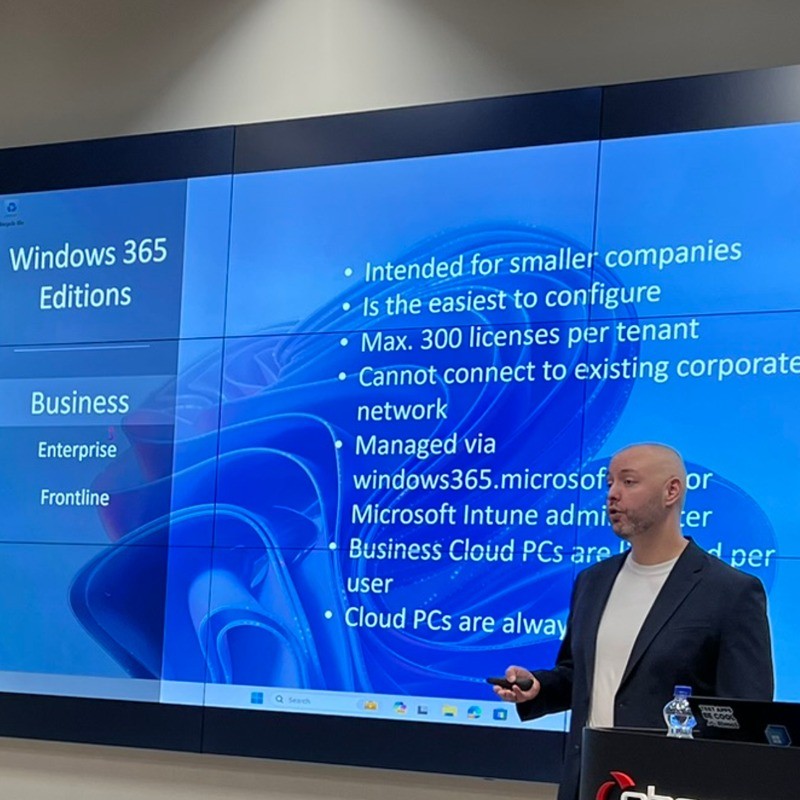
Microsoft MVP | Nerdio NVP | Author | Blogger | Speaker | dominiekverham.com
Dominiek Verham is a Principal Consultant at Open Line, where he helps organizations to enhance their desktop experience and transition to modern workplace solutions. His work focusses on designing and implementing technologies across modern workplace, desktop environments, Azure infrastructure and Microsoft security platforms.
He has a strong interest in new technologies and actively collaborates with partners while sharing his knowledge with the community through his personal blog and contributions to the Windows 365 community.
Dominiek served as a technical reviewer for both the first and second editions of Mastering Windows 365, written by Christiaan Brinkhoff, Sandeep Patnaik and Morten Pedholt. This experience gave him valuable insight into the publishing process and ultimately led him to co-author his own book with his good friend Johan Vanneuville.
In June 2024, he co-authored Securing Cloud PCs and Azure Virtual Desktop, a practical guide that explores Windows 365, Azure Virtual Desktop and related Azure solutions in-depth. The book covers use cases, decision-making considerations between the two solutions, and best practices for securing both new and existing environments.
He regularly participates in community events, where he enjoys connecting with peers and delivering sessions on topics such as Windows 365, Azure Virtual Desktop, Microsoft Intune, Nerdio and EUC solutions.
Since 2022, Dominiek has been recognized as a Microsoft MVP and Nerdio NVP, acknowledgements he considers a great honor.
His certifications inc…Read More

