
Microsoft Entra Access Packages Guide
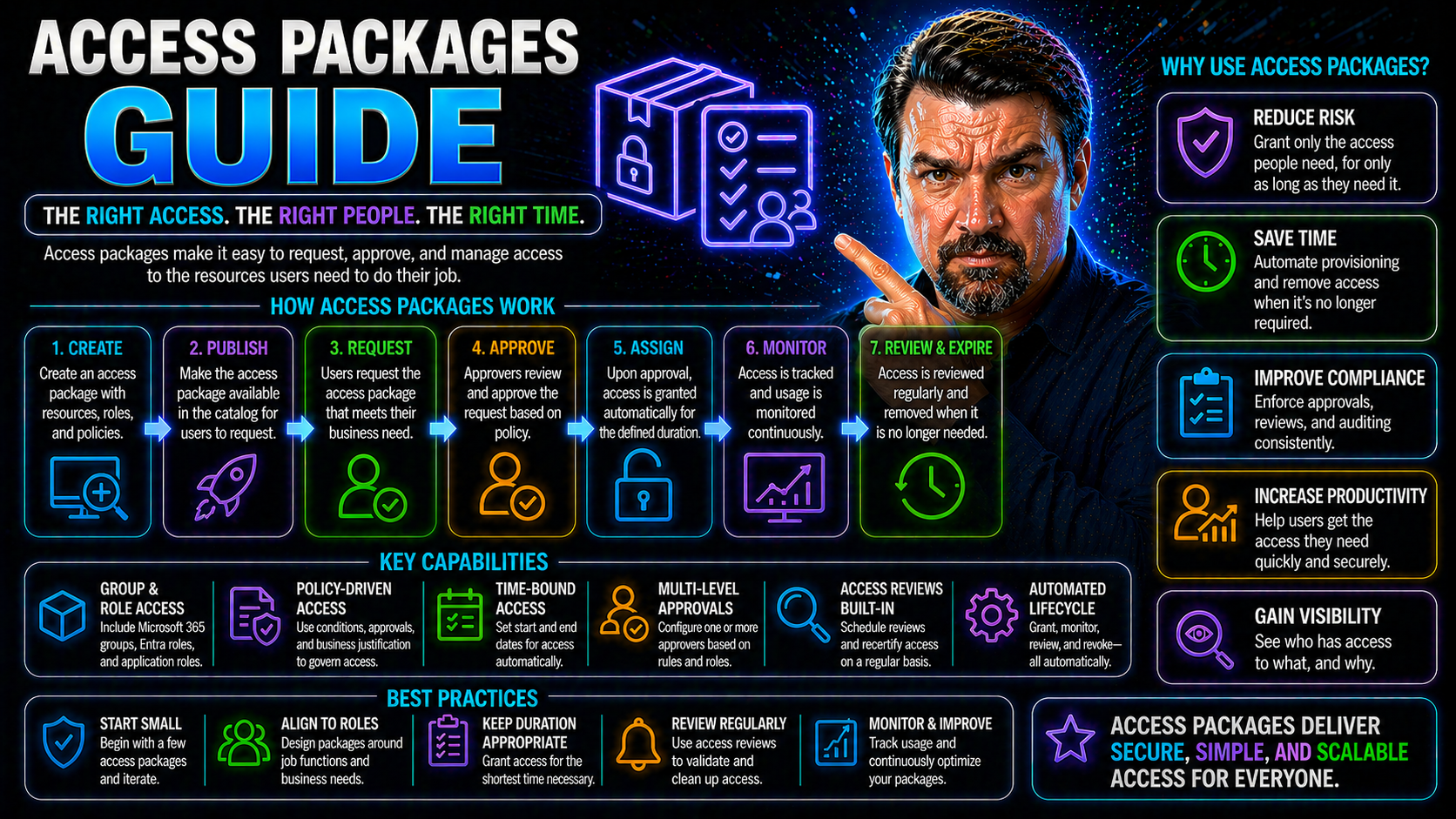
Quick Answer: Microsoft Entra access packages bundle the resources, policies, approvals, and lifecycle rules a person needs for a business scenario. Create them around a clear purpose—such as a project, partner, or department—then define who can request access, who approves it, how long it lasts, and how reviews or removal will work.
This guide dives deep into access packages in Microsoft Entra ID, shining a light on the role of entitlement management and practical governance. You'll get to know why access packages are such a big deal for identity governance, and how they lock down resources while keeping your digital workplace flexible. If you’re responsible for enterprise security, IT, or compliance, you’ll find step-by-step advice on deploying, managing, and fine-tuning these packages—plus a look at compliance factors most resources barely touch. Along the way, we'll connect the dots between day-to-day tasks and the bigger picture of secure, compliant business operations.
What Is an Access Package and Why Is Entitlement Management Important?
Let’s start simple: in Microsoft Entra ID, an access package is like a digital “welcome kit” packed with everything a user or group might need to get going—team memberships, SharePoint sites, apps, and all the right permissions bundled together. Instead of IT manually granting every permission for each user, you group related resources into a package. Request the package, and boom, you get access to everything inside, without a mess of tickets or back-and-forth emails.
Access package magic really happens when you combine it with entitlement management. Think of entitlement management as the rulebook and traffic cop for who gets access to what, how long they keep it, and how it all gets reviewed. It’s an identity governance framework that lets you automate, approve, and review access across your entire Microsoft environment (and even beyond).
This approach isn’t just about convenience. It’s about shrinking your security risks and staying on top of compliance. The less you rely on ad-hoc access, the fewer cracks there are for sensitive information to slip through. With access packages and structured entitlement management, you control who’s in, when they’re in, and when it’s time for them to step out—just like a well-run event.
Picture a project where people come and go—a new team member joins, a contractor steps in, or someone switches roles. Rather than chasing IT for every change, they can simply request the right access package, and entitlement management makes sure they get exactly what they need (and nothing extra), all governed by clear policies. This keeps collaboration smooth and secure while making audits and reviews a whole lot easier.
Entra Step-by-Step Guide to Access Management
If you want airtight access control, Microsoft Entra ID is your headquarters. With Entra, not only do you get identity and access management that covers the bases for Microsoft 365, Azure, and beyond—you also bring structure to who gets what, for how long, and under what rules.
Going step by step, you’ll first define clear resource groups, then set up access packages tailored for your business units or project needs. Want someone to access Teams, SharePoint, and a specific app? Wrap all those up into a single access package managed in Entra. Assign policies to control who can request it, who has to approve, and whether external partners are welcome.
Entra makes it easy to map out the lifecycle of access—from the first request, through multi-layered approvals, to automatic expiration or review. This helps keep your environment lean, with no old permissions just floating around waiting to cause trouble. You can check out strategies for reducing identity risk and cleaning up conditional access policies in this deep dive on Entra ID security loop, which provides practical tips for tightening your access controls.
If you’re worried about new threats (like attackers sneaking in via OAuth consent), you’ll find value in resources that explain the latest attack methods and advanced controls—see this breakdown of OAuth consent-based attacks for actionable ways to protect your environment. With Entra’s step-by-step setup, you gain the power to enforce, audit, and adjust access—without slowing down productivity.
How to Use Access Package Builder for Configuration and Advanced Settings
Microsoft’s Access Package Builder is where access packages go from idea to reality. The builder interface is designed to make your life easier, providing a clean dashboard to combine resources, define which users can request access, and set up sensible policies and expiration dates in one place.
Getting started, you’ll select the resources—maybe a few SharePoint sites, some Teams channels, or business apps. Then you move on to user scopes: should everyone in a department see this package, or just a specific project group? The builder makes these choices straightforward, with clear options and quick previews that help you avoid surprises.
You can tailor advanced settings, like requiring business justification on access requests, or setting flexible expiration—say, 30 days for contractors, 90 days for partners. Need more control? You can even set up approval chains, require multi-factor authentication, or route exceptions to different admins. For teams with higher security needs, advanced settings can mandate periodic reviews and automated reminders to check if access is still justified.
With the builder, tweaking your policies is as easy as picking options—no scripting or command-line magic required. But if your scenario gets more complex (like integrating with external ticketing systems or triggering custom workflows), you can expand on what’s baked in. Ultimately, the Access Package Builder lets you centralize and simplify even the most demanding access needs, all while keeping security guardrails firmly in place.
End-to-End Access Request and Provisioning Workflow Explained
The journey of an access package kicks off when a user finds it on the Entra self-service portal—no need for IT to invent the wheel every time. The user submits a request, often with a business justification that answers the “why”—for instance, joining a project, accessing a specific dataset, or supporting a new client.
From there, the approval process swings into action. You might want direct manager approval, or require a chain of reviewers for highly sensitive packages. Entra routes requests to the right people, collects approvals, and keeps everyone in the loop, so requests don’t vanish into the void. If business justification is required, the reviewer can see exactly why the access is needed before giving the green light.
Once approved, Entra automatically provisions access to every resource inside the package, whether it’s a Teams channel, a SharePoint library, or a third-party SaaS app. The system updates group memberships, applies permissions, and integrates those changes seamlessly—no more manual updates or missed steps.
For users, the process is straightforward and transparent. They can track the status of their requests and understand what access they’ve been granted, cutting down confusion and helpdesk tickets. For IT and security, it all happens behind the scenes—visible via dashboards and logs, but hands-off unless there’s an exception or special case. In the end, access is precise, timely, and fully documented for compliance and audit needs.
Prerequisites, Testing, and Steps for Successful Implementation
No one wants a rollout to hit a speed bump at the worst time. Before you build your first access package in Entra ID, double-check your prerequisites: make sure you’ve got the correct directory setup, appropriate admin permissions, and connections to the resources you want to include (think SharePoint, Teams, and any relevant Azure apps).
Testing isn’t a luxury—it’s your insurance policy. Before pushing live, run through the approval flows and provisioning steps with test accounts. Check what end users see, and make sure automated processes fire as expected. This helps you surface any odd security risks or access misconfigurations before employees start requesting packages for real.
Implementation steps usually follow a playbook: connect your resources, set clear policies, and use data and reporting tools to check that everything lines up. Enhance data quality by keeping directories cleaned up and ensuring groups and roles reflect your current org chart. When you trust your data, you can trust your access packages to do the right thing, every single time. For detailed strategies on auditing user activity and keeping tabs on your security posture, visit this Purview Audit guide.
Once live, monitor your packages. Automated alerts, error logs, and dashboards will spot outliers before they snowball. Learn more about setting governance guardrails with automated enforcement at this Azure governance resource. Keep testing, stay sharp, and you’ll sidestep common pitfalls. A smooth deployment isn’t about luck—it’s about planning and layers of backup for when things go sideways.
Governance, Compliance, and Auditing with Access Packages
Modern compliance isn’t just box ticking—it’s proving, with evidence, that you’re in control of access at every stage. Access packages in Entra ID are built with governance in mind, giving you audit logs, access review history, and detailed reporting out of the box. These tools make it possible to show auditors and regulators the full story behind each access request and every package assignment.
Need to track who approved what, when, and why? Audit logs keep a granular record, so when a compliance officer comes knocking, you’re ready. Reports on access changes and periodic reviews help spot outliers or old permissions that could spark a compliance fire. For actionable steps on continuous compliance monitoring, check out this guide to Microsoft Defender for Cloud compliance.
If your organization falls under strict frameworks like GDPR, HIPAA, or SOX, Entra’s entitlement management brings policy enforcement into play. You can align your access controls to regulatory requirements, assign ownership roles, and enforce periodic reviews so stale access doesn’t linger. Data governance features help you control not just who has access, but accountability and visibility across your resources—explored further at this governance resource.
All these baked-in tools reduce manual audit prep, ensure regulatory reporting is accurate, and help you maintain that well-oiled machine reputation with auditors. Whether it’s real-time monitoring, access review history, or compliance automation, access packages provide a security backbone matched to today’s audit and governance demands.
Tips for Maximizing Results with Access Packages
- Design access packages around real business needs. Bundle resources sensibly and avoid “kitchen sink” packages that grant more access than needed—this reduces risk and audit headaches.
- Set clear, automated policies for approval, expiration, and periodic access reviews. Use these guardrails to stop permissions from gathering dust and keep compliance sharp.
- Leverage communication: make sure users know how to request access, renew permissions, and understand what they’re getting. Well-informed users cut down IT support requests and speed up adoption.
- Regularly review audit logs and access reviews. Use built-in reporting to spot out-of-policy access before it spirals—get a head start on compliance with resources like Power Platform governance tips.
- Integrate security tools and conditional access where possible. Combining platforms, like using Microsoft Purview and Defender controls, enhances your overall security posture—see this modern M365 security guide for practical tips.
Conclusion and the Future of Access Governance
Managing access in today’s world is way more than handing out permissions and hoping for the best. With Microsoft Entra ID and access packages, you get a toolkit built for automation, granular control, and airtight compliance. The smartest orgs are leaning into automation, AI, and adaptive policies to keep up with new business models and security threats.
Looking ahead, expect identity governance to evolve—AI agents, zero trust principles, and ever-more-agile controls are already reshaping the landscape. Staying ahead means embracing tools that let you govern at scale and respond fast to change. For a glimpse into future challenges and AI-related governance, check resources on agent identity and governance like this discussion on AI agents and Entra Agent ID, or for securing new workloads like Microsoft Copilot, see this Copilot governance guide.
The upshot? Keep learning, stay alert to new trends, and your access package strategy will keep your house in order—even as the neighborhood keeps changing.
You Should Also Listen To
If you are researching Microsoft Entra access packages, these episodes add practical context on architecture, security, governance, and implementation:
- Microsoft AI Agent Harness – Simply Explained — Understand orchestration, guardrails, evaluation, and reliable AI workflows.
- Microsoft Defender XDR – Simply Explained — Connect identity and AI decisions with security monitoring and response.
- Microsoft Teams Governance – The Illusion of Control — Learn how governance, ownership, and policy reduce operational risk.
- Azure Virtual Network – Simply Explained — Understand the architecture context behind cloud connectivity.
Design access packages around real business access
- Start with a named business scenario and accountable owner.
- Include only the groups, applications, SharePoint sites, or Teams resources required for that scenario.
- Define request eligibility, approval, expiration, and recurring review before publishing the package.
- Test the request and removal journey with a real user and resource owner.
Use Microsoft Learn’s access package documentation for current configuration details.
Frequently asked questions
Are access packages only for external users?
No. They can also support internal access requests where multiple resources and an approval or expiry process are needed.
Why use expiry?
Expiry prevents a temporary project or partner entitlement from silently becoming permanent access.
🎧 You Should Also Listen To
These episodes help turn access packages into a sustainable identity-governance practice.
- Identity Governance in Microsoft Entra explains lifecycle, access reviews, and accountable ownership behind access packages.
- Privileged Identity Management (PIM) – Simply Explained adds the just-in-time model for high-impact administrative access.
- Microsoft Entra Private Access – Simply Explained provides a broader Zero Trust view for controlled access to private resources.
Last reviewed: July 2026. Microsoft Entra entitlement-management experiences evolve frequently.

Microsoft MVP | Host of M365.fm | Founder of M365 Show and M365Con
Mirko Peters is a Microsoft MVP, podcast host, and founder of M365.fm, M365 Show, and M365Con. His work connects Microsoft practitioners through podcast interviews, livestreams, and community events.
At M365.fm, Mirko hosts conversations with Microsoft MVPs, product experts, architects, and community contributors. Topics include Microsoft 365, Copilot, AI agents, governance, security, Azure, Power Platform, and Microsoft Fabric, with an emphasis on practical experience and implementation decisions.
M365.fm is the podcast and learning platform. M365 Show brings experts together for livestreams, while M365Con provides an online conference setting for community learning.
Official website: Mirko Peters (https://www.mirkopeters.com/). Recognition: Mirko Peters — Microsoft MVP profile (https://mvp.microsoft.com/de-DE/mvp/profile/9b0ca797-db5a-493a-a845-8b9158046cf5). Connect on LinkedIn (https://www.linkedin.com/in/m365showpodcast/).





