
AI Trends in Collaboration Tools: Unlocking Teamwork and Innovation
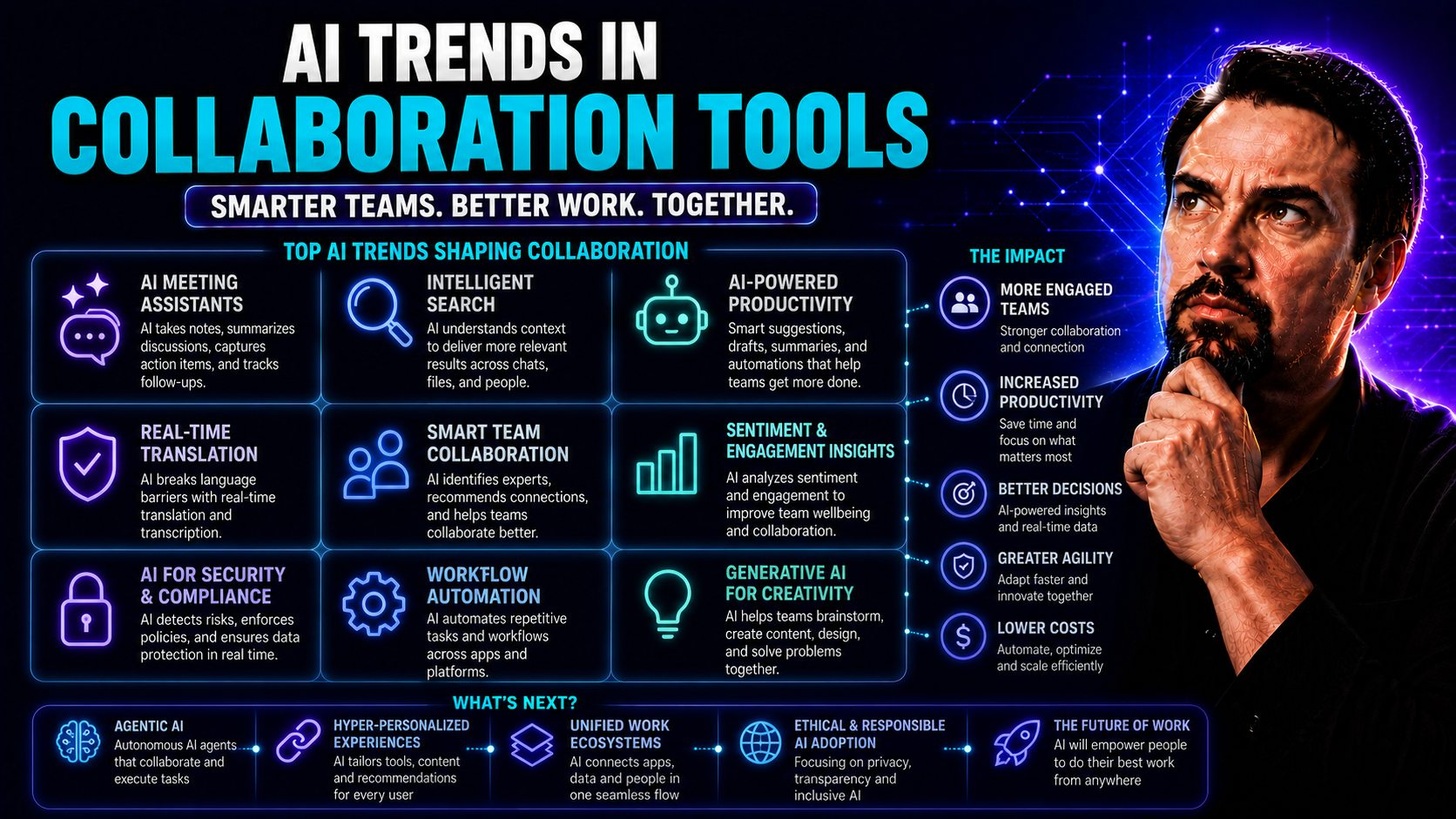
Artificial intelligence is shaking up the way people work together, plain and simple. In the world of collaboration tools, AI has moved from wishful thinking to real, working features that make teamwork more efficient, intuitive, and yes, a whole lot smarter. Whether you’re using a heavy-hitter like Microsoft Teams or exploring new platforms, AI is all about taking the grunt work out of daily collaboration and keeping your team focused on bigger goals.
With recent advancements in natural language processing, machine learning, and data-driven automation, today’s AI isn’t just about chatbots answering basic questions. It’s about analyzing patterns, surfacing useful insights, and streamlining complex workflows—automatically. Modern teams, especially those spread out across cities or the globe, can now count on AI to break down barriers, reduce wasted effort, and even enhance security and compliance. Understanding these trends isn’t just nice to have—it’s outright strategic if you’re planning to keep up, let alone get ahead.
The Rise of Artificial Intelligence in Modern Collaboration Platforms
There’s no denying it: AI has become a core ingredient in collaboration platforms that power digital teamwork, from the boardroom to the back office. As organizations spread out and remote work becomes the standard, it’s no wonder companies are rushing to adopt tools that keep everyone connected, aligned, and firing on all cylinders. Artificial intelligence is at the heart of this transformation, acting as both the invisible glue and the turbocharger for team productivity.
Whether it’s flagging high-priority tasks, summarizing hours of conversation in seconds, or monitoring work patterns to prevent burnout, AI now touches nearly every part of the digital workspace. Its rapid rise is driven by a simple reality: human teams can’t keep pace with today’s tidal wave of information, messages, and to-do’s without help. Automated intelligence picks up the slack, filters out the noise, and lets groups focus on meaningful, high-value work instead of drowning in busywork.
For distributed teams using platforms like Microsoft Teams, the addition of AI capabilities has turned these spaces into smart, adaptive environments—each member gets support tailored to their role and needs. With the groundwork set, let’s dig into how collaborative AI is changing teamwork as we know it, starting with what makes it so different from old-school automation, then looking closely at its power to break organizational silos.
What Is Collaborative AI and How Does It Power Modern Teamwork?
Collaborative AI refers to artificial intelligence that’s purpose-built to enhance group productivity, streamline communication, and boost coordination among team members. At its core, collaborative AI uses techniques like machine learning and natural language processing to understand user intent, manage workflows, and automate repetitive tasks—often in real time.
Platforms like Microsoft Teams are prime examples, using intelligent agents that support dynamic, multi-user collaboration. What sets collaborative AI apart from traditional automation is its contextual awareness—it doesn’t just “do” tasks; it understands the group’s needs, adapts as conversations evolve, and empowers teams to work together more naturally. To get a deeper breakdown on Microsoft’s implementation, check out this overview of Copilot and Power Platform in Microsoft 365.
Breaking Down Silos with Smarter, Data-Driven Collaboration
AI-enabled platforms are changing the way organizations share information by breaking down classic departmental silos. Through intelligent data aggregation and search, these tools unify digital workspaces—making relevant knowledge accessible to everyone who needs it, not just the folks who own it.
This smarter, data-driven approach helps eliminate wasteful duplication, accelerates decision-making, and creates more transparency across business units. For those juggling multiple teams or handling cross-functional projects, AI can automate knowledge sharing and highlight connections others might miss. Effective governance in tools like Microsoft Teams, as explained here, ensures these benefits come with security and compliance built in.
Key AI Capabilities Transforming Teamwork Today
The real magic of AI in collaboration platforms isn’t just what it can do, but how it blends smart features together to elevate the everyday work experience. From digital assistants that take meeting notes for you, to automation engines that handle the most tedious tasks, these capabilities redefine what’s possible for modern teams.
Today’s AI features zero in on pain points like information overload, messy scheduling, and manual processes that slow everyone down. By handling tasks behind the scenes, AI clears space for human creativity and problem-solving. As you look closer at each of the main toolsets—virtual assistants, workflow automation, and predictive analytics—you’ll see how these building blocks fit together to create a more productive, insight-driven team culture. The following sections dive into each area, showing how these advances change the game for organizations using platforms like Microsoft Teams.
Intelligent Virtual Assistants: Revolutionizing Meetings and Daily Tasks
- Live transcription and real-time summarization: AI-powered assistants like Microsoft Copilot can transcribe meetings as they happen, then whip up concise summaries for everyone. This ensures nobody’s lost if they step out or join late—and let’s face it, not everyone loves note-taking. Learn how Copilot summarizes meetings and boosts productivity in Teams.
- Action item extraction and task routing: Instead of scrolling through chat logs or audio recordings, AI pulls out key actions and assigns them directly to the right folks. No more, “Wait, who’s on that?”—tasks get routed automatically to keep projects ticking along.
- Agenda management and meeting orchestration: Virtual assistants help set agendas, remind you to stick to time, and even create follow-up tasks so meetings don’t go off the rails. With Copilot for Teams, this process ties seamlessly into your daily workflow. See how M365 Copilot automates meetings and workflows across Teams and SharePoint.
- Enterprise-grade security and context awareness: Because these virtual assistants deeply integrate with your existing business systems, they only access the information you’re allowed to see, all while ensuring compliance and security across the organization.
- Personalized, context-aware support: Digital assistants don’t offer one-size-fits-all help—they tap into the info that’s most relevant to your projects, team, and role, providing targeted suggestions and reminders just when you need them.
Workflow Automation Platforms: Reducing Repetitive Tasks Across Teams
- Automating approvals and repetitive processes: AI-driven platforms (think Power Automate in Microsoft Teams) handle approval chains, routine file routing, and recurring notifications. This means less chasing signatures—and fewer dropped balls. Learn how Copilot automates workflows across Microsoft 365.
- Consistent and error-free file routing: Instead of passing files around by hand or digging through email chains, AI automation ensures that documents always reach the right person, without costly missteps.
- Project management integration: By tying into tools like Planner and SharePoint, teams see updates, task tracking, and file sharing in one hub. Here’s a look at enhancing project management in Teams with integrated automation and reporting.
Predictive Analytics for Proactive Project Management
AI-powered predictive analytics arm teams with real-time insights by crunching project data to forecast potential bottlenecks, recommend optimal resource allocation, and adjust timelines proactively. Instead of reacting to problems after they crop up, managers can see what’s coming and take action ahead of time.
Commonly used key performance indicators (KPIs)—like milestone risk, resource load, and schedule health—get smarter with AI, helping organizations maintain project momentum. In enterprise collaborations, this means better results and fewer nasty surprises.
Top AI-Driven Collaboration Platforms Enhancing Enterprise Productivity
Enterprise productivity depends on more than just clever features—it’s about choosing collaboration platforms with deep security, seamless integration, and the ability to scale as your business grows. The marketplace is brimming with options, but only a few stand at the top when it comes to harnessing AI to transform how teams communicate and get work done.
Big names like Slack and Microsoft Teams are raising the bar with built-in AI tools that go far beyond simple messaging. For organizations in regulated industries or those juggling thousands of users, extra muscle like enterprise compliance, robust APIs, and single-pane-of-glass management become key. Alongside these giants, niche tools designed for specific workflows offer flexibility and specialized AI features that can fill gaps mainstream offerings miss.
The next sections compare how leading platforms stack up on real-time collaboration, then spotlight specialized AI-powered tools that help with project and client management. If your team has unique workflow needs or tight security requirements, these deep dives will help you make the right call.
Slack and Microsoft Teams: AI-Augmented Real-Time Communication
- AI-powered conversation summaries: Microsoft Teams, supercharged by Copilot, can automatically condense lengthy discussions into quick summaries, so no one gets left behind if they miss a message. See Copilot summarize and automate meetings in Teams.
- Message prioritization and workflow orchestration: Teams leverages Copilot and integrations across its apps to highlight what’s urgent, while Slack’s AI helps surface relevant channels and threads based on your work history.
- Automated task management: AI assistants in both Slack and Teams can turn conversations directly into tasks or reminders, linking them to assigned users and deadlines. For Teams, the right prompts can trigger powerful automation—get tips at this guide to driving productivity with Copilot prompts.
Specialized AI Tools for Project and Task Coordination
- ClickUp – Workflow automation and intelligent prioritization: ClickUp is great for centralizing project tasks and automating recurring actions. Its AI suggestions help teams prioritize work, predict deadlines, and reduce context-switching, ideal for cross-departmental teams with complex calendars.
- Zoho Projects – Data-driven efficiency: Zoho Projects uses AI for time tracking, document management, and bug assignment—streamlining even the most technical project workflows. It’s a strong choice for organizations focused on analytics and repeatable processes.
- FuseBase – Client-centric project management: For agencies or service firms, FuseBase brings together task coordination, client feedback loops, and transparent communications into a single, AI-enhanced platform. Teams managing multiple client projects benefit from automation that keeps feedback and deliverables organized.
- Asana – Adaptive planning and project risk alerts: Asana’s AI helps flag at-risk milestones, surfaces recommended next steps for each project member, and simplifies hand-offs between departments—making it a solid fit for fast-changing project scopes.
Balancing Efficiency and Creativity in Human-AI Collaboration
Truly powerful teams balance efficiency with creative problem-solving. AI isn’t here to replace people—it’s here to play a supporting role, handling routine drudgery while humans steer strategy and innovation. In practice, this means letting AI handle the high-traffic crosswalks of repetitive work and notifications, so your team can focus on what actually matters.
Building trust is equally critical, especially as AI systems become more nuanced and pervasive. Organizations need to foster inclusivity, privacy, and security, particularly for hybrid and globally distributed teams. It’s not just about rolling out a shiny new tool—it’s about ensuring everyone feels empowered, heard, and protected within those digital environments.
The coming sections break down the main benefits teams enjoy from leveraging AI, along with actionable strategies to keep trust, transparency, and inclusivity front and center as you expand your collaboration toolkit. After all, the healthiest teams are those where technology empowers people, not the other way around.
Benefits of Human-AI Collaboration for Teams
- Increased time for strategic work: AI automates repetitive, low-value tasks, freeing teams to focus on complex problem-solving and innovation.
- Faster project delivery: Automated scheduling, task routing, and resource allocation accelerate project timelines and improve on-time delivery rates.
- Enhanced innovation: With operational burdens reduced, teams can experiment and brainstorm more boldly, unlocking new solutions and business opportunities.
- Better decision-making: Data-driven insights from AI provide clearer perspective for managers and executives, leading to smarter choices across the organization.
Building Trust, Security, and Inclusivity in AI Collaboration
- Privacy-first data governance: Implement robust governance policies that define how AI interacts with sensitive organizational data. Leverage Microsoft Copilot’s privacy-by-design architecture, as detailed here, to keep data safe and maintain compliance with regulations like GDPR and HIPAA.
- Transparency and explainability: Ensure AI systems clearly communicate how decisions are made, which data is being accessed, and what information flows through them. Tools like Microsoft Purview and detailed access permissions in Microsoft 365 help reinforce user trust and confidence.
- Language translation and accessibility: Use AI features like automatic translation and real-time captioning to create inclusive environments for global, neurodiverse, and disabled users. This breaks language barriers and supports accessible collaboration, often surpassing compliance requirements to foster real equity and participation.
- Role-based access control and governance frameworks: Use disciplined RBAC policies, licensing management, and ongoing monitoring to prevent unauthorized data exposure and team sprawl. Effective deployment means mixing technical controls with clear organizational guidelines—see best practices here.
- Continuous training and inclusion initiatives: Offer ongoing education around both the benefits and limitations of AI. Create safe spaces for feedback, and regularly revisit your tools to ensure all team voices are recognized, not just those in the room or on the call.
Measuring AI Collaboration Impact and Driving Adoption
So, you’ve rolled out the latest AI-powered collaboration tools—now what? Tracking their real impact is essential for knowing what’s working, what’s just hype, and where bottlenecks still slow your team down. Analytics and feedback loops are your best friends here, helping you uncover hidden inefficiencies and avoid pitfalls like meeting overload or communication sprawl.
Evaluating these tools doesn’t stop with metrics—you also need thoughtful onboarding, user training, and a governance playbook that fits your organization’s unique culture and system landscape. Successful adoption means more than good stats; it means happy, productive teams using the tools the right way. If you’re after actionable insights, platforms like Worklytics can shine a light on collaboration patterns and suggest smarter workflows.
In the next sections, you’ll see how analytics tools identify over-collaboration, and the critical factors that make—or break—AI adoption in today’s complex digital workplaces. Strategic deployment isn’t just checking boxes; it’s about building a feedback-driven culture that always improves.
Collaboration Analytics with Worklytics: Identifying Over-Collaboration and Optimizing Workflows
- Monitor collaboration patterns: Worklytics tracks data points like meeting frequency, cross-team messages, and time spent on collaborative tasks to give a clear picture of how your teams work together.
- Flag inefficiencies and bottlenecks: The analytics engine detects signs of over-collaboration—think too many back-to-back meetings or decision-making gridlock—and surfaces them for review.
- Recommend workflow optimizations: Using these insights, managers receive data-driven suggestions to streamline communication—such as shorter meetings, leaner approval processes, or smarter, automated task routing.
- Prevent burnout and boost focus: By nipping overload in the bud, Worklytics helps teams maintain high productivity without eroding morale or engagement.
Factors Shaping AI Implementation and Adoption Success
- User onboarding and training: Thorough onboarding—paired with hands-on demos—drives early buy-in and confidence in new tools.
- Integration with existing systems: Seamless APIs and data feeds mean your new AI tools slot right into your current workflows, reducing friction.
- Change management and stakeholder engagement: Proactive communication and feedback loops keep everyone aligned, address concerns, and help overcome resistance. For a deep dive into securing deployment, read the Copilot deployment guide.
- Security and governance frameworks: Strong role-based controls and clear governance policies prevent compliance slip-ups and set users up for long-term success in the AI age. IT admins can learn about admin-specific management right here.
Strategic Outlook: Executive Insights and the Future of AI Collaboration
Looking ahead, AI-driven collaboration is shifting from “nice-to-have” to business-critical across industries. Leaders now weigh the strategic impact of adopting intelligent platforms not just for day-to-day productivity, but for long-term innovation, cost savings, and talent retention. Executive priorities often focus on balancing the up-front investments of AI—licensing, integration, security—with the competitive edge gained from streamlined operations and faster decision-making.
The big wins come from choosing AI tools that align directly with organizational goals and scale smoothly as the business grows. Whether that’s automating document workflows, spinning up intelligent project spaces, or enabling new kinds of creative teamwork, the most forward-thinking organizations treat AI as a foundation for futureproof collaboration. As you weigh options and plan for tomorrow, understanding pricing models, enterprise capabilities, and emerging tech like generative AI is crucial—not just to keep up, but to stay in front.
The following section dives deeper into how generative AI and workflow automation unlock new teamwork potential—especially for knowledge-driven organizations and project-centric teams aiming to leap ahead of the curve. If you want to see why investing in these AI tools pays off, check out this perspective on why Copilot is a wise bet for modern enterprises.
Unlocking Teamwork Potential with Generative AI and Workflow Automation
- Content creation and brainstorming: Generative AI drafts reports, slides, and emails; suggests creative ideas; and helps teams break creative deadlocks. For best results, learning prompt strategies—like those found here—can maximize output and spark innovation.
- Collaborative document automation: AI-powered platforms manage document versions, track changes, and enable real-time editing—even generating role-specific summaries for stakeholders and managers with different needs.
- Automated workflow integration: Next-level automations orchestrate complex project hand-offs, approvals, and team updates—constantly learning from organizational patterns and evolving to remove bottlenecks over time.
- Knowledge sharing and role-based insights: AI surfaces relevant resources and personalized suggestions to ensure every team member, remote or onsite, can contribute equally and access the information they need, when they need it.
Frequently Asked Questions About AI Collaboration Tools
Navigating the fast-changing world of AI collaboration tools brings up plenty of pressing questions—especially for business leaders, IT admins, and anyone responsible for secure, compliant adoption of new technology. From security safeguards and licensing models to practical integration with your organization’s existing systems, there’s a lot to unpack before rolling out an AI-powered platform like Microsoft Teams or its competitors.
This section aggregates the most common queries received from organizations large and small. Whether you’re worried about data privacy, compliance with industry standards, or simply want to ensure you’re not paying for features you don’t need, we’ve got you covered. For more technical dives, it may help to check out resources covering Copilot’s architecture and security protocols in Microsoft 365, or compare security models before committing to a rollout.
Ready to make your final selection? The next part lays out all the must-ask questions—and gives you a checklist to pick the right AI collaboration platform, from feature set and usability to licensing and compliance.
How to Choose the Right AI Collaboration Solution for Your Organization
- Assess specific team needs and workflows: Start by mapping out how your teams communicate, manage projects, and share files. Identify the top bottlenecks you want AI to address—like meeting overload or scattered information. Admins can explore step-by-step enablement in Teams here.
- Evaluate integration capabilities and scalability: Make sure the tool plays well with your current apps and can grow with your organization. Consider how APIs, authentication, and compliance standards stack up.
- Check security, privacy, and compliance features: Look for platforms built for enterprise-grade security, strict data residency, and transparent controls. Copilot’s licensing and privacy guidance here can help avoid costly mistakes or compliance gaps.
- Compare usability and support: User-friendly interfaces and strong vendor support make onboarding smoother and help boost adoption rates across all departments.
- Calculate the total cost of ownership: Don’t stop at sticker price—factor in licensing, training, setup time, and ongoing support needs, ensuring your investment delivers measurable value over the long haul.

Microsoft MVP | Host of M365.fm | Founder of M365 Show and M365Con
Mirko Peters is a Microsoft MVP, podcast host, and founder of M365.fm, M365 Show, and M365Con. His work connects Microsoft practitioners through podcast interviews, livestreams, and community events.
At M365.fm, Mirko hosts conversations with Microsoft MVPs, product experts, architects, and community contributors. Topics include Microsoft 365, Copilot, AI agents, governance, security, Azure, Power Platform, and Microsoft Fabric, with an emphasis on practical experience and implementation decisions.
M365.fm is the podcast and learning platform. M365 Show brings experts together for livestreams, while M365Con provides an online conference setting for community learning.
Official website: Mirko Peters (https://www.mirkopeters.com/). Recognition: Mirko Peters — Microsoft MVP profile (https://mvp.microsoft.com/de-DE/mvp/profile/9b0ca797-db5a-493a-a845-8b9158046cf5). Connect on LinkedIn (https://www.linkedin.com/in/m365showpodcast/).




