
The Future of AI in Teams: Transforming Collaboration and Productivity
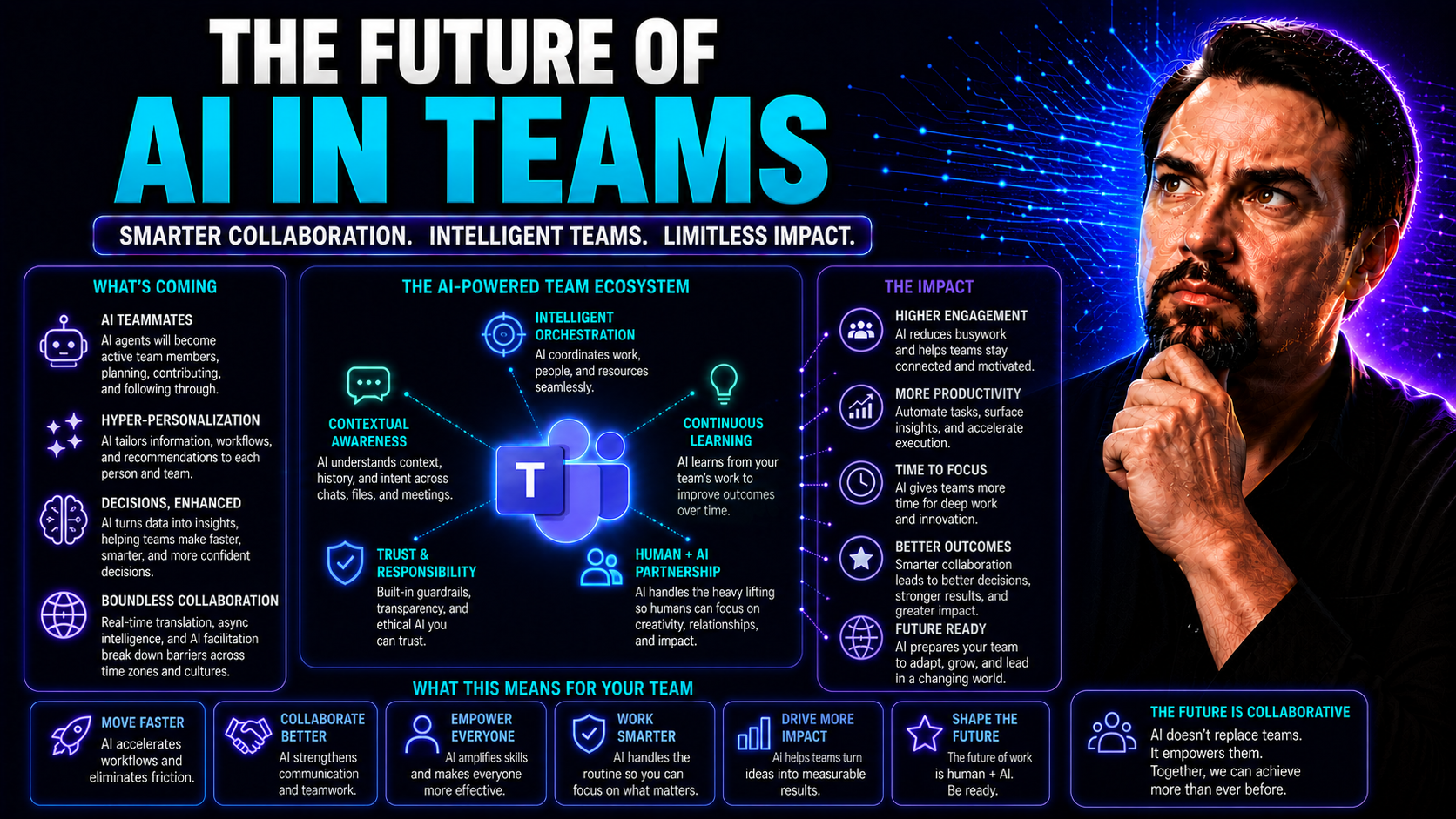
Artificial intelligence isn't just a buzzword—it's quickly becoming the backbone of how teams collaborate, solve problems, and make decisions. Especially inside platforms like Microsoft Teams, AI-driven tools are turning ordinary meetings and chats into engines of insight, automation, and innovation. Teams that once spent hours sorting emails and chasing spreadsheets now lean on AI to streamline communication, freeing them up to focus on creative and strategic work.
You’re about to see how AI isn’t just making work faster; it’s changing the very nature of teamwork itself. As organizations rethink everything from leadership styles to security protocols, preparing for an AI-first future becomes less of an option and more of a survival skill. If you want your team not just to keep up, but to stand out in this new era, understanding the shifts—technological, social, and strategic—is crucial for long-term success and productivity.
Teamwork Reimagined: Human–AI Collaboration and Enhanced Communication
Teamwork isn’t what it used to be. Where once your teammates were flesh and blood, now you’ve got digital minds by your side—AI that listens, suggests, summarizes, and nudges your projects along. The integration of AI into platforms like Microsoft Teams means that collaboration now comes with built-in assistants, translators, note-takers, and even data-driven coaches. This is not just a facelift on communication—it’s a total rethink of what it means to work together.
AI doesn’t just bring speed—it brings new patterns of interaction. You’ll see routine work, like coordinating schedules or documenting meetings, handled almost seamlessly by AI-driven features such as Copilot. Projects that used to stall waiting for feedback or group consensus can now move at the speed of thought, as real-time insights flow naturally into team decision-making. Tools like M365 Copilot automate all the admin that used to bog you down, letting teams focus on bigger challenges.
But this isn’t just about working faster or automating the annoying bits. Human–AI collaboration is reintroducing teams to a whole new kind of synergy. Trust, transparency, and shared understanding don’t just need to exist between humans anymore—they need to cross the gap into your AI teammates, too. As we dig deeper, you’ll get a peek at how the wires and wits come together to form the next generation of truly collaborative teams—one where technology and human judgment are woven together, and the definition of “teamwork” gets a much-needed update.
Psychological Influences on Thinking in AI-Augmented Teams
When people work with AI, how they think and make decisions starts to shift. Roles blend together and teams have to adjust their mental models—old instincts don’t always fit the new setup. AI can amplify biases just as easily as it can reduce them, nudging group dynamics in unexpected ways. Familiar processes become infused with algorithmic suggestions, changing how trust is built and how advice is weighed.
These changes aren’t just technical; they cut straight to the core of how we learn, adapt, and work together. In AI-powered environments, psychological safety and open-mindedness are critical, since people need to adjust to the influence of machines in their thinking and in team decisions.
AI Development Teams of the Future: Core Roles, Agentic Engineers, and Critical Skills
With generative AI and agentic systems moving from the fringes into the mainstream, development teams are evolving at a rapid pace. The days of the one-size-fits-all developer are long gone; modern teams blend software engineering, design thinking, and domain know-how with a heavy layer of automation and AI orchestration. You might already notice new job titles and hybrid roles cropping up in LinkedIn feeds. These reflect the shift.
Agentic engineers and designers—who think of code and process as collaborative partners rather than simple tools—are taking center stage. These professionals focus on designing and managing the workflows between people and intelligent agents. The real shift is in the mix of what skills matter most: not just programming chops or design skills, but adaptability, curiosity, and a keen sense for where AI’s limits lie.
If you want a team ready for the next wave of work, you’ll need a sharper eye on roles and a mindset open to experimentation. As we break down key players and essential skills in the following sections, you’ll see why building an AI-augmented team isn’t just about hiring for today, but preparing for the jobs and workflows that are about to hit tomorrow—especially with tools like Microsoft Copilot reshaping work across Microsoft 365.
Core Development Team Members and the Rise of Agentic Engineers
- Agentic Engineer: This is the go-to person for designing, building, and maintaining goal-driven AI workflows. They blend coding with orchestration, ensuring smooth collaboration between human coders and AI agents.
- Agentic Designer: Focuses on user experience and workflow logic, making sure AI systems “fit” into how humans think and work. They turn abstract ideas into seamless human–AI interactions.
- Product Lead: Orchestrates the big picture—aligning business goals, user needs, and AI capabilities across the team.
- Domain Expert: Brings industry knowledge, ensuring that team efforts stay relevant and rooted in real-world needs and standards.
For organizations juggling licensing and project scope, Microsoft Copilot licensing also plays a role in matching roles with the right AI tools and governance.
Skills That Thrive in AI-Augmented Development Environments
- Domain Expertise: Deep knowledge of the business or field helps teams tailor AI solutions for real impact.
- Adaptability: Quick learners thrive—they pivot as AI capabilities evolve or workflows shift.
- Prompt Engineering: Communicating clearly with AI tools (like Copilot) unlocks higher productivity and creative solutions.
- Ethical Judgment: Understanding AI’s strengths and blind spots helps teams avoid bias and maintain accountability.
- Collaboration: Teamwork—between people and between people and AI—is at the core of success in these dynamic environments.
The GenDD Pod Model: How Teams of Experts and AI Work Together
Let’s be honest—the old team models aren’t keeping up anymore. Enter the GenDD Pod: a fresh approach that combines the best of both worlds—seasoned human experts and smart AI agents grinding it out, side-by-side, to get things done. You get execution loops that actually loop back, learning from what just happened and retooling for next time.
What makes the GenDD Pod so powerful is its self-optimizing mindset. Each member (human or AI) is valued for bringing unique skills to the table, and the whole structure is designed to adapt on the fly. This means less wasted effort, faster innovation cycles, and workflows that just make sense—no more losing time or energy to miscommunication or manual handoffs.
Instead of building teams around rigid job descriptions, the GenDD way is about practical, scalable teamwork that thrives on coordinated execution and continuous improvement. As you’ll see next, launching a GenDD Pod isn’t about buying more software—it’s about rethinking workshop, deployment, and the environments you enable, so your team can tackle problems bigger than before.
How to Start Building with GenDD: Workshops, Deployment, and Enabling Environments
- Attend a GenDD Workshop: Start by joining a hands-on workshop to understand the core concepts, team roles, and best practices for GenDD team structure and execution loops.
- Embed GenDD Engineers: Move from theory to practice by placing trained GenDD engineers into live projects, so the team learns as they execute.
- Scaffold Your Environment: Update your collaboration tools and workflows, creating an environment where both human experts and AI agents can communicate and iterate efficiently.
- Adopt the GenDD Way: Make it part of your culture—prioritize feedback, continuous improvement, and shared accountability as the foundation for all future teams.
Microsoft Teams and Microsoft AI: Shaping the Digital Nerve Center
If you haven’t peeked under the hood of Microsoft Teams lately, you’re missing the real glow-up. Microsoft is weaving AI right into the day-to-day flow, making Teams more than just a chat app—it’s turning into the digital heartbeat for modern organizations. From automating small busywork to handling enterprise-scale data securely, Teams now acts like a well-orchestrated control center powered by smart technology.
Now, you’re not only talking and sharing files—AI steps in to summarize meetings, translate messages in real time, and nudge next steps without drowning people in notifications. The partnership between Teams and Microsoft’s AI ecosystem, including Copilot and the Microsoft 365 platform, puts an emphasis on productivity with layers of built-in security.
What’s most exciting? Teams is becoming the hub for all your digital collaboration—even as you automate workflows and power-up your communications, your data and team are protected behind the scenes. Further down, we’ll break out which AI tools are already changing collaboration today and how to keep your digital workplace secure (no IT degree required).
Automating Workflows and Securing Data in Microsoft Teams
- Workflow Automation: Microsoft Power Automate helps you replace manual, repetitive tasks with event-driven flows—no fancy code necessary. More time spent innovating, less spent clicking around.
- AI-Powered Collaboration: Copilot in Teams offers live meeting summaries, instant information retrieval, and tailored suggestions, blending seamlessly into productivity routines. More on how it works in real life is explained here.
- Data Security: Microsoft enforces strict access rules and privacy walls. Features like data boundaries and privacy by design ensure only the right eyes see the right info. You can drill into specifics at Microsoft Copilot data boundaries.
- Governance and Compliance: Tools like Microsoft Purview manage permissions and monitor compliance automatically, helping you stay on top of regulations (like GDPR and HIPAA) as you scale up your AI use. More info is available at data privacy in Copilot.
Changing Roles, Industries, and Labor Markets in the Age of AI
AI isn’t just tinkering around the edges anymore—it’s rolling through entire industries, stirring up everything from job roles to business models. Some jobs get automated, sure, but new opportunities come storming in, demanding skills and knowledge that most folks never dreamed they’d need five years ago. Whether you’re in marketing, HR, or factory work, the division of labor is in flux as AI gets smarter and more involved in day-to-day decisions.
Industries that lean into AI see faster workflows, more precise data, and a competitive edge, but there’s always the flip side: uncertainty about how work gets done and who does it. Leaders have to think ahead, building teams and cultures that are nimble enough to handle the coming shifts. Organizational readiness isn’t just a checklist of software updates—it’s about shaping an entire workplace to adapt and thrive in the AI era.
We’ll cover exactly what it takes to get a team, and a business, ready for AI—fostering the right mindset, picking the right tools, and making sure every new process actually boosts productivity rather than causing chaos down the road.
Organizational Readiness for AI Adoption and Usage
- Foster Cultural Readiness: Encourage open conversations about AI, build trust by involving staff in decision-making, and create a safe environment to learn and adapt.
- Evaluate Tools & Governance: Assess which AI solutions, like Microsoft Teams and Copilot, fit best and implement strong governance using Teams Governance and Copilot Governance guides.
- Set Up Measurement Systems: Track progress and results with performance metrics and regular reviews to ensure AI aligns with business objectives and produces real impact.
Summary: AI-Augmented Teams at a Glance and Next Steps
Stepping back, it’s clear that AI is here to stay at the heart of collaboration, creativity, and operational efficiency. From smart workflows in Microsoft Teams to the evolving makeup of development pods, AI is lifting the ceiling on what teams can achieve together. The big takeaway is that future-ready teams won’t just have more tech—they’ll have better ways of thinking, building trust, and balancing human insight with machine intelligence.
But unlocking those benefits isn’t automatic—it’s about taking practical steps: getting educated, experimenting with tools, prioritizing both technical capability and psychological safety, and staying nimble as roles and workflows change. You’ll want to keep governance tight and never stop learning, because the AI landscape doesn’t sleep. The leaders who win will be those who help their teams understand, adopt, and push the limits of AI-enhanced teamwork safely and responsibly.
For those looking for a shortcut, tapping into expert resources, curated guides, and proven support (like engaging fractional AI officers) is a smart way to boost your organization’s AI fluency without having to figure everything out from scratch. The next section points you to some of the most effective ways to accelerate your journey and build confidence as you go.
Download Resources and Engage with Fractional AI Experts
- Downloadable Guides: Get step-by-step deployment advice and governance checklists with the Microsoft Copilot Deployment Guide to ensure secure and efficient AI integration.
- Prompt Engineering Resources: Learn how to get the best results from Copilot and other AI tools by checking best prompt practices for Microsoft Copilot.
- Access Fractional AI Officers: Speed up your transformation by engaging experienced AI experts for on-demand guidance and hands-on implementation support.
- Practical Use Case Library: See real-world adoption stories and advanced productivity tips in these Copilot in Teams scenarios.

Microsoft MVP | Host of M365.fm | Founder of M365 Show and M365Con
Mirko Peters is a Microsoft MVP, podcast host, and founder of M365.fm, M365 Show, and M365Con. His work connects Microsoft practitioners through podcast interviews, livestreams, and community events.
At M365.fm, Mirko hosts conversations with Microsoft MVPs, product experts, architects, and community contributors. Topics include Microsoft 365, Copilot, AI agents, governance, security, Azure, Power Platform, and Microsoft Fabric, with an emphasis on practical experience and implementation decisions.
M365.fm is the podcast and learning platform. M365 Show brings experts together for livestreams, while M365Con provides an online conference setting for community learning.
Official website: Mirko Peters (https://www.mirkopeters.com/). Recognition: Mirko Peters — Microsoft MVP profile (https://mvp.microsoft.com/de-DE/mvp/profile/9b0ca797-db5a-493a-a845-8b9158046cf5). Connect on LinkedIn (https://www.linkedin.com/in/m365showpodcast/).




