
Auto Attendants Explained: The Modern Business Phone Revolution
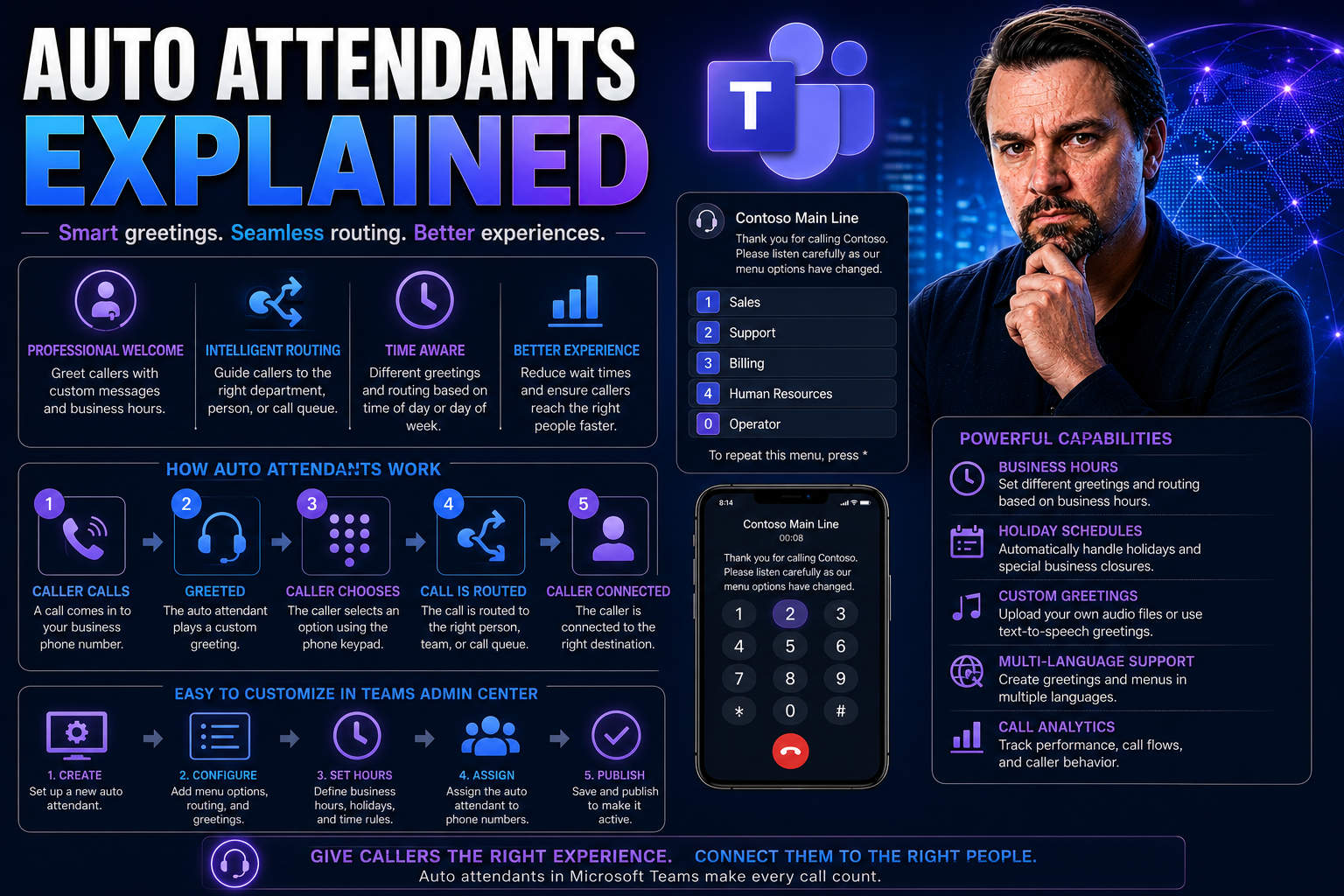
Let’s face it—business calls aren’t slowing down anytime soon. That’s where auto attendants come in, quietly reshaping how companies handle phone traffic. At their core, auto attendants are automated phone systems that answer calls, greet your customers, and direct them where they need to go—without a human receptionist stuck on every line all day.
For organizations using Microsoft Teams, or any cloud-based phone platform, understanding auto attendants isn’t just a technical detail—it’s key to delivering streamline communication and a better customer experience. Whether you’re in IT, running the business, or just trying to keep things running smoothly, these systems can create consistency, support hybrid work setups, and keep your brand looking sharp. This guide is your ticket to understanding exactly how the modern auto attendant works and why it might be the quiet hero of your business communications.
What Is an Auto Attendant and How Does It Work
If you’ve ever called a business and heard a friendly voice say, “Thank you for calling. Press 1 for sales, 2 for support,” you’ve met an auto attendant. In today’s business world, these automated systems have become the norm for answering and routing incoming calls, greeting each caller with a professional message and options—often powered by cloud services like Microsoft Teams.
The auto attendant’s job is simple but powerful: take the first call, gather enough info to know what the caller needs, and guide them—without endless ringing or confusion. It acts as a digital switchboard, controlling which department or person gets each call, based on choices the caller makes or the time of day. No more missed calls or customers getting lost in the shuffle.
This system isn’t just for big companies, either. Auto attendants give even small businesses an “always-on” approach by automating routine answering and freeing up people for more complicated or personal situations. The real magic is how these systems create a smooth journey: answering quickly, sounding polished, and getting every caller to the right spot. The rest of this guide will walk you through exactly how that’s achieved, what makes the auto attendant different from other phone tech (like IVR), and where it fits in today’s cloud-driven workplaces.
Core Function: Greeting Callers with Automated Voice Prompts
The main job of any auto attendant is to greet callers automatically with a friendly, clear voice. This isn’t just about playing a recording—it’s setting the tone for the whole customer experience. As soon as someone dials your number, the auto attendant’s voice comes on, thanking them for calling and offering simple prompts to help them pick the right option—for example, “For billing, press 1. For technical support, press 2.”
This greeting acts as a virtual receptionist. Instead of being left on hold or wondering if anyone’s home, your customers get a consistent introduction to your business. The voice prompts keep things moving and help callers navigate without confusion. Done well, these auto attendant greetings don’t just sound professional—they make every caller feel attended to, boosting satisfaction and setting the stage for efficient service.
How Auto Attendant Controls Call Flow Compared to IVR Systems
Auto attendants and IVR (Interactive Voice Response) systems both answer calls and provide automated options, but there’s a clear difference in their jobs. An auto attendant is designed for basic call routing: greeting callers, offering a menu, and directing those calls based on simple choices.
IVR takes automation a step further. It’s more interactive, often collecting information using voice or keypad inputs, then using that info to handle complex processes—like checking account balances or processing payments. Auto attendants keep things straightforward and speedy, best for companies who want efficient routing without building out deep, interactive workflows. In short: if you need basic, reliable call direction, auto attendants are ideal; if you need self-service or advanced phone automation, IVR is the solution to consider.
Key Benefits of Using an Auto Attendant for Your Business
It’s easy to see why auto attendants have become a business staple from startups to global enterprises. With today’s demand for immediate service and professional first impressions, having an automated system answer and route calls makes a real difference for everyone—callers and staff alike.
Switching to an auto attendant isn’t just about reducing staffing needs. It’s about unlocking a smarter, more consistent way of handling calls. You gain a system that works rain or shine, delivering the right greeting and options every single time—even after hours or during holiday closures.
Beyond the obvious operational savings, auto attendants help businesses create a brand image rooted in reliability and efficiency. Nobody likes being left on hold or bounced endlessly between departments. With this technology, you foster a reputation for caring about customer time and getting them help fast. Let’s break down the core reasons why businesses of every size lean on auto attendants to power their phone experience.
Cost-Effective and Time-Saving Solution for Modern Offices
- Cuts Operational Costs: By automating call answering, auto attendants eliminate the need for a full-time receptionist at the front desk. This means significant cost savings, especially for small businesses or those scaling up. You pay once for the tech and software, then run efficiently without extra payroll or overtime hours.
- 24/7 Availability Without Staff Burnout: An auto attendant never sleeps or takes a lunch break. This system is always ready to greet callers—even outside normal business hours—so potential leads and important customers aren’t lost just because it’s after 5 p.m. Your business stays “open” for calls, all day and night.
- Boosts Team Productivity: Employees don’t get sidetracked by a constant ringing phone. Instead, calls are routed directly to the right department or person, allowing your team to focus on high-priority work. Less interruption means more productivity—plain and simple.
- Efficiently Handles High Call Volumes: During peak times, an auto attendant keeps things flowing, preventing callers from being stuck on hold or lost in voicemail. It can handle multiple calls at once, so nobody is left waiting or turned away, no matter how busy your business gets.
- Reduces Missed Calls: You won’t be missing business because someone couldn’t get to the phone quickly enough. Automated greetings ensure every caller gets attention, helping secure sales and solve problems on the first try.
Creating a Professional Impression and Consistent Customer Experiences
- Polished, Professional Greeting Every Time: Auto attendants use clear, well-crafted voice recordings, instantly making your company seem established and reliable, even if you’re a one-person operation or a rapidly growing team.
- Consistent Caller Experience: No more worries about a human receptionist having a bad day or giving different answers. Every caller gets the same high-quality greeting and clear instructions, whether it’s noon on Monday or late Friday evening.
- Enhanced Brand Perception: The way your business answers the phone can make a powerful first impression. A confidently delivered, on-brand message reinforces trust and credibility, helping cement your reputation as organized and attentive.
- Reliable Service Across All Hours: Since the auto attendant can handle calls any time, your business never misses a beat—even when live staff are in meetings, traveling, or unavailable.
- Supports Modern Hybrid and Remote Work: With team members spread out or working from home, a virtual receptionist ensures calls still reach the right people, keeping communication smooth regardless of where the staff is located.
Call Routing and Navigation Features Explained
Auto attendants don’t just answer calls—they actively guide every caller to the right destination. Instead of your phone line feeling like a black hole, these systems transform it into a logical, easy-to-navigate path. Menu-driven flows, smart directories, and time-based routing form the backbone of how auto attendants perform their magic.
The real trick is making all these features feel simple, not overwhelming. Well-designed auto attendant menus let callers get what they want fast, minimizing confusion and dropped calls. As your business grows or shifts, you can add more sophisticated options such as staff directories or after-hours handling, keeping your call flow flexible and future-proof.
Next, let’s look at what goes into making these routing features as user-friendly as possible, and why getting the structure of your menu right can make or break the caller’s experience with your brand.
Menu-Driven Navigation: Planning Call Flow Effectively
- Keep Menus Simple: The best auto attendant menus don’t try to do too much. Stick to the essentials—no caller wants to press 9 just to talk to a human. Prioritize your most common needs and avoid stacking up too many options.
- Organize By Department or Service: Group options in a way that matches how customers think. Instead of “press 1 for Sam, press 2 for Sally,” try “press 1 for Sales, 2 for Support.” This clear structure helps people get where they need with zero guessing.
- Provide an Escape Hatch: Always include a quick way for callers to reach a live person, if needed. Not every problem fits neat menu options—offering a “to speak with an operator, press 0” saves your customers frustration.
- Use Short, Direct Prompts: Wordy menus lose people. Aim for clear, concise instructions so that even a caller in a rush knows exactly what to do.
- Test and Review Regularly: Set up test calls to catch menu hiccups. Ask a friend or colleague to navigate and give honest feedback. Continual small tweaks keep the process smooth for real customers.
Leveraging Dial-by-Name Directories and Time-Based Routing
- Dial-by-Name Directory: A feature allowing callers to reach employees by entering the first few letters of their name. This is essential for larger teams, where listing every employee in the menu is impossible. Just start typing and you’re on your way.
- Time-Based Routing: Smart auto attendants can change how calls are routed based on time of day, holidays, or business hours. For example, after 6 p.m., calls can route to a voicemail mailbox or an after-hours response team.
- Holiday and Vacation Schedules: Configure special greetings and call patterns for holidays, so callers always get an accurate message and know when to expect a response.
- Flexible User or Group Routing: Route incoming calls directly to different teams, groups, or on-call staff, based on business needs. No more bouncing calls endlessly—advanced directories mean everyone gets service, even as staffing or departments shift.
- Queue Management: For high volumes, send calls to queues managed by teams. This lets callers know they’re in line and provides updates, so they’re never left in the dark.
Implementation and Management Best Practices
Setting up your auto attendant shouldn’t feel like performing brain surgery, but getting it right is worth the effort. Success here starts with tailoring greetings, call menus, and routing options to fit the way your business actually works—not just what the manual says is possible.
Effective management is about more than ticking setup boxes. You’ll want your system flexible enough to grow as your business grows, with simple options for updating menus, greetings, or staff as needed. Consistent review and fine-tuning keep your auto attendant in peak form and protect your brand image.
Integration is another major win—especially if you use Microsoft Teams. Making your auto attendant part of your bigger workflow strategy, connected to your CRM, scheduling software, or collaboration tools, brings new opportunities for automation and seamless service. Let’s dig into key ways to get your system running smoothly and integrated into your tech ecosystem.
Tips for Customizing Greetings, Menus, and Routing Options
- Record Clear and Professional Greetings: Use a confident and friendly tone. If you’re not sure, hire a voice talent or use a trusted staff member with a clear voice. Consistent branding starts with the first “hello.”
- Tailor Menus to Customer Needs: Update your options based on the real reasons people call. If support calls outweigh sales, make that the first menu choice. Keep reviewing your call data to spot trends and adjust.
- Build in Flexibility: Your business will change. Set up your auto attendant so you can easily add new departments, change menu options, or insert temporary messages (like closures or emergencies) without a hassle.
- Use Simple, Familiar Language: Avoid jargon or inside terms—if callers can’t follow your prompts, your system is working against you. Pretend you’re explaining it to someone’s grandparent.
- Test From the Caller’s Perspective: Call into your own system as if you were a customer. If it feels clunky or confusing, change it. Regular tweaks are the secret to a sharp auto attendant.
Seamless Integration with Business Tools and Microsoft Teams
- Connect with CRM Applications: Sync your auto attendant with your CRM to route customers based on their history, priority, or even geographic location. Integrated contact data means fewer mistakes and more personalized service.
- Automate with Scheduling and Workflow Tools: Link your phone system to business calendar apps and automations (think Zapier or Microsoft Power Automate) so after-hours or holiday changes happen automatically, freeing up your team’s time.
- Embed in Microsoft Teams for Unified Communications: With Microsoft Teams integration, your auto attendant can assign calls directly to Teams channels, meetings, or users—streamlining collaboration in one centralized hub. To see how governance and integration come together, check out how Microsoft Teams Governance streamlines collaboration and integrating Dynamics 365 Sales data into Teams.
- Automate Notifications and Tasks: Set up your auto attendant to trigger follow-up tasks, meeting reminders, or notifications inside your work tools—making sure no request falls through the cracks.
- Prioritize Security and Compliance: As you bring together phone, CRM, and messaging systems, make sure you set clear permissions and controls. This keeps your business data safe and ensures only the right people handle sensitive calls.
Auto Attendants in Real-World Business Scenarios
So, what does all this technology mean in the trenches? Whether you’re running a small shop, growing fast, or managing a full-scale call center, auto attendants can be shaped to fit almost any business model or call volume scenario.
Some businesses rely on auto attendants as their only “receptionist,” especially when resources are tight or staff are spread thin. Others use them as a safety net for high-traffic times, overflow, or after-hours needs—ensuring customers always reach someone or at least get useful information, any time of day.
You might be weighing whether you still need a human at the front desk, or wondering if switching to a fully-virtual receptionist will make things smoother. This next section shines a light on the most common real-life ways people use auto attendants—in every type of company from a two-person office to a nationwide chain.
Use Cases for Small Teams, Growing Companies, and High-Volume Environments
- Small Businesses Without Receptionists: Auto attendants act as a digital front desk, ensuring every call gets answered even when staff are busy serving customers or out of the office.
- Growing Companies Needing Extra Coverage: As call volume increases, auto attendants scale up effortlessly, handling dozens (or hundreds) of calls simultaneously—far beyond what one person could manage.
- Call Centers and Support Hotlines: With complex routing needs, multiple departments, and lots of staff turnover, a smart auto attendant directs callers efficiently and never gets tired, no matter how many people are phoning in.
- Franchises or Multi-Location Businesses: Callers are routed to the correct branch, based on menu options or caller location, saving staff from constantly transferring calls and keeping customer experiences consistent across locations.
- Out-of-Hours Coverage: Even when the office is closed, auto attendants pick up, providing useful messages, routing emergencies, or taking voicemails for follow-up.
Comparing Auto Attendants to Desk and Virtual Receptionists
- Desk Receptionists: These staff provide a friendly face (and voice), handle nuanced requests, and offer a personal touch. But they’re limited by hours and call volume, and sick days or breaks can leave callers waiting.
- Auto Attendants as Supplement: Many use auto attendants alongside live staff, letting the system catch overflow, after-hours, or routine calls—while the receptionist handles complex or high-stakes inquiries.
- Virtual Receptionists and Answering Services: Completely remote teams or external partners field calls when no one else is available. They can be expensive and may not have in-depth business knowledge or access to internal systems.
- Fully Automated Approach: Businesses focused on efficiency or with predictable call patterns may move entirely to a virtual receptionist model, saving on salary but sacrificing some personal interaction.
- Hybrid Models for Flexibility: The best of both worlds—auto attendants handle predictable tasks, while live staff step in for things only a real person can solve.
Advanced Features and the Future of Auto Attendants
Tech never stands still, and auto attendants are no exception. What started as a simple tool for routing calls has grown into a platform for smarter, AI-driven communication. Now, companies are tapping into features like real-time voicemail transcription, automating follow-up workflows, and managing call volumes that would have been unthinkable just a few years ago.
Modern auto attendants are built to handle rapid change. With deeper integrations into apps like Microsoft Teams, these systems are poised to support whatever comes next—helping businesses provide seamless service, even as expectations climb higher. Coming up, we’ll show you what’s possible with AI on the phone line, and how scalability and smarter management are unlocking even more value from these humble digital gatekeepers.
AI-Powered Voicemail Transcription and Automated Workflows
- Voicemail Transcription with AI: Modern auto attendants use AI to transcribe voicemails automatically, turning spoken messages into searchable text. This means team members can quickly read voicemails in their email or collaboration app—no more hunting through old recordings.
- Texting and Workflow Automation: AI doesn’t just transcribe—it triggers follow-up actions. Imagine a missed call automatically triggering a text update, an email, or even a ticket in your support system, ensuring nothing slips through the cracks.
- Dynamic Agent Availability: Machine learning tracks who’s available and redirects calls in real time, minimizing wait times and keeping service levels consistently high.
- Speeding Up Resolution: With tools like Microsoft Copilot for Microsoft Teams—see best Copilot prompts and Copilot Teams real-world scenarios—you automate more, resolve calls quicker, and deliver smarter follow-ups any hour of the day.
- 24/7 Receptionist Coverage: AI removes the need for human night-shift coverage, reliably handling inbound inquiries, taking messages, and directing urgent cases for immediate response.
Unleashing Scalability with Unlimited Parallel Calls and Flexible Management
- Handle Unlimited Simultaneous Calls: Modern auto attendants can juggle as many incoming lines as you need. No more busy signals or dropped calls, even during rushes or large campaigns.
- Flexible Management Tools: Today’s phone systems put you in control—adjust menus, user groups, and routing rules fast, often with a few clicks in the admin portal.
- Minimal Development Costs: Cloud platforms and modular systems mean you’re not locked into expensive custom development for every little change. Update and expand affordably as your business shifts.
- Scales With Your Growth: From five employees to five hundred, your auto attendant grows as you do, giving peace of mind and protecting your investment long-term.
Measuring the Impact of Auto Attendants on Customer Satisfaction
Put simply, you can’t manage what you don’t measure. Even the slickest auto attendant won’t support your business goals if it’s making callers frustrated or causing more dropped calls than it solves. That’s why tracking the right metrics is crucial for anyone serious about customer service.
By paying attention to call outcomes, user behavior, and caller feedback, you get a complete picture of how well your auto attendant is performing. Is it getting people the help they need, or are they giving up before ever reaching the right person? Smart business leaders look for patterns—like high abandonment rates or too many menu transfers—that signal it’s time for a tune-up.
On top of the numbers, gathering direct feedback from callers closes the loop, giving you insight into what’s working and what isn’t. This section will show you which metrics matter most and how to use feedback as a powerful tool for ongoing improvement.
Key Metrics: Call Resolution, Abandonment Rate, and User Frustration
- Call Resolution Rate: Measure how many callers get their issue solved without needing a callback or multiple transfers. High resolution means your menu and routing are spot-on.
- Call Abandonment Rate: Track how often callers hang up before getting help. Spikes here signal confusion, long wait times, or a menu that’s too complicated.
- Menu Traversal Time: The quicker people get through the menu, the better. Long traversal times mean callers are lost or stuck.
- Transfer Frequency: Lots of transfers mean your initial routing isn’t working. Aim to get each caller to the right spot on the first try.
Using Feedback and Surveys to Improve Caller Experience
- Post-Call Surveys: Offer a short phone or SMS survey after a call to gauge satisfaction, ask about clarity of menus, and get real input on what could be improved.
- Sentiment Analysis Tools: Use software to review voicemail tone or transcribed messages for frustration, urgency, or confusion—this can reveal pain points that numbers alone can’t show.
- Actionable Feedback Loops: Combine survey data and call metrics to pinpoint bottlenecks. Modify greetings, tweak menus, or add new routing options based on real user comments.
- Regular Usability Testing: Ask staff or customers to use your system and document where they struggle. Honest outside perspectives keep your menu logic sharp.
Accessibility and Inclusivity in Auto Attendant Design
It’s not just about efficiency—a great auto attendant has to work for everyone. Making your system inclusive isn’t only morally right; it’s increasingly a legal and reputational must for businesses of all sizes. Think of your caller base: some may have hearing or speech challenges, cognitive disabilities, or prefer another language.
Accessibility is about more than ticking a compliance box. It’s about creating a welcoming, barrier-free experience for every caller, so nobody feels excluded or left behind. That means thoughtful design—from menu pacing to cultural tone—and smart technical features that support diverse needs.
The next section breaks down practical steps for making your auto attendant accessible and culturally sensitive, ensuring everyone who picks up the phone feels valued and can get the help they need.
Designing Accessible and Culturally Sensitive Auto Attendants
- Support for Hearing and Speech Impaired: Integrate TTY/TDD compatibility so those with assistive needs can access your menu. Always offer the option for text-based messages or relay services.
- Adjust Menu Pacing: Slow down greeting and prompt speed, and add brief pauses after options. This helps people with cognitive disabilities or who need a little extra time to understand choices.
- Use Clear and Simple Language: Avoid technical terms or slang in voice prompts. Write for broad understanding, erring on the side of clarity.
- Provide Multilingual Support: Allow callers to select a language up front. Use localized greetings with carefully chosen tone and respect for cultural differences—including honorifics and politeness.
- Test for Inclusive Usability: Periodically review your system with staff or customers who have varied needs. Their feedback will spot gaps you might have missed.
Troubleshooting Common Auto Attendant Failures and User Errors
Even the sharpest auto attendant sometimes goes rogue—calls don’t route right, menus confuse people, or the system just doesn’t “hear” a caller’s selection. These issues can frustrate callers, damage your brand, and defeat the whole purpose of automation. But with a bit of know-how, most common headaches are easy to diagnose and fix.
What causes these troubles? Sometimes it’s a misconfigured menu, a technical hiccup, or unclear prompts that leave folks stuck. Other times, it’s people making accidental choices, the system’s speech recognition failing, or timeouts happening too quickly.
If you want your callers to have a seamless ride—and keep your phones ringing for the right reasons—learn the most effective ways to troubleshoot and prevent these common snags. The next few steps will show you exactly how to stay ahead of problems and keep your auto attendant working its magic.
Diagnosing Stuck or Misrouted Calls with Workflow Audits
- Analyze Call Logs: Review system logs to track where calls get stuck or dropped. Spotting patterns makes it clear which menu option or routing rule needs fixing.
- Conduct Regular Test Calls: Actually dial in and walk through each menu and routing scenario. Test as real callers would—at different times of day and for every department.
- Check Configuration Settings: Misrouted calls are often traced to small set-up errors, like a missing extension or typo in a group name. Audit settings against actual business needs to catch painful disconnects.
- Enable Real-Time Alerts: Some systems let you set up notifications when something in the system fails—catching issues before they snowball.
Reducing Caller Input Errors and Improving Recognition Accuracy
- Confirmation Prompts: After a caller enters or says an option, repeat back for confirmation—“Did you say Sales? Press 1 to confirm.” This cuts down on accidental misroutes.
- Error Recovery Paths: If the system doesn’t understand an input, provide a gentle nudge: “Sorry, I didn’t catch that. Please try again or press 0 for assistance.” Never dump callers into a loop with no way out.
- Adjust Timeout Settings: Make sure your system gives callers enough time to listen and respond, especially for those who need a little longer to make a choice.
- Regularly Update Speech Recognition Data: If you use speech-based input, train the system on real caller audio over time—and tune it for accents and background noise.
Frequently Asked Questions About Auto Attendants
With all this talk of digital receptionists and automated call routing, it’s natural to have questions—especially if you’re exploring options for your own business. Here are answers to some of the top things business owners and IT teams want to know about auto attendants:
Can I change the greeting or menu options easily? Most modern systems make it simple to update greetings, menus, or routing—either through an admin dashboard or with a quick call to your service provider.
Do auto attendants work with Microsoft Teams and other cloud phone services? Absolutely. Native integrations make it possible to direct calls to Teams channels, users, or even external numbers.
What if callers need to speak with a human? Always include a menu option to route directly to a live agent, operator, or support group. This keeps frustrated callers from feeling trapped by automation.
How do I make sure my auto attendant keeps up as we grow? Look for systems that support unlimited users and easy menu updates—ideally cloud-based, so you’re not stuck paying for new hardware each time you add someone new.
Are there security risks in linking auto attendants with business tools? As with any integration, sticking to best practices around governance and permissions keeps your company data and call recordings safe. Choose reputable providers and review integrations often.
Final Takeaways for Effective Auto Attendant Deployment
- Design With the Caller in Mind: Keep menus simple, language clear, and always provide a human option for those who need it.
- Customize and Evolve: Continually review metrics, feedback, and business needs to tweak your system as you grow.
- Prioritize Accessibility: Make your auto attendant friendly to all, regardless of language, speed, or ability.
- Integrate Thoughtfully: Link to Microsoft Teams, CRM, and scheduling tools for a seamless, automated workflow—and don’t cut corners on security or governance.
- Monitor and Optimize: Track your results, listen to callers, and keep refining your auto attendant, so every phone call feels like good customer service—not just efficient automation.

Microsoft MVP | Host of M365.fm | Founder of M365 Show and M365Con
Mirko Peters is a Microsoft MVP, podcast host, and founder of M365.fm, M365 Show, and M365Con. His work connects Microsoft practitioners through podcast interviews, livestreams, and community events.
At M365.fm, Mirko hosts conversations with Microsoft MVPs, product experts, architects, and community contributors. Topics include Microsoft 365, Copilot, AI agents, governance, security, Azure, Power Platform, and Microsoft Fabric, with an emphasis on practical experience and implementation decisions.
M365.fm is the podcast and learning platform. M365 Show brings experts together for livestreams, while M365Con provides an online conference setting for community learning.
Official website: Mirko Peters (https://www.mirkopeters.com/). Recognition: Mirko Peters — Microsoft MVP profile (https://mvp.microsoft.com/de-DE/mvp/profile/9b0ca797-db5a-493a-a845-8b9158046cf5). Connect on LinkedIn (https://www.linkedin.com/in/m365showpodcast/).




