
Azure RBAC Role Assignment Pitfalls Guide
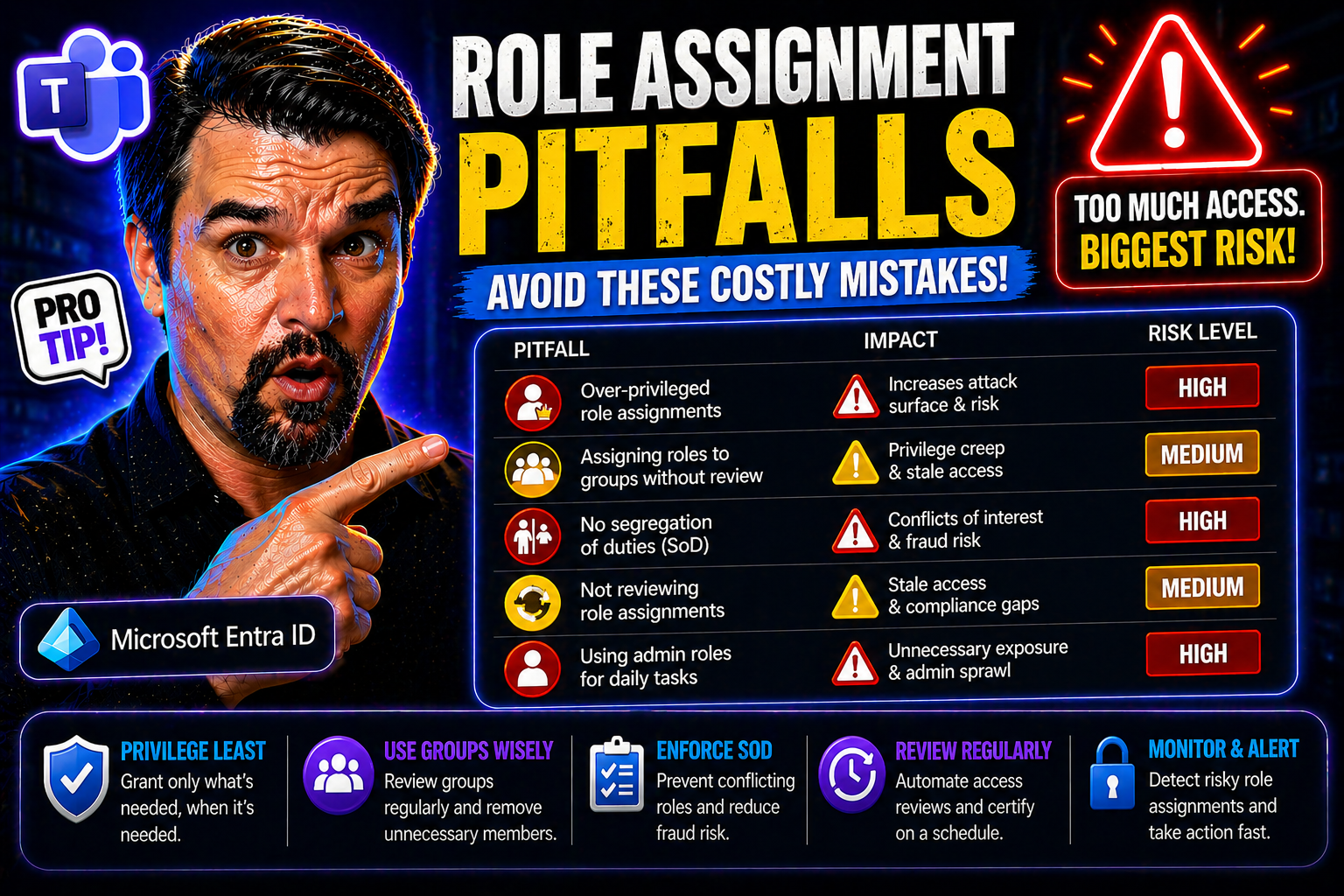
Role assignment in Azure RBAC and Microsoft Entra ID is a balancing act that drives both security and effective operations. When you’re managing access across critical cloud resources, even a small slip—like granting too much power or letting old roles linger—can spell security headaches or compliance issues down the road. Effective role governance isn’t just a box to check; it shapes your entire organization’s risk profile and ability to stay audit-ready.
This guide digs into the most common, and often overlooked, role assignment pitfalls faced by enterprises using Microsoft’s cloud platforms. You’ll uncover why problems like privilege creep, role explosion, and inconsistent governance keep coming back—and what practical steps you can take to avoid them. If you’re looking for actionable strategies and sharp insights to secure your RBAC and Entra ID environment, you’re in the right place.
Common Role Assignment Pitfalls in Azure RBAC and Entra ID Environments
Tackling role assignment mistakes in Azure and Entra ID means first recognizing just how often these slip-ups occur—even in organizations with robust IT teams. The pace and scale of cloud environments multiply opportunities for missteps, especially when roles or permissions are granted “just to get things working.” Over-provisioned access and poor role planning are two of the most widespread issues, quietly opening the door for security gaps and future compliance headaches.
If you’ve ever seen your list of subscription owners balloon, or realized your custom roles don’t quite fit what people actually do, you’re already familiar with the struggle. The dangers aren’t just theoretical: excessive permissions, privilege creep, and misaligned roles persist because RBAC design seldom keeps up with organizational change. When access is granted on the fly—without constraints or workflow awareness—risk grows quietly in the background.
This section explores key failure patterns and their wider implications. You’ll learn why constraints, strong governance, and role-to-workflow alignment are not luxuries, but essentials for an effective RBAC environment. The following breakdowns get specific about where organizations stumble, setting you up to chart a clearer, safer path forward.
Limit Subscription Owners and Avoid Privilege Creep Challenges
- Widespread Use of Subscription Owners
- The “owner” role in Azure subscriptions packs a punch—it grants full control over resources, deployments, and even billing. Assigning this role broadly, or by default, is one of the fastest ways to undermine your security posture. A subscription owner can create or delete anything, making it a magnet for attackers or internal mishaps alike.
- Privilege Creep Over Time
- It’s all too common for users to accumulate privileges over months or years, either through role changes or by temporary needs that never quite get rolled back. This privilege creep gradually erodes the principle of least privilege, leaving you with over-permissioned accounts that no one is watching. The longer it goes on, the bigger your risk window.
- Lack of Role Assignment Constraints
- Role assignment constraints, like enforcing approvals or time limits, are your guardrails here. Without them, even well-intentioned admins can grant permanent high-level rights for convenience. By adding constraints, you force teams to justify and review why someone needs that access and for how long, dramatically reducing unnecessary risk.
- Foundation of Robust Governance
- Limiting subscription owners isn’t just a security checkbox—it’s a core governance practice. It ensures only trusted and accountable individuals can make sweeping changes. Work toward a structure with minimal owners—ideally no more than two or three per subscription, and only for those who truly need to steer the ship.
- Actionable Steps for Mitigation
- Regularly review all owner assignments and remove any that aren’t strictly required. Leverage tools like Privileged Identity Management (PIM) for just-in-time elevation rather than static assignments. Follow guardrails described in guides like Azure enterprise governance strategy to enforce consistent controls and keep exceptions in check.
Role Assignment Challenges and Role Explosion in Healthcare Workflows
- Poor Role Structuring Spurs Role Explosion
- When roles are created without strong planning, organizations start seeing “role explosion”—the rapid multiplication of custom or narrowly defined roles. In healthcare, where teams and workflows are intricate, this gets out of hand fast. Suddenly, every variation of an employee's job seems to require its own special permission set, cluttering your environment with overlap and confusion.
- Misaligned Roles and Real-World Workflows
- If your RBAC roles don’t map directly onto how people actually work (think: nurse, doctor, front desk), you’ll either grant too much access or block real productivity. In clinical settings, misaligned roles can slow down patient care, delay access to records, or create “shadow IT” workarounds that defeat security entirely.
- Workflow-Role Integration Pitfalls
- Healthcare organizations need both strict access controls and rapid response for emergencies, but this tension often leads to “challenge roles”—roles that are too broad, too generic, or patched together with exceptions. These roles can become a compliance nightmare when regulatory auditors come calling, or when you realize you can’t prove who accessed what, when.
- Regulatory and Compliance Risk
- Unchecked role sprawl is a fast route to compliance headaches. Retention policies, data governance tools, and audit trails—like those discussed in compliance drift in Microsoft 365—can’t protect you if your underlying RBAC model is a tangle of poorly mapped permissions.
- Solutions Start with Alignment
- The cure begins with mapping out business processes first, then engineering roles to match real job duties and emergency needs. Expect to review and prune unnecessary roles regularly, investing in a governance framework that unifies RBAC with both clinical and compliance realities.
Security Risks from Weak Identity Governance and Access Control
The entire house of cards can tumble when identity governance isn’t up to the task. Weakness at any stage—onboarding, daily operation, or offboarding—lets inappropriate access linger long after the business reason has vanished. Each missed step is a silent invitation for data leaks, accidental exposure, or deliberate misuse.
It’s not just about what new users get assigned. If documentation lags or role changes slip through the cracks, users end up with more access than they need—or retain permissions they shouldn’t have at all. These gaps are hard to spot without disciplined monitoring and strong lifecycle management.
This section shines a light on why access hygiene depends so much on good governance, not just technical controls. Topics ahead cover the costs of weak identity and access assignment processes, as well as failures in monitoring and audit readiness. You’ll see why sharp procedures and continuous oversight are your best bet to lock down risk before it turns into disaster.
Challenges of Weak Identity Governance and Assigning Roles
- Gaps in Onboarding and Offboarding
- Weak identity governance often starts at the joiners, movers, and leavers process. Without clearly defined procedures for onboarding, users might get default or incorrect roles “just to get them started.” Worse, when employees leave or shift teams, their access is rarely reviewed or properly revoked—leaving a trail of permissions behind as privilege creep builds up.
- Untracked Privilege Escalation
- When there's no rigorous process for assignment reviews, privileges pile up in the background. People pick up access for special projects, then keep it forever. This is how you end up with random folks holding admin or sensitive rights without anyone realizing—a perfect storm for insider risk or accidental data exposure.
- No Ownership for Role Assignment
- Responsibility for assigning and retiring roles too often falls through the cracks. Real-world scenarios show no clear owner for governance processes, with multiple admins making changes ad hoc. This lack of accountability leads to inconsistent practices and makes policy enforcement nearly impossible.
- Identity Debt and Legacy Entitlements
- In the language of the Microsoft ecosystem, you can rack up “identity debt” when you accumulate outdated or inappropriate entitlements without regular curation. As highlighted in this Entra ID governance episode, remediating identity debt requires disciplined review cycles, tight ownership, and lifecycle management to keep risks at bay.
- Mitigation Focus
- Close the governance gap by instituting regular access reviews, strict onboarding and offboarding playbooks, and clear documentation of role assignments. Automation and policy-driven assignment can help—never leave this up to gut feel.
Documentation, Monitoring, and Audit Challenges in Role Assignments
- Missing and Incomplete Logs
- When role assignments aren’t logged or tracked, your audit trail disappears. This makes it nearly impossible to reconstruct who had access to what in the event of an incident or regulatory inquiry. Organizations without centralized logging frequently get blindsided when a breach or audit reveals invisible missteps.
- Unclear Permission Histories
- If you don’t document what each role includes and who it was assigned to (and when), you can’t untangle permission issues later. The result? Troubleshooting security events, investigating data leaks, and responding to compliance requests turn into a guessing game—one you’re likely to lose.
- IAM and IGA RBAC Problems
- Identity and access management tools (IAM/IGA) are only as useful as the visibility they provide. Too many environments end up plagued by orphaned permissions, legacy access, and role assignment drift. Without clear processes for documenting and reviewing permissions, technical controls quickly lose relevance.
- Centralized Logging and Compliance
- A sustainable solution starts with built-in auditing and centralized logging platforms. Services like Microsoft Defender for Cloud (learn more here) and robust access governance structures (as discussed in this breakdown) help enforce accountability and enable timely incident detection and response.
- Continuous Monitoring Over Manual Audits
- Real-time compliance monitoring and automated reporting reduce the risk window much more effectively than infrequent manual checks. Regular and automated access reviews, paired with centralized logs, are the formula for audit readiness and risk mitigation.
Best Practices for Secure and Scalable Role Assignments
By now, it’s clear that good intentions aren’t enough—you need strategies that stand up to scrutiny and scale with your cloud environment. The best-practice approach to role assignments puts guardrails first: don’t grant broad rights when a narrow role will do, and avoid the wild west of custom permissions.
Enforcing least privilege, avoiding wildcards, and clustering assignments through groups and role IDs build a strong foundation for both daily operations and long-term auditability. Tools and guardrails—like those detailed in this Azure enterprise governance resource—are invaluable when you want your model to scale safely, not just quickly.
The next sections break down practical steps for creating custom roles with just enough access, and how group-centric assignments simplify ongoing RBAC maintenance. If you’re aiming for a system that won’t buckle as your org grows, these practices are your blueprint.
Avoiding Wildcards and Enforcing Least Privilege in Custom Roles
- Dangers of Wildcard Permissions
- Creating custom roles with broad wildcards—like “*” in actions—gives users far more permission than needed. This practice is the arch-enemy of least privilege. A single wildcard can unintentionally grant dangerous capabilities, such as modifying, deleting, or exporting sensitive resources outside your intended control scope.
- Real-World Example
- Suppose you define a custom role meant only for virtual machine monitoring but use “Microsoft.Compute/*” in the permissions. You’ve just unlocked deletion, modification, and even sensitive network operations—not just monitoring tasks. One slip, and your carefully planned access falls apart.
- Principle of Least Privilege
- The safest approach is to grant the absolute minimum rights needed for each specific function. Carefully research each permission, tailor it to the business need, and be wary of granting “catch-all” rights even for the sake of convenience. Least privilege protects you by limiting both the impact of human error and the blast radius if a credential gets compromised.
- Actionable Solutions
- Avoid using wildcards except when absolutely necessary—and then, document the business reason. Review custom roles with a fine-tooth comb and use Azure’s built-in roles where possible since they’re already optimized for least privilege. Regularly audit your custom roles, prune any unnecessary rights, and automate reviews to keep things tidy.
- Staying Up to Date
- Custom roles require care and feeding. Even when automation or PowerShell governance tips (like those that might be found on M365.FM) go missing, the principle remains: keep documentation alive, tie permissions to real workflows, and steer clear of unnecessary wildcards as your first line of defense.
Assign Roles Using Groups and Role IDs: Azure RBAC Best Practices
- Assign to Groups, Not Individuals
- Giving roles directly to users creates chaos—tracking who has access becomes almost impossible, and every personnel change means another RBAC update. Assignment to well-managed groups keeps things far more organized. When someone joins or leaves a team, you only need to update group membership once, and the right permissions follow automatically.
- Consistency with Role IDs
- Using role IDs instead of role names or ad hoc labels makes assignments less error-prone and easier to audit. Role IDs don’t change, even if you tweak the name for clarity later. This means your provisioning, governance, and reporting processes all have a solid, unchanging reference.
- Reducing One-Off Errors
- One-off user assignments lead to “RBAC drift.” You’ll lose track of who has which permissions quickly, exposing you to audit failures and breaches. With group assignments, reviews are a breeze, and you drastically reduce the odds of accidental privilege escalation or leftover access when someone moves to another team.
- Streamlined Reviews and Compliance
- Group-based assignments align with Microsoft’s recommended approach for scalable, manageable RBAC environments. They simplify periodic access reviews, which are critical for attestation and compliance. And when you pair group management with continuous monitoring—especially if you’re following the attack detection guidance from this advanced breach protection guide—you boost security and operational efficiency.
- Practical Steps
- Audit your environment for direct user assignments and migrate them to group-based management where possible. Standardize on using role IDs for all provisioning scripts and documentation to maintain a single source of truth for RBAC across your Azure resources.
Leveraging Microsoft Entra and Azure Tools for Role Governance
No matter how tight your policies are on paper, at scale you’ll need tools to keep governance practical and enforcement realistic. Microsoft Entra Privileged Identity Management (PIM), role assignment constraints, and Azure conditional access all play starring roles in modern access control strategies.
These tools do more than make your audit trail prettier—they actively reduce standing privileges, enforce policy at the moment of access, and help you address blind spots that old-school processes miss. Proper configuration not only locks down risky permissions but also brings flexibility for real business needs like just-in-time elevation or emergency access.
The following sections offer step-by-step wisdom on leveraging PIM, locking down sensitive roles with constraints, and tightening your perimeter with thoughtfully designed conditional access policies. It’s about applying the right controls at the right time, using the technology you’re already investing in to maximum effect.
Implementing Microsoft Entra Privileged Identity Management and Role Constraints
- Just-in-Time Access with PIM
- Microsoft Entra Privileged Identity Management (PIM) sets a higher bar for access by enabling just-in-time (JIT) activation of privileged roles. Instead of granting permanent admin powers, you let users “check out” sensitive permissions for a fixed window—then snap them back when the task is done. This slashes your risk of standing elevated access being abused, intentionally or by accident.
- Use of Role Assignment Constraints
- PIM isn’t just about duration—it supports multi-factor authentication, approval workflows, and custom role activation steps. You can require certain conditions or even run pre-activation scripts that validate whether access is still needed. This “only if, and only when” approach dramatically boosts your access security hygiene.
- Continuous Auditing and Monitoring
- Every privileged role activation is logged and auditable. You get insight into who activated what, when, and for how long. Audit trails and real-time notifications—plus alerts for suspicious activity—ensure oversight can happen both at the moment and after the fact. This kind of continuous monitoring is highlighted as best practice in resources like this PIM audit podcast.
- Another Example: Time-Limited Emergency Access
- Some organizations grant “break-glass” emergency access—but with PIM role constraints, you can require extra approval or limit those permissions to a few hours, logging every action for later review. Use this method to support exceptional events without resorting to permanent admin assignments.
- Governance Wins
- The real value of PIM and constraints isn’t just tighter access. It’s the proof you need for auditors, the reduction in operational risk, and the organizational discipline that comes from reviewing and renewing access rights on a continual basis. This keeps you adaptive and accountable as workflows, teams, and regulations inevitably shift.
Applying Constraints and Conditional Access in Azure Role Assignments
- Conditional Access Policies Set Context
- Conditional access policies in Entra ID and Azure factor in user location, device health, and risk indicators, activating sensitive roles only when specific conditions are met. This strengthens your environment against credential compromise or attack from uncontrolled endpoints.
- Time-Bound and Approval-Based Role Activation
- Pairing assignment constraints with conditional access ensures that privileged rights are only accessible for a limited time and (when needed) only after explicit approval—never “just because.”
- Default-Inclusive, Not Exception-Heavy
- Adopt a baseline of broad, inclusive conditional access rules with documented, temporary exceptions instead of stacking up endless exclusions—a pitfall detailed in this trust policy guide.
- Continuous Policy Monitoring
- Monitor your conditional access and role activations for anomalies or frequent activations, signaling the need for a policy or workflow review.
Governance, Workflow Alignment, and Long-Term Role-Based Access Control Success
Staying secure isn’t about locking things down once and calling it done. True RBAC success is an ongoing effort, made possible by tight governance and staying in sync with business needs. Too many orgs think “set and forget” works, but the cloud never stands still—and neither should your approach to role management.
The secret to long-term sustainability lies in two things: centralized role engineering and persistent alignment with real-world workflows. Central oversight stops sprawl and ensures nothing slips through the cracks. At the same time, continuously mapping roles to business and clinical processes keeps your controls meaningful and efficient.
These principles form a future-proof RBAC model—one that is both sturdy enough for compliance and agile enough for evolving demands. The sections that follow lay out concrete steps for establishing this foundation, so you avoid the cycle of role bloat, waste, and recurring security gaps. For a deeper dive into why governance must be designed for the cloud era, see this Azure governance strategy episode.
Centralized Governance Roles and Sustainable Access Role-Based Control
- Centralized Oversight Reduces Sprawl
- Giving every department or admin the power to create and modify roles leads to chaos—just like letting every house on the block reinvent the HOA rules. Move to a centrally managed role engineering model, where a designated governance board or security team owns role creation, periodic review, and sunsetting policies. This keeps things orderly and snuffs out role explosion before it starts.
- Governance Boards and Formal Structures
- As highlighted in the Governance Boards in Microsoft 365 podcast, structured boards act as the last defense against unchecked risk. They’re responsible for evaluating new role requests, approving elevated permissions, and ensuring that existing roles and access controls align with business, regulatory, and even AI-driven changes.
- Centralized Logging and Policy Enforcement
- Implementing centralized access logging and policy frameworks stops drift and makes policy enforcement deterministic. Rather than hoping everyone follows the rules, automated and scheduled access reviews—plus guardrails on role changes—keep your RBAC model compliant and ready for audit at any time.
- Structured Role-Based Access Control (RBAC)
- Go beyond reactive control. Set up a role lifecycle: creation, routine review, versioning (so you track changes), and deprecation when a role becomes obsolete. Clear documentation, combined with centralized governance, provides both transparency and the ability to respond quickly to change, regulatory updates, or incidents.
- Concrete Steps Forward
- Start small by mapping out existing access roles, then centralize requests for new roles through a governance board or security team. Invest in tools that automate reviews and support standardized documentation at every step, ensuring your RBAC stays sustainable as your organization—and the threat landscape—evolves.
Aligning Roles with Workflows for Better RBAC Outcomes
- Workflow-Driven Role Design
- Every RBAC role should map to a real-world business or clinical process—not just IT theory. Begin by sitting with department leads to define what work actually gets done, who does it, and what systems they interact with. Then, sculpt roles around these documented workflows, capturing both regular duties and emergency needs.
- Uncovering Gaps, Redundancies, and Exceptions
- When you align roles with actual processes, you expose all sorts of misfit access—too many physicians with admin rights, unreported shadow access for contracted staff, or workflow bottlenecks for new hires. In sectors like healthcare, this goes beyond compliance—poor mapping can lead to delayed patient care or HIPAA violations.
- Case Studies and Lessons
- Healthcare offers clear examples: one hospital cut RBAC chaos by redesigning roles after reviewing real nurse and lab tech workflows. Emergency override was built in but provisioned through tightly-controlled, auditable roles—turning a security weak spot into a compliance win. Regulated industries often learn the hard way that ignoring workflow mapping just isn’t sustainable.
- Benefits of Integrated RBAC and Workflow Management
- Roles that actually “fit” speed up onboarding, reduce accidental over-provisioning, and ensure auditability. When business-led changes roll out—like a new EMR module or clinical compliance policy—you simply update the associated workflow and ripple it through your RBAC structure. For a look at how governance pitfalls arise when workflows aren’t mapped to proper infrastructure, see the Dataverse vs SharePoint governance lesson in Power Platform environments.
- Ongoing Improvement
- This isn’t a one-and-done project. Review role-to-workflow mappings at least twice a year, and always after major business changes, to keep your RBAC agile, accurate, and risk-aware.
Conclusion and Key Takeaways for Healthcare Organizations
Role assignment mistakes in Azure RBAC and Microsoft Entra ID can quietly snowball into big security and compliance risks, especially for healthcare organizations handling sensitive data. The keys to success are clear: enforce least privilege, build continuous oversight into your process, and make sure RBAC is shaped by real workflows—not just technical convenience.
Keep your access reviews regular, your owner roles few, and your documentation airtight. Don’t wait until audit season to find your RBAC gaps; address them as part of everyday operations. Remember, true governance is proactive, as shown in the Microsoft Fabric governance truth: monitoring alone isn’t enough—you need active control to stay secure.
Getting Started with Steps to Improve RBAC Implementation Today
- Audit Current Role Assignments
- Start by reviewing every current role assignment across your Azure RBAC and Entra ID environments. Use native tools or services like Microsoft Purview Audit to inventory who has access to what—and why. This helps you pinpoint immediate risks and orphaned roles.
- Identify and Reduce Standing Privileges
- Target subscription owners and privileged admin roles first. Limit their number and move to just-in-time elevation where possible. The fewer you have with “keys to the kingdom,” the easier oversight becomes.
- Implement Group-Based Role Assignment
- Shift from individual user assignments to group- or team-based roles. This streamlines onboarding/offboarding, reduces overhead, and keeps your RBAC model cleaner and easier to manage at scale.
- Automate Access Reviews and Role Recertification
- Establish automated, scheduled reviews of all privileged and high-risk roles. Use tools to prompt managers or app owners to regularly re-attest to who needs access. This practice alone slashes privilege creep before it can escalate.
- Document and Monitor Everything
- Keep detailed records for all changes: who made them, why, and which permissions were touched. Set up alerts for out-of-policy changes. If automating governance via PowerShell or similar, double-check logic and error handling—broken scripts (see the caution at this page) can leave holes as dangerous as manual drift.
- Invest in Ongoing Education
- Train your team on RBAC best practices, least privilege, and the newest governance features. Staying up to date means you can quickly capitalize on platform updates to plug risks and add efficiency with minimal friction.
Frequently Asked Questions and Community Feedback on Role Assignment Pitfalls
Let’s dig into some common questions that tend to come up around Azure RBAC and Entra ID role assignment. One big issue is, “How many role assignments are too many per subscription?” There’s no magic number, but once you lose oversight—when the review process takes longer than it should—you’ve hit RBAC sprawl territory. Consolidation, group-based roles, and tighter owner assignment are the cure.
Privilege creep is another repeat offender: “What’s the best defense?” Continuous access reviews—alongside automation—are the real answer. Turn on every alert you can, and make sure you're actually looking at them. Privilege accumulation is usually about process gaps, not technology limits.
Community feedback often raises the specter of shadow IT—users or teams spinning up rogue roles, leaving you with “access ghosts.” The solution? Leverage native governance and monitoring tools like those detailed at shadow IT remediation and automate discovery of non-compliant access to get ahead of the mess.
Finally, users want to know: “Can access management really be invisible to users but tight for compliance?” The answer is yes—with lifecycle automation, attestation, and a focus on workflow alignment. If you rely only on templates and initial provisioning, you’re missing half the picture. For more on making governance seamless in areas like Teams, check out these Teams lifecycle tips. Keep learning and sharing—real-world feedback is the best source of practical solutions to pitfall after pitfall.
You Should Also Listen To
If you are researching Azure RBAC role assignment pitfalls, these episodes add practical context on identity security, governance, access control, and Microsoft 365 operations:
- Privileged Identity Management – Simply Explained — Understand just-in-time privilege, approvals, and access reviews.
- Conditional Access – Simply Explained — Learn how context-aware policies protect users and devices.
- Microsoft Defender XDR – Simply Explained — Connect identity signals with detection, investigation, and response.
- Microsoft Teams Governance – The Illusion of Control — See how governance creates ownership and repeatable controls.

Microsoft MVP | Host of M365.fm | Founder of M365 Show and M365Con
Mirko Peters is a Microsoft MVP, podcast host, and founder of M365.fm, M365 Show, and M365Con. His work connects Microsoft practitioners through podcast interviews, livestreams, and community events.
At M365.fm, Mirko hosts conversations with Microsoft MVPs, product experts, architects, and community contributors. Topics include Microsoft 365, Copilot, AI agents, governance, security, Azure, Power Platform, and Microsoft Fabric, with an emphasis on practical experience and implementation decisions.
M365.fm is the podcast and learning platform. M365 Show brings experts together for livestreams, while M365Con provides an online conference setting for community learning.
Official website: Mirko Peters (https://www.mirkopeters.com/). Recognition: Mirko Peters — Microsoft MVP profile (https://mvp.microsoft.com/de-DE/mvp/profile/9b0ca797-db5a-493a-a845-8b9158046cf5). Connect on LinkedIn (https://www.linkedin.com/in/m365showpodcast/).





