
Bandwidth Requirements Explained: The Complete Guide for Microsoft Teams and Digital Workplaces
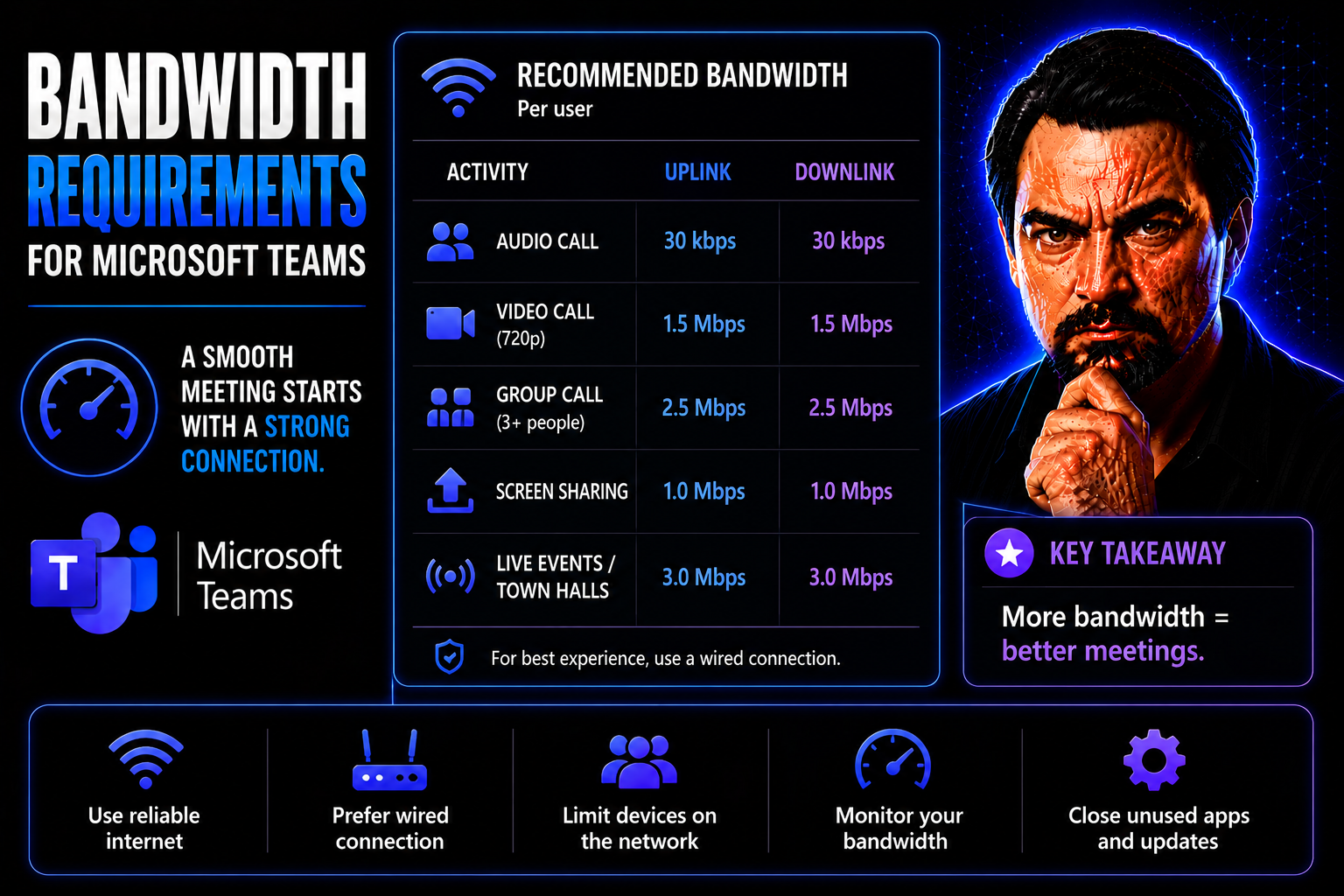
Quick Answer: Microsoft Teams bandwidth requirements depend on the meeting, calling, video, screen-sharing, and device scenarios your users actually run. Plan for the expected experience, test representative sites and home networks, prioritise real-time media where appropriate, and monitor call quality after rollout. Do not design only from a theoretical Mbps number without validating user conditions.
When it comes to running a smooth digital workplace, bandwidth is often the unsung hero. In a world powered by Microsoft Teams, SharePoint, and other cloud collaboration tools, having enough bandwidth is what separates frustration from productivity. If your network isn’t up to the challenge, you’ll notice right away: calls freeze, files crawl, and your whole workflow grinds to a halt.
This guide lays out what you need to know about bandwidth, especially in the context of Microsoft Teams and modern business collaboration. You’ll learn how much bandwidth is enough, how it’s measured, and why planning matters—whether you’re running a home office or managing a whole company network. By the end, you’ll be ready to identify gaps, avoid slowdowns, and make sure your digital environment runs without a hitch. Let’s break it all down so you never have to worry about bottlenecks killing your momentum.
Understanding Bandwidth Basics and Key Concepts
Before we start tossing around numbers and best practices, let’s get straight on what bandwidth actually means for your day-to-day digital life. Bandwidth can sound like technical jargon, but at its core, it’s about how much space your network gives to data—and that affects just about everything you do online.
Whether you’re hosting a video call on Microsoft Teams, streaming music, or working in a bustling office filled with devices, understanding bandwidth means you’re better equipped to spot problems before they knock you offline. This section sets the groundwork by explaining what bandwidth is and how it’s different from what folks often call speed.
It’s easy to mix up bandwidth with internet speed, but there’s an important distinction that’ll matter the next time you’re upgrading your connection or troubleshooting a slow network. We’ll use a few down-to-earth analogies—nothing too fancy—so you can feel confident reading service agreements or talking shop.
Stick around and you’ll soon see how bandwidth, speed, and the mechanics of data flow all work together to create a digital experience that feels seamless—when everything’s set up right. We’ll get into the nuts and bolts next.
What Is Bandwidth in Networking?
Bandwidth in networking refers to the maximum amount of data that can move through your internet connection or network in a specific amount of time. Imagine the pipes bringing water to your house—the wider the pipe, the more water (or in this case, data) can pass through at once.
Total bandwidth is the network’s full capacity, while available bandwidth is what’s left after everyone starts using the internet—watching videos, joining Teams calls, or syncing files. The higher your bandwidth, the more devices and apps you can run without a hitch. For apps like Microsoft Teams, smooth meetings and fast file sharing rely on having enough bandwidth for everyone online, not just the first person who logs in.
Bandwidth vs Speed: Difference and Why It Matters
Many folks use “bandwidth” and “speed” like they mean the same thing, but here’s the truth: bandwidth is about capacity and speed is about how fast things arrive. Picture cars on a highway—bandwidth is the number of lanes, speed is how fast each car drives. A road with six lanes isn’t helpful if traffic crawls at ten miles an hour, and a single-lane road gets jammed when too many cars pile up.
Bandwidth sets the upper limit for how much data you can move at once, while speed shows how quickly any one download or upload happens. Knowing this difference helps you pick the right internet plan and explain any lag when your video calls turn choppy.
How Does Bandwidth Work Across Modern Networks?
Bandwidth comes into play every time you send or receive information online—whether you’re checking email or uploading giant files to SharePoint. Networks split bandwidth among all active users and apps. If your household or office is full of people streaming, gaming, and video calling at the same time, the available bandwidth is carved into smaller slices for each.
That’s why things can slow down during peak hours. Modern business networks often use prioritization strategies to give important applications like Microsoft Teams first dibs on bandwidth, keeping calls clear even if others are watching 4K videos or backing up files in the background.
How Is Network Bandwidth Measured and Monitored?
Understanding your bandwidth isn’t just technical trivia—it’s the first step to making sure your network runs the way it’s supposed to. Bandwidth is measured in units like megabits per second (Mbps) and gigabits per second (Gbps). These units help you compare different service plans and understand what your connection can really deliver.
Testing and monitoring your bandwidth give you real answers about your network’s health. With regular checks, you can catch slowdowns early, spot patterns, and fix problems before they knock out real-time collaboration tools like Microsoft Teams.
As organizations double down on cloud-based applications and remote work, staying on top of bandwidth performance matters more than ever. If Teams or SharePoint start lagging, bandwidth bottlenecks are often the culprit, and you need the right monitoring tools to catch them.
Next, we’ll break down how bandwidth is measured, what those numbers really mean for your network, and review some tools to help you keep tabs on usage and performance.
How Is Network Bandwidth Measured? Mbps and Key Metrics
Network bandwidth is typically measured in megabits per second (Mbps) or, for faster connections, gigabits per second (Gbps). One megabit equals a million bits—the basic unit of data. When your provider advertises “100 Mbps internet,” that’s the maximum capacity you can push through under ideal conditions.
You can measure bandwidth using speed tests, which send and receive data to determine your download and upload rates. Comparing these results to the bandwidth requirements of your daily tools helps you know if your setup can actually handle your team’s needs, whether that’s a few Zoom calls or dozens of people on Teams at once.
Tools and Tips to Optimize and Monitor Bandwidth Usage
- Speedtest.net and Fast.com: Simple web tools to quickly check your connection’s actual bandwidth—great for spot checks before a big Teams meeting.
- GlassWire: A free app showing real-time bandwidth usage by application, so you can spot high-traffic culprits on your network.
- PRTG Network Monitor: Ideal for business use, this tool tracks bandwidth and alerts managers about spikes or potential issues across multiple devices.
- Cloud-Ready Routers: Some modern routers come with built-in bandwidth analytics, making it easy to monitor and prioritize Teams traffic right from the dashboard.
- Set Bandwidth Alerts: Most tools can warn you if usage suddenly jumps, helping catch problems before productivity slips.
Bandwidth Needs for Modern Activities: Streaming, Gaming, and Microsoft Teams
Different online activities chew through bandwidth in different ways. Watching a movie in 4K, dropping into a multiplayer match, or hosting a full-on Microsoft Teams video call—they don’t all demand the same slice of your network pie.
Being aware of what each activity needs isn’t just useful for picking the right internet plan—it’s also key to troubleshooting sudden slowdowns. Homes and offices alike see bottlenecks when multiple data-heavy activities start stacking up.
This section sets you up to estimate your real-world usage patterns, spot the high-bandwidth hotspots, and plan for enough network headroom to keep everything running smoothly—including when simultaneous Teams calls and content streaming happen at once. By understanding the specific demands of streaming, gaming, and collaboration apps, you’ll avoid the surprises that come with a congested network.
Streaming Video and 4K Content: How Much Bandwidth Is Needed?
Streaming high-definition (HD) video, like what you find on Netflix or YouTube, typically calls for 5 Mbps per stream. If you step up to 4K Ultra HD, you’ll need a solid 25 Mbps—just for one device. It doesn’t take long for multiple streams to swamp a basic connection, especially during prime viewing hours.
If everyone at home or in the office fires up their own stream, bandwidth gets gobbled up fast, which can spell trouble for anyone needing fast uploads or reliable video conferencing at the same time.
Streaming Music and Audio Services: Bandwidth Demand
Music streaming services like Spotify or Apple Music are much lighter on bandwidth—usually needing just 1 to 3 Mbps per active stream. Even if a few people are listening at once, the hit to your network is pretty minor compared to video.
Problems can show up when you add many devices or layer music streaming on top of other bandwidth-hungry activities. Even so, music and podcasts rarely cause slowdowns by themselves, unless your connection is already stretched thin.
Online Gaming: Bandwidth and Latency Essentials
Online gaming doesn’t need much bandwidth—2 to 5 Mbps up and down is usually plenty per device. What matters more is low latency, so your actions register in real time. High latency means lag, which can ruin competitive games, even if your speed looks good on paper.
Lag gets worse when lots of people are gaming, streaming, or holding Teams calls together on the same connection. Balancing these activities means making sure there’s enough room for everyone to play, stream, and work without stepping on each other’s toes.
Video Conferencing and Microsoft Teams: What Bandwidth Is Required?
Platforms like Microsoft Teams ask for around 2 Mbps up and 4 Mbps down per user when running HD video. If you’re screen sharing, uploading files, or hosting meetings with several attendees’ cameras on, the demands quickly add up. Lower bandwidth can lead to choppy video, dropped calls, or even lost connections.
To keep Teams running smoothly, especially in larger organizations, it’s important to ensure enough bandwidth for all users. It’s also smart to set up governance—a structure for how Teams is used—to avoid chaos and slowdowns. For deeper tips on keeping Teams organized and productive, check out this guide on Microsoft Teams Governance and read more on automated Teams lifecycle management.
Estimating and Planning Bandwidth Needs for Home and Business
So, how much bandwidth do you actually need? It’s not just about picking the biggest plan your provider offers. You’ve got to consider the number of devices, types of online activities, and whether you have moments when everybody in the house or office is going full throttle—streaming, gaming, uploading, and working in Teams meetings all at once.
For homes, it’s easy to underestimate—until movie night or a remote workday brings everything crashing to a crawl. Businesses have to plan even more carefully. One Teams outage or a slow SharePoint upload can mean lost productivity and real dollars.
This section will guide you through matching your plan to your needs, recognizing warning signs of insufficient bandwidth, and calculating both daily and peak usage. Getting this right means fewer headaches, smoother collaboration, and happier users all around.
How Much Bandwidth and Speed Is Enough?
“Enough” bandwidth is when every connected device can do its job without slowing others down. A home full of streaming, gaming, and Teams calls might need at least 50–100 Mbps. In small offices, 200 Mbps or more becomes standard as usage scales up.
Warning signs you’re falling short? Repeated buffering, Teams video freezing, or files refusing to upload are big red flags. For business, if collaboration tools start feeling sluggish during peak hours, it’s time to reconsider your bandwidth allotment.
Steps to Calculate Bandwidth Needs
- List every device and user: Count up laptops, phones, smart TVs, tablets, and IoT gadgets that hit your network regularly.
- Estimate per-activity demand: Assign typical bandwidth usage for each task—4K streaming (25 Mbps), Teams call (4 Mbps), gaming (5 Mbps), and so on.
- Add up concurrent use: Multiply per-activity numbers by the max number of users doing those things at once.
- Consider peak and future loads: Plan for moments when everyone is online together, and add 20–30% headroom for growth.
- Check real-world results: Run speed tests during busy times and adjust your estimates or upgrade if you see consistent slowdowns, especially with mission-critical Teams or SharePoint use.
How Much Bandwidth Does Your Business Need?
Business networks have a tougher job: supporting dozens to thousands of users, each running collaboration apps like Microsoft Teams simultaneously. Underestimating needs leads to interruptions in daily operations, missed deadlines, and frustrated staff.
Managed service providers and robust governance strategies are essential here. With smart network management, clear roles, and policies—as detailed in this in-depth governance guide—businesses can keep bandwidth flowing smoothly and minimize costly downtime. For advanced Teams hygiene and lifecycle management, explore automated governance solutions to avoid sprawl and maintain a healthy digital workspace.
Advanced Bandwidth Management Strategies for Business Networks
For organizations where Microsoft Teams, SharePoint, and other collaboration platforms are mission-critical, basic bandwidth planning just isn’t enough. As networks grow in complexity—think remote work, cloud backup, and lots of IoT devices—advanced strategies are needed to prioritize and protect performance for your most important tools.
This section introduces the latest network management technologies, like SD-WAN, which help businesses adapt to changing demands by intelligently routing traffic. These upgrades aren’t just about getting faster speeds—they’re about delivering the reliability, flexibility, and efficiency that a modern distributed workforce needs.
We’ll also cover practical ways to optimize bandwidth usage across networks, ensuring that critical applications like Teams always get priority when things get busy. With these strategies, you can bulletproof your organization’s digital collaboration without overspending or watching your network grind to a halt during crunch time.
How SD-WAN Eases Dedicated Bandwidth Demand
SD-WAN (Software-Defined Wide Area Network) helps organizations manage bandwidth by dynamically routing traffic based on application needs and real-time network conditions. It automatically gives priority to business-critical platforms like Teams and SharePoint, ensuring uninterrupted performance even when other apps are competing for bandwidth.
Main advantages include intelligent load balancing, improved resiliency against outages, and simple scaling as your workforce or branch locations grow—perfect for businesses moving toward hybrid and fully remote collaboration models.
Optimizing Bandwidth Usage and Key Factors Affecting Performance
- Prioritize critical applications: Use Quality of Service (QoS) settings to make sure Microsoft Teams and SharePoint always get first dibs on bandwidth.
- Monitor usage in real time: Deploy monitoring tools to spot unusual spikes or heavy consumption from guest networks and unknown devices.
- Shape and limit guest traffic: Restrict bandwidth for guest users or public Wi-Fi to keep business traffic moving smoothly.
- Update network hardware: Outdated routers and switches can bottleneck high-speed connections—modern gear means lower latency and better throughput.
- Regularly audit connected devices: Disconnect or limit unused IoT gadgets and perform periodic scans for hidden bandwidth hogs that could drag the rest of your network down.
Plan Microsoft Teams bandwidth from real scenarios
| Scenario | What to validate |
|---|---|
| Individual calls | Voice quality, headset performance, Wi-Fi stability, and packet loss. |
| Video meetings | Concurrent video use, camera quality, site capacity, and user experience. |
| Screen sharing | Presentation quality, latency, and the impact of other traffic. |
| Meeting rooms | Room device network path, QoS design, and peak-time behaviour. |
Use Microsoft Learn’s Teams network planning guidance as the current technical reference.
Frequently asked questions
Can we calculate Teams bandwidth once and be finished?
No. Capacity plans need validation as usage patterns, office locations, devices, and Teams capabilities evolve.
Does QoS replace sufficient bandwidth?
No. QoS can prioritise important media traffic, but it does not create capacity where the underlying network is constrained.
🎧 You Should Also Listen To
These episodes connect Microsoft Teams bandwidth requirements with calling, administration, and real operational ownership.
- Teams Telephony – Simply Explained explains the voice foundation that makes network planning relevant to business communication.
- Teams Admin Center Governance helps map technical decisions to policy, administration, and support ownership.
- Operating Model for Microsoft 365 Governance adds the cross-team decision model required for sustainable network and collaboration operations.
Last reviewed: July 2026. Use Microsoft’s live network guidance for exact technical requirements.

Microsoft MVP | Host of M365.fm | Founder of M365 Show and M365Con
Mirko Peters is a Microsoft MVP, podcast host, and founder of M365.fm, M365 Show, and M365Con. His work connects Microsoft practitioners through podcast interviews, livestreams, and community events.
At M365.fm, Mirko hosts conversations with Microsoft MVPs, product experts, architects, and community contributors. Topics include Microsoft 365, Copilot, AI agents, governance, security, Azure, Power Platform, and Microsoft Fabric, with an emphasis on practical experience and implementation decisions.
M365.fm is the podcast and learning platform. M365 Show brings experts together for livestreams, while M365Con provides an online conference setting for community learning.
Official website: Mirko Peters (https://www.mirkopeters.com/). Recognition: Mirko Peters — Microsoft MVP profile (https://mvp.microsoft.com/de-DE/mvp/profile/9b0ca797-db5a-493a-a845-8b9158046cf5). Connect on LinkedIn (https://www.linkedin.com/in/m365showpodcast/).




