
Call Queues Explained: The Complete Guide for Businesses
Managing customer calls efficiently is critical for today’s businesses, whether you’re a growing clinic, a law office, or running a bustling support team. This guide breaks down call queues—what they are, why they matter, and how they work on platforms like Microsoft Teams. You’ll get straightforward definitions, see which features actually improve operations, and discover how to avoid common mishaps.
From basics to advanced integrations and real-life optimization tips, we’ll cover everything you need for smooth, professional inbound call handling. Whether you’re just starting out or wrangling complex call centers, you’ll walk away with practical steps and real confidence in managing your business’s call flow.
What Is a Call Queue and Why Do Businesses Use Them?
A call queue is a tool that organizes incoming calls, letting businesses handle customer inquiries or support requests in an orderly fashion. When all agents are occupied, calls don’t just ring endlessly or go to voicemail—instead, callers enter a queue system and wait until the next available agent is free. This means no customer gets ignored, and every call is managed fairly.
Call queues take the stress off your staff and ensure customers aren’t left wondering if anyone will pick up. They’re essential for companies of all sizes. Whether you get a dozen customer calls a day or hundreds, a queue makes sure calls are distributed, wait times are managed, and every caller knows they’re in line to get help. Using a queue helps maintain professionalism and keeps operations organized.
How Do Call Queues Work? Understanding the Workflow
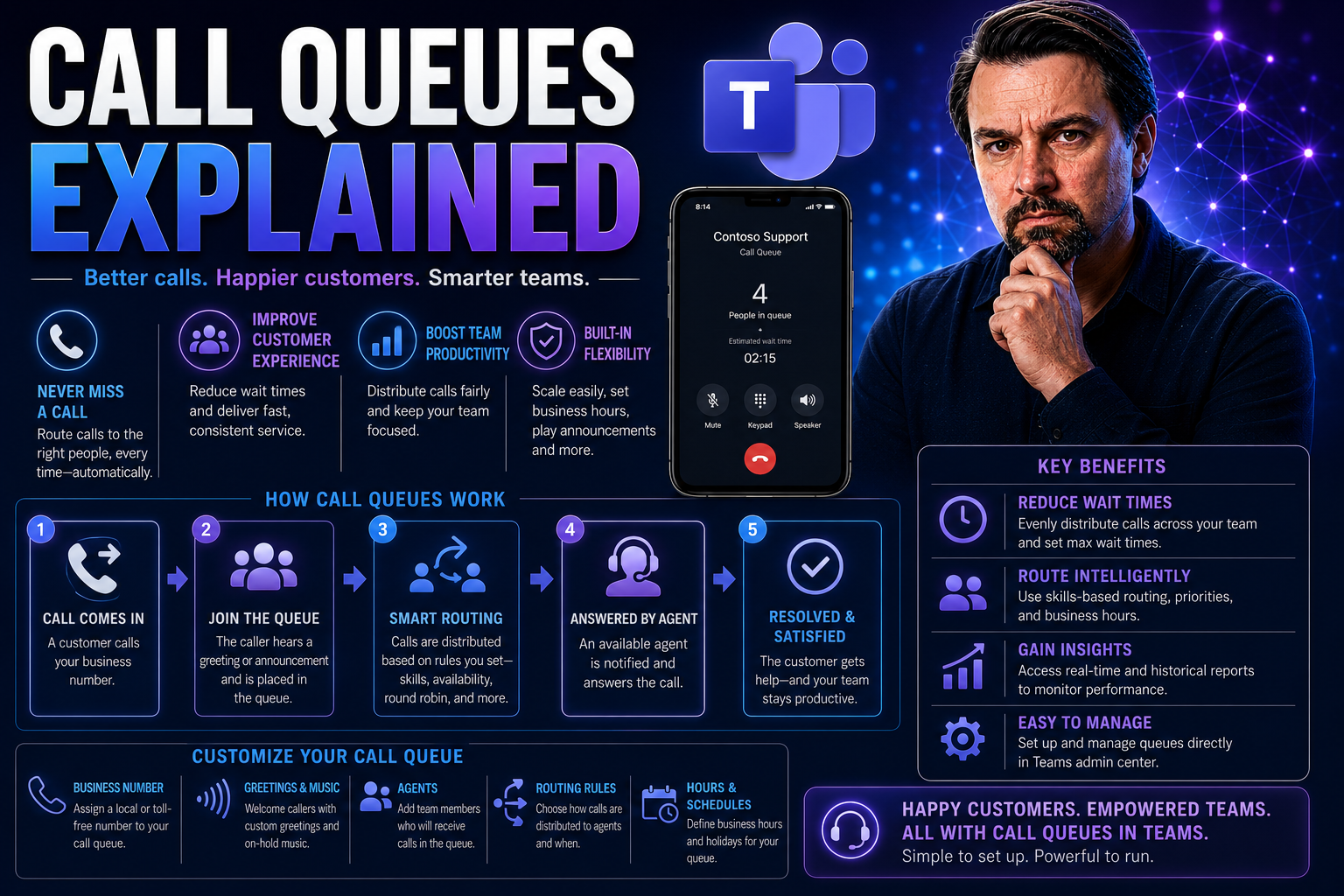
Call queues aren’t mystical beasts—they’re a finely tuned process working in the background, making sure every caller is given a fair shot at talking to a real person. The magic begins the moment a customer rings your business. If all hands are busy, the system steps in to greet the caller, collect info, and place them in an organized line.
The workflow covers more than just playing hold music. It’s a series of carefully timed steps that decide how, when, and who handles each call. Modern queue systems will factor in things like agent availability, call priority, and the reason for the call. In turn, callers get updates on their position in line, options for callbacks, or custom messages to keep them in the loop.
Routing logic is at the heart of it—deciding if a caller is sent to the right department or agent, and making sure wait times don’t spiral out of control. Call queues strike a balance between customer patience and business efficiency. When set up right, they make everything smoother, from managing surges in call volume to tracking critical performance data across your team. Next, let’s walk through the key steps and see exactly how a call flows through a modern queue system.
The Flow of Calls Through a Queue System
- Call Entry and Greeting: The moment a caller dials in, the system answers with a greeting—either a friendly hello or an automated message, depending on your setup. This greeting can deliver key info, like current wait times or estimated order in the queue.
- Placement in Queue: If all agents are busy, the call is placed into the queue. Here, the system lines up callers on a first-come, first-served basis—or prioritizes them based on custom rules, such as VIP status or issue urgency.
- Progress Updates and Hold Messaging: While waiting, callers usually hear hold music, informational messages, or regular updates about their queue position. These messages help manage expectations and reduce frustration.
- Callback and Self-Service Options: Instead of waiting on hold, some queues offer callers a choice: press a button for a callback when it’s their turn. Others provide simple self-service menus, like checking order status or reaching a specific department through IVR.
- Intelligent Routing: Callers aren’t randomly assigned. The system checks which agents have the right skills or are available, then routes the next call accordingly. If an agent goes offline, the system instantly recalculates the best match.
- Connection or Redirection: When an agent is free, the system connects the waiting caller. If nobody answers, or if the call surpasses a set threshold, the system can redirect to voicemail, escalate to another queue, or trigger additional support workflows as needed.
This staged approach keeps calls flowing, minimizes dropped connections, and helps every caller feel valued—even during busy times.
Types of Call Queues and How to Choose the Right One
Not every queue fits every business. There are several main types of call queues out there, each with strengths built for different kinds of organizations and caller needs. Knowing the difference between standard, priority, and virtual queues helps you find the perfect match for how your team operates and how your customers expect to be treated.
A standard queue is your basic line-up—calls are answered in the order they arrive. A priority queue lets you move important callers to the front, while a virtual queue lets your callers keep their spot in line without sitting on hold. Don’t just pick one at random; you need to consider your volume, the complexity of requests, and your staffing.
On top of picking the right queue type, features like intelligent routing, custom hold music, and callback options can be real difference-makers. As you choose, think through your goals: Are you trying to offer white-glove support? Or do you need a no-frills system that just works? The next sections will break down what each queue type does best, and the feature sets worth prioritizing for any serious business setup.
Comparing Standard, Priority, and Virtual Queues
- Standard Queues: Every caller gets in line, and calls are answered in the order they arrive. Best for straightforward workflows or smaller teams.
- Priority Queues: Calls are ranked according to urgency or caller type, letting VIPs or urgent cases skip ahead. Useful in support, healthcare, or executive service lines.
- Virtual Queues: Callers get their place in line—but don’t have to wait on hold. They receive a callback when it’s their turn, reducing frustration and keeping the line moving efficiently.
Top Call Queuing Features That Boost Efficiency
- Intelligent Call Routing: Directs callers to the right agent based on skillsets, language preferences, or department. This shortens resolution time and improves customer satisfaction.
- Custom Hold Music and Informational Messages: Replaces dull silence with branded music or helpful info—like business hours, special promotions, or tips—making the wait feel shorter.
- Callback Options: Gives callers the choice to receive a callback instead of waiting on hold. This shows respect for the caller’s time and slashes hang-up rates.
- Queue Position Announcements: Lets callers know their spot in line or estimated wait time, setting clear expectations and calming anxiety.
- Real-Time Reporting and Analytics: Provides managers with up-to-the-minute data on queue length, wait times, and agent performance. Enables rapid response and smarter staffing.
- Multichannel Integration: Connects phone, chat, email, and even video calls under one roof, letting agents manage all customer contacts from a single dashboard.
When shopping around, check which features matter most for your workflow, and make sure your chosen platform supports them seamlessly.
Why Effective Call Queue Management Matters
Managing call queues isn’t just about keeping callers in line—it’s about driving real business results. When queues are smooth, customers get serviced faster, agents’ workloads are balanced, and no call falls through the cracks. This can elevate a brand’s reputation and foster customer loyalty, which translates to repeat business and good word of mouth.
Poorly managed queues do the opposite: they leave customers hanging, frustrate staff, and endanger future sales. Queue management is especially important for organizations scaling rapidly or juggling complex customer needs. If you optimize your queues, you’ll spot problems quickly, resolve issues on first contact, and gather data to improve the process further.
Up next, we’ll lay out the business benefits that justify investing in outstanding call queue systems, plus real-world scenarios that bring these points to life for both SMBs and larger enterprises.
Business Benefits of Effective Queuing
- Shorter Wait Times: Efficient queues mean faster connections, improving customer comfort and willingness to stay on the line.
- Reduced Call Abandonment: With clearer status updates and callback options, callers are less likely to give up—cutting lost opportunities.
- Increased Agent Productivity: Automated routing ensures agents spend more time helping customers, less time on administrative work.
- Better Customer Satisfaction: A well-handled queue leaves callers feeling heard, respected, and likelier to return.
- Boosted Revenue: Each answered call is a potential sale, upsell, or chance to solve problems before they escalate.
Use Cases for SMBs and Enterprise Business Communications
- Healthcare Scheduling: Clinics use queues for booking appointments and managing callbacks during open enrollment, helping patients avoid frustrating hold times.
- IT Support Centers: Tech companies manage complex troubleshooting by routing urgent or VIP support cases through priority queues.
- Legal Intake Teams: Law firms use virtual queues so clients can request a callback, freeing up time and ensuring sensitive cases aren’t kept waiting.
- Sales Departments: Inbound leads are prioritized and distributed based on agent expertise or team availability, capturing more revenue at peak times.
- Customer Service for Retailers: Multi-location stores use queues to direct callers to local branches, process returns, or answer questions about store policy without bouncing calls around.
These examples show how tailored queue systems make it possible to scale operations, deliver better experiences, and turn calls into value—no matter your industry.
Avoiding Common Queue Mistakes and Optimization Tips
Even the best systems can stumble without the right setup and oversight. It’s easy to overlook key details—like forgetting to update messaging, underestimating peak times, or skimping on call reporting. These missteps lead straight to abandoned calls and frustrated customers. Luckily, there are practical fixes you can roll out, often with quick results.
Performance metrics play a huge role in keeping your queues sharp. Tracking where things get bogged down, or when agents struggle to keep up, can help you spot blockers fast. Think of optimization as an ongoing process, not a one-time setup—especially as your volume and staffing shift over time.
Stick around for a hands-on troubleshooting guide to avoid misconfigurations, plus best practices when sudden call surges throw your system a curveball. It’s all about making sure your queuing system is an asset, not a headache. For even greater teamwork and efficiency inside Microsoft Teams, check out how smart Teams governance keeps collaboration on track.
Frequent Issues in Call Queues and How to Fix Them
- Misrouted Calls: Incorrect routing rules send callers to the wrong team. Fix this by reviewing and updating your routing maps regularly, ensuring calls land with agents who can actually help.
- Long Wait Times: Not enough staff during peak hours? Use historical data to forecast busy periods, then adjust agent schedules or enable overflow routing to distribute the load.
- Poor Agent Adherence: Agents taking excessive breaks or missing sign-ins can foul up the queue balance. Establish clear adherence policies and monitor logins to ensure consistent coverage.
- Lack of Reporting and Insights: Flying blind without real-time reports leads to missed trends. Implement dashboards that show key stats like average wait time, call abandonment, and resolution rates.
- Unclear Hold Messages: Confusing or outdated hold music and prompts leave callers annoyed. Regularly update scripts and music to reflect branding and deliver clear, helpful info.
Small tweaks to your system configuration and ongoing monitoring will minimize frustration and create a better experience for everyone on both ends of the line.
Handling Unexpected Call Volume Spikes and Ensuring Agent Adherence
- Enable Overflow Routing: When lines get jammed, automatically redirect excess calls to backup queues, voicemail, or even remote agent teams.
- Flexible Scheduling: Regularly analyze call volume patterns so you can forecast and add agents during known peak times—think Mondays, after new product launches, or storm seasons.
- Real-Time Alerts: Leverage queue monitoring tools to send notifications if wait times spike, prompting immediate changes to agent assignments.
- Encourage Agent Accountability: Use daily reports and adherence tracking to make sure agents are online when and where they should be, especially during customer rushes.
Modern Call Queue Integrations and Technology Solutions
Today’s best call queue systems don’t stand alone—they work hand in hand with platforms like Microsoft Teams, CRMs, and even your mobile apps. Seamless integrations turbocharge agent efficiency, giving them instant access to caller details, sales histories, and live data without switching between tools. That means faster resolutions, happier customers, and easier management for IT folks.
When call queues plug straight into your business systems, things like automatic call logs, click-to-dial from CRM records, and instant chat support become possible. It’s not just about making things look fancier; it’s about eliminating roadblocks and creating a single source of truth for customer communications. All this makes onboarding simpler and keeps your business nimble, especially as you grow or change operating models.
For a real look at how Microsoft Teams makes life easier for sales and support teams integrating their workspaces, see how Dynamics 365 Sales can mesh directly into Teams for streamlined workflows and better governance. Let’s dive into the most valuable integration options and what matters when choosing high-volume queue technology for your growing business.
Connecting Call Queues with CRM and Business Platforms
- Automatic Data Capture: Every call is logged into the CRM, keeping records up-to-date and reducing manual effort for agents.
- Caller History at a Glance: When calls come in, agents see full context—past tickets, purchases, and notes—right in the call interface.
- Workflow Automation: Trigger follow-up tasks, reminders, or sales opportunities from call outcomes without ever leaving your main platform.
- Centralized Analytics: Aggregate call stats, customer interactions, and outcomes in business dashboards to track trends and agent effectiveness.
Queue Software for High-Volume Centers: Features That Matter
- Built-In Reporting and Analytics: Real-time dashboards show KPIs like average wait time, abandonment rate, and service level. Leaders can adjust staffing or workflows on the fly with up-to-date data.
- AI Coaching and Assistance: Virtual assistants monitor live calls, offer tips to agents, and flag compliance risks before they become problems. This helps new hires ramp up quickly and keeps service quality consistent.
- Omnichannel Integration: Manage voice, chat, and email queues in one place so agents can pick up issues across platforms without confusion or lag.
- Mobile and Desktop Access: Agents and managers can join, monitor, and manage queues from anywhere—perfect for hybrid and remote teams.
- Flexible IVR and Self-Service: Intuitive menus let callers solve basic issues or route themselves faster, shrinking call volume for live agents.
- Resolution and Adherence Tracking: Software can monitor first-call resolution rates, agent adherence to schedules, and pinpoint where calls get delayed or dropped—giving managers the intel to improve both systems and training.
For organizations handling thousands of calls a day or managing global teams, these features put the power back in your hands—without drowning in manual work.
How to Set Up a Call Queue in Your Phone System
Setting up a call queue doesn’t have to be intimidating, especially if you’re using Microsoft Teams or similar business phone systems. Start by logging into your admin portal and navigating to the call queue settings. Here, you can enter a name for the queue, select a greeting, and set up business hours for availability.
Next, assign agents or groups who’ll answer the calls. You can distribute calls based on round robin, longest idle agent, or select hunt groups. Don’t forget to decide on overflow options (like moving calls to voicemail or another queue after a maximum wait time) and set up hold music or informational messages for waiting callers.
Enable advanced features like callback requests, queue position announcements, and skill-based routing if your business needs them. Always test your configuration—do a few trial calls to check greetings, connection times, and routing results before sending real customers through the system. With the right setup, your queue can run smoothly from the first ring.
Call Queue FAQs and Solutions to Frequent Questions
- How many calls can a Microsoft Teams queue handle? Teams queues can handle hundreds of concurrent calls, but performance may vary based on licensing and configuration. Always check your plan’s limits.
- Can callers request a callback instead of waiting on hold? Yes, many systems (including Teams) let callers press a key to keep their spot and get a callback when an agent is ready.
- What’s the best way to distribute calls among agents? Skill-based and round robin routing are popular. Choose the method that best matches your team’s strengths and call types.
- How do I monitor agents and queue performance? Use built-in dashboards or connect third-party analytics tools. Track KPIs like average wait time, abandonment rate, and service level percentage to spot issues early.
- Can call queues integrate with CRM systems? Absolutely—most business-grade queue solutions connect seamlessly with platforms like Dynamics 365, Salesforce, and others, letting agents view caller details instantly.
- What’s the difference between auto attendant and call queue? An auto attendant routes callers to different departments or options via IVR, while a call queue holds callers in line for the next available agent.
- How do I handle missed calls after hours? Set up custom voicemail boxes or enable after-hours routing rules so no message gets lost. Many systems allow alerts to notify managers of missed calls for rapid follow-up.
Delivering Excellent Customer Experience with Call Queues
When call queues run well, everyone wins—your callers are less frustrated, your agents are less stressed, and your business comes across as organized and caring. Modern queue features help callers feel valued by trimming down wait times and keeping communication crystal clear. Even when things get busy, a professional greeting, regular updates, or an easy callback option can mean the difference between a happy customer and a lost one.
There’s also a big opportunity for businesses to stand out. Every minute a caller spends waiting is a chance to showcase your service, offer information, or simply reassure them their needs matter. With smart queue management, you can build loyalty on every call. Let’s look at simple tactics for boosting caller satisfaction and ways your business can turn inbound calls into real growth.
Tactics for Improving Customer Satisfaction and Professionalism
- Offer Callback Options: Let customers hang up and get called back without losing their place, saving time and reducing frustration.
- Rotate Hold Music and Messages: Use cheerful music or brief, relevant messages to keep callers engaged and informed as they wait.
- Empathetic Status Updates: Share queue position or estimated wait time so callers feel respected and in control.
- Custom Scripts for Agents: Equip staff with tailored greetings and answers to make every interaction feel warm and professional.
Optimizing Inbound Calling to Grow Your Practice or Business
- Monitor Performance Metrics: Watch KPIs like average response time and resolution rates to spot improvement opportunities.
- Analyze Queue Data for Staffing: Use call volume trends to schedule staff more efficiently, avoiding overwork or downtime.
- Upgrade with Advanced Teams Capabilities: Integrate Teams with CRM or analytics tools to unify customer data and streamline call handling.
- Experiment with Promotional Messaging: Use hold time to highlight services or special offers, turning downtime into value time that encourages new business.

Microsoft MVP | Host of M365.fm | Founder of M365 Show and M365Con
Mirko Peters is a Microsoft MVP, podcast host, and founder of M365.fm, M365 Show, and M365Con. His work connects Microsoft practitioners through podcast interviews, livestreams, and community events.
At M365.fm, Mirko hosts conversations with Microsoft MVPs, product experts, architects, and community contributors. Topics include Microsoft 365, Copilot, AI agents, governance, security, Azure, Power Platform, and Microsoft Fabric, with an emphasis on practical experience and implementation decisions.
M365.fm is the podcast and learning platform. M365 Show brings experts together for livestreams, while M365Con provides an online conference setting for community learning.
Official website: Mirko Peters (https://www.mirkopeters.com/). Recognition: Mirko Peters — Microsoft MVP profile (https://mvp.microsoft.com/de-DE/mvp/profile/9b0ca797-db5a-493a-a845-8b9158046cf5). Connect on LinkedIn (https://www.linkedin.com/in/m365showpodcast/).




