
Copilot and Power Platform: Transforming Microsoft 365 and Teams with AI
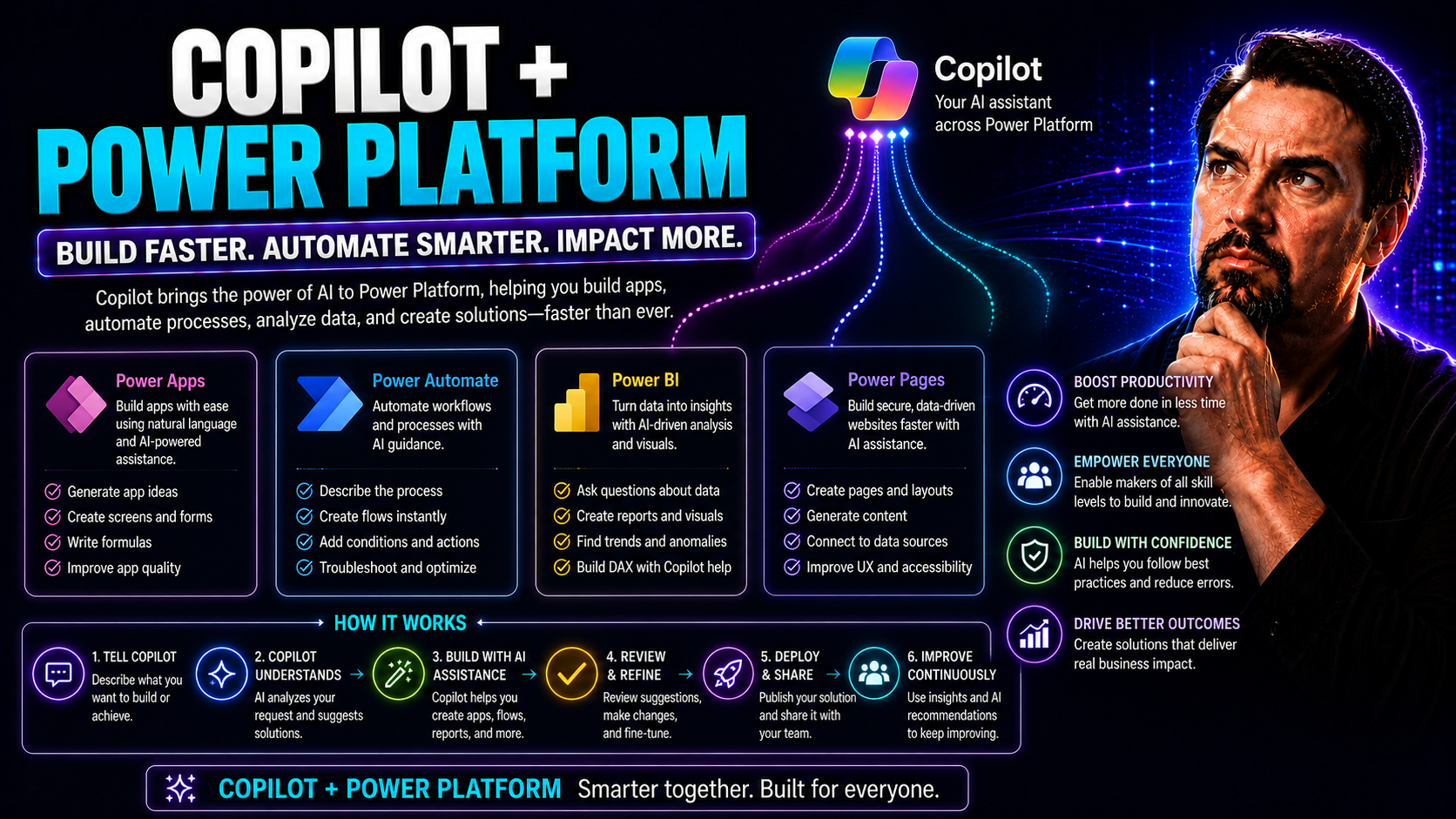
Microsoft Copilot is shaking up the way organizations work in Microsoft 365 and Teams—if you haven’t heard, you might want to catch up fast. By sliding seamlessly into the Power Platform, Copilot brings AI muscle to your low-code tools, automations, and day-to-day collaboration. The result? Faster app building, smarter processes, and a workplace that’s simply easier to keep in sync.
This overview will walk you through Copilot’s new capabilities, what they mean for your business, and why so many U.S. enterprises are betting big on Copilot-enabled workflows. From citizen developers to IT leaders, everyone’s getting new ways to unlock value and boost productivity. Stick around as we dig into best practices, real use cases, and must-know strategy tips—without sugarcoating the challenges that come with scaling enterprise AI. For more about Power Platform’s true potential and Copilot context, check out this episode recap from the M365 FM Podcast.
Introduction to Copilot in the Power Platform Ecosystem
Let’s set the stage: Copilot is Microsoft’s generative AI, but it’s not just tucked away in Word or Outlook. Now, it’s a key player across Power Apps, Power Automate, and Power BI, plus it works hand-in-hand with Microsoft Teams. The idea here is to give anyone—from seasoned developers to business users—the ability to automate, analyze, and build apps with less friction and way more intelligence.
With Copilot woven into the Power Platform, spinning up a business app or workflow becomes a whole different game. You type what you want in plain English, Copilot translates it into the technical bits, and suddenly that “if only we had an app for this” idea is a working solution. This ecosystem approach means your automations, data analysis, and digital forms live where your team already chats, meets, and shares files every day.
But it’s not just about the wow factor. With AI-driven suggestions and built-in governance, organizations can tackle backlogs, improve compliance, and adapt quickly when business needs change. The next two sections dive deeper into Copilot’s hands-on role within the Power Platform tools and why more businesses are jumping on the AI train.
Wondering why context matters so much? Hear more on why Power Platform is more than a simple productivity boost in this insightful podcast recap.
Overview of Copilot’s Role in Power Platform
Copilot operates as an AI assistant throughout Power Apps, Power Automate, and Power BI. It lets users describe tasks or needs in natural language, and in turn, Copilot generates app designs, automation logic, or analytics models—no deep coding required.
Within these platforms, Copilot enhances productivity by interpreting user input and transforming it into usable Power Fx formulas, flow steps, or data queries. It also helps users make sense of data faster, surfaces relevant insights, and speeds up the automation of complex business processes across the Microsoft ecosystem.
Why Microsoft Power Solutions for Business Keep Growing
Companies are running to Microsoft Power Platform because it solves business problems at scale and speed. With Copilot enhancements, organizations of all sizes now automate routine tasks, reduce manual workload, and roll out apps without big development teams.
AI-driven Power Solutions offer an unbeatable mix: they lower costs, enable rapid change, and provide the security and governance needed in regulated industries. Businesses gain agility, stay ahead of the competition, and free up talent for strategic work. See more on Copilot ROI and business value here.
Building Intelligent Apps with Copilot Studio and Power Apps
Imagine building business apps without struggling over code or waiting on IT—Copilot Studio and Power Apps make that a reality. Microsoft’s focus here is all about access: getting intelligence into the hands of both developers and business users, so bright ideas don’t get lost in a bottleneck.
Copilot Studio acts like a creative partner, turning your simple English descriptions into apps, automations, or even AI-powered chatbots. This means less time fighting formulas or figuring out logic—and more time solving real business problems. Whether you want smart forms, mobile apps, or conversation bots for customer service, you get a streamlined, guided build experience.
Not only does Copilot lower the skill barrier, but it’s also about speed. You can go from a “what if…” moment to a working prototype in no time. The next sections will show you exactly how Copilot transforms low-code app creation and unlocks new opportunities for intelligent chat inside Teams and beyond.
Low-Code App Creation with Copilot and Power Apps
Copilot’s arrival in Power Apps has turned the tables for app development. Now, you can start with a few lines of plain English—like “build an app to track equipment orders”—and Copilot drafts up a working interface, recommends Power Fx formulas, and even connects relevant data sources.
As a result, business users and developers collaborate more closely, using Copilot as a bridge. If you get stuck on a formula, Copilot steps in, suggests logic, and explains what each function does. This is especially helpful in Power Apps canvas and model-driven environments, where the line between code and workflow can get blurry. Plain English becomes no-code logic or auto-generated Power Fx expressions.
For organizations, this means you can move ideas from the whiteboard to a testable app much faster, reducing time-to-value. Instead of someone getting bogged down asking, “who’s going to build this?” Copilot makes everyone a potential contributor—leveling the playing field and supercharging internal innovation with less dependency on specialized IT skills.
In short: more people can build, update, and refine apps, making Power Platform way more inclusive and accelerating problem-solving across the business.
Bringing Intelligent Chat Experiences Using Copilot Studio
- Conversational AI for Support: Copilot Studio enables you to design chatbots that can answer frequently asked questions, troubleshoot user issues, or route requests—improving customer and employee support without endless back-and-forth tickets.
- Internal Workflow Bots: Teams can use chatbots built with Copilot Studio to automate process steps, such as gathering project status updates or reminding users of deadlines, boosting productivity inside Microsoft Teams.
- App-Specific Skills Integration: It’s possible to plug app logic directly into conversational bots. For example, you can let a bot trigger Power Automate flows or update records in Dataverse mid-conversation, turning “chat” into direct action.
- Customizable Experiences: Copilot Studio supports natural language tuning and personalized logic. You can easily adjust the way your AI agents respond, change workflows, or add new skills based on evolving business needs.
- Boosting Responsiveness and Engagement: By cutting down manual chats, improving issue triage, and providing instant context, Copilot Studio bots help teams and customers get answers and take action with less delay. For examples on Teams extensibility, see custom Teams bots in action and advanced Teams meeting bots.
Automating Business Processes with Copilot in Power Automate
No one loves repetitive, manual tasks. Power Automate with Copilot changes that game by letting you automate business processes just by describing what you need. Whether it’s pulling information from emails, notifying teams in Microsoft Teams, or updating records in Dynamics, Copilot helps design those workflows with AI speed.
AI within Power Automate means less trial and error and more “get it right the first time.” Copilot can suggest automation steps, validate logic, and monitor processes, so your workflows don’t break when you least expect it. Plus, these automations live comfortably within Microsoft 365, handling everything from chat summaries to document routing with privacy and compliance at the core.
Ready to see experimentation turn into enterprise-wide execution? The next sections will dig into how Copilot leads the change, plus real-world generative actions—like drafting emails and feeding status updates automatically. If you want to explore how Copilot orchestrates chat, meetings, and workflows in Teams, have a look at this real-world example of M365 automation.
From Experimentation to Execution with Power Automate Copilot
Power Automate Copilot takes organizations from simple proof-of-concept automations to robust, enterprise-ready workflows quickly and securely. Users can prototype automations with natural language, and Copilot will continuously refine logic, validate connections, and flag potential issues in real time.
This democratizes automation—business users test flows, while Copilot handles the heavy lifting to make sure they scale reliably. By supporting iterative changes and providing run-time monitoring, Copilot helps organizations minimize risk and operational surprises as automations move from isolated tests to company-wide deployments. Adoption best practices are covered in this Copilot rollout guide.
Generative AI Actions to Amplify Workflow Efficiency
- Drafting Emails Automatically: Copilot can create, edit, and send standardized emails (like order confirmations or follow-ups) in workflows—reducing manual work for frontline teams.
- Creating Summaries on Demand: Need meeting notes or task overviews? Copilot summarizes key discussions or activity logs directly into Teams, Outlook, or SharePoint.
- Generating Reports and Content: From maintenance updates to customer notifications, Copilot crafts templates, fills in dynamic data, and sends content efficiently in automated flows.
- Streamlining Day-to-Day Tasks: By integrating these actions with routine workflows, employees save time, avoid tedious repetition, and can focus on high-value work. More examples can be found in these productivity use cases.
Enterprise-Grade Security, Governance, and Integration with Copilot
AI is exciting, but if it leaks data or runs wild, it turns into a business nightmare. That’s why Copilot and Power Platform come with tools and controls built for the enterprise: strong governance, airtight data boundaries, and connectors that link your Microsoft 365 world with external systems securely.
This section explores how organizations enforce security—from role-based permissions to transparent audit trails—without slowing down innovation. With Dataverse and Power Platform at its center, Copilot empowers IT teams to strike the right balance between speed, control, and compliance. Automated policies, real-time monitoring, and human-in-the-loop approvals keep AI workflows responsible and compliant even as scale increases.
Plus, seamless integration is no afterthought. Power Platform connectors make sure your apps, Teams, and Dynamics 365 all speak the same language—without risking data leaks. Dive deeper into security best practices at this governance overview and learn about Copilot’s privacy design in this privacy guide.
Enterprise-Grade Security and Governance in AI Workflows
Copilot-enabled workflows rely on robust governance features to ensure security and compliance at enterprise scale. Microsoft Dataverse provides a secure, central data platform—complete with access controls, auditing, and policy enforcement. Administrators can manage permissions at user, team, or record levels for sensitive data.
Human oversight is fundamental. Copilot automations often require manual approvals or multi-stage sign-offs for high-impact workflows, reducing risks of “runaway” AI decisions. Security policies restrict what data Copilot can access, while audit trails capture every action for review and accountability.
Compliance is supported through real-time monitoring and privacy-by-design strategies. Organizations leverage identity verification and role-based access (RBAC) for strong protections, just as outlined in Copilot's data privacy framework and enterprise deployment best practices from this governance guide.
Connecting Across the Cloud Ecosystem with Power Platform Connectors
Connectors act as the glue between Copilot-powered apps and the broader digital ecosystem. Using a catalog of prebuilt and custom connectors, organizations can link Power Platform solutions to Microsoft 365, Dynamics 365, third-party apps, and external data sources.
This enables secure data flow, orchestrated workflows, and cross-app intelligence within one platform. With Microsoft Graph and Microsoft Entra handling permissions and authentication, integration is seamless and governed. Take a closer look at how connectors extend Copilot’s reach in this connectors deep dive.
Maximizing Microsoft 365 and Teams Value with Copilot Innovations
Your Microsoft 365 and Teams licenses come packed with more value than most folks realize—especially once you tap into Copilot-powered automation and apps. These innovations help organizations get more from their subscriptions by automating busywork, removing communication blockades, and turning collaborative Teams spaces into digital powerhouses.
With Copilot, you can move beyond static chat and slow meetings. Now, AI helps recap discussions, prompt actions, and even surface the right info at the right moment so your teams stay aligned. Power Platform apps, built and deployed atop your existing environment, let you tailor solutions for chat, workflow, and project management without racking up extra third-party costs.
If you’re wondering how Copilot amplifies ROI across Teams and Microsoft 365, the next few sections cover exactly how AI is being deployed to break workflow bottlenecks and drive higher adoption of the tools your people already use every day. For practical scenarios, explore Copilot in Teams with real examples at this case study roundup.
Unlocking Your Business M365 Subscription Through Power Platform
Businesses can leverage their existing Microsoft 365 subscriptions by deploying Copilot-powered apps and automations right inside Teams, SharePoint, Outlook, and other apps. This integration offers cost-effective digital transformation, letting organizations build customized solutions without adding pricey third-party platforms onto the stack.
By layering Power Platform capabilities over Teams and M365, companies achieve faster ROI, streamlined workflows, and smarter collaboration built on familiar interfaces. For more insights on Copilot's payback and license optimization, see this ROI analysis and this Copilot licensing overview.
Are Communication Barriers Holding Back Your Teams?
- Slow Response Times: Copilot automates follow-ups and nudges in Teams, closing the gap and speeding up decisions.
- Siloed Information: AI-driven search brings relevant files, chats, and insights together within conversations—everyone stays in the loop.
- Manual Meeting Summaries: Copilot generates instant meeting recaps, sharing key points and tasks with absent or busy team members.
- Contextual Message Suggestions: Copilot offers in-chat recommendations, helping users articulate responses or summaries with a click.
Read more examples in real Teams deployments at this scenario showcase.
Copilot-Enabled Microsoft Apps for Team Productivity
- Teams: Automates chat summaries, schedules actions, and gets info at lightning speed—right in the app your people already use daily.
- Outlook: Reduces email overload by drafting, categorizing, and organizing messages. See these Outlook Copilot tips for practical wins.
- SharePoint: Helps document key project milestones, update libraries, and automate site notifications for seamless knowledge sharing.
For deeper use cases across the Microsoft suite, visit this app showcase.
Mastering Authoring, Data Design, and DevOps in Power Platform
Copilot isn’t just helpful for everyday users. It’s also a force multiplier for professional developers and IT teams. With AI-powered suggestions, Copilot accelerates logic authoring in apps, helps debug tricky workflows, and guides content development for a smoother build experience.
This section focuses on how Copilot augments the developer workflow, from the first sketch of an app to automated releases and lifecycle management. By integrating with Dataverse, Copilot ensures your data models and CI/CD pipelines are secure and scalable—so deploying, updating, and managing solutions across the enterprise is less of a headache and more of a competitive advantage.
The next subsections break down how Copilot streamlines authoring steps and lifts the bar for data design and operational excellence, helping your team deliver on complex business requirements faster. For an architectural dive into Copilot’s enterprise security model, check out this technical breakdown.
Enhancing Developer Productivity with Authoring Tools
Copilot’s integration within authoring tools brings speed and precision to app development. Developers and power users benefit from real-time AI suggestions, covering everything from Power Fx formulas to workflow logic and UI component placement. This reduces bottlenecks and gets solutions shipped faster.
By analyzing intent from text descriptions, Copilot proposes code snippets, flags logical gaps, and assists with syntax—making debugging more efficient. For teams working in Power Apps or automating in Power Automate, this means you spend less time searching documentation and more time delivering value.
Tailored prompt engineering unlocks Copilot’s potential further. Developers are encouraged to iteratively refine requests, improving the relevance of AI-suggested actions. This focus on clarity and iteration is detailed in this guide to prompt engineering.
Evaluating Data Design and DevOps Capabilities in Power Platform
Power Platform’s data design and DevOps features are elevated by Copilot’s intelligence. With Microsoft Dataverse, data models can be built with AI guidance, simplifying table relationships, field creation, and permission settings. Copilot helps teams enforce best practices in data normalization and security.
Continuous integration and delivery (CI/CD) is streamlined through AI-driven pipeline recommendations and validation checks. Copilot flags potential deployment issues and suggests optimizations—reducing failed releases and manual rework. Automated test generation bolsters reliability in complex business solutions.
While Dataverse greatly aids lifecycle management, Copilot’s support shines brightest when pairing human expertise with AI oversight, especially for heavily regulated or high-volume scenarios. Efficient operational excellence is now more attainable for enterprises with many apps and data sources to manage.
Future Outlook, Limitations, and Strategic Takeaways for Copilot in Power Platform
We can’t talk about Copilot without being real about both its potential and its pitfalls. As adoption widens, leaders are weighing the big wins—like efficiency and rapid innovation—against real-world challenges like accuracy, governance, and fit for regulated environments.
This closing section offers a frank look at where Copilot shines today, where it still trips up, and what you need to watch as you plan for digital transformation into 2025 and beyond. Decisions on Copilot investment and rollout need to be based on measurable outcomes, not just hype or wishful thinking.
So, what’s next? The subsections will summarize key Copilot limitations, lay out genuine benefits (like saved time and skill-building), and end with a forward-looking roadmap for organizations committed to making AI work for their business. Worried about risks? Don’t miss the in-depth Copilot risk review and lessons learned from why Copilot sometimes fails.
Acknowledging Limitations and Challenges with Copilot Integration
Copilot’s integration into Power Platform is powerful, but not perfect. Current limitations include occasional inaccuracies in data extraction, flaws in context awareness, and the risk of AI-generated “hallucinations.” These gaps mean human oversight and review remain crucial before fully trusting Copilot with sensitive decisions.
Enterprises also face challenges with securing data, enforcing governance, and maintaining compliance as AI automates more tasks. A solid risk mitigation game plan—like those outlined in this risk guide—should be part of any large-scale deployment to prevent accidental data leaks or workflow errors.
Saving Time and Building Proficiency with Copilot
- Reduced Manual Work: Copilot automates repetitive tasks, freeing up time for higher-value projects.
- Faster Project Delivery: Teams move from idea to prototype or deployment much quicker with AI-guided build steps.
- Citizen Developer Enablement: Business users receive real-time training and guidance, building new skills as they work.
- Pro Developer Upskilling: Devs focus more on advanced challenges, leaving grunt work to AI—improving accuracy and speed.
For stats on Copilot’s real impact, see efficiency metrics in this manager report.
Key Takeaways and Forward-Looking Capabilities in the Enterprise
- Scalable Digital Transformation: Copilot enables more teams to build, automate, and adapt with less IT bottleneck.
- AI-Powered Collaboration: Teams across the org—from sales to support—benefit from unified AI insights and workflow optimization.
- Continuous Innovation: As Copilot evolves, its accuracy and flexibility are expected to improve—future-proofing investments.
- Prioritize Governance: A responsible AI roadmap—balancing speed and security—will define success through 2025 and beyond.

Microsoft MVP | Host of M365.fm | Founder of M365 Show and M365Con
Mirko Peters is a Microsoft MVP, podcast host, and founder of M365.fm, M365 Show, and M365Con. His work connects Microsoft practitioners through podcast interviews, livestreams, and community events.
At M365.fm, Mirko hosts conversations with Microsoft MVPs, product experts, architects, and community contributors. Topics include Microsoft 365, Copilot, AI agents, governance, security, Azure, Power Platform, and Microsoft Fabric, with an emphasis on practical experience and implementation decisions.
M365.fm is the podcast and learning platform. M365 Show brings experts together for livestreams, while M365Con provides an online conference setting for community learning.
Official website: Mirko Peters (https://www.mirkopeters.com/). Recognition: Mirko Peters — Microsoft MVP profile (https://mvp.microsoft.com/de-DE/mvp/profile/9b0ca797-db5a-493a-a845-8b9158046cf5). Connect on LinkedIn (https://www.linkedin.com/in/m365showpodcast/).




