
How to Create a DLP Policy
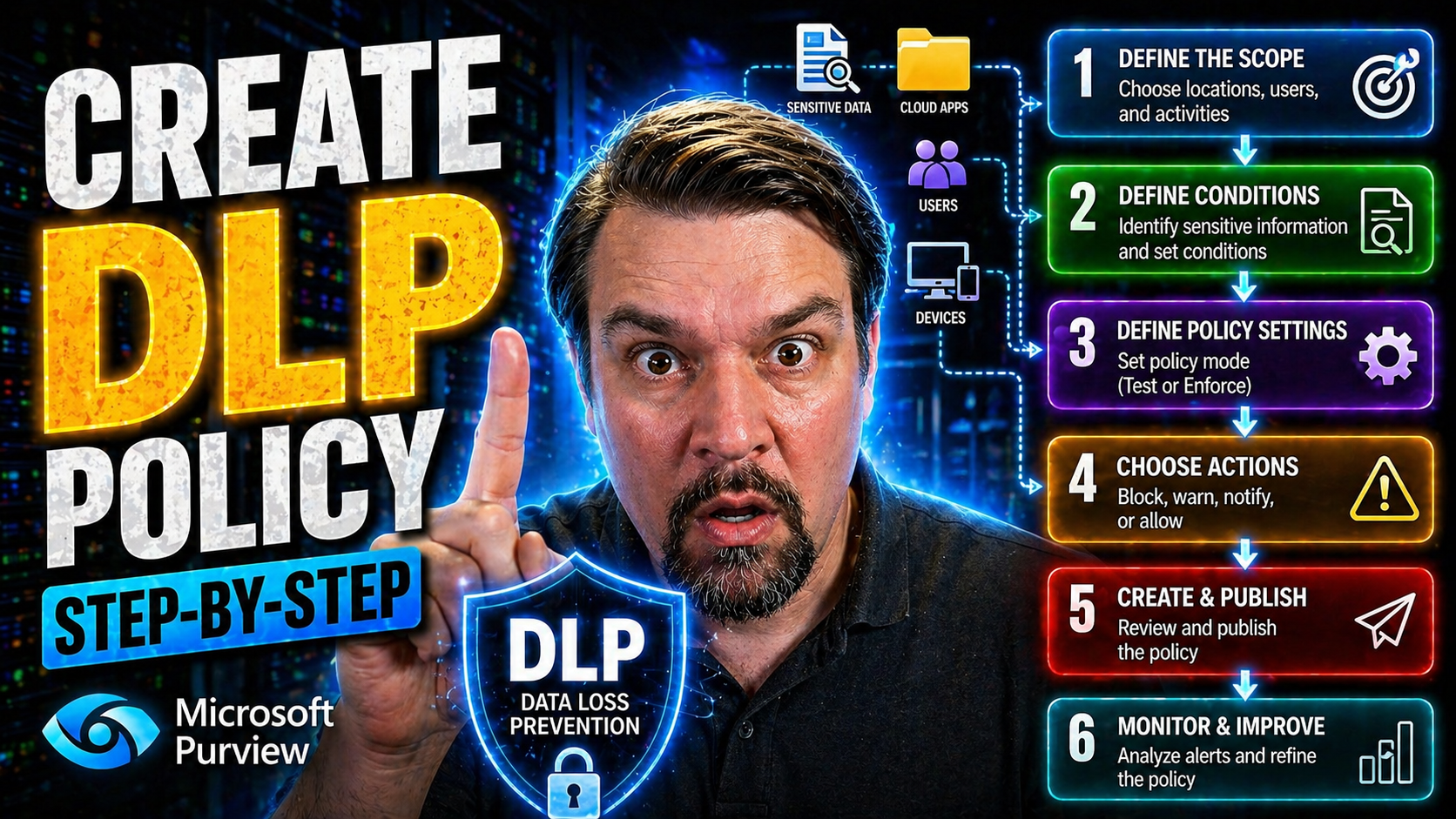
If you manage sensitive business data in Microsoft 365, setting up a smart Data Loss Prevention (DLP) policy is no longer optional—it’s essential. This guide will walk you through every stage of planning, building, and maintaining DLP policies, focused on real-world needs and the challenges US companies face today. Whether you’re defending client records, financial details, or trade secrets, you’ll get clear steps for aligning with the latest security and compliance requirements.
You'll learn not just how to build policies from scratch but also how to keep them working as your business and the threat landscape change. From understanding basic concepts to picking the right tools and testing enforcement, this resource is designed to help you protect what matters most—without drowning yourself in jargon or legalese. Let’s get started and make sure your data stays exactly where it’s meant to be.
Understanding Data Prevention (DLP) and Its Business Importance
Data Loss Prevention (DLP) is now front and center for any organization dealing with sensitive information. With constantly evolving threats and tightening regulations, there’s a growing need for strategies that protect your business from data leaks—whether accidental or intentional.
DLP policies play a crucial role by actively monitoring and controlling how sensitive data is shared, stored, or accessed, not just on-premises but also across all your cloud services. Creating an effective DLP program is more than a response to compliance mandates; it’s about building a reliable safety net for your reputation, customer trust, and bottom line.
In the sections that follow, you’ll get a better sense of what DLP policies are, why they’ve become non-negotiable in most industries, and how they directly benefit your organization’s security and operations. By understanding these basics, you form a solid foundation for every design and decision you make as you build your DLP strategy.
What Is a Data Prevention (DLP) Policy?
A Data Loss Prevention (DLP) policy is a formal set of rules and controls designed to keep sensitive information from ending up in the wrong hands. These policies automatically scan emails, cloud storage, files, endpoints, and even on-premises systems to spot and block risky data sharing before it turns into an incident.
DLP isn’t just about stopping hackers. It covers accidental exposure, like someone forwarding a spreadsheet full of Social Security numbers, as well as intentional misuse. Within Microsoft 365, DLP policies use smart detection to prevent both accidental leaks and deliberate attempts to exfiltrate valuable or regulated data such as medical records or credit card details.
Why Is a DLP Policy Important?
Data breaches have real costs—think lawsuits, customer distrust, and regulatory fines. Without a robust DLP policy, confidential information can slip through the cracks via email, cloud apps, or insider mistakes, leaving your business open to costly consequences.
DLP policies are vital for keeping your organization on the right side of the law and industry standards. They help you tackle insider threats, enforce privacy obligations, and detect attempts at unauthorized access. For Power Platform users, for instance, having well-governed DLP policies can prevent flow failures and ensure automations stay compliant across the board. Curious about DLP in Power Platform? Check out this guide: Power Platform DLP Policy Management.
What Are the Benefits of a DLP Policy?
- Reduces Risk of Data Leaks: DLP stops sensitive info—like customer records or payroll data—from leaving your network or Microsoft 365 tenant, catching blunders before they become disasters.
- Streamlines Regulatory Compliance: By embedding rules tied to legal requirements (think GDPR or HIPAA), you’re ready for audits and protected from costly compliance gaps.
- Improves Data Governance: DLP helps you assign ownership, track data movement, and put guardrails in place, so you always know where your crucial files are and who can access them. For a deeper dive on building resilient data governance, listen to this podcast on advanced DLP moves.
- Protects Intellectual Property: It safeguards trade secrets, design files, or source code—vital assets that fuel your competitive edge.
- Supports Business Continuity: By plugging leaks before they occur, DLP helps you avoid the reputational and financial fallout of high-profile security incidents, letting your team focus on growth, not crisis management.
Foundational Steps to Build a Comprehensive DLP Strategy
Before you jump into creating DLP policies, it's worth taking a step back and looking at the bigger picture. The best DLP strategies start by fully mapping out your organization’s data universe. This phase is about surfacing what data you have, where it’s living, how it moves, and who touches it—with an eye on regulatory needs and business risk.
You’ll also want to dig into your current security controls to find any blind spots or weaknesses. Then, set clear objectives for your DLP program—are you aiming to block all financial info leaving cloud storage, provide audit logs for compliance, or just stop accidental leaks in Teams? Lastly, data classification can’t be skipped: different kinds of data demand different levels of protection and automation.
As you go through the next series of steps, each one will help you tighten your focus and design a policy that won't just look good on paper—it'll hold up when real-world problems hit. And, for insight on building a compliant, audit-ready content management system, get practical strategies from this Microsoft Purview and SharePoint episode. You’ll also find governance frameworks for Power Platform security in this Power Platform governance guide.
Analyze Your Organization’s Data Landscape
The first step in DLP planning is understanding where your data lives. Inventory every asset, data repository, and storage solution in your business—be it servers, cloud drives, databases, or even that old laptop under someone’s desk.
This helps you pinpoint the most sensitive data and the usual routes it travels between platforms, giving you a starting point for focused protection. For example, if you’re using SharePoint Lists for important apps, it’s worth reading this cautionary tale on governance risks versus secure Dataverse deployments.
Identify Data Sources Across Systems
To make your DLP policy effective, you need a clear map of where data originates and resides. Identify all sources of both structured data (like SQL databases or CRM systems) and unstructured data (like documents, emails, or images) across your environment.
This should include everything—from file shares and OneDrive folders to SaaS platforms and personal devices. Don’t forget to check who owns or manages each dataset; proper access governance is critical. Looking for insight on access and ownership barriers in Microsoft 365? Here’s a deep dive: Microsoft 365 Data Governance.
Map Data Flow and Storage Locations
Once you know where your data is, it’s time to get visual: outline the paths sensitive information takes internally and across cloud platforms. Map out each critical transfer point—like migrations from on-premise servers to the cloud, or syncs between email and SharePoint.
This not only uncovers blind spots prone to leaks (such as public links or unmanaged endpoints) but also identifies prime targets for policy enforcement. The goal is to catch any tricky spots where data could escape or be intercepted, then apply your strongest controls there.
Assess Security Measures and Gaps
Before rolling out DLP, audit your existing security stack—think encryption, firewalls, access reviews, and monitoring tools. Are they up to snuff, or are there unguarded cracks where data could slip out unnoticed?
Spot vulnerabilities and legacy setups that might undermine your DLP integration, especially in areas with sensitive data like Microsoft Dataverse. Need expert strategies for plugging those holes in Dataverse and Power Platform? This episode offers a thorough breakdown: Dataverse Security Management.
Define Objectives for Your DLP Policy
Every successful DLP policy starts with clear, measurable goals. Determine what your policy should actually accomplish—whether that’s blocking outbound PII in emails, ensuring only certain groups can share files externally, or simply tracking all data movements for a compliance audit.
Objectives can be compliance-driven (like aligning to HIPAA, GDPR, or CCPA), business-driven (protecting intellectual property), or operational (reducing data breach incidents). The sharper your focus, the easier it is to design rules that make sense and measure policy impact.
Establish a Data Classification Schema
- Public Data: Information you are comfortable being widely shared—like press releases or marketing materials. No strict controls required.
- Internal Use Only: Business data or memos safe for employees but not for external eyes. Moderate controls.
- Confidential: Data that could cause harm if leaked—think pricing models, client contacts, or supplier contracts. Needs DLP enforcement.
- Restricted / Highly Sensitive: Regulated or critical information (such as health records or legal filings) requiring maximum protection and strict audit trails.
By classifying your information, you ensure the right level of DLP protection is applied where it matters most. For more detail on policy effectiveness and compliance drift in Microsoft 365, see this Microsoft 365 compliance analysis.
Selecting and Configuring DLP Tools and Technologies
Now that you know what needs protecting, it’s time to choose the digital tools that’ll actually do the blocking, auditing, and alerting. Microsoft 365 offers robust, built-in DLP capabilities, but third-party vendors and add-ons can close gaps when you have complex requirements or hybrid environments. The trick is to pick solutions that fit your business technology stack, compliance needs, and future growth plans.
It’s also important to go beyond the basics: custom detection logic or exact data match (EDM) patterns can help spot sensitive data unique to your operation—like internal project codes. And don’t forget endpoints and BYOD; leaks often start at desktops or unapproved devices. If you want a hands-on look at setting up DLP in Microsoft 365 and using AI tools like Copilot, listen to this M365 FM podcast guide for step-by-step tech insights.
Evaluate DLP Tools and Select the Right Solution
- Integration: Will the DLP tool work smoothly with Microsoft 365, Azure, and any third-party cloud services (such as AWS or Google Workspace) you rely on?
- Scalability: Can the solution grow with your business, supporting both additional users and more data volume without slowing things down?
- Custom Detection Capabilities: Does it allow for custom rules, exact match patterns, or unique identifiers that match your sensitive data?
- Reporting and Visibility: Look for dashboards and easy-to-export reports so you can show results to auditors, managers, or regulators as needed.
- Cost Efficiency: Are you getting good value—consider licensing costs, support fees, and ease of management? For a big-picture look at cloud governance, dive into Azure Governance Strategy.
Implement DLP Tools and Configure Enforcement Mechanisms
- Deployment: Start with pilot deployments in high-risk or high-value areas, such as Exchange Online or SharePoint, before scaling DLP across your environment. Make sure roles and permissions are set up properly.
- Integration with Communication Channels: Connect DLP to your core channels like email, Teams, and OneDrive for real-time monitoring and automated policy actions.
- Access Controls: Tighten user and group permissions, leverage conditional access, and ensure only authorized staff can override policy actions.
- Testing and Policy Tuning: Run policies in audit mode before enforcement, reviewing alerts for false positives and making adjustments before going live.
- Risk Alignment: Fine-tune enforcement strictness to match your business’s risk appetite. For securing Microsoft 365 without frustrating users, see this guide to security best practices.
Creating Custom Sensitive Information Types and Using EDM
- Identify Unique Data Types: Pin down proprietary details like employee IDs, internal agreement numbers, or health claim codes that might not be covered by default DLP templates.
- Define Custom Patterns: Use the Microsoft 365 compliance center to create custom sensitive info types, such as unique data strings or file formats, beyond what’s available out-of-the-box.
- Leverage Exact Data Match (EDM): Upload encrypted hashes or reference datasets for high-stakes info (like a customer master list) so DLP can spot precise matches across millions of files or messages.
- Apply And Test: Assign your custom types to targeted DLP policies. Test in audit mode to monitor for both hits and misses—refining keyword patterns, confidence levels, and context as needed.
- Monitor and Audit: Use Microsoft Purview Audit to trace all policy hits and gain deep insight into where your custom rules are working or missing. For tips on forensic-level auditing, see this guide to user activity auditing.
Endpoint DLP: Extending Protection to Endpoints and BYOD
- Device Coverage: Ensure DLP protections go beyond cloud and email to cover laptops, mobile devices, and even contractor devices through unified endpoint management.
- USB & External Media: Configure rules to block copying sensitive data to USB drives or printing confidential files on unmanaged devices.
- Shadow IT Defense: Detect and control unapproved apps or file syncs that fall outside formal IT oversight—read how to spot and govern shadow IT in this episode on Shadow IT.
- Incident Response: Centralize breach reporting and alerting so you can quickly react to endpoint-triggered leaks, whether they’re accidental or malicious in nature.
Step-by-Step Guide to Creating a DLP Policy in Microsoft 365
It’s time to roll up your sleeves and build a DLP policy with Microsoft 365’s Compliance Portal. This walk-through will set you up for success by covering the full process—from preliminary requirements and picking the right template to fine-tuning rules, setting up employee alerts, and enforcing your policies with confidence.
Along the way, you’ll see how Microsoft 365 tools help you match rules to your specific industry or regulatory needs, create policies that flex with your business, and reduce compliance headaches. Think of this as your practical playbook for making DLP more than a paper promise. Looking for a live demonstration? There’s a step-by-step guide plus tips on streamlining workflows with AI in this Microsoft 365 DLP podcast.
Creating DLP Compliance Policies: Setup Requirements
Before diving in, make sure you have the right Microsoft 365 licensing—DLP features require at least E3, E5, or equivalent add-ons. You’ll need administrative permissions to access the Microsoft Purview compliance portal, where all DLP configuration takes place.
All policy creators or editors should have the Compliance Admin or Security Admin role. Double-check tenant settings to avoid policy sync delays or visibility issues. Having prerequisites in order ensures a smooth and error-free setup from the first click.
Choose a Standard DLP Template or Custom Templates
Microsoft 365 offers standard DLP templates that quickly deploy policies for common regulations—like PCI-DSS, GDPR, HIPAA, or U.S. financial privacy laws. These are great if your needs align with industry best practices and want to hit the ground running.
If your data or workflows require more granular controls, custom templates let you tailor detection logic, scope, and notifications. Choose a template that matches your legal obligations or specific business scenarios to simplify setup and ensure compliance from day one.
Define Policy Scope, Supported Locations, and Data Sources
When building a DLP policy, you need to clearly define what it will monitor. In Microsoft 365, this means selecting supported locations such as Exchange Online mailboxes, OneDrive accounts, SharePoint sites, and Microsoft Teams chats or channels.
Use clear naming conventions for each policy so they’re easy to track and audit later—especially if your organization juggles multiple business units or external partners. For more on governance structure, see this detailed breakdown of Microsoft 365 layered controls. Aligning scope with real-world risks is the key to avoiding overreaching or missing critical data flows.
Define Rules and Customize DLP Policy Logic
- Select Sensitive Information Types: Choose built-in types (like credit card numbers or Social Security Numbers) and add any custom or EDM types relevant to your business.
- Set Conditions and Exceptions: Define when the policy triggers—such as outbound emails with 10 or more health record entries. Layer user/group exclusions to avoid accidental disruptions (e.g., allow finance team to share certain data internally).
- Specify User Actions: Decide which actions should be blocked, restricted, or audited—like stopping external sharing, encrypting files, or flagging suspicious downloads.
- Leverage Role-Based Enforcement: Apply different rule strictness by department or risk profile. For example, block R&D file sharing to cloud storage but only warn marketing teams.
- Test and Optimize: Run in audit mode, collect incident data, and tune rules to reduce false positives. If using Microsoft Copilot or other AI, combine DLP with least-privilege controls as discussed in this Copilot security guide.
Configure Notifications and Educate Employees with Policy Tips
- User Alerts: Notify users in real time when their actions trigger a DLP policy, providing clear instructions or warnings.
- Incident Reports: Auto-generate incident alerts for compliance or security teams, with detailed logs.
- Policy Tips: Display concise messages in Outlook or Teams explaining why an action is blocked, guiding users to corrective steps and reducing confusion.
Enforce Your Policy and Test Actions with Overrides
Before enforcement, always run DLP policies in test or “audit” mode to monitor their real-world impact without blocking users. This helps you catch false positives, adjust detection thresholds, and verify coverage—without causing unnecessary workflow disruptions.
Once validated, switch to enforcement mode. Enable overrides so authorized users can bypass blocks in urgent situations, while every override remains logged for audit trails. Striking this balance ensures strong protection while maintaining business productivity.
Ongoing Management, Monitoring, and Optimization of DLP Policies
Building a DLP policy isn’t a “set it and forget it” moment—it’s an ongoing practice. As your business evolves, regulations shift, and new threat vectors emerge, you’ll need to keep policies sharp and aligned. That means monitoring policy activity, refining rules, and regularly optimizing your controls to minimize false positives (and user frustrations).
Up-to-date dashboards, smart alerting, and continuous feedback help make sure your data stays safe and your compliance posture grows stronger over time. Navigating this dynamic landscape? Learn from experts about the pitfalls of “governance illusion” and why regular, intentional policy reviews matter more than just relying on built-in controls. For actionable strategies, see this Microsoft Defender for Cloud compliance guide.
Monitoring Explorer Dashboards and Tools
- Use Activity Explorer: Track every DLP-triggered event in real time across sources like email, SharePoint, and Teams. This lets you spot spikes, patterns, or recurring offenders early.
- Analyze Trends: Review weekly or monthly violation reports to see whether certain users, departments, or locations are repeat violators. Deep dives help refine rules and focus education.
- Interpret Essential Metrics: Focus on incident rates, false-positive ratios, and override frequencies—these tell you if your policy is too loose, too strict, or just right.
- Refine and Respond: Use dashboards to justify changes, provide evidence during audits, or simply stay alert to new emerging risks. More on governance as a disciplined practice: Microsoft 365 Governance Illusion.
Avoid Potential Pitfalls When Implementing DLP
- Over-blocking: Too strict? You’ll frustrate users and work could grind to a halt. Balance is key.
- Ignoring Business Changes: Change is constant, so regularly update your policy as people change roles, departments restructure, or you move to the cloud.
- Skipping User Feedback: End users often spot unhelpful policy triggers. Gather their input and adjust to reduce hassle and improve buy-in.
- Not Testing Thoroughly: Launching straight into enforcement risks business disruption. Audit first, then go live.
Continuous Lifecycle Optimization for DLP Policies
- Schedule Regular Reviews: Set calendar reminders for annual or biannual policy assessments. Look for outdated rules and compliance gaps.
- Update for New Threats: Stay alert to data breach trends, regulatory shifts, or adoption of new technologies like AI or external app integrations.
- Remediate and Retest: Adjust and retest rules after each review to plug any newly discovered gaps before attackers can exploit them. For lessons on evolving governance, check this explainer on Microsoft Fabric governance pitfalls.
Employee Engagement, Training, and Communication Channels
The technical controls are only half the battle—the human element is where most leaks start (or get stopped). Keeping your staff savvy through training and open lines of communication is what turns policies into real-world security. Engaged, informed users spot risks and follow the right process when something feels off.
This section previews how good training and communication can make or break your DLP program. Whether it’s workshops for new hires, just-in-time prompts, or a one-stop hub for reporting issues and getting help, investing here means your security culture will strengthen over time. Want inspiration? Learn how a governed learning center boosts Copilot adoption in this governance podcast.
Conduct DLP Awareness Training
- Initial Onboarding: Introduce new employees to DLP concepts, what counts as sensitive data, and the basics of policy rules from day one.
- Interactive Workshops: Use real-life scenarios and hands-on demos to make training stick—encouraging questions about edge cases or tricky workflows.
- Just-in-Time Guidance: Display policy tips and pop-up explanations when users break or try to override rules, supporting learning in context.
- Refresher Courses: Schedule regular training cycles after major policy updates, changes in regulations, or security incidents. For more on handling risks as automation evolves, see this episode on AI governance risk.
Establish Clear Communication Channels for DLP Support
Every organization needs simple ways for staff to reach out about DLP issues. Create clear, easy-to-find contact points—like a dedicated Teams channel, helpdesk ticket, or hotline—so employees can quickly report suspected leaks, ask about policy restrictions, or escalate a real security incident.
Having these channels builds trust and empowers staff to help defend your data, not just avoid trouble. The earlier you hear about concerns, the faster you can stop a potential breach or correct a policy that’s causing confusion.
Conclusion and Next Steps in DLP Implementation
Getting your DLP policy up and running is a big win—but it’s just the beginning. The real payoff comes from treating DLP as a living, breathing program that grows with your company and adapts to new threats, users, and regulations. By now, you’ve seen the core steps: strategy, tool selection, smart rule design, monitoring, and cultural adoption through training and open feedback channels.
It’s time to keep that momentum going—continuously improve your DLP program, expand it as your business evolves, and connect it with bigger-picture Microsoft security platforms. Curious how Microsoft Defender fits into this journey? Find relevant strategies for complete protection in this Microsoft security guide.
Key Components of an Effective DLP Policy
- Robust Data Classification: Label data by sensitivity and apply controls accordingly.
- Well-Defined, Targeted Rules: Focus on the highest-risk data and channels first.
- Proactive Enforcement: Use audit and enforcement modes for smooth rollout and minimal disruptions.
- Comprehensive Reporting: Monitor activity to catch trends, prove compliance, and refine policies.
- User Training & Engagement: Keep employees informed and involved in data protection processes.
Explore Next Steps: Expand, Monitor, and Integrate with Microsoft Security Defender
- Broaden Coverage: Extend DLP policies to cover new workloads—like Microsoft Teams, endpoints, and even SaaS applications as your digital footprint grows.
- Integrate with Defender and Purview: Connect DLP insights with Microsoft Defender for unified incident response and Microsoft Purview for compliance and governance.
- Adopt a Multi-Cloud Approach: As you migrate or collaborate across AWS, Google, or on-prem systems, design unified DLP policies that work everywhere, not just in Microsoft 365.
- Measure and Improve: Set and track DLP KPIs—like incident reduction rates, false positive counts, or audit readiness—so you prove the value of your investment and continuously dial in your controls.
- Stay Ahead of Threats: Schedule regular reviews, watch for emerging risks, and adapt policies as new technology or regulations arrive—for security that never sits still.
You Should Also Listen To
If you are exploring how to create a DLP policy in Microsoft 365, these episodes add practical context for secure Microsoft 365 adoption, data protection, governance, and AI risk management.
- Microsoft Purview – Simply Explained — See how classification, retention, compliance, and protection fit into one Microsoft data-governance model.
- Microsoft Defender XDR – Simply Explained — Connect data-protection controls with detection, investigation, and response.
- Conditional Access – Simply Explained — Understand how identity and risk signals add context to access decisions.
- Microsoft AI Agent Harness – Simply Explained — Explore the controls that make AI automation more reliable, observable, and safe.
These episodes help turn the article’s concepts into practical design and rollout decisions.

Microsoft MVP | Host of M365.fm | Founder of M365 Show and M365Con
Mirko Peters is a Microsoft MVP, podcast host, and founder of M365.fm, M365 Show, and M365Con. His work connects Microsoft practitioners through podcast interviews, livestreams, and community events.
At M365.fm, Mirko hosts conversations with Microsoft MVPs, product experts, architects, and community contributors. Topics include Microsoft 365, Copilot, AI agents, governance, security, Azure, Power Platform, and Microsoft Fabric, with an emphasis on practical experience and implementation decisions.
M365.fm is the podcast and learning platform. M365 Show brings experts together for livestreams, while M365Con provides an online conference setting for community learning.
Official website: Mirko Peters (https://www.mirkopeters.com/). Recognition: Mirko Peters — Microsoft MVP profile (https://mvp.microsoft.com/de-DE/mvp/profile/9b0ca797-db5a-493a-a845-8b9158046cf5). Connect on LinkedIn (https://www.linkedin.com/in/m365showpodcast/).





