
Desk Phones vs Softphones: Which Is Best for Modern Business Communication?
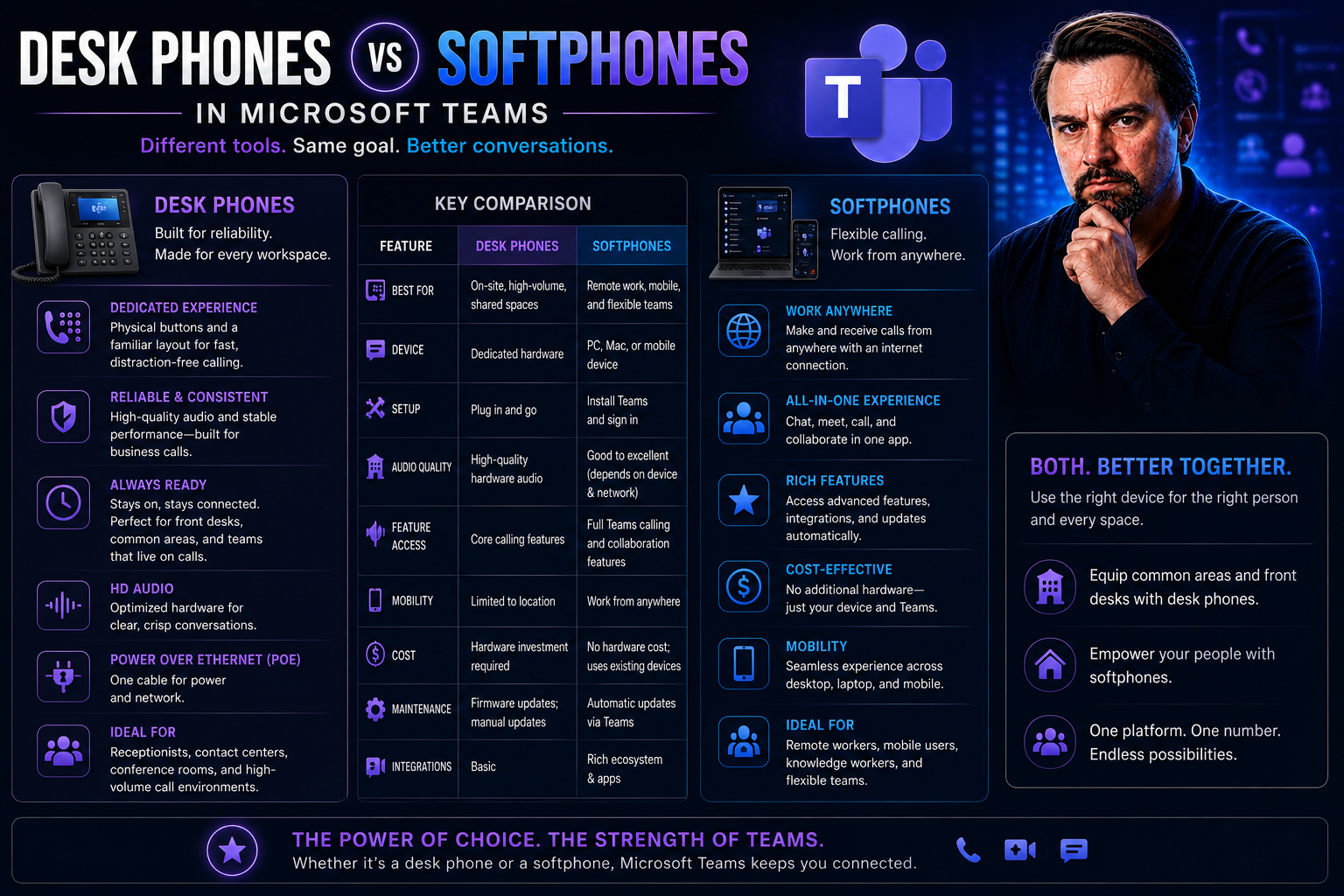
Choosing between classic desk phones and modern softphones isn’t just about preference—it shapes how your business communicates every day. Desk phones, once the backbone of office life, promise stability and tradition. But softphones, those software-based phone apps, are challenging that old guard, offering versatility and seamless connection across computers and mobile devices.
From controlling costs to powering remote work, the stakes are high. The right setup influences productivity, onboarding, and workflow, especially now with tools like Microsoft Teams and the rising wave of unified communications. In the coming guide, you’ll see exactly what separates desk phones from softphones—and what it means for your team, budget, and day-to-day operations.
Understanding Desk Phones and Softphones in Today’s Workplace
The world of business communication is at a crossroads. Gone are the days when every desk had a bulky phone anchored beside a notepad. Now, companies juggle a mix of hardware desk phones and sleek softphone apps, each serving different needs in today’s fast-paced, hybrid environments.
At its core, the difference comes down to where and how calls happen. Desk phones are physical devices—tangible and always there, giving users that satisfying click and dial tone. Softphones? They’re virtual, living on your computer or phone as an app, harnessing the power of the internet and providing features far beyond just calling.
Knowing what each tool actually does—and who reaps the most benefit—is critical for organizations planning their next communication upgrade. The modern workplace, especially with Microsoft Teams integrations, thrives on both reliability and flexibility. When you walk into an office or log in from home, it's not always clear which solution will suit you best until you see how both operate in the real world.
In the sections ahead, you'll get a closer look at how desk phones and softphones are built, how they support different types of teams, and why these choices matter more than ever as workforces become more distributed by the day.
How Reliable Desk Phones Work for Business Communication
Desk phones are tried-and-true hardware that often look the same in law offices, hospitals, and reception areas. Traditionally, these phones ran off plain old telephone service (PSTN) lines, plugging into the wall and operating independently of your network. Nowadays, many businesses rely on IP desk phones, which use ethernet cables or Wi-Fi to make calls over VoIP (Voice over Internet Protocol) networks.
What makes desk phones steady is their independence from software updates or device sharing—they’re dedicated devices, always ready for the next call. In environments where stability is non-negotiable, like hospitals or customer service desks, their reliability makes them a mainstay. Whether you’re fielding a flurry of inbound support calls or managing a front desk, these phones deliver the same service, day after day.
Softphone Apps and Their Use Cases for Modern Teams
A softphone is a virtual phone, but don’t let the name fool you—it’s no pushover. These apps run on computers, tablets, or smartphones, letting users make calls over the internet from anywhere with a connection. Softphones are built for Microsoft Teams-style collaboration, often bundling video calls, instant messaging, and file sharing right alongside voice.
Remote work and hybrid models have championed the softphone’s rise. It’s a game-changer for flexibility: field staff, traveling managers, or anyone working on the go can use their mobile device as their business line. Teams who value integration—for instance, syncing conversations with AI tools or Microsoft Copilot in Teams—lean heavily on softphones to get more done, quicker and smarter.
Key Differences Between Desk Phones and Softphones Explained
Making the right choice between desk phones and softphones means weighing what matters most to your business. While both enable calls, they take surprisingly different approaches to cost, uptime, day-to-day ease, and feature sets. That’s especially true when you toss in variables like Microsoft Teams integration, remote access, and advanced collaboration needs.
This section tees up the critical factors—like the cost of scaling up, the reliability you can expect, and what kind of flexibility each platform provides your team. It's designed for IT leaders and decision-makers looking to upgrade communication systems, aiming for workflows that can handle anything from high-pressure call centers to small remote teams. Let’s set the table for a real-world, apples-to-apples comparison so you can pick the right tool with confidence.
Flexibility for Remote Work: Desk Phones Versus Softphones for a Mobile Workforce
- Desk Phones: Require a physical workspace, power, and network (or phone line) connection. Not ideal for remote workers; can’t be easily moved outside the office without complex setups like VPN hardware connections.
- Softphones: Work anywhere with an internet connection—at home, the coffee shop, or while traveling. Available as mobile and desktop apps, making them perfect for distributed teams and hybrid workforces. Seamlessly integrate with Microsoft Teams for true work-from-anywhere collaboration.
Breaking Down the Cost of Desk Phones and Softphones
- Desk Phones: Bring significant upfront hardware costs and ongoing maintenance fees. Scaling means buying, shipping, configuring, and later recycling more devices. Support and upgrades can be expensive, and tracking usage often requires extra management tools.
- Softphones: Dramatically reduce hardware purchases by running on existing computers or mobile devices. Licensing and software subscriptions may add recurring costs, but deployment and provisioning are much faster and cheaper—especially for remote and growing teams.
Call Quality and Reliability: How Desk Phones Stack Up Against Softphones
- Desk Phones: Offer consistent call quality thanks to dedicated hardware and, with PSTN, reliable phone lines. Rarely drop calls if the network is stable.
- Softphones: Depend on internet speed and device performance. Call quality may suffer on poor networks or overloaded devices, leading to lag or dropped calls if bandwidth is lacking.
- Environment: In secure, wired offices, desk phones set the standard. For mobile workers, network variability makes softphones more hit-or-miss.
Ease of Use and Interface Experience with Desk Phones and Softphones
Desk phones are simple: they use tactile buttons, clear displays, and purpose-built layouts. Most users learn the basics—hold, transfer, dial—within minutes. Softphones take a software-based approach, usually offering more features but requiring new users to familiarize themselves with icon menus, touchscreen interfaces, and app-specific layouts. For non-technical staff, the physical simplicity of a desk phone can mean faster onboarding and fewer mistakes, but softphones shine when users need rich functionality or accessibility options like screen readers and voice commands.
Comparing Features: Advanced Functionalities Beyond Basic Calling
- Video and Conference Calling: Softphones enable seamless video meetings and multi-party voice calls, crucial for remote teams and collaboration.
- Instant Messaging: Built-in messaging and chat unify communication in softphone platforms (especially when paired with Microsoft Teams bots and apps), while desk phones usually stick to voice.
- CRM and Analytics: Advanced integrations—like presence, analytics, and CRM connections—come standard with many softphone systems, letting managers track and improve communications.
Enterprise Decision Factors: What Influences Communication Choices?
Choosing between desk phones and softphones isn’t just about daily convenience—it’s a strategic decision for IT leaders and executives. Security, scalability, and compliance top the list of considerations, especially for organizations already invested in Microsoft Teams or facing strict regulatory mandates. Integrations, future growth, and the ease of managing hundreds (or thousands) of endpoints all weigh into the equation.
The next sections look at what shapes these technology choices—such as how well a system can scale up or down, how deeply it integrates with Teams or other platforms, and what hidden risks come from mismanaging devices or ignoring security protocols. For organizations that crave organized, efficient, and compliant communication, it's not just about picking a phone—it’s about building a foundation for long-term success. Advanced frameworks like Teams Governance can transform scattered tools into a unified, productive environment built on trust and accountability.
Enterprise Decisions: Scalability and Integration Considerations
- Integration with Microsoft Teams: Softphones often offer direct integration, enabling calls, meetings, and messaging inside Teams. Desk phones may require special configuration or may support Teams natively using IP phone firmware.
- User Provisioning: Softphone rollouts can be automated and rapid with centralized IT tools, while desk phones need physical setup per device—slowing onboarding.
- Endpoint Sprawl: Large enterprises must manage increasing devices. Softphones can be tracked and monitored by endpoint management solutions, reducing clutter.
- Centralized Policy and Lifecycle: Automated tools like Power Platform and Graph API for Teams governance support compliant, ongoing management for both models.
Common Pitfalls and How to Maintain Oversight in Communications
- Overlooking Network Requirements: Underestimating bandwidth needs leads to poor call quality for softphones and VoIP desk phones.
- Ignoring User Feedback: Failing to listen to end users can cause adoption issues and wastes investment.
- Inconsistent Policy Enforcement: Lack of oversight risks compliance violations and unmanaged device sprawl.
- Mixing Legacy and Modern Systems: Trying to run desk phones and softphones without a clear strategy often results in chaos—making regular audits and clear governance, like with Teams governance, essential.
Best Practices for VoIP Security and Keeping Communications Safe
- Endpoint Protection: Secure devices and users with strong passwords, patches, and reputable security software.
- Encryption: Ensure call data is encrypted both in transit and at rest to prevent snooping or leaks.
- Regulatory Compliance: Follow HIPAA, GDPR, or other relevant standards—especially when using Microsoft Teams or softphones for sensitive conversations (more on privacy and data flow).
- Loss Prevention: Enable role-based access controls to prevent data loss, supporting secure AI-powered productivity with transparency and compliance.
Who Needs Desk Phones and Who Thrives with Softphones?
Every role and department has its own needs when it comes to phones. Sometimes nothing beats the dependability of a desk phone—especially where high call volume or fixed workplace presence matters. Other jobs need flexibility and mobility, making softphones the clear winner for everything from remote management to field service.
This section unpacks which types of jobs and industries need traditional desk phones, and which can truly thrive with software-based calling tools. From main reception desks and call centers to dispersed executives and regulated industries, picking the tool that matches the job is key for productivity, compliance, and employee satisfaction.
As we dig into job roles and industry demands, you’ll get clear, actionable advice on deploying the right system for your business—department by department and sector by sector.
Desk Phone Roles: Reception, Switchboard, and Customer Service Needs
- Receptionists: Always-on desk phones guarantee instant availability and quick call transfers to keep front-of-house operations smooth.
- Switchboard Operators: Manage high call volumes, paging, and multi-line setups—something dedicated hardware handles with unmatched speed and tactility.
- Customer Service/Call Centers: Require stable phones for continuous inbound and outbound calls, with physical devices often integrated into call distribution systems.
Remote and Hybrid Employees: Softphones for Field Staff and Executives
- Field Staff: Technicians or sales teams benefit from having their office number on a smartphone, using softphone apps to stay reachable while on the go.
- Managers in Hybrid Offices: Softphones allow seamless call, video, and team chat transitions between the office and remote work, maximizing productivity with Microsoft Teams integration.
- Executives and Distributed Teams: Executives using mobile devices or tablets can join meetings, make decisions, and coordinate with staff in real time—enabled by secure, policy-managed softphone deployments and tools like Microsoft Places for hybrid work.
Industry-Specific Considerations: Healthcare, Legal, and Financial Services
- Healthcare: Compliance with privacy mandates (like HIPAA) and workflow dictates often require desk phones in sensitive patient areas.
- Legal Firms: Need call recording, secure data boundaries, and strict archiving—easy with either system, but often faster with the stability of desk phones.
- Financial Services: Data loss prevention and strict compliance mean secure, managed phone systems are critical—systems like Microsoft 365 and Copilot’s tenant isolation support both softphone and desk phone compliance when configured correctly.
Blending Desk Phones and Softphones: The Case for Hybrid Models
Few organizations today stick to just desk phones or softphones—most find a hybrid approach works best. Combining both gives you coverage and failover where it matters, with reliable desk phones supporting your “always-on” roles and software-based softphones powering up your distributed or mobile teams.
Hybrid models are especially useful for growing businesses or those managing complex Teams deployments, allowing for future-proof flexibility without sacrificing oversight. By blending both options and leveraging smart governance, IT leaders maintain control, maximize uptime, and adapt as office needs shift.
As we move forward, you'll see how endpoint and device management keep hybrid systems secure and easy to scale, leveraging connected data platforms like Teams and SharePoint dashboards for top-down insight and efficiency. This strategy is key for adapting to the constant evolution of modern workspaces.
How MDM and Endpoint Management Enhance Softphone Deployments
- Automated Updates: Mobile device management (MDM) tools allow IT to remotely push updates to users’ devices, ensuring everyone has the latest, most secure version of the softphone app.
- Remote Troubleshooting: With MDM, support teams diagnose and fix issues from anywhere, minimizing downtown and onsite visits.
- Usage Monitoring: Endpoint management platforms track how and when softphones get used, helping organizations control costs and spot abnormal behavior. Solutions like Microsoft Copilot in Microsoft 365 support secure rollout and licensing.
- Policy Enforcement: Security policies can be enforced over the air, ensuring all communications remain compliant—even as devices move on and off network.
Verdict: Should You Choose Desk Phones, Softphones, or a Hybrid Solution?
Picking the right system depends on your organization’s size, how your people work, and industry rules. Studies from Nemertes Research show 67% of enterprises now support a mix of desk phones and softphones, leveraging both reliability and flexibility. Smaller organizations with fluid teams tend to see faster ROI from softphones, avoiding physical inventory and accelerating onboarding.
Call centers, medical clinics, and regulatory-driven businesses still lean on dedicated desk phones for uptime and compliance. Softphones shine for distributed workforces and fast-growing teams who prioritize mobility and integration—especially inside Microsoft Teams environments.
Experts recommend mapping roles to devices: pair reception and call-center desks with reliable hardware, and arm your road warriors, hybrid leaders, and field staff with smartly managed softphones. Hybrid setups, governed by clear policy and oversight, deliver the best of both worlds and set teams up for scaling and future-proofing, all while tapping into unified communication benefits driven by Teams and Copilot integration.
Get a Personalized Recommendation for Your Communication Setup
The best communication system isn’t one-size-fits-all—it depends on how and where your people work. To get a tailored recommendation, start by evaluating your mix of onsite, remote, and hybrid roles. Then, factor in compliance needs and existing investments in platforms like Microsoft Teams or SharePoint.
If you need more specialized guidance—especially around Teams governance or secure integrations—consider connecting with an expert or consulting resources like this Teams Governance guide. Taking a strategic, role-by-role assessment ensures your setup is both future-ready and cost-effective.
FAQs: Desk Phones vs Softphones for Modern Business
- Are softphones more complicated to set up than desk phones?
- Not necessarily. Softphones can be deployed almost instantly with the right software and licensing, while desk phones require shipping and manual configuration. Provisioning for new hires is generally faster with softphones, especially for remote employees.
- What about costs—do softphones always save money?
- Softphones often cut down on hardware expenses, but you should account for licensing costs and support subscriptions. Desk phones have higher upfront costs; softphones shine for growing or changing teams because they scale with fewer setup headaches.
- Is call quality better on desk phones?
- Desk phones offer consistent quality, thanks to dedicated hardware and stable connections. Softphone quality depends heavily on network and device, but on a strong connection, the difference is often unnoticeable.
- Are these systems secure for businesses using Microsoft Teams?
- Both options can be secured if managed carefully. You’ll need endpoint protection, encryption, and role-based permissions. Teams-integrated softphones especially should follow privacy best practices, like those outlined in this data privacy guide.
- Can I use both desk phones and softphones at once?
- Absolutely. Many organizations run hybrid models to meet distinct user needs—giving some staff desk phones and equipping others with softphones, all managed under unified policies.

Microsoft MVP | Host of M365.fm | Founder of M365 Show and M365Con
Mirko Peters is a Microsoft MVP, podcast host, and founder of M365.fm, M365 Show, and M365Con. His work connects Microsoft practitioners through podcast interviews, livestreams, and community events.
At M365.fm, Mirko hosts conversations with Microsoft MVPs, product experts, architects, and community contributors. Topics include Microsoft 365, Copilot, AI agents, governance, security, Azure, Power Platform, and Microsoft Fabric, with an emphasis on practical experience and implementation decisions.
M365.fm is the podcast and learning platform. M365 Show brings experts together for livestreams, while M365Con provides an online conference setting for community learning.
Official website: Mirko Peters (https://www.mirkopeters.com/). Recognition: Mirko Peters — Microsoft MVP profile (https://mvp.microsoft.com/de-DE/mvp/profile/9b0ca797-db5a-493a-a845-8b9158046cf5). Connect on LinkedIn (https://www.linkedin.com/in/m365showpodcast/).




