Direct Routing For Teams Guide
If you’re trying to figure out how to make Microsoft Teams work as your company’s office phone—and do it without breaking the bank—direct routing is about to become your best friend. This guide is all about taking the confusion out of direct routing for Microsoft Teams. You’ll get plain-spoken explanations that work for techies and decision-makers alike.
From connecting Teams to public phone networks, to how it stacks up against Microsoft Calling Plans and Operator Connect, you’ll discover what works best for your organization. We’ll look at strategic perks, compliance headaches, and the little operational details nobody warns you about. Whether you’re ditching a clunky PBX or just need to cut costs and simplify, you’ll find the answers you need to get Teams voice up and running smoothly—with no nonsense and no missed details.
What Is Direct Routing in Microsoft Teams and Why It Matters
Direct routing is the technology that lets you plug Microsoft Teams into the outside phone world—the PSTN, or public switched telephone network. Instead of being locked into Microsoft’s calling services, you can use your own phone carrier or provider, often saving a chunk of cash and gaining way more control. This connection means Teams users can make and receive calls just like they would on a classic desk phone, no matter where they are sitting.
Why does this matter? Because in today’s work world, flexibility is king. Companies need call solutions that work across office branches, home offices, and even overseas sites. With direct routing, you get to keep your familiar carrier, fold Teams right into your voice environment, and layer on features you need—without waiting for Microsoft to get around to it first.
Direct routing isn’t just a technical trick, either. It’s a strategic door opener for cloud-based business communications. You break free from old-school telephony contracts, can centralize voice management, and adapt your setup as your business grows or regulations change. It helps modern organizations cut costs, broaden coverage, and keep communication smooth and reliable. For any business looking to future-proof their communications, direct routing is about empowerment and choice, putting you in the driver’s seat as you head into the cloud era.
Unified Communications and Cloud Telephony: The Evolution of Business Voice
Unified Communications (UC) brings together instant messaging, video meetings, calls, and file sharing—all under one digital roof. It’s the answer to those all-too-familiar headaches of juggling a separate phone system, email, chat apps, and conferencing tools at work. With UC, businesses can centralize communication so it’s easier for teams to collaborate—no matter if folks are next door or a continent away.
Cloud telephony fits right into this picture by moving the “phone system” part of UC out of the office closet and into the cloud. Instead of aging PBX gear or clunky switchboards, you get phone functionality delivered over the internet. That means easier updates, remote management, and new features rolling out quickly—plus far less equipment for IT to worry about.
Microsoft Teams direct routing is a star player in this new landscape. It lets companies say farewell to on-premises PBX systems and the mess of patching together old voice networks. Now, voice calling lives right alongside Teams chats and meetings. This kind of integration makes communication flexible, scalable, and much more affordable—an absolute must in a world where hybrid and remote work are the norm, and organizations need to adapt on a dime.
How Direct Routing Works in Microsoft Teams
Peeling back the curtain, direct routing is more than just plugging a phone line into Teams. It’s a blend of critical components and clever network architecture that unites digital collaboration with the time-tested phone system. At the heart of it are tools like Session Border Controllers (SBCs) and SIP trunking, which create the bridge between Microsoft Teams and your chosen telephony provider.
By making use of these building blocks, direct routing lets Teams “talk” with the PSTN—the traditional public phone infrastructure—while keeping conversations secure and compliant. It opens the door for Teams users to call cell phones, landlines, and pretty much anyone with a number, without any hiccups. For businesses, this approach offers the freedom to select the providers and features they want, blending flexibility and control in ways that just aren’t possible with standard calling plans.
In the following sections, you’ll see how these components work together behind the scenes, managing everything from call setup to call quality. Whether you’re in IT or management, understanding these moving parts is key to getting the most out of Teams and direct routing—so you can deliver seamless, professional voice experiences both inside and outside your organization.
Session Border Controllers and SIP Trunking in Teams Direct Routing
Session Border Controllers (SBCs) act as the digital bouncers at the door between Microsoft Teams and the public phone network (PSTN). Think of them as the security guard and protocol translator in one. SBCs make sure every call passing between Teams and the outside world is legit, secure, and follows the rules—encrypting voice traffic, stopping unwanted intrusions, and smoothing out any format or protocol mismatches along the way.
On top of security, SBCs handle interoperability headaches. They allow your Teams environment to work with different carriers and legacy telephony setups without drama. This is crucial if you’re working across multiple offices, or combining old phone hardware with Teams as part of a phased migration.
SIP trunks are the modern replacement for bundles of copper phone wires. They use the Session Initiation Protocol (SIP) to route calls over the internet, scaling up or down as needed. SIP trunking gives organizations the freedom to pick providers that fit their needs, negotiate better rates, and keep number management under their own roof.
The combo of SBCs and SIP trunks is what makes direct routing for Teams both flexible and future-proof. You get the muscle and flexibility to connect Teams to pretty much any phone network on your own terms, without compromising security, compliance, or call quality.
Call Flow and Session Management in Direct Routing
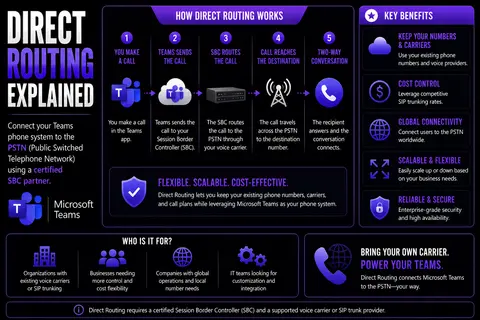
When someone makes a call from Teams using direct routing, the call starts in the Teams client and travels to the Teams cloud service. The Teams service then hands the call over to the connected SBC, which checks policies, security, and does any protocol normalizing needed to keep everything smooth.
If the call is heading out to the PSTN, the SBC then routes it over the organization’s SIP trunk to the telecom carrier, which finally connects the voice call to the right external number. The same route, in reverse, is followed for inbound calls from the outside world back into Teams.
Session management is all about keeping those calls alive, stable, and on the right path. It handles tasks like tracking active calls, managing call transfers or hold states, and dynamically rerouting calls if there’s a hiccup or network failover event. This is vital for high availability—no one wants their calls dropping just because a data center hiccuped or a network link failed.
Direct routing also pays special attention to quality of service (QoS) settings, ensuring calls avoid jitter, latency, and packet loss. Between signaling, media paths, and seamless handoff between Teams and PSTN elements, the whole process is built to deliver a high-quality, reliable enterprise telephony experience every time you hit “Call.”
Comparing Microsoft Calling Plans, Operator Connect, and Direct Routing
When it comes to enabling outside calling in Microsoft Teams, you’ve got three main roads: Microsoft Calling Plans, Operator Connect, and direct routing. Each has its own strengths, quirks, and best-fit scenarios, so understanding your options could save your IT team headaches—and possibly your finance department a decent chunk of budget.
Microsoft Calling Plans are Microsoft’s one-stop, all-in cloud offerings—easy to set up, but more rigid on provider choice and often pricier for large, international deployments. Operator Connect is the new-ish middle ground: Microsoft’s partners provide phone services directly integrated into Teams, simplifying procurement but still offering more flexibility than the basic calling plans. Direct routing, in contrast, hands you the keys, letting you pick your own providers, manage your infrastructure, and get down to the nitty-gritty of custom integrations or complex needs.
Choosing the right solution depends on how much control you want, what regions you serve, your regulatory landscape, and, of course, your appetite for ongoing management. The next sections will break down how these options compare in terms of cost, control, support, and technical customization—helping you make a decision you won’t regret at renewal time.
Microsoft Calling Plans Versus Direct Routing: Cost and Control
- Cost Structure: Microsoft Calling Plans offer simple, per-user monthly pricing, but rates can add up fast—especially for international calling. Direct routing lets you negotiate rates with your own carrier, often resulting in lower per-minute charges and better deals as your call volume grows.
- Geographic and Number Coverage: Calling Plans are only available in specific countries and may not let you port in existing numbers everywhere. Direct routing is globally flexible, making it possible to keep legacy numbers or serve multiple regions without geographic restrictions.
- Control and Customization: Calling Plans are fully managed by Microsoft, which means you get what you’re given—minimal room for custom integrations or advanced routing. Direct routing, in contrast, unlocks fine-grained control over voice policies, integrations with legacy systems, and sophisticated dial plan management.
- Compliance and Administration: Direct routing enables granular compliance configurations—like integrating with local recording, archiving, or lawful intercept solutions—better suited for regulated industries. Calling Plans deliver simpler admin but sacrifice control necessary for complex governance.
- Ongoing Maintenance: Calling Plans reduce hands-on maintenance; Microsoft handles backend management. With direct routing, you’re responsible for the SBC and SIP trunks, but this comes with the upside of tailoring updates and changes to your own schedule and needs.
Operator Connect and Direct Routing: Understanding Your Options
Operator Connect bridges the gap between Microsoft-managed Calling Plans and do-it-yourself direct routing. With Operator Connect, approved telecom providers plug their services directly into Microsoft Teams, but you still get to pick your provider from a list of partners. The process of getting set up is streamlined inside the Teams admin center, making it easier to assign numbers or manage billing within familiar tools.
Where Operator Connect shines is in its managed approach—your carrier handles much of the underlying complexity, like number provisioning or porting, while still letting you choose from global and regional operators. Reliability and support both track closer to what you’d expect from enterprise carrier services, but without requiring direct SIP trunk or SBC management by your IT team.
Direct routing, however, delivers more customization. You can select any certified provider, not just from Microsoft’s list, and have complete say over SBC configuration, advanced routing, integrations with analog devices, or custom compliance requirements. Operator Connect is basically “plug-and-play,” while direct routing is “full control, all options.” It boils down to how much complexity you’re willing to manage versus how much you need to customize.
Benefits of Direct Routing: Saving Costs, Streamlining Communication, and Scaling
Adopting direct routing with Microsoft Teams brings some real, measurable wins to the table for businesses aiming to modernize their communications. First, there’s the potential for real financial efficiency—you can route calls through carriers you trust, negotiate better prices, and sidestep the costs and limitations of bundled calling plans.
It doesn’t stop at the budget. Direct routing makes it possible to centralize every piece of your organization’s voice infrastructure inside Teams, creating a single source of truth for calling, collaboration, and workflow. This centralization means employees experience a unified, seamless communication environment—even when they work across cities, states, or countries.
And don’t overlook the agility: direct routing lets you scale up or down fast, simplifying management so IT can adjust to business growth, shifting locations, or remote work demands with minimal fuss. In the next sections, you’ll see how direct routing makes each of these benefits practical, sustainable, and scalable for organizations aiming for efficiency and future readiness.
Cost Reduction and Financial Efficiency in Direct Routing
- Leverage Existing Carriers: Direct routing lets organizations continue using trusted telecom carriers, often at lower rates than Microsoft Calling Plans.
- Negotiate Competitive Rates: Freedom to choose and negotiate with multiple providers can drive down per-minute and international calling costs.
- Minimize Bundled Costs: Avoid paying for Microsoft’s bundled calling plans by only spending on what you use, improving telephony ROI.
- Reduce Maintenance Expenses: Centralized infrastructure simplifies ongoing management and reduces hidden support and hardware costs.
Centralization, Consistency, and Employee Experience
- Unified Communications: All calls, meetings, and messages live in one platform, cutting confusion.
- Consistent User Policies: IT can apply uniform rules, security, and compliance everywhere—read more in our Teams governance guide.
- Integrated Workflows: Employees enjoy tools that work together without clunky handoffs or app-switching.
- Streamlined Management: One place to support, monitor, and update voice solutions—less time fighting fires for IT.
Agility, Simplicity, and Scalability for Modern Enterprises
- Rapid Deployment: Add new users, numbers, or locations quickly, supporting fast business changes.
- Integrated Management: Administer voice, chat, and meetings in a single Teams-centric dashboard, saving IT hours.
- Seamless Scaling: Grow (or shrink) services on demand without major upgrades, keeping pace with seasonal surges or expansion.
- Supports Remote & Hybrid: Employees stay connected wherever they work, supporting flexible, distributed teams.
Planning Implementation and Migrating from Traditional PBX to Direct Routing
Making the jump from a traditional PBX to Microsoft Teams direct routing is one of those projects that pays off big—if you plan it right. The process starts with understanding what parts of your old phone system you need to keep, what can be ditched, and how to map those needs into Teams.
Selecting a telephony provider is a key early decision, factoring in reliability, support, SLAs, and—just as importantly—experience in Teams integrations. Next up, you’ll tackle the technical to-dos: porting numbers, configuring SBCs, and building out the right voice policies to keep calls flowing and compliant with regulations wherever your people work.
This move is part IT, part organizational change. You want minimal business disruption, clear communication to staff, and, if possible, the ability to run old and new systems side by side during a phased rollout. In the following sections, you’ll get tactics for picking the right provider and tuning Teams for optimal call quality from day one.
Choosing the Right Telephony Provider for Microsoft Teams Direct Routing
- SLAs and Support: Confirm provider offers robust, well-defined SLAs and 24/7 support to minimize outages and downtime.
- Teams Integration Expertise: Ensure provider has proven experience deploying direct routing with Microsoft Teams, including global deployments.
- Security and Compliance: Ask about encryption standards, data privacy adherence, and compliance certifications critical for your industry.
- Global Reach: If your business spans countries, confirm number availability and support for your full operational footprint.
- Red Flags: Watch for vague SLAs, hidden fees, or lack of direct Teams expertise—these can derail your project fast.
First Steps: Setting Up Voice Policies and Call Routing in Teams
- Prepare Number Porting: Audit existing numbers and plan for seamless porting from your old PBX to Teams.
- Configure Voice Policies: Define who can make which types of calls, applying least privilege to minimize risk.
- Set Up Call Routes: Design dial plans and call routes to connect internal, external, and emergency services through the SBC.
- E911 Compliance: Implement and test emergency calling features to meet legal requirements in every region served.
- Ongoing Tuning: Regularly review policies and call flows to improve quality, add new locations, or update compliance settings.
Direct Routing Compliance, E911, and Data Privacy Requirements
Adding direct routing to Microsoft Teams isn’t just about features—it’s tightly linked to compliance, especially for organizations working in regulated industries or across borders. Law and safety requirements come into play when routing calls outside the company network. Configuring E911 for emergency calling is a legal must-have, and data privacy rules like GDPR or CCPA may apply wherever voice traffic traverses international borders.
Many organizations overlook these details until an audit—or emergency—calls their bluff. Getting them right, from emergency service routing to protecting call metadata and storing it in the right jurisdiction, helps avoid legal headaches and properly safeguard employees. The next sections will dive into how to deliver on E911 obligations and keep your Teams voice communications both compliant and globally safe.
Supporting Emergency Calling (E911) in Direct Routing Environments
To meet E911 compliance, Microsoft Teams direct routing setups must capture a caller’s real-world location, route emergency calls appropriately, and ensure responders get the right address automatically. This means dynamic location tracking inside Teams, robust configuration of the SBC for location-based call routing, and periodic testing with your carrier and public safety answering points (PSAPs). Proper E911 support is legally required for U.S. businesses and critical to safe, responsible operations everywhere.
Data Privacy, Sovereignty, and Global Direct Routing
Voice traffic from Teams direct routing may pass through data centers in various countries, raising compliance concerns under laws like GDPR and CCPA. Organizations should choose providers able to guarantee data residency, use encryption in transit and at rest, and offer transparent privacy controls. For a deeper dive into how Microsoft manages data boundaries, check out this explanation and privacy best practices. Global deployment brings both reach and responsibility—secure providers and tested safeguards are essential.
Operational Management and Troubleshooting for Teams Direct Routing
After you’re live, the real work of keeping Teams direct routing problem-free begins. Daily management means tracking voice quality, spotting mumbles or dropped calls before they become user complaints, and tackling issues with proactive monitoring tools. It’s about making sure your voice environment stays reliable and secure—even as folks, workloads, or networks shift.
IT admins need routines to monitor health, respond quickly to incidents, and sync with carrier updates or SBC firmware patches. Quality assurance doesn’t end at day one; it’s ongoing, involving metrics like jitter, latency, and loss tracked via dashboards and logs. The next sections will lay out how to keep performance sharp and quickly resolve the most common direct routing snafus.
Monitoring Call Quality and Teams Voice Performance
- Call Quality Dashboard (CQD): Use Microsoft’s CQD tool to visualize and drill into call quality trends and problem spots.
- SBC Logs and Analytics: Regularly review logs from your Session Border Controller for anomalies, errors, and performance metrics.
- Quality of Service (QoS): Apply and monitor QoS settings to prioritize voice packets and reduce jitter or packet loss.
- Proactive Alerts: Set up automated alerts for call failures, high latency, or registration errors to minimize downtime.
- Periodic Assessments: Schedule regular reviews to address trends, measure uptime, and fine-tune configurations based on user feedback.
Troubleshooting Common Direct Routing Issues
- Failed Call Setup: Check SIP trunk status, SBC registration, and dial plans for misconfigurations causing call failures.
- Inbound Calling Issues: Diagnose routing or carrier issues using SBC logs—often call reaches the SBC but isn’t routed inside Teams.
- Media Bypass Problems: Verify network paths and firewall rules if users report audio one-way or no-way issues.
- Registration Errors: Ensure SBC is correctly certified and registered with Teams; update and test credentials if needed.
- Escalation Procedures: Document escalation paths—internal and with carriers—so issues are resolved quickly and with minimal user impact.
Conclusion: Which Direct Routing Option Best Fits Your Business?
Deciding between Microsoft Calling Plans, Operator Connect, or direct routing comes down to your organization’s unique mix of priorities. Direct routing gives unmatched control, flexibility, and often cost savings—an ideal fit for companies with complex telephony, regulatory needs, or a global footprint. Calling Plans are best when simplicity and Microsoft-managed service matter most, while Operator Connect offers the best of both worlds for those wanting flexibility with less hands-on maintenance. Evaluate your communication requirements carefully, and involve both IT and business stakeholders to ensure your Teams voice journey starts strong and grows with you.
Download Whitepaper on Cloud Communications and Explore Additional Resources
- Cloud Communications Whitepaper: Download our in-depth whitepaper to understand how shifting to cloud voice solutions transforms modern enterprises, from security to scalability and ongoing savings.
- Teams Governance Essentials: For strategies to manage Teams in a way that drives productivity and keeps data safe, visit this guide on transforming Teams governance.
- Further Learning: Explore curated resources on Teams security, best practices, and maximizing your investment to future-proof your business communications.
- Lead Capture: Access these resources to equip your team for successful adoption and receive ongoing insights tailored to your digital communication goals.
Wrapping Up: The Future of Organizations’ Communication with Microsoft Teams
Business communication has evolved from standalone phone systems to integrated, cloud-based platforms anchored by tools like Microsoft Teams. Direct routing and its alternatives make it possible to unify voice, chat, and collaboration in one ecosystem, ready for the speed and unpredictability of today’s business landscape.
Looking ahead, trends like AI-driven interactions, deeper automation, and smarter cross-platform integration will reshape how teams connect and thrive. Now is the time for organizations to embrace modern voice solutions, building resilience, flexibility, and competitive strength for whatever the future throws at them.
You Should Also Listen To
If you are researching Direct Routing for Teams, these episodes add practical context on architecture, operations, security, and governance:
- Teams Telephony – Simply Explained — Understand calling architecture, routing, devices, and operational trade-offs.
- Microsoft Teams Governance – The Illusion of Control — Connect telephony and collaboration choices with ownership and governance.
- Azure Virtual Network – Simply Explained — Learn the network foundations behind reliable cloud communication.
- Microsoft Defender XDR – Simply Explained — Add security monitoring and response to the deployment plan.

Microsoft MVP | Host of M365.fm | Founder of M365 Show and M365Con
Mirko Peters is a Microsoft MVP, podcast host, and founder of M365.fm, M365 Show, and M365Con. His work connects Microsoft practitioners through podcast interviews, livestreams, and community events.
At M365.fm, Mirko hosts conversations with Microsoft MVPs, product experts, architects, and community contributors. Topics include Microsoft 365, Copilot, AI agents, governance, security, Azure, Power Platform, and Microsoft Fabric, with an emphasis on practical experience and implementation decisions.
M365.fm is the podcast and learning platform. M365 Show brings experts together for livestreams, while M365Con provides an online conference setting for community learning.
Official website: Mirko Peters (https://www.mirkopeters.com/). Recognition: Mirko Peters — Microsoft MVP profile (https://mvp.microsoft.com/de-DE/mvp/profile/9b0ca797-db5a-493a-a845-8b9158046cf5). Connect on LinkedIn (https://www.linkedin.com/in/m365showpodcast/).