Direct Routing Vs Operator Connect Guide
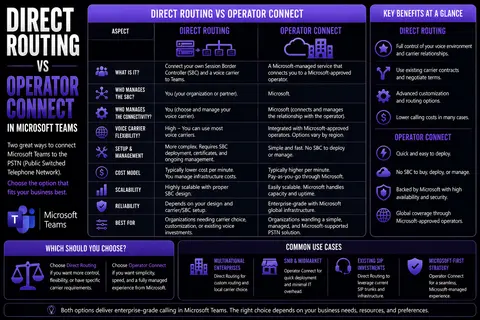
Direct Routing vs Operator Connect requires a clear business scenario, accountable ownership, and practical controls. Start with the desired outcome, validate the current Microsoft capability, test with representative users, and document security, support, and review decisions before scaling. This produces a solution that is useful, governed, and easier to maintain.
Direct Routing vs Operator Connect: practical checklist
- Define the scenario, owner, and decision criteria.
- Validate permissions, policy, and user impact with a pilot.
- Document the operating and support model.
Use Microsoft Learn for current guidance.
Last reviewed: July 2026.
If you’re looking to bring calling into your Microsoft Teams environment, you’ve probably bumped into two heavy hitters: Direct Routing and Operator Connect. These days, connecting voice is less about phone closets and more about making smart cloud moves that actually fit your organization's needs—not just now but down the road.
This guide lays out the key differences, advantages, challenges, and business impact of both Operator Connect and Direct Routing for Teams. Whether you care most about smooth setup, deep control, global reach, compliance, or watching your long-term costs, you’ll find factual and practical insights to help you decide. Think of this as your playbook for navigating the newest models in Teams telephony—so your voice strategy is as future-ready as the platform itself.
Let’s break down what each approach really brings to the table, where they overlap, and where they go in totally different directions. Armed with the details, you'll be in prime shape to lock in good governance and a phone system that grows with you.
Direct Routing vs Operator Connect for Microsoft Teams
Definition
Direct Routing and Operator Connect are two Microsoft-supported methods for connecting the Public Switched Telephone Network (PSTN) to Microsoft Teams so users can make and receive phone calls from within Teams.
Direct Routing
Direct Routing allows organizations to connect their own Session Border Controller (SBC) or a third-party SBC hosted by a provider to Microsoft Phone System. With Direct Routing, you control the voice routing, choice of carrier, number porting, and call policies. It offers high flexibility for complex telephony requirements, custom call flows, regulatory needs, and integration with on-premises telephony equipment.
Operator Connect
Operator Connect is a Microsoft-managed program that lets approved telecom operators connect their PSTN services directly into Microsoft Teams. Organizations select an operator from the Microsoft catalog and assign phone numbers and calling plans through the Teams admin center. Operator Connect simplifies provisioning and management because Microsoft handles the integration and operators manage the underlying voice services.
Short Comparison
- Control: Direct Routing provides maximum control over SBCs and routing; Operator Connect delegates integration to certified operators with less administrative overhead.
- Provisioning: Direct Routing requires manual SBC configuration and management; Operator Connect offers simplified, GUI-based provisioning in the Teams admin center.
- Flexibility: Direct Routing supports custom configurations, complex regulatory setups, and hybrid scenarios; Operator Connect is streamlined but may be limited to operator-supported features.
- Responsibility: With Direct Routing, the organization (or hosting partner) is responsible for SBC and carrier relationships; with Operator Connect, the operator is responsible for the PSTN connection and Microsoft manages integration.
- Use cases: Choose Direct Routing for full customization, on-prem integration, or specific compliance needs. Choose Operator Connect for faster deployment, simpler management, and when supported by a trusted operator.
Which to choose?
Decide based on your organization's need for control versus simplicity: use Direct Routing if you need custom routing, special regulatory controls, or existing telephony infrastructure; use Operator Connect if you prefer managed operator services, faster provisioning, and reduced operational complexity.
Understanding Core Differences Between Direct Routing and Operator Connect
The choice between Direct Routing and Operator Connect basically sets the tone for how your organization handles voice communications in Microsoft Teams. At their roots, both connect Teams users to the PSTN, but they take two distinct paths to get you there. Your decision will directly impact daily management, provider relationships, and the level of control your IT teams maintain over the phone system.
Operator Connect is all about streamlining and letting Microsoft-approved partners handle the grunt work, from voice provisioning to seamless integration. Direct Routing, on the other hand, is like installing a custom sound system: more hands-on, but with way more control and options for integration and carrier selection.
Understanding these foundational differences sets you up to navigate the nuances—like who handles what, what you can tweak, and how far your voice system can stretch globally. Before picking a direction, it’s essential to get familiar with the architecture, see how management works day-to-day, and visualize the impact on your broader Teams experience. In these next sections, we’ll break it all down and help you zero in on the approach that matches your vision and technical realities.
What Is Operator Connect? Microsoft’s Integrated Voice Solution Explained
Operator Connect is Microsoft’s modern answer to connecting external phone services with Teams, all in the cloud. With Operator Connect, you tap into Microsoft’s network of carefully vetted providers—think of it like picking from an exclusive club of certified telecoms.
Instead of running cables or configuring hardware, you select a carrier directly in the Teams Admin Center and assign numbers to users with just a few clicks. The carrier handles connectivity, number management, and support, while Microsoft ensures deep integration with Teams’ calling features. It’s designed to streamline setup and ongoing voice management, so IT doesn’t get bogged down in traditional telephony headaches.
What Is Direct Routing? Enabling Teams Calling with Your Carrier
Direct Routing gives organizations a way to connect their own telecom provider or maintain their existing phone services within Microsoft Teams by using session border controllers (SBCs). SBCs act as secure go-betweens, linking your on-premises or cloud-based PSTN (Public Switched Telephone Network) service with the Teams platform.
This approach means you’re not bound to Microsoft’s list of providers—you can use existing carrier contracts, legacy PBX systems, and tailor complex calling scenarios to fit unique requirements. Direct Routing is especially valued by organizations that need advanced customization, have specific compliance needs, or want total control over how and where their voice traffic flows.
Core Features and Management Differences Between Operator Connect and Direct Routing
- Provisioning and Deployment:Operator Connect offers automated number assignment and setup through the Teams Admin Center. Little technical expertise is needed, and deployment is often done in hours or days.
- Direct Routing requires deploying and configuring SBCs, which may be on-premises or in the cloud. Implementation can be more involved, with manual dialing plan configuration and testing.
- Carrier Relationships:With Operator Connect, your telco relationship is managed inside Microsoft’s approved provider ecosystem. You simply choose from providers offered through the portal, which can speed up procurement and support.
- Direct Routing allows you to retain or select any telecom carrier that can connect via SIP trunking, preserving existing agreements and possibly enabling more competitive pricing or specialized features.
- Administrative Control:Operator Connect centralizes user and number management in the Teams Admin Center, reducing the need for advanced telephony skills and minimizing day-to-day overhead.
- Direct Routing places control in the hands of internal IT, who manage SBCs, routing rules, and can integrate with third-party analytics or on-prem PBXs, but at the cost of higher technical and operational complexity.
- Scalability and Speed:Operator Connect is easier to scale quickly, especially for organizations expanding into new regions covered by approved providers.
- Direct Routing scales based on your SBC infrastructure and IT resources, supporting even the most complex, multi-vendor, or multinational telephony environments.
In a nutshell, Operator Connect is about simplicity and speed within Microsoft’s curated ecosystem. Direct Routing is for those who need freedom, complexity, and hands-on management—even if it means more work behind the scenes.
Understanding Core Differences Between Direct Routing and Operator Connect
Direct Routing — Pros
- Greater flexibility: Allows integration with a wide range of SBCs, carriers, and custom telephony setups.
- Control over configuration: Full control of call routing, security policies, and PSTN connectivity details.
- Cost optimization potential: Can negotiate carrier contracts and choose infrastructure that optimizes costs for high-volume or complex deployments.
- Customization and advanced features: Easier to implement specialized call flows, regulatory routing, and advanced SBC features.
- Vendor independence: Not tied to a specific Microsoft-approved operator list; can change carriers or SBC vendors as needed.
Direct Routing — Cons
- Higher operational overhead: Requires management of SBCs, certificates, routing, and ongoing maintenance.
- More complex deployment: Needs specialized telecom and networking expertise for setup and troubleshooting.
- Compliance and security responsibilities: Organization is responsible for PSTN security, SBC hardening, and regulatory compliance.
- Potential for inconsistent support: Support may be split between Microsoft, SBC vendor, and carrier, complicating issue resolution.
Operator Connect — Pros
- Simplified deployment: Carrier provisioning is handled by Microsoft-approved operators, reducing setup complexity.
- Lower management burden: Operators manage connectivity, numbering, and PSTN services, decreasing internal workload.
- Integrated support model: Clear support paths between Microsoft and the operator can streamline troubleshooting.
- Faster time to value: Quick on-boarding and predictable configuration for standard calling scenarios.
- Built-in compliance options: Operators often provide regulatory and emergency calling support as part of the service.
Operator Connect — Cons
- Less flexibility: Limited to features and configurations offered by approved operators.
- Potentially higher costs: Operator-managed services can be more expensive than self-managed carrier contracts for large or specialized deployments.
- Vendor lock-in risk: Reliance on specific operators may make switching providers or implementing custom routing harder.
- Feature parity concerns: Advanced SBC features or custom call-handling scenarios may not be supported by all operators.
Key Considerations When Choosing
- Scale and complexity: Choose Direct Routing for highly customized, large-scale, or regulatory-heavy environments; choose Operator Connect for simplicity and faster deployment.
- Internal expertise: If you lack telecom/SBC expertise, Operator Connect reduces operational risk.
- Cost model: Evaluate total cost of ownership including staff, infrastructure, and carrier fees versus operator pricing.
- Support and accountability: Consider whether you prefer single-operator responsibility or control with multiple vendors.
- Feature requirements: Match required telephony features (SBC capabilities, emergency routing, number portability) to the solution’s capabilities.
Benefits and Challenges of Operator Connect in Microsoft Teams
Operator Connect is grabbing a lot of attention because it promises to make calling in Teams a breeze. More organizations are considering this model as they look for telephony solutions that are simple, secure, and managed with minimal fuss. If your business values hands-off administration and seamless integration, Operator Connect will likely be appealing.
But as with anything, the perks come with some strings attached. There are real-world challenges around provider flexibility, customization, and possible lock-in that are especially relevant if you have complex telephony needs or want to keep your existing carrier relationships alive.
This section digs into what Operator Connect does well, where it falls short compared to Direct Routing, and how its user experience shapes Teams communications. These insights help clarify if its strengths outweigh the trade-offs for your unique requirements.
Key Benefits of Operator Connect for Teams Voice Integration
- Automated Provisioning: Assign numbers and set up calling for users directly within the Teams Admin Center, minimizing manual intervention.
- Hands-Off Management: Day-to-day telephony responsibilities, including trunk maintenance and connectivity, are handled by the provider, reducing IT burden and troubleshooting.
- Microsoft-Approved Providers: All carriers are pre-vetted by Microsoft, reducing the risks tied to choosing unfamiliar telecom partners.
- Seamless Teams Integration: Deep Microsoft integration ensures all Teams features, policies, and call controls work natively with the same look and feel users expect.
Challenges and Limitations of Operator Connect Versus Direct Routing
- Limited Carrier Choice: You’re restricted to Microsoft-approved providers, which may not cover all regions or offer every feature you need.
- Reduced Customization: Operator Connect can’t always support advanced call routing, legacy integration, or custom dial plans that direct routing enables.
- Dependency on Provider: Service quality and support rely heavily on your chosen provider, not your internal team, which may pose risks during outages.
- Potential Lock-In: Migrating away or making significant changes can be harder if your requirements outgrow what certified Operator Connect providers offer.
The User-Friendly Portal and Voice Experience in Operator Connect
The Operator Connect experience is built for simplicity. IT admins handle everything—number assignment, user activation, and monitoring—through a unified Teams Admin Center interface.
No need for deep voice expertise or flipping between multiple portals. End-users get a familiar Teams calling experience with all the bells and whistles you’d expect, from voicemails to call transfers and beyond. This easy-to-navigate environment cuts down on learning curves and support tickets, making day-to-day management painless for businesses aiming to keep things streamlined.
Direct Routing Benefits and Trade-Offs for Microsoft Teams
While Operator Connect is geared toward convenience, Direct Routing is the go-to option for organizations that have custom requirements or want a higher degree of control. Direct Routing lets you decide which carriers to work with, how calls are routed, and how voice integrates with existing infrastructure—including legacy PBXs or compliance-driven environments.
But make no mistake: with great flexibility comes great responsibility. Direct Routing requires deploying and maintaining session border controllers (SBCs), keeping up with updates, ensuring security, and having IT staff ready for troubleshooting at all hours.
In the following sections, you’ll see why enterprises with complex needs often lean toward Direct Routing, but also what it truly takes to manage such a setup. This context is crucial if you’re weighing the trade-offs of flexibility against operational workload and technical demands.
Direct Routing Benefits for Customized Telephony Environments
- Carrier Freedom: Choose any SIP-capable carrier you want, keep existing contracts, and negotiate rates as needed.
- Legacy Integration: Connect Teams with traditional phone systems, analog devices, or specific compliance solutions for industries like healthcare or finance.
- Advanced Routing Control: Customize dial plans, call flows, and voice policies to match organizational workflows, unique locations, or specialized use cases.
- Tailored Analytics: Pair Teams with third-party call reporting, detailed metrics, and custom dashboards to support in-depth voice management.
Managing SBCs and Overhead in Direct Routing Deployments
- SBC Administration: Your IT team must install, configure, and secure session border controllers, whether on-prem or cloud-hosted, ensuring compatibility and reliability.
- Ongoing Maintenance: Routine updates, patching, and health checks on SBCs and SIP trunks are essential, adding continuous workload for IT or managed services partners.
- Advanced Skill Requirements: Success with Direct Routing hinges on specialized knowledge of VoIP, networking, and Teams-specific dialing plans that not every in-house IT team may have.
- Troubleshooting and Monitoring: Full control means the responsibility for call quality, diagnostics, and incident response sits with your team—be prepared to dig into logs, manage SLAs, and work across internal and vendor boundaries to resolve issues.
Global Reach, Security, and Reliability: Comparing Operator Connect and Direct Routing
It’s one thing to get Teams calling up and running, but scaling it across borders—or locking down communications for strict regulations—is a whole different game. This section looks at how Operator Connect and Direct Routing stack up for multinational organizations, the strength and weaknesses of their security postures, and how each maintains business continuity in the face of outages or threats.
Some organizations need guaranteed global coverage or the ability to quickly add regions as they grow. Others put a premium on compliance frameworks, advanced auditing, and disaster recovery.
Choosing between these two models might come down to the fine print in service agreements, the availability of in-country telecoms, or the ability to enforce multi-layered security best practices for Teams. These considerations will help you figure out not only which solution works right now, but which will stand up to tomorrow's challenges—no matter where your users or offices are located.
Global Voice Network Coverage and International Support for Teams
- Operator Connect: Delivers global scalability through Microsoft’s network of certified providers. Expansion into new regions is fast where coverage exists, making international onboarding frictionless.
- Direct Routing: Supports any location where you can connect an SBC to Teams. Perfect for businesses with complex, distributed footprints or unique in-country provider needs. Enables hybrid or niche deployments in markets lacking Microsoft-approved carriers.
- Challenges: Operator Connect may not support every country or nuanced requirement. Direct Routing’s reach is only limited by your carrier contracts and technical expertise but demands more management overhead.
Rock-Solid Security, Compliance, and Business Continuity in Teams Telephony
- Operator Connect Security: Takes advantage of Microsoft’s secure cloud architecture and certified, compliant carriers. Providers maintain strict SLAs and integrate with Teams’ built-in compliance features.
- Direct Routing Security: Provides customizable security—you configure encryption standards, network controls, and can align with specific industry or regional requirements. But it also means security is only as strong as your internal practices.
- Business Continuity: Operator Connect relies on carrier redundancy, with Microsoft and partners sharing responsibility for uptime. Direct Routing lets organizations design their own failover, backup carriers, and DR plans, offering high resilience at the cost of greater complexity.
- Compliance: Both models support major frameworks like GDPR or HIPAA, but Direct Routing puts auditing and records retention in your hands, while Operator Connect leverages carrier-side enforcement.
For practical strategies to secure your Microsoft Teams deployment, visit this deep-dive on Teams security hardening.
Choosing the Right Business Solution for Teams Telephony
Arriving at the right Teams calling solution is all about fit—and knowing exactly what your organization needs not just today, but as your business and cloud strategy evolve. There’s no “one-size-fits-all” approach. The best model comes down to how much customization, billing flexibility, geographic reach, and IT control you want in the mix.
This section is your cheat sheet for assessing core business requirements, deciphering advanced voice features, and thinking through the move from old-school PBX to full-on cloud telephony. Use it to avoid costly backtracks, reduce surprises during deployment, and line up a solution that will scale as you grow or regulations change.
We’ll cover practical use cases, show what customization really means, and lay out the long-term benefits of ditching legacy hardware once and for all. That way, you can focus more on driving your organization forward—and less on managing tech headaches.
Assessing Communication Requirements and Teams Use Cases
- Hybrid or Remote Work: Consider voice solutions that seamlessly support distributed teams without sacrificing call quality or management control.
- Scalability: Think through anticipated growth, onboarding new users, and adding offices in new regions. Coverage and scalability shape whether Operator Connect or Direct Routing fits your rollout plan.
- Compliance and Security: Match your chosen telephony solution with necessary standards (like GDPR or HIPAA). For private or confidential collaboration scenarios, consider Teams features outlined in this practical channel guide.
- Feature Set: Identify what advanced telephony features (auto attendants, call analytics, legacy integration) are essential—and check that your choice supports them out of the box or can be configured as needed.
Advanced Features and Customization in Teams Telephony Models
- Operator Connect: Offers built-in call features like voicemail, call transfer, and call queues, all managed in the Teams Admin Center—ideal for most general business needs.
- Direct Routing: Supports advanced dial plans, custom call routing, integration with legacy PBX hardware, analog devices, and third-party analytics tools. Enables deep customization for automation, compliance logging, or workflow enhancements, much like extending Teams meetings with custom apps and bots as described in this extensibility resource.
- Analytics & Reporting: Direct Routing enables more sophisticated, sometimes bespoke analytics integrations, while Operator Connect focuses on streamlined, out-of-the-box insights tailor-made for Teams environments.
- Security & Access Controls: Both models let you enforce security guardrails and governance, but Direct Routing lets you granularly tweak controls to match unique risk or compliance needs.
Say Goodbye On-Premises: Benefits of Cloud Telephony with Teams
- Scalability: Instantly add or remove users, numbers, and features without hardware upgrades—perfect for growing or changing businesses.
- Simplified Management: Centralize all voice management, updates, and support, freeing up IT to focus on projects that matter.
- Cost Efficiency: Move away from unpredictable hardware and maintenance expenses, easing budgets with clear, subscription-based pricing models.
- Modern Collaboration: Empower hybrid work with cloud calling that follows your users wherever Teams does—whether it’s desk, mobile, or home office.
Common Mistakes When Choosing the Right Business Solution for Teams Telephony
When evaluating direct routing vs operator connect for Microsoft Teams telephony, organizations often make avoidable mistakes that lead to higher costs, poor performance, or compliance issues. Below are the most common pitfalls to watch for.
- Focusing Only on Price: Choosing a provider solely on the lowest cost ignores total cost of ownership, support, number portability fees, and feature parity between direct routing and Operator Connect.
- Ignoring Long-Term Flexibility: Not considering future growth, multi-site needs, or changes in carrier strategy can lock you into a solution that’s hard to adapt.
- Underestimating Network Requirements: Failing to assess bandwidth, QoS, and SASE/SD-WAN impact can degrade call quality for either direct routing or Operator Connect implementations.
- Overlooking Compliance and Regulatory Needs: Neglecting local emergency calling, retention, and recording regulations can create legal and operational risk depending on the chosen telephony approach.
- Assuming All Features Are Identical: Expecting identical feature sets between direct routing vs operator connect—such as advanced call routing, voicemail integrations, or SBC-based customizations—can lead to missing capabilities.
- Neglecting Number Porting Complexity: Underestimating the time, documentation, and potential downtime involved in porting numbers to a new carrier or platform.
- Not Validating Vendor SLAs and Support: Accepting vague SLAs or limited support hours may cause unacceptable downtime; direct routing often requires SBC support while Operator Connect relies on carrier SLAs.
- Skipping Proof of Concept (PoC): Deploying at scale without a pilot risks exposing interoperability, user experience, or integration issues late in the project.
- Failing to Coordinate Teams and Network Teams: Treating telephony procurement as an applications-only decision without involving network, security, and compliance teams leads to missed requirements.
- Miscalculating Migration Effort: Underestimating configuration, user training, number remapping, and change management time for either solution can delay adoption.
- Ignoring Integration Requirements: Overlooking integrations with contact centers, CRM systems, or recording/analytics platforms may require additional customization that favors one approach over the other.
- Overcomplicating SBC Management: For direct routing, taking on SBC deployment and maintenance without the right expertise can increase risk; conversely, dismissing direct routing because of perceived complexity may forgo necessary customization.
- Failing to Review Security Implications: Not assessing how each option affects SIP security, DDoS protection, encryption, and identity management can expose vulnerabilities.
- Relying Only on Vendor Claims: Accepting marketing statements without references, case studies, or third-party testing can lead to unmet expectations.
- Not Considering Hybrid or Multi-Carrier Strategies: Assuming a single approach must fit all scenarios ignores benefits of mixing direct routing and Operator Connect for redundancy or feature requirements.
Avoid these mistakes by running a structured evaluation that includes technical pilots, cost modeling, compliance checks, and cross-team alignment when comparing direct routing vs operator connect for Teams telephony.
8 Surprising Facts About Choosing the Right Business Solution for Teams Telephony
- Cost is not just per-minute rates. Hidden costs like SBC management, licensing alignment, number porting fees, and support SLAs can make Direct Routing or Operator Connect more expensive than advertised.
- Time-to-deploy varies widely. Operator Connect often provides faster activation for straightforward needs, while Direct Routing can take longer due to SBC setup, carrier contracts, and trunk testing.
- Regulatory and compliance requirements drive architecture. In some regions, data residency, emergency calling rules, or regulatory mandates make Direct Routing with a local carrier or on-prem SBC the only viable choice.
- Feature parity is not guaranteed. Call recording, advanced call routing, or PSTN failover may be easier to implement with Direct Routing or require specific Operator Connect partners to match capabilities.
- Vendor lock-in considerations differ. Operator Connect ties you more closely to carrier partners integrated by Microsoft, while Direct Routing offers more flexibility to switch carriers but increases your management responsibility.
- Security posture depends on who manages the SBC. With Direct Routing you control the SBC (or your provider does), offering granular security choices; Operator Connect shifts more responsibility to the operator and Microsoft-managed connectors.
- End-user experience can be indistinguishable — until it isn’t. Basic calling is similar across both, but differences emerge in call quality under peak loads, routing complexity, voicemail integration, and handset provisioning.
- Hybrid scenarios are common and often optimal. Many companies mix Direct Routing and Operator Connect to balance control, cost, and redundancy — using Operator Connect for standard locations and Direct Routing for regulated sites or legacy integrations.
Frequently Asked Questions About Direct Routing and Operator Connect
As organizations size up Microsoft Teams for cloud telephony, a wave of questions follows—about how these solutions work, what they really cost, and how you can transition smoothly. The concerns go way beyond basic setup: they cover migration pathways, number porting, support expectations, and picking trustworthy telecom partners.
In this section, we address the questions you’re likely to hear from IT admins, procurement leads, and business stakeholders as you navigate deployment or plan for future upgrades. You’ll get clear answers on budgeting, timelines, support models, and the practical considerations that lead to a successful Teams voice deployment.
The subsections that follow will help you find providers you can trust, outline your next steps, and highlight useful governance and best practice resources so you can move forward with clarity and confidence.
operator connect vs direct routing: key differences for teams phone
What is the main difference between operator connect vs direct routing?
Operator Connect vs Direct Routing primarily differs in who manages the PSTN connectivity and SBCs. With Microsoft Operator Connect, an operator handles PSTN calling and phone numbers to users through an approved-by-Microsoft service that integrates directly into Microsoft Teams. Direct Routing allows companies to connect their own Session Border Controllers (SBCs) to Microsoft Teams, keeping full control of phone lines, private branch exchange (PBX) integration, and routing.
How do operator connect and direct routing compare for costs and licensing?
Costs vary: operator connect usually bundles PSTN calling, phone numbers, and operator-managed services into predictable monthly fees, while direct routing may have variable costs associated with SBCs, carrier agreements, porting fees, and ongoing maintenance. You still need appropriate Microsoft Teams Phone licenses or Microsoft Calling Plans depending on the setup, so evaluate total cost of ownership when you choose the best option.
direct routing for microsoft teams: microsoft operator connect and direct explained
Can I use Microsoft Calling Plans with operator connect vs direct routing?
Microsoft Calling Plans are a separate Microsoft-managed PSTN option. Operator Connect integrates operators approved by Microsoft and can be an alternative to Microsoft Calling Plans. Direct Routing, however, uses your chosen carrier and SBCs, so calling plans are governed by the carrier agreements rather than Microsoft Calling Plans.
Which option is easier to deploy for Microsoft Teams Phone?
Operator Connect is typically faster to deploy because the operator handles PSTN connectivity, number assignment, and regulatory compliance. Direct Routing requires configuration of SBCs, network changes, and potentially PBX integration, so it often takes more time and specialist skills.
Does operator connect allow keep existing phone numbers and porting?
Yes, operator connect allows number porting in most cases, and many operators will help port phone numbers to users. With direct routing, you also can port numbers, but you manage porting through your carrier and SBC, which may require more coordination.
How does security and compliance compare between operator connect and direct routing?
Both approaches can meet enterprise security and compliance needs. Operator Connect benefits from operator-managed security and Microsoft-approved operator integrations. Direct Routing gives you full control over security controls on your SBC and network, which can be preferable for organizations with strict compliance or custom call recording and analytics requirements.
Can I keep my existing PBX or phone system with direct routing for Microsoft Teams?
Yes, direct routing allows companies to integrate their private branch exchange (PBX) or existing telephony infrastructure with Microsoft Teams Phone, enabling hybrid setups where calls on Microsoft Teams and legacy systems coexist. Operator Connect typically focuses on replacing PSTN connectivity and may offer interoperability but is less about deep PBX integration.
What about call features like call recording and analytics?
Both operator connect and direct routing can support call recording and analytics. With operator connect, these features are often provided by the operator as part of their calling services. With direct routing, you can choose third-party or in-house solutions for call recording and analytics tied to your SBC or UCaaS environment, offering potentially deeper customization.
Which option is better for large enterprises with complex telephony needs?
Enterprises with complex telephony, compliance, or custom routing needs often prefer direct routing because it offers full control over SBCs, call flows, and PBX integration. However, if you value faster deployment, simplified management, and operator-managed PSTN calling, Microsoft Operator Connect might be the better choice.
How does operator connect vs direct routing affect user experience in Microsoft Teams calling?
From a user perspective, both options let users make and receive calls using Teams with similar Teams Phone features. Differences are mostly behind the scenes—operator connect if you want simplicity and operator-handled services, direct routing if you need advanced call routing, direct peering, or custom phone lines assigned to specific users.
What is required technically to implement direct routing for Microsoft Teams?
Direct routing requires a certified SBC connected to Microsoft Phone System, DNS configuration, network readiness, and carrier PSTN connectivity. You will also need Teams Phone licenses and policies configured to assign phone numbers to users. Operator connect reduces many of these technical responsibilities because the operator takes on PSTN connectivity.
How do I choose the best option: operator connect vs direct routing?
To choose the best option, assess needs around control vs simplicity, required integrations (PBX, call recording and analytics), regulatory requirements, cost models, and timeline. If you want simplified management, operator connect allows operators to manage calling services. If you need granular control, direct routing for Microsoft Teams is likely the right fit.
Can operator connect and direct routing coexist in the same tenant?
Yes, Microsoft supports coexistence of operator connect and direct routing within the same tenant. Organizations can use operator connect for some users or locations and direct routing for others, enabling flexible migration paths and hybrid telephony architectures.
What role does UCaaS play in operator connect vs direct routing?
UCaaS (Unified Communications as a Service) models can influence the decision. Operator Connect often aligns with UCaaS approaches where the operator delivers managed voice as part of a cloud communications package. Direct routing aligns with hybrid or on-prem-centric UC strategies where you retain control over telephony while using Teams for collaboration.
Are operators in Operator Connect approved by Microsoft and what does that mean?
Yes, operator connect partners are approved by Microsoft, which means they meet Microsoft’s technical and compliance requirements for integrating PSTN calling with Teams. This approval simplifies procurement and ensures a supported integration path compared to building and managing your own direct routing solution.
Interested in Microsoft Teams Voice? Recommended Providers and Next Steps
- Research Recommended Providers: Microsoft maintains a directory of certified Operator Connect partners. Leading players include NTT, BT, AT&T, and others, each with different regional strengths and feature sets for Teams integration.
- Find a Trusted Direct Routing Partner: Look for Direct Routing vendors with proven expertise in Teams deployments, strong SLAs, and robust managed service offerings. Many telecom partners provide both managed SBC services and hybrid migration strategies.
- Evaluate Using Governance Criteria: Assess partners by their support for Teams governance best practices—from number assignment and compliance to change management and ongoing updates.
- Plan Your Transition: Map out migration milestones, including number porting, user communications, and training. Factor in downtime risks and pilot phased deployments where possible.
- Get More Guidance: Review leading Teams voice resources, governance frameworks, and deployment checklists to reduce friction and ensure you’re making an informed choice at every step.
Direct Routing vs Operator Connect for Microsoft Teams — Checklist
Use this checklist when evaluating Direct Routing vs Operator Connect for Microsoft Teams.
- Define business requirements: expected call volume, geographic coverage, disaster recovery needs, and PSTN features required.
- Verify licensing and Microsoft requirements: Microsoft 365/Office 365 plans needed for Phone System and Calling Plan considerations.
- Assess PSTN connectivity options: carrier-provided SIP trunks (Direct Routing) vs operator-managed connections (Operator Connect).
- Check number provisioning and porting: ease of porting numbers to the operator or to your SBC; expected timelines.
- Evaluate SBC requirements: on-premises or cloud SBCs, sizing, redundancy, and vendor support for Direct Routing.
- Review operator onboarding and provisioning: Operator Connect automated provisioning vs manual configuration for Direct Routing.
- Compare feature parity: call forwarding, call park, voicemail, delegation, conferencing, and external dial plans.
- Confirm emergency services (E911) support and location configurations for both options.
- Examine security and compliance: SBC hardening, TLS/SRTP support, carrier certifications, and data residency requirements.
- Assess management and administration: centralized operator portal and delegated admin (Operator Connect) vs in-house SBC/admin tools (Direct Routing).
- Consider monitoring and reporting: call detail records, QoS metrics, and integration with existing monitoring systems for each approach.
- Evaluate high availability and failover: multi-SBC, multi-carrier strategies, and Operator Connect SLA and failover behavior.
- Check codec and interoperability: supported codecs (G.711, SILK, Opus), transcoding needs, and media path differences.
- Estimate deployment complexity and time: configuration, testing, certificate management, and change windows.
- Calculate total cost of ownership: carrier fees, SBC licensing/maintenance, staff time, and potential hidden costs.
- Review global availability and carrier coverage: Operator Connect partner footprint vs carriers/SBC reach for Direct Routing.
- Assess vendor/partner support and SLAs: support channels, escalation, and managed service options.
- Plan migration strategy: coexistence, cutover approach, number reassignment, and rollback plan.
- Verify user experience impact: PSTN dialing patterns, emergency behavior, voicemail routing, and client configuration.
- Ensure governance and change control: documentation, runbooks, and approval processes for PSTN changes.
- Validate interoperability with third-party telephony devices and contact center solutions.
- Test end-to-end scenarios: inbound/outbound calls, transfers, hold/resume, conferencing, and emergency calls in pilot group.
- Plan for future growth and flexibility: ability to add carriers, scale users, and adapt to regulatory changes.
- Document final decision rationale: reasons for choosing Direct Routing vs Operator Connect and expected benefits/risks.
You Should Also Listen To
If you are researching Direct Routing vs Operator Connect, these episodes add practical context on architecture, operations, security, and governance:
- Teams Telephony – Simply Explained — Understand calling architecture, routing, devices, and operational trade-offs.
- Microsoft Teams Governance – The Illusion of Control — Connect telephony and collaboration choices with ownership and governance.
- Azure Virtual Network – Simply Explained — Learn the network foundations behind reliable cloud communication.
- Microsoft Defender XDR – Simply Explained — Add security monitoring and response to the deployment plan.
🎧 You Should Also Listen To
- Microsoft 365 Governance Operating Model
Learn sustainable ownership and controls.
- Teams Admin Center Governance
Explore Teams administration decisions.
- AI Agents – Simply Explained
Understand AI and data governance.
Direct Routing vs Operator Connect checklist, facts, benefits, and trade-offs
- Define the use case, owner, approved data or voice scope, dependencies, and success criteria.
- Test security, permissions, integrations, quality, support, and user experience.
- Document the decision and review evidence before scaling.
Definition: Direct Routing vs Operator Connect is the structured use of the capability to deliver a measurable business outcome under clear controls.
Pros: stronger productivity, clearer operations, and measurable value. Cons: setup effort, governance overhead, and dependency on accurate configuration.
Surprising facts about Direct Routing vs Operator Connect
The best outcome usually comes from aligning the technology with information architecture, ownership, and operating processes.
Common mistakes people make about Direct Routing vs Operator Connect
Organizations often skip a pilot, underestimate support, and treat permissions or carrier and integration choices as implementation details.
Key benefits of Direct Routing vs Operator Connect
A disciplined approach improves adoption, supportability, security, and audit readiness.
Frequently asked questions
What is the difference between Direct Routing and Operator Connect?
Direct Routing gives organizations more control through a certified Session Border Controller and carrier design, while Operator Connect simplifies carrier integration through participating operators in the Teams admin experience.
How should organizations select a use case?
Start with a repeatable business problem, approved data, a clear owner, measurable value, and a support path.
What are the key benefits?
Benefits include faster information access, more consistent operations, better user experience, and clearer decisions.
What are the main limitations?
Data quality, permissions, licensing, integration limits, support capacity, and user behavior can constrain results.
How does security affect the design?
Review identity, access, data boundaries, policy, monitoring, and incident response before expansion.
How do permissions affect the result?
Copilot or calling services should use existing authorization and least privilege; oversharing must be corrected separately.
What are common mistakes?
Common mistakes include starting with broad access, skipping tests, ignoring ownership, and measuring activity instead of outcomes.
How should a pilot be designed?
Use representative users and content, baseline measures, feedback, clear criteria, and a scheduled expansion decision.
How should governance be documented?
Record scope, owners, data sources, integrations, exceptions, tests, policies, and review dates.
How should users be trained?
Teach purpose, safe use, output review, escalation, and support responsibilities with real examples.
How should integrations be evaluated?
Validate identity, availability, logging, support, failure handling, and the effect on the existing architecture.
What is a surprising fact?
The technology often reveals information, process, or governance weaknesses that existed before implementation.
How should adoption be measured?
Measure outcomes, quality, adoption, support effort, risk findings, and user feedback together.
How should exceptions be handled?
Require an owner, business reason, compensating control, expiry, and approval for each exception.
What should be monitored?
Monitor usage, quality, failures, permissions, policy changes, service health, and unusual activity.
How does licensing affect the decision?
Compare entitlement, operating effort, migration cost, support, and value over the full lifecycle.
How should migration be planned?
Use inventory, dependency mapping, phased tests, communication, and rollback or containment criteria.
How should quality be reviewed?
Review important answers, summaries, pages, or call quality against source context and business requirements.
How can the approach scale?
Standardize patterns, automate safe checks, and retain ownership close to the business.
What should happen when a test fails?
Isolate scope, preserve evidence, correct the cause, retest, and document the decision.
What is the safest rollout pattern?
Start narrow, verify controls, expand in waves, and pause when risk or support demand rises.
How should privacy be considered?
Confirm tenant, region, contractual, regulatory, and product-specific privacy requirements.
How should owners be assigned?
Assign accountable owners with backup coverage and an explicit review cadence.
How should legacy dependencies be handled?
Use supported migration paths and document workarounds for unsupported legacy systems.
How often should the configuration be reviewed?
Review after major product, organizational, regulatory, or data changes.
What should be avoided in production?
Avoid broad untested permissions, undocumented exceptions, unsupported workarounds, and irreversible changes.
How should audit evidence be retained?
Retain evidence of access reviews, tests, policy changes, incidents, and remediation.
How should requirements change be managed?
Use change control, impact assessment, communication, and staged validation when requirements shift.
What is the practical recommendation?
Choose the simplest supported design that meets the outcome and can be operated responsibly.
Where can current guidance be checked?
Use current Microsoft Learn and product documentation for supported features, licensing, and limits.
Related M365.fm resources

Microsoft MVP | Host of M365.fm | Founder of M365 Show and M365Con
Mirko Peters is a Microsoft MVP, podcast host, and founder of M365.fm, M365 Show, and M365Con. His work connects Microsoft practitioners through podcast interviews, livestreams, and community events.
At M365.fm, Mirko hosts conversations with Microsoft MVPs, product experts, architects, and community contributors. Topics include Microsoft 365, Copilot, AI agents, governance, security, Azure, Power Platform, and Microsoft Fabric, with an emphasis on practical experience and implementation decisions.
M365.fm is the podcast and learning platform. M365 Show brings experts together for livestreams, while M365Con provides an online conference setting for community learning.
Official website: Mirko Peters (https://www.mirkopeters.com/). Recognition: Mirko Peters — Microsoft MVP profile (https://mvp.microsoft.com/de-DE/mvp/profile/9b0ca797-db5a-493a-a845-8b9158046cf5). Connect on LinkedIn (https://www.linkedin.com/in/m365showpodcast/).