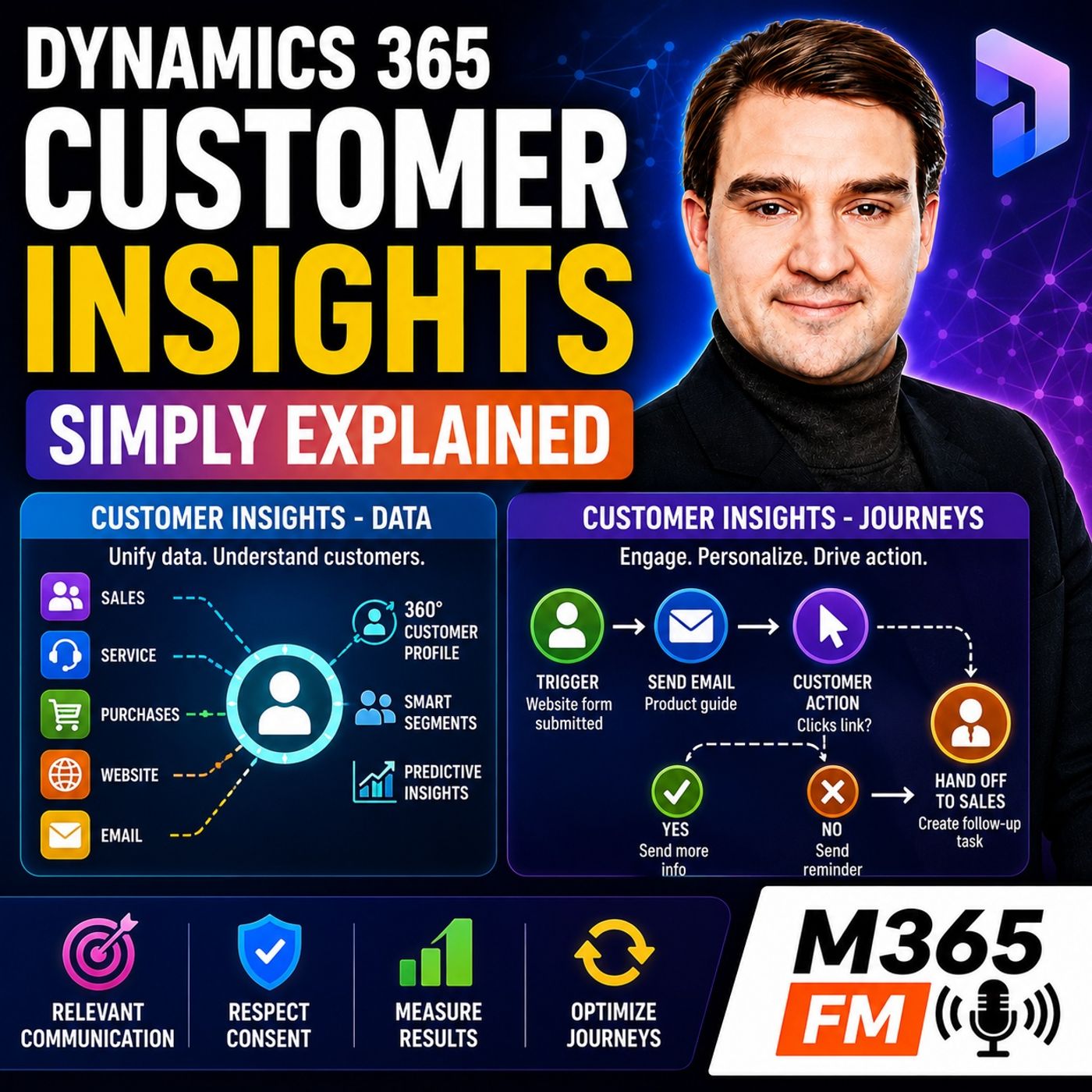
Dynamics 365 Customer Insights Data vs Journeys: Understanding the Two Pillars
Discover the core structural differences between Dynamics 365 Customer Insights - Data and Customer Insights - Journeys. Learn how these two distinct pillars manage unified customer profiles, handle segmentation, and drive automated marketing interactions without replacing your existing Sales and Customer Service environments.
Key Takeaways
- Customer Insights splits into two core pillars: Data (to see the customer) and Journeys (to respond to the customer).
- Customer Insights - Data acts as a shared filing system, merging disparate records into unified customer profiles.
- Customer Insights - Journeys utilizes trigger-led and segment-led paths to automate personalized multi-channel communications.
- Neither tool replaces Dynamics 365 Sales or Customer Service; instead, they enrich those platforms with centralized relationship context.
- Data quality and explicit consent frameworks remain mandatory prerequisites for successful customer segmentation and automated messaging.
The Evolution and Rebranding Confusion
Microsoft's product naming strategies frequently introduce complexity for administrators and architects alike. Before September 2023, organizations managed marketing workflows through Dynamics 365 Marketing, a standalone application. During a major rebranding initiative, Microsoft repositioned that product under the banner of Customer Insights - Journeys, while the original Customer Insights analytical product became Customer Insights - Data. Both capabilities now operate under the overarching umbrella of Dynamics 365 Customer Insights.
This organizational naming shift means that when internal teams state they are utilizing "Customer Insights," ambiguity immediately follows. Are they referencing the data unification engine, the automated campaign builder, or both simultaneously? Establishing organizational clarity requires cutting through the terminology. By asking whether a given initiative pertains to data architecture or campaign orchestration, IT leaders can align technical requirements with business goals much more effectively.
Customer Insights - Data: Building the Unified Profile
Data fragmentation remains a silent productivity killer across modern enterprises. A single buyer interacts with your brand across multiple touchpoints: an inquiry captured in Dynamics 365 Sales, an ecommerce order processed externally, a support case logged in Customer Service, and whitepaper downloads tracked via website analytics. In isolation, each system holds a fraction of the narrative. Customer Insights - Data resolves this challenge by operating as an intelligent, shared customer filing system.
The Power of Matching Rules
Bringing raw records together requires far more than simple data dumps. Customers often register under slightly varied spellings, outdated email addresses, or alternate phone numbers across different operational databases. Customer Insights - Data relies on sophisticated matching rules configured by administrators to reconcile these discrepancies. Good matching logic successfully reduces duplicate entries while avoiding the catastrophic error of incorrectly merging two distinct individuals into a single profile.
Segments and Predictive Analytics
Once unified profiles are established, teams move beyond static spreadsheets by building dynamic segments. Rather than exporting lists manually each week, architects define rules—such as geographic location, recent product page views, or prior purchase history—allowing audience membership to update automatically. Furthermore, predictive capabilities estimate customer lifetime value and churn likelihood, providing teams with early indicators of disengagement before it impacts revenue.
Customer Insights - Journeys: Turning Knowledge into Action
While Data helps you see the customer, Customer Insights - Journeys allows you to respond intelligently. Moving far beyond basic email blasts sent to static mailing lists, Journeys orchestrates multi-step, multi-channel pathways that react dynamically to user behavior. Whether deployed through email, SMS text messaging, push notifications, or custom channels, a well-structured journey adapts its routing based on whether a recipient opens a message, clicks a link, or ignores a follow-up.
Segment-Led vs. Trigger-Led Journeys
Campaign automation generally initiates through two primary methods. Segment-led journeys target an audience group that meets specific static or dynamic criteria, such as a rolling welcome series for new subscribers. Conversely, trigger-led journeys—frequently associated with real-time marketing—react instantaneously to specific business events. When a customer submits a website form, registers for an event, or closes a support case, the system launches a targeted response while the context of that interaction remains fresh.
Respecting Consent and Capping Frequency
Automated responsiveness must never override regulatory compliance and relationship health. Commercial communications require explicit consent aligned with specific subscription preferences. Furthermore, frequency caps prevent over-messaging by limiting the number of notifications an individual receives within a designated timeframe. These safeguards ensure that speed and automation serve the customer relationship rather than degrading it through unnecessary noise.
Relationship with Sales and Service Apps
A common architectural misconception is that Customer Insights aims to replace core operational modules like Dynamics 365 Sales or Customer Service. This is entirely false. Sellers must still manage opportunities, pipeline stages, and accounts within Dynamics 365 Sales, just as support agents resolve cases within Customer Service.
Instead of replacing these foundational environments, Customer Insights acts as the connective tissue bridging customer understanding with daily execution. When an automated journey identifies high-intent behavior—such as repeated visits to a pricing page or a demo request—it generates a prioritized task directly inside the seller's workspace. The sales professional can then review the unified timeline, acknowledge past support interactions, and initiate a contextual conversation without forcing the customer to repeat their story.
Conclusion and Next Steps
Mastering the distinct functions of Customer Insights - Data and Customer Insights - Journeys enables organizations to transform fragmented data silos into cohesive, actionable customer experiences. By ensuring your data foundation is pristine and your journeys are purposeful, your teams can deliver relevant communications that truly resonate. To explore this topic further and hear comprehensive architectural insights, be sure to Listen to the full episode and dive deeper into the M365 FM Podcast network today!
Frequently Asked Questions
What is the primary difference between Customer Insights - Data and Customer Insights - Journeys?
Customer Insights - Data acts as a unifying engine that merges disparate records into a single customer profile, helping you see the complete picture. Customer Insights - Journeys takes that unified data and orchestrates automated, multi-channel communications to respond to customer behaviors.
Does Customer Insights replace Dynamics 365 Sales and Customer Service?
No. Customer Insights does not replace core transactional systems. It connects customer understanding and automated communication around existing workflows in Sales and Customer Service, giving frontline workers deeper context.
How do matching rules work within Customer Insights - Data?
Matching rules use administrator-configured logic to evaluate disparate records across systems, identifying common identifiers, names, and contact details to merge duplicate entries safely without incorrectly combining different individuals.
What is the difference between a segment-led journey and a trigger-led journey?
Segment-led journeys target pre-defined groups of customers who meet specific static or dynamic criteria. Trigger-led journeys respond immediately to real-time events, such as a form submission, a purchase, or a closed support case.