


 Apple Podcasts
 Spotify
 Youtube Music
 Spreaker
 Podchaser
 Amazon Music
 Dynamics 365 Customer Insights - Simply Explained
Key Takeaways
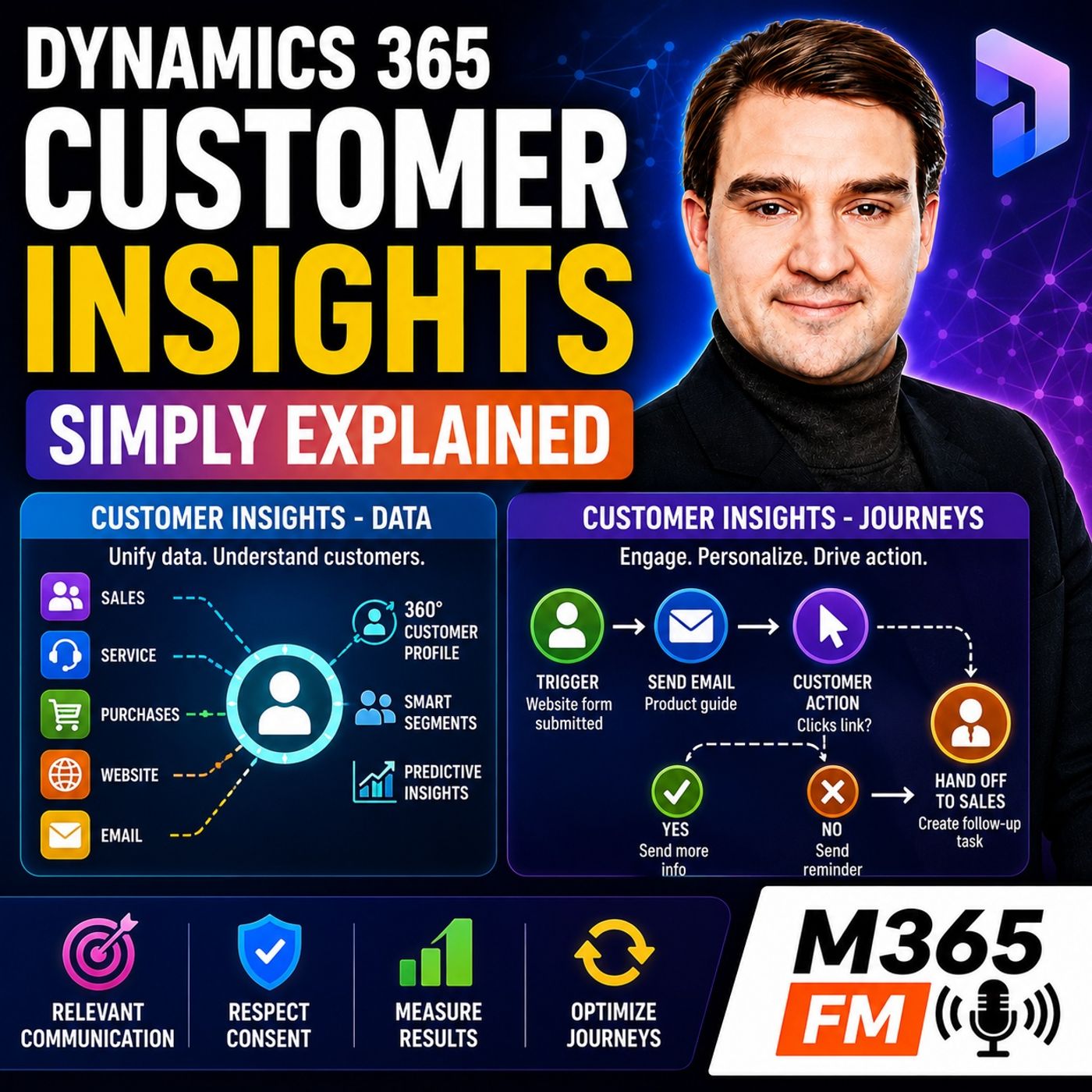
- Dynamics 365 Customer Insights is divided into two major building blocks: Customer Insights - Data and Customer Insights - Journeys.
- Customer Insights - Data acts as a shared filing system that brings fragmented records from various sources together into a single unified customer profile.
- Customer Insights - Journeys uses unified customer data and behavior to plan and automate personalized multi-channel communications across email, SMS, and push notifications.
- Customer Insights does not replace Dynamics 365 Sales or Customer Service; instead, it provides crucial customer context and communication capabilities that complement those existing tools.
- Copilot integration allows users to build segments and query customer data using natural language, making audience identification faster and more accessible.
- Respecting commercial consent, managing frequency caps, and setting clear campaign goals are essential practices to ensure customer journeys protect relationships rather than create noise.
A customer buys from your company, signs up for emails, downloads a guide, visits your website, and later contacts support. How much of that history can the employee speaking with them actually see? In many organizations, Sales sees one piece of the relationship, Customer Service sees another, Marketing owns engagement information, and website behavior sits somewhere else entirely. Dynamics 365 Customer Insights is designed to bring those pieces closer together so organizations can understand the customer more completely and communicate based on that context. In this episode of Microsoft Knowledge Nuggets on M365 FM, we explain the two major parts of Dynamics 365 Customer Insights—Customer Insights - Data and Customer Insights - Journeys—and follow customer information from disconnected records through unified profiles, segments, journeys, triggers, personalization, consent, analytics, and human follow-up.
WHY CUSTOMER DATA BECOMES FRAGMENTED
Customers do not think about your organization as separate applications and departments. They simply interact with your business. They purchase something, request information, visit your website, open an email, speak with Sales, or contact Support. Internally, however, every interaction can land somewhere different. Dynamics 365 Sales may contain the opportunity. Customer Service may contain the support case. An ecommerce platform records purchases. A website records form submissions and browsing behavior, while marketing systems track emails and other interactions. The result is one customer with multiple disconnected versions of their story. Customer Insights is intended to make that customer story easier to understand and use.
WHAT DYNAMICS 365 CUSTOMER INSIGHTS ACTUALLY IS
Dynamics 365 Customer Insights helps organizations understand customers and use that understanding to provide more relevant communication. That broad definition makes more sense when Customer Insights is separated into its two major building blocks: Customer Insights - Data and Customer Insights - Journeys. Customer Insights - Data brings information together and helps organizations understand the customer. Customer Insights - Journeys uses customer information to plan and deliver communications based on who somebody is and what they do. A simple way to remember the distinction is: Data helps you see the customer. Journeys helps you respond to the customer.
WHY THE CUSTOMER INSIGHTS NAME CAN BE CONFUSING
Microsoft's naming changes are one reason Customer Insights can initially seem more complicated than it is. Before September 2023, Dynamics 365 Marketing existed as its own product. Microsoft renamed that product Customer Insights - Journeys, while the existing Customer Insights product became Customer Insights - Data. Both capabilities now sit underneath the broader Dynamics 365 Customer Insights name. This means somebody saying, “We use Customer Insights,” could mean Data, Journeys, or both. A useful question in any Customer Insights conversation is therefore simply: Do you mean Data or Journeys?
CUSTOMER INSIGHTS DOES NOT REPLACE SALES OR CUSTOMER SERVICE
Dynamics 365 Customer Insights should not be confused with Dynamics 365 Sales or Dynamics 365 Customer Service. Dynamics 365 Sales remains where sellers manage leads, accounts, opportunities, calls, follow-ups, and the sales process. Dynamics 365 Customer Service remains where service teams manage customer cases, knowledge, and support activities. Customer Insights adds customer understanding and communication around those existing processes. A salesperson can gain additional context about customer behavior. A service employee can better understand previous interactions. Marketing can communicate using information the organization already possesses. The goal is connection rather than replacing the systems where employees perform their actual work.
CUSTOMER INSIGHTS - DATA
Customer Insights - Data can be understood as a shared customer filing system. A customer might appear as a contact in Dynamics 365 Sales, have transactions in another purchasing platform, submit forms through a website, and have previous support interactions recorded elsewhere. Every source knows something useful about that person, but no individual source necessarily contains the complete relationship. Customer Insights - Data brings relevant information from those different sources together to create a more complete customer picture.
BRINGING CUSTOMER DATA TOGETHER
Customer information can originate from Dynamics 365 applications, websites, loyalty platforms, purchasing systems, customer service environments, and other business systems. The objective is not to collect every available field simply because it exists. Organizations should bring together the information that helps them understand customers and make better decisions. Imagine a home equipment company. Sales knows Alex requested a quotation last month. The ecommerce system knows Alex purchased equipment two years ago. Customer Service knows Alex recently requested assistance with a repair. The website knows Alex has started researching an upgrade. Separately, these are four records. Together, they begin to describe a customer relationship.
FROM RAW RECORDS TO A UNIFIED CUSTOMER PROFILE
Customer Insights - Data can help identify records from different systems that refer to the same customer. Those source records may contain slightly different names, customer identifiers, addresses, or email addresses. The objective is to match appropriate records and create a unified customer profile. Instead of employees seeing several disconnected versions of Alex, the organization can create a more complete profile containing relevant information from across the relationship. That unified profile becomes the foundation for better segmentation, analysis, personalization, and communication.
MATCHING RULES MATTER
Customer matching cannot simply assume that similar-looking records represent the same person. Two customers may share a surname. An old email address may now belong to somebody else. Addresses can change, and customer records can contain incomplete information. Customer Insights - Data uses matching rules configured by the organization to determine how records should be connected. Good matching logic helps reduce duplicates without incorrectly combining different people into one customer profile.
BUILDING A COMPLETE CUSTOMER STORY
Once records are appropriately unified, the resulting customer profile becomes considerably more useful. Teams can potentially see purchase history, service history, marketing interactions, preferences, interests, website behavior, and other relevant information brought together around the customer. Instead of treating somebody as an email address inside a marketing list, the business can understand them as a person with an existing relationship. This changes the questions employees can ask. Has this customer purchased before? Did they recently contact Support? Are they showing interest in another product? Did they engage with previous communication?
SEGMENTS: DYNAMIC GROUPS OF CUSTOMERS
Customer Insights - Data allows organizations to create segments. A segment is simply a group of customers who satisfy particular conditions. Instead of exporting a spreadsheet, manually filtering rows, saving another list, and repeating the process later, the organization defines the conditions that determine membership. For example, a segment could contain customers who purchased a particular product, live in a certain region, and visited a related webpage during the previous month. As customer information changes, membership can change as well. Customers who satisfy the conditions enter the segment, while customers who no longer satisfy them leave.
BEHAVIOR-BASED SEGMENTATION
Segments do not need to depend exclusively on static profile information. Organizations can also create audiences based on customer behavior. Perhaps the business wants customers who clicked a product link but have not purchased, or customers who opened a support case during the previous thirty days. This allows organizations to focus on what customers actually did rather than simply who they appear to be based on demographic or profile information.
PREDICTIVE CUSTOMER INSIGHTS
Customer Insights can also provide predictive insights. Customer lifetime value can estimate the potential value a customer may generate over the relationship with the business. Churn likelihood can estimate whether a customer may stop purchasing, stop using a service, or otherwise disengage. These predictions are not guarantees. They are estimates derived from the available information and historical patterns. If the organization's underlying customer data is incomplete or poor quality, the resulting predictions will also be limited. Used appropriately, however, predictive insights can help teams identify customers or situations that deserve additional attention.
COPILOT AND CUSTOMER DATA
Copilot can help employees work with customer information using natural language. Instead of beginning with complicated filtering logic, an employee could describe the audience they are trying to identify—for example, customers with a strong purchasing history who have not engaged recently. Copilot can help translate that request into something the employee can inspect and refine. The important point is that Copilot does not remove the need for reliable customer data. AI becomes more useful when the information underneath it is accurate, connected, and meaningful.
Become a supporter of this podcast: https://www.spreaker.com/podcast/m365-fm-modern-work-security-and-productivity-with-microsoft-365--6704921/support.
🚀 Want to be part of m365.fm?
Then stop just listening… and start showing up.
👉 Connect with me on LinkedIn and let’s make something happen:
- 🎙️ Be a podcast guest and share your story
- 🎧 Host your own episode (yes, seriously)
- 💡 Pitch topics the community actually wants to hear
- 🌍 Build your personal brand in the Microsoft 365 space
This isn’t just a podcast — it’s a platform for people who take action.
🔥 Most people wait. The best ones don’t.
👉 Connect with me on LinkedIn and send me a message:
"I want in"
Let’s build something awesome 👊
Frequently Asked Questions
What is the difference between Customer Insights - Data and Customer Insights - Journeys?
Customer Insights - Data brings disparate information together from various business systems to create a unified customer profile and help you see the complete customer story. Customer Insights - Journeys uses that information to plan, automate, and respond to customers with relevant communications based on who they are and what they do.
Does Dynamics 365 Customer Insights replace Sales and Customer Service?
No, Customer Insights does not replace Dynamics 365 Sales or Customer Service. Instead, it acts as a connective layer that adds deeper customer context, behavior tracking, and automated communication around the existing work performed by sales and service teams.
How did Microsoft's naming change affect Dynamics 365 Customer Insights?
In September 2023, Microsoft renamed Dynamics 365 Marketing to Customer Insights - Journeys and the original Customer Insights product to Customer Insights - Data, placing both capabilities under the broader umbrella of Dynamics 365 Customer Insights.
What is a trigger-led customer journey?
A trigger-led journey is an automated sequence that starts immediately when a customer performs a specific action, such as filling out a website form, registering for an event, or closing a support case.
00:00:00,000 --> 00:00:04,500
Imagine a customer called support after buying from you twice, signing up for emails and
2
00:00:04,500 --> 00:00:06,480
downloading a guide from your website.
3
00:00:06,480 --> 00:00:09,400
Can the person answering the call see that whole story?
4
00:00:09,400 --> 00:00:13,680
Often no, sales sees one part, customer service sees another, your website has clicks and
5
00:00:13,680 --> 00:00:18,860
form fills, marketing has email activity, eTaoTems, one customer, but every team holds a different
6
00:00:18,860 --> 00:00:20,560
page from the same file.
7
00:00:20,560 --> 00:00:25,760
Welcome to another episode of Microsoft Knowledge Nuggets on M365, FM, I out M, M,
8
00:00:25,760 --> 00:00:33,760
Melcopeters and we out TM were going to put Dynamics 365 customer insights into play in English including its two parts and how they fit together
9
00:00:33,760 --> 00:00:38,760
Think of a large office building where each department keeps customer files in separate locked rooms
10
00:00:38,760 --> 00:00:43,600
Customer insights creates one shared customer desk so the right teams can work from a fuller picture
11
00:00:43,600 --> 00:00:47,560
Morselle the simple definition and the name changed Dynamics 365
12
00:00:47,560 --> 00:00:53,040
Customer insights helps a business understand its customers and respond to them with more relevant communication
13
00:00:53,120 --> 00:00:58,000
That sounds broad because it is broad a customer does no temperate experience your business as separate teams
14
00:00:58,000 --> 00:01:00,560
They don't know what might think oh, yeah
15
00:01:00,560 --> 00:01:04,600
I'm now dealing with marketing and later you out and will deal with service a yo
16
00:01:04,600 --> 00:01:08,320
They bought something asked for help visited your site or requested information
17
00:01:08,320 --> 00:01:10,720
They expect your business to recognize that context
18
00:01:10,720 --> 00:01:16,820
Customer insights brings the customer view and customer communication closer together before September 2023
19
00:01:16,820 --> 00:01:22,640
Microsoft sold Dynamics 365 marketing as its own product if you worked with dynamics before that change
20
00:01:22,640 --> 00:01:30,200
You may still hear people call it D365 marketing real-time marketing or just marketing those names have not been disappeared from every day conversations
21
00:01:30,200 --> 00:01:37,960
Microsoft renamed that product customer insights journeys at the same time the original customer insights data product became customer insights
22
00:01:37,960 --> 00:01:45,040
Data both now sit under the larger dynamics 365 customer insights name that naming change causes a lot of the confusion
23
00:01:45,040 --> 00:01:51,840
You might hear someone say how we use customer insights are you but they could mean the data side the journey side or both
24
00:01:52,000 --> 00:01:54,920
So when you are in a meeting it helps to ask one simple question
25
00:01:54,920 --> 00:01:59,680
Oh, do you mean data or journeys? Oh those are the two building blocks customer insights
26
00:01:59,680 --> 00:02:03,560
Data brings customer information together and helps you understand it
27
00:02:03,560 --> 00:02:11,080
Customer insights journeys uses customer information to plan and send communications based on who someone is and what they do a
28
00:02:11,080 --> 00:02:16,440
Simple way to remember it is this data helps you see the customer journeys helps you respond to the customer
29
00:02:16,440 --> 00:02:20,280
You can use one without becoming an expert in the other but they make more sense together
30
00:02:20,640 --> 00:02:26,320
One part creates a clearer customer picture the other part let's teams act on that picture through planned communications
31
00:02:26,320 --> 00:02:30,480
Now don't attempt confused customer insights with the rest of dynamics 365
32
00:02:30,480 --> 00:02:37,200
Dynamics 365 sales remains the place where sellers manage leads accounts opportunities and their sales work a
33
00:02:37,200 --> 00:02:41,760
Sales person still needs a place to track the deal plan the next call and record what happened
34
00:02:41,760 --> 00:02:46,600
Dynamics 365 customer service remains the place where service teams manage cases
35
00:02:46,920 --> 00:02:52,320
Knowledge articles and customer support work if a customer reports a problem customer service handles the case itself
36
00:02:52,320 --> 00:02:58,840
Customer insights does no temtu replace either product instead it connects customer understanding and communication
37
00:02:58,840 --> 00:03:05,040
Around the work those teams already do a sales team can see useful customer activity a service team can understand more context
38
00:03:05,040 --> 00:03:12,200
Marketing can communicate based on information the business already knows that outmess a much better setup than exporting lists from one system
39
00:03:12,360 --> 00:03:17,720
Uploading them somewhere else and hoping they stay current but before you can understand a customer or send the right message
40
00:03:17,720 --> 00:03:20,360
You need to bring their information into one place
41
00:03:20,360 --> 00:03:28,440
Customer insights data building one customer record customer insights data works like a shared customer filing cabinet
42
00:03:28,440 --> 00:03:30,240
Not a cabinet full of paper folders obviously
43
00:03:30,240 --> 00:03:35,680
But one place where the business can bring together the customer information that normally sits in separate systems
44
00:03:35,680 --> 00:03:40,080
A customer might appear in dynamics 365 sales as a contact linked to an opportunity
45
00:03:40,080 --> 00:03:46,800
While a purchase system records their orders a website records form submissions and a service system stores past support requests
46
00:03:46,800 --> 00:03:51,800
Each source knows something useful but none of them automatically tells the whole story by itself
47
00:03:51,800 --> 00:04:01,800
Customer insights data connects those sources that can include dynamics 365 apps website activity loyalty systems purchase records customer service data and other
48
00:04:01,800 --> 00:04:05,760
Business systems the point isn't to copy every piece of information just because you can
49
00:04:05,880 --> 00:04:10,880
The point is to bring together the information that helps you understand the customer and make a better decision
50
00:04:10,880 --> 00:04:12,840
Picture a company that sells home equipment
51
00:04:12,840 --> 00:04:18,440
It sales team knows that Alex requested a quote last month the store system knows that Alex bought a product two years ago
52
00:04:18,440 --> 00:04:21,640
The service team knows that Alex recently asked for help with a repair
53
00:04:21,640 --> 00:04:27,000
Meanwhile the website records that Alex has been reading about an upgrade those records may all use slightly different names
54
00:04:27,000 --> 00:04:29,480
email addresses or customer numbers
55
00:04:29,480 --> 00:04:31,760
Customer insights data can help match them
56
00:04:31,760 --> 00:04:38,440
This is where the difference between raw records and a unified profile matters raw records are the separate entries coming from different places a
57
00:04:38,440 --> 00:04:44,480
Unified customer profile brings related entries together when the system can identify that they refer to the same person
58
00:04:44,480 --> 00:04:51,160
So instead of seeing four disconnected records a team can view one customer profile with the details joined around that customer matching needs care
59
00:04:51,160 --> 00:04:56,000
For example two people can share a last name and an old email address may no longer be correct
60
00:04:56,440 --> 00:05:03,880
Customer insights data uses matching rules that the business sets up so it doesn't just guess that every similar record belongs to the same person
61
00:05:03,880 --> 00:05:07,880
Good matching rules help reduce duplicates without joining the wrong people together
62
00:05:07,880 --> 00:05:14,040
Once records come together the profile becomes much more useful you can see purchase history you can see support history
63
00:05:14,040 --> 00:05:17,640
You can see marketing activities such as messages received or links clicked
64
00:05:17,640 --> 00:05:23,840
You can also include preferences and behavior like a stated product interest a form request or pages visited on a website
65
00:05:24,120 --> 00:05:29,240
Suddenly a customer isn't just an email address in a campaign list. They're a person with a relationship and a history
66
00:05:29,240 --> 00:05:32,680
That fuller picture helps different teams ask better questions
67
00:05:32,680 --> 00:05:35,960
Has this customer board before have they contacted support recently?
68
00:05:35,960 --> 00:05:40,840
Are they interested in a certain product area? Did they respond to a previous message or did they ignore it?
69
00:05:40,840 --> 00:05:47,560
Customer insights data also lets teams build segments a segment is simply a group of people who meet conditions you choose
70
00:05:48,040 --> 00:05:55,000
Rather than exporting a spreadsheet sorting columns saving a new list then repeating the job next week you define the rules once for example
71
00:05:55,000 --> 00:06:01,880
You could create a segment for customers who bought a certain product live in a specific region and visited a related page in the past month
72
00:06:01,880 --> 00:06:05,560
As customer data changes the people in that segment can change too
73
00:06:05,560 --> 00:06:09,640
Someone who meets the rules joins the group someone who no longer meets them drops out
74
00:06:09,640 --> 00:06:14,120
That means the group follows the data instead of becoming another old spreadsheet nobody trusts
75
00:06:14,360 --> 00:06:20,200
You can also build segments from actions not only profile details maybe you want people who clicked a product link but haven't purchased
76
00:06:20,200 --> 00:06:25,320
Or customers who opened a support case in the last 30 days those are behavior-based segments
77
00:06:25,320 --> 00:06:29,800
And they let teams focus on what customers actually did not just who they are on paper
78
00:06:29,800 --> 00:06:36,360
They're also predictive insights customer lifetime value is an estimate of the value a customer may bring over their relationship with the business
79
00:06:36,360 --> 00:06:41,640
Turn likelihood is an estimate of whether a customer may stop buying stop using a service or disengage
80
00:06:41,800 --> 00:06:47,400
These aren't promises about the future they're informed estimates based on available customer data and patents from the past
81
00:06:47,400 --> 00:06:51,160
If the underlying data is thin or messy the estimate will be thin or messy too
82
00:06:51,160 --> 00:06:56,840
Still when used with common sense those estimates can help a team decide where to pay closer attention
83
00:06:56,840 --> 00:07:00,280
Copilot can help people explore this customer data in plain English
84
00:07:00,280 --> 00:07:05,080
Instead of starting with a complex filter a user can describe the audience or question they have in mind
85
00:07:05,080 --> 00:07:09,640
For example they might ask for customers with a high purchase history who haven't engaged recently
86
00:07:09,720 --> 00:07:13,400
Copilot can help turn that request into something the team can review and refine
87
00:07:13,400 --> 00:07:16,920
But the data only becomes useful when someone can act on it at the right moment
88
00:07:16,920 --> 00:07:20,440
Customer insights
89
00:07:20,440 --> 00:07:22,760
Journeys turning knowledge into action
90
00:07:22,760 --> 00:07:25,960
Customer insights
91
00:07:25,960 --> 00:07:30,040
Journeys takes what your business knows about a person and turns it into a planned response
92
00:07:30,040 --> 00:07:34,600
Think of a journey as a route a customer can follow after a message reaches them
93
00:07:34,600 --> 00:07:36,760
It isn't just one marketing email sent to a list
94
00:07:37,000 --> 00:07:43,240
A journey can send a message wait for a response react to that response and then take the next suitable step some journeys are short
95
00:07:43,240 --> 00:07:46,280
A customer receives one email about an event then the journey ends
96
00:07:46,280 --> 00:07:50,200
Others run across several days or weeks someone receives an introduction email
97
00:07:50,200 --> 00:07:56,920
Then a text message if they haven't responded and a different follow-up if they show interest the route changes because the customer did something or didn't
98
00:07:56,920 --> 00:08:04,760
Messages can go out through email SMS text messages push notifications for a customer app and custom channels that a business sets up
99
00:08:04,920 --> 00:08:10,440
That gives a team choices email may work well for a detailed guide a text message may suit a short appointment reminder
100
00:08:10,440 --> 00:08:16,520
A push notification can reach someone who uses the company app the channel should fit the message and the customer's permission choices
101
00:08:16,520 --> 00:08:22,280
Not just the team's habit creating those messages doesn't always require a designer or someone who writes HTML code
102
00:08:22,280 --> 00:08:28,600
Customer insights journeys includes templates and a drag and drop editor a user can add text images
103
00:08:28,600 --> 00:08:33,480
Buttons and other content blocks then build an email that follows the company's usual look
104
00:08:33,800 --> 00:08:36,920
Personal details such as a customer's name can appear in the message too
105
00:08:36,920 --> 00:08:42,760
But using a first name is only the starting point a message becomes more personal when different customers see different content
106
00:08:42,760 --> 00:08:48,200
Someone interested in home insurance could see a section about home cover while another person interested in car insurance
107
00:08:48,200 --> 00:08:52,600
Sees a section about car cover in the same email the email itself stays under one design
108
00:08:52,600 --> 00:08:58,440
Yet the content inside it changes based on a customer's interests purchase history location or other details that the business knows
109
00:08:58,440 --> 00:09:02,440
That helps avoid the familiar problem where a customer receives an offer for something they already own
110
00:09:02,680 --> 00:09:06,040
Or content that has nothing to do with them customer insights
111
00:09:06,040 --> 00:09:10,120
Journeys can start in two main ways the first is a segment led journey
112
00:09:10,120 --> 00:09:13,320
A team chooses a group of people and sends communication to that group
113
00:09:13,320 --> 00:09:18,440
It might run once using everyone who meets the segment rules at that moment or it can keep running
114
00:09:18,440 --> 00:09:24,440
When new people meet the segment rules they can enter the journey imagine a welcome journey for people who join a mailing list
115
00:09:24,440 --> 00:09:26,680
You don't want to rebuild that journey every Monday
116
00:09:26,680 --> 00:09:30,680
You want each new subscriber to receive the right welcome message when they qualify
117
00:09:31,320 --> 00:09:39,000
The second option is a trigger led journey a trigger is an event that starts the journey when it happens a person completes a website form a contact record changes
118
00:09:39,000 --> 00:09:44,520
A customer registers for an event a case closes in customer service instead of waiting for someone to prepare a list
119
00:09:44,520 --> 00:09:46,520
The system can react to that event
120
00:09:46,520 --> 00:09:53,560
This is often called real-time marketing although the name can sound more complicated than it needs to it simply means a customer action can start a response
121
00:09:53,560 --> 00:09:59,400
While that action still has context take a support case as an example a customer contact support because something isn't working
122
00:09:59,640 --> 00:10:03,480
The service agent works through the issue records the outcome and closes the case
123
00:10:03,480 --> 00:10:09,400
That closed case can start a journey that sends a short survey asking about the support experience timing changes the message
124
00:10:09,400 --> 00:10:14,040
If the survey arrives while the conversation is still fresh the customer knows exactly what it refers to
125
00:10:14,040 --> 00:10:18,040
If it arrives three months later it can feel random and the feedback may not help much
126
00:10:18,040 --> 00:10:21,880
The journey can use the customers details to personalize that survey request
127
00:10:21,880 --> 00:10:26,600
It can also send the message through the channel the business has set up and the person has agreed to receive
128
00:10:26,600 --> 00:10:30,440
Now a journey shouldn't become an endless machine that sends messages just because it can
129
00:10:30,440 --> 00:10:33,720
It needs choices inside it should the system wait for a reply
130
00:10:33,720 --> 00:10:37,240
Should it send a different message if someone clicks a link when should the journey stop
131
00:10:37,240 --> 00:10:40,440
And when does a person such as a seller or service agent need to take over
132
00:10:40,440 --> 00:10:47,320
Those decisions turn a collection of messages into a customer journey that respects the person's time and gives the right team a chance to respond
133
00:10:47,320 --> 00:10:53,000
How a customer journey actually works let out Tim's make this real with a simple example
134
00:10:53,000 --> 00:10:59,480
Someone visits your website because they are timry interested in a product they fill in a form to request more information entering their name
135
00:10:59,480 --> 00:11:02,920
Email address company and the product they want to know about
136
00:11:02,920 --> 00:11:06,440
That form submission is more than an email landing in a shared inbox
137
00:11:06,440 --> 00:11:10,440
A customer insights can use the submitted details to create a new customer record in dataverse
138
00:11:10,440 --> 00:11:13,640
Or update an existing one if the person already exists there
139
00:11:13,640 --> 00:11:17,400
Dataverse is the shared data store behind Dynamics 365 business apps
140
00:11:17,400 --> 00:11:22,040
So the same customer details can connect with sales, customer service and other apps that use it
141
00:11:22,040 --> 00:11:24,520
Imagine the person already spoke with a seller last month
142
00:11:24,520 --> 00:11:30,120
Instead of creating another separate contact the form can update the existing customer record with the new interest
143
00:11:30,120 --> 00:11:33,320
The seller now sees that this person asked for product information
144
00:11:33,320 --> 00:11:36,440
And the communication journey can use that detail straight away
145
00:11:36,440 --> 00:11:38,520
The form submission can also start a journey
146
00:11:38,520 --> 00:11:42,280
A trigger watches for that action then starts the right set of steps when it happens
147
00:11:42,280 --> 00:11:45,320
The first step could send an email with the requested product guide
148
00:11:45,320 --> 00:11:47,960
Followed by a pause while the customer has time to read it
149
00:11:47,960 --> 00:11:53,560
That pause matters, without it the system could send three messages before the person has even opened the first one
150
00:11:53,560 --> 00:11:58,920
A journey needs room for the customer to respond because their response decides what should happen next
151
00:11:58,920 --> 00:12:01,480
Suppose the email includes a link to a product page
152
00:12:01,480 --> 00:12:06,520
If the person clicks that link, customer insights can send a second message with more detailed information
153
00:12:06,520 --> 00:12:12,200
such as a customer story, a demo invitation or a guide that answers common questions
154
00:12:12,200 --> 00:12:15,560
They click signals interest so the next message can match that interest
155
00:12:15,560 --> 00:12:19,640
But maybe they don't automatically click, the journey can wait a few days and send one reminder
156
00:12:19,640 --> 00:12:23,320
Perhaps with a clearer subject line or a shorter message it can also stop after that
157
00:12:23,320 --> 00:12:26,120
Not every quiet customer needs a long chain of follow-ups
158
00:12:26,120 --> 00:12:28,760
This is where the branches in a journey earn their place
159
00:12:28,760 --> 00:12:31,480
A branch is simply and if this happens do that choice
160
00:12:31,480 --> 00:12:33,400
Click the link, send more detail
161
00:12:33,400 --> 00:12:35,240
Geed no EMT click, send a reminder
162
00:12:35,240 --> 00:12:39,560
Requested a demo alert sales, bought the product, stopped the promotional messages
163
00:12:39,560 --> 00:12:42,440
Each person follows the route that fits their actions
164
00:12:42,440 --> 00:12:46,280
At some point an automated message should turn into a human conversation
165
00:12:46,280 --> 00:12:50,520
If the customer clicks an o-talk to sales o-link, requests a demonstration
166
00:12:50,520 --> 00:12:52,920
or takes another action that shows strong interest
167
00:12:52,920 --> 00:12:57,160
The journey can create a task or phone call for the owner of that customer record
168
00:12:57,160 --> 00:13:01,240
The seller does know that a mentee needs to hunt through email reports to spot the signal
169
00:13:01,240 --> 00:13:03,000
A task appears where the seller works
170
00:13:03,000 --> 00:13:07,640
It might say "Oh follow up with Jordan, requested product information and viewed the demo page"
171
00:13:07,640 --> 00:13:10,200
A.O. the seller can see the context, pick up the phone
172
00:13:10,200 --> 00:13:15,400
and continue from where the customer left off instead of starting with "Oh, so what can I help you with?"
173
00:13:15,400 --> 00:13:18,360
O. the trigger does not know it only need to come from a website form
174
00:13:18,360 --> 00:13:22,760
Because Dynamics 365 apps share dataverse, actions and sales, customer service
175
00:13:22,760 --> 00:13:25,160
or a custom power app can start a journey too
176
00:13:25,160 --> 00:13:28,440
A seller could update a record, a service agent could close a case
177
00:13:28,440 --> 00:13:31,560
A custom app used by field staff could record a customer visit
178
00:13:31,560 --> 00:13:34,200
Those business events can start the right communication
179
00:13:34,200 --> 00:13:36,360
A power automate flow can take the work further
180
00:13:36,360 --> 00:13:40,920
For example, an action in a journey could start a flow that sends a notification in teams
181
00:13:40,920 --> 00:13:43,240
Updates a record in another connected system
182
00:13:43,240 --> 00:13:46,280
or starts a follow-up process outside customer insights
183
00:13:46,280 --> 00:13:49,640
That connection matters when a customer journey touches more than messages
184
00:13:49,640 --> 00:13:53,480
Still, none of this gives a business permission to contact anyone without limits
185
00:13:53,480 --> 00:13:55,320
Commercial messages need consent
186
00:13:55,320 --> 00:13:59,960
People may choose which subscriptions they want, such as product news, event updates or special offers
187
00:13:59,960 --> 00:14:03,320
They may also decide that they don't now ultimately want those messages anymore
188
00:14:03,320 --> 00:14:05,800
and customer insights needs to respect that choice
189
00:14:05,800 --> 00:14:09,080
A customer may agree to service updates but not promotional email
190
00:14:09,080 --> 00:14:10,360
Those are different purposes
191
00:14:10,360 --> 00:14:12,280
and the journey should treat them differently
192
00:14:12,280 --> 00:14:16,120
The person out TM's preferences decide whether a commercial message can go out
193
00:14:16,120 --> 00:14:18,520
even if they fit every other rule in the journey
194
00:14:18,520 --> 00:14:20,040
Teams can also set frequency caps
195
00:14:20,040 --> 00:14:25,000
A frequency cap limits how many emails or text messages a person receives during a chosen period
196
00:14:25,000 --> 00:14:28,600
If several journeys try to send messages to the same customer in one day
197
00:14:28,600 --> 00:14:31,800
The cap can block an extra message rather than overwhelm them
198
00:14:31,800 --> 00:14:33,480
That protects the customer relationship
199
00:14:33,480 --> 00:14:37,560
Automation can respond quickly but speed alone does no good prove it worked
200
00:14:37,560 --> 00:14:42,680
Without measurement, teams only guess whether a journey helped or simply added more noise
201
00:14:42,680 --> 00:14:45,960
Seeing results and improving the next journey
202
00:14:45,960 --> 00:14:48,360
A journey needs a clear goal before anyone builds it
203
00:14:48,360 --> 00:14:51,000
That goal could be more engagement such as people clicking a link
204
00:14:51,000 --> 00:14:55,000
It could be a completed purchase, a survey response that measures loyalty
205
00:14:55,000 --> 00:14:58,200
or another customer action that the business can define and track
206
00:14:58,200 --> 00:15:01,720
Without a goal, a journey can look busy while achieving nothing useful
207
00:15:01,720 --> 00:15:05,480
Customer insights lets teams follow what happens at each step in the journey
208
00:15:05,480 --> 00:15:08,840
For an email, you can see how many messages reached people
209
00:15:08,840 --> 00:15:10,920
and how many people interacted with them
210
00:15:10,920 --> 00:15:14,760
For a branch, you can see how many people took one route and how many took the other
211
00:15:14,760 --> 00:15:16,520
That view helps answer simple questions
212
00:15:16,520 --> 00:15:17,800
Did people receive the message?
213
00:15:17,800 --> 00:15:18,840
Did they click the link?
214
00:15:18,840 --> 00:15:20,760
Did most people leave before the next step?
215
00:15:20,760 --> 00:15:23,640
A journey diagram isn't just a plan on a screen after it starts
216
00:15:23,640 --> 00:15:26,440
It becomes a record of how customers moved through the process
217
00:15:26,440 --> 00:15:28,840
which gives the team a reason to change a week step
218
00:15:28,840 --> 00:15:30,680
instead of guessing at the whole journey
219
00:15:30,680 --> 00:15:34,600
The customer timeline also helps the people who speak directly with customers
220
00:15:34,600 --> 00:15:39,320
A seller or service agent can see communications that customer insights sent to a customer
221
00:15:39,320 --> 00:15:42,120
along with the interaction history that the system records
222
00:15:42,120 --> 00:15:46,120
So before someone calls a customer, they can see whether that person received a guide
223
00:15:46,120 --> 00:15:48,440
Click the product link or completed a survey
224
00:15:48,440 --> 00:15:49,720
That changes the conversation
225
00:15:49,720 --> 00:15:52,680
The employee can start from what the customer already knows
226
00:15:52,680 --> 00:15:55,640
rather than sending the same information again or asking questions
227
00:15:55,640 --> 00:15:56,920
The customer answered yesterday
228
00:15:57,720 --> 00:16:02,280
For a wider view, customer insights includes journey analytics and power BI visuals
229
00:16:02,280 --> 00:16:07,480
Teams can compare journeys, channels, goals, and exit reasons across a chosen period
230
00:16:07,480 --> 00:16:10,280
Maybe emails lead to more guide downloads
231
00:16:10,280 --> 00:16:12,840
while text messages bring more appointment confirmations
232
00:16:12,840 --> 00:16:15,640
Or perhaps one journey loses people because they complete a goal
233
00:16:15,640 --> 00:16:18,120
while another loses them because they no longer meet the entry rules
234
00:16:18,120 --> 00:16:19,560
Those are very different outcomes
235
00:16:19,560 --> 00:16:21,880
and the reports help teams tell the difference
236
00:16:21,880 --> 00:16:26,120
A.B. testing gives teams another way to learn before they send one approach more widely
237
00:16:26,120 --> 00:16:30,120
You can test two versions of an email such as different subject lines or different calls to action
238
00:16:30,120 --> 00:16:36,920
You can also compare channels where the same type of message reaches one group by email and another by text message
239
00:16:36,920 --> 00:16:39,720
The system tracks the result based on the measure the team chooses
240
00:16:39,720 --> 00:16:41,240
such as a click or the journey goal
241
00:16:41,240 --> 00:16:44,120
Still, don't let a complicated journey distract from the basics
242
00:16:44,120 --> 00:16:48,200
Clean customer data affects every segment and every personalized message
243
00:16:48,200 --> 00:16:50,360
Consent decides whether a message can be sent
244
00:16:50,360 --> 00:16:53,560
A clear goal tells the team what success even looks like
245
00:16:53,560 --> 00:16:58,040
Fancy branches can't repair wrong data, ignored preferences or a journey with no purpose
246
00:16:58,040 --> 00:17:04,040
With that in place the two parts of customer insights start to make sense as one connected customer experience
247
00:17:04,040 --> 00:17:07,160
Where customer insights fits in Dynamics 365
248
00:17:07,160 --> 00:17:11,560
Customer insights fits between knowing the customer and communicating with the customer
249
00:17:11,560 --> 00:17:14,840
Customer insights, data provides the customer picture
250
00:17:14,840 --> 00:17:16,360
Customer insights
251
00:17:16,360 --> 00:17:21,240
Journeys respond to that picture with messages and planned actions that suit the person and the moment
252
00:17:21,240 --> 00:17:26,120
Dynamics 365 sales still manages sales work from leads and opportunities to calls and follow-ups
253
00:17:26,120 --> 00:17:30,040
Customer service still manages customer cases and the work needed to resolve them
254
00:17:30,040 --> 00:17:33,960
Customer insights connects customer understanding and communication around those jobs
255
00:17:33,960 --> 00:17:37,160
Because these apps can share data versus their common data foundation
256
00:17:37,160 --> 00:17:42,040
Teams avoid the old routine of copying lists between separate marketing and customer systems
257
00:17:42,040 --> 00:17:44,440
Then waiting for them to sync
258
00:17:44,440 --> 00:17:48,520
A seller, service agent and marketing team can work from one customer story
259
00:17:48,520 --> 00:17:52,840
While access controls and consent rules protect customer information
260
00:17:52,840 --> 00:17:56,200
Conclusion, one customer story, timely action
261
00:17:56,200 --> 00:17:59,880
Customer insights turns scattered customer records into a clearer picture
262
00:17:59,880 --> 00:18:02,920
Then helps teams communicate based on that picture
263
00:18:02,920 --> 00:18:05,000
Subscribe on your favorite podcast platform
264
00:18:05,000 --> 00:18:09,080
For more Microsoft Knowledge Nuggets from Mirko Peters at M365 FM
265
00:18:09,080 --> 00:18:13,880
And share this episode with someone still trying to sort out Dynamics 365 names and products




