
Microsoft Entra Entitlement Management Guide
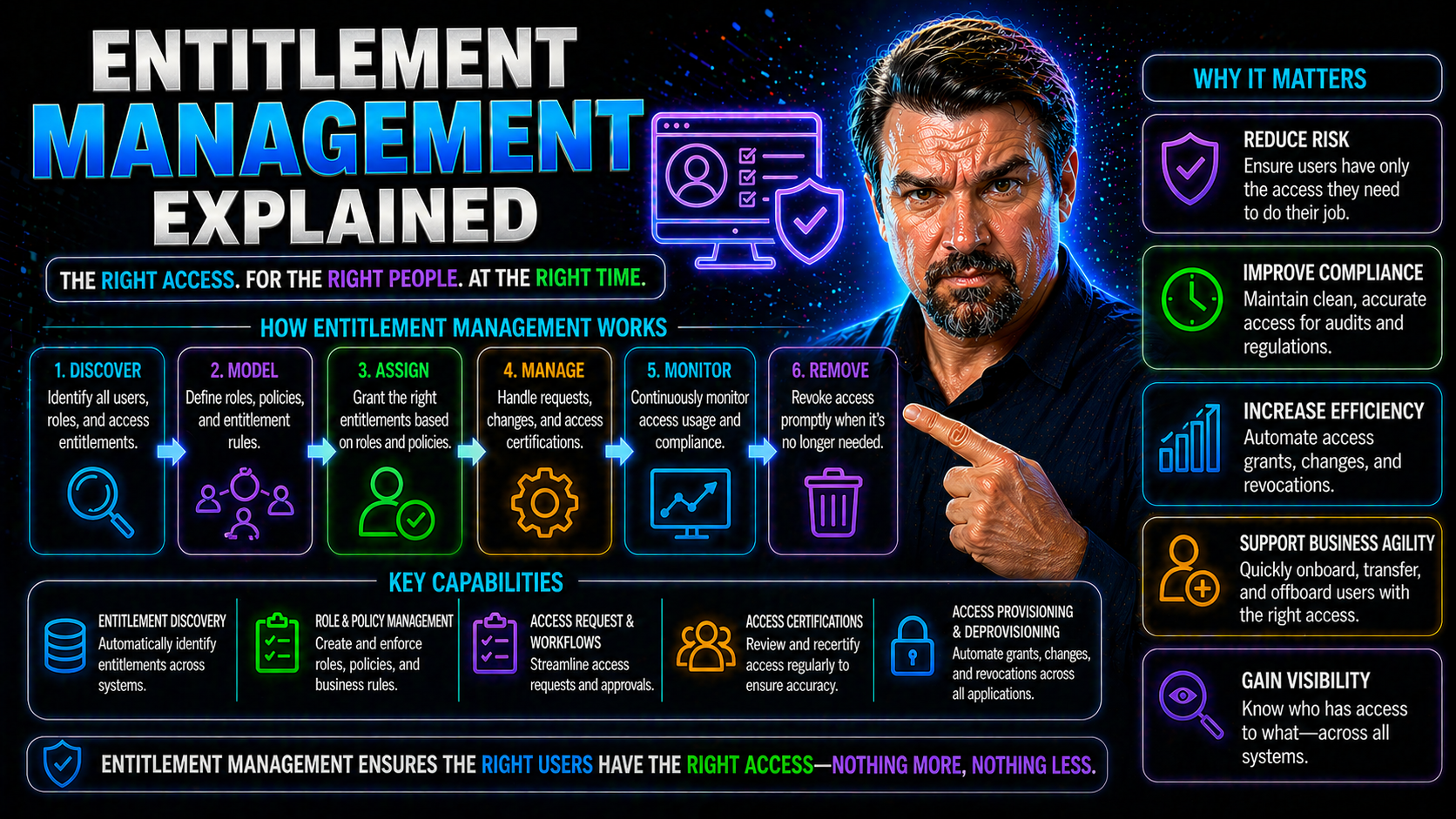
Entitlement management sits at the heart of modern identity and access strategies, especially for businesses using Microsoft Entra ID, Microsoft 365, and Azure. Think of it as the smart engine behind who can do what in your digital world—the thing that keeps your sensitive files, apps, and cloud resources gated just right.
This guide unpacks entitlement management from the ground up. You'll see how it goes way beyond basic access control, weaving security, compliance, and business rules together into something actually workable for large-scale and cloud-first organizations.
Expect a practical, step-by-step look at the systems, policies, and day-to-day workflows that help you manage access safely, efficiently, and at scale. Plus, you’ll find plenty of insights tailored for Microsoft shops—making the shift from chaos to control a reality.
Introduction to Entitlement Management: Enabling Secure, Modern Access
Entitlement management is all about controlling precise access—who gets what, when, and under which circumstances—across a whole galaxy of apps, files, and data. Unlike old-school access management, entitlement management doesn’t just say “in or out”; it deals with layers, conditions, and context, all while keeping auditors and CISOs happy.
It solves headaches for organizations juggling hybrid work, cloud migrations, SaaS adoption, and mounting compliance demands. The magic is in enabling just-right access that changes as roles shift, users come and go, or business needs evolve. Within Microsoft’s ecosystem, entitlement management powers secure collaboration and governance for Microsoft 365, Azure, Power Platform, and more. This is especially vital as identity becomes the new security perimeter.
What Is an Entitlement Management System?
An entitlement management system is the backbone for defining, assigning, and enforcing countless access rights ("entitlements") across your IT landscape. Unlike basic access control tools, these systems run on dynamic policies, not just static roles or groups.
They handle everything from onboarding and offboarding users to managing complex approval chains for high-risk permissions. Modern entitlement management systems bake in things like automated reviews, rich audit trails, and the muscle to handle millions of identities or entitlements at once. Their system-oriented design means you can scale, adapt, and audit access quickly—whether for thousands of employees or millions of customers.
Core Components of an Entitlements Management System: PDP, PAP, PEP, and More
- Policy Administration Point (PAP):This is where you define the rules. The PAP is your central spot for creating and managing access policies, specifying exactly who can access what resources under which circumstances.
- Policy Decision Point (PDP):The PDP is the brain of the operation. When an access request comes in, the PDP checks all relevant policies, consults current context (like location or device health), and makes the go/no-go decision in real time. In many systems, this is powered by a robust evaluation engine capable of fine-grained, dynamic authorization decisions.
- Policy Information Point (PIP):This is your data source hub. The PIP gathers all the information needed for access decisions—user attributes, resource types, contextual signals, and any relevant system records. It feeds the PDP with up-to-date, accurate data.
- Policy Enforcement Point (PEP):The PEP keeps everything honest. It’s embedded in apps, APIs, or services, enforcing whatever decision the PDP makes: grant access, deny it, or perhaps prompt for extra verification. This means your policies actually stick at runtime, no matter where users connect.
- System Records and Audit Logging:Behind every access grant or denial, the system generates rich records, tracking what was requested, decided, and by whom. This is crucial for compliance, forensic analysis, and operational transparency, making sure nothing slips through the cracks.
Together, these architectural blocks form the backbone for scalable, policy-driven entitlement management—giving organizations the control, visibility, and agility to keep access just right, every time.
System Records and the Evaluation Engine
System records act as the historical memory of your entitlement management system, documenting every access request, decision, and change. Whenever someone tries to access a resource, their request—and the outcome—is logged for future reference, audit, and compliance tracking.
The evaluation engine is what powers real-time, context-aware decisions. It takes all relevant input from system records, current user details, and environmental context, then processes the rules to determine exactly what’s allowed. This ensures your entitlements always reflect your latest business and security policies, not stale access data from six months ago.
How Entitlement Management Works: From User Request to Enforcement
Entitlement management isn’t just about writing policies—it’s about what happens every time someone actually needs access. The process begins when a user requests an entitlement, like joining a group, getting permissions to a sensitive file, or stepping into a new project role. That request sparks an approval workflow, where managers or designated approvers review and decide if access should be granted.
Once the request is approved (or rejected), the entitlement system evaluates all conditions—looking at who’s asking, what resources are in play, and any relevant risk factors. The system then applies policies instantly, enforcing access or denying it in real time. This loop bridges user self-service with strict governance, supporting automated approvals, delegated oversight, and detailed audit trails.
In Microsoft environments using Entra ID or M365, entitlement processes are mapped tightly to identity governance, helping organizations keep up with compliance obligations and the constant cycle of onboarding, offboarding, and business change. The next sections break down each phase in more detail, showing you exactly how requests, approvals, and enforcement play out across modern IT.
User Access Requests and Approval Workflows
- User-Driven Requests:Users can request access to specific systems, roles, or application features—typically through a self-service portal or by joining an access package. This reduces IT bottlenecks and increases business agility.
- Multi-Layer Approval Chains:Approval chains can include line managers, data owners, or even automated policies. Some workflows allow for one-click approvals, while others require a series of manual checks for sensitive entitlements.
- Policy-Based Automation:Entitlement management systems often automate straightforward approvals using preset rules, only escalating to manual review for high-risk cases or exceptions. This balance minimizes “rubber-stamping” and strengthens security.
- Audit Trails and Compliance:Every request, approval, or denial is logged—providing a crystal-clear audit trail. Combined with identity governance best practices, these workflows dramatically improve compliance in both cloud and hybrid setups.
Policy Decision Points and Runtime Enforcement Scenarios
- Dynamic Evaluation at the PDP:The Policy Decision Point (PDP) receives requests and looks up all relevant policies, user context, device health, and environmental data. Using an evaluation engine, it decides—instantly—whether access is allowed or denied. This means policies flex automatically when users’ roles or risk profiles change.
- Authorization Flows to PEPs:Once the PDP hands down a decision, that result is forwarded to Policy Enforcement Points (PEPs)—often embedded in your application, API, or cloud gateway. These PEPs are the traffic cops for enforcement, making sure access sticks to whatever policy ruled the day.
- Real-Time Enforcement Scenarios:Example: A user’s device fails a compliance check, so conditional access policies instantly restrict their permissions—no manual intervention needed. Or, a surge in suspicious activity leads to session suspension right away. See guidance at conditional access policy trust issues for practical scenarios and how real-time policy enforcement prevents security gaps and invisible bypasses.
- Continuous Monitoring and Audit Logging:All runtime decisions and flow events are logged, giving you a rich dataset for compliance, troubleshooting, or forensic investigation if things go sideways. This also supports ongoing review and refinement of your access policies across Microsoft 365 and beyond.
Unlocking the Benefits of Entitlement Management: Security, Compliance, and Savings
The benefits of getting entitlement management right go way beyond simply “keeping the boss happy.” At a high level, these systems are game changers for managing security, passing audits, and showing value on the bottom line.
For security professionals, entitlement management means tightly controlling who can do what—with detailed records and just-in-time approvals that shrink insider risk. Meanwhile, compliance officers can rest easier knowing every access decision is tracked for auditing and you’re ready for regulatory scrutiny, whether it’s GDPR, SOX, or HIPAA on the docket.
But there’s a big operational upside, too. Automation replaces endless spreadsheets and manual reviews, reducing errors and outright saving money. By aligning entitlements with changing job roles and business requirements, you also support smoother digital transformation, ensuring employees and customers always have the right access at the right time. The next sections will get into the specifics on privileged access, AI-driven security, and tangible cost reductions.
Privileged Access Governance and AI-Driven Security
- Least Privilege Enforcement:Entitlement management restricts admin and sensitive permissions to only those who absolutely need them. This shrinks your risk surface across core Microsoft platforms, like Microsoft 365, Azure, and Entra ID—especially when paired with tools like Microsoft Defender and Purview for data classification and vigilance. Check these Microsoft 365 security best practices for reducing friction while staying secure.
- AI-Driven Anomaly Detection:Modern entitlement systems harness AI to spot unusual entitlements—like overlapping access rights or risky privilege combinations—prompting automatic reviews or revocation. Integrations with strong ownership practices ensure ongoing governance without restricting business agility.
- Automated Corrective Actions:Suspect access can be flagged and fixed automatically, limiting the window for insider breaches or accidental errors, and keeping unsanctioned access in check—across both Microsoft and other SaaS environments.
Driving Operational Efficiencies and Cost Savings
Automation in entitlement management means routine tasks—onboarding, offboarding, and role changes—move fast, with fewer manual steps. This keeps IT and business teams from drowning in tickets and makes access provisioning and deprovisioning nearly automatic.
Operational overhead drops as access requests, reviews, and renewals follow predictable workflows. You avoid the dangers of “access creep,” where users keep rights they no longer need. The system’s audit logs help you pass compliance checks easily and spot savings opportunities—tying entitlement management directly to digital transformation and real cost reductions.
Entitlement Management in Modern IT: Cloud, Hybrid, and Microsoft Entra ID
Today’s IT environments rarely live in a single box. Businesses balance on-premises systems, cloud-native apps, and sprawling SaaS portfolios—all while grappling with complex identity challenges. Entitlement management bridges these worlds, connecting the dots between local Active Directory systems, multi-cloud setups, and external SaaS products.
Advanced solutions are all about integration. They link traditional on-prem directories with flexible cloud APIs, offer granular policy models, and unify both governance and daily access operations under a single pane of glass. Within Microsoft’s sphere, Entra ID stands out for orchestration, policy enforcement, and handling complex cross-platform requirements for M365, Azure, and the Power Platform.
The upcoming sections break down real cloud and hybrid scenarios, highlighting both technology and governance strategies for Microsoft-focused organizations intent on staying compliant, secure, and fully in control.
Cloud and Hybrid Cloud Entitlement Management Systems
- Enhanced Active Directory Integrations:These systems leverage both on-premises AD and cloud-native Microsoft Entra ID to keep policies aligned as users move between environments. This prevents policy drift and helps you maintain a consistent approach to access management.
- Federated Identity and Access Control:By connecting with other cloud identity providers, you can unify entitlements for external partners, hybrid remote staff, and customers—providing seamless but trusted access from anywhere.
- Native Cloud APIs and Automation:Direct integration with cloud platforms like Azure allows for fine-tuned, automated access adjustments as resources spin up or down. See Azure enterprise governance strategy for strategies on enforcing guardrails and preventing chaos in cloud operations.
- Portable Compliance and Audit:No matter where your data lives, entitlement systems maintain a single source of truth. This makes compliance reviews and audit reporting much more manageable as you shift workloads between on-prem, Azure, and SaaS.
Identity Entitlement Management with Microsoft Entra ID
Microsoft Entra ID bakes in entitlement management by supporting role- and group-based access assignments, workflow automation, and conditional access policies out of the box. With Entra ID, you can provision access with clear ownership, automate expiration for temporary access, and keep entitlements consistent across Microsoft 365, Azure, Power Platform, and beyond.
Features like delegated approvals, conditional policies, and granular logging simplify governance—even as users and workloads shift daily. To learn more about policy sprawl, security strategies, and consent-based attacks in Entra ID, dive into security loop best practices and OAuth consent attack mitigation.
Use Cases for Entitlement Systems: Monetization, Licensing, and Lifecycle Scenarios
Entitlement management isn’t just an internal IT concern—it’s a big deal for software vendors, SaaS providers, and any business building digital products. These systems enable dynamic licensing, usage-based billing, feature trials, and the ability to instantly upgrade or downgrade user access as business needs change.
For SaaS vendors, entitlement management powers flexible software packaging and recurring revenue models, allowing precise control over which customers get what features, when, and for how long. On the back end, it also automates billing, enforces usage quotas, and supports personalized customer experiences.
Lifecycle scenarios, such as plan upgrades, contract expirations, or mid-period subscription changes, all hinge on fast, accurate updates to entitlements. These real-world examples show why both enterprises and ISVs increasingly view robust entitlement management as a must-have for scaling and securing digital operations.
Software Packaging, Metered Usage, and Recurring Revenue Models
- Flexible Packaging:Entitlement management enables multiple software editions or tiers, giving each customer the right feature set instantly. Vendors flip features on or off per contract or package.
- Metered/Usage-Based Pricing:Credits, prepaid balances, and tracked usage allow billing to match consumption. The entitlement system enforces quotas or triggers upsell prompts as customers approach limits.
- Time-Based Trials:Entitlements set start and end dates, supporting automatic disabling or conversion after a trial period. This removes manual work for sales and support teams.
- Account-Specific Overrides:Vendors can apply one-off exceptions or customer-specific features with minimal risk, since entitlement records track every change and assignment.
- Recurring Revenue Stream Management:As subscriptions auto-renew or lapse, entitlement systems update user access in real-time, preventing accidental loss or over-exposure of services.
Runtime Access, Plan Changes, and Subscription State Scenarios
- Plan Upgrades:When a customer upgrades, new features become available instantly through updated entitlements.
- Usage-Based Expansion:Usage thresholds can auto-trigger entitlement widening, such as extra storage or additional users.
- Downgrades and Expirations:Contract expiration or voluntary downgrade restricts or removes entitlements immediately, enforcing new access boundaries with no lag.
- Subscription State Changes:Actions like freezing, suspending, or reactivating subscriptions all reflect instantly in system access—protecting both vendor revenue and customer experience.
How to Choose and Implement the Right Entitlement Management Solution
With the market full of entitlement management platforms, picking the right one comes down to knowing your needs and matching them to must-have features. You’ll want a solution that not only scales with your business but also integrates with your existing IAM stack, billing system, and compliance programs. AI-driven decisioning, advanced analytics, and support for hybrid and cloud-native workloads are important considerations for complex organizations.
The next step is a smart implementation plan: mapping out integration points, deciding between phased or big-bang rollouts, and enlisting cross-team stakeholders early. Done right, this ensures your entitlement management system delivers ROI—through better access security, streamlined operations, and confident audit compliance. The child sections dive into key features to look for and proven best practices for rolling out and integrating your chosen solution.
Key Features for Scalability and Functionality
- Robust Scalability:Handles thousands to millions of identities and permissions, supporting business growth effortlessly.
- Flexible Policy Models:Adapts to both role-based and attribute-based access, handling the most-detailed business logic you throw at it.
- Real-Time Decisioning:Delivers instant access updates as business context, user risk, or resource status changes—no waiting for nightly syncs.
- Comprehensive Auditing:Maintains detailed, exportable logs for every change, supporting compliance and fast incident response.
- Advanced Integration Capabilities:Works seamlessly with your IAM, billing, and security tools for a unified access management ecosystem.
Best Practices for Implementation and Billing Usage Integration
- Map Your Ecosystem:Catalog all critical resources, applications, and existing IAM components. This helps you spot where entitlements need to connect and where manual steps should be automated.
- Engage Stakeholders Early:Involve business owners, IT operations, compliance teams, and finance to align on objectives and secure buy-in. This reduces future scope drift and ensures smoother rollouts.
- Prioritize Billing and Usage Integrations:Connect your entitlement system to billing and usage metering from the beginning, not as an afterthought. This supports showback, chargeback, and operational accountability. For more on tying financial accountability to enforcement, see the showback accountability podcast.
- Implement Phased Rollouts:Avoid "big bang" go-lives. Start with high-impact groups or systems, validate workflows, then expand. This prevents overwhelming support teams and allows for feedback-driven tuning.
- Continuously Monitor and Improve:Review audit logs, stakeholder feedback, and business KPIs to refine entitlements over time, closing security blind spots and optimizing operational efficiency.
Entitlement Management and Zero Trust Access: Enforcing Least Privilege
Zero trust isn’t a buzzword—it’s the new reality for securing modern organizations, and entitlement management is right at its core. Instead of relying on traditional network boundaries, zero trust uses identity-aware and context-driven rules to continuously verify users, devices, and sessions. The result? Only the right people get the right access, at the right time, for the right reason.
Entitlement management delivers the fine-grained controls required to make zero trust actually work. With continuous evaluation and policy enforcement, you avoid overbroad access, undetected privilege creep, and invisible security gaps. Whether it's a user connecting from a new device, a partner accessing sensitive APIs, or an app making service calls, the entitlement system is what determines access in real time based on risk, context, and business policy.
If you want to see how this all comes together across Microsoft 365 and Dynamics 365—integrating unified identity, adaptive MFA, and risk-based controls—check out resources like Zero Trust by Design in Microsoft 365 and Dynamics 365. The next section goes deeper on how technical integration across proxies, segmentation, and policy engines makes zero trust practical in the field.
How Entitlements Enable Zero Trust Policies and Micro-Segmentation
- Context-Aware Access:Entitlement systems assess user role, device state, session risk, and behavioral patterns before granting or adjusting access—enforcing continuous verification, not just point-in-time checks.
- Micro-Segmentation:Access policies segment sensitive resources by least privilege, carving up your environment into logical zones—reducing blast radius if credentials get compromised.
- Integration with Identity-Aware Proxies:Policy enforcement happens at gateways, application fronts, or APIs—meaning entitlements dynamically shape what a user or partner sees and can touch, closing the door to lateral movement.
- Dynamic Policy Updates:Policy engines apply or remove rights instantly as user attributes, environmental signals, or business scenarios change, bolstering defense against advanced threats.
- Design Patterns and Resources:Patterns like "just-in-time access," adaptive MFA, and risk-based segmentation are all powered by entitlement data—key for anyone starting their zero trust journey in Microsoft-heavy environments.
Summary, Key Takeaways, and Additional Resources
At the end of the day, entitlement management brings clarity, security, and efficiency to the wild world of modern IT. It’s more than a compliance checkbox—it’s a must-have discipline that ties identity, business policy, and real-time risk together. With the right systems and strategy, you move from access chaos to predictable, governed controls—no matter how complex your digital footprint is.
We’ve covered key concepts, system components, the end-to-end workflow from request to runtime enforcement, and the massive benefits for security, compliance, and the bottom line. You also saw how entitlement management fits with Microsoft Entra ID and enables zero trust for nuanced, context-driven access management.
Want to dig deeper or solve a real-world challenge? Start with Microsoft docs, community forums, and our practical Entra ID governance podcast. No matter your starting point, the next sections answer burning questions and give you the tools to take control of your entitlements—once and for all.
Frequently Asked Questions About Entitlement Management
- How is entitlement management different from basic access control?Entitlement management offers fine-grained, policy-driven control—handling context, approvals, and auditing—while basic access control is typically just role or group-based without dynamic enforcement.
- What does Entra ID contribute to entitlement management?Microsoft Entra ID automates group-based entitlements, workflow approvals, and conditional policies across M365, Azure, and third-party SaaS, all from a unified platform.
- Can entitlement management speed up audits?Absolutely. Rich system records and audit logs make gathering evidence for compliance, security reviews, or identity governance loops much faster and more reliable than manual tracking.
- What are common rollout mistakes?Poor stakeholder alignment, incomplete system mapping, and neglecting billing integrations top the list. Always plan for phased implementation, not one-size-fits-all launches.
- Where can I learn more?Start with Microsoft documentation, the global M365 community, and in-depth podcasts like those highlighted above for practical advice and peer insights.
You Should Also Listen To
If you are researching Microsoft Entra entitlement management, these episodes add practical context on architecture, security, governance, and implementation:
- Microsoft AI Agent Harness – Simply Explained — Understand orchestration, guardrails, evaluation, and reliable AI workflows.
- Microsoft Defender XDR – Simply Explained — Connect identity and AI decisions with security monitoring and response.
- Microsoft Teams Governance – The Illusion of Control — Learn how governance, ownership, and policy reduce operational risk.
- Azure Virtual Network – Simply Explained — Understand the architecture context behind cloud connectivity.

Microsoft MVP | Host of M365.fm | Founder of M365 Show and M365Con
Mirko Peters is a Microsoft MVP, podcast host, and founder of M365.fm, M365 Show, and M365Con. His work connects Microsoft practitioners through podcast interviews, livestreams, and community events.
At M365.fm, Mirko hosts conversations with Microsoft MVPs, product experts, architects, and community contributors. Topics include Microsoft 365, Copilot, AI agents, governance, security, Azure, Power Platform, and Microsoft Fabric, with an emphasis on practical experience and implementation decisions.
M365.fm is the podcast and learning platform. M365 Show brings experts together for livestreams, while M365Con provides an online conference setting for community learning.
Official website: Mirko Peters (https://www.mirkopeters.com/). Recognition: Mirko Peters — Microsoft MVP profile (https://mvp.microsoft.com/de-DE/mvp/profile/9b0ca797-db5a-493a-a845-8b9158046cf5). Connect on LinkedIn (https://www.linkedin.com/in/m365showpodcast/).





