
Essential Technical and Soft Skills for Power Platform Developers
Succeeding in low-code development takes more than just technical know-how. This post explores the database design, API development, and essential soft skills like communication and problem-solving that employers are looking for. Whether you are taking your first steps into the world of tech or looking to level up your existing professional profile, mastering the blend of technical aptitude and human-centric capabilities is what separates a mediocre app builder from an elite developer.
To dive deeper into what it takes to forge a path in this ecosystem, make sure to check out our related podcast episode on how to Build a Power Platform Career with Nathalie Leenders [MVP-MCT], where industry experts share real-world advice on setting goals, finding tasks to automate, and leveraging the power of community.
Building a Career Path
Why Choose Power Platform?
You can begin as a power platform developer by learning about low-code tools. The microsoft power platform lets you make apps, automate jobs, and look at data without needing to know a lot of code. Many people pick this platform for different reasons:
- It works well with other Microsoft tools, so it is easy to use.
- There are many jobs because companies want people who know automation.
- You can finish projects fast and see results right away.
- There are over 1,400 connectors that help you make work easier.
- Dataverse keeps business data organized and simple to use.
- Power Automate helps manage tasks and cuts down on doing things by hand.
Jobs in this area are steady. Big companies use Microsoft tools, so you can have a job for a long time. Low-code tools let you solve business problems instead of writing hard code. You can help your company by using these tools.
Tip: Begin with small projects. This will help you get better and learn more about low-code development.
Microsoft Ecosystem Overview
The microsoft power platform is a good fit with other Microsoft products. You can link your apps and work to many services. These connections give you some great benefits:
| Integration Feature | Description |
|---|---|
| Microsoft Dataverse | It is the main data platform. It keeps data safe and lets apps use it easily. |
| Azure Integration | It gives you smart tools like analytics, AI, and machine learning to make your apps better. |
| Dynamics 365 and Microsoft 365 | These let your apps and work use data and features from these services. This makes everything work well together. |
You can use low-code tools to help your company change how it works. In 2022, Satya Nadella talked about 'Doing more with less.' The platform lets you make your own apps, save money, and get more done. You can make building, automating, and showing data easier. This way, you can become a power platform developer and have a great career.
Essential Skills to Learn Power Platform

To be a good power platform developer, you need both tech and people skills. You also need to know where to find the best ways to learn power platform. This section shows what skills you need and how to build them step by step.
Technical Skills for Power Platform
You need strong tech skills to use microsoft power platform. These skills help you make, automate, and study business solutions. You will use no-code and low-code tools, so you do not need to be a coding expert. But you must know how to use different tools and connect data.
Here are the most wanted tech skills for power platform jobs:
| Skill Area | Description |
|---|---|
| Database Design | You need to make good databases and keep data safe and neat. |
| API Development | You should know how to make and use RESTful APIs to connect systems. |
| Security Measures | You must spot security risks and keep your apps and data safe. |
| Azure Resource Management | You should handle Azure resources and automate setups. |
You also need to learn more in these areas:
- Power apps development for canvas and model-driven apps
- Making workflows with power automate
- Building dashboards and reports in power bi
- Connecting with SharePoint and Dataverse
- Using SQL for data questions
- Knowing JavaScript and JSON for extra features
You will often use canvas apps and model-driven apps. Canvas apps let you make custom layouts and user screens. Model-driven apps use data models and business rules to make strong solutions. You should practice making both types of apps to get better at power platform.
Programming languages and tools you may use are:
- SQL for working with databases
- JavaScript for adding custom logic
- JSON for data formatting
- C# for advanced development
- Python for data processing
You do not need to know all these languages well, but learning the basics helps you fix problems and make better solutions. Focus on learning how to use canvas and model-driven apps, since these are important parts of the platform.
Soft Skills for Success
Tech skills matter, but soft skills help you stand out as a developer. Employers want people who work well with others and solve problems. Here are the top soft skills you need:
- Communication: You must explain tech ideas to people who are not tech experts.
- Teamwork: You will often work with others to make solutions.
- Adaptability: Tech changes fast, so you need to learn new things quickly.
- Problem-solving: You must find and fix issues in your apps and workflows.
- Emotional intelligence: You need to understand how people feel and work with them.
- Time management: You must finish your work on time and handle many tasks.
- Leadership potential: You may lead projects or help others learn power platform.
- Conflict resolution: You should turn disagreements into good talks.
You will use these skills every day. For example, when you make a canvas app, you may need to talk with users to learn what they need. When you work on model-driven apps, you may need to solve problems with your team. These skills help you grow and do well in your job.
Tip: Stay curious and keep learning. Try new features in canvas and model-driven apps. Ask questions and share your knowledge with others.
Learning Resources and Courses
You can find many ways to learn power platform. Microsoft has free and paid courses, hands-on labs, and certifications. These help you build your knowledge and practice your skills. You can start with beginner courses and move to harder topics as you grow.
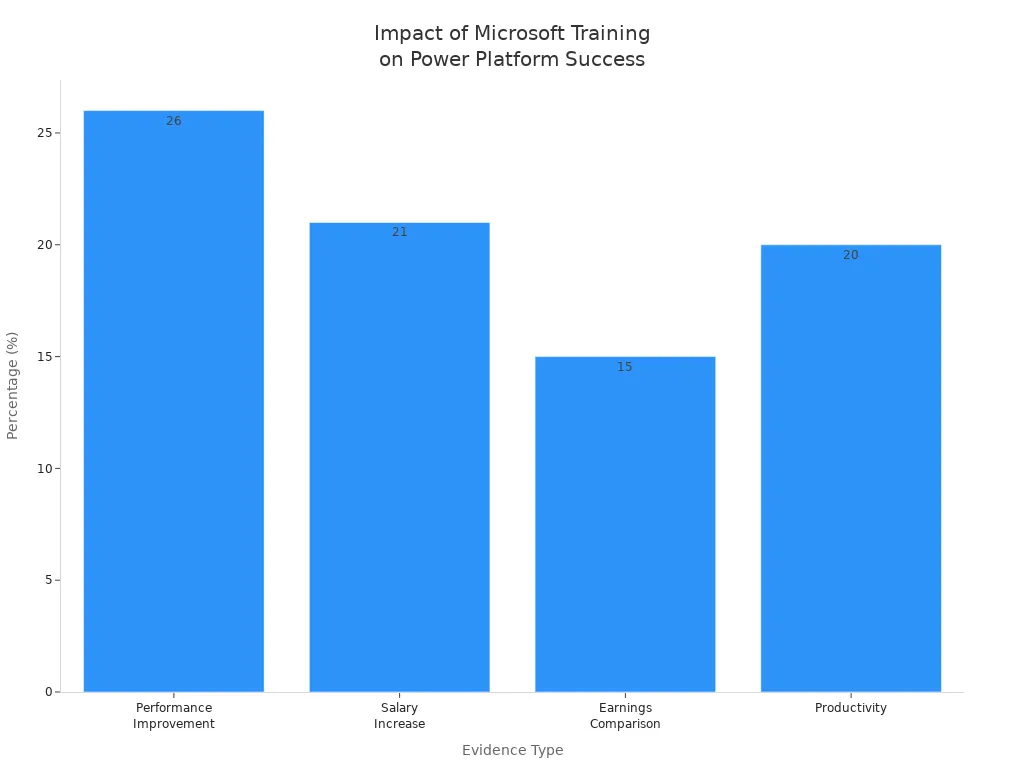
Here are some good things about getting certified and using Microsoft training:
| Benefit | Description |
|---|---|
| Performance Improvement | IT workers with certifications do 26% better than others. |
| Salary Increase | Certified workers earn 21% more on average. |
| Earnings Comparison | Certified workers earn 15% more than those without certifications. |
| Employer Perception | 91% of employers value certifications when hiring. |
| Productivity | Certified teams are 20% more productive. |
You can see how Microsoft training helps you get ready for real projects:
To learn power platform, start with these steps:
- Explore Microsoft Learn for guided lessons on canvas and model-driven apps.
- Join online groups to ask questions and share your knowledge.
- Make your own canvas apps and model-driven apps to practice your skills.
- Take certification tests to show your knowledge and boost your career.
- Go to webinars and workshops to learn about new features.
You will need to use both no-code and low-code tools. No-code tools help you make apps without writing code. Canvas apps are good for no-code work. Model-driven apps let you use more advanced features and business rules. Practice both to become a well-rounded power platform developer.
Note: Hands-on learning is the best way to build your skills. Try to fix real problems with canvas and model-driven apps. Share your solutions with the community to get feedback and improve your knowledge.
By focusing on both tech and soft skills, and by using the best ways to learn, you can master the knowledge needed to learn power platform. Stay curious, keep practicing, and you will see your skills and knowledge grow every day.
Certifications and Training
Microsoft Power Platform Certifications
You can make your career better by getting certifications. These show you have the right skills and help you get noticed. The microsoft power platform has different certifications for many jobs. You can look at the table to see the most popular ones:
| Certification Name | 2022 Updates | 2023 Updates |
|---|---|---|
| Microsoft Power Platform Fundamentals (PL-900) | March 24, 2023 | June 22, 2023 |
| Microsoft Power Platform Functional Consultant (PL-200) | March 28, 2023 | N/A |
| Microsoft Power Platform Developer (PL-400) | September 19, 2022 | July 11, 2023, September 19, 2023 |
| Microsoft Power Platform App Maker (PL-100) | March 15, 2023 | N/A |
| Microsoft Power Platform Solution Architect (PL-600) | March 24, 2023 | September 26, 2023 |
| Microsoft Power BI Data Analyst (PL-300) | January 31, 2023 | August 22, 2023, October 27, 2023 |
| Microsoft Power Automate RPA Developer (PL-500) | June 27, 2023 | N/A |
Pick a certification that matches what you want to do. Each one teaches you more about the platform and gets you ready for real work.
Preparing for Certification Exams
You need to get ready before you take power platform exams. First, look at what skills each test checks. Try practice tests to see what you know. Doing things yourself helps you remember better. You can join study groups to get tips and ask questions. Many people say using the platform for real helps a lot when you take the test.
Tip: Try making apps and automating jobs. This practice will help you feel sure when you answer test questions.
Training Providers and Sessions
There are many ways to learn about power platform. Good training gives you the skills you need to pass the tests. The table shows some common ways to train:
| Training Type | Description |
|---|---|
| Instructor-Led Training | Gives you lessons with an expert, hands-on work, and test vouchers. |
| Books and Study Guides | Teach you about the test topics with practice and sample questions. |
| Microsoft Documentation | Has lots of guides to help you learn about Power Platform tools and best ways to use them. |
| Study Groups and Forums | Let you learn with others, share tips, and find resources. |
You can also take courses like the PL-200 Exam Prep Deep Dive from Skillsoft. This course helps you learn how to take the test and pass the first time. Using different ways to learn and real practice will help you do well on your certification path. Remember, microsoft certifications can help you get new jobs and grow as a developer.
Power Platform Developer Roles

Job Titles and Responsibilities
There are many jobs in the microsoft power platform world. Each job has its own tasks and helps companies do better. You might work as a power platform developer, consultant, or specialist. Here is a table with common job titles and what they do:
| Job Title | Responsibilities |
|---|---|
| Power Platform admins | Administer Power Platform, manage security settings, monitor performance, and troubleshoot issues. |
| Power Platform environment admins | Oversee management and configuration of Power Platform environments. |
| Community and enablement leads | Provide training and support to Power Platform users, fostering collaboration and knowledge sharing. |
| DevOps engineer | Bridge development and operations, implementing and automating processes to enhance the software lifecycle. |
| Solution architects | Develop solutions architecture, ensuring they meet business needs and technical requirements. |
| Data stewards | Maintain data quality, security, and compliance, establishing governance policies. |
| End users | Use Power Platform for daily tasks, improving productivity and efficiency. |
You can also find jobs like power platform developer, microsoft power apps specialist, power automate engineer, BI & data visualisation developer, and power platform consultant. Each job helps you learn new things and get better at your work.
Entry-Level vs. Advanced Roles
You can begin with entry-level jobs and move up as you learn more. Entry-level jobs have simple tasks like power apps development and basic SQL. Advanced jobs need more skills in solution architecture and big projects. Here is a table that shows the differences:
| Role Level | Salary Range | Required Skills |
|---|---|---|
| Entry-Level | $75,000 - $95,000 | Power Apps development, basic SQL, Microsoft 365 |
| Mid-Level | $95,000 - $130,000 | Solution architecture, integration, performance bonuses |
| Senior-Level | $130,000 - $180,000+ | Technical leadership, advanced benefits, enterprise architecture |
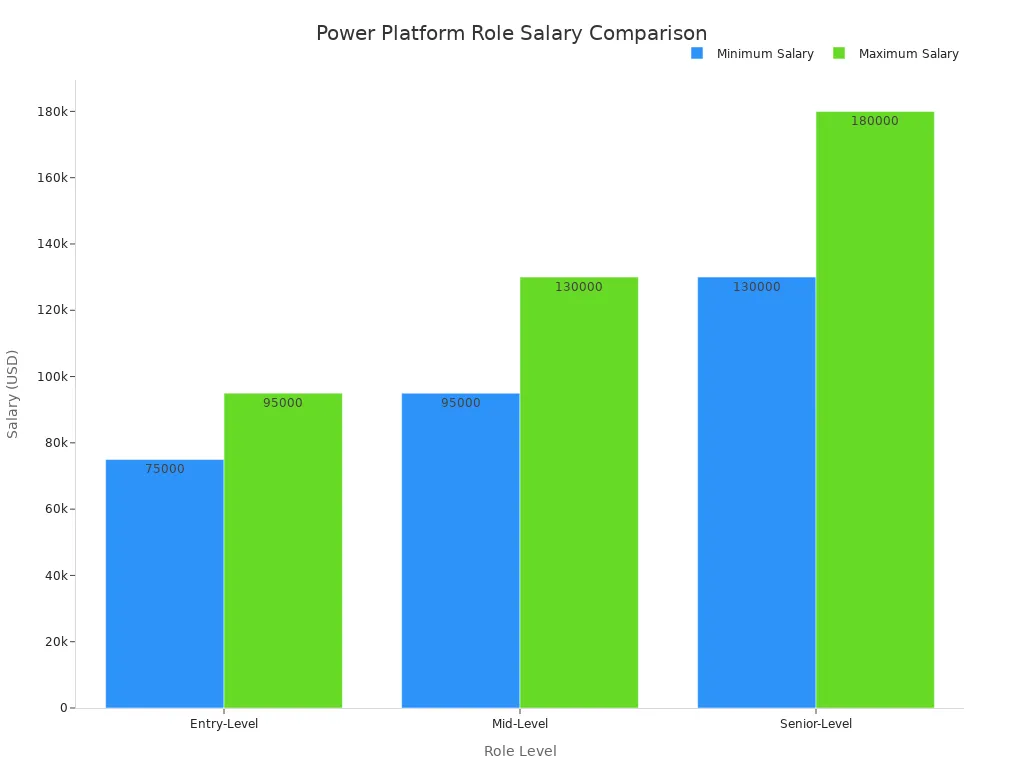
Your skills and experience can change your job and pay. As you get better, you can become a consultant or lead bigger projects.
Tip: Try real projects to build your experience. This will help you move from entry-level to advanced jobs.
Career Progression
You can follow a clear path to grow as a power platform developer or consultant. Start with basic certifications and get more experience by working on projects. Here is a table with common certifications for career growth:
| Certification Name | Description |
|---|---|
| PL-900 | Entry-level certification validating foundational knowledge of Power Platform concepts. |
| PL-200 | Certification for those aiming to become functional consultants in Power Platform. |
| PL-400 | Designed for developers building Power Platform solutions, demonstrating expertise in complex implementations. |
| PL-500 | Validates skills in designing and deploying RPA solutions using Power Automate Desktop. |
You can use your experience to move from junior jobs to senior jobs. You might become a power platform consultant, solution architect, or team leader. Each step gives you more responsibility and helps you learn more.
Note: Your experience and certifications help you move up in your job. Keep learning and practicing to reach higher roles.
Gaining Experience
You get better at technology by doing real work. The microsoft power platform lets you learn by trying things out. You can grow your skills with projects, internships, and joining groups. Each step helps you go from learning to doing well in real jobs.
Building Projects and Portfolios
A portfolio shows what you can do. Employers want to see your work, not just what you know. Start by making different projects. These projects give you practice and show you can solve real problems.
- Make a Power BI portfolio with dashboards using real or sample data. This proves you can work with messy data and find useful answers.
- Try projects about sales, money, or customer analysis. Do a Customer Segmentation Analysis with the Global Superstore dataset. Many people in the community like this project.
- Do data wrangling tasks. These teach you how to clean and get data ready for use.
- Make at least one project with advanced features, like fraud detection or predictive analytics.
When you make your portfolio, focus on doing good work. Employers look for certain things in your projects:
| Criteria/Qualities | Description |
|---|---|
| Clear problem definition | Begin each project with a clear business problem. |
| Data storytelling | Show your findings in order and use clear numbers. |
| Business context | Connect your results to real business choices, like keeping customers or making more money. |
| Clean design | Make dashboards simple and neat. Each one should answer one big question. |
| Technical depth | Use advanced tools when they help real business needs. |
| Common mistakes | Do not use unclear problems, too many flashy pictures, bad notes, or data that does not fit. |
Tip: Show your steps in every project. Explain the problem, what you did, and what happened. This helps employers see how you think and what you have done.
Internships and Real-World Practice
You learn a lot from internships and real work. Internships let you join real teams and fix real business problems. You see how companies use the microsoft power platform every day. You also see how your work helps others.
- Try to get internships at places that use the platform for business.
- Offer to help local groups or small businesses with their data or automation.
- Join hackathons or project contests. These let you work on real problems with other people.
- Ask mentors or team leaders for feedback. Use their advice to get better at your work.
You feel more sure of yourself by working on real projects. Each new job adds to your skills and helps you grow. You also learn to work with others and manage your time.
Note: Every project, big or small, helps you learn. Keep a record of your work and update your portfolio often.
Community Engagement
You can learn faster by joining the Power Platform community. The community gives you help, ideas, and support. You learn from others and share what you know.
- Join online groups on LinkedIn or Reddit. You can ask questions and show your work there.
- Go to events like the Microsoft Power Platform Conference. You meet experts and learn about new things.
- Take part in webinars and training. These let you ask questions right away.
- Follow Microsoft and top people on social media. You get news and tips from people who know a lot.
- Sign up for newsletters to get the latest updates and resources.
Nathalie Leenders is a well-known expert who shows how joining the community can help your career. She helped someone from Nigeria on LinkedIn, guiding them with certifications and job choices. She also started learning from MVP Hugo Bernier, which taught her how important the community is. This support helped her get nominated for the Microsoft MVP award.
Nathalie speaks at local events and makes sure everyone feels welcome. She wants you to join community calls and learn in a friendly way. Her story shows that sharing and helping others can bring new chances.
Callout: You learn more when you connect with others. The community helps you fix problems, learn new things, and find mentors.
You build a strong base by doing projects, real work, and joining the community. Each part adds to your skills and gets you ready for a great career with the microsoft power platform.
Advancing Your Career
Networking and Professional Growth
You can grow your career by joining user groups and forums. These places help you meet experts and learn new skills. You get advice from Microsoft MVPs and community leaders. You also connect with IT pros and consultants from many fields. Here is a table showing what you get from these activities:
| Feature | Description |
|---|---|
| Community-Powered | Made by experts for experts. It focuses on real skills and solutions. |
| Top-Tier Sessions | You get deep technical content on Azure, Microsoft 365, and Power Platform. |
| Industry-Leading Speakers | Learn from Microsoft MVPs, Regional Directors, and community leaders. |
| Network with Peers | Meet IT pros, consultants, and decision-makers from different industries. |
| Professional Growth | Stay ahead with new trends, tools, and best ways to work. |
| Skill Development | Improve your hands-on skills and find new career chances. |
Tip: Go to conferences and webinars. You will meet new people and learn the latest news.
Continuous Learning and Staying Updated
You need to keep learning to stay ahead in Microsoft. The platform changes often, so you must follow new trends and tools. Here are steps to help you stay updated:
- Check the Microsoft Power Platform Roadmap and Blog for news.
- Join online communities and LinkedIn groups to share and learn.
- Attend webinars and training sessions for deeper knowledge.
- Follow social media and subscribe to newsletters for updates.
- Work with experts to get advice and support.
Note: Keep learning to handle new features and fix business problems.
Tips for Long-Term Success
You can build a strong career by setting clear goals. Break big goals into smaller tasks. Assign roles for each task and set steps and standards. Talk with your team and check progress. Change your plans if needed. Use three horizons to plan your work:
| Strategy Type | Description |
|---|---|
| Horizon 1 (immediate) | Focus on urgent tasks that need to be finished soon. |
| Horizon 2 (near-term) | Plan important tasks for the next few months. |
| Horizon 3 (long-term) | Match tasks with big goals for future growth. |
Callout: Stay flexible and ready to learn. Microsoft keeps changing, so you must be able to adapt.
You can begin a career in Power Platform by learning new things. Try to earn certifications and get real experience. You can grow by joining the microsoft community and sharing what you know. The table below shows how practice, joining others, and certifications help you do well:
| Evidence Type | Description |
|---|---|
| Hands-on Practice | Lab sessions and sandbox tools help you learn and feel sure. |
| Community Engagement | Sharing ideas and talking with others helps you learn faster. |
| Certification Relevance | Certifications need real practice and help your career grow. |
You build your career one step at a time. Try these steps to begin:
- Follow us for more advice.
- Tell your friends about this.
- Join the Community.
- Start today.
Stay curious and try every challenge. A career in Power Platform gives you many new chances.
FAQ
What is Microsoft Power Platform?
You use Microsoft Power Platform to make apps and automate tasks. You can also look at data with it. The platform has Power BI, Power Apps, Power Automate, and Power Virtual Agents. You can build solutions even if you do not know much code.
How do you start learning Power Platform?
You begin with Microsoft Learn. You follow lessons and try labs. You join online groups for help. You make simple apps and dashboards to practice.
Which certification should you choose first?
You start with PL-900: Power Platform Fundamentals. This certification teaches basic ideas. You learn about each tool and how they work together. You build a strong base for more learning.
How can you gain real-world experience?
You make projects for your portfolio. You join internships or help local businesses. You take part in hackathons and community events. You ask mentors and friends for feedback.
What are the benefits of joining the Power Platform community?
You meet experts and other learners. You get answers to your questions. You learn about new features and trends. You find mentors and job chances.
Tip: Being active in the community helps you learn faster.
🎧 Listen to this episode
Want a practical explanation of Build a Power Platform Career? This episode breaks down the topic in clear language and shows why it matters for Microsoft 365, Azure, Power Platform, security, AI, and modern work.
Listen to this episode if you want to:
- Understand the key concepts behind Build a Power Platform Career
- See how it fits into the wider Microsoft technology ecosystem
- Learn where it can create practical value for your organization
You may also enjoy these related M365 FM episodes:
- How to Build a Winning Microsoft Partner Strategy
- AI-First UX for Microsoft Power Platform with Tchesco Ayih [MVP-MCT]
- Secure Azure Networking with Rex de Koning [MVP-MCT]
- Microsoft Security Exposure Management with Uros Babic [MVP-MCT]
- Enterprise AI Agents with Sailaja Mantripragada [MVP-MCT]
Discover more practical Microsoft conversations on M365 FM.

Microsoft MVP | Host of M365.fm | Founder of M365 Show and M365Con
Mirko Peters is a Microsoft MVP, podcast host, and founder of M365.fm, M365 Show, and M365Con. His work connects Microsoft practitioners through podcast interviews, livestreams, and community events.
At M365.fm, Mirko hosts conversations with Microsoft MVPs, product experts, architects, and community contributors. Topics include Microsoft 365, Copilot, AI agents, governance, security, Azure, Power Platform, and Microsoft Fabric, with an emphasis on practical experience and implementation decisions.
M365.fm is the podcast and learning platform. M365 Show brings experts together for livestreams, while M365Con provides an online conference setting for community learning.
Official website: Mirko Peters (https://www.mirkopeters.com/). Recognition: Mirko Peters — Microsoft MVP profile (https://mvp.microsoft.com/de-DE/mvp/profile/9b0ca797-db5a-493a-a845-8b9158046cf5). Connect on LinkedIn (https://www.linkedin.com/in/m365showpodcast/).





![Build a Power Platform Career with Nathalie Leenders [MVP-MCT]](https://d3wo5wojvuv7l.cloudfront.net/t_rss_itunes_square_1400/images.spreaker.com/original/85abd326963d3573e7f64bbee4c5ddf7.jpg "Build a Power Platform Career with Nathalie Leenders [MVP-MCT]")