Fixing Copilot's Flaws with Small Language Models
Welcome back to the podcast companion blog! In this post, we are diving deep into the technical shift transforming how enterprise organizations approach artificial intelligence. If you have ever used an AI coding assistant or a productivity tool like Microsoft Copilot, you have likely encountered its occasional missteps—hallucinated package names, unexpected data exposures, or sluggish responses that stall your workflow. Large Language Models (LLMs) are powerful, but they are not always the right tool for every job, particularly inside secure corporate environments.
Fortunately, a massive shift is underway. The rise of Small Language Models (SLMs) is changing the game by offering hyper-targeted, cost-effective, and secure alternatives that address the core flaws of massive LLMs. To get a complete breakdown of how these models operate in real-world Microsoft environments, be sure to check out the corresponding podcast episode Small Language Models for Faster, Cheaper Enterprise AI.
Copilot’s Core Flaw
Main Weakness Explained
You expect Copilot to help you work faster and smarter, but it often struggles with accuracy and privacy. Copilot uses large language models to generate answers, but these models sometimes misrepresent information or invent details. You might see responses that sound convincing but are actually incomplete or even wrong. This happens because the models do not always understand the context or the data they use. You need to double-check facts and review citations, which slows you down.
Privacy is another big concern. Copilot connects to your business data and uses your permissions to access information. If you or your team have too many permissions, Copilot can pull sensitive data without warning. For example, someone with broad access could ask Copilot for confidential details like salaries or performance reviews. Attackers who gain access to these accounts could trigger serious data breaches. The models do not always inherit security labels, so sensitive information might get shared without proper classification.
Here is a table showing some of the most common security flaws in Copilot:
| Security Flaw | Description |
|---|---|
| EchoLeak vulnerability | A zero-click attack exploiting Copilot to pull sensitive data from connected M365 sources. |
| Prompt injection at scale | Malicious instructions hidden in content can manipulate Copilot to retrieve and share data. |
| Agent misconfigurations in Copilot | Misconfigured agents can expose data, run with excessive privileges, or store credentials. |
| Overly permissive data access | Copilot can access everything a user can, risking oversharing of sensitive business data. |
| Security label inheritance issues | Copilot outputs may not inherit security labels, leading to unclassified and improperly shared data. |
Impact on Developers and Teams
When you use Copilot, you want reliable help. Instead, you often need to review and correct its output. This extra work can slow down your projects. Developers may lose trust in the models if they see too many mistakes or privacy risks. Teams must spend more time checking for errors and making sure sensitive data does not leak. You might also need to train your team to spot and fix these problems, which takes time and resources.
The models can amplify poor data security practices. If your organization does not manage permissions carefully, Copilot can make things worse by exposing more data than you expect. You need to set strict access controls and monitor how the models interact with your business data.
Real-World Consequences
You can see the effects of these flaws in real situations. The US Congress banned its staff from using Copilot because of fears about data breaches. Leaders worried that sensitive government data could leak to unauthorized cloud services. In another case, researchers found a way to use prompt injection and tool exploits to steal personal data through Copilot. These incidents show that the risks are not just theoretical.
If you rely on models that do not protect your data or provide accurate answers, you face real business risks. Sensitive information can leak, and your team may waste time fixing mistakes. You need models that give you both accuracy and privacy to keep your work safe and efficient.
The SLM Revolution in AI

What Are Small Language Models?
You may have heard about the slm revolution, but what does it mean for you? Small language models are a new type of ai that focus on efficiency and accuracy. These models use fewer resources than traditional systems. You can run them on regular computers or even on your own servers. This makes them easy to deploy in your workplace. Small language models help you complete tasks like summarizing emails, extracting key points from meetings, and classifying documents. You get fast answers without waiting for cloud servers. The slm revolution gives you more control over your data and your workflow.
SLMs vs. Large Language Models
You might wonder how small language models compare to large language models. The main difference is size and focus. Large language models need expensive hardware and often run in the cloud. Small language models work on local machines and use less power. You can see the differences in the table below:
| Characteristic | Small Language Models (SLMs) | Large Language Models (LLMs) |
|---|---|---|
| Efficiency | Train and run on commodity hardware | Requires expensive cloud GPUs |
| Deployment | On-premises for enhanced privacy | Often cloud-based |
| Cost-Effectiveness | Lower operational costs | Higher operational costs |
| Performance | Fast inference with a small footprint | Slower due to larger size |
| Hallucination Reduction | Fine-tuned on specific datasets for reliable outputs | More prone to hallucinations |
| Use Cases | Tailored for specific tasks in the SDLC | General-purpose applications |
| Security | Keeps sensitive data in-house | Data may be exposed externally |
You can see that slms offer speed, privacy, and cost savings. You do not need to rely on outside servers. You keep your sensitive information safe.
Why the SLM Revolution Matters
The slm revolution is changing how you use ai at work. You can now deploy models that fit your needs and protect your data. Many organizations choose slms because they support compliance with rules like HIPAA and GDPR. You can process information locally and avoid sending data to the cloud. This helps you meet strict security standards. The slm revolution also boosts productivity. You get real-time answers and can monitor compliance as you work. You do not have to worry about slow responses or high costs. The slm revolution puts you in control of your ai tools and your business data.
Note: The slm revolution is not just about technology. It is about giving you the power to use ai safely, quickly, and efficiently.
How Small Language Models Fix Copilot’s Flaw
Reducing Hallucinations
You want your ai tools to give you reliable answers. Small language models help you achieve this goal. These models focus on accuracy and context. They use targeted training data and optimization techniques to reduce hallucinations. You see fewer invented packages and more trustworthy code suggestions. When you use models like Microsoft’s Phi Family, you get security-first code generation. This means your code stays clean and safe.
Small language models excel in real-time applications. You can use them for intelligent refactoring and automated requirements analysis. They help you optimize your code and avoid mistakes. You notice performance gains because the models deliver effective and fast results. You spend less time correcting errors and more time building solutions.
Enhancing Privacy and Data Control
You care about security and privacy. Small language models give you control over your data. You can deploy these models on your own devices or servers. This on-device capability keeps sensitive information inside your organization. You do not need to send data to external cloud services. You protect your business and meet compliance standards.
With small language models, you manage permissions and access. You decide who can use the models and what data they can see. This approach supports proactive log analysis and automated incident response. You monitor activity and respond quickly to threats. You keep your applications secure and your data private.
Small language models support optimization for security. You can use them for real-time performance monitoring. They help you classify documents and extract action items without exposing confidential information. You gain peace of mind knowing your data stays safe.
Lowering Costs and Resource Needs
You want to optimize your budget and resources. Small language models offer high efficiency and low latency. You can run them on commodity hardware. You do not need expensive cloud GPUs or large infrastructure. This reduces your operational costs and makes ai accessible to more teams.
Look at the cost comparison table below. You see how small language models like Phi-3 Mini save money compared to large models:
| Model | Input Cost ($/M tokens) | Output Cost ($/M tokens) |
|---|---|---|
| GPT-5.5 | $5.00 | $15.00 |
| Claude Sonnet 4.6 | $3.00 | $15.00 |
| Gemini 3.1 Pro | $3.50 | $10.50 |
| Mistral 7B (via API) | $0.20 | $0.20 |
| Llama 3.1 8B (via API) | $0.18 | $0.18 |
| Phi-3 Mini (self-hosted) | Hardware cost only | Hardware cost only |
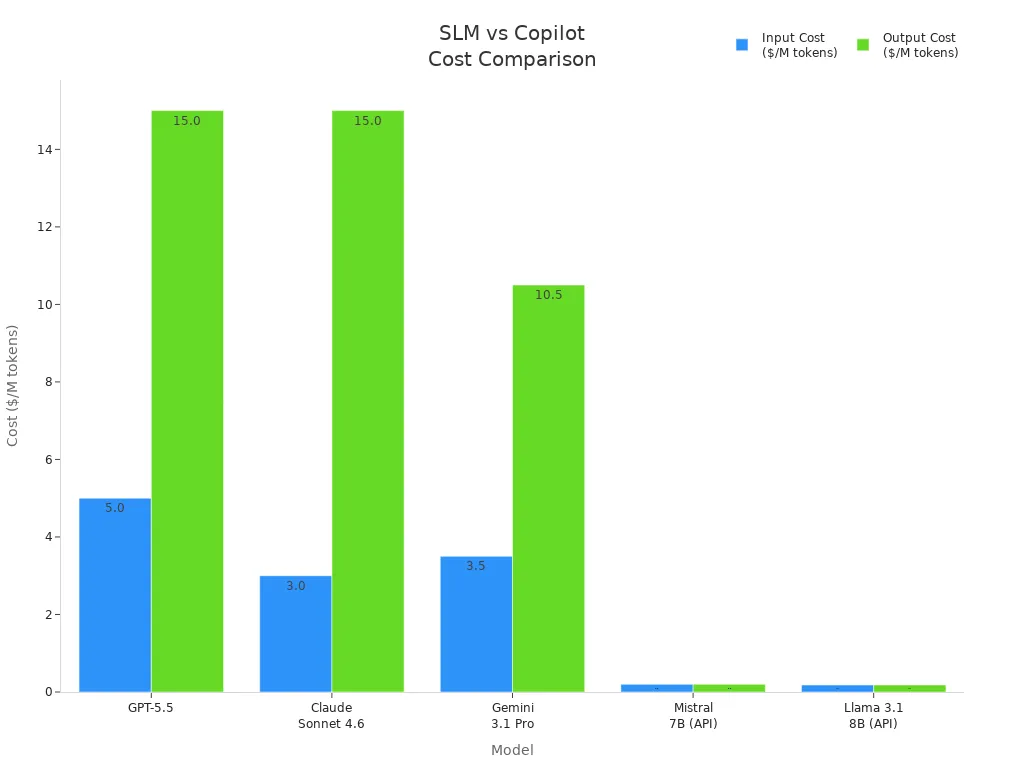
You see that Phi-3 Mini only requires hardware costs. You avoid ongoing token fees. This optimization lets you scale your applications without worrying about rising expenses. You achieve data efficiency and high responsiveness. Your applications run with low latency and real-time performance.
Small language models support optimization for many tasks. You use them for refactoring, code generation, and document classification. You get performance that matches your needs. You can deploy models locally and maintain security. You build applications that deliver value and stay within budget.
Tip: Small language models help you optimize your workflow. You gain speed, privacy, and cost savings. You can focus on building great applications and improving your team’s productivity.
Speed and Responsiveness
You expect your AI tools to respond quickly. Slow answers can disrupt your workflow and waste your time. Small Language Models, like Microsoft’s Phi Family, give you fast results. You see answers in milliseconds, not seconds. This speed helps you stay focused and productive.
You can run SLMs on your own devices or servers. You do not need to wait for cloud processing. Your requests stay local, so you get instant feedback. This is important for mobile workers and teams in the field. You can access information right when you need it.
The Phi Family models use efficient algorithms. They process tasks with minimal delay. You notice the difference when you summarize emails, extract action items, or classify documents. Your team can handle more tasks in less time.
Tip: Fast AI responses mean you spend less time waiting and more time creating value.
Here is a table showing how SLMs compare to large models in response time:
| Model Type | Average Response Time |
|---|---|
| Large Language Model | 2-5 seconds |
| Small Language Model (Phi) | < 0.5 seconds |
You can see that SLMs deliver answers almost instantly. This speed improves your experience and keeps your projects moving.
You also gain reliability. Fast responses mean fewer interruptions. Your applications run smoothly. You can trust your AI tools to keep up with your pace.
Small Language Models help you build responsive apps. You can integrate them into your workflow. Your team benefits from real-time insights and quick decision-making.
Note: Speed and responsiveness are not just technical features. They are key to making AI useful in your daily work.
Enterprise Benefits of SLMs
Cost Savings in Practice
You want to see real savings when you invest in ai tools. Small Language Models deliver impressive cost optimization for enterprises. Many companies have replaced larger models with smaller ones that are 5 to 150 times cheaper. You can achieve better results for specific tasks without paying high fees for cloud processing. The following table shows how leading organizations benefit from SLMs:
| Company | Model Type | Cost Reduction | Performance Comparison |
|---|---|---|---|
| Checkr | 7B-14B parameter | 5-150x less | Better results |
| NVIDIA | 7B-14B parameter | 5-150x less | Better results |
| Bayer | 7B-14B parameter | 5-150x less | Better results |
| DoorDash | 7B-14B parameter | 5-150x less | Better results |
You can reduce your total ai costs by 85-95% compared to traditional large model solutions. This lets you scale your operations and invest in other areas of your business.
Local Deployment and Data Sovereignty
You need to protect your data and meet compliance requirements. SLMs allow you to deploy ai locally, keeping sensitive information inside your organization. Regulated industries like healthcare, finance, and law prefer local setups because they offer strict security and privacy. You avoid sending data to external servers, which reduces the risk of breaches and supports regulatory standards.
- Local deployment ensures zero data transmission to outside servers.
- You can fine-tune models with proprietary data, making ai decisions transparent and compliant.
- Nations and organizations invest in sovereign ai solutions to control their information and strengthen regional resilience.
Hybrid approaches also help you balance local execution for sensitive data with cloud offloading for scalability and accuracy. You gain flexibility while maintaining control.
Productivity Gains in Microsoft 365
You want your team to work faster and smarter. SLMs integrated into Microsoft 365 boost productivity by delivering rapid responses and accurate results. You see inference latency drop to 50-150 milliseconds, compared to 200-1,000 milliseconds for larger models. Your employees get instant answers when summarizing emails, extracting action items, or classifying documents.
- Specialized SLMs achieve 85-97% accuracy in narrow domains, outperforming general models.
- On-device processing keeps your workflow smooth and secure.
- You reduce technical support needs and maintain compliance as you work.
You also help the environment. SLM training produces a much smaller carbon footprint, often between 2-50 tons CO2 equivalent, while large models can exceed 500 tons. You make your business more sustainable and efficient.
Tip: SLMs give you the power to optimize costs, protect your data, and boost productivity—all within your existing Microsoft 365 environment.
Use Cases: Phi Family in Action
You want to see how small language models work in real business situations. The Phi Family gives you practical solutions that help you solve daily challenges. You can use these models to improve communication, boost productivity, and support your team in many ways.
Here are some real-world examples of how you can use the Phi Family in your organization:
-
Multilingual Customer Support Chatbots
You can build chatbots with Phi-3.5 that answer customer questions in many languages. This helps you serve customers from different countries without hiring extra staff. Your support team becomes more efficient, and your customers get help faster. -
Multilingual Content Generation
You can automate the creation of marketing content for different regions. Phi-3.5 helps you write ads, emails, and social media posts in several languages. This makes your brand more relatable to people from different cultures. You reach more customers and grow your business. -
Document Translation and Summarization
You can use Phi-3.5 to translate and summarize long or complex documents. This is useful if you work in law, education, or research. You save time by getting clear summaries and accurate translations. Your team can focus on important tasks instead of manual work.
Tip: You can combine these use cases to create even more value. For example, you can translate customer feedback, summarize it, and use the results to improve your products.
You do not need special hardware or cloud services to use the Phi Family. You can run these models on your own servers or devices. This keeps your data safe and helps you meet privacy rules. You control where your information goes and who can access it.
You also gain speed. The Phi Family gives you answers in milliseconds. Your team does not have to wait for slow cloud responses. This makes your workflow smoother and keeps your projects on track.
You can see that the Phi Family fits many industries. Whether you work in customer service, marketing, law, or education, you find ways to use these models every day. You help your team work smarter and deliver better results.
Note: The Phi Family of Small Language Models gives you the tools to solve real problems. You can start small and scale up as your needs grow.
Trade-Offs and Limitations
Scope and Specialization
Small Language Models (SLMs) give you speed and privacy, but you should know their limits. SLMs focus on specific tasks and domains. They do not cover as much ground as large language models (LLMs). You may notice these differences:
- SLMs have smaller knowledge bases than LLMs.
- They sometimes give vague answers on open-ended or unfamiliar topics.
- SLMs can struggle with long documents or complex reasoning.
- You may see less consistency in long text or when switching between topics.
- SLMs do not generalize as well, so they may not perform as strongly in new or cross-domain tasks.
If you need a model for broad, open-domain questions, SLMs may not always meet your needs. For focused tasks, though, they shine.
Bias and Dataset Size
You want fair and accurate results from your AI. The way SLMs and LLMs handle bias and data size is different. SLMs use smaller, carefully chosen datasets. This helps reduce bias and keeps your data private. LLMs train on huge, open datasets, which can bring in unwanted bias or errors.
Here is a table that shows how SLMs and LLMs compare:
| Aspect | SLMs | LLMs |
|---|---|---|
| Bias Risk | Lower due to smaller, curated datasets | Higher due to training on raw, diverse data |
| Training Data | Domain-specific, curated | Openly accessible, potentially biased data |
| Model Architecture | Less complex, reducing bias risk | More complex, may inadvertently enforce bias |
| Performance in Tasks | Effective in specialized domains | Strong in open-domain tasks but may have factual errors |
LLMs sometimes make factual mistakes or repeat bias from their training data. SLMs, with their focused training, help you avoid these problems and protect your privacy.
Note: SLMs are not perfect, but their smaller, curated datasets make them a safer choice for sensitive or regulated work.
Accessibility and API Availability
You want easy access to AI tools. SLMs give you more options for how you use and deploy them. Many developers find that running SLMs locally makes AI more accessible and affordable. In a study with 180 developers, local deployment of SLMs cut costs by 33% compared to commercial APIs. You can experiment more and learn faster when you control the model on your own hardware.
- Commercial LLM APIs can be expensive and slow, and they may raise privacy concerns.
- Open-source models exist, but you need some technical skill to set them up.
- Local hosting of SLMs lets you manage your data and costs more effectively.
You get more flexibility and control with SLMs. You can choose how to deploy them, who can access them, and how to keep your data safe.
Tip: If you want to experiment, save money, and protect your data, SLMs offer a practical path forward.
Deploying SLMs in the Real World

Deployment Options
You have several ways to deploy Small Language Models in your organization. You can choose the best option based on your needs and resources. Many teams use edge devices for real-time processing. These devices let you run models locally, so you get fast answers and keep your data secure. Cloud deployment gives you scalability and easy management. You can handle large workloads and update models quickly, but you may face latency and depend on internet access.
On-premises deployment keeps your sensitive information inside your company. You control your infrastructure and meet strict compliance rules. Hybrid setups combine local and cloud resources. You balance speed, privacy, and scalability.
Here is a table showing the main deployment options:
| Deployment Option | Advantages | Disadvantages |
|---|---|---|
| Edge Deployment | Real-time processing on devices | Limited computational resources |
| Cloud Deployment | Scalable and efficient management | Potential latency and dependency on internet |
| On-Premises | Full control and compliance | Higher setup and maintenance costs |
| Hybrid | Flexibility and balanced performance | Complexity in integration and management |
When you plan your deployment, you should identify your workload scope, audit data governance, measure computational power, estimate user load, and consider your future roadmap.
Fine-Tuning and Customization
You can fine-tune Small Language Models to fit your business needs. Fine-tuning lets you adjust the model’s behavior and improve accuracy for your tasks. You start by preparing and cleaning your data. You select the best base model for your goals. You connect the model to live databases, so your AI gives up-to-date answers.
You apply security protocols, like masking personal information, to meet global standards. You label your corporate data and train the model to match your brand voice and technical processes. You test the model in real-world scenarios to check for accuracy and bias. You deploy the model and monitor its performance, retraining as needed.
A study showed that a fine-tuned small model can outperform larger models at a fraction of the cost. You can serve many requests cheaply and achieve high quality. Fine-tuning helps you get the same results as bigger models, but with less expense and faster response.
Integration with Developer Workflows
You want your AI tools to fit smoothly into your workflow. You may face challenges like data leakage, complicated prompt engineering, and high resource use. You can solve these problems by using private datasets and robust evaluation protocols. You fine-tune your models to reduce unwanted knowledge and improve decision-making.
You integrate SLMs with your development tools and automate tasks like code generation and document classification. You run models on edge devices for instant feedback and secure processing. You monitor performance and adjust your setup to keep your workflow efficient.
Tip: Start with small tasks and scale up as you gain confidence. You can build reliable, fast, and secure AI solutions that help your team work smarter.
Open-Source vs. Proprietary Models
You face an important choice when you decide to deploy Small Language Models: open-source or proprietary. Each path offers unique advantages and challenges. Understanding these differences helps you make the best decision for your organization.
Open-source SLMs give you freedom and flexibility. You can access the source code, modify it, and adapt the model to your needs. This approach works well if you want to experiment, customize, or control your AI tools. You can run these models on your own hardware, which helps you protect sensitive data and meet compliance requirements. Many developers choose open-source slms because they want transparency and community support.
Proprietary models, on the other hand, come from companies that build and maintain them. You get a polished product with professional support and regular updates. These models often include advanced features, security patches, and integration with other enterprise tools. If you want a solution that works out of the box and comes with a service agreement, proprietary models may fit your needs.
You should consider several factors when making your choice:
- Customization: Open-source models let you fine-tune and adapt the AI for your specific tasks. Proprietary models may limit your ability to change the core system.
- Cost: Open-source models usually have no licensing fees. You only pay for hardware and maintenance. Proprietary models often require subscriptions or usage fees.
- Support: Proprietary models offer dedicated support and documentation. Open-source models rely on community forums and shared resources.
- Security and Compliance: Both options can meet high security standards, but open-source models give you more control over data handling.
A table can help you compare the two options:
| Feature | Open-Source SLMs | Proprietary SLMs |
|---|---|---|
| Customization | High | Moderate to Low |
| Cost | Hardware/maintenance only | Subscription/usage fees |
| Support | Community-driven | Professional, dedicated |
| Updates | Community contributions | Regular, vendor-driven |
| Data Control | Full (local deployment possible) | Varies by vendor |
Recent research from Stanford HAI shows that specialized SLMs reach 85-97% accuracy in narrow domains. This outperforms many general-purpose large models. You benefit from this performance when you tailor models for your business. The economic advantages of SLMs also drive adoption, as you can achieve high-quality results without high costs. Many companies now choose both open-source and proprietary models, focusing on those designed for specific tasks rather than generic solutions.
Tip: Start with your business goals. If you need flexibility and control, open-source SLMs may be the best fit. If you want reliability and support, consider proprietary options. You can also mix both types to get the best of each world.
The Future of Small Language Models
Trends in SLM Development
You see small language models (SLMs) growing fast across many industries. Companies want AI that works well, costs less, and keeps data safe. SLMs now power smart tools in healthcare, finance, and manufacturing. You can check the table below to see how different regions and industries use SLMs:
| Segment | Insights |
|---|---|
| Healthcare | SLMs help with patient engagement and communication through chatbots and assistants. |
| U.S. Market Trends | The U.S. leads in SLM use, with companies like Microsoft pushing new models forward. |
| European Trends | Europe focuses on ethical AI and uses SLMs for customer support and content creation. |
| Asia Pacific Trends | Fast growth as businesses want efficient language tools for many sectors. |
You notice new trends shaping SLMs. Developers use parameter-efficient fine-tuning (PEFT) and knowledge distillation to make models smarter without needing big computers. Quantized models now run on edge devices, so you get fast answers even on small hardware. SLMs support automation and predictive insights in many fields. You benefit from models that fit your needs and work where you need them.
| Trend Type | Description |
|---|---|
| Key Innovation Trends | PEFT and knowledge distillation make SLMs efficient and easy to adapt. |
| Industry Adoption | SLMs drive automation in manufacturing, finance, and cybersecurity. |
| Driver | Demand for fast, low-compute AI pushes SLM adoption. |
| Opportunity | SLMs tailored for healthcare and finance improve precision and compliance. |
| Challenge | Balancing accuracy and efficiency remains a key focus for developers. |
Expanding Capabilities
You may think SLMs only handle simple tasks, but that is changing. Recent research shows SLMs can now take on complex jobs once reserved for large language models. For example, SLMs can process images, text, and even help robots understand their environment. You see SLMs working with larger models to manage tasks like document analysis, vision-language understanding, and real-time decision-making.
| Study | Contribution |
|---|---|
| Collaborative Mechanisms | SLMs handle lower-level tasks in multimodal systems, making AI more efficient. |
| LLM Distillation | SLMs learn from larger models to perform multitask learning in specialized areas. |
| VITA-1.5 Model | SLMs process specific data types before sending information to larger models. |
| Long-Context Vision | SLMs manage visual information for long documents or images. |
| Embodied Agent Systems | SLMs work in robotics, helping machines act in real-world settings. |
| Cloud-Edge Collaboration | SLMs handle specialized tasks in enterprise environments, reducing costs and latency. |
| Enterprise SLM Solution | SLMs now match the performance of larger models for many business tasks. |
You gain more from SLMs as they learn to handle new challenges. These models now support multitasking, work with different types of data, and deliver results quickly.
The Role of Microsoft Phi
You see Microsoft’s Phi Family leading the way in SLM innovation. Experts highlight that Phi models, like Phi-4-mini, work well on edge devices. You can use them in places with weak internet or strict privacy needs. These models help you boost efficiency in manufacturing, healthcare, and retail. Phi-4-mini and Phi-4-multimodal models need less computing power, so you save money and get faster results. Their longer context window lets you analyze large documents or data sets with ease.
"Language models are powerful reasoning engines, and integrating small language models like Phi into Windows allows us to maintain efficient compute capabilities and opens the door to a future of continuous intelligence baked in across all your apps and experiences. Copilot+ PCs will build upon Phi-4-multimodal’s capabilities, delivering the power of Microsoft’s advanced SLMs without the energy drain. This integration will enhance productivity, creativity, and education-focused experiences, becoming a standard part of our developer platform." —Vivek Pradeep, Vice President Distinguished Engineer of Windows Applied Sciences.
You can expect Microsoft Phi to keep driving new uses for SLMs. As these models become part of your daily tools, you will see smarter, faster, and more secure AI everywhere you work.
You see how Small Language Models, like Microsoft’s Phi Family, fix Copilot’s biggest flaw. These models give you:
- High accuracy on specialized tasks with low risk of errors
- Fast processing and low latency for real-time answers
- Strong privacy with on-premises deployment
- Lower costs and less need for expensive hardware
You can automate customer support, classify tickets, and process regulatory documents efficiently. Experts predict AI will soon join the workforce and transform industries. You should consider SLMs for your business and stay ready for the next wave of AI innovation.
FAQ
What is a Small Language Model (SLM)?
A Small Language Model uses fewer parameters than large models. You can run SLMs on local devices. SLMs deliver fast, accurate results for specific tasks like summarizing emails or classifying documents.
How does Microsoft’s Phi Family improve privacy?
You deploy Phi models locally. Your data stays within your organization. You control access and meet compliance requirements. Phi models help you protect sensitive information and reduce privacy risks.
Can I use SLMs without expensive hardware?
Yes! You run SLMs like Phi-3 Mini on regular computers or servers. You avoid costly cloud GPUs. SLMs work efficiently with minimal resources, making AI accessible for your team.
How do SLMs reduce hallucinations in code suggestions?
SLMs use targeted training and optimization. You see fewer invented packages and more reliable answers. Phi models focus on accuracy, helping you trust your AI-generated code.
What tasks can SLMs handle in Microsoft 365?
You use SLMs to summarize emails, extract action items, classify documents, and automate routine tasks. SLMs boost productivity and deliver quick, accurate results in your daily workflow.
Are SLMs suitable for regulated industries?
Yes. You deploy SLMs locally to keep data secure. Healthcare, finance, and legal teams use SLMs to meet strict privacy and compliance standards. You maintain control over sensitive information.
How do SLMs help reduce AI costs?
SLMs require only hardware costs for self-hosted deployment. You avoid ongoing token fees. You scale your AI solutions affordably and achieve significant savings compared to large models.
🎧 Listen to this episode
Want a practical explanation of Small Language Models for Faster, Cheaper Enterprise AI? This episode breaks down the topic in clear language and shows why it matters for Microsoft 365, Azure, Power Platform, security, AI, and modern work.
Listen to this episode if you want to:
- Understand the key concepts behind Small Language Models for Faster, Cheaper Enterprise AI
- See how it fits into the wider Microsoft technology ecosystem
- Learn where it can create practical value for your organization
You may also enjoy these related M365 FM episodes:
- From Data to Intelligent Agents: Building Trusted Enterprise AI with Microsoft AI Foundry with Shubhangi Goyal [MVP]
- Azure DevOps in 2026: The Quiet Backbone of Enterprise AI
- Enterprise AI Experiences in Power Apps with Sara Lagerquist [MVP]
- Microsoft Graph: The Enterprise Nervous System
- Graph-Powered AI Agents: An Enterprise Architecture Guide
Discover more practical Microsoft conversations on M365 FM.
Last reviewed: July 2026.
Who Should Listen
This episode is for Microsoft administrators, architects, developers, security professionals, and business leaders who need a practical foundation before making implementation, operations, or governance decisions.
🎧 You Should Also Listen To
- AI Agents — A strongly related next step for extending this topic.
- Power Platform — A strongly related next step for extending this topic.
- Microsoft Graph Data Connect — A strongly related next step for extending this topic.

Microsoft MVP | Host of M365.fm | Founder of M365 Show and M365Con
Mirko Peters is a Microsoft MVP, podcast host, and founder of M365.fm, M365 Show, and M365Con. His work connects Microsoft practitioners through podcast interviews, livestreams, and community events.
At M365.fm, Mirko hosts conversations with Microsoft MVPs, product experts, architects, and community contributors. Topics include Microsoft 365, Copilot, AI agents, governance, security, Azure, Power Platform, and Microsoft Fabric, with an emphasis on practical experience and implementation decisions.
M365.fm is the podcast and learning platform. M365 Show brings experts together for livestreams, while M365Con provides an online conference setting for community learning.
Official website: Mirko Peters (https://www.mirkopeters.com/). Recognition: Mirko Peters — Microsoft MVP profile (https://mvp.microsoft.com/de-DE/mvp/profile/9b0ca797-db5a-493a-a845-8b9158046cf5). Connect on LinkedIn (https://www.linkedin.com/in/m365showpodcast/).