
How DLP Works
If you’re working in IT or security, you probably know the headaches that can come from leaked data—especially with all these cloud apps, remote work setups, and sensitive information flying around. That’s where Data Loss Prevention (DLP) steps in. DLP isn’t some magic “stop the leaks” button, but it is a set of security controls built to keep sensitive information exactly where it belongs, whether that’s on a user’s device, inside your company’s network, or locked down in a cloud service.
The real magic of DLP lies in its architecture—how it watches data, how it recognizes the risky stuff, and how it decides on the fly whether to block, allow, or log what’s happening. It does all this with an ecosystem of rule engines, context-aware decisions, endpoint agents, network sensors, and cloud connectors. These tools work together to understand what counts as sensitive, track it, and enforce your business policies to stop accidental leaks and intentional thefts alike.
This guide is here to walk you through all the ins and outs of DLP—from the absolute basics right up to the gritty details of how it plugs into Microsoft cloud, endpoint, and hybrid environments. You’ll see not just the “what” of DLP, but the “how” and “why”—the architecture, the interception tricks, and the practical strategies you need for real-world protection.
What Is Data Loss Prevention (DLP) and Why Does It Matter?
Let’s set the table. Data Loss Prevention (DLP) is all about stopping sensitive and valuable info—think credit card numbers, health records, trade secrets—from getting out to people who shouldn’t have it. It’s one thing to protect against hackers, but just as often, data slips out through mistakes, cloud misconfigurations, or even trusted employees cutting corners.
DLP rises in importance because data isn’t stuck in one spot anymore. You’ve got folks working from everywhere, storing files in the cloud, using powerful automation, and plugging in USB sticks. It’s easy for important stuff to walk out the front door, whether it’s through an email, a misconfigured cloud policy, or the wrong connector in a Power Platform app.
Nowadays, organizations see DLP not just as a nice-to-have but a must. There’s a growing lineup of privacy rules and industry mandates, and any slip can bring audits, fines, and a mess of bad press. If you want to keep your boss out of the news and your organization in business, understanding how DLP works—and why it matters—isn’t optional anymore. You’ll find the “nuts and bolts” in the next sections.
DLP Security Meaning and Core Concepts Explained
DLP—Data Loss Prevention—is a security strategy and set of tools built to keep sensitive data from getting out to unauthorized people or systems. At its core, DLP systems identify, monitor, and control data as it moves, sits idle, or is used within your organization. The key idea is to catch risky data activity—like copying files to USB drives or emailing confidential info—before it turns into an incident. DLP is an essential layer in modern security programs, bridging classic “protect the perimeter” approaches with today’s reality, where data can flow just about anywhere.
Why Organizations Invest in DLP to Protect Data
Organizations put money and resources into DLP because data leaks are expensive, embarrassing, and legally risky. Even an unintentional slip—an email attachment, a cloud sharing mistake—can expose thousands of records and trigger regulatory fines, not to mention lasting reputational damage. Regulators are raising the bar on privacy, making DLP a frontline defense for audits and compliance. For a deeper dive into managing DLP rules within Microsoft environments, check out this guide for Power Platform developers—it sheds light on preventing flow failures and meeting governance requirements.
Inside DLP Architecture: Key Components and System Design
DLP architecture isn’t a single tool—it’s a coordinated system of parts that keep tabs on your data from endpoint to cloud. Under the hood, a robust DLP solution brings together several major building blocks: a central policy engine (that’s the “brains” making decisions), data inspection modules, endpoint and network agents (the eyes and ears), and the enforcement logic that steps in if it spots trouble.
In a typical enterprise, these pieces work together like a series of sentries. Some watch files and emails before they leave your network, others keep an eye on what gets copied, moved, or uploaded on laptops, tablets, or mobile devices. And in cloud environments, DLP extends its reach via integration with services like Microsoft 365, using cloud connectors and API hooks.
This section gives you a high-level map of the terrain. Whether your data lives inside local desktops, zips around the internal network, or hangs out in Microsoft’s cloud, understanding the core elements and design of DLP systems will help you see how real-world protection is built—and where it sometimes falls short.
Core Components of Robust DLP Systems
- Policy Engine: Think of this as the brains of the operation. The policy engine holds and evaluates your organization’s rules: what data to protect, who can access it, and what actions trigger alerts or blocks. Every DLP action—whether allowing, warning, or stopping something—starts with these policies.
- Data Inspection Modules: These are the detective units. They scan email messages, files, web traffic, or clipboard activity for sensitive information like Social Security numbers or proprietary secrets. Inspection can happen on the endpoint, at the network gateway, or even directly inside cloud services.
- Sensors and Agents: Agents are installed on endpoints (laptops, desktops), while sensors live on the network or in the cloud. They monitor data in use (when a user works with it), in transit (as it moves across the network), and at rest (sitting in storage). Each offers different vantage points to spot risk.
- Enforcement Mechanisms: When a policy is violated—like someone tries to upload a customer list to a personal drive—the enforcement component steps in. It might block the action, encrypt the data, alert security teams, or simply log the event for later review. How strict or lenient it is depends on your organization’s risk appetite.
- Management Console: This is the control center for DLP operations. Here, admins build policies, monitor activity dashboards, and review incident logs. A well-designed console streamlines policy updates and provides clear visibility across endpoints, networks, and clouds.
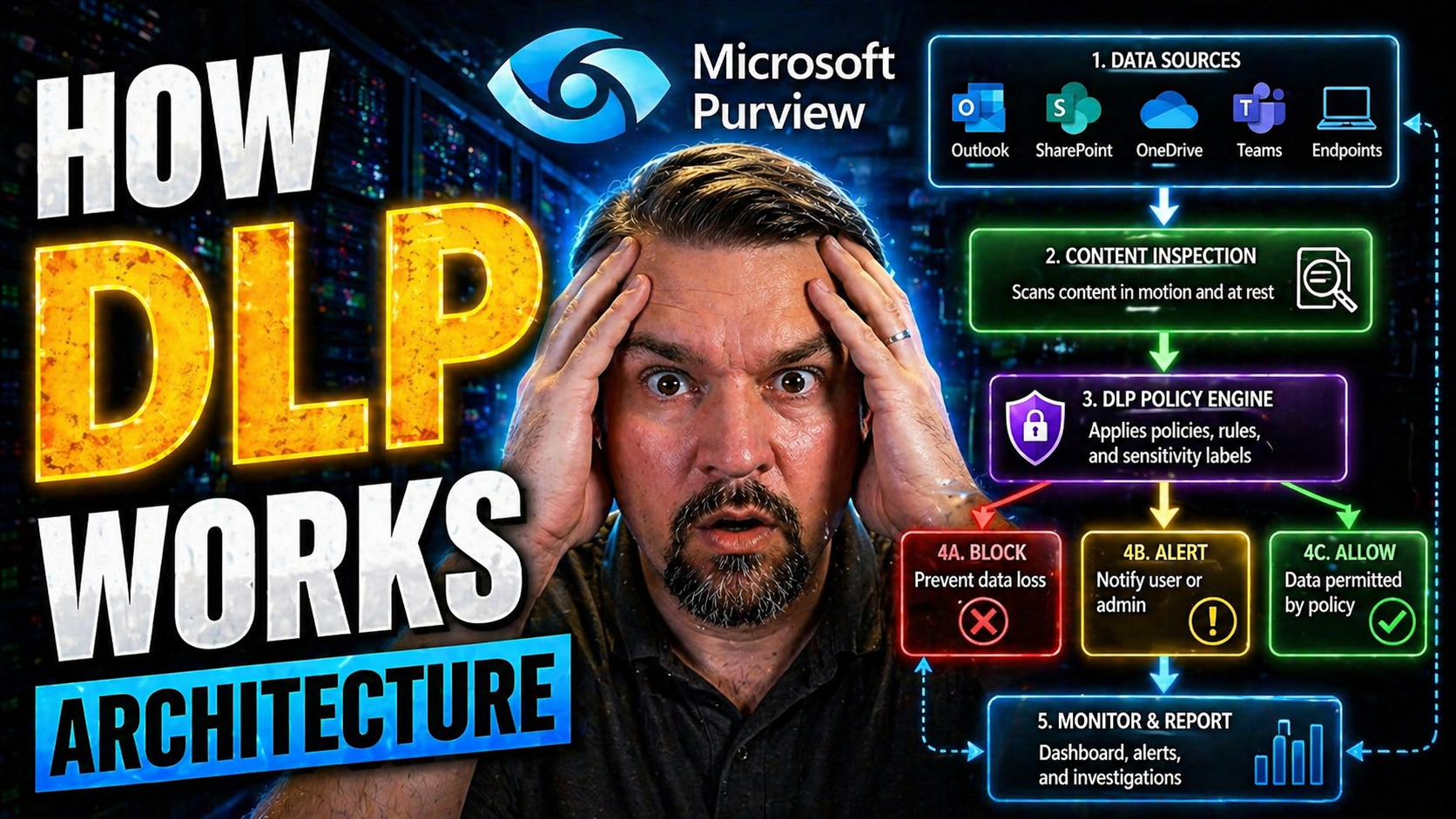
How DLP Works: The Typical Process Flow
- Discover and Identify Data: First, DLP scans storage, email, or cloud apps to discover where sensitive information lives. Discovery uses matching patterns, labels, or fingerprints to flag protected content—such as customer information or trade secrets—no matter where it resides.
- Monitor Usage and Movement: As users interact with data—copying it, sending emails, uploading it to SharePoint—the DLP solution watches those moves. Agents track data in use on endpoints, while network sensors monitor files in motion and cloud connectors observe SaaS activity.
- Inspect and Analyze Content: Before letting data actions proceed, DLP inspects the content using pattern-matching (like regex for credit card numbers), dictionaries, or machine learning. This ensures only truly sensitive info triggers a response, minimizing false positives.
- Evaluate Against Policy: The DLP rule engine checks if the attempted action (copy/paste, upload, attach, print) matches any active policy. Policies are set by admins—such as blocking uploads to public cloud drives or warning if a file contains protected health info.
- Enforce or Alert: If a violation is detected, the DLP system executes enforcement—blocking the transfer, quarantining the file, notifying a manager, or simply logging what happened for compliance investigations.
- Log and Audit: All events pass through logging systems and dashboards so security teams can investigate, tune policy, and report for compliance. This gives visibility across Microsoft, Azure, and hybrid deployments.
DLP Data Flow and Interception Mechanisms
Think of DLP as a traffic cop—it needs to see what’s happening with your data before it can step in. That’s why the technical plumbing of DLP matters: it has to intercept, scan, and sometimes stop data as it moves through different channels. Some channels are easy to watch, like email moving across your corporate network. Others, like encrypted web traffic or data zipping from your endpoint up to a cloud SaaS app, are much trickier.
This is where the nuts-and-bolts of interception come in. DLP can operate inline (directly in the path of your data, inspecting it on the fly), or out-of-band (by copying and analyzing traffic later). Tools like deep packet inspection, SSL/TLS decryption, and cloud API monitoring make it possible to keep tabs on data no matter where it lives or how it travels.
If you’re designing secure data pathways in an enterprise—especially one using a mix of Microsoft cloud, endpoints, and hybrid apps—understanding these interception mechanisms is non-negotiable. You’ll see the specific pros and cons, and the realities of endpoint agents versus modern cloud connectors, in the next pieces.
Intercepting Data in Motion Across Network and Cloud
- Deep Packet Inspection (DPI): DLP solutions often sit in-line with your network traffic to file through packets and sniff out sensitive info. DPI checks inside each packet—not just the surface—so even if data is hidden in attachments or obscure files, the inspector can find it. Powerful, but can require a lot of horsepower, especially with high volumes.
- SSL/TLS Decryption: So much data today is encrypted in transit (think HTTPS websites or Microsoft 365 services). To police this traffic, DLP often needs to decrypt the stream briefly, scan it, then re-encrypt before sending it along. This lets DLP “look inside” the protected tunnel but raises privacy and performance questions, plus it must be handled carefully to avoid new risks.
- Traffic Monitoring and Taps: Some DLP tools rely on span ports or network taps—essentially, mirrored copies of network traffic. This out-of-band approach avoids bottlenecks but may introduce delays in detection and can miss encrypted flows if not paired with decryption.
- API Traffic Monitoring (Cloud): Cloud-native DLP connects via the API layer of SaaS platforms (Microsoft 365, Google Workspace, Salesforce) to monitor activity, scan files, and enforce policies at the app level. This approach is key for visibility when data never touches the corporate network. Effective API integration means DLP can detect and intercept risky file sharing or data exfiltration in real time.
- Inline vs. Out-of-Band Processing: Inline DLP acts directly in the path of user activity, blocking or alerting in real time. Out-of-band systems analyze traffic or log events after the fact. Both have a place: inline is better for immediate control, while out-of-band supports deep forensic review. For best results—especially in complex setups like Microsoft 365—many organizations use a hybrid approach. To learn more on how this works, see this podcast on Microsoft 365 DLP setup.
Data Pathways: Endpoint Agents Versus Cloud API Connectors
- Endpoint DLP Agents: Installed directly on user devices, these agents monitor file copies, clipboard actions, USB transfers, and print operations. They offer granular, real-time control, especially for remote or mobile workers.
- Network DLP Gateways: Deployed at network choke points, these catch data crossing network boundaries—like uploads, emails, and file transfers—without requiring anything on the endpoint itself.
- Cloud API Connectors: Rather than watching traffic, these integrate with SaaS apps at the API level. They can scan stored files, audit sharing, and respond as data moves within or between cloud services, even if users are off-network.
- Event Stream Processing (Cloud): Cloud DLP often uses event streams from apps like Microsoft 365 or Power Platform, reacting to changes and scanning activity logs for risky moves or abnormal behavior.
- Trade-Offs: Agents provide tighter on-device control, while cloud connectors shine for centralized compliance and coverage of remote, bring-your-own-device (BYOD), or shadow IT scenarios. Choosing the mix depends on your risk profile and where your sensitive data tends to live.
Comparing Types of DLP: Endpoint, Network, and Cloud Deployments
Not all DLP is created equal, and where you deploy it makes a big difference in what you can see and control. Classic DLP often started on the network—watching emails and uploads—but as work moved to laptops, mobiles, and cloud services, new strategies appeared. Now, a modern DLP deployment often combines several layers: endpoint agents, network inspection, and cloud/SaaS integrations.
Endpoint DLP is your front line for activity on laptops and desktops, catching things like USB transfers and local file copies. Network DLP is more about monitoring data that flows out of, or into, your corporate network—emails, file uploads, and similar. But as users have shifted to working outside the office and stashing files in the cloud, endpoint and network DLP by themselves just don’t cut it anymore.
That’s where cloud (and SaaS) DLP steps in—integrating with Microsoft 365, Azure, and other platforms to oversee sharing, access, and risky moves in cloud environments. In practical terms, a robust data protection program often needs some of each approach, stitched together to safeguard every data pathway your business cares about.
Endpoint DLP and Network DLP: Architecture and Use Cases
- Visibility and Control (Endpoint): Endpoint DLP agents track actions like copying files to USB drives, print jobs, or uploading to cloud storage directly from the endpoint. This “front row seat” lets you block risky moves right as they happen—even when a user’s off-network.
- Network DLP Architecture: Network-based DLP sits at key points in your environment—usually the web/email gateway or firewall—and inspects traffic as it flows out (and sometimes in). This is excellent for catching emails with attachments that violate policy or mass file uploads to external sites.
- Core Differences: Endpoint DLP protects data in use (on the device), while network DLP handles data in motion (moving through the network). Endpoint is stronger for device controls and off-network users; network DLP is better for centralized enforcement and large-scale data movement detection.
- Common Use Cases: Endpoint DLP is essential for remote and hybrid workforces, where you don’t control the whole network path. Network DLP excels in environments with centralized data flows—think headquarters or organizations with defined traffic patterns.
- Threat Coverage: Together, these two approaches help cover accidental insider leaks, exfiltration attempts, and risky transfers, creating more complete protection for both desktops and the network backbone.
Cloud and SaaS DLP: Addressing Modern Data Risks
- API-Driven Inspection: Cloud DLP integrates with cloud apps (like Microsoft 365, Power Platform, Salesforce) at the API level, enabling rapid content scanning, real-time enforcement, and in-depth activity tracking—no matter where users log in from.
- Monitoring Modern Cloud Workflows: Users now share files, automate workflows, and store sensitive info entirely in the cloud. Cloud DLP watches collaboration, sharing, and automation triggers to block risky actions before data escapes. For advanced governance of Microsoft Copilot and connectors, this resource on Copilot agent governance provides actionable insights.
- Unique Cloud Risks: Traditional DLP falls flat when users operate outside the corporate network or store files “off the grid.” API-based DLP plugs these blind spots by working directly where the data lives—not just as it moves.
- Protection of SaaS Apps and Environments: Many organizations split users, data, and apps across multiple clouds. Cloud and SaaS DLP ensure consistent controls, no matter the app or device accessing the sensitive info.
- Response Capabilities: Modern cloud DLP can trigger automated remediation—blocking sharing, alerting admins, or removing files that violate policy, all without a human having to chase down the incident manually.
DLP in Action: Detection Methods, Policies, and Response
DLP systems don’t just passively “watch” data. They’re actively looking for trouble—hunting for sensitive information, applying rules, and triggering alarms or blocks if they spot a policy violation. The real work of DLP is in detection and response: it needs to know what counts as protected data and what to do when it finds someone mishandling it.
Detection involves scanning content using a mix of pattern matching, machine learning, and big lists of known “red flag” info (like credit card regexes or GDPR-protected fields). Once DLP identifies something sensitive, it compares the action against your policies—are you allowed to send this to that domain, or upload this to a public folder?
Finally, response kicks in. Depending on your rules and the level of risk, DLP might just log it, send you a warning, alert your security team, or slam the brakes with a block. This section dives into how all those gears mesh, so you can see what actually happens when DLP spots a problem—and how to craft your own rules that work for your business reality.
How Sensitive Data Is Identified and Classified
- Regular Expression (Regex) Matching: DLP systems often use regex to detect patterns—like a credit card number, Social Security format, or IBAN. By scanning for these signatures, the system hones in on high-risk info fast.
- Data Fingerprinting: For organizations with unique sensitive files (patent drafts, price lists), fingerprinting creates a “digital DNA” of the content. DLP tags and traces any attempt to move or copy these reference sets, making it extremely precise.
- Dictionary Matching: Some DLP solutions maintain massive dictionaries of keywords or terms—think health diagnosis codes or company project codenames. They match content against these lists to spot protected info.
- Machine Learning (ML): Advanced systems use ML to spot context or behaviors—even if the pattern isn’t obvious. For example, a sudden mass download of files by an employee who never did so before might trigger a flag.
This multi-layered approach helps admins reduce false alarms while still giving DLP the power to block real data leaks. For practical DLP tuning in Microsoft Power Platform environments, see this breakdown of hidden Power Platform risks.
Defining Enforceable DLP Policies and Remediation Actions
- Blocking Actions: Policies can be set to outright block risky moves—no USB copy, no upload to unsanctioned cloud, no emailing outside the domain. This is the strongest enforcement but must be set carefully to avoid disrupting business workflows.
- Quarantining Files: Sometimes, it’s safer to automatically quarantine a file for review (rather than flat-out deleting or blocking it). This gives you a chance to analyze suspicious actions in detail.
- Alerting and Logging: Many policies are about visibility. You can trigger alerts to security teams or managers, and log every suspicious or outright blocked event. That’s invaluable for investigations and audits.
- Flexible Access Restrictions: DLP can be tuned to allow certain actions for specific users, groups, or devices—like allowing executives to move sensitive data but logging all their moves. This balances business needs with risk.
- Microsoft Ecosystem Integration: In Microsoft 365 or Power Platform, policies can be precisely targeted. Connector classification (business vs. non-business), environment alignment, and pre-flight checks avoid silent workflow failures. For developers or IT pros, this guide to Power Platform DLP policies covers the nitty-gritty of effective, enforceable controls.
Enforcement is about more than “just say no”—it’s about aligning policy with business reality and preventing both accidental and malicious leaks before they happen.
Inside the DLP Rule Engine and Content Analysis
The real muscle behind DLP isn’t in the sensors or connectors—it’s in the rule engine that decides what’s risky, what’s safe, and what deserves a closer look. This behind-the-scenes analysis is where detection gets smart and policies actually mean something. The engine takes a hard look at content, context, and user behavior, applying everything from basic regex patterns to advanced machine learning to decide on enforcement.
Think of the rule engine as a hyper-vigilant “bouncer” with perfect recall, making split-second decisions. But unlike a nightclub, the bouncer here checks the contents of your files, where they’re heading, who’s sending them, and whether that matches “normal” business activity. The more granular and contextual this inspection, the more accurate and useful your DLP outcomes become—instead of a thousand false alarms, you get actionable signals.
This section gives you an inside track on how all this analysis actually works—so when you hear “false positive” or “behavioral risk,” you’ll know exactly what’s going on and how to dial in the perfect rule set for your Microsoft or hybrid environment.
Pattern Matching and Contextual Data Analysis in DLP
- Regex Pattern Matching: Rule engines scan text and attachments for specific sequences—like credit card numbers—with regular expressions. This approach is fast and reliable for well-defined data types and reduces misses when patterns are clear-cut.
- Dictionary and Exact Data Matching: Using custom dictionaries, DLP can spot not just general terms, but exact matches to protected names, codes, or content. Exact matching (data fingerprinting) is especially valuable for proprietary documents—if it leaves the organization in any medium, DLP flags it immediately.
- Metadata Tagging and Analysis: Document tags (like “Confidential” or internal labels in Microsoft Purview) add essential context. The DLP engine checks these tags to apply policies, enabling dynamic rules that adapt to the business context instead of simply blocking all movement.
- Contextual Awareness: DLP doesn’t stop at “what’s in the file”—it also considers where it’s going, who’s sending it, and at what time. For instance, a file download during off-hours or a surge in outbound emails from a user might trigger escalated response. Rules like these cut down on bogus alerts and zero in on real threats.
- Policy Logic and Tuning: The more sophisticated the rule engine, the more you can tune it—fewer false positives, faster detection, and business-aligned controls. This flexibility is critical for industries handling varied data types or running complex, distributed work environments.
Machine Learning and Behavioral Analytics for DLP Detection
- Anomaly Detection: ML-powered DLP models baseline “normal” user and data activity, alerting on deviations—like massive downloads or unusual sharing.
- User Risk Scoring: Advanced systems assign risk scores to users based on behavior patterns, flagging high-risk accounts for closer scrutiny.
- Insider Threat Detection: Machine learning surfaces subtle patterns—such as disgruntled employee activity or accidental data mishandling—that static rules would miss.
- Adaptive Policy Enforcement: Policies can automatically adjust based on real-time analytics, tightening controls in response to rising risk signals.
Integrating DLP with Compliance and Security Platforms
DLP doesn’t exist in a bubble—it’s just one piece of the larger puzzle when it comes to governance, risk, and compliance. For most organizations, compliance with regulations like HIPAA, PCI DSS, and GDPR isn’t negotiable. DLP becomes the hands-on tool that proves you know where your sensitive data is, and you’re actively controlling it in line with legal mandates.
You’ll find DLP often working side-by-side with SIEM platforms, endpoint protection tools, and audit systems. This integration brings together data alerts, activity logs, and policy violations, delivering a single pane of glass for incident detection, triage, and response. That unified view is especially important in cloud-heavy Microsoft environments, where data, users, and apps span on-prem, cloud, and hybrid.
This section spotlights how DLP gets wired into the broader security stack, helps with compliance headaches, and supports proactive monitoring and response. If compliance and continuous auditability—like what Microsoft Defender for Cloud delivers—are on your mind, check out this walkthrough of compliance monitoring in Microsoft Defender. You’ll see how the pieces fit together for operational peace of mind.
How DLP Supports Compliance: HIPAA, PCI DSS, and GDPR
- HIPAA (Healthcare): DLP is configured to prevent protected health information (PHI) from leaking—by scanning for health identifiers and blocking unauthorized disclosures. This helps healthcare teams meet HIPAA’s strict data control mandates.
- PCI DSS (Finance): For organizations handling credit card data, DLP spots and prevents transmission of cardholder data over insecure channels, supporting PCI DSS requirements and reducing scope for card data breaches.
- GDPR (EU Data Protection): DLP monitors movement of personal data, flags transfers outside the EU, and ensures proper consent or legal basis before transmission—critical for GDPR compliance. For a peek at hidden gaps in cloud data retention, see this podcast on Microsoft 365 compliance drift.
- Audit Trails and Documentation: DLP automatically logs policy enforcement actions, creating a compliance paper trail for audits. This accelerates regulatory reviews and supports proactive mitigation if a violation is detected.
DLP Integration with SIEM and Security Tools
- Centralized Incident Management: DLP integrates with SIEM tools (like Microsoft Sentinel) so security teams can monitor DLP events alongside all other incident alerts. This supports unified threat response and speeds up investigations.
- Correlated Analytics: SIEM platforms correlate DLP activity—like attempted data exfiltration—with broader signals (user account compromise, privilege escalation), providing deeper context and reducing alert fatigue.
- Endpoint and Cloud Security Synergy: DLP ties into endpoint protection (EPP/EDR) and cloud-native security—helping to flag risky endpoints or automate sandboxing of files that break DLP policy.
- Operational Benefits: Integrated DLP helps reduce manual overhead, improves compliance posture, and speeds up alert triage. By binding DLP with SIEM, you create actionable workflows—see how breach chains play out in this detailed Microsoft 365 attack chain analysis.
Best Practices and Future Trends in DLP Adoption
The tech is powerful, but successful DLP depends just as much on good rollout tactics and keeping an eye on emerging threats. Implementation isn’t just about checking boxes; it’s a process: define smart policies, train your people, deploy in manageable phases, and always tune for what actually works on the ground. Ongoing monitoring and swift remediation are what keep your controls tight—and your headaches small.
Looking forward, DLP’s boundaries keep shifting. New hybrid and cloud architectures, AI-driven apps, and more creative insider risks mean DLP needs to be nimble. Broker-based hybrid models, Data Security Posture Management (DSPM), and intelligent risk scoring are where we’re headed—giving you broader, deeper, and more adaptive coverage.
If you want real strategy—balancing business innovation with protection—don’t just set DLP and forget it. Learn from hidden pitfalls in environments like Microsoft Power Platform, where, as explained in this practical DLP podcast, leaking data often comes from sloppy environment governance, not just bad rules. Addressing those gaps is what future-proofs your program.
DLP Implementation Best Practices: Policies and Rollout
- Phase Your Rollout: Start small—pilot DLP in one business unit, then expand after tuning policies and fixing any false positives or user friction. This cuts down on disruption.
- Build Effective Policies: Use templates (like Microsoft Purview’s) to cover common risks but customize rules for your specific business processes and sensitive data types. Overly broad policies risk blocking legitimate work.
- User Training and Awareness: Teach employees why DLP matters, what to expect, and how to work within new controls. Empowering users results in fewer accidental incidents—and less pushback.
- Continuous Monitoring and Auditing: Regularly review DLP alerts and incidents to fine-tune policy, spot new risks, and keep up with regulatory change. Proactive monitoring keeps your environment secure.
- Plan for Remediation: Map out clear playbooks for responding to policy violations—who gets alerted, who investigates, and how quickly incidents are contained and resolved. This closes the loop and shows board-level commitment to protection.
Hybrid Approaches and the Future of DLP
- Hybrid Broker-Based Solutions: Next-gen DLP leverages cloud brokers (CASBs) that unify controls across on-prem, cloud, and SaaS, giving you single-pane-of-glass management—even as work moves outside traditional borders.
- Data Security Posture Management (DSPM): DSPM tools go beyond classic DLP, mapping where sensitive data lives, who accesses it, and continuous risk scoring. This closes gaps across shadow IT and cloud silos.
- AI and Insider Threat Controls: As AI-powered agents (think Microsoft Foundry) gain access privileges, DLP adapts by enforcing policies tailored for autonomous, machine-driven activity—vital for preventing shadow IT risks. See this challenge unpacked in this AI governance podcast.
- Adaptive, Real-Time Protection: By blending machine learning with context-aware policies, future DLP systems target the riskiest behavior, dynamically tightening controls as threats evolve.
You Should Also Listen To
If you are exploring how DLP works, these episodes add practical context for secure Microsoft 365 adoption, data protection, governance, and AI risk management.
- Microsoft Purview – Simply Explained — See how classification, retention, compliance, and protection fit into one Microsoft data-governance model.
- Microsoft Defender XDR – Simply Explained — Connect data-protection controls with detection, investigation, and response.
- Conditional Access – Simply Explained — Understand how identity and risk signals add context to access decisions.
- Microsoft AI Agent Harness – Simply Explained — Explore the controls that make AI automation more reliable, observable, and safe.
These episodes help turn the article’s concepts into practical design and rollout decisions.

Microsoft MVP | Host of M365.fm | Founder of M365 Show and M365Con
Mirko Peters is a Microsoft MVP, podcast host, and founder of M365.fm, M365 Show, and M365Con. His work connects Microsoft practitioners through podcast interviews, livestreams, and community events.
At M365.fm, Mirko hosts conversations with Microsoft MVPs, product experts, architects, and community contributors. Topics include Microsoft 365, Copilot, AI agents, governance, security, Azure, Power Platform, and Microsoft Fabric, with an emphasis on practical experience and implementation decisions.
M365.fm is the podcast and learning platform. M365 Show brings experts together for livestreams, while M365Con provides an online conference setting for community learning.
Official website: Mirko Peters (https://www.mirkopeters.com/). Recognition: Mirko Peters — Microsoft MVP profile (https://mvp.microsoft.com/de-DE/mvp/profile/9b0ca797-db5a-493a-a845-8b9158046cf5). Connect on LinkedIn (https://www.linkedin.com/in/m365showpodcast/).





