
Hybrid Identity Migration Strategy: A Complete Guide for Microsoft Entra ID
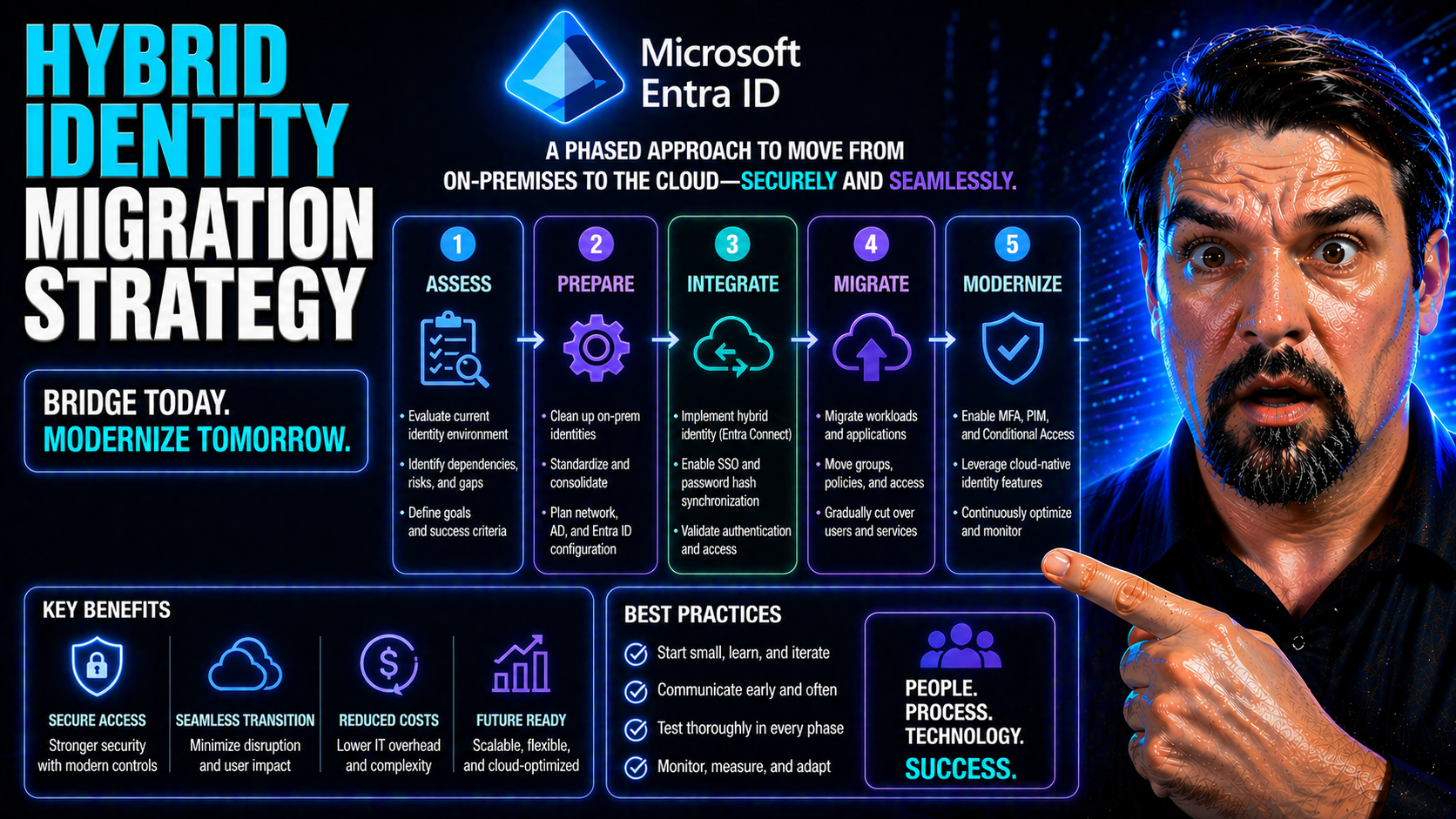
Hybrid identity migration isn’t just a tech upgrade—it’s a business transformation. In today’s Microsoft ecosystem, modernizing from on-premises Active Directory to the cloud with Microsoft Entra ID unlocks security, flexibility, and access to the latest productivity tools. But pulling off a smooth migration takes more than flipping a few switches. You’re dealing with directories, permissions, compliance, and—most importantly—people counting on you to keep everything running safely.
This guide gives you the full playbook to build a hybrid identity migration strategy with Entra ID at the center. You’ll get clarity on planning and readiness steps, how to map dependencies, and methods for real risk analysis. We dig into identity governance, show you how to stay audit-ready, and explain how to automate compliance for regulations like SOX, HIPAA, and GDPR—even as your environment straddles on-prem and cloud.
You’ll find practical runbooks, tools, and automation options for scaling migrations in the Microsoft stack. Plus, if you want to avoid helpdesk melt-downs and user revolts, we cover how to communicate identity changes and measure user experience to keep everyone productive. Whether you’re patching technical holes or easing business nerves, this guide sets you up for real-world success—no matter how deep your AD roots go.
Understanding Hybrid Identity Migration
Hybrid identity migration means blending your traditional on-premises Active Directory (AD) with modern cloud-based solutions like Microsoft Entra ID. Instead of ripping out what’s already there, you connect both worlds—giving users seamless, secure access to resources, wherever they are. Think of it as building a bridge to the cloud, rather than setting sail all at once.
Organizations pursue this hybrid approach for several reasons. Some want to leverage new cloud features while still honoring legacy systems that can’t move overnight. Others need hybrid to support remote work or to meet specific compliance demands. Whatever the driver, hybrid offers flexibility: you can modernize gradually without breaking mission-critical processes.
But, it’s not just plug-and-play. Balancing on-prem AD with Entra ID introduces real challenges—like keeping passwords in sync, unifying security policies, and ensuring old and new apps work together. In the Microsoft world, this journey is about controlling risk, minimizing disruption, and setting up your identity estate for the future. Hybrid is the stepping stone—not just for IT, but for end-user experience, compliance, and organizational agility.
Key Principles of Hybrid Identity Solutions
- Federation: Set up trusted connections between AD and cloud services using protocols like SAML or OAuth. Federation lets users authenticate with on-prem credentials in the cloud, reducing password fatigue and improving security.
- Synchronization: Keep user accounts, groups, and attributes aligned between AD and Entra ID using tools like Entra Connect. This ensures a consistent, up-to-date identity footprint and minimizes manual updates and errors.
- Coexistence: Support both AD and Entra ID in parallel. Legacy systems and cloud apps both need to function while migration occurs—so coexistence reduces downtime and keeps users functional throughout the project.
- Phased Adoption: Don’t try to migrate everything or everyone at once. Use staged rollouts—starting with pilot users or non-critical systems—to limit risk, identify issues early, and gradually build confidence as you expand across the organization.
In Entra ID–centric migrations, these principles ensure a stable, secure, and well-managed transition. They help you avoid surprises, maintain regulatory alignment, and keep both users and IT teams happy as you modernize your identity infrastructure.
Entra ID in Hybrid Identity Architectures
Microsoft Entra ID (formerly Azure AD) is the cornerstone of a modern hybrid identity architecture. It connects your on-premises AD to the cloud, providing a unified identity system for accessing Microsoft 365, Azure, SaaS apps, and custom solutions. With Entra ID, your users get single sign-on (SSO) across cloud and on-prem apps, making access seamless and secure.
The power of Entra ID comes from its synchronization and identity federation capabilities. Entra Connect keeps user attributes, passwords, and groups synced between your AD and the cloud, eliminating drift. Meanwhile, tools like Entra ID Conditional Access let you enforce policies based on real-time risk, location, device, and session context. For a deep dive into these policy controls, including strategies to reduce “identity debt,” see this excellent resource about conditional access security loops in Entra ID.
Entra ID also enables advanced features like MFA, self-service password reset, and just-in-time privilege grants, laying the groundwork for Zero Trust security models. But hybrid brings new risks, too—OAuth consent abuse can bypass even MFA policies, so it’s imperative to lock down user consent and require admin approvals. Unpack more risks (and how to defend against them) in this guide to OAuth consent attacks in Entra ID.
Bottom line: Entra ID is the linchpin for bridging your Active Directory to the cloud, bringing together access, governance, and security—all without sacrificing user experience or compliance.
Planning for Hybrid Identity Migration Success
Kicking off a successful hybrid identity migration takes more than just technical know-how. It starts with strong planning and a clear understanding of what you’re working with. Before any changes, you need to define the project’s scope, pull the right stakeholders to the table, and lay out a reasoned timeline. Skipping these foundational steps is a fast track to confusion, scope creep, and avoidable risk.
This stage is also about taking a hard look at your current environment. You’ll need to understand all the moving pieces—users, apps, security controls, and dependencies—across Active Directory, Entra ID, and any integrated systems. This readiness assessment helps you avoid surprises and stops problems before they toast your project later on.
Architectural planning brings everything together. Solid architecture ensures security, compliance, and business continuity aren’t left to chance. By clarifying your goals and mapping a realistic path forward, you build trust across business and IT. The next sections break down exactly how to assess your environment and set practical goals that ensure a smart, low-risk migration with visible wins along the way.
Assessing Current Identity Infrastructure
- Inventory Existing Objects: Use tools like Entra Connect Health, Microsoft Assessment and Planning Toolkit, or PowerShell scripts to catalog users, groups, service accounts, and applications in both Active Directory and Entra ID. Accurate inventory sets the foundation for proper planning and risk reduction.
- Document System Interconnections: Map out dependencies, such as LDAP integrations, application bindings, or scripts depending on specific AD accounts. This helps predict what can break and what needs extra testing during migration.
- Assess Directory Health: Scan for stale accounts, duplicate objects, orphaned permissions, or synchronization errors. Clean these up early to avoid carrying problems into your new, cloud-first environment.
- Watch for Pitfalls: Don’t overlook hidden or undocumented integrations. A missed custom script or legacy app can disrupt operations if not accounted for during migration.
Establishing Migration Goals and Milestones
- Improve Security: Set objectives for adding MFA, eliminating legacy authentication, or reducing privilege sprawl.
- Streamlined User Experience: Aim for SSO, simple sign-in, and fewer password resets across hybrid resources.
- Regulatory Compliance: Ensure alignment with frameworks like SOX, HIPAA, or GDPR by tracking audit and reporting capabilities.
- Key Milestones: Define steps such as readiness assessment, pilot migration, bulk migration, operational handoff, and post-migration audits to track and celebrate progress.
Mapping Dependencies and Risk Analysis for Migration
Migrating identity systems isn’t just about copying users from one place to another. Your environment is full of hidden ties—service accounts, business apps, automations, and third-party add-ons—all relying on your current directory setup. If you miss or misjudge the impact of these dependencies, the fallout can be serious: service outages, broken integrations, or even security gaps.
Dependency mapping is critical. Before you make changes, you need to know which Active Directory accounts and groups are powering which cloud apps, SaaS services, and business-critical workflows. With hybrid, it’s not just who logs in—it’s what those logins unlock beneath the surface. If you take out the wrong piece, something else can fall.
Risk analysis keeps your migration controlled and prioritized. Not all users or groups are created equal: some handle sensitive data, others belong to core finance or HR systems, while some are ghost accounts nobody’s touched in years. Triaging these by risk and business impact lets you sequence your migration, putting extra care on what matters—and finally cleaning out the stale stuff before it moves to the cloud. The next sections get specific about how to automate discovery and put real numbers on migration priorities.
Automated Discovery of AD-to-Cloud Resource Dependencies
- Built-in Azure/Entra ID Tools: Leverage Entra Connect’s reporting and synchronization logs to trace which AD users or groups are linked to specific cloud resources or apps. These tools help visualize identity flows so you spot critical ties quickly.
- Scripting Approaches: Use PowerShell scripts to enumerate service account usage, API connections, and shared mailbox permissions. Scripts can pull dependency data across AD and Entra ID, flagging accounts supporting vital automations or integrations.
- Third-Party Platforms: Consider identity governance solutions or SaaS security tools that offer automated discovery and impact analysis dashboards. They can highlight AD-to-SaaS linkages, risk, and potential break points during migration.
- Documentation Integration: Capture this info in living documentation or architectural diagrams so nothing critical is overlooked when sequencing the migration waves.
Risk Scoring and Prioritization of Identity Objects
- Usage Frequency: Assign higher risk scores to accounts and groups most frequently used for business operations. Heavy traffic signals operational dependency, needing extra care.
- Business Criticality: Tag objects tied to sensitive data, financial apps, or executive access. These require robust test migration and backup plans.
- Privilege Level: Flag objects with admin or delegated roles. Privileged accounts are prized targets for attackers and must be migrated under maximum control.
- Stale or Orphaned Accounts: Give low-risk or ‘clean up’ scores to dormant accounts, which can be disabled or deleted before—or during—migration.
- Scoring Example: Combine these factors in a spreadsheet or tool, scoring each object from 1 (low risk) to 5 (critical risk), to guide migration order and attention level.
Governance and Compliance in Hybrid Identity Migration
Hybrid migrations introduce a new world of governance complexity. As you move identities from on-prem Active Directory to Entra ID, you must keep a tight grip on security policies, audit controls, and compliance mandates that span both old and new systems. Regulatory requirements—including SOX, HIPAA, and GDPR—don’t pause for a migration, and neither do auditors.
Establishing robust identity governance frameworks ensures that privilege management, access reviews, and lifecycle controls work just as well in the cloud as they did on-prem. If not, you risk new security holes, compliance drift, or failed audits during your transition. One overlooked setting or a missing policy can kick off a chain of unintended consequences, especially as users toggle between AD and Entra ID environments.
Automation and centralized policy enforcement help avoid this chaos. Solutions like Microsoft Purview or Microsoft 365 compliance tools can close many gaps between environments, supporting continuous monitoring and real-time controls. Check out examples of advanced governance with Microsoft Purview for a peek at robust controls (like DLP and role scoping) in action—even as productivity agents like Copilot move data across platforms.
Be mindful that compliance isn’t about static controls; it’s about monitoring user behavior and policy effectiveness. This episode on compliance drift in Microsoft 365 reveals how technical controls can appear solid while real-world behavior introduces risk. Stay vigilant, automate where possible, and use dashboards that highlight both outcomes and user actions.
Automating Compliance Controls Across Hybrid Environments
- Policy Templates: Use built-in or custom policy templates in Entra ID and Microsoft 365 to enforce SOX, HIPAA, and GDPR requirements. Predefined policies provide a baseline that maps to regulatory standards.
- Automated Remediation: Set up real-time compliance monitoring and automated remediation using tools like Microsoft Defender for Cloud. This minimizes compliance drift and shortens windows of elevated risk—see examples in this guide on continuous compliance.
- Identity Lifecycle Automation: Script the onboarding and offboarding of accounts to ensure access rights are instantly revoked when users leave, reducing lingering risk.
- DLP and Information Protection: Implement Data Loss Prevention policies in Microsoft 365 and Entra ID, using these DLP setup strategies to stop accidental data leaks as users move to cloud-first apps.
RBAC Harmonization Between On-Premises and Cloud
- Role Mapping: Map on-prem AD groups to Entra ID roles using a consistent schema. Document the intended function and access scope of each role for clarity and auditability.
- Conflict Resolution: Identify overlaps or conflicts between existing AD group memberships and new cloud roles. Clean up duplicate permissions and eliminate orphaned entitlements before migration to avoid privilege creep.
- Least-Privilege Enforcement: Use Azure Policy, Privileged Identity Management (PIM), and automated access reviews to enforce least-privilege principles after migration. This strategy guide on Azure enterprise governance spells out how RBAC and PIM help keep privilege management airtight.
- Unified Access Governance: Leverage centralized governance tools, like Microsoft Purview, to oversee entitlements across both legacy and modern identity systems. This reduces drift and makes sure your new, cloud-first controls stick.
Developing a Step-By-Step Hybrid Migration Runbook
- Preparation: Kick off with an environment inventory, data cleanup (removing stale accounts), and dependency mapping. Confirm backup and rollback plans are in place before moving any live accounts.
- Pilot Migration: Select a small, low-risk group of users or apps to test migration. Monitor for issues, collect feedback, and refine processes based on real-world results rather than guesswork.
- Full Rollout: Expand migration in phases—targeting higher-risk or more complex accounts once low-hanging fruit is stable. Maintain close monitoring on critical business units and privileged accounts.
- Validation: Confirm that user access, SSO, MFA, and group memberships match expected outcomes across both environments. Use reports and audit logs for verification.
- Fallback Planning: Always prepare to roll back or re-sync users if an issue is detected post-migration. Robust documentation and scripted processes ensure you can quickly correct mistakes without extended downtime.
This structured approach protects productivity, keeps security tight, and ensures compliance as you shift from old to new.
Tooling and Automation for Hybrid Identity Migrations
- Microsoft Entra Connect: The backbone for most hybrid migrations, Entra Connect handles directory synchronization, password hash sync, and seamless SSO between AD and Entra ID.
- PowerShell Automation: PowerShell scripts deliver granular control for bulk user updates, license assignments, role changes, and reporting—ideal for custom migration steps.
- Third-Party Migration Platforms: Tools like Quest Migration Manager or Binary Tree deliver advanced features—robust reporting, staged migrations, and automated rollback—in high-complexity or multi-forest environments.
- Health and Monitoring Dashboards: Use Entra Connect Health and Azure Monitor to track sync status, spot errors, and troubleshoot issues during high-volume migrations. Reporting visibility is key to early intervention.
- Custom Automation Workflows: Where off-the-shelf doesn’t fit, custom scripts and API integrations can automate business-specific tasks or legacy application onboarding. While this automation resource is down, keep an eye out for future scripts and examples to streamline recurring migration activities.
Zero Trust Security Considerations in Hybrid Identity
You can’t bolt on security at the end—Zero Trust needs to be in your hybrid identity plan from the start. Zero Trust treats every access attempt as a potential risk, constantly validating devices, sessions, and identities whether the user sits in the office or on a different continent.
Microsoft-centric migrations should leverage Conditional Access policies to demand strong authentication based on location, risk signals, app sensitivity, and device health. Adaptive MFA kicks in when risk spikes, but stays out of the way for trusted sign-ins. This reduces the “MFA fatigue” users dread while still blocking threats.
Identity segmentation is big here: don’t give users or admins more access than required. Assign permissions and roles on a just-in-time, just-enough basis. Leverage Entra ID Privileged Identity Management (PIM) to limit standing admin access and require approvals for elevated operations.
Continuous validation is key—real-time monitoring and automated responses to suspicious activity keep your hybrid environment resilient. Want practical tips for unifying Zero Trust across hybrid M365 and D365 environments? Check out this episode on Zero Trust by Design. It’s about making security invisible to good users and a dead end for attackers.
Managing Human Change: Stakeholder and User Adoption
No technical migration ever succeeded without people coming along for the ride. Hybrid identity shifts impact how end users log in, access apps, and handle multifactor authentication. They also disrupt how IT teams manage permissions and resolve access issues. Ignoring the human side means higher frustration, more helpdesk tickets, and adoption delays.
Smart organizations focus early on communication and training. Clear explanations, realistic timelines, and proactive guides help users know what’s changing, why it matters, and how it benefits them. For IT staff, targeted workshops and knowledge transfers prepare them to operate in the hybrid world and troubleshoot new challenges before users even notice.
But the work isn’t one-and-done. Measuring user experience as migration rolls out helps you course-correct for usability, productivity, and satisfaction. Loops for feedback, support escalation, and quick-win fixes let you turn complaints into improvements. The following sections will show how to keep stakeholders informed and your user base not only compliant, but genuinely satisfied with the new identity experience.
Communicating Identity Changes to End Users and IT Teams
- Early Announcements: Let users know what’s coming at least 2-4 weeks in advance—highlight new sign-in screens, MFA requirements, and why the change is happening.
- Multi-Channel Messaging: Use email, company meetings, intranet posts, and digital signage to deliver consistent migration messages.
- FAQs and Templates: Share “what, why, when” guides and readiness checklists so users and support teams can prepare with zero confusion.
- Training Sessions: Offer hands-on demos and short videos showing the new login experience and tips for resolving common issues.
- Feedback Hotlines: Set up channels for questions and early problem reporting, so IT teams can respond fast and keep users calm.
Measuring and Improving User Experience During Transition
- Login Success Rate: Track successful versus failed authentication attempts daily—rapid dips point to usability issues needing quick action.
- Support Ticket Volume: Monitor helpdesk tickets tied to login, MFA, or access problems to spot friction points early.
- User Satisfaction Surveys: Run short, anonymous polls to collect direct feedback on login, app access, and overall identity experience post-migration.
- Real-Time Feedback Channels: Launch live chat or support Slack channels during major migration phases for instant trouble-spotting and resolution.
- Quick Fixes and Iteration: Implement known solutions fast and update training based on real-life feedback, making sure productivity rebounds instead of lags.
Troubleshooting Common Pitfalls in Hybrid Migrations
- Synchronization Failures: These can stem from network outages, schema mismatches, or misconfigured connectors. Check Entra Connect Health and sync logs—resolving errors quickly keeps users in sync.
- Duplicated/Conflicting Objects: Account overlaps between AD and Entra ID create unexpected access or disable user sign-in altogether. Clean up before migration and use matching rules to avoid collisions.
- Lost Group Memberships: Mismapped or orphaned group memberships mean users lose access to apps post-migration. Audit group sync and use sample users to test permissions before rolling out fully.
- Authentication Loops: Browser settings or cached credentials can trap users in endless sign-in requests. Provide step-by-step solutions (like clearing cache, checking SSO endpoints) to resolve quickly.
- Downtime During Cutover: Missed dependencies or inadequate fallback plans can cause planned outages to linger. Always have a rollback playbook and temporary access workarounds for critical users.
- Compliance Drift: Policy configuration gaps after migration introduce risk. Routinely audit and compare controls across AD and Entra ID to ensure nothing’s been missed.
Case Study: Real-World Hybrid Identity Migration with Entra ID
Consider a regional healthcare provider migrating 4,000 users from legacy AD to Entra ID. The project was driven by the need to meet HIPAA audit requirements, secure access to remote EHR applications, and reduce manual password resets by 60%. The team's initial assessment found 340 service accounts with hardcoded AD dependencies, 700 stale user objects, and fragmented group policies built up over a decade.
Pilot migrations started with administrative staff in a non-critical branch. Automated tools uncovered SaaS app dependencies that weren’t in documentation. Advanced dependency mapping avoided a major outage by flagging a legacy app using a soon-to-be-migrated service account.
Risk-based triage sequenced rollouts: high-privilege accounts last, non-essential users and stale accounts first. Multi-channel user communications (email, intranet, town hall) minimized friction, and daily login success rates rose to 98% within two weeks. Support tickets for sign-in dropped by half after targeted MFA training.
The project concluded with a post-migration audit confirming compliance alignment and improved privileged access management. Key lessons: automation and pilot feedback shape success, while real-time user monitoring and clear governance avoid business disruption. Even at enterprise scale, Entra ID delivered unified access and future-proofed their identity infrastructure.
Key Takeaways and Next Steps for Hybrid Identity Modernization
- Start with a Strong Foundation: Comprehensive assessment and clear project goals set up successful hybrid migration—don’t skip the groundwork.
- Automate Everything You Can: Use Entra Connect, scripts, and compliance automation tools to streamline migration and avoid human error.
- Govern for Security and Compliance: Build and enforce role-based access, privilege management, and continuous monitoring frameworks across both AD and Entra ID.
- Care About User Experience: Invest in change management, communication, and responsive support to keep productivity high and users on board through the transition.
- Measure, Tune, Repeat: Use KPIs—like login success, helpdesk volume, and audit scores—to evaluate progress and refine processes post-migration.
- Pursue Ongoing Modernization: Migration is the start, not the end. Review new Microsoft features, invest in continuous learning, and seek expert advice as needed to further secure and streamline your identity estate.

Microsoft MVP | Host of M365.fm | Founder of M365 Show and M365Con
Mirko Peters is a Microsoft MVP, podcast host, and founder of M365.fm, M365 Show, and M365Con. His work connects Microsoft practitioners through podcast interviews, livestreams, and community events.
At M365.fm, Mirko hosts conversations with Microsoft MVPs, product experts, architects, and community contributors. Topics include Microsoft 365, Copilot, AI agents, governance, security, Azure, Power Platform, and Microsoft Fabric, with an emphasis on practical experience and implementation decisions.
M365.fm is the podcast and learning platform. M365 Show brings experts together for livestreams, while M365Con provides an online conference setting for community learning.
Official website: Mirko Peters (https://www.mirkopeters.com/). Recognition: Mirko Peters — Microsoft MVP profile (https://mvp.microsoft.com/de-DE/mvp/profile/9b0ca797-db5a-493a-a845-8b9158046cf5). Connect on LinkedIn (https://www.linkedin.com/in/m365showpodcast/).




