
Just-In-Time Access Guide
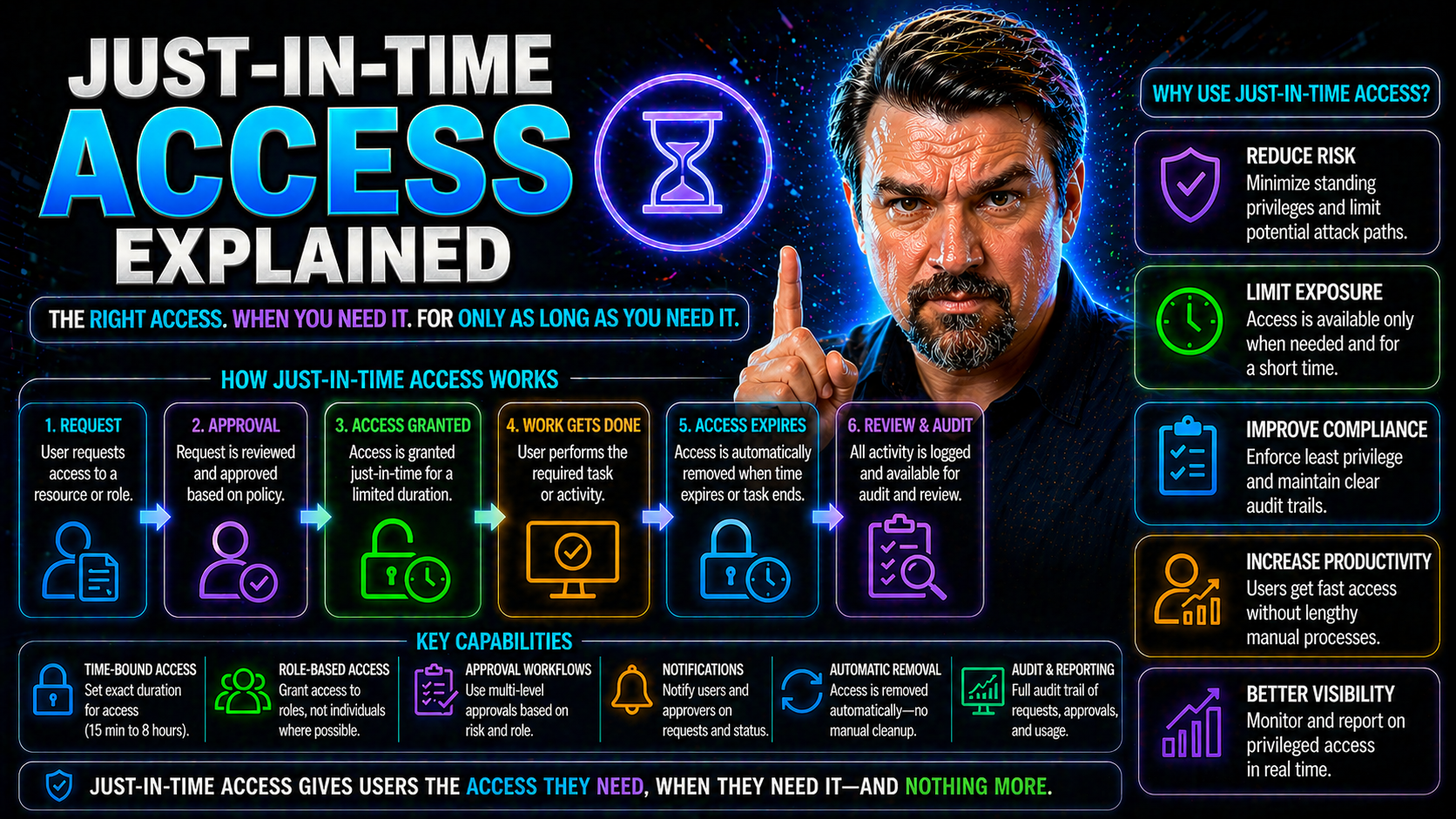
Just-in-time (JIT) access is changing the game for how companies manage digital identities and permissions. Instead of granting users standing, always-on privileges, JIT delivers access only when needed, for just as long as it’s required. This shift is especially relevant in Microsoft environments, where sprawling permissions can mean big security headaches.
This guide breaks down the real meaning and mechanics of JIT access, examining why it’s such a leap forward in keeping data safe and operations efficient. By exploring key benefits, comparing models, and detailing practical steps for integration, you’ll get a 360-degree view of how JIT strategies—powered by tools like Entra ID—can make your Microsoft ecosystem tighter and more secure. Whether you’re new to access control or managing a fleet of privileged accounts, understanding JIT is crucial for a modern, secure, and efficient IT strategy.
Understanding Just-in-Time Access and Its Benefits
If you’ve ever wondered why so many cyberattacks succeed, it often comes down to over-permissioned accounts and out-of-date access grants. Just-in-time access is designed to address exactly this challenge, by redefining how, when, and why users receive privileged access. Unlike older models—where permissions linger long after they’re needed—JIT focuses on minimizing the window of opportunity for threats to slip in.
This section builds your understanding of the foundational ideas behind JIT access. It draws a clear line from legacy “always on” permissions to more dynamic, request-driven models that aim to keep your environment nimble and protected. Before diving into the nuts and bolts of request workflows and technology, it showcases the big-picture reasons why this change is necessary—especially in a world of rapid cloud adoption and evolving cyber threats.
Whether you’re supporting a bank, a hospital, or an enterprise development team, knowing the core concepts of JIT prepares you to confidently advocate for (and design) smarter identity and access management solutions. Up next: a deeper look at what just-in-time access really means, and how it’s shaking up the status quo in Microsoft-focused organizations.
What Is Just-in-Time Access? Key Benefits and Core Ideas
Just-in-time access is a security model where permissions are granted to users—or systems—only when absolutely necessary and strictly for the time they’re needed. Instead of giving standing privileges that hang around for weeks, months, or even years, JIT access enforces temporary, need-based entitlements. Once the job is done, access is automatically revoked, reducing risk and complexity.
This approach is rooted in the principle of least privilege, which means people (and apps) get only the minimum access required—nothing more, nothing less. JIT access borrows this thinking, but adds a time limit. Why is that such a big deal? Because most breaches happen when someone exploits permissions that should’ve been removed long ago. By limiting access windows, JIT makes it much harder for attackers to find a door left unlocked.
The real benefit is in how security and productivity get along. JIT access reduces chances of unauthorized exposure, supports audit requirements, and lightens the load on IT, all while letting users get what they need—when they need it. For Microsoft environments, this means easier integration with tools like Entra ID, streamlined compliance, and modern controls that match the pace of business and risk.
How Just-in-Time Access Control Works in Practice
Putting JIT access into action starts with an access request. Say a user needs to perform a sensitive task—like changing a configuration in Microsoft Azure. Instead of handing them the keys permanently, the JIT system triggers an approval workflow. This typically involves submitting a request, sometimes with a justification, for elevated rights. Approvers (often managers or security leads) review and either grant or deny the request.
Once approved, the system—integrated with platforms such as Entra ID—automatically provisions access for a limited period. Every action is logged for compliance and auditing. When the timer runs out, or the user finishes early, these privileges are deprovisioned without anyone needing to remember to remove them. This workflow is the backbone of effective JIT access control in Microsoft clouds.
Modern JIT solutions add an extra layer by using dynamic, context-aware criteria. For example, policies may require multi-factor authentication, check device health, or deny access outside business hours. Microsoft’s Entra ID and Conditional Access policies (learn more about identity governance here) help automate these checks, making security tight but unobtrusive. In high-risk scenarios, extra approval or real-time session monitoring might be triggered, especially if automation detects unusual activity that could indicate a threat.
The Business Value of Just-in-Time Access
Switching to just-in-time access is not just a technical upgrade—it’s a strategic move with measurable value. For organizations managing sensitive data or operating under strict regulatory regimes, reducing standing privileges means shrinking both the attack surface and audit headaches. Decision-makers appreciate how JIT access closes security gaps attackers often exploit while also satisfying requirements from frameworks like HIPAA, SOX, and GDPR.
At a high level, JIT access makes security proactive rather than reactive. It helps ensure access is only available at the right moment, to the right person, for the right reason. The result? Fewer opportunities for privilege misuse, lower risk of costly breaches, and a dramatic improvement in operational efficiency thanks to automation. Compliance officers, in particular, benefit from simplified audit trails and clear records of who had access, when, and why.
As you continue through this section, you’ll see how these business benefits play out in practical terms—through risk reduction, easier audits, and improved day-to-day operations for both users and IT.
How Just-in-Time Access Reduces Identity Surface and Prevents Privileged Misuse
- Eliminates Standing Privileges: JIT ensures privileged access can’t sit unused or be forgotten. This tightens control over sensitive systems and prevents the usual issues with accounts that quietly accumulate high-risk permissions. Attackers love sleeping accounts; JIT makes those a rarity.
- Reduces Opportunity for Credential Theft: With fewer “always-on” privileged credentials, there’s less for attackers to steal. If a threat actor compromises an account, the window for misuse is narrow, making breaches significantly less damaging.
- Limits Both Human and Non-Human Identity Exposure: Not only does JIT protect users, it also secures automated accounts and service principals. Solutions like Microsoft Entra Workload Identities excel here, replacing static service accounts with governed, temporary permissions for automation and bots.
- Enforces Consistent, Automated Approvals: Access grants require a documented process, reducing “backdoor” permissions and the risk of unauthorized elevation. Incidents of accidental over-permission slip dramatically, and every access grant is visible in audit logs, which also makes attacks via shadow IT and rogue apps easier to detect. Learn more about managing shadow IT in Microsoft environments.
- Supports Zero Trust by Default: JIT’s request-driven flow and automated removal embody zero trust—never trust, always verify, and never let permissions linger. This modern mindset leads to real, quantifiable reductions in both identity risk and the chance of data breaches.
JIT Access Streamlines Compliance Auditing and Drives Operational Efficiency
- Clear, Complete Audit Trails: Every access request, approval, and removal is tracked, making compliance audits easier to manage. Using tools like Microsoft Purview Audit, organizations can demonstrate who accessed what, why, and when—supporting HIPAA, SOX, GDPR, and more.
- Automated Processes Reduce Human Error: Manual tracking is replaced with automated workflows, cutting the risk of misconfigurations or missed deprovisioning steps and making day-to-day operations more efficient.
- Lower Cost of Compliance: By minimizing manual checks and improving record precision, Microsoft environments equipped with JIT make it easier to comply with various frameworks, while helping you avoid the drift and hidden risks detailed in this discussion on compliance drift.
Comparing JIT Access with Traditional and Related Models
Understanding just-in-time access is easier when you stack it up against the models that came before it. Traditional access management relied on long-term, static permissions, which are notoriously easy to lose track of and dangerous if misused. Over time, attempts to tighten access led to approaches like just-enough-access (JEA) and Privileged Access Management (PAM), each bringing their own strengths and trade-offs.
This section sets up a fair comparison between these models to clarify why JIT is gaining ground so quickly in organizations that need watertight defenses—especially those deeply invested in Microsoft 365 and Azure. We’ll break down the core differences, demystify how JIT and JEA play together, and spotlight why shifting away from standing access is a smart bet in today’s threat landscape. The goal? Help you map out which mix of strategies best fits your unique needs.
JIT Versus Traditional Access Control: Key Differences
- Standing vs. Temporary Privileges: Traditional models give long-term access; JIT is strictly time-bound, slashing risk.
- Risk Exposure: Always-on access creates wide attack surfaces—JIT narrows them down dramatically.
- Auditability: JIT creates precise records for every access event, supporting compliance and easier investigations, while legacy systems rely on static logs that are often incomplete.
- Integration with Modern Security: JIT naturally fits zero trust strategies, as highlighted in approaches like Zero Trust by Design in Microsoft 365, whereas traditional access struggles to keep up with adaptive security policies and session controls.
How Just-in-Time and Just-Enough-Access Differ in Modern Access Strategies
- Scope vs. Timing: Just-in-time (JIT) limits the duration of access; Just-enough-access (JEA) restricts permissions to the lowest necessary level. Both enforce the principle of least privilege but from different angles.
- Complementary Tools: JEA cuts down the power a user or process holds at any time, while JIT ensures that even those limited powers aren’t sitting around open to abuse when not needed.
- Zero Trust Alignment: In Microsoft 365, using both together supports zero trust strategies—JIT handles “when,” JEA handles “what.”
- Policy Complexity: JIT focuses on approval workflows and timing; JEA relies more on detailed role definitions and entitlement management.
Components, Capabilities, and Integration of JIT Access
Implementing just-in-time access requires a blend of technology, automation, and policy enforcement—all coming together to control who gets what access, for how long, and under what circumstances. At a foundational level, JIT systems need tools to automate provisioning and removal, verify identity, and monitor sessions in real time. Modern solutions also leverage integrations and context signals to make access decisions smart and adaptable.
This section gives you a practical overview of what’s involved when planning or deploying JIT in Microsoft environments. You’ll see what technical pieces are required, which features matter most, and how integrations with key identity systems and platforms like Entra ID, Azure, and endpoint security can streamline the whole picture. If you’re considering JIT or looking to upgrade your access controls, this background prepares you for success with Microsoft-focused tools and policies.
Key Components and Capabilities: Automated Provisioning, Verification, Monitoring
- Automated Provisioning & Deprovisioning: JIT solutions handle granting and removing access automatically—from privileged roles in Entra ID to specific Azure resources—ensuring no manual tasks slip through the cracks.
- Identity Verification & Authentication: Before granting access, robust checks confirm user (or service) identity—often using multi-factor authentication or risk-based controls. This step limits chances for compromised credentials to slip through, and responds to advanced attack vectors like OAuth consent abuse. See the risks and controls explained for Entra ID OAuth consent.
- Session Monitoring & Termination: Modern JIT platforms actively watch privileged sessions. If a session goes sideways, or risky behavior is spotted, access can be terminated instantly, preventing escalation or data exfiltration mid-stream.
- Centralized Credential Management: All credentials and entitlements are centrally controlled—reducing sprawl and shadow admin rights that can sneak in when different apps are managed separately. This is essential for areas like Power Platform, where good governance stops data leakage and risk, discussed in depth here: Power Platform security and governance best practices.
- Comprehensive Audit Logging: Every access event is meticulously logged, making it simple to satisfy auditors, spot unusual trends, and respond rapidly to incidents. These records are especially critical in regulated industries.
Integrating Just-in-Time Access with Identity and Security Tools
- Active Directory and Entra ID: JIT access works hand in hand with Microsoft identity solutions to enforce temporary permissions, leveraging Conditional Access and approval workflows. Secure and scalable governance, as outlined in this Entra ID governance discussion, ensures policies don’t drift or become unmanageable.
- Cloud and Hybrid Infrastructure: Integration with Azure Policy, RBAC, and Privileged Identity Management (PIM) centralizes control and automates enforcement. For governance by design, get insights at Azure enterprise governance strategy.
- Endpoint and Threat Detection: Linking JIT access with endpoint protection and SIEM solutions allows instant revocation and incident playbooks if a threat is detected, further tightening defenses.
Real-World Use Cases, Risks, and Best Practices for JIT Access
Understanding just-in-time access in theory is one thing—but real value comes to light when you see it at work in actual business scenarios. Different industries have unique compliance hurdles and operational needs, making it crucial to get policy right for healthcare, finance, DevOps, and beyond. At the same time, knowing what can go wrong and how to avoid common pitfalls gives your JIT deployment the best shot at success.
This section dives into grounded examples, typical risks, and proven best practices for managing JIT in Microsoft environments. By showcasing what’s unique in each sector, common project challenges (from user pushback to tool integration), and practical guidance for policy, risk, and auditing, you’ll get both strategic and hands-on insights to shape an effective access management plan—no matter how complex or sensitive your environment may be.
JIT Access in Healthcare, Finance, and DevOps Cloud Environments
- Healthcare (HIPAA-Sensitive Access): JIT can provide on-demand access to electronic medical records (EMRs) for clinicians responding to emergencies, ensuring that only those with an immediate need can view sensitive data. Temporary permissions reduce exposure risks when doctors or researchers change roles or teams, directly supporting HIPAA’s principle of minimum necessary access.
- Finance (Fraud and Insider Risk Management): JIT access models limit the amount of time and scope for financial employees to execute high-risk tasks like fund transfers, supporting anti-fraud controls and regulatory expectations (SOX, PCI-DSS). Automated provisioning and deprovisioning protects critical systems and makes auditing straightforward for compliance teams. Data governance also improves, as described in Microsoft 365 data access ownership governance.
- DevOps and Cloud Automation: Fast-moving DevOps teams benefit from ephemeral, just-in-time “build agent” permissions for deployment pipelines. Instead of leaving static credentials hardcoded in CI/CD tools, JIT provides temporary secrets or tokens, which vanish when work completes—drastically lowering the risk of a breach via code repositories or automation scripts.
- Third-Party and Contractor Scenarios: External consultants and partners gain short-lived, auditable permissions for project-based work—meaning their access vanishes after the project, reducing long-lasting risk and compliance headaches.
- AI and Automation Agents: With AI tools (like Copilot or Bots) gaining increased data access, JIT policies ensure these non-human identities only operate when expected, never indefinitely. This approach closes gaps left open by legacy automation and unmanaged environments prone to “orphaned” access.
Common Risks and Implementation Challenges
- Policy Complexity: Overly intricate or unclear policies can confuse users and admins, leading to misconfigurations and missed access removals. This is amplified with autonomous AI and automation agents, which can quickly slip outside governance, as seen with tools like Microsoft Copilot—learn more about these risks in Agentageddon.
- User Resistance: Employees sometimes push back against new approval workflows or perceive JIT as slowing them down, risking the rise of shadow IT or workarounds.
- Integration Hurdles: Connecting JIT with legacy systems, custom applications, or cloud platforms adds extra setup challenges and potential weak spots.
- Audit Gaps: Incomplete or inconsistent audit logging—especially for new AI-driven services—can leave security teams blind to privilege abuse, creating compliance and data exposure risks. For AI and shadow IT governance, see Microsoft Foundry and Purview.
Best Practices for Implementing Just-in-Time Access
- Start With Clearly Defined Access Policies: Collaborate with stakeholders to draft rules for who can request what, when, and under which circumstances. Account for both human and non-human users—and revisit policies regularly as business needs change.
- Automate Where Possible: Use platform tools (like Entra ID, Conditional Access, and PIM) to automate approvals, provisioning, and audit trails. Automation reduces human error and supports continuous compliance checking, as shown in Microsoft Defender for Cloud.
- Apply Ongoing Risk Assessments: Regularly review the threat landscape and internal access logs—using advanced auditing solutions like Microsoft Purview—to ensure policies actually reduce risk.
- Enforce Regular Audits and Reviews: Set automatic reminders for periodic access reviews and deprovisioning, making stale permissions a thing of the past.
- Empower Users With Training & Change Management: Communicate the “why” behind JIT to reduce resistance, and roll out hands-on training for security teams, managers, and end users to promote adoption.
- Monitor Productivity Impact and Workflow Usability: Keep an eye out for friction in the request/approval process to avoid creating pressure for shadow IT or risky workarounds.
Frequently Asked Questions About JIT Access
There’s no shortage of questions when you start rolling out just-in-time access. Teams want to know how JIT interacts with other security models, whether it’s strictly for admins, or if it means their PAM tool is obsolete. This section gathers the most common queries—providing direct, expert-vetted answers that help demystify how JIT fits in the broader world of identity and access management.
Look for straightforward definitions, clarifications about limitations, and advice on getting real value from JIT in your Microsoft ecosystem. Whether you’re a technical lead, compliance officer, or executive seeking a fast refresher, these Q&As are designed to tackle the nuts-and-bolts questions without burying you in jargon or vendor hype.
The most important terms and acronyms get clear definitions in the following glossary, supporting readers at all levels in grasping the key language and principles that drive JIT and modern identity security.
Glossary: Key Just-in-Time and Identity Security Terms
- Ephemeral Accounts: User or system accounts created and deleted automatically for temporary access, limiting long-term risk.
- Principle of Least Privilege: Security best practice that only grants the minimum required permissions for a given role or task, reducing unnecessary risk.
- Standing Privilege: Persistent, broad access rights assigned to users or systems—often the main target for attackers.
- Privileged Access Management (PAM): Set of tools and processes to control, monitor, and audit access to high-value accounts and systems—JIT is often a feature or add-on to PAM solutions.
- Conditional Access: Automated policies in Microsoft environments that determine access based on user status, location, device health, and more, enforcing dynamic approval for sensitive assets.
Conclusion: The Future of Just-in-Time Access in a Zero Trust World
As threats accelerate and regulations tighten, just-in-time access is moving from “nice to have” to strategic necessity—especially for organizations embracing Zero Trust and digital transformation. Industry analysts report that shifting to time-bound privileges can reduce the attack surface by up to 80%, while Microsoft’s own guidance positions JIT as a core building block of secure cloud operations.
Expert consensus holds strong: aligning with NIST SP 800-207 and frameworks like Zero Trust by Design in Microsoft 365 requires continuous verification, adaptive controls, and context-driven access—in other words, everything JIT delivers. Balancing security with user productivity, as discussed in Zero Trust vs. User Freedom, rests on getting just-in-time strategies right. Expect JIT to remain a cornerstone of security-first organizations for years to come.
Further Resources and Guides for Identity Protection
- Microsoft’s Official Documentation: Always keep current with Microsoft’s identity protection docs, with step-by-step JIT and Entra ID guidance.
- Podcasts and Practical Guides: For advanced strategies, dive into practical tips on AI agent governance, Copilot controls, and DLP policies at Advanced Copilot Agent Governance.
- Identity Protection Overviews: Find tutorials and checklists for building a high-assurance identity system using Microsoft and Azure tools in this identity protection guide (if available).
- Ongoing Learning: Track new threats, audit techniques, and industry-specific security news to keep your JIT and identity protection knowledge razor-sharp.
You Should Also Listen To
If you are researching just-in-time access, these episodes add practical context on identity security, governance, privileged access, and implementation:
- Microsoft Defender XDR – Simply Explained — Connect identity governance with security signals, investigation, and response.
- Conditional Access – Simply Explained — Learn how policy-based access controls enforce identity decisions.
- Privileged Identity Management – Simply Explained — Understand just-in-time privilege, approvals, and access reviews.
- Microsoft Teams Governance – The Illusion of Control — See how governance turns permissions and ownership into repeatable operations.

Microsoft MVP | Host of M365.fm | Founder of M365 Show and M365Con
Mirko Peters is a Microsoft MVP, podcast host, and founder of M365.fm, M365 Show, and M365Con. His work connects Microsoft practitioners through podcast interviews, livestreams, and community events.
At M365.fm, Mirko hosts conversations with Microsoft MVPs, product experts, architects, and community contributors. Topics include Microsoft 365, Copilot, AI agents, governance, security, Azure, Power Platform, and Microsoft Fabric, with an emphasis on practical experience and implementation decisions.
M365.fm is the podcast and learning platform. M365 Show brings experts together for livestreams, while M365Con provides an online conference setting for community learning.
Official website: Mirko Peters (https://www.mirkopeters.com/). Recognition: Mirko Peters — Microsoft MVP profile (https://mvp.microsoft.com/de-DE/mvp/profile/9b0ca797-db5a-493a-a845-8b9158046cf5). Connect on LinkedIn (https://www.linkedin.com/in/m365showpodcast/).





