
Managed Identities vs App Registrations in Azure: Key Differences and Best Practices
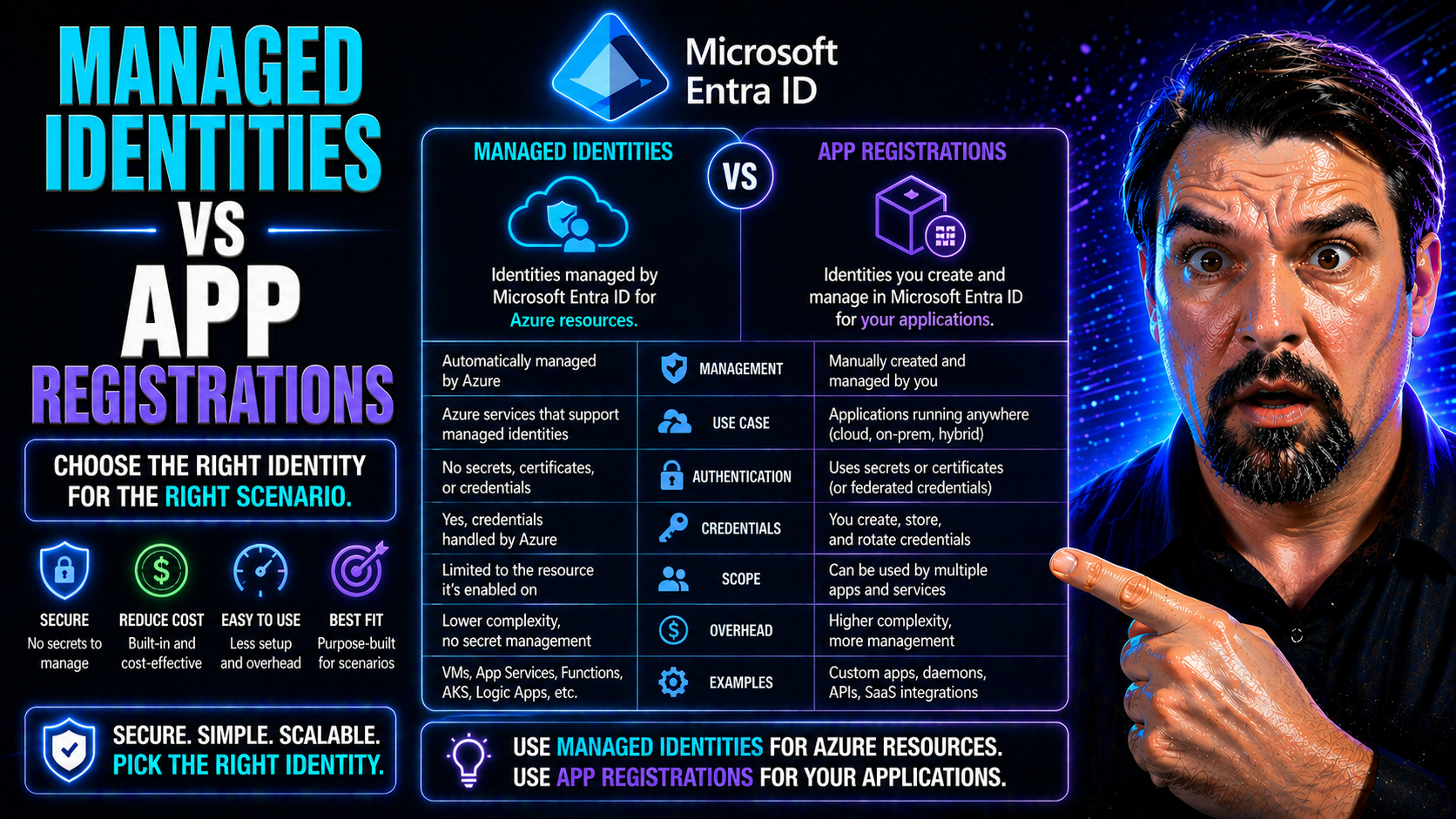
If you’re building or securing anything serious in Azure these days, wrapping your head around managed identities and app registrations isn’t optional—it’s table stakes. Both play huge roles in identity and access management for your apps, automations, and services. But mix up which model fits where, and you’ll wind up with unnecessary headaches, security gaps, or way too much secret management.
This guide breaks down what managed identities and app registrations are, how they hook into Entra ID (formerly Azure AD), and why picking the right approach matters for your security posture and daily operations. Expect no-nonsense definitions, practical scenarios, migration smarts for ditching secrets, and actionable tips for troubleshooting and governance. The focus: helping you run a tighter, safer, and more efficient Microsoft cloud—especially as attacks grow and Entra ID best practices shift.
Understanding Managed Identities and App Registrations
Let’s kick things off by getting clear on what managed identities and app registrations actually do in Azure and Entra ID. Both are ways for non-human actors—like apps, scripts, or automations—to authenticate and access stuff in the Microsoft cloud. But how they do it, and the day-to-day headaches they solve (or cause), are pretty different.
Managed identities are Azure’s answer to secretless authentication. Instead of dealing with app passwords and certificates, you can give an Azure resource (think: virtual machine, App Service, Logic App) its own identity in Entra ID. This identity is automatically taken care of by Azure: it spins up when your resource is created, gets destroyed if you delete the resource, and—most importantly—never exposes you to plain old secrets swapping hands. Managed identities come in two flavors: system-assigned (one per resource, locked tight) and user-assigned (reusable across multiple resources).
App registrations are the classic approach. Registering an app in Entra ID creates an application object and hands you a client ID, with optional secrets or certificates for authentication. If your app needs to sign in to Microsoft services, access the Graph API, or work outside of Azure (or as more than just one resource), you’ll likely use an app registration. But—you’re on the hook for managing its secrets, security, and lifecycle, which comes with some trade-offs.
Understanding which tool to pick isn’t just a technical decision. It’s a security risk calculation: secrets are juicy targets for attackers, while secretless managed identities cut out whole classes of vulnerabilities. If you want a glimpse into why this matters, check out this deep dive into Entra ID OAuth consent abuse. Attackers know how to persist in environments that get the basics wrong—so getting identity right is step one.
Core Differences: Lifecycle, Security, and Azure Integration
Here’s where theory meets reality. Managed identities and app registrations both hand apps or scripts their digital “name tags,” letting them access resources. But how you get that tag, care for it, and clean up after it varies—a lot.
Managed identities are as close to “set it and forget it” as the cloud gets. Create an Azure resource, ask for a managed identity, and you’re done—Azure spins up the identity for you, plumbs it into Entra ID, and keeps the back-end synced. Delete the resource, and the identity vanishes too. There’s zero secret management, no password rotations, and security teams sleep better.
App registrations require a much heavier lift. You manually create the app registration in Entra ID, keep track of its client ID, and generate secrets or certificates for authentication. Over time, those secrets expire (or can leak), and it’s on you to audit which apps are using them. Rotating secrets, tracking expiring credentials, and cleaning up orphaned registrations is a job in itself—which is why security teams always ask about lifecycle automation.
When it comes to security, the contrast is clear: managed identities use secretless authentication tied to Azure resources, while app registrations lean on static secrets or certs. That’s why managed identities are favored wherever secrets are a risk—or where automation is king.
These lifecycle and security contrasts have big implications for automation, compliance, and keeping cloud environments tight. If you want to see how governance policies and controls play into identity sprawl and security drift, take a look at this guide on Azure governance strategy—it’s a must-read for anyone responsible for large, growing Azure estates.
Service Principals, RBAC Roles, and Microsoft Graph Permissions
Now, let’s peel back the curtain a bit. Under the hood, both managed identities and app registrations make use of service principals in Entra ID. Think of a service principal as the real, working identity Entra ID knows about—whether it comes from a managed identity or an app registration, it’s this object that gets permissions and access in your tenant.
For app registrations, when you drop in a new app, Entra spins up a matching service principal for each tenant you assign it to. This is the identity you’ll use to hand out Azure RBAC roles, like Contributor or Reader, and to grant Graph API permissions—whether delegated or application-level.
Managed identities are slightly different but built on the same bones. Enabling a managed identity for an Azure resource tells Entra to create a special-purpose service principal that lives and dies with the resource. You then assign RBAC roles (like Key Vault Reader) straight to this identity, and the resource gets token access behind the scenes—no code changes, no secrets flopping around.
Granting permissions is where the rubber meets the road. Both models use Azure’s RBAC for resource-level access, but the way you grant Graph permissions diverges. App registrations let you approve Graph API access through explicit consent or admin approval; managed identities can be given application permissions to Graph without interactive sign-in, making them perfect for automation that needs to fetch user data, audit security, or trigger workflows.
Assigning access and monitoring compliance for these identities isn’t exactly “set it and forget it,” though. Tight RBAC role assignment, regular audits, and leveraging tools like Microsoft Defender for Cloud help you keep tabs on who’s doing what, spot misconfigurations, and keep drift to a minimum. Deep-dive on identity governance? Don’t miss this guide to Azure enterprise governance or this explainer on compliance monitoring in Microsoft Defender for Cloud for pro tips on continuous security.
Choosing the Right Model: Scenarios, Migration, and Governance
All that background’s important, but here’s what most teams actually want to know: When do you use managed identities versus app registrations? And how do you migrate or govern these identities so things don’t go sideways as you scale?
Managed identities shine for workloads running directly inside Azure that only need access within the same tenant—think VMs running scripts, App Services talking to Key Vault, or Logic Apps querying the Microsoft Graph. The security is better, the setup is quicker, and there’s less secret management to mess with. But if you’re running SaaS, multi-tenant solutions, or hybrid setups (like on-premises apps crossing over to cloud APIs), app registrations are still the go-to because of their flexibility and broader compatibility.
Migration from app registrations to managed identities is a hot topic. The process starts with a readiness assessment: What workloads can actually make the switch, and what dependencies or limitations exist? For applications already built on app registrations, you’ll want to phase things in, test thoroughly, and have fallback plans to prevent downtime or authentication surprises.
Hybrid and multi-cloud environments demand a little creativity. Sometimes, you have to use both models together—a practice called hybrid identity. The trick is to minimize secrets, limit permissions, and clearly document which identity does what. And yes, regular audits are a must to spot stale or orphaned identities that create hidden risks.
Strong governance policies pull the whole strategy together. Using Azure Policy, Privileged Identity Management, and routine compliance checks ensures you’re enforcing least privilege, catching drift, and aligning with zero trust. For a reality check on service accounts versus true workload identities (and why old-school approaches fall short), dig into this analysis of non-human identity risk and Microsoft Entra Workload Identities. Want all-around governance essentials? The enterprise governance strategy resource is packed with best practices.

Microsoft MVP | Host of M365.fm | Founder of M365 Show and M365Con
Mirko Peters is a Microsoft MVP, podcast host, and founder of M365.fm, M365 Show, and M365Con. His work connects Microsoft practitioners through podcast interviews, livestreams, and community events.
At M365.fm, Mirko hosts conversations with Microsoft MVPs, product experts, architects, and community contributors. Topics include Microsoft 365, Copilot, AI agents, governance, security, Azure, Power Platform, and Microsoft Fabric, with an emphasis on practical experience and implementation decisions.
M365.fm is the podcast and learning platform. M365 Show brings experts together for livestreams, while M365Con provides an online conference setting for community learning.
Official website: Mirko Peters (https://www.mirkopeters.com/). Recognition: Mirko Peters — Microsoft MVP profile (https://mvp.microsoft.com/de-DE/mvp/profile/9b0ca797-db5a-493a-a845-8b9158046cf5). Connect on LinkedIn (https://www.linkedin.com/in/m365showpodcast/).




