Mastering Azure Event Hubs: Partitions, Consumer Groups, and Scaling
Welcome back to our ongoing exploration of cloud architecture and real-time data engineering. In the world of modern enterprise applications, the volume of data generated by users, IoT devices, microservices, and log aggregators is staggering. Organizations no longer just store data for batch processing overnight; they need actionable insights right now. To meet this demand, cloud architects turn to robust event streaming platforms. If you are building solutions within the Microsoft Azure ecosystem, Azure Event Hubs stands out as the premier fully managed service for ingestion at scale.
In this comprehensive guide, we are going to dive deep into the core architectural components that make Azure Event Hubs tick. We will break down how partitions allow for massive parallel processing, explore how consumer groups enable multiple applications to read the same stream without stepping on each other's toes, and examine scaling strategies like throughput units and auto-inflation. Whether you are architecting a financial fraud detection system or a global telemetry pipeline, understanding these foundational concepts is critical to your success.
If you prefer an auditory deep dive, be sure to check out our related podcast episode on Azure Event Hubs - Simply Explained, where we break down these architectural patterns in clear, practical language.
Introduction to Azure Event Hubs Architecture
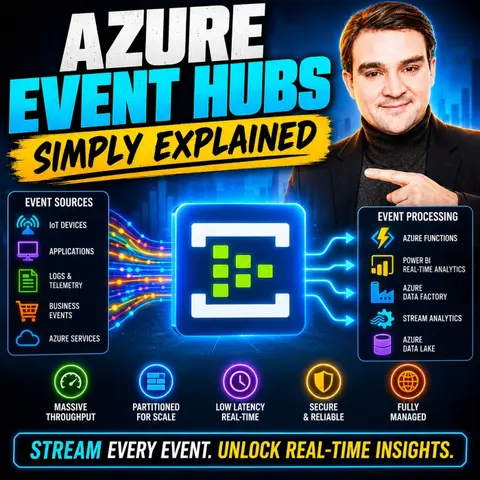
At its core, Azure Event Hubs is designed as a massively scalable event ingestion engine. It can receive and process millions of events per second with ultra-low latency, serving as the front door for big data pipelines in the cloud. Think of it as a giant, highly organized parking garage for data packets. Producers—such as mobile apps, server logs, or factory sensors—drop their payloads into the hub, and consumers—such as Azure Stream Analytics, Azure Functions, or custom worker services—pick them up for processing.
Unlike traditional message queues that store messages until an individual consumer acknowledges them (at which point the message is removed), Azure Event Hubs operates on a streaming model. Data is appended to an immutable log. This means multiple downstream systems can read the exact same data stream independently, at their own pace, without destroying the data for other readers. To handle the sheer velocity of modern workloads, Event Hubs relies on a distributed architecture built around two fundamental concepts: partitions and consumer groups.
Understanding Partitions for Parallel Processing
If you want to achieve high throughput, you cannot funnel all your incoming data through a single processing bottleneck. This is where partitions come into play. A partition is essentially a distinct sequence of events held within an event hub. When you create an event hub, you must specify the number of partitions, which typically ranges from 2 to 32 for standard tiers, though much higher limits are available for dedicated environments.
When producers send events, they can include a partition key—such as a device ID, a user ID, or a transaction region. Event Hubs takes a hash of this key and routes the event to a specific partition. This guarantees that all events sharing the same key always land in the exact same partition, preserving strict ordering for related data.
The true magic of partitions lies in parallel processing. By dividing the total data stream into multiple independent slices, multiple consumer instances can read from different partitions simultaneously. For example, if your event hub has 16 partitions, you can deploy a consumer application with 16 distinct reader instances, each dedicated to a single partition. This horizontal scaling model ensures that your data processing capability grows linearly as your workload increases.
Leveraging Consumer Groups for Independent Data Consumption
In a complex enterprise environment, a single data stream is rarely used by just one team. Your security operations center might want to scan logs for anomalies, your data science team might want to feed telemetry into a machine learning model, and your billing department might want to track usage metrics—all from the exact same incoming event stream.
Azure Event Hubs solves this challenge through consumer groups. A consumer group represents a complete view of an entire event hub. It acts as a cursor or a bookmark collector. By creating multiple consumer groups, multiple consuming applications can concurrently read the event stream from the beginning to the end independently.
Because each consumer group maintains its own separate offset—or pointer—indicating which events have already been read, consumer application A can be processing events in real time, while consumer application B can be lagging behind or replaying historical data from earlier in the day, all without interfering with one another. This decoupling of producers and consumers is what makes Event Hubs such a versatile integration hub for modern enterprise architectures.
Scaling Strategies: Throughput Units, Processing Units, and Auto-Inflation
Managing capacity effectively is one of the most important responsibilities of a cloud architect. Azure Event Hubs provides flexible pricing tiers and scaling mechanisms to ensure your architecture remains performant and cost-effective under varying loads.
For the Standard tier, capacity is measured in Throughput Units (TUs). A single Throughput Unit grants you 1 MB/s of ingress and 2 MB/s of egress, along with up to 1,000 incoming events per second per TU. If your traffic spikes, manual scaling can be tedious and prone to human error. Fortunately, Event Hubs features a native auto-scaling capability known as Auto-Inflate.
When Auto-Inflate is enabled, Azure automatically scales up the number of Throughput Units based on your traffic load, preventing throttling and ensuring your ingestion pipeline never drops packets during unexpected surges. For organizations requiring dedicated, isolated compute resources with predictable performance guarantees, the Premium and Dedicated tiers introduce Processing Units (PUs), offering higher limits, no noisy-neighbor interference, and enterprise-grade isolation.
Data Reliability, Retention, and Disaster Recovery
When dealing with high-velocity telemetry and critical business logs, data loss is simply not an option. Azure Event Hubs incorporates robust mechanisms to guarantee data durability and high availability.
Data written to Event Hubs is replicated across multiple fault domains within an Azure region by default. Furthermore, the Standard tier retains data for up to 7 days, while Premium and Dedicated tiers extend retention up to 90 days. This retention window allows applications to recover from extended outages by replaying data from a specific point in time.
For mission-critical applications that require protection against regional outages, Azure provides Geo-Disaster Recovery and geo-replication features. By pairing a primary namespace with a secondary namespace in a paired Azure region, organizations can fail over their data pipelines rapidly in the event of a disaster, satisfying stringent Recovery Time Objectives (RTO) and Recovery Point Objectives (RPO).
Comparing Azure Event Hubs, Service Bus, and Apache Kafka
Architects often struggle to choose the right messaging service in Azure because the portfolio includes several powerful options. To make the right choice, it helps to understand how Event Hubs compares to Azure Service Bus and Apache Kafka.
Azure Service Bus is designed for enterprise messaging patterns, focusing on robust guarantees like transactions, dead-lettering, sessions, and complex pub/sub routing for relatively moderate volumes of data. In contrast, Azure Event Hubs is purpose-built for massive telemetry ingestion and high-throughput stream processing. If you need to process millions of lightweight events per second, Event Hubs is far more cost-effective and performant than Service Bus.
When compared to open-source Apache Kafka, Azure Event Hubs offers a distinct operational advantage: it is fully managed. You do not need to manage clusters, configure Zookeeper, or handle OS patching. Event Hubs even provides a Kafka-compatible endpoint, allowing existing Kafka applications to connect to Azure Event Hubs with minimal code changes, giving you the best of both worlds.
Best Practices for Designing Robust Streaming Pipelines
Designing an enterprise-grade streaming pipeline requires careful planning and adherence to established best practices. To wrap up our architectural exploration, keep these key recommendations in mind:
- Plan Your Partition Count Carefully: Remember that while you can scale throughput units dynamically, the number of partitions is fixed when you create an event hub. Choose a partition count that accommodates future growth without introducing unnecessary coordination overhead.
- Choose the Right Partition Keys: Use meaningful partition keys to ensure even distribution of data across partitions, avoiding "hot partitions" where a single key monopolizes resources.
- Implement Robust Error Handling: Build retry policies and dead-lettering mechanisms into your consumer applications to handle poison messages and transient network failures gracefully.
- Monitor for Throttling: Use Azure Monitor to track metrics such as incoming requests, throttled requests, and partition health, ensuring your application stays well within its provisioned limits.
By mastering partitions, consumer groups, and scaling strategies, you can build streaming pipelines that are not only lightning-fast but also resilient, scalable, and ready to handle whatever data volume your organization encounters.
In this blog post, we explored the foundational architecture of Azure Event Hubs, detailing how partitions enable parallel execution, how consumer groups decouple independent workloads, and how auto-scaling mechanisms keep your applications running smoothly under pressure. To get started, spin up an Event Hubs namespace in the Azure portal, configure your first consumer group, and hook up a stream processor.
To deepen your knowledge and hear real-world discussions on this topic, make sure to listen to our dedicated podcast episode: Azure Event Hubs - Simply Explained. Embrace the power of real-time data streaming and transform your organization's data engineering workflows today! 🚀
FAQ
What is Azure Event Hubs?
Azure Event Hubs is a fully managed, high-throughput event streaming platform capable of ingesting and processing millions of events per second with low latency, making it ideal for modern real-time data pipelines.
How do partitions work in Azure Event Hubs?
Partitions divide the overall data stream into independent sequences. Producers route events to partitions using a partition key, enabling multiple consumer instances to read data in parallel and maximize processing throughput.
What is the difference between an Event Hub and a Consumer Group?
An event hub is the central log storage for incoming events, while a consumer group represents a distinct view of that event stream. Multiple consumer groups allow different applications to read the same data independently without interfering with each other.
Can I scale Azure Event Hubs automatically?
Yes. By enabling the Auto-Inflate feature on Standard tier namespaces, Azure automatically increases your provisioned Throughput Units as your traffic load grows, preventing performance throttling.
How long is data retained in Azure Event Hubs?
Data retention depends on your pricing tier. The Standard tier retains data for up to 7 days, whereas Premium and Dedicated tiers allow for data retention of up to 90 days.
Is Azure Event Hubs compatible with Apache Kafka?
Yes. Azure Event Hubs provides a Kafka-native endpoint, allowing existing Apache Kafka client applications and tools to communicate with Event Hubs without requiring a rewrite of your codebase.
🎧 Listen to this episode
Want a practical, spoken-word explanation of Azure Event Hubs? This episode breaks down the architecture in clear language and shows why it matters for modern cloud development, enterprise analytics, and scalable applications.
Listen to this episode if you want to:
- Understand the core mechanics behind Azure Event Hubs partitions and scaling
- See how streaming architectures fit into the wider Microsoft Azure ecosystem
- Learn where event streaming creates practical business value for your organization
You may also enjoy these related M365 FM episodes:
Discover more practical cloud and Microsoft conversations on M365 FM.
Last reviewed: July 2026.
Who Should Listen
This episode is essential for Azure administrators, enterprise architects, software developers, and technical leaders who need a solid, practical foundation before designing, governing, or operating real-time streaming architectures.
🎧 You Should Also Listen To
- Azure Event Grid — A practical next step for exploring reactive cloud messaging.
- Azure Service Bus — Learn when to use message queues versus event streams.
- Azure Functions — Discover how to process your event streams serverless-style.

Microsoft MVP | Host of M365.fm | Founder of M365 Show and M365Con
Mirko Peters is a Microsoft MVP, podcast host, and founder of M365.fm, M365 Show, and M365Con. His work connects Microsoft practitioners through podcast interviews, livestreams, and community events.
At M365.fm, Mirko hosts conversations with Microsoft MVPs, product experts, architects, and community contributors. Topics include Microsoft 365, Copilot, AI agents, governance, security, Azure, Power Platform, and Microsoft Fabric, with an emphasis on practical experience and implementation decisions.
M365.fm is the podcast and learning platform. M365 Show brings experts together for livestreams, while M365Con provides an online conference setting for community learning.
Official website: Mirko Peters (https://www.mirkopeters.com/). Recognition: Mirko Peters — Microsoft MVP profile (https://mvp.microsoft.com/de-DE/mvp/profile/9b0ca797-db5a-493a-a845-8b9158046cf5). Connect on LinkedIn (https://www.linkedin.com/in/m365showpodcast/).

Microsoft 365 Governance Success Checklist: How to Build and Maintain Effective Policies