


 Apple Podcasts
 Spotify
 Youtube Music
 Spreaker
 Podchaser
 Amazon Music
 Azure Event Hubs - Simply Explained
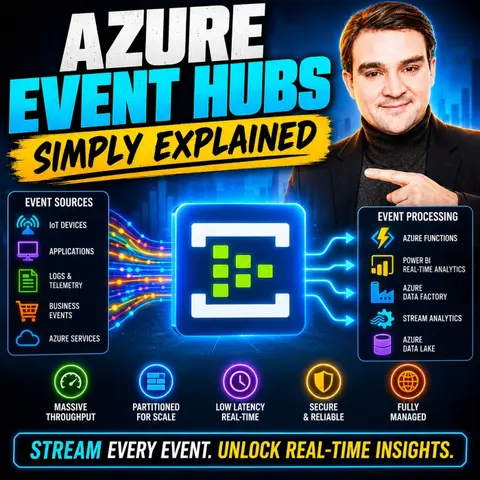

Azure Event Hubs is Microsoft's high-throughput event streaming platform, built to ingest and process millions of events per second with low latency. In this episode, we explain what Azure Event Hubs is, how it works, and why it's a critical service for modern cloud-native applications, IoT solutions, real-time analytics, and large-scale data pipelines. Whether you're collecting telemetry from connected devices, application logs, or streaming business events, Event Hubs provides the scalable foundation to move data in real time.
You'll learn the core concepts behind Event Hubs, including namespaces, partitions, consumer groups, offsets, and event retention. We also explore how Event Hubs integrates with Azure Functions, Azure Stream Analytics, Microsoft Fabric, Azure Data Explorer, Apache Kafka, and other analytics platforms to power real-time processing and insights. Along the way, we compare Azure Event Hubs with Event Grid and Service Bus so you'll understand when each messaging service is the right choice.
Whether you're a developer, cloud architect, data engineer, or preparing for an Azure certification, this episode explains Azure Event Hubs in simple, practical terms without unnecessary jargon. By the end, you'll understand how event streaming enables scalable, resilient applications and why Azure Event Hubs is a cornerstone of modern data-driven architectures and enterprise AI solutions.
Quick answer: Azure Event Hubs is a high-throughput event streaming service for ingesting telemetry, logs, and application events in real time. This episode explains partitions, consumer groups, retention, capture, and scaling decisions so teams can design robust streaming data pipelines.
Azure Event Hubs serves as a fully managed platform for real-time data streaming. It enables you to process and analyze vast amounts of data with minimal latency. This capability makes it essential for modern applications across various industries.
You will find Azure Event Hubs utilized in sectors like finance for fraud detection, retail for customer behavior analysis, and telecommunications for real-time analytics. The benefits of using Azure Event Hubs include:
| Benefit | Description |
|---|---|
| Low-latency event streaming | Optimized for high performance, enabling the handling of high-velocity data. |
| Stream large volumes of data | Capable of streaming millions of events per second. |
| Guaranteed consistent performance | Ensures a stable experience with minimized latency jitter. |
| Zero interference | Operates on a single-tenant architecture for dedicated resources. |
| Self-serve scaling | Allows you to adjust capacity based on your needs. |
With Azure Event Hubs, you can unlock the potential of real-time data.
Key Takeaways
- Azure Event Hubs is a fully managed platform for real-time data streaming, ideal for processing large volumes of data quickly.
- It supports high throughput, allowing millions of events to be processed per second, making it suitable for big data applications.
- The platform's partitioning feature enhances efficiency by enabling parallel processing of data streams.
- Azure Event Hubs ensures data reliability through strategies like geo-replication and disaster recovery, keeping your data safe.
- You can easily integrate Azure Event Hubs with other Azure services, enhancing your data processing capabilities.
- To optimize performance, monitor your Event Hubs and adjust settings based on your data flow needs.
- Getting started with Azure Event Hubs involves creating an Event Hub Namespace and setting up authentication with Azure AD.
- Consider exploring additional resources, like courses on Azure Event Hubs, to deepen your understanding and application of the platform.
Azure Event Hubs Overview
Key Features
Azure Event Hubs is a powerful cloud-based data streaming platform that allows you to ingest and process large volumes of data in real-time. Its architecture supports high-throughput data ingestion, making it ideal for applications that require immediate insights. Here are some of the key features that make Azure Event Hubs stand out:
- High Throughput: Azure Event Hubs can handle millions of events per second. This capability ensures that you can scale your applications without worrying about performance bottlenecks.
- Partitioning: The platform allows you to split data into multiple partitions. This feature enables parallel processing, which enhances throughput and efficiency.
- Consumer Groups: You can create multiple consumer groups to read the same event stream independently. This flexibility allows different applications to analyze the same data without interference.
- Scalability Options: Azure Event Hubs offers various scalability options, including throughput units and processing units. You can adjust these settings based on your data flow needs.
Here’s a quick overview of the scalability options available:
| Scalability Option | Description |
|---|---|
| Throughput Units (Standard) | 1 MB/s ingress and 2 MB/s egress per TU |
| Processing Units (Premium) | Dedicated resources for predictable performance |
| Partitions | Increases parallel processing; defined at creation |
| Auto-Scaling (Native) | Automatically increases Throughput Units based on load |
To ensure optimal performance, you should monitor for throttling. This practice helps prevent your Event Hubs namespace from becoming overloaded. Additionally, optimizing client configurations, such as increasing the prefetchCount, can minimize round trips and enhance data ingestion efficiency.
Azure Event Hubs also guarantees data reliability and durability. It employs several strategies to ensure that your data remains safe and accessible:
| Strategy | Description |
|---|---|
| Self-preservation and graceful degradation | Implement custom patterns to handle poison messages and protect traffic during recovery scenarios. |
| Disaster recovery strategy | Use geo-disaster recovery and geo-replication to provide regional failover capabilities and define RTO and RPO based on business needs. |
| Redundancy strategies | Add multiple redundancy layers, including availability zones and geo-replication, to eliminate single points of failure. |
Use Cases of Azure Event Hubs
Real-World Applications
Azure Event Hubs plays a crucial role in various industries by enabling real-time data streaming. Here are some common event hubs scenarios where organizations leverage this powerful platform:
- Telemetry and Logging Pipelines: Event Hubs serves as a central point for ingesting logs and metrics. This setup allows for real-time monitoring and alerting, ensuring that you can respond quickly to any issues.
- IoT Device Data Streaming: The platform handles data from numerous IoT devices. This capability enables real-time processing and supports machine learning applications, enhancing operational efficiency.
- Real-Time Fraud Detection: Organizations can detect and respond to fraudulent activities by analyzing transaction data streamed into Event Hubs. This immediate analysis helps in mitigating risks effectively.
In the Internet of Things (IoT) sector, Azure Event Hubs proves to be scalable and reliable. It facilitates real-time ingestion of telemetry data from devices and sensors. This feature allows you to monitor, analyze, and alert based on the data received. Additionally, it supports large volumes of data processing, which enhances data-driven decision-making.
In the finance industry, Azure Event Hubs is essential for processing financial transactions and customer data. It collects, stores, and analyzes large volumes of data in real-time. This capability enables timely decision-making and operational efficiency. By integrating with Azure Stream Analytics, you can perform complex event processing and gain insights quickly.
For analytics platforms, Azure Event Hubs serves as the 'front door' for big data on Azure. It ingests large volumes of real-time data, which is then streamed to Azure Stream Analytics for processing. You can configure the Event Hub in the Azure Portal to enable real-time insights. Here’s how it works:
- Azure Event Hubs ingests large volumes of real-time data.
- Data is streamed to Azure Stream Analytics for processing.
- You can create and test queries using the Stream Analytics Query Language.
- The output can be directed to storage for further analysis.
This integration makes Azure Event Hubs a vital component for organizations seeking immediate insights from their data.
Comparing Azure Event Hubs
Azure Service Bus vs. Event Hubs
When you consider Azure Event Hubs and Azure Service Bus, you find two powerful services designed for different messaging needs. Understanding their differences helps you choose the right tool for your specific requirements.
| Feature | Azure Event Hubs | Azure Service Bus |
|---|---|---|
| Throughput | Optimized for high-throughput scenarios | Moderate throughput suitable for moderate messaging demands |
| Cost-Effectiveness | More cost-effective for large-scale data processing | Can become expensive as you scale due to tiered pricing model |
Azure Event Hubs excels in scenarios requiring high throughput and real-time data ingestion. It handles millions of events per second, making it ideal for big data applications. In contrast, Azure Service Bus focuses on reliable messaging between applications. It supports complex messaging patterns, such as queues and topics, which are essential for enterprise applications.
Here are some strengths and weaknesses of each service:
-
Azure Event Hubs Strengths:
- High throughput for massive data streams.
- Cost-effective for large-scale data processing.
- Simplified scaling within Azure’s managed environment.
-
Azure Event Hubs Weaknesses:
- Limited data retention (7 days for Standard tier).
- Less suitable for complex messaging patterns.
-
Azure Service Bus Strengths:
- Supports advanced messaging patterns like publish/subscribe.
- Reliable message delivery with features like dead-lettering.
- Configurable message retention policies.
-
Azure Service Bus Weaknesses:
- Moderate throughput may not meet high-volume needs.
- Can become costly as you scale due to its tiered pricing model.
In addition to these comparisons, you might also consider how Azure Event Hubs stacks up against Apache Kafka. Event Hubs automates scaling within Azure’s managed environment, allowing it to adjust capacity based on event ingestion rates. This feature simplifies operational management. On the other hand, Kafka provides elastic scaling across hybrid and multi-cloud environments, offering flexibility in resource management.
However, data retention differs significantly. Azure Event Hubs limits retention to 7 days for the Standard tier and 90 days for Premium and Dedicated tiers. This limitation may not meet the needs of industries requiring longer retention periods. Kafka’s data retention is configurable and robust, allowing for inherent replayability, which is crucial for applications needing to reprocess data or recover from failures.
By understanding these differences, you can make informed decisions about which service best fits your needs.
How Azure Event Hubs Works
Data Processing Mechanism
Azure Event Hubs operates on a distributed architecture that enhances its ability to handle high-speed ingestion of data. This architecture allows for efficient partitioning and scaling, making it suitable for real-time analytics. Here’s a breakdown of its key features:
| Feature | Description |
|---|---|
| Distributed Architecture | Event Hubs uses a distributed architecture for efficient partitioning and scaling. |
| High Throughput | It allows for high-throughput and low-latency event processing, ideal for real-time analytics. |
| Partitioning | Events are routed to partitions based on a hash of their partition key, enabling concurrent reads. |
| Scalability | Multiple consumers can read from different partitions, enhancing throughput and scalability. |
| Trade-offs | Balancing partition count with performance and complexity is crucial for optimal use. |
You can think of Azure Event Hubs as a central hub for your data pipelines. It efficiently manages data flow by using partitioning. This feature allows multiple parallel logs, increasing the overall input-output throughput capacity. Each event gets assigned to a specific partition based on a partition key, ensuring that related events are processed in order.
When it comes to security features, Azure Event Hubs prioritizes data protection. Here’s a summary of its security capabilities:
| Feature | Description | Supported | Enabled By Default | Configuration Responsibility |
|---|---|---|---|---|
| Data in Transit Encryption | Service supports data in-transit encryption for data plane. | True | True | Microsoft |
| Data at Rest Encryption Using Platform Keys | Data at-rest encryption using platform keys is supported, any customer content at rest is encrypted with these Microsoft managed keys. | True | True | Microsoft |
| Azure AD Authentication Required for Data Plane Access | Service supports using Azure AD authentication for data plane access. | True | False | Customer |
| Conditional Access for Data Plane | Data plane access can be controlled using Azure AD Conditional Access Policies. | True | False | Customer |
Azure Event Hubs scales automatically to accommodate increasing data volumes. Its auto-scaling feature adjusts throughput units in response to traffic spikes. This capability prevents bottlenecks and maintains consistent event stream processing during peak usage. You can enable features like auto-inflate to allow dynamic adjustment of throughput units based on workload spikes.
To optimize performance, consider these best practices:
- Plan capacity for Event Hubs workload requirements.
- Choose your Event Hubs tier and SKU based on performance needs.
- Design your Event Hubs scaling strategy for optimal performance.
- Implement performance monitoring and testing.
By following these guidelines, you can ensure that your Azure Event Hubs implementation remains efficient and effective.
In this blog, you learned about Azure Event Hubs and its vital role in real-time data streaming. You discovered its key features, such as high throughput and scalability, which make it suitable for various applications. Azure Event Hubs empowers industries like finance and IoT to process data efficiently.
To get started with Azure Event Hubs, follow these steps:
- Create an Event Hub Namespace in the Azure portal.
- Send data to your Event Hub using Azure Monitor.
- Set up authentication with Azure AD.
- Assign roles for data access.
- Configure necessary integrations, like the Splunk Add-on.
For further learning, consider exploring resources like the "Getting Started with Azure Event Hubs with C#" course. This course covers essential concepts and practical applications, helping you maximize your use of Azure Event Hubs.
Embrace the power of real-time data streaming and transform your data processing workflows today! 🚀
FAQ
What is Azure Event Hubs?
Azure Event Hubs is a fully managed platform for real-time data streaming. It allows you to ingest and process millions of events per second with low latency, making it ideal for modern applications.
How does Azure Event Hubs ensure data reliability?
Azure Event Hubs employs strategies like geo-replication and disaster recovery. These features protect your data and ensure accessibility even during outages, maintaining business continuity.
Can I integrate Azure Event Hubs with other Azure services?
Yes, you can easily integrate Azure Event Hubs with various Azure services like Azure Stream Analytics, Azure Functions, and Azure Logic Apps. This integration enhances your data processing capabilities.
What programming languages can I use with Azure Event Hubs?
You can use multiple programming languages with Azure Event Hubs, including C#, Java, Python, and JavaScript. The SDKs provided by Microsoft support these languages for seamless integration.
How do I monitor my Azure Event Hubs performance?
You can monitor Azure Event Hubs performance using Azure Monitor. This tool provides insights into metrics like throughput, latency, and partition health, helping you optimize your data streaming.
Is there a limit to data retention in Azure Event Hubs?
Yes, Azure Event Hubs has data retention limits. The Standard tier retains data for up to 7 days, while the Premium and Dedicated tiers allow retention for up to 90 days.
How do I secure my data in Azure Event Hubs?
You can secure your data in Azure Event Hubs using Azure Active Directory for authentication and enabling encryption for data in transit and at rest. These measures protect your data from unauthorized access.
What are the costs associated with Azure Event Hubs?
Costs for Azure Event Hubs depend on factors like throughput units, data retention, and the tier you choose. You can review the Azure pricing calculator for detailed cost estimates.
🎧 Listen to this episode
Want a practical explanation of Azure Event Hubs? This episode breaks down the topic in clear language and shows why it matters for Microsoft 365, Azure, Power Platform, security, AI, and modern work.
Listen to this episode if you want to:
- Understand the key concepts behind Azure Event Hubs
- See how it fits into the wider Microsoft technology ecosystem
- Learn where it can create practical value for your organization
You may also enjoy these related M365 FM episodes:
Discover more practical Microsoft conversations on M365 FM.
Last reviewed: July 2026.
Who Should Listen
This episode is for Azure administrators, architects, developers, and IT leaders who need a practical foundation before designing, governing, or operating this service.
🎧 You Should Also Listen To
- Azure Event Grid — A practical next step for extending this topic.
- Azure Service Bus — A practical next step for extending this topic.
- Azure Functions — A practical next step for extending this topic.
🚀 Want to be part of m365.fm?
Then stop just listening… and start showing up.
👉 Connect with me on LinkedIn and let’s make something happen:
- 🎙️ Be a podcast guest and share your story
- 🎧 Host your own episode (yes, seriously)
- 💡 Pitch topics the community actually wants to hear
- 🌍 Build your personal brand in the Microsoft 365 space
This isn’t just a podcast — it’s a platform for people who take action.
🔥 Most people wait. The best ones don’t.
👉 Connect with me on LinkedIn and send me a message:
"I want in"
Let’s build something awesome 👊
1
00:00:00,000 --> 00:00:02,640
Welcome back to another episode of Microsoft Knowledge Nuggets.
2
00:00:02,640 --> 00:00:03,840
I'm your host, Mirko Peters,
3
00:00:03,840 --> 00:00:06,560
and today we're tackling a real world data problem.
4
00:00:06,560 --> 00:00:07,760
So let me ask you this.
5
00:00:07,760 --> 00:00:10,040
Imagine you're in a factory with a thousand sensors,
6
00:00:10,040 --> 00:00:11,640
temperature, pressure, vibration,
7
00:00:11,640 --> 00:00:14,120
all running constantly sending us a reading each second,
8
00:00:14,120 --> 00:00:17,160
so that's a thousand data points every single second.
9
00:00:17,160 --> 00:00:19,720
20 years ago, the solution was simple.
10
00:00:19,720 --> 00:00:21,640
You'd collect all that data during the day,
11
00:00:21,640 --> 00:00:24,240
store it in a file, then run a batch job at midnight
12
00:00:24,240 --> 00:00:25,920
to process it, and the next morning,
13
00:00:25,920 --> 00:00:28,560
you'd have a report showing what happened yesterday.
14
00:00:28,560 --> 00:00:32,200
That worked fine when fast enough meant by tomorrow morning.
15
00:00:32,200 --> 00:00:33,800
But the world changed.
16
00:00:33,800 --> 00:00:36,120
Senses got cheaper, apps got smarter,
17
00:00:36,120 --> 00:00:38,160
and users expect instant responses.
18
00:00:38,160 --> 00:00:41,320
Now that nightly batch job means your data is always a day old,
19
00:00:41,320 --> 00:00:44,800
and in a world where a machine overheating can cause a fire in minutes,
20
00:00:44,800 --> 00:00:46,280
a day old is useless,
21
00:00:46,280 --> 00:00:49,680
so you shift to real-time collecting data the moment it's generated.
22
00:00:49,680 --> 00:00:51,520
But here's where the trouble starts.
23
00:00:51,520 --> 00:00:54,760
You try putting all that streaming data into a traditional database,
24
00:00:54,760 --> 00:00:56,040
and it just chokes.
25
00:00:56,040 --> 00:00:58,440
Databases are built for queries and transactions,
26
00:00:58,440 --> 00:01:01,000
not for ingesting a fire hose of events.
27
00:01:01,000 --> 00:01:03,960
You try a regular message queue, and it works for a while,
28
00:01:03,960 --> 00:01:07,920
but queues are designed for one consumer to grab a message and process it,
29
00:01:07,920 --> 00:01:10,680
so they're not built for millions of events per second,
30
00:01:10,680 --> 00:01:15,440
with multiple downstream systems all wanting to read the same stream.
31
00:01:15,440 --> 00:01:16,880
This is the core challenge.
32
00:01:16,880 --> 00:01:19,360
You need a way to ingest massive amounts of data,
33
00:01:19,360 --> 00:01:21,240
buffer it so you don't lose anything,
34
00:01:21,240 --> 00:01:24,560
and distribute it to multiple consumers all in real time.
35
00:01:24,560 --> 00:01:25,760
That's not a database problem.
36
00:01:25,760 --> 00:01:26,880
It's not a queue problem.
37
00:01:26,880 --> 00:01:27,840
It's a streaming problem.
38
00:01:27,840 --> 00:01:28,800
So what's the solution?
39
00:01:28,800 --> 00:01:30,760
That's where Azure EventHubs comes in.
40
00:01:30,760 --> 00:01:32,680
What is Azure EventHubs?
41
00:01:32,680 --> 00:01:34,320
Here's the simplest definition.
42
00:01:34,320 --> 00:01:38,040
Azure EventHubs is a fully managed real-time data streaming platform,
43
00:01:38,040 --> 00:01:41,320
purpose-built to ingest millions of events per second with low latency.
44
00:01:41,320 --> 00:01:44,520
Notice I didn't say message queue or database.
45
00:01:44,520 --> 00:01:47,080
EventHubs is not a queue, and it's not a database.
46
00:01:47,080 --> 00:01:49,280
It's a stream and the difference matters.
47
00:01:49,280 --> 00:01:52,640
The queue holds a message until one consumer picks it up and then it's gone.
48
00:01:52,640 --> 00:01:55,320
A database stores data so you can query it later.
49
00:01:55,320 --> 00:01:56,600
But a stream is different.
50
00:01:56,600 --> 00:02:00,280
It's a continuous flow of events that multiple readers can read independently
51
00:02:00,280 --> 00:02:03,760
at their own pace without removing anything from the stream.
52
00:02:03,760 --> 00:02:05,160
Now let's clear up a few myths.
53
00:02:05,160 --> 00:02:07,840
EventHubs can handle millions of events per second.
54
00:02:07,840 --> 00:02:10,520
We're talking about ingesting hundreds of thousands of messages
55
00:02:10,520 --> 00:02:13,000
every single second from thousands of producers.
56
00:02:13,000 --> 00:02:15,360
And it does this with very low latency.
57
00:02:15,360 --> 00:02:19,480
Milliseconds from the moment an event is sent to the moment a consumer can read it.
58
00:02:19,480 --> 00:02:21,400
Here's something that surprises a lot of people.
59
00:02:21,400 --> 00:02:23,160
EventHubs is Kafka compatible.
60
00:02:23,160 --> 00:02:25,200
So if you've worked with Apache Kafka before,
61
00:02:25,200 --> 00:02:28,680
you can use your existing Kafka tools and clients to talk to EventHubs
62
00:02:28,680 --> 00:02:31,560
without learning a new protocol or rewriting your applications.
63
00:02:31,560 --> 00:02:33,120
It speaks the same language.
64
00:02:33,120 --> 00:02:37,600
The simplest way to think about this is EventHubs as a high speed data front door.
65
00:02:37,600 --> 00:02:40,600
Imagine a busy office building during rush hour.
66
00:02:40,600 --> 00:02:42,960
Hundreds of people walk through the front door every minute
67
00:02:42,960 --> 00:02:46,800
and the door doesn't stop them ask questions or root them to specific rooms.
68
00:02:46,800 --> 00:02:48,760
It just lets them in fast.
69
00:02:48,760 --> 00:02:49,800
That's EventHubs.
70
00:02:49,800 --> 00:02:51,360
It's the front door for your data.
71
00:02:51,360 --> 00:02:54,360
It doesn't process it, analyze it, or decide what to do with it.
72
00:02:54,360 --> 00:02:57,480
It just gets it inside your Azure environment as fast as possible.
73
00:02:57,480 --> 00:03:00,200
So your downstream systems can do the real work.
74
00:03:00,200 --> 00:03:01,360
But how does it actually work?
75
00:03:01,360 --> 00:03:02,960
Let's break down the pieces.
76
00:03:02,960 --> 00:03:05,840
The building blocks, partitions, consumer groups, throughput.
77
00:03:05,840 --> 00:03:09,200
So inside every EventHubs, there's a structure that makes the whole thing work.
78
00:03:09,200 --> 00:03:10,960
The most important piece is the partition.
79
00:03:10,960 --> 00:03:12,800
Think of a partition like a lane on a highway.
80
00:03:12,800 --> 00:03:14,800
Data comes in and lands in one of these lanes.
81
00:03:14,800 --> 00:03:15,720
Here's the key.
82
00:03:15,720 --> 00:03:18,960
Within each lane, the order of events stays exactly as they arrived.
83
00:03:18,960 --> 00:03:22,520
Event1 comes before Event2 and Event2 before Event3.
84
00:03:22,520 --> 00:03:24,800
That order never changes inside that lane.
85
00:03:24,800 --> 00:03:28,400
So if your application needs events in the exact order, you keep them in the same partition.
86
00:03:28,400 --> 00:03:31,800
You can have between 2 and 32 partitions per EventHubs.
87
00:03:31,800 --> 00:03:34,000
And you set this number when you create the hub.
88
00:03:34,000 --> 00:03:35,240
You can't change it later.
89
00:03:35,240 --> 00:03:37,960
So you need to think about your throughput needs upfront.
90
00:03:37,960 --> 00:03:40,280
More partitions mean more parallel processing.
91
00:03:40,280 --> 00:03:43,400
If you expect a high volume of events, you want more partitions.
92
00:03:43,400 --> 00:03:46,600
So multiple consumers can read from different lanes at the same time.
93
00:03:46,600 --> 00:03:48,920
But more partitions also mean more complexity.
94
00:03:48,920 --> 00:03:52,480
The rule of thumb is to choose based on your expected throughput, not randomly.
95
00:03:52,480 --> 00:03:54,960
If you're not sure, start smaller and test.
96
00:03:54,960 --> 00:03:56,640
Now, partitions alone aren't enough.
97
00:03:56,640 --> 00:03:58,120
You also need consumer groups.
98
00:03:58,120 --> 00:04:02,040
A consumer group is simply a separate downstream application that reads the same stream.
99
00:04:02,040 --> 00:04:05,200
Each consumer group gets its own independent copy.
100
00:04:05,200 --> 00:04:09,240
So if you have one group for real-time analytics and another for archiving to storage,
101
00:04:09,240 --> 00:04:12,360
they both read the same events at the same time without interfering.
102
00:04:12,360 --> 00:04:15,640
The analytics group reads temperature data to detect anomalies.
103
00:04:15,640 --> 00:04:19,600
The archiving group reads the same data and sends it to a data lake for long term storage.
104
00:04:19,600 --> 00:04:23,840
Both groups see every event, neither group blocks the other, and this is a big deal.
105
00:04:23,840 --> 00:04:27,480
In a traditional queue, a message is consumed by one processor and then it's gone.
106
00:04:27,480 --> 00:04:30,320
Here, multiple consumers can read the same stream independently.
107
00:04:30,320 --> 00:04:31,840
That's the power of consumer groups.
108
00:04:31,840 --> 00:04:34,560
But how do you measure how much data your event can handle?
109
00:04:34,560 --> 00:04:36,280
That's where throughput units come in.
110
00:04:36,280 --> 00:04:39,320
A throughput unit or TU is how we measure capacity.
111
00:04:39,320 --> 00:04:44,960
One TU gives you one megabyte per second of incoming data and two megabytes per second of outgoing data.
112
00:04:44,960 --> 00:04:48,280
So if you need to ingest 10 megabytes per second, you need at least 10 TUs.
113
00:04:48,280 --> 00:04:54,120
You can scale up manually or you can enable auto-inflate, which automatically increases your TUs when traffic spikes.
114
00:04:54,120 --> 00:04:57,160
You pay for the maximum number of TUs used in an hour.
115
00:04:57,160 --> 00:05:02,680
So if you spike to 20 TUs for 10 minutes, you're built for 20 TUs for that entire hour.
116
00:05:02,680 --> 00:05:04,240
One more piece, retention.
117
00:05:04,240 --> 00:05:06,760
Events don't disappear from the hub after they're consumed.
118
00:05:06,760 --> 00:05:08,920
They stay in the hub for a configurable period.
119
00:05:08,920 --> 00:05:10,720
In the standard tier, that's one to seven days.
120
00:05:10,720 --> 00:05:14,160
In the premium tier up to 90 days, this enables something called replaying.
121
00:05:14,160 --> 00:05:21,040
If your downstream consumer fails or if you need to reprocess data for a new analysis, you can go back and read all the events again.
122
00:05:21,040 --> 00:05:24,400
That's different from a queue where once a message is consumed, it's gone forever.
123
00:05:24,400 --> 00:05:25,640
So now you know the parts.
124
00:05:25,640 --> 00:05:28,680
But how do they actually work together in a real system?
125
00:05:28,680 --> 00:05:29,680
How it works?
126
00:05:29,680 --> 00:05:31,400
The producer and consumer model.
127
00:05:31,400 --> 00:05:33,640
Let's walk through the flow from start to finish.
128
00:05:33,640 --> 00:05:35,280
On one side, you have producers.
129
00:05:35,280 --> 00:05:39,080
A producer is any application or device that sends events to the hub.
130
00:05:39,080 --> 00:05:42,960
It could be a temperature sensor in a factory, a web server, logging page views,
131
00:05:42,960 --> 00:05:45,080
or a banking app sending transaction data.
132
00:05:45,080 --> 00:05:48,080
Producers can talk to event hubs using three different protocols,
133
00:05:48,080 --> 00:05:50,800
AMQP, HTTPS, or Kafka.
134
00:05:50,800 --> 00:05:54,040
So whatever language or platform you're using, there's a way to connect.
135
00:05:54,040 --> 00:05:57,680
When a producer sends an event, the hub decides which partition it goes into.
136
00:05:57,680 --> 00:06:00,760
By default, events are distributed in round-robin fashion.
137
00:06:00,760 --> 00:06:04,120
First event goes to partition one, second to partition two, and so on.
138
00:06:04,120 --> 00:06:05,600
But you can also use a partition key.
139
00:06:05,600 --> 00:06:08,760
If you want all events from the same device to land in the same partition,
140
00:06:08,760 --> 00:06:11,000
you set the device ID as the partition key.
141
00:06:11,000 --> 00:06:13,720
That way, the order of events from that device is preserved.
142
00:06:13,720 --> 00:06:15,800
The hub itself doesn't do much processing.
143
00:06:15,800 --> 00:06:19,480
It buffers the events and stores them in the partitions for the retention period.
144
00:06:19,480 --> 00:06:21,160
Think of it as a holding area.
145
00:06:21,160 --> 00:06:24,040
The events sit there waiting for someone to read them.
146
00:06:24,040 --> 00:06:25,800
On the other side, you have consumers.
147
00:06:25,800 --> 00:06:28,680
Consumers are downstream applications that read from the hub.
148
00:06:28,680 --> 00:06:30,080
And here's the important part.
149
00:06:30,080 --> 00:06:31,800
Consumers use a pull model.
150
00:06:31,800 --> 00:06:33,040
They control their own pace.
151
00:06:33,040 --> 00:06:34,360
They don't get pushed events.
152
00:06:34,360 --> 00:06:36,640
Instead, they ask for events when they're ready.
153
00:06:36,640 --> 00:06:40,280
This is different from a queue where the system pushes messages to a consumer.
154
00:06:40,280 --> 00:06:42,920
Here, the consumer decides when to pull the next batch.
155
00:06:42,920 --> 00:06:46,120
Each consumer group tracks its own position in the stream.
156
00:06:46,120 --> 00:06:47,960
This position is called an offset.
157
00:06:47,960 --> 00:06:51,160
The offset tells the consumer which events it has already processed.
158
00:06:51,160 --> 00:06:55,880
And the consumer stores this offset somewhere durable, typically in Azure Blob Storage.
159
00:06:55,880 --> 00:06:57,640
This process is called check pointing.
160
00:06:57,640 --> 00:06:59,120
Here's why check pointing matters.
161
00:06:59,120 --> 00:07:03,000
Imagine your consumer application crashes halfway through processing a batch of events.
162
00:07:03,000 --> 00:07:06,000
When it restarts, it reads the last checkpoint from Blob Storage
163
00:07:06,000 --> 00:07:07,920
and resumes from that exact point.
164
00:07:07,920 --> 00:07:11,000
It doesn't reprocess all the events and it doesn't skip any events.
165
00:07:11,000 --> 00:07:12,680
It picks up right where it left off.
166
00:07:12,680 --> 00:07:14,640
And that's reliability without complexity.
167
00:07:14,640 --> 00:07:19,000
The key insight is that event hubs completely decouples producers from consumers.
168
00:07:19,000 --> 00:07:21,000
Producers don't know who's reading their data.
169
00:07:21,000 --> 00:07:22,760
Consumers don't know who's sending the data.
170
00:07:22,760 --> 00:07:23,480
They're independent.
171
00:07:23,480 --> 00:07:26,040
The hub sits in the middle, buffering and distributing events.
172
00:07:26,040 --> 00:07:28,120
And each side operates at its own pace.
173
00:07:28,120 --> 00:07:30,880
And that decoupling is what makes event hubs so powerful
174
00:07:30,880 --> 00:07:33,040
for building scalable, resilient systems.
175
00:07:33,040 --> 00:07:35,880
Let's make this concrete with real world scenarios.
176
00:07:35,880 --> 00:07:37,280
Real world use cases.
177
00:07:37,280 --> 00:07:38,760
Let's start with the biggest one.
178
00:07:38,760 --> 00:07:40,080
IoT telemetry.
179
00:07:40,080 --> 00:07:42,720
Picture a smart factory with thousands of sensors.
180
00:07:42,720 --> 00:07:46,800
Every machine has sensors measuring temperature, pressure, vibration and energy consumption.
181
00:07:46,800 --> 00:07:48,920
And each one sends a reading every few seconds.
182
00:07:48,920 --> 00:07:50,560
That's not hundreds of events per second.
183
00:07:50,560 --> 00:07:54,000
That's hundreds of thousands, maybe millions, depending on the size of the factory.
184
00:07:54,000 --> 00:07:56,160
You can't store that in a traditional database
185
00:07:56,160 --> 00:07:59,240
and you can't process it with a batch job that runs once a day.
186
00:07:59,240 --> 00:08:00,720
By the time you get the report,
187
00:08:00,720 --> 00:08:03,400
a machine might have already overheated and shut down production.
188
00:08:03,400 --> 00:08:05,800
So you pipe all that sensor data into event hubs,
189
00:08:05,800 --> 00:08:08,160
which ingest the fire hose without breaking a sweat.
190
00:08:08,160 --> 00:08:10,680
Then you connect Azure Stream Analytics to the hub,
191
00:08:10,680 --> 00:08:13,120
and it runs real-time queries on the data.
192
00:08:13,120 --> 00:08:15,320
When a temperature reading exceeds a threshold,
193
00:08:15,320 --> 00:08:17,800
and alert fires, a maintenance team gets notified
194
00:08:17,800 --> 00:08:19,880
and a machine gets shut down before it fails.
195
00:08:19,880 --> 00:08:21,680
That's predictive maintenance in action.
196
00:08:21,680 --> 00:08:24,560
Another common use case is application logging and monitoring.
197
00:08:24,560 --> 00:08:28,400
Say you run a microservices architecture with 50 different services
198
00:08:28,400 --> 00:08:29,720
all doing different things.
199
00:08:29,720 --> 00:08:33,200
Each one generates logs with errors, warnings and performance metrics.
200
00:08:33,200 --> 00:08:36,120
In the old world, you'd write those logs to files on each server,
201
00:08:36,120 --> 00:08:39,400
and when something broke, you'd log into five different machines to find the error.
202
00:08:39,400 --> 00:08:40,960
That's a nightmare.
203
00:08:40,960 --> 00:08:45,080
Instead, you make every service send its logs to a single event hub.
204
00:08:45,080 --> 00:08:47,040
One central pipeline.
205
00:08:47,040 --> 00:08:49,040
Then you create multiple consumer groups.
206
00:08:49,040 --> 00:08:53,320
One group reads the stream and sends critical errors to a real-time alerting system.
207
00:08:53,320 --> 00:08:56,520
Another group reads the same stream and writes all logs to Azure Data Lake
208
00:08:56,520 --> 00:08:58,400
for long term storage and analysis.
209
00:08:58,400 --> 00:09:01,360
A third group feeds a live dashboard showing system health.
210
00:09:01,360 --> 00:09:05,200
Every team sees the same data in real-time without interfering with each other.
211
00:09:05,200 --> 00:09:06,840
Clickstream Analytics is another big one.
212
00:09:06,840 --> 00:09:08,600
Imagine you run an e-commerce site.
213
00:09:08,600 --> 00:09:12,840
Every click, page view, search query and add-to-card event gets sent to event hubs.
214
00:09:12,840 --> 00:09:15,120
That's a massive stream of user behavior data.
215
00:09:15,120 --> 00:09:17,960
Downstream consumers analyze the stream in real-time.
216
00:09:17,960 --> 00:09:21,000
One consumer builds user profiles showing what products people look at
217
00:09:21,000 --> 00:09:22,520
and what categories they browse.
218
00:09:22,520 --> 00:09:26,360
Another consumer detects trends and spots which products are suddenly popular.
219
00:09:26,360 --> 00:09:29,080
A third consumer personalizes the shopping experience
220
00:09:29,080 --> 00:09:31,960
by showing recommendations based on what the user just clicked.
221
00:09:31,960 --> 00:09:34,200
All of this happens in milliseconds, not overnight,
222
00:09:34,200 --> 00:09:36,200
and then there's fraud detection in finance.
223
00:09:36,200 --> 00:09:38,840
Banks process millions of transactions every day.
224
00:09:38,840 --> 00:09:41,920
Credit card swipes, wire transfers, online payments.
225
00:09:41,920 --> 00:09:46,440
Each transaction is an event and each one needs to be scored for fraud in real-time.
226
00:09:46,440 --> 00:09:49,920
You can't wait for a batch job because if a fraudulent transaction goes through,
227
00:09:49,920 --> 00:09:51,000
the money is gone.
228
00:09:51,000 --> 00:09:53,400
So the bank streams every transaction into event hubs.
229
00:09:53,400 --> 00:09:56,200
Downstream, machine learning models consume the stream
230
00:09:56,200 --> 00:09:58,360
and score each transaction for fraud risk.
231
00:09:58,360 --> 00:10:01,760
And suspicious transactions get flagged and blocked within seconds.
232
00:10:01,760 --> 00:10:04,760
Meanwhile, separate consumer groups feed the same stream
233
00:10:04,760 --> 00:10:06,960
to compliance systems for regulatory reporting
234
00:10:06,960 --> 00:10:10,160
and to operational dashboards for monitoring transaction volumes.
235
00:10:10,160 --> 00:10:13,880
Three different consumers all reading the same stream, all doing different things.
236
00:10:13,880 --> 00:10:16,640
The common thread across all these scenarios is the same.
237
00:10:16,640 --> 00:10:20,520
High volume, multiple consumers, and the need for real-time insight.
238
00:10:20,520 --> 00:10:22,840
Event hubs isn't the solution to every problem,
239
00:10:22,840 --> 00:10:26,080
but when you have this combination, it's the right tool for the job.
240
00:10:26,080 --> 00:10:28,800
Now, event hubs isn't the only messaging service in Azure.
241
00:10:28,800 --> 00:10:30,280
Let's compare it with the others.
242
00:10:30,280 --> 00:10:33,000
Event hubs versus event grid versus service bus.
243
00:10:33,000 --> 00:10:35,720
Azure has three main services for moving data around.
244
00:10:35,720 --> 00:10:38,000
Event grid, event hubs, and service bus.
245
00:10:38,000 --> 00:10:40,920
People mix them up all the time, so let's clear up the confusion.
246
00:10:40,920 --> 00:10:42,400
Event grid is the smoke alarm.
247
00:10:42,400 --> 00:10:45,360
It's lightweight and reactive when something happens.
248
00:10:45,360 --> 00:10:47,560
A blob gets uploaded to storage.
249
00:10:47,560 --> 00:10:49,880
A virtual machine changes state.
250
00:10:49,880 --> 00:10:51,360
A resource gets created.
251
00:10:51,360 --> 00:10:52,840
Event grid fires an event.
252
00:10:52,840 --> 00:10:54,440
It doesn't carry the data itself.
253
00:10:54,440 --> 00:10:57,360
It just says, hey, something happened, and then roots that notification
254
00:10:57,360 --> 00:10:59,680
to handlers like Azure Functions or Logic Apps.
255
00:10:59,680 --> 00:11:02,840
Event grid is not a stream and it's not designed for high throughput.
256
00:11:02,840 --> 00:11:05,320
It's for discrete events that need a quick reaction.
257
00:11:05,320 --> 00:11:09,920
Best for blob upload triggers, resource state changes, and serverless workflows.
258
00:11:09,920 --> 00:11:11,480
Service bus is the postal service.
259
00:11:11,480 --> 00:11:13,960
It's reliable, ordered, and guarantees delivery.
260
00:11:13,960 --> 00:11:17,040
When you send a message through Service bus, you know it will arrive.
261
00:11:17,040 --> 00:11:20,800
It supports first and first out ordering duplicate detection and transactions.
262
00:11:20,800 --> 00:11:23,600
If a message fails to process, it goes to a dead letter queue
263
00:11:23,600 --> 00:11:25,120
where you can inspect it later.
264
00:11:25,120 --> 00:11:27,440
Service bus is built for business critical workflows
265
00:11:27,440 --> 00:11:30,960
like payment processing, order fulfillment, and approval chains.
266
00:11:30,960 --> 00:11:33,440
It handles thousands of messages per second, not millions.
267
00:11:33,440 --> 00:11:35,480
And that's fine because when you're processing a payment,
268
00:11:35,480 --> 00:11:37,480
you don't need millions of events per second.
269
00:11:37,480 --> 00:11:40,600
You need every single message to arrive exactly once in the right order.
270
00:11:40,600 --> 00:11:42,280
Event hubs is the security camera.
271
00:11:42,280 --> 00:11:45,040
It records everything for playback and analysis.
272
00:11:45,040 --> 00:11:48,160
It's built for high volume streaming, millions of events per second,
273
00:11:48,160 --> 00:11:51,120
and multiple consumers can read the same stream independently.
274
00:11:51,120 --> 00:11:52,920
Events stay in the hub for days or weeks
275
00:11:52,920 --> 00:11:54,720
so you can replay them if needed.
276
00:11:54,720 --> 00:11:56,640
Event hubs is not for transactional messaging.
277
00:11:56,640 --> 00:11:58,440
It's for telemetry, analytics pipelines,
278
00:11:58,440 --> 00:12:01,920
and any scenario where you need to ingest massive amounts of data
279
00:12:01,920 --> 00:12:04,040
and distribute it to multiple consumers.
280
00:12:04,040 --> 00:12:06,360
So how do you decide, ask yourself three questions?
281
00:12:06,360 --> 00:12:07,640
Are you reacting to a change?
282
00:12:07,640 --> 00:12:11,280
A blob was uploaded, a VM was created, a resource changed state.
283
00:12:11,280 --> 00:12:12,360
That's event grid.
284
00:12:12,360 --> 00:12:14,720
Do you need guaranteed delivery and strict ordering?
285
00:12:14,720 --> 00:12:16,600
Processing payments, running workflows,
286
00:12:16,600 --> 00:12:19,360
coordinating business transactions, that's Service bus.
287
00:12:19,360 --> 00:12:21,760
Are you streaming massive amounts of data for analytics,
288
00:12:21,760 --> 00:12:25,600
IoT telemetry, application logs, click streams, fraud detection?
289
00:12:25,600 --> 00:12:27,240
That's event hubs.
290
00:12:27,240 --> 00:12:28,080
Here's the thing.
291
00:12:28,080 --> 00:12:29,640
You don't have to pick just one.
292
00:12:29,640 --> 00:12:31,000
These services work together.
293
00:12:31,000 --> 00:12:33,240
Event hubs ingest the raw data stream.
294
00:12:33,240 --> 00:12:35,520
Event grid reacts to events within that stream
295
00:12:35,520 --> 00:12:37,080
and triggers downstream actions.
296
00:12:37,080 --> 00:12:40,560
Service bus handles the reliable messaging for business workflows.
297
00:12:40,560 --> 00:12:43,040
Use them together and you get the best of all worlds.
298
00:12:43,040 --> 00:12:45,840
Let's talk about the cost of running this kind of pipeline.
299
00:12:45,840 --> 00:12:46,960
Pricing and tears.
300
00:12:46,960 --> 00:12:49,920
Let's talk about cost because knowing what event hubs does is one thing,
301
00:12:49,920 --> 00:12:52,080
but knowing what a cost is another thing entirely.
302
00:12:52,080 --> 00:12:54,840
Event hubs has four tiers and basic is the cheapest.
303
00:12:54,840 --> 00:12:57,640
It gives you one day of retention, limited features,
304
00:12:57,640 --> 00:12:59,720
and the lowest cost per throughput unit.
305
00:12:59,720 --> 00:13:02,040
That works for simple scenarios where you don't need much,
306
00:13:02,040 --> 00:13:04,680
but most people skip basic and start with standard.
307
00:13:04,680 --> 00:13:06,040
Standard is the sweet spot.
308
00:13:06,040 --> 00:13:07,960
It offers up to seven days of retention,
309
00:13:07,960 --> 00:13:10,880
event hubs capture for automatic archiving to storage,
310
00:13:10,880 --> 00:13:14,000
Kafka compatibility, and up to 20 consumer groups.
311
00:13:14,000 --> 00:13:15,520
That covers most production workloads,
312
00:13:15,520 --> 00:13:16,880
so if you're building something real,
313
00:13:16,880 --> 00:13:18,360
this is usually where you begin.
314
00:13:18,360 --> 00:13:19,520
Premium is a step up.
315
00:13:19,520 --> 00:13:20,800
You get 90 days of retention,
316
00:13:20,800 --> 00:13:22,640
one terabyte of storage per processing unit,
317
00:13:22,640 --> 00:13:23,720
predictable performance,
318
00:13:23,720 --> 00:13:25,600
and vnet support for network isolation.
319
00:13:25,600 --> 00:13:28,200
Reserved resources mean noisy neighbors won't affect you,
320
00:13:28,200 --> 00:13:30,280
and this tier is built for high-end workloads
321
00:13:30,280 --> 00:13:32,240
where latency and isolation matter.
322
00:13:32,240 --> 00:13:33,640
Dedicated is the top tier.
323
00:13:33,640 --> 00:13:35,320
A single tenant cluster just for you
324
00:13:35,320 --> 00:13:37,120
with 10 terabytes per capacity unit.
325
00:13:37,120 --> 00:13:38,400
It's for very large workloads
326
00:13:38,400 --> 00:13:40,360
where you need the whole environment to yourself.
327
00:13:40,360 --> 00:13:43,760
Yes, it's expensive, but if you're processing massive volumes steadily,
328
00:13:43,760 --> 00:13:46,200
it can be more cost-effective than scaling premium.
329
00:13:46,200 --> 00:13:47,560
So what drives the cost?
330
00:13:47,560 --> 00:13:48,520
Four things.
331
00:13:48,520 --> 00:13:51,480
Throughput units, which is how much data you're moving,
332
00:13:51,480 --> 00:13:54,280
retention duration, how long you keep events,
333
00:13:54,280 --> 00:13:56,800
capture whether you're archiving to storage,
334
00:13:56,800 --> 00:13:58,920
and georeplication if you're copying data
335
00:13:58,920 --> 00:14:01,280
across regions for disaster recovery.
336
00:14:01,280 --> 00:14:03,160
Here are a few cost optimization tips.
337
00:14:03,160 --> 00:14:06,400
Start with standard, and scale up only when you need to.
338
00:14:06,400 --> 00:14:08,400
Use short retention for hot data.
339
00:14:08,400 --> 00:14:10,120
Keep it in the hub for a day or two,
340
00:14:10,120 --> 00:14:12,640
then offload it to cheaper storage like blob or data lake
341
00:14:12,640 --> 00:14:14,040
for long-term analysis.
342
00:14:14,040 --> 00:14:15,960
Monitor your throughput usage and write size,
343
00:14:15,960 --> 00:14:18,080
your TUs, and don't over-provision.
344
00:14:18,080 --> 00:14:21,800
Also use HTTP for senders instead of AMQP where possible,
345
00:14:21,800 --> 00:14:25,520
because AMQP connections have charges and HTTP does not.
346
00:14:25,520 --> 00:14:27,080
Now let's walk through a simple architecture
347
00:14:27,080 --> 00:14:28,880
to see how you actually get started.
348
00:14:28,880 --> 00:14:31,080
Getting started, a simple architecture.
349
00:14:31,080 --> 00:14:32,600
The basic pattern is simple.
350
00:14:32,600 --> 00:14:34,800
Produces send events to event hubs
351
00:14:34,800 --> 00:14:36,720
and consumers read from event hubs.
352
00:14:36,720 --> 00:14:37,520
That's it.
353
00:14:37,520 --> 00:14:38,840
Here's a concrete example.
354
00:14:38,840 --> 00:14:42,200
Imagine IoT devices sending temperature data to event hubs.
355
00:14:42,200 --> 00:14:44,760
And as your function gets triggered by every new batch of events
356
00:14:44,760 --> 00:14:46,600
and the function processes the data,
357
00:14:46,600 --> 00:14:49,040
it might filter out readings that are within normal range,
358
00:14:49,040 --> 00:14:51,280
only keep the anomalies and then write those anomalies
359
00:14:51,280 --> 00:14:52,800
to Cosmos DB for fast querying.
360
00:14:52,800 --> 00:14:55,040
That's a complete pipeline in three services.
361
00:14:55,040 --> 00:14:57,120
The nice thing about functions is they automatically
362
00:14:57,120 --> 00:14:59,080
scale with your partition count.
363
00:14:59,080 --> 00:15:01,560
If you have eight partitions, functions can spin up
364
00:15:01,560 --> 00:15:04,240
to eight instances, each reading from one partition
365
00:15:04,240 --> 00:15:06,000
with no manual scaling needed.
366
00:15:06,000 --> 00:15:08,000
For security, use managed identities
367
00:15:08,000 --> 00:15:09,640
instead of connection strings.
368
00:15:09,640 --> 00:15:11,600
Managed identities let your function authenticate
369
00:15:11,600 --> 00:15:13,640
to event hubs without storing any secrets
370
00:15:13,640 --> 00:15:16,440
and for regulated workloads, use private endpoints,
371
00:15:16,440 --> 00:15:18,800
so traffic never goes over the public internet.
372
00:15:18,800 --> 00:15:20,080
The simplest way to try it yourself
373
00:15:20,080 --> 00:15:22,760
is to create an event hubs namespace in the Azure portal
374
00:15:22,760 --> 00:15:24,160
then create a hub inside it.
375
00:15:24,160 --> 00:15:27,280
Use the portals built in test tool to send a few events,
376
00:15:27,280 --> 00:15:29,800
then write a simple console app that reads them back.
377
00:15:29,800 --> 00:15:31,240
You'll have your first streaming pipeline
378
00:15:31,240 --> 00:15:32,800
running in under an hour.
379
00:15:32,800 --> 00:15:35,240
The key takeaway is this, event hubs is the pipe,
380
00:15:35,240 --> 00:15:36,520
not the processing engine.
381
00:15:36,520 --> 00:15:39,240
It ingests and distributes data, pair it with functions,
382
00:15:39,240 --> 00:15:41,960
stream analytics, or data bricks for the real value.
383
00:15:41,960 --> 00:15:43,400
Event hubs alone doesn't do much,
384
00:15:43,400 --> 00:15:45,120
but event hubs plus a processing engine
385
00:15:45,120 --> 00:15:46,680
is where the magic happens.
386
00:15:46,680 --> 00:15:49,680
So there you have it, event hubs in plain English.
387
00:15:49,680 --> 00:15:52,000
Think of it as the high-speed front door for your data,
388
00:15:52,000 --> 00:15:54,040
pulling in millions of events every second
389
00:15:54,040 --> 00:15:55,960
and sending them to wherever they need to go.
390
00:15:55,960 --> 00:15:58,840
Next time you build a real-time pipeline,
391
00:15:58,840 --> 00:15:59,720
this is where you start.
392
00:15:59,720 --> 00:16:01,640
Subscribe on your favorite podcast platform
393
00:16:01,640 --> 00:16:04,760
and share this with someone just beginning their cloud journey.

Founder of m365.fm, m365.show and m365con.net
Mirko Peters is a Microsoft 365 expert, content creator, and founder of m365.fm, a platform dedicated to sharing practical insights on modern workplace technologies. His work focuses on Microsoft 365 governance, security, collaboration, and real-world implementation strategies.
Through his podcast and written content, Mirko provides hands-on guidance for IT professionals, architects, and business leaders navigating the complexities of Microsoft 365. He is known for translating complex topics into clear, actionable advice, often highlighting common mistakes and overlooked risks in real-world environments.
With a strong emphasis on community contribution and knowledge sharing, Mirko is actively building a platform that connects experts, shares experiences, and helps organizations get the most out of their Microsoft 365 investments.




