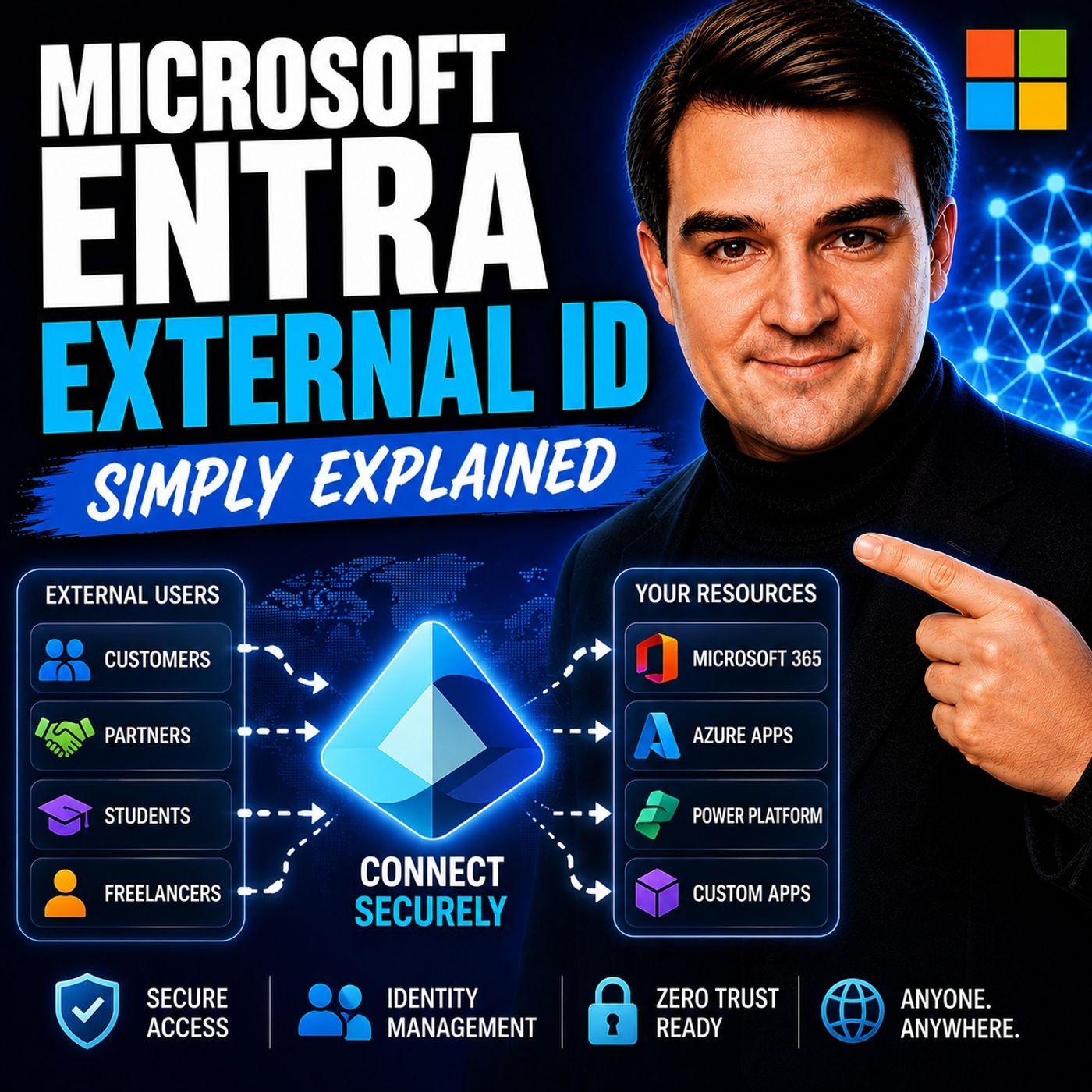
Mastering Customer Identity and Access Management (CIAM) with Microsoft Entra
Welcome back to our ongoing exploration of modern digital workplace architecture! In today’s interconnected digital landscape, managing external identities securely and efficiently is one of the most pressing challenges facing IT leaders, system architects, and developers alike. Whether you are opening up your services to university alumni, streamlining supplier portals for global manufacturing partners, or building consumer-facing SaaS applications, the way you handle user onboarding, authentication, and authorization can make or break your platform's success. In this comprehensive post, we are going to dive deep into Customer Identity and Access Management (CIAM) and examine how Microsoft Entra External ID transforms how organizations scale trust, secure boundaries, and delight users.
If you want to hear a direct, no-nonsense conversation unpacking this exact topic, be sure to check out our related podcast episode, Microsoft Entra External ID - Simply Explained. Now, let’s break down the foundational elements of Microsoft Entra External ID and how you can harness its full potential.
Overview of Microsoft Entra External ID
Microsoft Entra External ID is a powerful solution designed to help organizations manage identities for external users. This platform ensures secure authentication and authorization to applications and APIs through modern identity standards and centralized policy controls. By providing a streamlined approach to identity management, Microsoft Entra External ID allows you to focus on enhancing user experiences while maintaining security.
Key Features
The relevance of Microsoft Entra External ID in identity management stems from its comprehensive set of features. Here are some of the core functionalities that make it stand out:
- Manage External Identities: You can create and manage an external identity directory, allowing for efficient organization of user data.
- User Authentication: The platform enables external users to sign up and sign in easily, enhancing user engagement.
- Integration with Identity Providers: Microsoft Entra External ID supports various authentication methods, including local accounts, email one-time passcodes, and social providers like Facebook and Google.
- Token Issuance: It issues standards-based tokens (OIDC/OAuth2) to applications and APIs, ensuring secure access.
- Custom User Journeys: You can customize user flows and advanced policy configurations to meet specific organizational needs.
- Security Controls: The platform applies robust security measures and monitors sign-in activity with logs and reporting.
Additionally, Microsoft Entra External ID addresses challenges in identity management for external users by offering a modern approach to authentication. It integrates seamlessly with various identity providers, allowing users to choose their preferred login options. This flexibility enhances user satisfaction and compliance with regulations like GDPR and CCPA.
The platform also supports lifecycle management, automating the creation, updating, and deletion of user identities and permissions. This feature ensures that your organization maintains compliance and improves overall security.
Functionality of Microsoft Entra External ID
User Experience
Microsoft Entra External ID offers a seamless integration with existing systems, making it easier for organizations to manage external identities. You can implement a phased strategy for integrating third-party multi-factor authentication (MFA) with Entra ID. Start with a pilot program to minimize disruption. Conduct a thorough needs analysis to identify specific MFA requirements and compliance needs. Choose a solution provider that ensures seamless integration with Entra ID and supports various authentication methods.
The user experience with Microsoft Entra External ID is designed to be intuitive and efficient. Recent surveys show that users appreciate the convenience of creating accounts, applying licenses, and monitoring sign-ups. Here is a summary of user feedback:
| User Experience Description | Performance Rating |
|---|---|
| Users find Microsoft Entra External ID convenient for user creation, license application, and monitoring sign-ups. | Performing well |
| Integration with applications is seamless, allowing AD users to connect easily. | Positive feedback |
| The on-premise part is easier for some users, indicating a preference for traditional setups. | Mixed feelings |
| Users have successfully integrated external collaborators into their domain. | Successful integration |
| The use of various solutions indicates adaptability based on project requirements. | Flexible usage |
Accessibility features enhance the overall experience. The platform supports modern authentication standards, ensuring that users can sign in using their preferred methods. This flexibility not only improves user satisfaction but also helps organizations comply with regulations like GDPR and CCPA.
Moreover, Microsoft Entra External ID allows you to customize user journeys. You can tailor the sign-up and sign-in processes to reflect your brand identity. This customization includes configuring logos, colors, and styles, which helps create a cohesive experience for your users.
Benefits of Microsoft Entra External ID
Enhanced Security
Microsoft Entra External ID offers robust security measures to protect user data. You can trust that your organization’s sensitive information remains secure with the following features:
- Bot Protection: This feature defends against automated attacks, including identity-related security flaws (IRSF).
- Reputation Email Filtering: It validates email domains to reduce the risk of fraudulent accounts.
- IP Email Filtering: This restricts sign-ups from untrusted IP addresses, enhancing security.
- Excessive OTP Monitoring: You receive alerts for high volumes of one-time password requests from the same source.
- Sign-up Protection: The platform integrates with fraud protection providers to block bot-driven sign-ups.
- CAPTCHA for MFA: This feature distinguishes human users from bots during SMS verification.
- Conditional Access Policies: You can customize these policies to enhance security and reduce risks of compromise.
- Tenant Isolation: This prevents data leakage and ensures resource access isolation across tenants.
- Encryption in Transit: It secures data during transmission between data centers.
These security protocols create a strong defense against common threats. The table below summarizes how Microsoft Entra External ID mitigates risks associated with external identity access:
| Security Layer | Purpose |
|---|---|
| Front-door protection | Protects against common threats like bot attacks and unauthorized access. |
| Identity security | Implements MFA and access controls to secure user identities. |
| Fraud prevention | Detects and prevents fraudulent sign-ups and sign-ins. |
| Application-level authorization | Ensures that only authorized users can access specific applications. |
| Monitoring and alerting | Provides real-time alerts to detect and respond to suspicious activities. |
Streamlined identity management through Microsoft Entra External ID offers several advantages over traditional methods. Here is a comparison of the benefits:
| Advantage | Description |
|---|---|
| Deep Microsoft Ecosystem Integration | Native compatibility with Microsoft 365, Azure, and Windows environments eliminates integration complexity. |
| AI-Powered Security | Machine learning algorithms provide intelligent threat detection and automated risk remediation. |
| Comprehensive Governance | Built-in access reviews, privileged identity management, and compliance reporting streamline regulatory requirements. |
| Scalable Automation | Handles enterprise-scale identity management with automated provisioning and lifecycle workflows. |
| Extensive Third-Party Support | Integrates with thousands of SaaS applications through pre-built connectors and standard protocols. |
| Enhanced Security Features | Advanced capabilities such as Multi-Factor Authentication (MFA), Conditional Access policies, and Identity Protection safeguard against unauthorized access. |
| Seamless Integration with SaaS Apps | Facilitates Single Sign-On (SSO) and automated provisioning for a wide range of SaaS applications, streamlining user access across platforms. |
With these features, Microsoft Entra External ID not only enhances security but also simplifies the management of external identities. You can focus on delivering a better user experience while ensuring that your organization remains secure.
Use Cases for Microsoft Entra External ID

Customer Identity Management
Microsoft Entra External ID serves various use cases, making it a versatile solution for organizations. One of the primary applications is Customer Identity and Access Management (CIAM). This approach allows you to manage customer identities effectively while ensuring security and compliance.
Here are some key use cases for CIAM:
| Use Case | Description |
|---|---|
| Delegation of Access Management | Centralized IT can delegate access management to business teams, easing management burdens. |
| Customer Access Auditability | Provides full retention of access management events, allowing tracking of customer access history. |
| Customer Lifecycle Management | Ensures proper handling of customer access when subscriptions are canceled or information is removed. |
| Enhanced Security | Isolates customer data from employee data, reducing risks of data breaches. |
| Scalability | Efficiently manages millions of customer identities and transactions. |
| Improved Customer Experience | Facilitates frictionless interactions like single sign-on and social logins. |
Organizations across various sectors can benefit from these capabilities. For example, universities can create portals for alumni and prospective students. They allow sign-in with social identities or one-time passcodes, simplifying access without needing an internal account.
Manufacturers also leverage Microsoft Entra External ID for secure access to supplier portals. They can implement federated login support for large partners and apply Conditional Access for compliant devices. This ensures that only authorized users can access sensitive information.
SaaS providers integrate Microsoft Entra External ID into their applications. This integration enables business customers to register new users and manage access efficiently. By focusing on product features rather than security infrastructure, these companies can enhance their offerings.
Business-to-Business (B2B) Collaboration
Microsoft Entra External ID excels in B2B identity scenarios. It supports user flows that define various sign-in methods and external identity providers. Here are some key features:
- Microsoft Entra ID federation enables seamless B2B collaboration.
- Business partners can onboard via Entitlement Management, self-service sign-up, or invitations.
- Cross-tenant synchronization and access settings are available for multi-tenant scenarios.
These features simplify the management of B2B relationships, allowing organizations to collaborate more effectively.
Machine-to-Machine (M2M) Communication
In addition to CIAM and B2B, Microsoft Entra External ID supports machine-to-machine (M2M) communication. This capability allows secure authentication through the OAuth 2.0 client credentials flow. One machine can authenticate itself and obtain an access token to interact with APIs or trigger processes without human intervention.
For example, backend services can communicate with payment processors or internal microservices. Microsoft Entra External ID enables these services to authenticate using a client ID and secret, ensuring secure API calls. This design allows applications to communicate directly without human involvement, streamlining operations.
By implementing Microsoft Entra External ID, organizations can enhance their identity management capabilities across various scenarios, ensuring security and efficiency.
Importance of Microsoft Entra External ID
In today's rapidly evolving digital landscape, managing identities effectively is crucial. Microsoft Entra External ID plays a significant role in modern identity management. It provides organizations with the tools they need to secure user identities while ensuring seamless access to applications and services. By centralizing identity management, you can enhance security and improve user experiences.
Here are some key reasons why Microsoft Entra External ID is essential:
- Unified Identity Management: You can manage identities across both cloud and on-premises environments. This ensures consistent security controls, which is vital for protecting sensitive data.
- Automated Account Management: The platform automates account management for guest users. This feature allows secure access without requiring additional passwords, simplifying the user experience.
- Enhanced Security Measures: Microsoft Entra External ID integrates multifactor authentication policies for guest users. This integration strengthens security during application proxy authentication, reducing the risk of unauthorized access.
As you look to the future, several trends in identity security will shape how organizations approach identity management. Here is a summary of predicted trends relevant to Microsoft Entra External ID:
| Trend Description | Implication for Microsoft Entra External ID |
|---|---|
| Shift towards integrated identity security solutions | Microsoft Entra is positioned to support a Zero Trust architecture, enhancing security across platforms. |
| Emphasis on vendor neutrality | Microsoft aims to strengthen security capabilities through comprehensive solutions that integrate with various third parties. |
| Bundling of cybersecurity offerings | Organizations may increasingly rely on platforms like Microsoft Entra for identity management, reducing complexity and vendor count. |
These trends indicate a growing need for comprehensive identity solutions. As organizations face increasing security threats, they will seek platforms that offer robust identity management capabilities. Microsoft Entra External ID is well-equipped to meet these demands, ensuring that you can manage identities securely and efficiently.
By adopting Microsoft Entra External ID, you position your organization to thrive in an environment where identity security is paramount. The platform not only addresses current challenges but also prepares you for future developments in identity management.
Microsoft Entra External ID significantly impacts enterprise identity management. It enhances security by providing a robust framework for managing external identities. This solution streamlines user experiences, making it easier for organizations to manage access. Here are some key takeaways:
- Enhances security: Protects sensitive data through advanced security measures.
- Streamlines user experiences: Simplifies identity management for better engagement.
- Optimizes authentication: Choosing the right methods can improve efficiency.
To maximize the benefits of Microsoft Entra External ID, consider these recommendations:
| Recommendation | Description |
|---|---|
| Utilize Entra ID Protection Dashboard | Leverage tailored security recommendations based on recent attacks. |
| Implement Passwordless Authentication | Reduce risks associated with password attacks and enhance user experience. |
| Disable Legacy Authentication | Strengthen security across the organization by turning off outdated methods. |
By adopting these strategies, you can enhance your security posture and ensure effective identity management.
FAQ
What is Microsoft Entra External ID?
Microsoft Entra External ID is a Customer Identity and Access Management (CIAM) platform. It helps organizations manage external user identities securely and efficiently.
How does Microsoft Entra External ID enhance security?
The platform offers advanced security features like multi-factor authentication, conditional access policies, and bot protection. These measures safeguard user data and prevent unauthorized access.
Can I customize user experiences with Microsoft Entra External ID?
Yes! You can tailor sign-up and sign-in processes to reflect your brand. Customize logos, colors, and styles to create a cohesive user experience.
What types of organizations benefit from Microsoft Entra External ID?
Organizations across various sectors, including universities, manufacturers, and SaaS providers, can benefit. They can streamline identity management and enhance user access.
How does Microsoft Entra External ID support compliance?
The platform helps organizations comply with regulations like GDPR and CCPA. It provides features for managing user consent and data protection.
Is Microsoft Entra External ID easy to integrate with existing systems?
Absolutely! Microsoft Entra External ID integrates seamlessly with various applications and identity providers. This flexibility simplifies the management of external identities.
What are the primary use cases for Microsoft Entra External ID?
The main use cases include Customer Identity and Access Management (CIAM), Business-to-Business (B2B) collaboration, and Machine-to-Machine (M2M) communication.
How can I get started with Microsoft Entra External ID?
To get started, visit the Microsoft Entra website. You can explore documentation, tutorials, and resources to help you implement the platform effectively.
🎧 Listen to this episode
Want a practical explanation of Microsoft Entra External ID? This episode breaks down the topic in clear language and shows why it matters for Microsoft 365, Azure, Power Platform, security, AI, and modern work.
Listen to this episode if you want to:
- Understand the key concepts behind Microsoft Entra External ID
- See how it fits into the wider Microsoft technology ecosystem
- Learn where it can create practical value for your organization
You may also enjoy these related M365 FM episodes:
- Microsoft Entra External ID for Digital Trust and Growth
- Microsoft Entra Permissions Management - Simply Explained
- Copilot in Microsoft Entra ID - Simply Explained
- Building a Secure Microsoft-First MSP: Intune, Defender & Entra ID at Scale with Albin Klinaku [MVP]
- Microsoft Entra Agent ID: Secure Identity for AI Agents
Discover more practical Microsoft conversations on M365 FM.
Last reviewed: July 2026.
Who Should Listen
This episode is for Microsoft 365 administrators, architects, IT leaders, and practitioners who need a practical understanding of Microsoft Entra External ID before planning, implementing, or supporting it.

Microsoft MVP | Host of M365.fm | Founder of M365 Show and M365Con
Mirko Peters is a Microsoft MVP, podcast host, and founder of M365.fm, M365 Show, and M365Con. His work connects Microsoft practitioners through podcast interviews, livestreams, and community events.
At M365.fm, Mirko hosts conversations with Microsoft MVPs, product experts, architects, and community contributors. Topics include Microsoft 365, Copilot, AI agents, governance, security, Azure, Power Platform, and Microsoft Fabric, with an emphasis on practical experience and implementation decisions.
M365.fm is the podcast and learning platform. M365 Show brings experts together for livestreams, while M365Con provides an online conference setting for community learning.
Official website: Mirko Peters (https://www.mirkopeters.com/). Recognition: Mirko Peters — Microsoft MVP profile (https://mvp.microsoft.com/de-DE/mvp/profile/9b0ca797-db5a-493a-a845-8b9158046cf5). Connect on LinkedIn (https://www.linkedin.com/in/m365showpodcast/).