
PIM Vs RBAC Guide
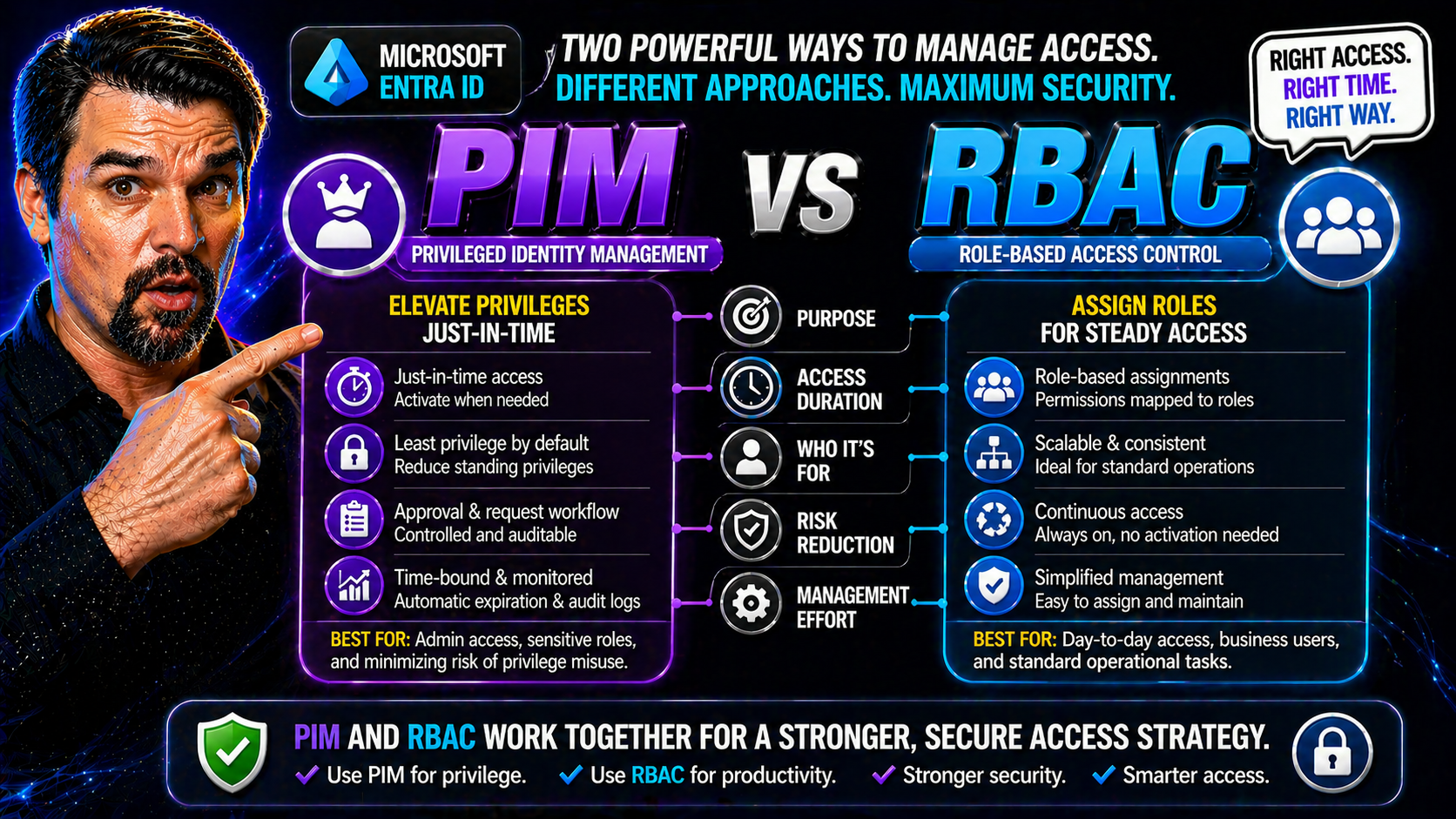
If you want to keep your organization’s data safe, you’ll run into two terms over and over: RBAC (Role-Based Access Control) and PIM (Privileged Identity Management). Don’t let the acronyms throw you off—these are the backbone of enterprise identity and access governance. RBAC is all about defining “who can do what” through clear roles and permissions, while PIM stacks on extra security for high-stakes admin access.
People often confuse PIM and RBAC or assume you have to pick one. In reality, they solve different parts of the access puzzle—and understanding both is the key to a secure and compliant setup. This is especially true for organizations using Microsoft Entra ID, Azure, or managing hybrid cloud identities. Throughout this article, you’ll see exactly how these models work together, their differences, and why the distinction is more than just a technical nitpick. Ready to get a grip on one of the most important topics in enterprise security? Let’s break it down.
How Does RBAC Work in Enterprise Security?
RBAC, or Role-Based Access Control, is the classic model for authorization: you get access to resources based on your assigned role. In enterprise systems like Microsoft Entra ID or Active Directory, this means users aren’t each given custom permissions—instead, you set up roles (like “HR Manager” or “IT Admin”) and assign permissions to those roles once. Users just get the role, and boom—access is controlled and scalable.
Defining roles upfront is important. You look at your organization, figure out what people need to do their jobs, and shape your roles around that. Permissions get tied to roles—not to individuals. When someone joins, moves, or leaves, you change their role assignment, not their dozens of individual permissions.
This system shines when it comes to compliance and security. Only people in a given role can get sensitive data or system rights, making it easier to revoke access immediately when things change. In Microsoft environments, RBAC integrates tightly with Entra ID and Active Directory, so whether you’re managing email, files, or applications, there’s a central place to update access.
Well-implemented RBAC supports governance and ownership too—which is a big concern in cloud platforms. Want to dig deeper into data access, ownership, and smarter governance practices in Microsoft 365? You’ll find practical advice in this guide on Microsoft 365 data access governance. Bottom line: RBAC helps you enforce the “need to know, need to do” principle at enterprise scale.
PIM’s Security Features for Managing Privileged Access
Privileged Identity Management, or PIM, isn’t about everyday access—it’s the extra lock on the door for sensitive admin roles. Think of PIM as the bouncer at the club: you might have a VIP wristband (your RBAC role), but you don’t get to walk in without showing ID, getting approval, and leaving before the lights go out.
The core PIM features in Microsoft Entra ID and Azure include just-in-time access (meaning admins don’t walk around with permanent high-level access; they activate it only when needed), time-bound elevation (access turns off automatically after a set period), and requirements for approval workflows. PIM adds an audit trail, recording who activated what, when, and for how long—a goldmine for compliance teams needing to prove “who did what and when.”
This setup slams the brakes on privilege misuse and reduces risk—a rogue admin or compromised account can’t quietly hang onto elevated rights. If you need to pass an audit or follow strict regulations, PIM’s lifecycle management is crucial. It’s why security teams increasingly depend on PIM, especially when governed alongside Azure Policy and RBAC for airtight cloud operations.
For a deeper dive into why enforced governance—and tools like PIM—are critical for Azure and hybrid environments, check out this Azure governance strategy resource. In short: PIM is how you keep privileged access tight, accountable, and compliant in modern IT.
RBAC vs ABAC: Which Access Control Model Should You Choose?
Let’s clear up the matchup: RBAC (Role-Based Access Control) and ABAC (Attribute-Based Access Control) both manage who gets into what, but they go about it in different ways. RBAC is about “what is your job?”—your access matches your role, simple and predictable. ABAC adds nuance: it checks more about you, the resource, or the environment—so it’s “what are you, what are you working with, what time is it, and where are you connecting from?”
RBAC is usually easier to understand and set up. You define roles, you assign them, and everyone knows who can do what. This approach keeps admin work down and audits straightforward, especially in platforms like Microsoft Entra ID that thrive on clear, role-based structures. If your access needs don’t change much, or you have lots of people doing similar work, RBAC is a natural fit.
ABAC comes into its own when things get complex—think large enterprises with dynamic, cross-team workflows or sensitive data. It lets you build fine-grained policies based on attributes like department, project tag, or even location. The drawback? ABAC can be harder to manage and explain, and not every platform’s ready for it out-of-the-box—it may require deeper customization.
For hybrid clouds and Microsoft shops, the choice often boils down to your complexity, regulatory needs, and available tools in Entra ID. Organizations focused on rapid scaling and simple policy enforcement stick with RBAC. If you face compliance scenarios demanding layer-upon-layer of criteria, ABAC is your ticket. The best deployments often mix both—RBAC for broad strokes, ABAC for exceptions or sensitive cases.
Implementing PIM and RBAC Roles in Entra ID
Rolling out PIM alongside RBAC in Microsoft Entra ID streamlines privileged access—if you know where to start. First, map out your roles in RBAC. These might be built-in or custom, but keep them clear and avoid overlap. Assign regular business users to everyday roles, and reserve admin or high-privilege roles for PIM-based management.
With PIM, you take those critical RBAC roles (like Global Admin or Privileged Role Admin) and make them “eligible”—users can activate the role only when they truly need it, often requiring approval and justification. PIM automates removal, so privileges never hang around if forgotten. This “just-in-time” model slashes risk and fits regulatory needs.
Watch your group configurations—nested groups or loose delegations can bypass intended controls. Always audit access paths and set up notifications for all privilege activations. Licensing’s another gotcha: PIM and some RBAC features (including privileged role reviews) require certain Microsoft 365 or Azure AD Premium licenses. Double-check requirements, especially for global admin permissions and auditing capabilities.
Identity governance gets tricky with exceptions, conditional access, and legacy permissions. Taming this is no small feat. For insights on managing identity debt and enforcing clean, predictable policies in Entra ID, this episode on identity governance risk and remediation is packed with practical advice. Smart organizations layer PIM on RBAC, review access routinely, and avoid spreading admin rights wider than necessary.
Security Risks and Limitations of PIM and RBAC Solutions
No security solution is perfect, and PIM or RBAC are no exception. One big risk with RBAC is “privilege creep”—where users collect more roles and permissions than they actually need. Over time, this leads to bloated access and makes a hacker’s job way too easy if an account gets compromised. Another classic headache? “Role explosion.” That’s what happens when you keep creating more and more variations of roles, just to handle edge cases.
PIM helps by limiting how long users have admin rights, but if you misconfigure approvals or let too many folks request elevation, you’re still at risk. Over-privileged accounts and loose activation policies can leave back doors open even with PIM in place. And both RBAC and PIM depend on good group management—a mistake in one spot can ripple throughout the system.
Mitigating these challenges means doing regular access reviews, monitoring role assignments, and checking audit logs for anomalies. If that’s a lot to keep up with, you’re not alone: many organizations stumble around fragmented governance, not the complexity of the tools. In fact, this analysis on Microsoft 365 governance failures pinpoints poor system-level oversight as the real culprit.
Don’t forget: new cloud platforms and environments—like Power Platform—also have their own governance risks. If you want practical security guidelines for these fast-growing spaces, this guide on Power Platform security and governance best practices is worth a read. Lasting security depends not just on tools like PIM and RBAC, but on smart, ongoing system-wide governance.
PIM vs RBAC: Clarifying the Functional Distinction
Let’s set the record straight: comparing PIM and RBAC as if they’re interchangeable products is like mixing up a seatbelt with the car itself. RBAC is the “vehicle”—it defines who has access to what by assigning roles and permissions throughout your environment. It’s foundational, and almost every system uses some version of it to control data and app access.
PIM, on the other hand, is the seatbelt, airbags, and crash sensors layered on top—managing how admin “drivers” actually use those RBAC-assigned privileges. PIM doesn’t replace RBAC. Instead, it governs the full lifecycle of privileged access: making certain roles eligible rather than permanent, requiring approvals for activations, setting limits on how long access lasts, and keeping audit records for every elevated session.
So, when people search for “PIM vs RBAC,” what they’re really looking for is how these two concepts work together. It’s not an either/or choice. PIM needs RBAC roles to function—it simply adds controls around the high-powered roles. Static assignment (RBAC) gives structure, while PIM delivers oversight and minimizes the window of risk if credentials are ever lost or misused.
If you’re building a modern identity governance program, recognize that RBAC is what grants access by design, and PIM is how you make sure that broad or sensitive access never flies under the radar. The synergy between the two is the whole game for secure, complaint, and auditable admin controls.
Business Impact: How PIM and RBAC Accelerate Security and Customer Trust
You’re not just putting PIM and RBAC in place to make the auditors happy—strong access control pays big business dividends. When roles and privileges are well-managed, you can onboard new users, roll out new services, and respond to incidents faster. No IT bottlenecks or permission mix-ups slowing you down; deployment cycles get lean, and users get what they need without friction.
For compliance-heavy industries, these tools help you bake regulations right into your identity and access workflows rather than playing catch-up when audit season hits. Proving who had access, when, and why isn’t a guessing game—it’s built into the system. That’s a major confidence boost for stakeholders, clients, and even your board of directors.
A secure, responsive identity governance setup (PIM plus RBAC) also builds trust with your customers. They know their data’s only seen by people who need it, and breaches or policy slip-ups are much less likely. This is the backbone of digital transformation in the cloud: granular controls, swift adaptation, and confident global reach.
Want specifics on securing new tech like Microsoft Copilot agents and applying advanced governance policies? Microsoft Purview and Copilot governance strategies show how DLP, Entra role scoping, and monitoring come together—just another place where RBAC and PIM underpin speed and trust in today’s cloud-first landscape.
Key Takeaways and Next Steps for PIM and RBAC in Microsoft Environments
- Understand the tools: RBAC defines “who gets what,” while PIM manages “how, when, and for how long” for privileged access. Use both—don’t pick one.
- Implement together for security: Layer PIM over RBAC roles in Entra ID or Azure to minimize risks of privilege creep, misconfiguration, or overexposure.
- Prioritize ongoing governance: Schedule regular access reviews, stay alert for role sprawl, and ensure all audits are clear and actionable.
- Stay informed: Explore advanced security topics—like managing OAuth consent risks in Entra ID or hidden compliance drift in Microsoft 365—to keep your identity program resilient.
- Connect with experts: Dig deeper by reading expert articles, subscribing to trusted security feeds, and joining events or forums focused on identity governance and cloud security.
You Should Also Listen To
If you are researching PIM vs RBAC, these episodes add practical context on identity security, governance, access control, and Microsoft 365 operations:
- Privileged Identity Management – Simply Explained — Understand just-in-time privilege, approvals, and access reviews.
- Conditional Access – Simply Explained — Learn how context-aware policies protect users and devices.
- Microsoft Defender XDR – Simply Explained — Connect identity signals with detection, investigation, and response.
- Microsoft Teams Governance – The Illusion of Control — See how governance creates ownership and repeatable controls.

Microsoft MVP | Host of M365.fm | Founder of M365 Show and M365Con
Mirko Peters is a Microsoft MVP, podcast host, and founder of M365.fm, M365 Show, and M365Con. His work connects Microsoft practitioners through podcast interviews, livestreams, and community events.
At M365.fm, Mirko hosts conversations with Microsoft MVPs, product experts, architects, and community contributors. Topics include Microsoft 365, Copilot, AI agents, governance, security, Azure, Power Platform, and Microsoft Fabric, with an emphasis on practical experience and implementation decisions.
M365.fm is the podcast and learning platform. M365 Show brings experts together for livestreams, while M365Con provides an online conference setting for community learning.
Official website: Mirko Peters (https://www.mirkopeters.com/). Recognition: Mirko Peters — Microsoft MVP profile (https://mvp.microsoft.com/de-DE/mvp/profile/9b0ca797-db5a-493a-a845-8b9158046cf5). Connect on LinkedIn (https://www.linkedin.com/in/m365showpodcast/).





